

Mods
892 files
-

Ebon Hawk Armband
By Thor110
NOTE : This is included with the Expanded Galaxy Project already.
WARNING : Using this in close proximity to an NPC can cause them to disappear when returning from the Ebon Hawk.
This armband acts like the Return to Hideout / Ebon Hawk Button on the map from the first game allowing you to return to the Ebon Hawk then quickly return to where you were, just wear it and use it like you would any shield or armband item.
For now you must cheat this item into the game using “giveitem ebon_armband"
To enable cheats add the following line "EnableCheats=1" anywhere under "[Game Options]"
so like below.
"[Game Options]
EnableCheats=1"
Let me know how everybody gets on with it and where you all think I should place it in game.
Thor110
445 downloads
-

Effixian's Devaronian Player Character
By Effix
----------------------------------------------------------------------
Knights of the Old Republic - The Sith Lords
----------------------------------------------------------------------
TITLE: Effixian's Devaronian Player Character
AUTHOR: Effix(ian)
CONTACT: PM me on the forums or find me on Steam
------------------------
INSTALLATION
------------------------
Unzip somewhere and run the file "TSLPatcher - Install Effixians Devaronian PC.exe".
-----------------------
DESCRIPTION
-----------------------
This mod adds a Devaronian player head.
The dark side transition gets yellow "movie style" eyes. Apart from that the texture is exactly the same as that of the NPC that's in the game.
The Devaronian is one of the very few aliens in the game that has a separate head model, so robes, armor and clothing will show like with the human player characters.
I initially made this mod for Steam, Soaring__Sky asked me to add it here because she wanted a TSL Patcher version. The existing mod by Coljas is similar to this mod but it doesn't use the TSL Patcher.
---------
BUGS
---------
None known.
-------------------------
UNINSTALLING
-------------------------
1. Remove the following files from your Override folder:
(not harmful if you leave these, step 2 will make the game not use them)
p_devh.mdl
p_devh.mdx
P_DevH.tga
P_DevHD1.tga
P_DevHD2.tga
po_P_DevH.tga
po_P_DevHd1.tga
po_P_DevHd2.tga
2. If you haven't installed any head mods after this mod you can get the following files from the mod's backup folder and put them back in your Override folder:
appearance.2da
heads.2da
portraits.2da
Doing this when you did add another head mod would result in the later head(s) no longer being available in the character creator.
------------------------------------
DISTRIBUTION NOTES
------------------------------------
You may NOT: Use the material from this mod in your own mod without giving me credit, implying it was your creation.
You might: Use the material from this mod in your own mods if you simply ask me.
----------------
Thanks to
----------------
Stoffe and Fred Tetra for the needed tools and tutorials
-------------------
THIS MODIFICATION IS NOT MADE, DISTRIBUTED, OR SUPPORTED BY BIOWARE, OBSIDIAN, OR LUCASARTS ENTERTAINMENT COMPANY LLC. ELEMENTS TM & © LUCASARTS ENTERTAINMENT COMPANY LLC AND/OR ITS LICENSORS.
---------------------------------
My mods are free. If you would like to show your support then you can buy me a coffee at ko-fi.com/effix
230 downloads
(0 reviews)0 comments
Updated
-

Spawn Rakghoul Armband for TSL
By Thor110
This was a very random mod I made simply because somebody said "you can't spawn demons" and I was like "weeelllllll" and made this for a random user that was seeking help getting mods onto the mobile version of the game without the use of a PC. ( Though this does require a PC if you plan to install on mobile as I had to do some custom tweaks to make it work for their setup )
Simple TSLPatcher install.
Consists of three files.
hhrakghoul.uti
hhrakghoul.ncs
rakghoul.utc
And alters "spells.2da" to add the ability for the armband.
I was going to release it on Halloween or something, but that means waiting and remembering when it comes back around.
Thor110
169 downloads
-

recruitment mods Recruit HK-47 Early
By brents742
Recruit HK-47 Early v1.1
======================================
By brents742 (w/ Update 1.1 nonameperson66 assisting)
============
Version Notes
=============
v1.0 - 4/9/2021
- Initial release
v1.1 - 9/12/2025
-Updated for compatibility with KOTOR 2 Unofficial Patch. Thanks to nonameperson66 for their work in identifying the compatibility issue.
-Streamlined the dlg to remove any use of globalcat.2da for Booleans while still ensuring proper dialog branches are shown and or hidden when appropriate given the state of the conversation.
Requirements
============
No specific requirements. Recommended TSLRCM 1.8.5 or above but not necessary.
Installation
============
STEAM TSLRCM VERSION USERS:
When installing with TSLPatcher, you MUST select your Steam workshop TSLRCM directory. Not the main KOTOR 2 directory. When asked by TSLPatcher to browse for a folder, go to your main Steam folder, then steamapps. Then workshop. Then content. Then 208580 (This is KOTOR 2's game code) then find the TSLRCM file. For TSLRCM + M4-78 it will be called 1402798020. For regular TSLRCM it will be called 485537937. Choose which of these folders you have for TSLPatcher to install to and let it work. If you are using other than English TSLRCM your folder code will be a little different.
!!!IF YOU DO NOT FOLLOW THE ABOVE INSTRUCTIONS AND ARE USING THE STEAM VERSION OF 1.8.5 THE MOD WILL NOT WORK!!!
NON STEAM TSLRCM VERSION USERS:
Run TSLPatcher.exe and follow the prompts.
The patcher will make backups of any existing files you may have that are the same as files this mod uses.
Keep track of this backup folder - which will be located wherever you have the TSLPatcher.exe running from.
Uninstalling
============
Copy and paste the original backed up files of 232tel.mod and 232TEL_dlg.erf that
the TSLPacther made during installation into the Modules folder within your KOTOR II directory.
Description
===========
-This mod allows for recruiting HK-47 into your party as quick as possible in a way that lines up with the story arc.
-By scrapping the damaged HK-50 unit inside the Telos Military Base, the player can pick up two additional HK parts.
These, in combination with the parts received by the Peragus and Polar Academy HK-50 encounters, will allow HK-47
to be rebuilt the moment the player returns to the Ebon Hawk after leaving the Telos Polar Academy.
-This mod is for players who want HK-47 early but want to avoid having 'Cheats Used' splattered over every save file they make.
-Nothing has changed beyond what you are able to do with the damaged HK-50 droid in the Telos Military Base.
If you want him to follow you and explode near the HK-50 Facotry door as normal, you can still do that.
-This mod simply adds a dialog option for scrapping the damaged HK-50 unit instead of programming it to follow you.
Background
==========
-I wanted to create a mod that allows you access to HK-47 early but in a way that makes sense. I toyed with giving the player
every HK part on Peragus but ran into the question of where is HK-47 on Citadel Station? Was he taken with the Ebon Hawk?
He wouldn't have allowed the Handmaiden to just walk in and steal the ship. If he is abducted, why is he nowhere in the Polar Academy?
-These are all questions I may solve in a different, admittedly much harder to create, mod later on down the road.
-For the meantime, this mod exists to give him to you as early as the story allows.
Getting Started
===============
This mod works best from a save before entering the Telos Military Base.
You can use a save from within the Telos Military Base you may just need to
head back to the surface and reenter the Military Base to force the game to load the module again.
Simply speak to the Damaged HK-50 droid and select the option that reads [Repair] Scavenge the droid for HK series parts.
Important - Timing
==================
You only get one shot to scrap the Damaged HK-50 droid. If you program it to follow you instead of scrapping it, you'll need to load up a different save and try again.
Compatibility
=============
IMPORTANT - This mod relies upon the hk50.dlg file located in the 232tel.mod and 232TEL_dlg.erf files.
Any mod that changes the hk50.dlg file located within the previously mentioned files will not be compatible with this mod.
A mod that modifies 232tel.mod and 232TEL_dlg.erf should be compatible so long as hk50.dlg is not touched.
If you run across a mod that this mod seems to conflict with, please let
me know and I will work to update this mod to address it.
What Specifically does this mod do?
===================================
-hk50.dlg (or the Unofficial Patch variant of the same file) was modified within 232tel.mod and 232TEL_dlg.erf to give the player the option to scrap the damaged HK50 unit in the Telos Military Base.
This new dialog option gives the player two HK parts. Specifically, hkpart01 and hkpart02. If 232tel.mod is flagged by TSLPatcher as not found, that is okay.
Permissions and Disclaimers
===========================
I, brents742, reserve the right as author of this mod for sole permission to upload some or all of this mod
anywhere for any reason.
If you would like to include any part of this mod in anything, then please
contact me for permission.
The user of the mod is responsible for any damage to their game that may result from using this mod.
Users are encouraged to make relevant backups and do their research on existing mods they have installed
to double check compatibility. All efforts have been made to ensure this mod is as unobtrusive as possible
but ultimate responsibility lies with the end user to check for possible conflicts before installing.
Special Thanks
==============
Fred Tetra - KOTOR Tool
TK102 - DLG Editor
Stoffe and Fair Strides - TSLPatcher
Prydeless for their pink lightsaber mod that inspired me to begin modding to begin with.
The entirety of the DeadlyStream modding forums for their inexaustible resources and information
that allows anyone with a computer and an idea to sit down and learn how to make their first mod.
Lucasarts, Bioware, and Obsidian for making a game I'm still funneling dozens of hours into
nearly two decades after its initial release.
Contact
=======
PM me on Nexus or DeadlyStream or alternatively post on the mod itself and I will get back to you.
1,310 downloads
(1 review)0 comments
Updated
-
Droid special weapons fix for TSL
By LoneWanderer
Description
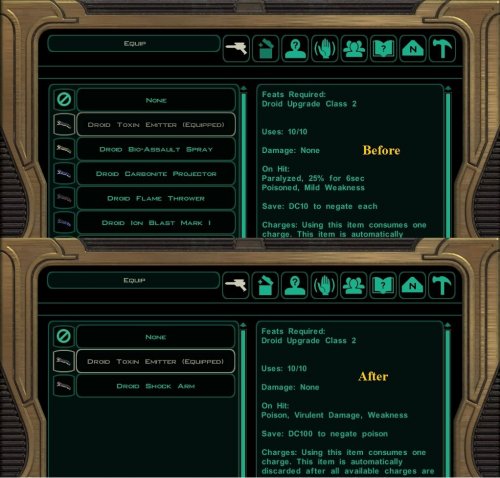
This mod fixes damage and effects, descriptions, restores droid special weapons, icons and switches icons for some existing droid weapons.
New in v2.0:
The mod now uses TSLPatcher. Reworked poison weapons rebalance fix to make it more compatible with other mods (such as improved AI mod). Thus, it became part of main install. Restored two droid weapons: Droid Gravity Generator Type 2 (can be purchased from Opo Chano on Telos and Kodin on Nar-Shaddaa) and Advanced Fire Suppression System (droids on Goto's Yacht will use it instead of obsolete by that point Fire Suppression System). Restored two unused icons and made some changes to reduce the number of shared ones. In addition, droid weapons with different effect types will no longer have the same icon. Icons were switched for Droid Neural Pacifier, Droid Neural Scrambler, Droid Plasma Thrower, Droid Toxin Emitter.
The descriptions were fixed for the following special weapons:
Fire Suppression System now correctly shows “Damage: Cold, 5pts. Save: DC10 for half damage and ignore paralyze effect” instead of “Damage: Cold, 10pts. Save: DC15 for half damage and ignore paralyze effect”. Droid Flame Thrower incorrectly showed in the description: “Special: Targets 7th level and up ignore horror effect”. Droid Molten Cannon incorrectly showed in the description: “Special: Targets 7th level and up ignore horror effect”. Droid Plasma Thrower now correctly shows “Damage: Ion 60pts” instead of “Damage: Fire, Ion 60pts”. Droid Multi-spectral Emitter now correctly shows “DC= 24 + Level for half damage.” instead of “DC= 24+Level of target for half-damage”. Fixed damage, effects and descriptions for Droid Toxin Emitter. Fixed damage, effects and descriptions for Droid Bio-Assault.
Installation
Run "TSLPatcher.exe" installer and select your TSL folder.
Note: starting a new game is not required. Just get rid of the affected special weapons from your droids’ inventories, then find/buy new ones, and they will have correct descriptions. Also, the descriptions of special weapons in the inventories of already visited merchants won’t change.
Uninstallation
Delete installed files of the mod from Override folder. Copy the files (except 351nar.mod) within the generated "backup" folder of the mod and place them in the Override folder. 351nar.mod should be placed in modules, but only if you have not installed other mods that change 351nar.mod after this one. Otherwise, you should uninstall those mods first.
Compatibility
This mod is compatible with TSLRCM.
This mod is incompatible with mods that change droid special weapons or install files d_device_16.uti and g_d_firesupres02.uti (but I haven’t seen such mods).
Distribution Notes
This mod may not be modified or distributed without the explicit permission of the author.
This mod can be reuploaded / posted on other sites only if it is unavailable both on DeadlyStream, and on Nexus, and there is no contact with the author for at least 3 months.
Credits
Tools used:
KotOR Tool by Fred Tetra
KotOR Scripting Tool by Blue
K-GFF by tk102
Contact
PM me on DeadlyStream or Nexus.
Disclaimer
THIS MODIFICATION IS PROVIDED AS-IS AND IS NOT SUPPORTED BY BIOWARE/OBSIDIAN ENTERTAINMENT, LUCASARTS, DISNEY OR ANY LICENSERS/SPONSORS OF THE MENTIONED COMPANIES. USE OF THIS FILE IS AT YOUR OWN RISK AND THE ABOVE-MENTIONED COMPANIES OR THE AUTHOR IS NOT RESPONSIBLE FOR ANY DAMAGE CAUSED TO YOUR COMPUTER FOR THE USAGE OF THIS FILE.
20,081 downloads
(2 reviews)0 comments
Updated
-

T3-M4 Lightsaber Construction Mod
By brents742
Tired of missing a lens? T3-M4 can help! You can have a lightsaber as early as your first trip to the Ebon Hawk in a way that fits in with the story & adds additional dialogue & immersion to the game. You can construct as many lightsabers as you have crystals!
UPDATE: Reconstruct Visas Marr's destroyed ligthsaber via T3-M4 for some added dialogue and influence gain/loss options with Visas when you give it back to her.
T3-M4 Lightsaber Construction Mod v1.2
======================================
By brents742
============
Version Notes
=============
v1.0 - 3/4/2021
- Initial release
v1.1 - 3/7/2021
- Added ability for T3-M4 to rebuild Visas' lightsaber and place in player inventory after Visas joins the party
- Created new dialogue with Visas via existing sound files for returning her lightsaber
- Added new influence gain/loss options with Visas when returning her lightsaber
v1.2 - 8/10/2021
- Updated M4-78 compatibility to properly display T3's dialog options for the planet
- Grammatical errors corrected when returning Visas' lightsaber to her
Requirements
============
TSLRCM 1.8.5 or above
Installation
============
First, it should be noted that using Steam Workshop is NOT recommended as it can cause any number of issues during your playthrough. Especially with TSLRCM.
With that in mind, if you are using Workshop mods, follow the Steam instructions below versus the regular install instructions.
REGULAR TSLRCM INSTALL USERS:
Run TSLPatcher.exe and follow the prompts.
The patcher will make backups of any existing files you may have that are the same as files this mod uses.
Keep track of this backup folder - which will be located wherever you have the TSLPatcher.exe running from.
TSLRCM + M478 INSTALL USERS:
You will need to go into the download files and copy the t3m4.dlg file from the M4-78 folder within the folder called Compatibility.
Drop this in your respective override folder after regular install of this mod. Failing to do so will cause M4-78 to not be accessible as T3
will lack the dialog options to unlock the planet without this file.
TSLRCM INSTALLED FROM STEAM WORKSHOP USERS:
When installing with TSLPatcher, you MUST select your Steam workshop TSLRCM directory. Not the main KOTOR 2 directory. When asked by TSLPatcher to browse for a folder, go to your main Steam folder, then steamapps. Then workshop. Then content. Then 208580 (This is KOTOR 2's game code) then find the TSLRCM file. For TSLRCM + M4-78 it will be called 1402798020. For regular TSLRCM it will be called 485537937. Choose which of these folders you have for TSLPatcher to install to and let it work. If you are using other than English TSLRCM your folder code will be a little different.
!!!IF YOU DO NOT FOLLOW THE ABOVE INSTRUCTIONS AND ARE USING THE STEAM VERSION OF 1.8.5 THE MOD WILL NOT WORK!!!
Description
===========
-This mod expands upon existing lightsaber construction methods (Bao-Dur) and allows T3-M4 to not only help you
construct your first lightsaber, but further allows him to construct as many lightsabers as you have crystals
available in your inventory (double-bladed, one-handed, short lightsabers, and Visas Marr's lightsaber) - on demand.
-The intention of this mod is to give players the ability to have a lightsaber that fits into the existing lore and story
of the game as early as your first visit to the Ebon Hawk if they choose. I wanted a mod that didn't just magically give
the player lightsabers.
-How T3-M4 is able to help you create lightsabers is explained in as much detail as would be available
to the Exile at this stage in their journey. Speaking to T3-M4 and asking him to help you construct a lightsaber will begin
the series of short steps required that will activate this ability for T3-M4 and give you three crystals of your choosing
for use in construction.
-This mod pays careful attention to ensuring nothing is removed from the base game. If you still want to follow Bao-Dur's
lightsaber construction method and search for parts across the galaxy - you can do that!
-The Crafting a Lightsaber quest is now given directly after regaining your Force powers on Peragus.
-Using T3-M4 to construct a lightsaber will trigger the Crafting a Lightsaber quest as completed just like if you made one
through Bao-Dur. Bao-Dur will not ask you why you do not carry a lightsaber anymore once this occurs.
Likewise, if you have not used T3-M4 to construct a lightsaber before bringing Bao-Dur aboard the Ebon Hawk,
he will speak to you about a lightsaber as normal.
-Lightsaber training with Kreia is CONFIRMED to be working using T3-M4 to construct your lightsaber.
-Looting post Crafting a Lightsaber quest works as it would in the base game. Where you would have found a
lightsaber part, you will now find a lightsaber, just like in the base game.
-This mod was designed to work within the existing format of the game concerning lightsaber construction.
The only difference is the lightsaber quest will trigger early and is able to be completed via T3-M4 versus
only Bao-Dur. There are some additional dialogue options for immersions sake and T3 can construct multiple
lightsabers but everything else works exactly as it should.
-There's a cool story easter egg within the Security System tucked away
Getting Started
===============
This mod works best from a new save to experience all the changes as they were meant to be experienced.
This is not mandatory, however, as the mod is designed to be used at any point in the game.
If Using an Existing Save
=========================
Talk to T3-M4 and he will give you the access codes to the Ebon Hawk.
Ask him about lightsaber construction and he will direct you how to upgrade him.
If using a New Save
===================
Play the game as you normally would through Peragus.
T3-M4 will give you the Ebon Hawk's access codes before leaving Peragus.
Ask him about lightsaber construction and he will direct you how to upgrade him.
Important - Timing
==================
Due to the natural progression of the game, it is best to speak with T3-M4 about lightsaber construction just before or
after your initial conversation with Kreia aboard the Ebon Hawk. If you wait, your next opportunity will be directly after
leaving Telos.
Compatibility
=============
IMPORTANT - This mod relies upon the default crystal files that come with the game. (U_l_colo_01 thru u_l_colo_10)
Any mod that removes some of these files for some reason will cause this mod to not function at 100%. Mods that change
existing u_l_colo files should not be a problem.
Any mod that gives you a lightsaber and then changes how the Crafting a Lightsaber quest works is likely to conflict
with this mod.
A mod that just gives you a lightsaber and messes with nothing else should be okay, if also redundant.
-I have made a somewhat thorough search of existing lightsaber mods to search for any crystal files they may add.
-To my knowledge, no existing mod adds new crystals to the game beyond Prydeless' Pink Lightsaber mod.
-If you are using a mod that adds crystals to the game, then after running TSLPatcher.exe and the installation of
the base mod has completed, open the 'Compatibility' folder inside 'tslpatchdata' and drag and drop the secsys.dlg
from the folder corresponding to the crystal mod you have installed into the override folder located inside the
main directory of your KOTOR II installation. When prompted, override the existing file. I will update this file
as more mods come out / I am made aware of that add new color crystals to the game.
Current compatible crystal mods:
-Prydeless' Pink Lightsaber mod
-Working on adding more!
If you run across a mod that this mod seems to conflict with, or a mod that adds crystals to, the game, please let
me know and I will work to update this mod to address it.
What Specifically does this mod do?
===================================
-000.dlg was modified to give the player the Crafting a Lightsaber quest early (Peragus after regaining Force powers).
-Global.jrl has been updated to reflect a non Bao-Dur specific lightsaber quest through string 128188 that comes
with the base game and a new string appended to dialog.tlk that reads "With your companion's assistance, you have
crafted a new lightsaber."
-103atton.dlg was modified to reflect T3's new abilities and gives the player owner identification codes to the Ebon Hawk.
-T3M4.dlg was modified with a new dialogue option that will begin the steps needed to allow for lightsaber
construction (double-bladed, one-handed, short lightsabers, and Visas Marr's lightsaber)
Will not allow creation without a crystal.
Will properly set boolean 000_Lightsaber_Built that flags the Crafting a Lightsaber quest as completed. This is the same boolean
the game has always used.
T3 can be asked how he learned to help create lightsabers, after a brief explanation of time serving the Jedi, conversation
is routed to existing conversation that can lead to the holorecording with KoTOR 1 characters.
-Modified u_have_any_co_cr.ncs, a script that comes with the base game, so the game properly checks bronze crystals in your inventory
when checking for crystals (This script will continue to be updated to reflect additional lightsaber crystals that new mods add to the game).
-Modified baosaber.dlg so that Bao-Dur's conversation about lightsabers will not trigger if Crafting a Lightsaber quest
is complete. This conversation will occur as normal if it is not complete.
-Modified secsys.dlg with an Access System Commands option.
Added a hidden compartment with three crystals that can be made into any color.
Created the process for upgrading T3-M4 to allow for lightsaber construction.
Placed existing camera recordings within an Access Security Cameras option.
-Modified visasmarr.dlg to allow for dialogue when returning her rebuilt lightsaber as well as influence gain/loss options.
-Created the following Booleans:
KES_CR1 boolean - flags when the compartment crystals are created, preventing crystal creation from repeating.
KES_CR2 boolean - will allow for the secret easter egg to take place.
KES_CR3 boolean - prevents an infinite LS/DS point exploit from forming from repeating the secrete easter egg.
KES_CR4 boolean - flags T3-M4 as having had an update, allowing for lightsaber construction to take place.
KES_CR5 boolean - flags whether the character has received the Ebon Hawk's owner identification codes.
KES_CR6 boolean - flags when T3-M4 has helped rebuild Visas' lightsaber, preventing this option from appearing again in dialogue.
KES_CR7 boolean - prevents repeatedly activating the dialogue of giving Visas her lightsaber back.
Permissions and Disclaimers
===========================
I, brents742, reserve the right as author of this mod for sole permission to upload some or all of this mod
anywhere for any reason.
If you would like to include any part of this mod in anything, then please
contact me for permission.
The user of the mod is responsible for any damage to their game that may result from using this mod.
Users are encouraged to make relevant backups and do their research on existing mods they have installed
to double check compatibility. All efforts have been made to ensure this mod is as unobtrusive as possible
but ultimate responsibility lies with the end user to check for possible conflicts before installing.
Special Thanks
==============
Fred Tetra - KOTOR Tool
TK102 - DLG Editor
Stoffe and Fair Strides - TSLPatcher
Prydeless for their pink lightsaber mod that inspired all of this to begin with.
The entirety of the DeadlyStream modding forums for their inexhaustible resources and information
that allows anyone with a computer and an idea to sit down and learn how to make their first mod.
Lucasarts, Bioware, and Obsidian for making a game I am still funneling dozens of hours into
nearly two decades after its initial release.
Contact
=======
PM me on Nexus or DeadlyStream or alternatively post on the mod itself and I will get back to you.
1,611 downloads
-
New_Lightsaber_Blade_Model_TSL
By Crazy34
========================================================
KNIGHTS OF THE OLD REPUBLIC II SOURCE FILE
========================================================
New_Lightsaber_Blade_Model_TSL_v1
=================================
Author: Crazy34
Contact: PM me on Deadlystream
For: TSL
Date: 03/02/2021
=================================
DESCRIPTION:
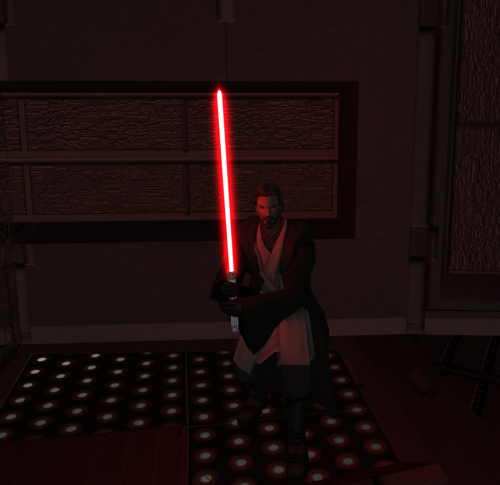
The vanilla lightsaber blades in Kotor and TSL look bad in my opinion. So, I tried to improve them by adding a dynamic ambient light to the blade (environmental lightning), which works quite well. Since this is hard-coded in the model I also optimized the blade plane models to have a different UV layout inspired by Sithspecter's work. I also simplified their geometry and fixed the different brightness bug (different brightness of the blade when viewed from the front compared to the back).
Additionally, I included 3D models for the core of the blade and the inner glow of the blade, which can now be used to create black core sabers as seen in SWTOR. The glow - as well as the models - are fully animated to work as the vanilla blades.
The hilts are updated together with the blades including hilts from Kaidon Jorn's SLM 2.0 mod.
Summary:
- All saber hilts are updated with hilts from Kaidon Jorn SLM 2.0 mod (I love it!) All credits for the hilt models, textures and icons go fully to him!
- Ambient light for lightsabers
- 3D models for blade core and inner glow
- Symmetric lightsaber blade planes with a modified version of Sithspecter's crossguard saber UV layout. (Compatible with his unstable textures also included with all credits going to Sithspecter.)
- Black core sabers are possible
- Homogeneous brightness of the blade (no more “brighter blades when viewed from the front” happening any more)
- All sabers are fully upgradeable (added black core and unstable crystals as well as crossguard versions of them)
How to use the new lightsabers:
Get the black core, unstable and crossguard sabers or crystals by cheating them by using the giveitem command or use KSE to include them in your inventory.
The item codes are organized as follows:
Lightsaber and crystal follow the standard naming scheme:
Black core: 51-60
Unstable: 21-30
Crossguard: 101-110
Crossguard, black core: 111-120
Crossguard, unstable: 91-100
For example:
giveitem u_l_colo_51 (Blue, Black core crystal)
giveitem u_l_colo_92 (Red, unstable crossguard crystal)
giveitem g_w_lghtsbr118 (Viridian, crossguard unstable lightsaber)
giveitem g_w_dblsbr025 (Purple, unstable double blade lightsaber)
giveitem g_w_shortsbr53 (Green, black core short lightsaber)
!!!! Important: If you put a crossguard crystal in either a short lightsaber or double blade lightsaber the crystal will be transformed into its normal non crossguard version!
I HOPE that in the future some talented texture artist will create better looking blade textures using these new blade models. I plan to upload a Modders Resource explaining the blade system in detail.
CREDITS:
Kaidon Jorn:
Lightsaber Hilts models and textures and icons are created by Kaidon Jorn and taken from his SLM 2.0 mod, which you can find here: https://deadlystream.com/files/file/551-schematic-lightsaber-mod-slm/
Thank you very much for the permission to use your models and hilts here. They are amazing and I enjoyed working with them.
Sithspecter:
The new layout for the lightsaber blades plane models are inspired by Sithspecter's animated Crossguard Lightsabers mod for KOTOR which can be found here: https://deadlystream.com/files/file/1314-crossguard-lightsabers/
Thank you very much for the permission to include your animated unstable blade texture and to modified them to include the new TSL colors.
___________________________________________________________
COMPATIBILITY:
It should pretty much be compatible with any mod that doesn't use the same crystal and lightsaber model slots. This mod should be compatible with TSLRCM. However, please notify me in the release thread if any bugs do appear that are not listed below.
___________________________________________________________
INSTALLATION:
Use the TSLPatcher multiple times. You can choose which lightsabers you want. So, for example say you are only interested in the normal saber update and the related crossguard sabers: Then install the standard saber first and second run the TSLpatcher again and install the crossguard sabers.
The crossguard sabers require to have their related non-crossguard sabers installed first.
The TSLPatcher is set up to only install a certain part of the mod and requires multiple runs to install all sabers.
It should install everything correctly.
UNINSTALL:
Navigate to the backup folder and place the contents into the Override folder. Remove all files from the tslpatchdata folder of this mod from your override folder.
___________________________________________________________
BUGS:
The tip of the blade has a spike which comes from a deformation of the lightsaber planes. This is also present in the original model. I was not able to find a fix. (Sorry about that.)
The lightsaber hilts will clip through the blades. (Unfortunately, DarthParametric has said that it is not possible to fix this.)
___________________________________________________________
PERMISSIONS:
You may use this mod as you see fit. Display it in screenshots, make it compatible with your mod. However, do please give credit where it's due, and DO NOT release it with any of your mods without my permission. If you have any ideas for improvements, or if you want to you can mod them yourselves and include them in the mod. Saves me time and I'll give you credit for what I put in.
___________________________________________________________
THANKS:
Fred Tetra: All the thanks for KotOR Tool.
TK102: All the thanks for K-GFF.
ndix UR: All the thanks for the kotorblender plugin, which I used to create the blade 3d models.
bead-v: All the thanks for Mdledit and constantly updating it. Without it this mod would not be possible. Thanks also for the comments on the ascii code.
Kaidon Jorn: All the thanks for giving me the permission for using the hilts textures and icons. With these included this is a real mod. Thank you so much.
Sithspecter: All the thanks for giving me the permission to include his animated blade textures and to modify them. Also i want to thank you for inspiring me to start modding KOTOR in the first place.
Jorak Uln: All the thanks for the constant feedback, suggestions and beta testing of the preliminary versions of the mod.
JCarter426: I want to thank him for providing information regarding lights in KOTOR and the documentation.
DarthParametric: I want to thank him for answering all my questions and being so helpful when creating and tuning of the models.
Sith Holocron: For minor proofreading of the mod documents.
For the initial feedback on the ambient light, I want to thank: DarthVarkor, Stormie97, ebmar.
Also, I want to thank all the modders out there whose work I've consistently studied and learned from.
___________________________________________________________
LEGAL:
THIS MODIFICATION IS PROVIDED AS-IS AND IS NOT SUPPORTED BY BIOWARE/OBSIDIAN ENTERTAINMENT, LUCASARTS, DISNEY OR ANY LICENSERS/SPONSORS OF THE MENTIONED COMPANIES. USE OF THIS FILE IS AT YOUR OWN RISK. NEITHER THE ABOVE MENTIONED COMPANIES NOR THE AUTHOR ARE RESPONSIBLE FOR ANY DAMAGE CAUSED TO YOUR COMPUTER FOR THE USAGE OF THIS FILE.
21,224 downloads
-

Ultrawide 3440x1440p Cutscenes
By Ausanan
Kotor 2 cutscenes upscaled to 3440x1440p for ultrawide users.
To install, download parts 1-12, extract the .bik files and paste them into "Knights of the Old Republic II > Movies" and overwrite the existing files. Good idea to make a backup of the vanilla movies.
Fully compatible with TSLRCM and M4-78.
If you don't have M4-78 installed, in Part 1 just don't paste the files "DroMov02.bik" and "DroMov04.bik" into the Movies folder.
Programs used to upscale the cutscenes were:
- RAD Video Tools
- HxD (Hex Editor)
1,507 downloads
(0 reviews)0 comments
Updated
-

Extended Enclave Tweaks
By N-DReW25
A Mod for Star Wars Knights of The Old Republic 2
Author: N-DReW25
1.3.0 Release Date: 22.03.2025
INSTALLATION:
(It is highly recommended that you update your game to version 2.10 (the 1.0b update) before installing this mod.)
As this is an add-on for TSLRCM, TSLRCM 1.8.6 is REQUIRED. It will not work otherwise, so have that installed first.
As this is a patch for Extended Enclave, Extended Enclave 2.5.2 is REQUIRED. It will not work otherwise. Install the Extended Enclave mod AFTER TSLRCM and BEFORE the Extended Enclave Tweaks.
The Extended Enclave Tweaks used the M4-78 versions of the Enclave dialogues, if you aren't using M4-78EP none of the M4-78 restricted content should be activated (There exists some weird easter egg ending where, if you kill Vrook, Kavar and Zez-Kai Ell then you can save Vash only to kill her in the Enclave.)
To install, extract the Extended Enclave Tweaks folder to anywhere you like, as long as it is not the SWKotOR2 folder. When you run the installer, it will present you with two options, the option "Main Installation" is REQUIRED as it installs the base mod and "CARTH FIX" is OPTIONAL, select "Main Installation" first and run it.
"CARTH FIX" can be installed after "Main Installation", this option fixes an inconsistency with Carth's armor as seen in TSLRCM. DO NOT USE THIS OPTION if you use DarthParametric's "TOR Ports: KOTOR Comic Republic Uniforms Admiralty Patch"
Description:
This is a patch for the Extended Enclave mod which extends version the Rebuilt Enclave sequence with new restored dialogue, scenes and other missing content.
The following scenes have been modified:
1. "Tobin's Corruption"
Colonel Tobin has several head textures in the game files- his main head texture, his Dark Side transition for his end game appearance, and a partial Dark Side transition. This patch will restore the partial Dark Side transition for Tobin's cutscene during the Enclave section of the game.
2. "Admiration"
Scenes in the Jedi Enclave where the dialogue shows an animated fly-by camera have now been made unskippable for the duration of the camera, this was done to allow players to admire the scene for a brief moment rather than skipping it like you can in vanilla.
3. "Disciple's Choice."
The "Disciple's Choice" restored content has been moved from the Ebon Hawk to the Enclave. Once inside the Enclave, Kreia telepathically goads Disciple into telling the Republic what's happening but in doing so, he'd endanger the Exile.
3. "Disciple's Distress Call"
Knowing that Kreia is a Sith and that the Exile and Jedi were in danger, the Disciple contacts Atris, who in turn sends her Handmaidens to Dantooine. Atton will acknowledge this in the post-Enclave scene.
4. "Alternate Lines."
A handful of 'alternate lines' exist within the Enclave files, these have been restored.
5. "Restructuring."
Certain dialogue replied have been restructured so that you don't unknowingly skip past dialogue content by accident.
Known Bugs:
This mod shouldn't have bugs, but youu find any just report it to me on Deadlystream.
Incompatibilities:
Report any incompatibilities to me on Deadlystream.com
Permissions:
This mod may not be modified or distributed without the explicit permission of the authors.
Thanks and Credits:
danil-ch & Darth Hayze: Extended Enclave mod and associated files
Zbyl2: Help with getting it ready for TSLRCM 1.8.6
Leilukin: For her amazing Partywap compatibility patch
Sith Holocron: The Awesome logo and screenshot edits
Exile007: Sion related files
LoneWanderer: Extensive Beta Testing and identifying solutions to 1.0.0 bugs
Alex Star: Discovering the Sion Harbinger and Atris Academy Bypass bugs in version 1.0.0
TSLRCM Team: TSLRCM 1.8.6 and associated files
Bioware: For such an amazing game
Obsidian: For such an amazing sequel and for keeping the cut content in the files
Fred Tetra: For Kotor Tool
Everyone who downloads the mod!
Extended Enclave Credits:
danil-ch and Darth Hayze: Pretty much most stuff, this included lots of scripting, vo splicing, picking up slack when one of us dissapeared, etc...
Thanks go the entire TSLRCM team; your work has been outstanding.
Hassat Hunter; for help with getting it ready for TSLRCM 1.8.2
Sith Holocron; for suggesting a mod collaboration and the cool logo
zbyl2; for help with getting it ready for TSLRCM 1.8.3
Exile007; for contribuitng his early work on the Sion scenes
TESTERS: Loki147, Malkior
Legal:
THIS MODIFICATION IS NOT SUPPORTED BY BIOWARE/OBSIDIAN ENTERTAINMENT, LUCASARTS, DISNEY OR ANY LICENSERS/SPONSORS OF THE MENTIONED COMPANIES. USE OF THIS FILE IS AT YOUR OWN RISK AND THE ABOVE-MENTIONED COMPANIES OR THE AUTHOR IS NOT RESPONSIBLE FOR ANY DAMAGE CAUSED TO YOUR COMPUTER FOR THE USAGE OF THIS FILE.
6,351 downloads
- restored dialogue
- jedi enclave
- (and 6 more)
-
K2 Light Mobile UI
By utilizer
K2 Light Mobile UI (any language)
Hello there.
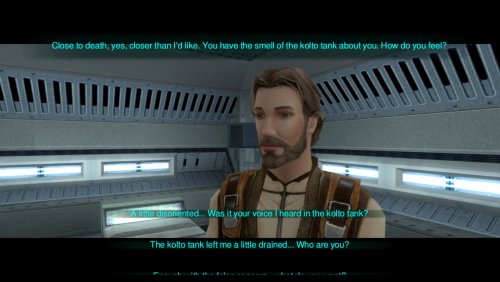
Never liked Aspyr UI (KotOR/TSL/Jade Empire) on mobile. Too big for small display. With unnecessary elements. So i made some improvements.
-Dialogue/Cutscenes
-green letterbox lines removed
-subtle (tsl green) undershadow for subtitles
-subtle (tsl green) dialogue choices undershadow
-new (tsl green) "dialogue choices select" texture (same undershadow but bigger)
-dialogue choices frame window and its elements completely removed
-annoying flashing cross-piece thingy in every dialogue was utterly and violently destroyed
-HUD
Sadly, we can't unpack obb's from TSL mobile atm. So i can't do anything for hud elements w/o knowing ui tga names.
-Install
unpack and copy *.tga files to -
if MTSLRCM installed -
override folder with your language -android/data/com.aspyr.swkotorii/files/dlc/mods_english/override
OR if you don't have MTSLRCM installed -
to default override folder - android/data/com.aspyr.swkotorii/files/override
-Uninstall
delete previously copied files
Compatible with MTSLRCM and pretty much everything.
======================================
Under NO circumstances is this, or any of my other,
mod(s) to be posted on ANY site other than by myself.
======================================
THIS MODIFICATION IS NOT MADE, DISTRIBUTED, OR SUPPORTED BY BIOWARE, OBSIDIAN, OR LUCASARTS ENTERTAINMENT COMPANY LLC. ELEMENTS TM & © LUCASARTS ENTERTAINMENT COMPANY LLC AND/OR ITS LICENSORS.
636 downloads
(0 reviews)0 comments
Updated
-

Effixian's Black Atton
By Effix
----------------------------------------------------------------------
Knights of the Old Republic - The Sith Lords
----------------------------------------------------------------------
TITLE: Effixian's Black Atton
AUTHOR: Effix(ian)
CONTACT: PM me on the forums or find me on Steam
------------------------
INSTALLATION
------------------------
Unzip somewhere and run the file "TSLPatcher - Install Effixians Black Atton.exe".
-----------------------
DESCRIPTION
-----------------------
This mod changes Atton's head texture, he gets a darker skin, brown eyes, darker hair and a bit of a stubble.
The dark side transition is similar to the vanilla one, but a bit less pronounced and with more "movie style" Sith eyes than the pale zombie eyes.
Requested by Anansi on Steam.
Clothing reskin in the screenshot: "Effixian's Alternative Atton Clothing"
https://deadlystream.com/files/file/1834-effixians-alternative-atton-clothing
---------
BUGS
---------
None known.
-------------------------
UNINSTALLING
-------------------------
1. Remove the following files from your Override folder:
P_AttnH1.tga
P_AttnH1D1.tga
P_AttnH1D2.tga
PO_PAtton.tga
po_pAttond1.tga
po_pAttond2.tga
2. If you haven't installed any mods after this mod then you can get the file appearance.2da from the mod's backup folder and put it back in your override folder.
More technical: Apart from moving the files listed above, the patcher only changes his underwear texture value in appearance.2da.
Row 452, column texa -> original value: PMBAMC, new value: PMBAMB
------------------------------------
DISTRIBUTION NOTES
------------------------------------
You may NOT: Use the material from this mod in your own mod without giving me credit, implying it was your creation.
You might: Use the material from this mod in your own mods if you simply ask me.
----------------
Thanks to
----------------
Stoffe and Fred Tetra for the needed tools and tutorials
THIS MODIFICATION IS NOT MADE, DISTRIBUTED, OR SUPPORTED BY BIOWARE, OBSIDIAN, OR LUCASARTS ENTERTAINMENT COMPANY LLC. ELEMENTS TM & © LUCASARTS ENTERTAINMENT COMPANY LLC AND/OR ITS LICENSORS.
---------------------------------
My mods are free. If you would like to show your support then you can buy me a coffee at ko-fi.com/effix
169 downloads
(0 reviews)0 comments
Updated
-

TSL Icons for modifications of lightsabers By TFT
By Dark Hope
I am publishing the work of a Russian colleague. Icons for kotor 2. Great job. Perhaps I couldn't have done better. All permissions received. Enjoy. By TFT
To Install
1. Download: TSL Icons for modifications of lightsabers By TFT
2. Copy all files to the Knights of the Old republic's Override folder.
(Example location - C:\Program Files (x86)\Steam\steamapps\common\swkotor\Override)
3. When/if prompted to overwrite files, press okay.
4. If you like the mod; leave a comment or endorse! (It would be much appreciated) Made with love.
2,104 downloads
- lightsabers
- icons
- (and 2 more)
-
Bao Dur & Force Fields
By Thor110
NOTE : This is included with the Expanded Galaxy Project already.
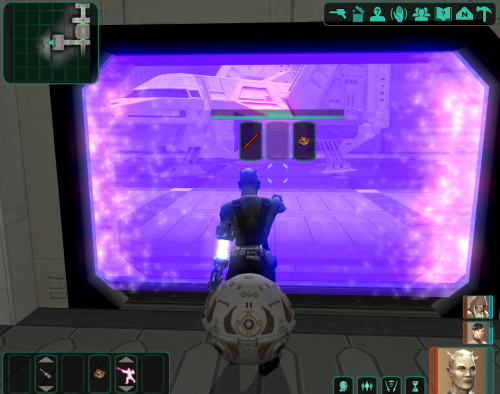
This mod makes it so that Bao-Dur actually uses his arm and the associated animations shown in the cutscene that introduces his ability in order to open force field doors in the Military Base on Telos.
For now that is the only place it works until I remember or rediscover any forcefields elsewhere in the game that he has the ability to open.
Thor110
1,516 downloads
-

Prequel Robe Replacement and Kreia Visible Body Models Compatibility Patch
By ajdrenter
Prequel Robe Replacement and Kreia Visible Body Models Compatibility Patch by ajdrenter
Just drop the two files in your override and you are good to go!
Credit to Kainzorus Prime and DarthParametric for original mods.
506 downloads
(0 reviews)0 comments
Submitted
-

Movie-style Jedi Master Robes and Kreia Visible Body Models Compatibility Patch
By ajdrenter
Movie-style Jedi Master Robes and Kreia Visible Body Models Compatibility Patch by ajdrenter
Just drop the two files in your override and you are good to go!
Credit to DeadMan and DarthParametric for original mods.
361 downloads
-

KillSaber Code
By 90SK
KillSaber Code
by 90SK
Same idea as the killstick or killblaster cheat, except this code gives a saber. It's "giveitem killsaber"
Install: Copy killsaber.uti into your Override folder
Pick what type and color you want the KillSaber to be,
Then copy the "killsaber.uti" file into Override.
If you want another color, copy another "killsaber.uti" into override and click Ok to replace.
Should have all correct colors now.
Permissions: Please do not reupload this mod.
Do not upload this on Steam workshop.
Special Thanks:
DeadlyStream.com, LucasForums.com
LucasArts – Obsidian Entertainment – Bioware
THIS MODIFICATION IS PROVIDED AS-IS AND IS NOT SUPPORTED BY BIOWARE/OBSIDIAN ENTERTAINMENT OR LUCASARTS OR ANY LICENSERS/SPONSORS OF THE MENTIONED COMPANIES. USE OF THIS FILE IS AT YOUR OWN RISK AND THE ABOVE MENTIONED COMPANIES OR THE AUTHOR IS NOT RESPONSIBLE FOR ANY DAMAGE CAUSED TO YOUR COMPUTER FOR THE USAGE OF THIS FILE.
516 downloads
(1 review)0 comments
Updated
-

Blue Kotor-Like GUI
By Thor110
I recently made this GUI with the help of a tool created by another user that should see a release soon, I also automated the colour correction of all of the icons that were not already in the first game.
Slowly I have been finding every last texture that is involved in the GUI's operation as well as the appropriate colour values in their .gui files.
They aren't the best / don't match the other icons very well, but I will work on it again in the future as well as release it on it's own.
Thor110
This should work for the base game and most variations, if not let me know. The only unnecessary entries that I can think of might be the planets on the galaxy map but they will now show unless scripted to do so, so it should not cause any problems. These .gui files are based on the base game's .gui files so might not contain any changes made in any other mods such as TSLRCM ( I am not sure how much the .gui's are altered )
699 downloads
-
svösh Robe Collar Fix and robes + ilikecommas's additional robes
By JumpStationZ
Editor: There are 3 separate read-me files in this package. What you see below only covers the robe collar fix by svösh but the others can be read after you open the package. As the package as originally saved on JumpStationZ was a bit of a cluster, it should be needless to say that you're on your own for this one. But I'll say it loudly for the those in the back. You'll receive no assistance from Staff on this one and you should take all necessary precautions before attempting to use this. Caveat emptor.
Author : svösh 05/29/05
=======================================================================
-: male / female Master and padawan robes model and UV fix
UPDATE *** female padawan model FIXED ***
=======================================================================
All right. Not being a fan of the collar on the Jedi robes models, I went ahead and remapped and complied these models. They come with the exported fixed uv cords to use as an overlay in Photoshop or any other layer based graphic applications.
========================================================================
-: Included in this .rar
4 models [ so 8. mdl / mdx count as 1 each ]
3 jpg’s are the unwrapped UV’s . The master model uses the same texture
PFBIM mdl /mdx female padawan model FIXED*
PFBNM mdl /mdx female master model FIXED*
PMBIM mdl /mdx male padawan model
PMBNM mdl /mdx male master model
PFBI01.jpg female padawan UV
PMBI01.jpg male padawan UV
PFBN01.jpg male and female Master UV
Not included:
---------------
My robe skins from the screen shots, where’s the fun in that?
Consider this a fresh canvas for your skins you will see you have very little to change to fit the edited UV’s
************************************************************************
WARNING!!!! This is basically a model / UV fix to use for new unique robes. More of a base to use with new mods, If u drop this in override without editing EVERY SINGLE DEFAULT TEXTURE that uses one of the 4 models in this .rar. The collar will appear much worse than it already was
That being said, there’s nothing stopping you from overriding all robe models with these and editing ALL the default robe skins.
************************************************************************
-: Changes I made
====================
On the master robes, I only moved the collar in to place. The old placement of the collar is now empty space.
On the padawan robes, I moved the collar shifted the ring fingers over a touch, and had to move the back half of the sash over and scaled it down a little bit to fit the collar in
The red outlined UV’s are the torso the green are the hands.
-: How to use this in Photoshop or other layer based graphic apps
=================================
Open your edited skin hopefully still in .psd format
Drag and drop the .jpg for the selected skin you are working on, in to your psd . drag the layer to the top of the stack.
Hit W and click in the black area on th UV layer. Now with your selection active go to the menus above..
Select > Similar with all the black selected hit Ctrl +X or delete key now u set the opacity to 20 to 40 % and lock it so u don’t accidentally start editing it
The rest, I leave to you
************************************************************************
Just one little thing you can freely use this as your base in any new mods you make or fix up older ones. All I ask is credit for my work with the model’s and uv edits and include this read-me please, and if you can’t type my forum handle from lack of finding the character map. Then please by all means copy and paste it from here.
svösh
************************************************************************
554 downloads
(0 reviews)0 comments
Submitted
-

KotOR 1/2 saber on/off sound replacer
If you ever wanted your lightsaber(s) to have more pizzazz to them, this might be what you're looking for. This replaces the on/off sounds for all lightsabers.
The on sound is Luke's from Return of the Jedi, and the off sound is Vader's ignition sound from Revenge of the Sith and Rogue One, but reversed and trimmed down.
Installation is super easy, just drop the files included into your override folder. There are no problems unless you have another mod that changes these files, and even then, nothing will break. This will work for either game, by the way.
Demonstration:
467 downloads
(0 reviews)0 comments
Updated
-

Xcom's Grenades Mod
By JumpStationZ
Ed: The mod has not been tested with TSLRCM so I'm currently listing it as TSLRCM incompatible.
Title: Grenades Mod
Version: 1.0
Author: Xcom
Idea: JCDenton
E-Mail: [redacted - see read-me for more info]
------------------------------------------------------
INSTALLATION::
Extract k_sup_grenade.ncs to kotor2\Override directory.
If you don't have Override directory inside Kotor2, create it.
DESCRIPTION::
The mod modifies grenade and rocket damage and DC based on your demolitions skills which means the higher demolition skill,
the greater is damage. This works both ways (also when enemy throw grenades at you). The mod also makes Thermal Detonator
impossible to evade (via Evasion feat).
I'd like to thank everyone who contributed at Holowan Labs.
-Xcom
(Feb 25, 2005)
243 downloads
(1 review)0 comments
Submitted
-

Content Pack: Feats and Powers (TSL ver)
By TamerBill
Content Pack: Feats And Powers (TSL ver)
Version 1.67
Installation:
-Run the included TSLPatcher.exe and select your installation directory (the folder containing swkotor2.exe, NOT the Override).
-You can use this version on a non-English copy, but the descriptions will still be in English.
Details:
-Content Pack: Feats and Powers is a collection of feats and powers for KotOR II:TSL.
-It contains 26 new feats, in 15 separate feat chains.
-In addition, it contains 5 new force powers, in 2 separate power chains.
-Starting a new game is not required.
-Full details are included in the TSL Patcher writeup.
History:
-v1.00: Initial release
-v1.10: Added Dark Rage, Sadism and Sweet Release.
-v1.20: Added Constancy, Respite and Anti-Shield Protocol
-v1.30: Added Auto-Shield Protocol, Applied Knowledge and Last Stand
-v1.40: Added Resonance, Deep Resonance and Master Resonance. Also completely reworked Payday.
-v1.50: Added Mysterious Benefactor
-v1.60: Added Whirling Blade Combo, Thunderous Blade Combo and Heartstopper Combo
Bug Fixes:
-v1.01: Fixed a bug preventing Shutdown and Overload from targeting blaster rifles.
-v1.02: Stopped T3 from being able to take the Payday and Killer Instinct feats.
-v1.11: Fixed a bug preventing Sith Lords from taking dark-side feats.
-v1.31: Fixed a bug preventing Auto-Shield Protocol from triggering.
-v1.61: Fixed the interaction between Overload and combo feats. Fixed some lingering bugs from the Steam conversion. Improved compatibility.
-v1.67: Improved compatibility.
Permissions:
-Don't redistribute the mod without permission. I'm pretty reasonable.
Credits:
-By TamerBill
3,436 downloads
-

MOBILE Restored Content Mod (MTSLRCM)
By zbyl2
Experience famous restored content mod on your mobile device.
Install instructions:
Both iOS and Android place all files in a folder called ‘mods_english’ (or ‘mods_italian’, etc.) within a folder called ‘dlc’. So /dlc/mods_english/[all files]/.
1. Unzip mtslrcm.zip
2. dlc folder contains five subfolders, for each language version; feel free to delete ones you don't use.
3. Paste it in the install location:
iOS:
On iOS, they are placed in iTunes > Apps > Documents, in the same spot that the ‘saves’ folder goes.
ANDROID:
On Android the files should be placed in /Home/Android/data/com.aspyr.swkotor2/files/
As long as you’ve closed the game from the app switcher before launching with the mod, everything should work as normal."
165,299 downloads
-
TOR Ports: Pureblood Sith Female Player Head for TSL
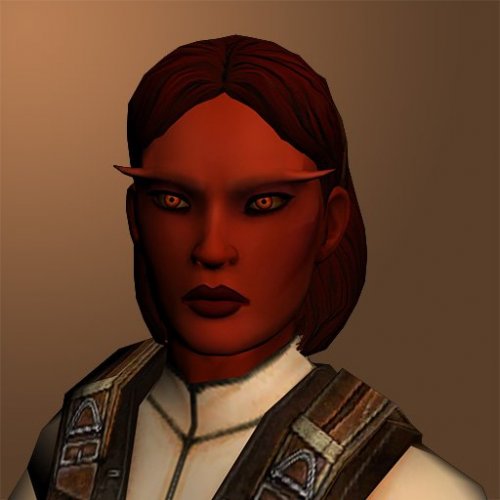
This mod adds a Pureblood Sith head and underwear model from The Old Republic MMO, ported to TSL as a selectable player head for female characters.
A few notes:
A unique underwear model is included, but because of the different way TOR and KOTOR mate heads to bodies, I had to add a neck stump to the torso to elevate the head to the right height. That makes for a pretty nasty transition at the seam line, but it should mostly only be visible in dialogue. Try not to have too many conversations while naked I guess. By default, the underwear is a sports bra and panties. For those wanting something a little more chaste, there’s an alternative modesty patch that provides a pair of shorts/hot pants instead. After running this installer, simply copy and paste the TPCs from the OPTIONAL folder to your Override folder, overwriting when prompted. Odyssey’s lack of proper specularity, much less the advanced (by comparison) graphical features of TOR, means you should expect that the textures will look pretty flat in KOTOR compared to how the originals look in TOR. KOTOR has a maximum bone limit per mesh of 17. This creates a problem for TOR meshes, as adding the eyelids to the face bone array pushes that to 18. I had to drop 2 bones to make it work. I chose the two nose corner bones, as they seemed the least important. I don't know what effect this may have on various facial animations, but probably nothing significant for mute player characters. Differences between how TOR and KOTOR handle animations mean that some of the bone weights are probably too strong, so expect some bad deformation occasionally. Especially when the game uses stunt animations in certain cutscenes. If you notice anything particularly egregious, post a comment with some notes of the specifics and a screenshot/video and I'll see if it can be mitigated. Dark Side transitions are included, but they are relatively mild. I'm not a big fan of the zombie look. The portraits are the versions I made for K1, so they probably don't mesh well with TSL. I'm lazy like that. Installation:
If you are using TSLRCM or the hybrid TSLRCM + M4-78 from the Steam Workshop, make sure to choose its Workshop folder as the installation location, not the main game folder. Or preferably don't use the Workshop at all. A custom dancer outfit was added in v1.1. A patch has been provided for users of v1.0 to add this to their existing game. Only use it if you have v1.0. Acknowledgements:
Original models and textures ported from The Old Republic MMO Thanks to @bead-v for KOTORMax and MDLEdit Thanks to @ndix UR for TGA2TPC Thanks to zaramot on the Xentax forums for the TOR GR2 Max import script Thanks to @VarsityPuppet for supplying a custom commandline version of his 2DA editor for the dancer patch.1,600 downloads
-
Balance Tweak Pack
By Pavijan357
BALANCE TWEAK PACK
version 1.1
Author: Pavijan357
1. Description:
---------------------
This is just a small compilation of minor fixes to some "Knights Of The Old Republic 2" game balance issues and oversights.
I originally made this for my personal use, but I decided to share it anyway at the end.
All these tweaks/fixes are made to be used with TSLRCM and assume that you have TSLRCM 1.8.6 (or eventual later version) installed.
Usage of these components without TSLRCM is not tested.
2. Component list:
---------------------
This pack consists of four main components and one small extra:
Component 1 - Discple and Handmaiden Grant Both Bonuses
Bonus feat that Handmaiden grants to Exile after their sparring match on Ebon Hawk ("Battle Precognition" - adds Wisdom bonus to defense) is much better reward than Disciple’s measly increase of 10 force points to the Exile's maximum amount after their first meditation session, and is just one of the points why some people prefer having first one as a companion that the second.
This mod remedies that by having both of them grant both Battle Precognition and Maximum Force Points increase at those respective dialogue points (I even added a few lines for justifying it, sorry if you don't like them ).
I have also fixed an oversight where if you take the DS path in dialog about meditation with Disciple you don’t get a FP bonus even though in-dialogue info said that you did.
Until someone restores Disciple’s cut Holocron quest (which is highly unlikely) this will serve to bridge that only slight advantage male Exile had in combat over than the female one (not that it really matters because of extremely low general difficulty of the game, but here it is anyway...).
Component 2 - Force Crush Balance
As many of you already know, KOTOR 2 in not a challenging game, but even taking that in account, there is one Force Power that really breaks its every potential for real boss fights for the Dark Side player...
Of course I’m speaking of Force Crush, the ultimate cheese tool.
There were many mods that tried to improve KOTOR 2 boss fights, and for Light Side player they might succeed to increase the challenge, but for Dark Side one, if the boss fights you solo (Nihilus and Sion for example), it ultimately doesn’t doesn’t matter how much you buff the stats of the bosses when you have the power that, as long as you have enough Force Points and FP regeneration, makes you able to get them to helplessly jump and down and take damage without hitting you even once!
What is the root of a problem here?
It is the fact that when opponent fails the save against the power he/she suffers the full damage amount and gets lifted and dropped down on the ground helplessly, which is cool, but even if opponent succeeds on save, he/she suffers the half of damage, but STILL gets lifted and dropped, after which you can simply cast the power again and proceed to repeat the process until the opponent is dead.
If the opponent has more Hit Points fight will only last longer and be more tedious, but not really harder in any way.
My solution for this is simple: keep the effect the same if the save fails, but in the case that save succeeds opponent still suffer the half of the full damage BUT they do not get lifted and dropped, and can therefore continue to attack you, in that round at least, and actually pose some real danger.
Component 3 - Sith Lords Improvements
Yes, I know that there are already several mods that make the Sith lord bosses tougher to beat, but some of them did not hit the right spot for me, and some of them do not even work properly for all bosses, or can create the game breaking bugs when used with TSLRCM or some other mods.
So I created this component to both get them to the challenge level worthy of the true boss status, and make it as compatible with as many other mods that I can.
I play-tested this mod with:
a) unoptimized LS melee character made by fist-time novice player from the save I found on the net – on the "Normal" game difficulty,
b) optimized DS force-focused character of mine – on the "Difficult" game difficulty.
In both cases fights were winnable but were hard and lengthy enough, and required a fair amount of usable items to be spent (stims, medipacks and shields).
Be warned, with this mod installed, you should save those consumables for these boss fights, ESPECIALLY your best shields, since you can easily get one-shotted on higher difficulty without these, but that should not be any problem to accomplish anyway since, because of the general low difficulty of the regular fights, you don't really need to use those at any non-boss fight in the game, so you should always have enough by the time you get to the final 3 bosses.
Component 4 - Disable "Droid Interface" Feat
Combat droid class (only HK-47 of all party members belongs to that class) is able to take "Droid Interface" feat on level-up, which, in both vanilla TSL and TSLRCM, does absolutely nothing.
That was most likely to be used in some cut content out of many that were planned to be at the game but were never completed by the game developers.
All you can do with this feat now is to completely waste one HK-47's feat point by taking this if you are a new player and you do not know what each feat does (or in this case - doesn't).
Because of that, this mod serves to disable this feat, so you will not be offered to take it in on HK-47's level-up screen.
M4-78EP mod, which restores the droid planet to the game, actually uses "Droid Interface" feat at some points, so you should not install this component with along with that mod if you intend to use this feat.
Extra component - Maximum Level Sith AC Bonus Fix
This is just one small bug fix for the oversight in acbonus.2da file where a lvl 50 Sith Lord and lvl 50 Sith Marauder had swapped AC values.
While it is true that no player or non-player character should reach those levels in the unmodded game without cheating, this can happen when some difficulty or experience mods are used. So I'm supplying that fix here.
3. Installation:
---------------------
Install components from this patch AFTER TSLRM is installed.
Use TSL Patcher to install each component individually.
4. Uninstallation
---------------------
Copy appropriate files from the "backup" folder to their original places.
5. Mod Compatibility:
---------------------
Detailed individual compatibility notes are listed in each component's "tslpatchdata/info.rtf" file.
Apart from that, any mod that is compatible with TSLRCM should be compatible with this Tweak Pack.
---------------------
THIS MODIFICATION IS PROVIDED AS-IS AND IS NOT SUPPORTED BY BIOWARE/OBSIDIAN ENTERTAINMENT OR LUCASARTS OR ANY LICENSERS/SPONSORS OF THE MENTIONED COMPANIES. USE OF THIS FILE IS AT YOUR OWN RISK AND THE ABOVE-MENTIONED COMPANIES OR THE AUTHOR IS NOT RESPONSIBLE FOR ANY DAMAGE CAUSED TO YOUR COMPUTER FOR THE USAGE OF THIS FILE.
18,130 downloads
-
Ranged Weapon Expansion Pack
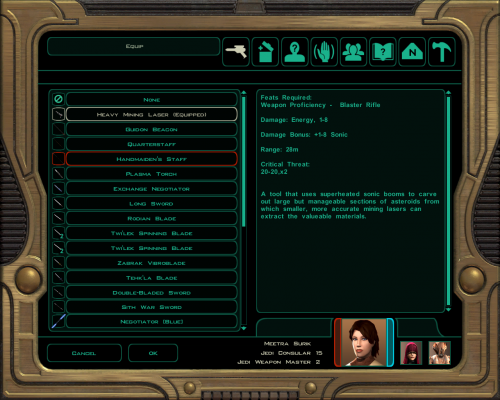
This mod adds three new upgrades for ranged weapons, three new weapons (not new models, I used existing in-game models), and modifies the Heavy Mining Laser. All of the weapons also come with lore-friendly descriptions.
The included screenshots show the stats of all the weapons and a standard blaster rifle with all of the max level upgrades. Electroshock Blaster can be crafted with Repair 2, CB-100 and the Railgun with Repair 20, and the Heavy Mining Laser cannot be crafted. If you're using TSLRCM you can find the Heavy Mining Laser in-game at Peragus. Item codes and crafting requirements are in the readme.
Installation:
Simply run TSLPatcher.exe
Uninstallation:
Remove the .uti files from your override and replace the .2da files with those in the "Backup" folder of the Expansion Pack (created when you installed).
Bugs/Issues
There is a small visual bug where the feat provided by the weapon upgrades will not appear in the Feats page of character abilities if you have not already learned the first feat in that line. So for example, if you have the Sniper Shot feat, the Master Sniper Shot gained from Tri-Light Scope IV will appear on your list of feats, but if you don't have Sniper Shot the Master version will not appear. However, even if it is not listed on your character sheet, it will be available in combat.
Compatibility:
Will not fully work with any mod that changes the heavymininglaser.uti, such as Marauder’s Mining Laser Consistency Fix. If you want to use both, whatever mod you want to affect the Heavy Mining Laser, install that one last. So you if you like Marauder's mining laser better, install my mod, then install Marauder's mod and overwrite my heavymininglaser.uti with his.
See below for what each level of the new upgrades do and how to craft them:
Tri-Light Scope
Mark I: Sniper Shot
Mark II: Sniper Shot, Keen
Mark III: Improved Sniper Shot, Keen
Mark IV: Master Sniper Shot, Keen, +1 Attack
Skill to Craft: Awareness 4, 10, 16, 22
Overcharged Power Cell
Mark I: Power Shot
Mark II: Power Shot, +2 Energy
Mark III: Improved Power Shot, +3 Energy, Massive Criticals 1d4
Mark IV: Master Power Shot, +1d6 Energy, Massive Criticals 1d4
Skill to Craft: Security 4, 10, 16, 22
Acceleration Chamber
Mark I: Rapid Shot
Mark II: Rapid Shot, +1 Piercing
Mark III: Improved Rapid Shot, +1d4 Piercing
Mark IV: Master Rapid Shot, +1d4 Piercing, +1 Attack
Crafting Skill: Repair 4, 10, 16, 22
591 downloads
(0 reviews)0 comments
Updated
-
File Reviews
-

Ellhaim 0
This mod sorta works. Except that the model is very transparent. Especially on the metal/darker details of her outfit/model. Kind of unusable imo. Just makes me feel like I'm playing the ghost of Talon.
-
Fantastic work!!! Quick question to any who read this: I'm a total rookie with modding, and in my most recent playthrough, when the camera executed the flyby when the HK-50s shot you down over the polar region(when they start speaking "Egotistical Boast") I saw the mod author's logo. Again, since I;m new to this, I likely made a mistake when I added them, so how can I correct it so I don't see the logo?
-

lorddli 2
does what it says on the tin and i like it
-
 1
1
-
-
Awesome mod! Some necessary powers filling out the pool, especially with Revitalize.
I don't know if this is cool, if not I will absolutely delete it... But I had AI upscale your icons so that they would work properly at high resolution (the images look basically identical, they're just 64x64 instead of 32x32). -
Nice job !
ou plutôt dans ce cas Beau travail ! -
This Mod fixes all of the problems that I have when I got back to play this game on newer systems.
The dev behind this mod was quick to answer any questions I had since I was a Linux user of this mod.
Great quality mod, that fixes issues I was having in Ultrawide such as the dialogue windows not working on the first step of a new conversation (Typical on Ultrawide) as well as improving general stability of the game.
Would recommend for anyone playing the game.
-
Ok, I hope this helps perfect it because it's a good idea on paper. I'll keep it as "matter-of-factly" as possible.
My experience with this mod: My setup already had TSLRCM+M478PE+PartySwap as a foundation already running. I installed this mod, created a fresh, new character to test it out, made it to the Telos Citadel Station, and after the "house arrest" sequence wrapped up and I was free to move, the quest triggers, unknown to me, were compromised. For example: The ambush on Dock Module 126? The 5 thugs that attack you spawned, I fought them and beat them, but the dialogue script failed to recognize the instance, leaving the TSF NPC in an infinite "text box loop" saying "don't let them hurt the droid; the instance didn't close properly and, naturally, the journal quest didn't update. I reloaded a save file just prior to that beat and it played out correctly a second time. When I showed the "modified holdout blaster" to Lt. Grenn to pick up the "suspicious goods" quest? that dialogue with Grenn played normally, however the journal didn't log the "suspicious goods" quest at all. So, the masked thug that's supposed to ambush you in the Entertainment Module immediately after that dialogue didn't spawn. Another tell-tale sign that something was wrong is that the Dobo Brothers' Merchant Room was completely inaccessible: The door would not open, full stop. Also, one of the doors to the cantina turned into a "one-way" exit. You could exit out of the cantina through it but not go back in. The other door worked fine. And for some reason, some NPCs appeared with no head whatsoever, (though I'm uncertain of this last bit is related.) To solve these problems on my setup, I purged my game's Override, performed a Steam Integrity Check, and re-installed all my mods in the proper order, except this one. I hope this helps you perfect it.
EDIT: To be clear, I don't use the Steam Workshop for anything whatsoever; I only use Steam to launch the game. All my mods were installed through their respective standalone TSLPatcher executable.
Edited by jmorenobothwell -
-
lorddli 2
Perfect companion mod to go along with KMRP
-
You are the pillar of this community
-
The Atton no guyliner with mid scruff is absolutely perfect! Love this!
-
This wonderful black magic fuckery has enabled me to play my favorite game of all time at 240fps without any issues and I am very happy about it. Thank you!
Edited by gilless429-
 1
1
-
-
Excellent addition! Everything worked great, and I love the different logs and the story they tell!
-
1
-
-

Synchro 21
These look great! Now I know what you meant about not being able to get portrait images out of your head

-
-






-
File Comments
-

By Radamanth77 · Posted
Hello, nice work here. Where can I get the .kpatch version of this mod? -

By paramano01 · Posted
I already deleted the game for other reasons. But this was definitely a mod conflict, not the fault of this mod. I had a pretty long mod list. I fixed it with downloading a Saul Karath texture mod, that resolved it. -
By paramano01 · Posted
KMRP especially together with k1cp makes the cutscenes to ALWAYS minimize, making the game's narrative unenjoyable. There's no fix, no other mod that works. Please try to find a solution for this. -
 Shem's Robes for Korriban Sith Students mod already does that.
 -

-