

Mods
892 files
-

Iziz Workbench
By InSidious
Iziz Workbench by Darth InSidious
This mod adds a workbench to Iziz on Onderon, which previously didn't have one.
There are two options for installing the mod:
Option 1 adds the workbench to the landing bay you arrive in;
Option 2 addsthe workbench to Dhagon's office.
Installation
Run 'Install Iziz Workbench.exe', select an option, hit select, and run the installer.
Uninstallation
Take either di_spnwb_501.ncs or di_spnwb_512.ncs out of your Override folder,
and then copy the backup of either 501OND.mod or 512OND.mod in the 'backup' folder
that the installer generated when it installed the mod, and copy it into your modules folder.
398 downloads
-
![More information about "Mr Defender's Wrist Console [TSL]"](https://deadlystream.com/downloads/screens/monthly_2023_12/1966727934_RepresentativePicture600x600MDwrist.thumb.png.38e0cc100d3b8a31b50c3fcc19db50f6.png)
Mr Defender's Wrist Console [TSL]
By JumpStationZ
Defender's Wrist Console
Modification Version 1.9
Author: Defender
Creation Date: February 4th, 2006
[contact information in read-me)
=========
Installation
=========
- For starters, make sure you have a folder named 'override' in your KotOR 2 directory.
- This modification requires a modified spells.2da file to work, if you have a spells.2da
file please place it in your 'override' folder and not a sub folder.
YES: c:\games\kotor2\override\spells.2da
NO!!: c:\games\kotor2\override\modification\spells.2da
TSL Patcher will then be able to patch your own spells.2da file instead of a new one.
- Once the 2da files are located in your override folder, click "Install" and TSL Patcher will ask you to point it to your Kotor 2 folder before installing.
YES: C:\Games\Kotor2\
NO!!: C:\Games\Kotor2\Override\
- TSL Patcher will now install the modification, and patch the 2da files (if any) if needed. Once this process is done, you will be able to use the wrist console modification in KotOR 2.
================================
Adding Wrist Console to your inventory
================================
Adding the wrist/droid console to your inventory is rather simple... the first method requires cheats to be enabled.
1) while playing the game, press ~ and type in "giveitem wristconsole" or "giveitem dcc" , this will give you the wrist console or the droid console (respectively)
2) Walk up to any workbench or medical lab and select the new dialogue options relating to this modification. Note, this is the method to use if you're playing on the Microsoft Xbox.
========================================
Giving the Wrist Launcher Proficiency to Everyone
========================================
If you walk up to the medical lab or workbench and select the 'upload schematics for replication’, and choose either the 'run proficiency script' or 'replicate a wrist console' or even 'replicate a droid console', the script will be executed and the proficiency feat will be given to everyone in your party (the ones onboard and offboard of the ebon hawk). There is a similar option located in the wrist console's replicator options under 'replicate wrist consoles' . If a party member joins your quest, simply re-run this script and he/she will acquire this feat.
===============================
Equipping the Wrist Console/Launcher
===============================
Once the wrist console is added to your inventory, and the proficiency script has been executed, you can equip it on any character in either armband slots. Please note, droids do not need the 'wrist launcher proficiency' feat to equip the droid command console (wrist console for droids).
Alternatively, there seems to be an interesting side-effect of making the wrist console a wrist launcher, apparently you can simply replicate 1 and not equip it, making it usable by anyone when it's just sitting in your inventory.... much like Chainz.2da's hak pad.. Not exactly sure how I managed to make that happen, but it is somewhat useful, if you don't want the wrist launcher console, simply leave it in your inventory... however, if you are interested in using the new wrist launcher capabilities, you will need to equip on a character (and, obviously, switch to that character to be able to use this feature)
NOTE FROM JUMPSTATIONZ ARCHIVIST: This mod – like most of the mods in the JumpStationZ Archive - has not been tested recently. (Note the creation date above precedes TSLRCM by many years.) If you download and install this mod, you assume all risk. Additionally, you may note that this mod has no screenshots other than the old JumpStationZ logo and the title of the mod. Feel free to include screenshots with your review if you feel moved to.
164 downloads
(0 reviews)0 comments
Updated
-

DARTHMOELLER's TSL Exile's Item Pack
By JumpStationZ
DARTHMOELLER's TSL EXILE'S ITEM PACK
Creation date: July 15th, 2005
--------------------------------------------------------------------------
Author:
--------------------------------------------------------------------------
DARTHMOELLER
e-mail: [see read-me for e-mail]
NOTE: For optimal viewing, line up the edges to fit the dashes.
Description:
--------------------------------------------------------------------------
This mod adds new items to the beginning of the game that are specially made for the exile. The items can be found in a metal crate inside the medical room on Peragus. The items you find include the Exile's armband, shield, belt, gauntlets, and implant. I didn't add any clothes because it wouldn't fit well with Atton's "naked Jedi" lines.
List of Files:
dm_shield.uti - shield properties file
dm_band.uti - armband properties file
dm_belt.uti - belt properties file
dm_gloves.uti - gauntlets properties file
dm_implant.uti - implant properties file
ii_belt_050.tga - belt icon
ii_FrArmBnds_050.tga - armband icon
ii_FrArmBnds_049.tga - shield icon
ii_Gauntlet_050.tga - gauntlets icon
ii_Implant3_050.tga - implant icon
metalbox080.utp - metal crate file
dm_byebox.ncs - script
a_doormor.ncs - script
dm_bmedbox80.ncs - script
NOTE: The source scripts are included in this mod in a folder called "source."
Installation:
--------------------------------------------------------------------------
1.If you haven't done so already, create a folder named "override" (without quotes) in your KotOR II directory.
2. Next, extract the contents of the .rar file into your TSL override folder.
3. Use the giveitem cheat (optional!!)
This way of getting the robes will add the items directly to the player's inventory. To enable cheats, open your swkotor2.ini file, and under GameOptions, enter "EnableCheats=1" without the quotes. Then in game, press the ~ button to open the console, which will be invisible. Type "giveitem <item name>" without the quotes. The item names are below.
NOTE: The items are placed in-game, so there is no reason to use the giveitem cheat.
Cheat Names:
dm_shield - exiles shield
dm_band - exiles armband
dm_belt - exiles belt
dm_gloves - exiles gauntlets
dm_implant - exiles implant
Uninstall:
---------------------------------------------------------------------------
Simply remove all files included in this mod from your override directory.
Known Issues:
---------------------------------------------------------------------------
There are currently no known issues or problems with this mod. If you do encounter any issues or problems, please alert me via the e-mail above. I will try to fix them the best I can.
Acknowledgements:
---------------------------------------------------------------------------
Thanks to Fred Tetra for his amazing Kotor Tool. Without it, none of this would be possible.
http://kotortool.home.comcast.net/
Thanks to Darth333 and RedHawke for all of their scripting help. Without their help, I would still be lost on how to script.
Thanks to all the folks at Holowan labs, for providing guidance and encouragement along the way. You guys rule!
Conditions of Use:
---------------------------------------------------------------------------
You are free to use this mod for your own personal use. You may use the source scripts included however you like, even in a public mod. However, I must grant proper permission in order to use anything else from this mod for a public mod. If I do grant permission, make sure to give me proper credit in your readme and include this readme file with your mod.
NOTE FROM JUMPSTATIONZ ARCHIVIST: This mod – like most of the mods in the JumpStationZ Archive - has not been tested recently. (Note the creation date above precedes TSLRCM by many years.) If you download and install this mod, you assume all risk. Additionally, you may note that this mod has no screenshots other than the old JumpStationZ logo and the title of the mod. Feel free to include screenshots with your review if you feel moved to.
438 downloads
-
![More information about "maverick187's Ancient Sword [for TSL]"](https://deadlystream.com/downloads/screens/monthly_2023_12/938080229_RepresentativePicture600x600Questforancientsword.thumb.png.e95e446da9ba2fde310bf62384143354.png)
maverick187's Ancient Sword [for TSL]
By JumpStationZ
Ancient Sword (for TSL): modeled and skinned by: maverick187
Creation date: May 27th, 2005
-------------------------------------------------------------------------------------------
Intro:
This is simply a new sword model, very katana like, for KotOR: TSL, no special stats other than an Awareness +2 bonus, the sword is upgradeable.
Note: version 1.1 fix: fixed w_Vbroswrd_oo1.mdl as showing the same appearance as the sword in this mod.
----------------------
Files:
mav_ktnbld_001.uti - .uti file, item properties etc.
iw_vbroswrd_087.tga - menu icon
mav_swrdktn.tga/.txi - the texture and shader files for the sword
w_vbroswrd_087.mdl/.mdx - the model files for the sword. DON'T TOUCH!!!
----------------------
Installation and Uninstallation:
To install place all of the files in the override folder.
to uninstall remove them from the override folder.
----------------------
In-Game Placement:
Simple, as there is none. Instead use the cheat code "giveitem mav_ktnbld_001"
or do the following:
1. Extract and/or Open itemcreate.2da and itemcreatemira.2da, using Kotor Tool
2. Scroll down to the bottom of each and type the following in each:
column..-..what you type
(Row Label)..-..next number
label..-..mav_ktnbld_001
skill..-..15
group..-..2
level..-..5
align..-..0
base_skill..-..5
dunno..-..0
overridetag..-..****
----------------------
Comments, Complaints, Questions:
[see read me for e-mail]
----------------------
Acknowledgements:
Fred Tetra: Heaps of thanks for the ever-helpful Kotor Tool
T7nowhere: Thank you for helping me to start modeling.
svösh: Tons of thanks for helping me figure out my texture warping problem with this model as well as helping me with several other modeling problems of mine
NOTE FROM JUMPSTATIONZ ARCHIVIST: This mod – like most of the mods in the JumpStationZ Archive - has not been tested recently. (Note the creation date above precedes both K1CP and K1R.) If you download and install this mod, you assume all risk. Additionally, you may note that this mod has no screenshots other than the old JumpStationZ logo and the title of the mod. Feel free to include screenshots with your review if you feel moved to.
71 downloads
(1 review)0 comments
Submitted
-
![More information about "Force Power: FORCE DISARM [for TSL]"](https://deadlystream.com/downloads/screens/monthly_2023_12/902685627_RepresentativePicture600x600ForceDisarm.thumb.png.a7a8bf4520430324bb2dcfa38021ff78.png)
Force Power: FORCE DISARM [for TSL]
By JumpStationZ
Force Power: FORCE DISARM
--------------------------
by 010_sWitch_010
Creation Date: July 7, 2005
Description:
------------
This is just a quick new force power I created. Its similar to the force pull powers from the "Jedi Knight" series (damn those games were awesome). When used it should pull any ranged weapons from the targeted NPC's hands, forcing them to engage in melee combat.
In Game:
--------
The power comes available to all Jedi classes at and over level 5 and can be selected like other powers from the character upgrade screen. It's a hostile force power so will only show up when you have targeted a hostile NPC. It works just like any Stun, Kill, Push or etc. powers. Once used the power will look for and equip the targeted NPC with a melee weapon
Mod Contents:
-------------
fp_disarm.ncs - The force disarm script
if_disarm.tga/.txi - The icon for force pull
k_search.ncs - The melee search script
spells.2da - list of force powers with Force Disarm on the end
source files - I've included the source .nss files for making it compatible
Testing:
--------
I have currently tested it on the Serocco thugs within Nar Shaddaa. It works on them and equips them with the generic short sword. I also tested on the mercenaries on Dantooine and seems to equip their melee weapons without giving them anything. Also, I didn't make the 'given' short sword to un-droppable. So, a short sword will show up in the remains of any NPC who didn't have a melee weapon and you used the power on.
Installation:
------------
Unzip the files straight into your Override folder. The files were compressed within the appropriate sub folder.
Compatibility:
--------------
spells.2DA...ARRGGGHH!!!! Compatibility’s Achilles heel. If you don't have any spells.2da files in your Override folder then just extract this straight into it. However, if you do already have one, you can probably just open up the spells.2da file included in this mod and copy the last row in mine over to the last row in your spells.2da file. Then open the source file included and change the row source number to the new row number. Then compiled the edited source file and put into override.
Note:
-----
I haven't done a new .tlk file entry for this force power, instead I just referred to an empty slot on the original dialog.tlk file. This means that the force power will not have a name and no description. Hopefully the icon should distinguish it. Sorry if this puts people off my mod
Note 2:
-------
I've included a search for any melee weapons before the end of the power's script. So that any NPC its used on will have a sword. I might release another one where they run around unarmed, it's funny
NOTE FROM JUMPSTATIONZ ARCHIVIST: This mod – like most of the mods in the JumpStationZ Archive - has not been tested recently. (Note the creation date above precedes TSLRCM.) If you download and install this mod, you assume all risk. Additionally, you may note that this mod has no screenshots other than the old JumpStationZ logo and the title of the mod. Feel free to include screenshots with your review if you feel moved to.
165 downloads
(0 reviews)0 comments
Updated
-
Play as Juhani in TSL (Jedi/Default Outfit and Underwear)
By Algo
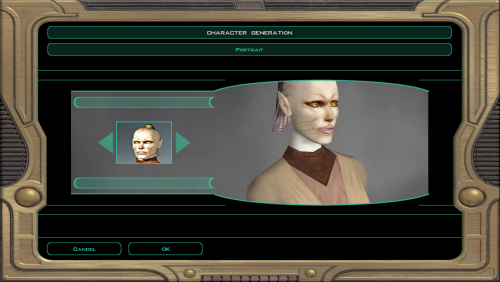
Replaces the first black woman player character with Juhani from Kotor 1. This mod replaces the head, portrait, underwear model and underwear textures with Juhani's. In addition, the dancer outfit has been replaced by either a Kotor 1 style Jedi outfit or Juhani's default outfit, depending on the version. Since every female player character uses the same model for underwear and every black woman the same texture, this mod will affect all of those.
The respective dark side textures were also replaced with Juhani's normal textures.
JuhaniTSL_jedi_outfit.zip is the recommended version, which replaces the dancer outfit with her Jedi outfit. JuhaniTSL_default_outfit.zip uses the (still buggy) default outfit instead.
The flap on her default outfit is a bit weird, so I'll try to fix that later. I'll also be fine-tuning whatever details I assuredly missed when messing with this stuff, as this is all still new to me.
This mod was suggested by Bane_Ross, who is welcome to suggest alterations in case I misunderstood something.
288 downloads
-

Gammorean Shadow Fix
By Thor110
NOTE : This is included with the Expanded Galaxy Project already.
So I noticed this once before somewhere but never came across it again until testing some things recently.
The shadow stretches across the screen for this model.
It was a simple fix, just recompiling the model from the first game for the second game. ( thanks or DarthParametric for the suggestion on how to achieve this quickly )
Very noticeable, but I don't think it's visible in the main game due to always being in close proximity to the Gammoreans on Nar Shaddaa.
Installation : Unzip and drop the four files into the override folder.
Uninstallation : Delete the following files from the override folder.
c_gammorean.mdl
c_gammorean.mdx
c_gammoreanp.mdl
c_gammoreanp.mdx
Thor110
289 downloads
(0 reviews)0 comments
Updated
-
Sentry Droid Animation Fix
By Thor110
NOTE : This is included with the Expanded Galaxy Project already.
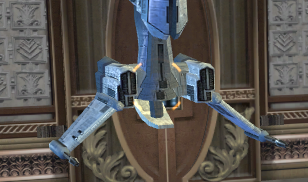
So I noticed this once in the Sith Temple on Dxun, which I believe is the only place in the main game where the droid actually appears.
Two sets of animations happening on one model resulting in two sets of what appear to be engine pods glitching around inside one another.
It was a simple fix, just deleting one set of the animations, it looked as if perhaps the original modeler or animator was trialing two different versions of the animation and then left them both there in the end.
Hardly noticeable really but it bothered me so I got around to fixing it eventually.
Installation : Unzip and drop the two files into the override folder.
Uninstallation : Delete the following files from the override folder.
c_drdsentry.mdl
c_drdsentry.mdx
Thor110
401 downloads
(0 reviews)0 comments
Updated
-

Energy Shields 2 Star Cards
By Lewok2007
Description:
I've been playing EA's Star Wars Battlefront 2 recently and I enjoy the idea of the Star Cards. I decided to work on a mod that makes Energy Shields into Star Cards similar to the ones in Bf2 but in kotor 2.
5 Shields remain the same but they have different icons and different names:
Players Personal Armband > Player's Star Card
Energy Shield > Energy Star Card
Vao Armband > Only Icon changed but it's too sacred to change anything, also never found in game.
Arkanian Shield > Arkanian Star Card
Mandalorian Melee Shield > Melee Star Card
While they aren't exact replica's I've made a few that are Star Cards in bf2 but with a kotor twist (e.g. Bacta Bomb gives 2 regeneration, Bounty Hunter gives bonuses to Throw Saves.)
While they are quite "overpowered," most of them lose the og energy shield function and just give stat boosts instead. On a regular run on normal difficulty and good kotor experience, you probably won't need the original function anyway. (The 3 most commons at the start have stayed the same anyway.)
Installation:
Copy the "Override" folder into your Kotor 2 game directory and overwrite if prompted.
Older Energy Shields won't be affected iirc.
UnInstalling:
Delete the files in your game override folder that are in this mod's override folder.
Compatability:
Compatible with almost everything, as long as this mod is installed after them.
Tools used:
Kotor Tool
Gimp
Permissions:
Use assets from this mod in your own if you'd like, as long as I am credited in the description.
DO NOT directly reupload this mod exactly to other sites without my permission. (Although if I wanted them there, I will upload them myself.)
DO NOT claim this mod as your own if you upload it to other sites without my permission.
Legal:
THIS MODIFICATION IS PROVIDED AS-IS AND IS NOT SUPPORTED BY BIOWARE/OBSIDIAN ENTERTAINMENT,
LUCASARTS, DISNEY OR ANY LICENSERS/SPONSORS OF THE MENTIONED COMPANIES. USE OF THIS FILE IS
AT YOUR OWN RISK AND THE ABOVE-MENTIONED COMPANIES OR THE AUTHOR IS NOT RESPONSIBLE FOR ANY
DAMAGE CAUSED TO YOUR COMPUTER FOR THE USAGE OF THIS FILE.
46 downloads
(0 reviews)0 comments
Submitted
-
Edge Of Darkness
By 90SK
Bioware: For such an amazing game!
Obsidian: For such an amazing sequel!
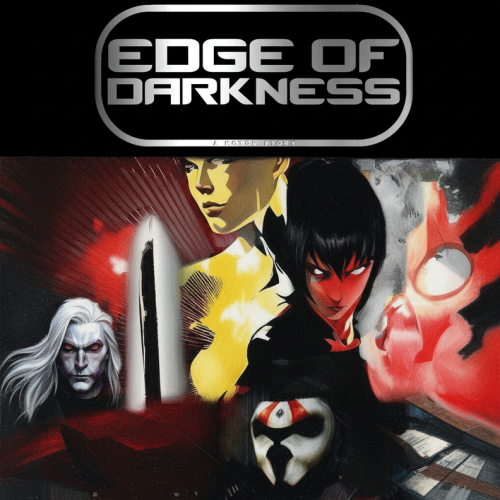
EDGE OF DARKNESS - A KNIGHTS OF THE OLD REPUBLIC II: THE SITH LORDS MODIFICATION
---
Visionaries HARIII & bead-v
Expertise and Research by Thor110
A Story by N-DReW25
Directed by 90SK
tk102: Scripting Knowledge
Stoffe: Scripting Knowledge
Darth333: Whereami Armband & Scripting Knowledge
Feat. ThePal - Song For The Masses
Feat. SHEXPIR & 97Kickstvr - To The Exit
Feat. Johannes Bünemann - bodymap
HobbitVFX – Ebon Hawk In-Hyperspace Render (Creative Commons Attribution)
Yhttps://www.youtube.com/@HobbitVFX
Fractal Flame algorithm used created by Scott "Spot" Draves
Sound Effects by BlueZone Corporation
Opening Crawl made with MakerMoon
Fotor.com AI Reimaging and Editing
Arcana Labs AI Reimaging
90SK - Manager/Fixer N-DReW25 – Setting/Manager HARIII – Level Prototypes/Manager Thor110 – Red GUI, Expanded Galaxy Project & Developer Adviser Guru bead-v – Developer Adviser Guru & K-GFF Research Fair Strides – Developer & Developer Programs, NPC Auto-Level, ModHex, K-GFF Research Sithspecter – Sleheyron Model Developer DarthParametric – Jal Shey Capeless Model, TOR Sith Pureblood Head Port, Workbench Camera Tweak VarsityPuppet – Armored Robes Model & Developer Adviser Bullobrien – Talon/Yimille Original Skin svösh – Mech Malak Original Texture Malkior – Foliage Texture Guru tjsase – M4-78 Movies Uncompressed 1.0.0 newbiemodder – GONK Droid Darth_Sapiens – G0-T0 Overhaul RGB – Cloth Texture Guru NiuHaka – Dread Cyborg Skin RedHawke – Sith Hood Model Koolizz – A Closer View Camerastyles.2da Quanon – Scrapyard Games/Yavin IV Models and Level Modeler Sith Holocron – Edge Of Darkness Logo and Texture Upscaling InSidious – K1 Lost Modules Pack Stoney – Ebon Hawk Placeable aVol - Darth Vader Model deathdisco – Meditate Script Imptactular – Yoda Model Animation Fix Darth Darkus – Armored Robes Mod Kaidon Jorn – Armored Robes Mod, Saber Backstory writer Marius Fett - Lightsaber TOR Hilts and Editing Logan23 – Content Editor and Developer, Plot Editor
Based on Star Wars by George Lucas
IN MEMORY OF LucasArts
LucasArts - LucasFilm
This mod replaces Knights Of The Old Republic II: The Sith Lords
It will totally reshape TSL into Knights Of The Old Republic Edge Of Darkness
Future content including additional side-quests, planets expanded, and party members.
You are welcome to inquire about addons, ideas, and mods for Edge Of Darkness.
Locations include: Thyferra, Raxus Prime, Dromund Kaas, Tatooine, Zeltros, and 6 other planets.
It was inspired by older text-based games
It is meant to be a throwback to 2004 gaming.
It was created over the course of 8 years by 90SK & Holowan Labs
Special Thanks: DeadlyStream.com & LucasForums.com
OPEN ENDING / CLIFFHANGER
Please start a new game to use the mod
IMPORTANT DISCLAIMERS:
This mod cannot be uninstalled.
I recommend you clone your TSL directory to install it, so you can swap back and forth.
V-Sync Setting is Required to be "On" In Edge Of Darkness
You must disable “Frame Buffer Effects” in your TSL Graphics Settings Menu In-Game.
You must start a new game, and a fresh installation of KOTOR 2 is “required” to install, unless you're updating your version.
Permissions:
Please do NOT claim credit for this mod and do not use assets from this mod!
NOTES:
Please reinstall your TSL if you want to Uninstall Edge Of Darkness.
Known Compatible Mods (Use the following mods for Edge Of Darkness):
TSL Vibro-Weapons HQ High Quality Blasters for TSL by Sithspecter
CHEATS in EDGE OF DARKNESS:
warp 091ebo – Go back to the Ebon Hawk
giveitem killsaber – One Hit Kill Lightsaber
giveitem d3_location – WhereAmI Armband
giveitem cdx_co - Bypass Coruscant
Special thanks to Fred Tetra, author of KOTOR Tool, and Obsidian / Bioware for their original material.
Legal:
THIS MODIFICATION IS PROVIDED AS-IS AND IS NOT SUPPORTED BY BIOWARE/OBSIDIAN ENTERTAINMENT, LUCASARTS, DISNEY OR ANY LICENSERS/SPONSORS OF THE MENTIONED COMPANIES. USE OF THIS FILE IS AT YOUR OWN RISK AND THE ABOVE-MENTIONED COMPANIES OR THE AUTHOR IS NOT RESPONSIBLE FOR ANY DAMAGE CAUSED TO YOUR COMPUTER FOR THE USAGE OF THIS FILE.
3,450 downloads
-
Transparent Cockpit Windows for TSL
By WildKarrde
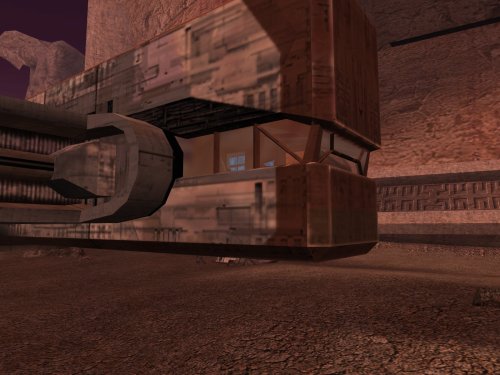
This mod edits the various landing pad areas so that you can see the through the cockpit windows of the Ebon Hawk and the Telos shuttles, which should be a bit more interesting than the blacked-out windows in the vanilla game. It also adds more detail to the room which is visible through the hole in the side of the ship in the prologue.
This mod includes some model fixes to the Telos hangars and Telos shuttle crash site developed by PapaZinos, which are included here with permission. I have also made the following model improvements to the areas:
- Added proper lightmaps and missing geometry to the Ebon Hawk on Malachor V (i.e. landing gear hatches, the exit ramp, and the entire port side). Also patched the chunk missing from the starboard side for better consistency with the prerendered cutscenes.
- Fixed the flickering windows at the Citadel Station Entertainment Module's shuttle terminals.
- Changed the texture for the base of the crane in the Telos Academy to one that doesn't look like concrete.
- Added unique environment map reflections for the Ebon Hawk similar to KOTOR 1 ("Enhanced Reflections" version only).
- Replaced the 512x512 vanilla Ebon Hawk texture with the 1024x1024 version from KOTOR 1 ("Enhanced Reflections" version only).
Because mods that edit the same area models are incompatible by nature, I have included optional compatibility patches for use with other notable mods. Please see the "Compatibility" section below for further information.
**IMPORTANT**: There are two versions of this mod:
- Enhanced Reflections - Adds new area-specific reflections to the Ebon Hawk's exterior. Recommended if you do not use any mods that reskin/upscale the Ebon Hawk exterior (or if you do and are willing to do some extra work to make them compatible)
- Reskin Friendly - More readily compatibility with reskins of the Ebon Hawk exterior. Does not include the new reflections.
Thank you for downloading, and I hope you enjoy this mod!
-------------------------------------------------------------------
ASPYR (STEAM/GOG) COMPATIBILITY NOTES
When using the Aspyr version of the game from Steam or GOG, the "Enhanced Reflections" version of this mod requires the 3C-FD Patcher by J (https://deadlystream.com/files/file/2734-fog-fix-more-3c-fd-patcher/) for the reflections to display properly. Even if you are using the "Reskin-Compatible" version, I still strongly recommend the 3C-FD Patcher since it fixes a few graphics issues which Aspyr accidentally introduced when they re-published TSL.
-------------------------------------------------------------------
INSTALLATION
If you are using one or more of the mods listed in the "Compatibility" section below, install them first. Run "INSTALL.exe" for this mod and follow the prompts. It is normal to see warnings that 202tel.mod and 222tel.mod already exist and have been skipped. When installation is complete, copy the files from any required compatibility patches into your game's Override folder, overwriting when asked. If you are using TSLRCM from the Steam Workshop, see this guide for how to combine installer-based mods with the Workshop: https://steamcommunity.com/sharedfiles/filedetails/?id=488641307
For best results, I recommend using a save from before visiting the Citadel Station Entertainment Module for the first time. However, this is not required. If you continue from a later save, all you will miss are a couple of pilots for the Entertainment Module shuttles.
-------------------------------------------------------------------
COMPATIBILITY
This mod is compatible with The Sith Lords Restored Content Mod (TSLRCM). For best results, install this mod after TSLRCM, any of the mods listed below, or any other mods which make significant edits to the Telos Entertainment Module.
Except as noted below, this mod is incompatible with any other mods that edit the same files. The main installation is compatible with following mods:
- Ultimate Citadel Station Repairs by PapaZinos (https://deadlystream.com/files/file/2059-ultimate-citadel-station-repairs/)
- Telos Model Repairs by PapaZinos (https://deadlystream.com/files/file/2059-ultimate-citadel-station-repairs/)
I have also included compatibility patches for the following mods:
- KOTOR 2 Community Patch (K2CP) (https://deadlystream.com/files/file/1280-kotor-2-community-patch/)
- M4-78 Enhancement Project (https://deadlystream.com/files/file/277-m4-78-enhancement-project/)
- High Quality Skyboxes II for TSL by Kexikus (https://deadlystream.com/files/file/1793-high-quality-skyboxes-ii/)
- Realistic Nar Shaddaa Skybox by Sharen Thrawn (https://www.gamefront.com/games/knights-of-the-old-republic-ii/file/realistic-nar-shaddaa-skybox)
- Telos Polar Academy Hangar Skybox by DarthParametric (https://deadlystream.com/files/file/1389-telos-polar-academy-hangar-skybox/)
- Coruscant Jedi Temple by deathdisco (https://deadlystream.com/files/file/585-coruscant-jedi-temple-by-deathdisco/)
- Nar Shaddaa Landing Pad Repair by PapaZinos (https://deadlystream.com/files/file/2004-nar-shaddaa-landing-pad-repair/)
- Spark Effect - Ebon Hawk by PapaZinos (https://deadlystream.com/files/file/2314-spark-effect-ebon-hawk/)
This mod is compatible with most reskins and texture mods. If you use the "Enhanced Reflections" install package with a mod that reskins the exterior of the Ebon Hawk, the Telos military base, and/or the Telos polar academy, follow the steps below.
-------------------------------------------------------------------
KNOWN ISSUES
It has been reported that the Korriban area model may render with severe distortion on the Steam/Aspyr version of the game with "Disable Vertex Buffer Objects=1" in swkotor2.ini. If you experience this issue, copy the files from "Korriban Distorted Model Fix" into your Override folder. The fix works by changing the shrubs in the area from danglymeshes to static trimeshes, so this patch should only be used if you encounter this issue. You may also be interested in "Stretching Model Bug Fixes" by J (https://deadlystream.com/files/file/2683-stretching-model-bug-fixes/), which addresses other models which may distort.
If you have previously downloaded version 1.1 of this mod, see the comments below for a smaller download which contains only the affected Korriban models.
-------------------------------------------------------------------
USING RESKIN MODS WITH ENHANCED REFLECTIONS
If you are using an Ebon Hawk reskin with the "Enhanced Reflections" version, perform the following steps:
1. Make a copy of PER_EH1.tga/txi for each row in the table below, named to match the Texture Name column.
2. Open each of the resulting TXI files in a text editor and change the envmaptexture or bumpyshinytexture parameter to the corresponding "EnvMap" in the table.
3. Delete each corresponding TPC file from this mod, as well as kor_ehok.tpc.
Texture Name EnvMap Notes:
------------- ------------- -------------
wk_dan_eh1 WK_CM_DanPad
wk_dxn_eh1 WK_CM_DxnHawk
wk_nar_eh1 WK_CM_NarPad
wk_per_eh1 WK_CM_PerHang
wk_telac_eh1 WK_CM_TelAcad
wk_telcit_eh1 WK_CM_TelHang
wk_cor_eh1 WK_CM_CorPad Only needed if using with Coruscant Jedi Temple by deathdisco
wk_m478_eh1 WK_CM_M478Pad Only needed if using with M4-78
If the reskin includes any of the following files, open their TXIs and change the "envmaptexture" or "bumpyshinytexture" as follows. Also delete the conflicting TPC file from this mod.
Texture Name EnvMap
------------- -------------
002_ebo_main1 WK_CM_PerSpace
002_ebo_main3 WK_CM_PerSpace
mal_ebo_main2 WK_CM_MalHawk
If you are using a reskin mod for the Telos military base and/or polar academy with the "Enhanced Reflections" version, I recommend doing the following:
1. Make extra copies of tel_tr07.tga/txi and rename them to wk_telacadmtl.tga/txi.
2. Open wk_telacadmtl.txi with a text editor and change the envmaptexture to WK_CM_TelAcad.
3. Delete the version of wk_telacadmtl.tpc from this mod.
-------------------------------------------------------------------
CREDITS
KotorBlender by seedhartha
MDLedit and KOTORmax by bead-v
tpcview and tga2tpc by ndix UR
NWNSSCOMP by Torlack and tk102
K-GFF by tk102
TSL Patcher by stoffe
ERFEdit by stoffe and Fair Strides
Kotor Tool by Fred Tetra
Thanks to Kexikus, deathdisco, and DarthParametric for granting permission to include modified files from their mods for compatibility.
Thanks to PapaZinos for also granting permission to include some of his model fixes as part of the standard installation.
Thanks to Sharen Thrawn for creating the original Nar Shaddaa Realistic Skybox mod.
Thanks to Thor110 for reporting a render order issue with the placeable Telos shuttle.
Thanks to Emil8000 for reporting the distortion issues with the Ebon Hawk on Korriban and to StellarExile and J for suggesting how to fix it.
The Telos shuttles' interiors are based on "Modder's Resource: Shuttle" by Darth InSidious and JCarter426 and are used in accordance with the permissions in its Readme file. Thanks to both of them for putting that together. The original resource may be downloaded here: https://deadlystream.com/files/file/381-modders-resource-shuttle/.
This mod includes material ported from Knights of the Old Republic 1 by Bioware.
-------------------------------------------------------------------
VERSION HISTORY
1.0 - Initial Release
1.1 - Corrected an issue where the placeable shuttle did not render properly behind the forcefield doors in the Telos military base
- Patched a small vanilla hole by the statue over Ajunta Pall's tomb on Korriban
1.1.1 - Added a patch for cases when the Ebon Hawk on Korriban is distorted on the Steam version of the game. Thanks to Emil8000 for
reporting the issue and to StellarExile and J for suggesting how to fix it.
1.1.2 - Fixed an incorrect texture reference for the reskin-compatible version of the Telos Academy. Thanks to J for reporting the error.
No changes to the Enhanced Reflections version
-------------------------------------------------------------------
DISCLAIMER AND PERMISSIONS
This modification is provided as-is and is not supported by Disney, Lucasarts, or Obsidian. Use at your own risk. The author shall not be held responsible for damage to your game installation, computer, or saved games resulting from the use of this mod.
The cockpit interior elements may be treated as a modders resource and used in other mods as long as appropriate credit is given to this mod's author. The new environment maps may also be used in other mods with appropriate credit. Use of any assets which are based on or incorporate material from other authors also requires permission from those authors. Other uses not described here of assets from this mod require the author's permission. This mod shall not be reposted on any sites other than Deadly Stream without permission.
4,947 downloads
-
NPC Collection
By GearHead
This mod adds an armband to the game that allows you to spawn NPCs and control them.
If you start a new game you will find the new item on Peragus - Administration Level after you leave the Medical Bay in the Medical Lab & Lab Station area in the very first lootable container. In existing playthroughs you need to use the console to add the item to your inventory, type "giveitem npc_collection" in the console. I still need to add more NPCs to the mod but it is in usable condition.
510 downloads
-
PC's Robe & Armband Improvement
By Lewok2007
Description:
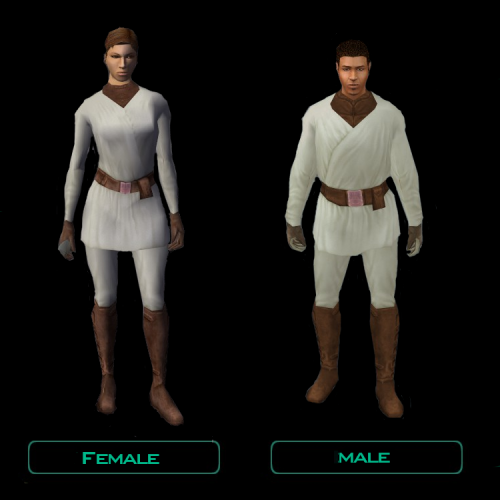
This mod gives a stat boost to the player armband acquired on the Harbinger and adds in a robe in that same footlocker. It has a lighter version of the normal clothing texture.
Armband:
Robe:
There are 3 Install Options: Both the new robe and armband stats, armband stats, or just the new robe.
Installation:
1. Extract the .zip this mod is located in. You can use 7zip or WinRAR.
2. Launch the "TSLPatcher.exe" located in the folder in the .zip you just extracted
3. You will be presented with 3 options:
- Robe and Armband
- Armband
- Robe
Select which you will want. If you want both the armband stat boost and the robe, select the first option. Armband is just the stat boost. Robe adds in the Robe, without the armband stat boost.
4. Continue with TSLPatcher instructions. Getting a warning that 152har.mod already exists in Modules is perfectly normal; but any errors are not.
5. Load a save before first entering the Harbinger med bay.
UnInstalling:
1. Delete these files from override if you have them in there:
a_band_c01.uti
exilerobe.uti
ia_cloths_020.tga
N_CommF20.tga
N_CommM20.tga
2. Open up "Backup" in the main folder with the TSLPatcher.exe.
3. Copy 152har.mod and put that in the Modules folder in your TSL directory. Overwrite when prompted.
Compatability:
TSLRCM and K2CP compatible.
Incompatible with any mod that edits the exile's footlocker in 152har.mod/Harbinger med bay or any mod that has N_CommF20.tga, N_CommM20.tga, and ia_cloths_020.tga in it.
Credits:
Kotor Tool
GIMP
TSLPatcher
Permissions:
Feel free to use assets I have made in this mod in your own, as long as I am credited.
Do not upload this mod to any other Platforms (NexusMods. Steam Workshop, Gamebanana, etc.) If I have not uploaded it to there without any modifications to this mod.
Legal:
THIS MODIFICATION IS PROVIDED AS-IS AND IS NOT SUPPORTED BY BIOWARE/OBSIDIAN ENTERTAINMENT, LUCASARTS, DISNEY OR ANY LICENSERS/SPONSORS OF THE MENTIONED COMPANIES. USE OF THIS FILE IS AT YOUR OWN RISK AND THE ABOVE-MENTIONED COMPANIES OR THE AUTHOR IS NOT RESPONSIBLE FOR ANY DAMAGE CAUSED TO YOUR COMPUTER FOR THE USAGE OF THIS FILE.
440 downloads
(0 reviews)0 comments
Updated
-
Leia's lightsaber (Ep.IX)
By LoneWanderer
"Leia's lightsaber (Ep.IX)" mod for Star Wars: Knights of the Old Republic II: The Sith Lords
-------------
1.Description
-------------
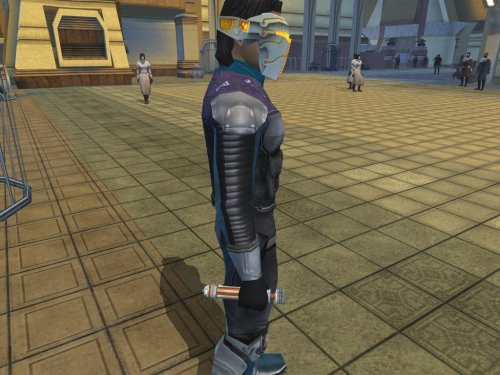
This mod adds a custom crystal that allows to build Leia's lightsaber from Episode IX. Available in 2 versions: with Crazy34's new glowing blade and with vanilla blade.
The container with Leia's crystal will appear in the room after finding and talking with T3-M4 in the Polar Academy. You'll need a save before the first entrance to the Polar Academy for the container to spawn.
Alternatvely, you can place the items in your inventory via KSE or console command 'giveitem'. The hilt is leia_lghtsbr40 and the crystal is leia_crstl_40.
The hilt model was created by gabriel.roig.
--------------
2.Installation
--------------
Extract the archive and run TSLPatcher.exe. Follow the program's instructions to install the mod.
The hilt with Crazy34's glowing blade is installed by default. If you want to use the vanilla blade model, then after installation, copy the files from the "model with vanilla blade" folder to your game's override folder, replacing the installed ones.
----------------
3.Uninstallation
----------------
Delete installed files of the mod from Override folder. Copy the files from the generated "backup" folder and place them in the Override folder.
-----------------
4.Known issues
-----------------
Don't put Leia's crystal in short or double-bladed lightsabers or you will lose the item.
--------------
5.Compatibilty
--------------
This mod uses slot #40 for Leia's lightsaber and icon, so it will conflict with other lightsaber mods that have w_lghtsbr_040.mdl, w_lghtsbr_040.mdx and iw_lghtsbr_040.tga (or tpc) files.
-------------
6.Permissions
-------------
This mod can be reuploaded / posted on other sites only if it is unavailable both on DeadlyStream, and on Nexus, and there is no contact with the author for at least 3 months.
The content of this mod, however, may be modified and uploaded/incorporated into other mods. Just be sure to include the legal info: "Leia's Lighstaber" (https://skfb.ly/oquDN) by gabriel.roig is licensed under Creative Commons Attribution (http://creativecommons.org/licenses/by/4.0/).
---------
7.Credits
---------
"Leia's Lighstaber" (https://skfb.ly/oquDN) by gabriel.roig is licensed under Creative Commons Attribution (http://creativecommons.org/licenses/by/4.0/).
Crazy34 - New_Lightsaber_Blades_Modder's_Res
Fred Tetra - KOTOR Tool
Stoffe and Fair Strides - TSLPatcher
Blue - KotOR Scripting Tool
VarsityPuppet - 2DA Editor Alpha
---------
8.Contact
---------
PM me on DeadlyStream or Nexus.
Disclaimer
THIS MODIFICATION IS PROVIDED AS-IS AND IS NOT SUPPORTED BY BIOWARE/OBSIDIAN ENTERTAINMENT, LUCASARTS, DISNEY OR ANY LICENSERS/SPONSORS OF THE MENTIONED COMPANIES. USE OF THIS FILE IS AT YOUR OWN RISK AND THE ABOVE-MENTIONED COMPANIES OR THE AUTHOR IS NOT RESPONSIBLE FOR ANY DAMAGE CAUSED TO YOUR COMPUTER FOR THE USAGE OF THIS FILE.
179 downloads
-
KotOR1 items for KotOR2
By GearHead
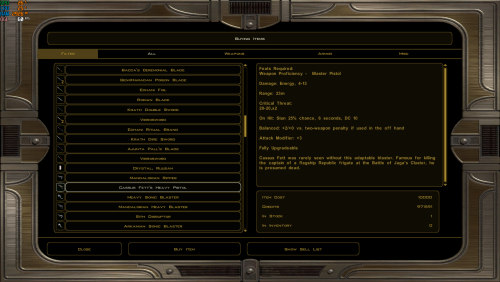
This mod allows you to buy KotOR1 items from Adum Larp on Dantooine. It won't work if you already visited the Khoonda outpost, you need to load an earlier savegame.
1,115 downloads
-
Spark Effect - Ebon Hawk
By PapaZinos
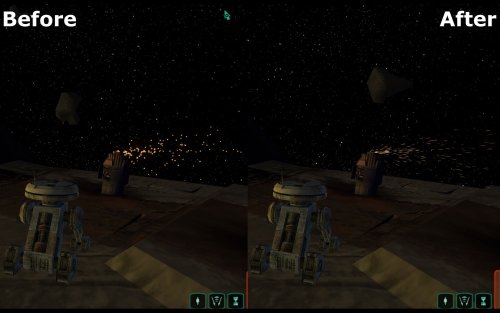
Something's gone wrong with the Ebon Hawk. Not only are sparks flying out of its panels every which way, but those sparks look less like sparks and more like Pac-Man's power pellets. Most likely because the spark objects in the local geometry are not making use of the same effects technology the rest of the game's sparks are, namely motion blur for that streak look. This mod takes fixes up the sparks used in the game's prologue to use the same technology as the rest of the game, for a stronger look more consistent with the rest of the game, while retaining all of the same intention as the original ones. For clarity, this is not a texture mod, but a model one. It is compatible with any texture mods of your choice. Check out the included video below to see the differences.
spkeff.mp4 Installation:
Download the .7z file and extract to your override folder, found in the same directory as your main game executable. For Steam installations, this would be "Steam\steamapps\common\Knights of the Old Republic II\override". You can open .7z files with programs like Archive Utility on macOS, or by downloading free programs like PeaZip on Windows and Linux.
Uninstallation:
Remove the folder "Spark_Effect_v1.0" from your override.
Compatibility:
Users should expect full compatibility with any other mods, so long as they do not modify/replace the files listed below. This mod is compatible with "Ultimate Ebon Hawk Repairs".
You can also check out ShiningRedHD's "Ebon Hawk HD - 4x Upscaled Texture" on NexusMods for a high definition version of the exterior of the ship. Dark parts of the ship's map bothering you? Check out "TSL Ebon Hawk Downloadable Map" by Ashton Scorpius.
Included Files:
-001ebo17.mdl
-001ebo17.mdx
-002ebo.mdl
-002ebo.mdx
Acknowledgments:
Thanks to Cortisol and Fred Tetra for making file extraction easy with the Holocron Toolset and KotORTool, respectively, and Symmetric, Purifier, Ndix UR, and seedhartha for making importing to Blender simple using KotORBlender. I would also like to give a big shout out to ConansHair for the idea for the mod, and for lending me his thoughts.
This modification is not supported by Obsidian Entertainment, Lucasarts, Disney or any licensers/sponsors thereof. Use of this modification is at your own risk and neither the aforementioned companies nor the author may be held responsible for any damages caused to your computer via this modification's usage.
spkeff.mp4 spkeff.mp46,577 downloads
(1 review)0 comments
Updated
-
.thumb.png.06ef20ff1740fb14b3be84a221bba7a4.png)
Dark Side Portraits for Droids in TSL
By Lewok2007
Dark Side Portraits for Droids in TSL
Description:
The Name of the mod is quite self explanatory for what the mod mainly does lol, but in case of a misread, this mod adds Dark Side Portraits for Droids in TSL. Now that is cleared up, it also adds a new Neutral/Light Side portraits for HK47 and T3M4, unlike the regular portraits which were the average beige like G0T0's, which I kept regular. T3's is changes to a misty blue, and HK's is changed to a more brown colour. First Dark side Portraits are Misty Orange - G0T0, Purlpish Beige - HK47, Misty Green - T3M4. Second Dark Side Portraits are Orange - G0T0, Purplish Red - HK47, Orange - T3M4. I find the Orange for the second transitions make sense for G0T0 and T3 since they would never fully ever be dark, while red for HK47 makes sense since he really is quite dark side.
Installation:
Run the executable that comes in the readme in the mod. Follow the instructions that come with it.
Uninstallation:
Delete the .tga files that come with this mod in tslpatchdata that are in your override folder. Copy the .2da files from "Backup" into your override folder and replace when prompted.
Use of Files:
You can use this in your mod, as long as you make 1 or more changes to this. Think of it as a Modders Resource as well as a mod. You can have Dark Side Transitions for your own custom retextures.
LEGAL:
This mod is not distributed by Bioware or Obsidian. I am not at fault for any damage to your pc or game from this mod, as all necessary information for use has been given.
81 downloads
(0 reviews)0 comments
Submitted
-

Transparent Spacesuit Faceplates for TSL
By WildKarrde
This mod makes your spacesuit's faceplate transparent so that you can see the head of the character wearing it, as opposed to the opaque faceplate on the vanilla spacesuit. I have also made the following edits to the suit model:
- Adjusted texture UVs to hide texture regions that appear unfinished.
- Added a bright texture to the bright white squares on either side of the faceplate.
For plot-related reasons, the faceplate will still be opaque for the Jekk'Jekk Tarr sequence when Mira steals your spacesuit.
I have also included an option with a less transparent faceplate, if you would like some transparency but prefer something closer to the mirrored visors on real spacesuits.
This mod requires The Sith Lords Restored Content Mod (TSLRCM). It has not been tested with an unaltered version of the game without TSLRCM. Please note that if you are using a non-vanilla player head, the spacesuit will default back to the vanilla-style mirrored helmet. See the "Compatibility" section below for further information.
Thank you for downloading, and I hope you enjoy this mod!
-------------------------------------------------------------------
INSTALLATION
Run INSTALL.exe and select the install directory for your game. Select "Main Installation" from the drop-down at the top, and click the "Install" button. If you are using TSLRCM from the Steam Workshop, see this guide for how to combine installer-based mods with the Workshop: https://steamcommunity.com/sharedfiles/filedetails/?id=488641307
If you would like to use the "Less Transparent Faceplates" option, select the corresponding option from the drop-down menu after the main installation is complete, and click "Install" again.
This mod includes the Windows version of HoloPatcher for installation. If you are running on Mac or Linux, you can find the appropriate versions of HoloPatcher here, along with the latest Windows version: https://deadlystream.com/files/file/2243-holopatcher/. This mod requires HoloPatcher version 1.5.2 or higher.
If you have other mods installed, it is normal to see warnings that some or all of the following files already exist and have been skipped:
- appearance.2da
- heads.2da
- 201TEL.mod
If you would like to edit the scripts in this mod for personal use, please note that most of the provided script source files cannot be directly compiled because they include 2DA memory tokens, placeholders which are automatically replaced by appearance.2da row numbers when compiled during installation. Running the installer and selecting the option "MODDING TOOL: Build Script Source" will save copies of the source scripts to the subfolder "temp_nss_working_dir" within "tslpatchdata" with the necessary appearance.2da row references automatically filled in.
-------------------------------------------------------------------
COMPATIBILITY
This mod requires The Sith Lords Restored Content Mod (TSLRCM). It is not compatible with any other mods which edit a_104per_enter.ncs. For best results, install this mod after TSLRCM and any other mods that make significant edits to:
- The walk speed of the spacesuit
- The Peragus spacewalk module
- The Citadel Station dock module
This mod is compatible with reskins and texture mods that affect vanilla heads. It will not conflict with mods that edit the MDL/MDX files of vanilla heads, but the changes to the head model will not carry over to the head seen inside the spacesuit.
Due to the way this mod is implemented, the environment suit faceplates will still be opaque if you use a non-vanilla player head. If you would like to see a non-vanilla head in the spacesuit, I have included instructions for making the new head compatible with this mod. For further information, please see the file "Instructions to Add New Heads.pdf".
-------------------------------------------------------------------
CREDITS
KotorBlender by seedhartha
tpcview and tga2tpc by ndix UR
NWNSSCOMP by Torlack and tk102
DeNCS by JdNoa and Dashus
K-GFF by tk102
Holopatcher by Cortisol and th3w1zard1
ERFEdit by stoffe and Fair Strides
Kotor Tool by Fred Tetra
Thanks to Salk for suggesting an option with reduced transparency on the faceplate for the K1 version of this mod.
A big thank you to th3w1zard1 and Cortisol for their time and effort spent upgrading HoloPatcher to be able to compile all of the scripts in this mod.
This mod contains material ported from Knights of the Old Republic 1 by Bioware.
a_104per_enter.ncs includes edits which were originally developed by the TSLRCM team.
-------------------------------------------------------------------
VERSION HISTORY
1.0 - Initial Release
1.1 - Added option to reduce the faceplate's transparency (suggested by Salk for the K1 version).
- Added an edited version of the spacesuit placeable to make its faceplate transparent.
1.2 - Adjusted inner suit geometry around neck
- Adjusted head motion during walking and running animations
- Correctly assigned texture to the helmet lights
- Switched installer to Holopatcher to improve cross-platform installability. Special thanks to th3w1zard1
and Cortisol for their substantial efforts to improve Holopatcher's script compiling ability.
-------------------------------------------------------------------
DISCLAIMER AND PERMISSIONS
This modification is provided as-is and is not supported by Disney, Lucasarts, or Obsidian. Use at your own risk. The author shall not be held responsible for damage to your game installation, computer, or saved games resulting from the use of this mod.
This mod shall not be reposted, in whole or in part, on any sites other than Deadly Stream without the author's permission. Assets from this mod shall not be redistributed in other modifications without the author's permission.
563 downloads
(1 review)0 comments
Updated
-
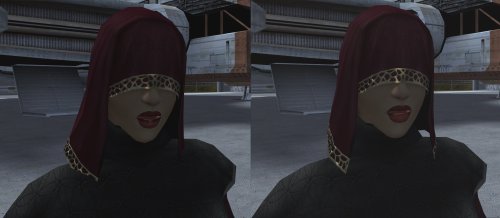
Visas Reduced Model Clipping
By feeling
Visas Reduced Model Clipping
Drop the files to override
"Hi poly" version has a smoother chin (picture 2)
I tried, it's not perfect.
Shield effects show a gap on the back of the head (same as vanilla afaik)
Dangly veil part might show a seam at the connection with the part above under specific lighting (not sure why or how to fix)
I'll fix those if I figure out how lol
Screenshot uses Darth_Sapiens' HD 2k Visas Marr textures
Let me know if there's any other issues
thanks
Made with KOTOR BLENDER for Blender 2.93+ thanks Seedhartha
Made with KOTOR BLENDER for Blender 2.79 thanks Symmetric, Purifier, Ndix UR
Cortisol for Holocron Toolset
bead-v for MDLedit
kotor modding community
5,364 downloads
(0 reviews)0 comments
Updated
-
K1 Ithorian03 retextured
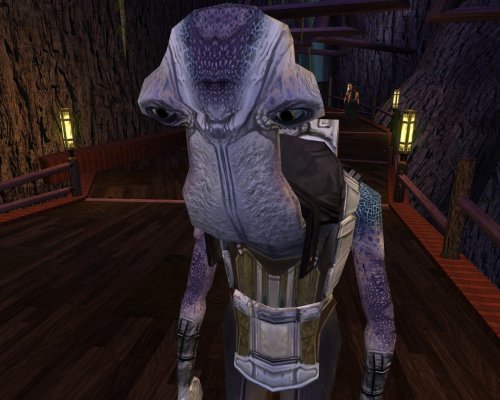
it use my Chodo textures and some variants. If you rename it for another Ithorian or for chodo they work just fine.
241 downloads
(0 reviews)0 comments
Submitted
-

Zoomed Out Minimap
By feeling
Zoomed Out Minimap
See more map
Includes a fix to the action bar tooltip so make sure you download the version for your resolution Drop the gui file to override. Other options included if you want to zoom out even more.
Made for steam/gog version, not sure if it works on the legacy version - Thanks - Amcolash for Kotor GUI Editor Cortisol for Holocron Toolset Fred Tetra for Kotor Tool757 downloads
-
Malak Redone 2023
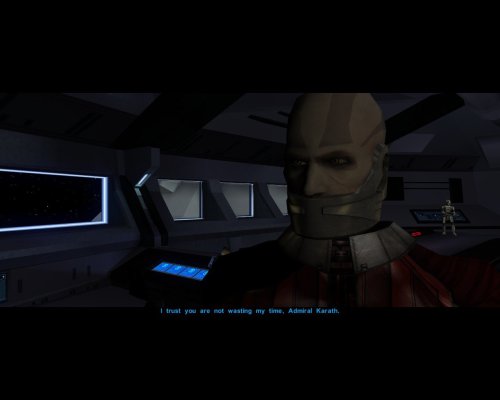
I was tired of Malak old dumb egg face so I made another inspired on the banner on steam and i used Dark Hope's great model to do so !
I REALY THANK Dark Hope to let me use the textures of her great mode
here is the link of her great mode I've only edited the face and the body in my version the base work is hers.
423 downloads
-

K1 Zhar New head (Upscaled)
I was tired of Zhar face and i decided to upscale the base texture and he still looked like any other Twilek. So i decided to Photoshop something with him.
169 downloads
-

JC's Spider Filter for K2
By JCarter426
Summary
This mod removes spider-like creature appearances from the game. Kinrath are replaced with wraid and laigreks are replaced with katarn.
Installation
Extract files from the downloaded archive. Run Install.exe. Click "Install Mod" and select your game directory (default name SWKotOR2). Uninstallation
Remove the following files or replace them with backups if necessary:
- appearance.2da
- plc_knrthcps.mdl
- plc_knrthcps.mdl
- plc_knrthvin.mdl
- plc_knrthvin.mdl Compatibility
There are no known compatibility issues at this time.
Permissions
This mod is released under the Creative Commons Attribution-NonCommercial 4.0 International license (CC BY-NC 4.0).
CC BY-NC: This license allows reusers to distribute, remix, adapt, and build upon the material in any medium or format for noncommercial purposes only, and only so long as attribution is given to the creator.
Credits
KOTOR Tool – Fred Tetra
TSLPatcher – stoffe & Fair Strides
2DAEditor – VarsityPuppet
KOTORMax & MDLEdit – bead-v
NWMax – Joco
xoreos tools – xoreos team https://xoreos.org/
Disclaimers
NOT ARACHNOPHOBIC, JUS' DON' LOIK 'EM.
Donations
If you enjoy my mods and would like to show your support in a monetary manner, you may do so via PayPal with this donation link.
For various legal and ethical reasons, this is entirely optional and is not a requirement to downloading or using any of my mods. I also do not create specific mods for hire.
I make mods as a hobby and will most likely do so regardless of any donations or lack thereof, but modding does take up a lot of my time and every bit helps.
57 downloads
(0 reviews)0 comments
Updated
-
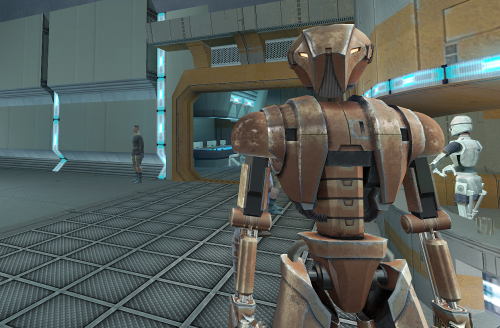
Existential Selkath's HK-47 Overhaul, TSL Patch
By Nehua
THIS IS A PATCH, ORIGINAL MOD BY EXISTENTIAL SELKATH IS STILL REQUIRED
The purpose of this mod is to provide a patch to finally be able to use Existential Selkath's excellent HK Overhaul mod in Kotor 2. I was hoping for Existential Selkath to release their own version of this but after seeing the following comment by them it seemed to me like they mostly gave up on doing so, thus I decided to release my own.
This patch does not include any of the incredible texture work by Existential Selkath, it only patches the model to bring it to work within TSL. This patch also makes it so the model uses the new TSL animations and includes Marius Fett's HK-47 Disabled Animation Eye Fix Mod. A disabled HK-47 will have its eyes turned off.
Original Mod: https://www.nexusmods.com/kotor/mods/1476?tab=files
------------------------------
Installation
------------------------------
Download Existential Selkath's original mod, and copy its contents to your TSL Override directory.
Once that is done, run the TSL Patcher found with this mod.
------------------------------
Uninstallation
------------------------------
Copy the appearance.2da found in the backup directory back to override.
Then delete the new p_hk47.mdl and p_hk47.mdx files.
348 downloads
-
File Reviews
-

Ellhaim 0
This mod sorta works. Except that the model is very transparent. Especially on the metal/darker details of her outfit/model. Kind of unusable imo. Just makes me feel like I'm playing the ghost of Talon.
-
Fantastic work!!! Quick question to any who read this: I'm a total rookie with modding, and in my most recent playthrough, when the camera executed the flyby when the HK-50s shot you down over the polar region(when they start speaking "Egotistical Boast") I saw the mod author's logo. Again, since I;m new to this, I likely made a mistake when I added them, so how can I correct it so I don't see the logo?
-
lorddli 2
does what it says on the tin and i like it
-
 1
1
-
-
Awesome mod! Some necessary powers filling out the pool, especially with Revitalize.
I don't know if this is cool, if not I will absolutely delete it... But I had AI upscale your icons so that they would work properly at high resolution (the images look basically identical, they're just 64x64 instead of 32x32). -
Nice job !
ou plutôt dans ce cas Beau travail ! -
This Mod fixes all of the problems that I have when I got back to play this game on newer systems.
The dev behind this mod was quick to answer any questions I had since I was a Linux user of this mod.
Great quality mod, that fixes issues I was having in Ultrawide such as the dialogue windows not working on the first step of a new conversation (Typical on Ultrawide) as well as improving general stability of the game.
Would recommend for anyone playing the game.
-
Ok, I hope this helps perfect it because it's a good idea on paper. I'll keep it as "matter-of-factly" as possible.
My experience with this mod: My setup already had TSLRCM+M478PE+PartySwap as a foundation already running. I installed this mod, created a fresh, new character to test it out, made it to the Telos Citadel Station, and after the "house arrest" sequence wrapped up and I was free to move, the quest triggers, unknown to me, were compromised. For example: The ambush on Dock Module 126? The 5 thugs that attack you spawned, I fought them and beat them, but the dialogue script failed to recognize the instance, leaving the TSF NPC in an infinite "text box loop" saying "don't let them hurt the droid; the instance didn't close properly and, naturally, the journal quest didn't update. I reloaded a save file just prior to that beat and it played out correctly a second time. When I showed the "modified holdout blaster" to Lt. Grenn to pick up the "suspicious goods" quest? that dialogue with Grenn played normally, however the journal didn't log the "suspicious goods" quest at all. So, the masked thug that's supposed to ambush you in the Entertainment Module immediately after that dialogue didn't spawn. Another tell-tale sign that something was wrong is that the Dobo Brothers' Merchant Room was completely inaccessible: The door would not open, full stop. Also, one of the doors to the cantina turned into a "one-way" exit. You could exit out of the cantina through it but not go back in. The other door worked fine. And for some reason, some NPCs appeared with no head whatsoever, (though I'm uncertain of this last bit is related.) To solve these problems on my setup, I purged my game's Override, performed a Steam Integrity Check, and re-installed all my mods in the proper order, except this one. I hope this helps you perfect it.
EDIT: To be clear, I don't use the Steam Workshop for anything whatsoever; I only use Steam to launch the game. All my mods were installed through their respective standalone TSLPatcher executable.
Edited by jmorenobothwell -
-
lorddli 2
Perfect companion mod to go along with KMRP
-
You are the pillar of this community
-
The Atton no guyliner with mid scruff is absolutely perfect! Love this!
-
This wonderful black magic fuckery has enabled me to play my favorite game of all time at 240fps without any issues and I am very happy about it. Thank you!
Edited by gilless429-
 1
1
-
-
Excellent addition! Everything worked great, and I love the different logs and the story they tell!
-
1
-
-
Synchro 21
These look great! Now I know what you meant about not being able to get portrait images out of your head

-
-





-
File Comments
-

By Radamanth77 · Posted
Hello, nice work here. Where can I get the .kpatch version of this mod? -

By paramano01 · Posted
I already deleted the game for other reasons. But this was definitely a mod conflict, not the fault of this mod. I had a pretty long mod list. I fixed it with downloading a Saul Karath texture mod, that resolved it. -
By paramano01 · Posted
KMRP especially together with k1cp makes the cutscenes to ALWAYS minimize, making the game's narrative unenjoyable. There's no fix, no other mod that works. Please try to find a solution for this. -
 Shem's Robes for Korriban Sith Students mod already does that.
 -

-