

Mods
892 files
-
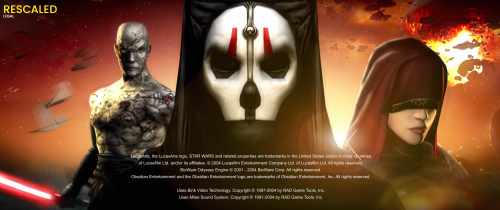
K2 Loading Screen Rescaled
Separated the upscaled loading screen and the alt version from my K2 Cutscene Rescaled mod.
Disclaimer
This mod only includes the enhanced legal screens. Adjusting your game to the preferred resolution is necessary.
Installation
- Download your the zip for your resolution.
- Extract the preferred legal screen file (legal.tga) into the "override" folder in your game installation directory.
Mirror
- A google drive mirror for all of the zipped files is available here: link
Alts
- Features an alternative legalscreen option. (or even 2 versions when using the 3440x1440 resolution)
1,745 downloads
-
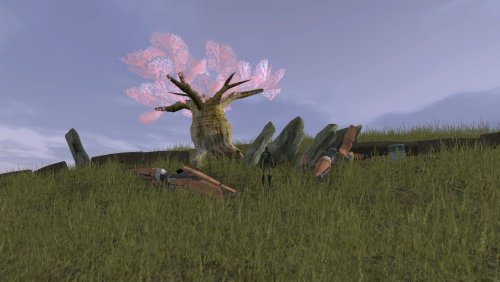
Cherry Blossoms on Dantooine
By Guest
This simple re-texture makes the trees on Dantooine look like cherry blossoms.
To install, extract the files and place them in the override folder of your KotOR2 directory.
To uninstall, remove the files from the override folder.
116 downloads
(1 review)0 comments
Submitted
-
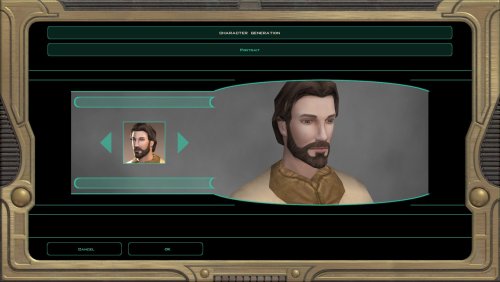
Brown Hair for PMHC04
By Guest
This mod gives the PMHC04 portrait brown hair.
To install, extract the files and place them in the override folder of your KotOR2 directory.
To uninstall, remove the files from the override folder.
98 downloads
(0 reviews)0 comments
Submitted
-
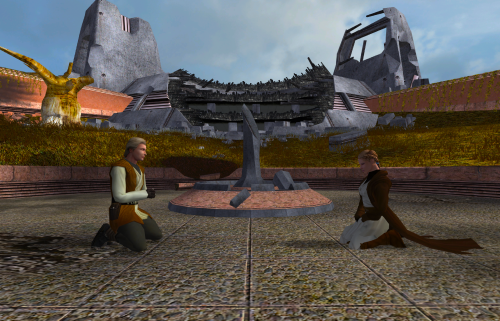
Better Disciple Meditation
Makes it so meditating with Disciple grants a temporary bonus to Wisdom.
SUMMARY:
In the vanilla game you can meditate with Disciple if no enemies are around to fully restore your Force points. It's a cool mechanic but FP regenerates fast enough outside of combat that I've never really used it except for role-playing.
This mod aims to make meditation more useful by also granting both the PC and Disciple a +2 bonus to Wisdom for 5 minutes. Nothing huge but it's free and lasts a long time, so it might get you to bring Disciple along more often or check in to meditate before heading out.
INSTALLATION:
To install, run TSLPatcher.exe.
If an edited file already exists in your override folder, an unaltered copy will be placed in the "backup" folder in the location of TSLPatcher.exe.
UNINSTALLATION:
1. Remove the following files from override:
- spells.2da
- effecticon.2da
- dscplmed_caster.utp
- a_forcepointheal.ncs
- m_imp_dscplmed.ncs
- m_dscmed_plc_htb.ncs
- disciplemed.tga
2. Replace dialog.tlk in the main game folder with the unaltered version in the backup folder.
3. Move any remaining files in the backup folder to override.
COMPATIBILITY:
Not compatible with mods that edit the script a_forcepointheal.ncs. Otherwise should be compatible as long as the mod uses a patcher or this mod is installed after. Compatible with Party Swap.
PERMISSIONS:
Please do not reupload this mod or any contained files without my permission.
CREDITS:
offthegridmorty
TSLPatcher, TalkEd - stoffe, Fair Strides
KOTOR Tool - Fred Tetra
Holocron Toolset - Cortisol
KGFF - TK102
5,549 downloads
- disciple
- meditation
- (and 2 more)
(0 reviews)0 comments
Updated
-
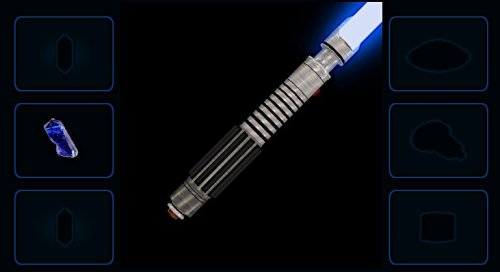
Default Hilt Replacement Mod 2024
By Kaidon Jorn
Default Hilt Replacement Mod 2024
----------------------
Kaidon Jorn - November 2024
This mod will replace all of the default game's lightsaber hilt models and adds new 3D blade models and textures - courtesy of Crazy34 and his crazy awesome modder's resource.
I have, of course, tweaked his blade textures again to my own preferences and increased the ambient lighting glows by 0.2 on all single and double bladed lightsabers (short stayed the same).
In this version I've removed most of my old hilt models and replaced them with ones that may have never been released before, but if I didn't replace the entire model then I remapped and reskinned that previously existing model. All saber icons have been remade to be consistent with my SLM2024 icon backgrounds (I know I said I wouldn't, but to heck with that).
Much thanks to Crazy34 for use of his new 3D blade models and textures and thank you to Deadly Stream for hosting all my mods.
To install run the .exe and choose the location of the game (not the override itself).
To uninstall take them all back out.
948 downloads
- lightsaber mod
- kotor 2 saber mod
- (and 3 more)
-
AxC's Kreia's Canonical Lightsaber
By AxConsortium
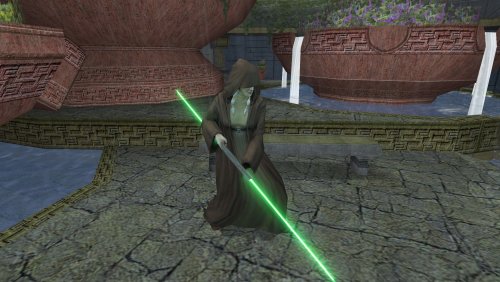
Although it’s not possible in the unmodded game, The Complete Star Wars Encyclopedia states that Kreia wielded a double-bladed lightsaber during her travels with the Exile, and the Star Wars Miniatures model of Kreia also depicts her using one. From the moment I learned this, it felt odd that the game didn’t reflect it. It’s just one of many canonical elements that remain out of reach in the base game. So, I decided to create this mod to bring Kreia’s canonical weapon to The Sith Lords.
Kreia will receive her double-bladed lightsaber aboard the Harbinger during her confrontation with Darth Sion. This weapon comes with improved stats but cannot be upgraded, and it can be used by Kreia even after the loss of her hand.
However, if you're already past Peragus (specifically, the point of no return when you board the Ebon Hawk), you can still add the lightsabers using cheats:
w_kreia_dblsbr: Kreia's canonical green double-bladed lightsaber, usable only by her.
w_traya_dblsbr: A red-crystalled version of the lightsaber, typically unobtainable, but usable by anyone.
Credits:
Fred Tetra, for KOTOR Tool
TK102, for DLGEditor
Torlack, stoffe & TK102, for NWNSSCOMP
JdNoa & Dashus, for DeNCS
Cortisol, for Holocron Toolset
bead-v, for their mod "Kreia's Lightsaber / Long sword", which inspired me and allowed me to edit and include 2 of his scripts in my mod (the mod has open permissions)
448 downloads
-

TSL Jekk'Jekk Tarr Tunnel model fix
By OzilsEyes
===========================================================================
TSL Nar Shaddaa - Jekk'Jekk Tarr Tunnel Model Fix
===========================================================================
Description:
In the Jekk'Jekk Tarr Tunnels, there is a doorframe with a large gap between itself and the wall, so I've fixed the model.
Includes:
Fixed model with the gap closed up to the doorframe.
Screenshots:
Installation:
Copy the files into your override folder.
Uninstall:
Remove the following files from your override folder:
305nar_55.mdl 305nar_55.mdx
Legal Disclaimer
All materials and copyrights belong to LucasArts, Bioware and Obsidian Entertainment Inc. & I own none of the materials and are not making money for this.
Please don't upload this on other sites, I will handle that. You may request use in other mods, pending approval; any mods using the assets should credit all the below parties.
Credits:
(Kotor Modding) Tools Used:
136 downloads
(0 reviews)0 comments
Submitted
-
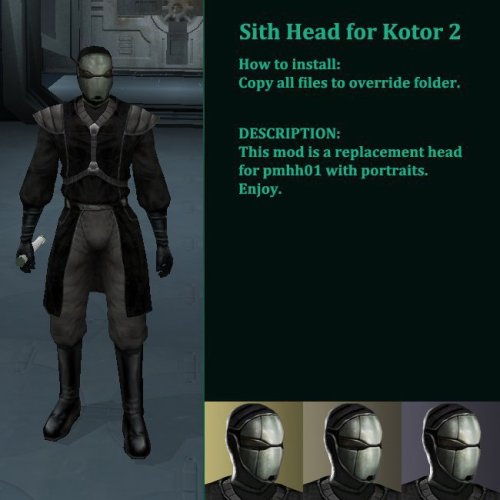
Sith Head
By Blackrock
--------------------------------------------
Knights of the Old Republic - The Sith Lords
--------------------------------------------
TITLE: Sith Head
AUTHOR: Blackrock
------------
INSTALLATION
------------
Unzip and move all files to Override folder.
-----------
DESCRIPTION
-----------
This mod is a replacement head for pmhh01 with portraits.
Enjoy
------------
UNINSTALLING
------------
Remove from the Override folder
pmhh01.mdl, pmhh01.mdx, PMHH01.tpc, PMHH01d1.tpc, PMHH01d2.tpc, PO_PMHH01.tpc, po_PMHH01d1.tpc and po_PMHH01d2.tpc.
223 downloads
(0 reviews)0 comments
Updated
-
Sith robes
By Blackrock
--------------------------------------------
Knights of the Old Republic - The Sith Lords
--------------------------------------------
TITLE: Sith Robes
AUTHOR: Blackrock
------------
INSTALLATION
------------
A note before installing: This mod uses the Revan/Star Forge model slot. Only one mod can do that, make sure you're not already using a mod that takes that approach, you can only use one option.
Unzip and copy and paste all files to Override folder.
-----------
DESCRIPTION
-----------
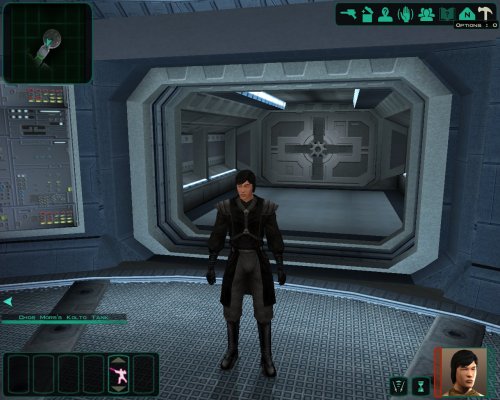
This mod adds 1 robe. It's original sith robe that sith apprentice and dark jedi use in game.
To get this item write a_sith on cheat codes.
Only player can wear it.
------------
UNINSTALLING
------------
Remove from the Override folder
a_sith.uti
ia_revan_051.tpc
PFBJ51.tpc
pfbjm.mdl
pfbjm.mdx
PMBJ51.tpc
pmbjm.mdl
pmbjm.mdx
---------
THANKS TO
---------
Effix for the guide.
288 downloads
(0 reviews)0 comments
Updated
-
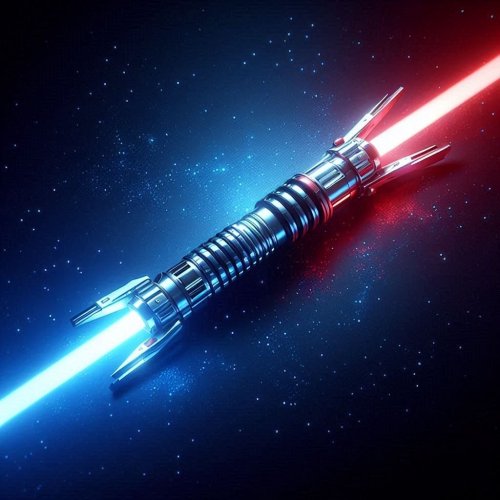
Rizouge and Effix Present: The Red and Blue Lightsaber
By ChilledTwo
I had so much assistance from Effix on this mod, it's crazy! Thanks bud! This is a two color lightsaber mod that I originally released for KotOR 1 here on deadlystream under the username "TheFrozenOne". I'm here to upload the now final update to this mod, but for KotOR II this time! All cheat stats have been removed by Effix (Thank ya) so it's not an OP weapon anymore.
(Note to the moderators here: I locked myself outta my original account shortly after enabling the authenticator for it. Rizouge is also the username I'm known for everywhere else)
I really hope you guys find this cool! Maybe if I can get KotOR Tool working, I can finally show you guys how to make your own!! I've been wanting to do a tutorial on this for years lol.
Enjoy!
96 downloads
(0 reviews)0 comments
Submitted
-
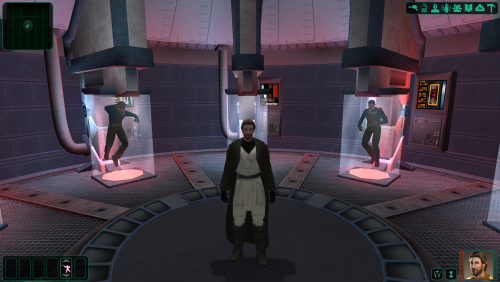
Unique Exile robes
This is a trio of specially named robes that only the player can wear, that use the player's name. The first set can be found on the Harbinger, alongside the armband, while the second and third can be crafted at level 15 and level 20 respectively. Neither have a skill requirement, so long as you have components and are the right level, you can craft them. As you can see, they're based on Jedi, Jedi Knight, and Jedi Master robes, but have a grey colour palette instead. They provide a slightly greater defence bonus than you'd get from typical robes, and also come with minor health and later Force regen as a little bonus. I wanted something useful but not overpowered.
To install, extract the folder contained in the .zip, and run the TSLPatcher.
654 downloads
-
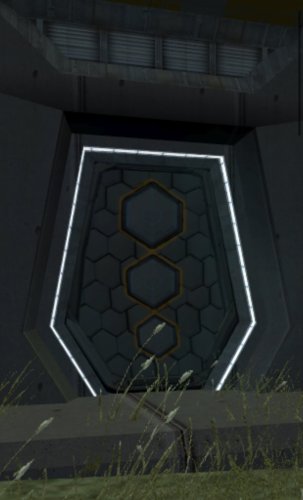
TSL Telos - Czerka Site Door Reskin / Model Fix
By OzilsEyes
===========================================================================
TSL Telos - Czerka Site Door Reskin / Model Fix
===========================================================================
Description:
The doors in the Czerka Site have always thrown me off, they're reusing the Peragus door - which is fine... however; the UV map for each model object was atrocious, none of them matched & one was put in for whatever reason?
This mod reskins the doors on the Telos Czerka Site in the restoration zone, it also fixes a hole in the floor in the model & removes a pointless plate with a texture of a door on, to match the rest of the environment.
Includes:
New door skin for 2 of the doors, removed the third on the bunker to match the other bunker. Resized objects on the level to make it match. Fixed a hole in the floor near the ramp, I was not aware of the hole in the floor until I came across a thread (here) by PapaZinos, when I was searching for '233telg' to check compatibility. Instead of using PapaZinos' fix, I decided to fix it myself to make this release compatible with his but will still credit him as he's already released a fix.
Screenshots:
Installation:
Copy the files into your override folder.
Uninstall:
Remove the following files from your override folder:
233telg.mdl 233telg.mdx CAT_d03.tga
Legal Disclaimer
All materials and copyrights belong to LucasArts, Bioware and Obsidian Entertainment Inc. & I own none of the materials and are not making money for this.
Please don't upload this on other sites, I will handle that. You may request use in other mods, pending approval; any mods using the assets should credit all the below parties.
Credits:
(Kotor Modding) Tools Used:
184 downloads
(0 reviews)0 comments
Updated
-
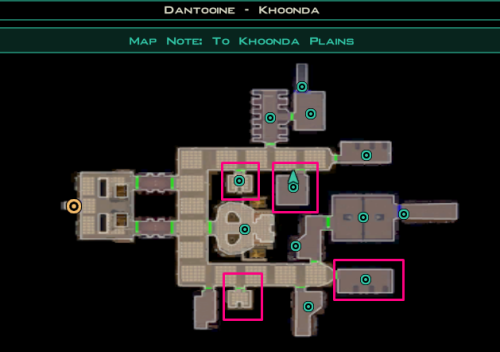
TSL Khoonda Expansion Mod
By OzilsEyes
============================================
Khoonda Expansion Mod
============================================
Features:
This mod unlocks 4 rooms within Khoonda, feature list below: Additional XP available to be gained Additional ‘Bonus Mission’ Training facilities Doors previously locked can now be accessed, 3 via Khoonda key, 1 via quest. New Quest Droids join the battle of Khoonda if they're activated
New rooms:
South Droid Defence Workshop Kaloopo's Quarters Training Room Additional Room left empty but accessible, it is used as part of the 'TSL Collectables' mod
New Characters:
3M-BR - Astro Utility Droid Wounded Militia Kaloopo Wounded Kinrath
Installation:
Extract the files from the download, run the Holopatcher.exe installer.
Uninstall:
Holopatcher creates an uninstall / backup folder, please use this.
Legal Disclaimer
All materials and copyrights belong to LucasArts, Bioware and Obsidian Entertainment Inc. & I own none of the materials and are not making money for this.
Please don't upload this on other sites, I will handle that. You may request use in other mods, pending approval; any mods using the assets should credit all the below parties.
Credits:
Tools used:
841 downloads
-
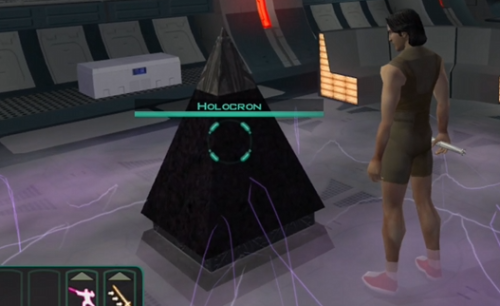
TSL Collectables
By OzilsEyes
============================================
Collectables: Holocrons
============================================
Install 14 ‘Collectable’ Holocrons across the game, each holocron will give you different temporary boosts to stats, different items and a little bit of XP which differs. This is a mini 'easter egg hunt' which you can partake in through your play throughs. Just a bit of fun.
Here is a short video, showcasing what the mod provides:
EDIT: After reviewing, I've changed the dialog to differ slightly from the video as 'You reach out and feel a pulling power' sounds stupid.
Key points:
Each Holocron discovered gives a different reward. Each Holocron discovered gives an interesting fact / short story about the area it was discovered in. There are 14 to collect throughout the game (This is set to increase to include planets such as: M4-78, Coruscant & Cathalan). One of every planet & almost every level. Short animations / some cutscenes included for immersion. 3-4 locations that are not usually accessible now opened up. Compatible with TSLRCM, M4-78EP, Expanded Galaxy Project, Coruscant, Cathalan (Expansions incoming).
Compatibility wise, I packaged up with holopatcher, there should be no compatibility issues unless you've put placeables on the exact spots the Holocrons are OR have changed inaccessible door files.
The idea behind this was to use some of the unused / inaccessible rooms across the game, though I ended up placing a few of the Holocrons in some very accessible places.
This may not be to everybody's taste as you wouldn't expect to find a Holocron in some of the locations; however, I may change the model / naming / rewards to something more relevant in a future update.
Legal Disclaimer
=================
All materials and copyrights belong to LucasArts, Bioware and Obsidian Entertainment Inc. & I own none of the materials and are not making money for this. Please don't upload this on other sites, I will handle that. You may request use in other mods, pending approval; any mods using the assets should credit all the below parties.
Credits:
Tools used:
687 downloads
-
![More information about "Party Stealth Mode [TSL]"](https://deadlystream.com/downloads/screens/monthly_2026_03/partystealthmode_2.thumb.png.3d508c987134916522fe3c7d9cf3a473.png)
Party Stealth Mode [TSL]
Adds the ability to enter your whole party into stealth without activating solo mode.
SUMMARY
Why do Sith assassins get to sneak around in groups? Don't they have to turn on solo mode?
Now your party can move through the shadows together too. This mod introduces party stealth mode, allowing all eligible party members to simultaneously enter stealth without turning on solo mode.
Party stealth mode is activated through a usable item which turns on stealth for all party members that are equipped with a stealth unit or otherwise able to use stealth (Force Camouflage, G0-T0). Solo mode will be turned off and your party members will follow you like they normally do. Activating the item while this mode is on will remove everyone from stealth. See additional notes below.
Only the main character can activate this ability and must be able to use stealth.
You will get the item as soon as Kreia joins your party on Peragus. Because of this you'll need a save from before she joins your party for the mod to work properly. However if you're mid-game and want to install this, you can get the item with the giveitem code "partystealth".
INSTALLATION
To install, run TSLPatcher.exe.
Unaltered copies of any modified files will be placed inside the "backup" folder in the location of TSLPatcher.exe.
UNINSTALLATION
1. Remove the following files from override:
- spells.2da
- baseitem.2da
- partystealth.uti
- m_imp_partysneak.ncs
- a_addkreia.ncs
- ii_otgmUse_001.tga
2. If any files were created in the backup folder, move them to override.
COMPATIBILITY
Should be compatible with most mods assuming they use TSLPatcher or this mod is installed after.
OTHER NOTES
Party stealth mode is defined by the following conditions:
1. All eligible party members are in stealth mode.
2. Solo mode is turned off.
If any of the above conditions are not fulfilled, activating the item will apply them. If all of the conditions are fulfilled, activating the item will remove stealth from all party members.
You won't be able to toggle stealth for individual party members without turning on solo mode. If you press the normal stealth toggle it will turn on solo mode regardless of whether a character is in stealth or not. Also occasionally characters may exit stealth on their own to perform an action for whatever reason. If any of these things happen, just activate the item again to reinitialize party stealth.
Computer-controlled characters with the Sneak Attack feat will usually perform sneak attacks if you enter combat from this mode. However sometimes they might do another action which breaks stealth first.
When changing modules like entering the Ebon Hawk with party stealth on, characters may remain in stealth mode until they perform an action which breaks stealth, such as entering a conversation. I don't expect this to cause major issues but it's probably best to remove party stealth before leaving an area.
Bear in mind the developers had reasons for enforcing solo mode, whether for balance or technical issues. I haven't encountered any serious issues but haven't tested every situation. Please let me know of any bugs or weirdness and I'll try to fix it.
PERMISSIONS
Feel free to use the source code for your own mod as long as you give credit.
CREDITS
offthegridmorty
TSLPatcher - stoffe, Fair Strides
KOTOR Tool - Fred Tetra
321 downloads
(1 review)0 comments
Updated
-

Improved LS Enlightenment & DS Corruption Feats
Changes the Jedi Master/Sith Lord unique feats to also increase influence changes.
SUMMARY:
The unique feats Light Side Enlightenment and Dark Side Corruption granted to Jedi Masters and Sith Lords cause your influence to have a greater effect on party members' alignment. Unfortunately, party members don't get stat bonuses from LS or DS mastery, making these feats have little practical use. This is one of the factors that make JM/SL cool for role-playing but without much extra to offer in functionality.
This mod aims to make the feats a little more useful by having them also amplify changes to companion influence. Now, Jedi Masters and Sith Lords will gain 50% more influence with party members. However, influence lost will also be increased by 50%. Low influence is the same as high influence in terms of unlocking dialogue so I don't want to bias one strategy over the other. Still you will be able to gain or lose influence faster. For example, with these feats, 3 influence gains and 1 loss will net the equivalent to 3 regular gains.
INSTALLATION:
Copy the contents of "to override" to your game's override folder.
UNINSTALLATION:
Remove the following files from override:
- a_influence_dec.ncs
- a_influence_inc.ncs
COMPATIBILITY:
Not compatible with Modified Influence System by Hassat Hunter.
CREDITS:
offthegridmorty
KOTOR Tool - Fred Tetra
TSLPatcher, TalkEd - stoffe, Fair Strides
Holocron Toolset - Cortisol
4,139 downloads
- feats
- enlightenment
- (and 5 more)
(1 review)0 comments
Submitted
-
Fixed / Better Czerka Salvager
By OzilsEyes
============================================
Better / Fixed Czerka Salvager – OzilsEyes
============================================
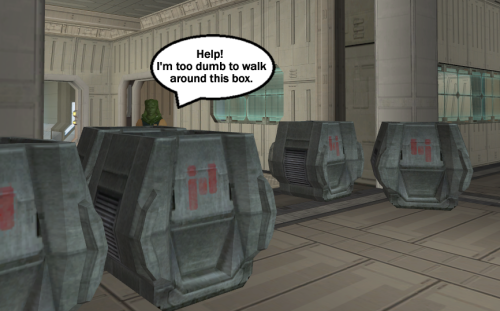
We all know how annoying the Czerka Salvager can be on our lightside play throughs. He sometimes decides to just stop dead until you run back, sometimes just gets stuck walking around objects or through doorways....
This patch will better / fix the Czerka Salvager in the Telos underground. Currently he gets stuck on objects, you have to run back sometimes – it’s not ideal.
Now he will follow your party, if he does fall behind or get stuck for whatever reason, will warp towards your party. The leaving script has also been fixed to accommodate my new script, it has been cleaned up & now has a check for combat before initiating too.
He now walks towards the door and fades out instead of sprinting in the same spot for 5 seconds before disappearing.
Install:
=================
Run the tslpatcher.exe, choose your root installation folder (NOT override).
Let it run -> Play the game
Please note: This will only take effect on a save where you haven't already been to the Telos Underground Base.
Alternatively, if you want to run this mod without tslpatcher, it will work in override.
Uninstall:
=================
A backup of your original 232TEL.mod file, replace that if you need to uninstall.
Legal Disclaimer
=================
All materials and copyrights belong to LucasArts, Bioware and Obsidian Entertainment Inc. & I own none of the materials and are not making money for this. please don't upload this on other sites, I will handle that. You may request use in other mods, pending approval; any mods using the assets should credit all involved parties in this release.
Credits:
OzilsEyes – Deadlystream
Tools used:
tslpatcher
Holocron Toolset
KOTOR Scripting Tool
Special thanks to all creators / developers of these tools
6,096 downloads
-
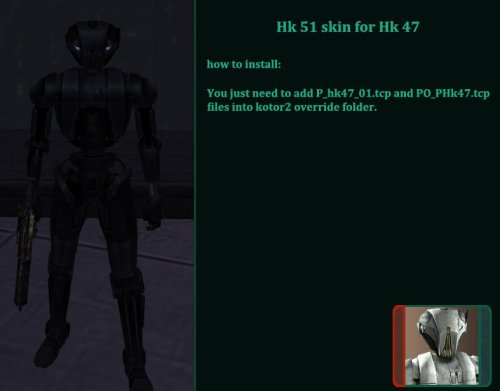
Hk 51 skin for Hk 47
By Blackrock
This mod is for Kotor 2
Hk51 skin for Hk 47, actually i used original hk 51 skin from the game but for portrait i recolored it's original icon.
enjoy.
71 downloads
(0 reviews)0 comments
Submitted
-
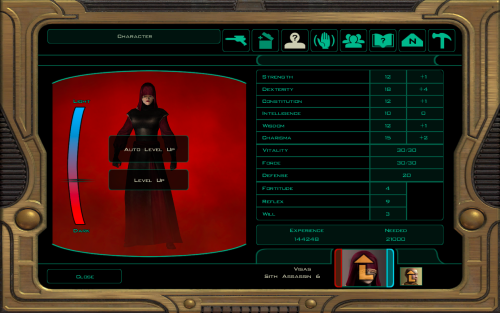
Visas Marr: Sith Assassin
Makes Visas a Sith Assassin.
SUMMARY:
This mod switches Visas' class from Jedi Sentinel to Sith Assassin. It's a fitting class story-wise given that she is an assassin sent by the Sith when you meet her. This is purely for fun, not balance. Sentinels and Assassins both have their advantages, so it doesn't necessarily make her better or worse, just more stealth-oriented. Her attributes and skills are untouched.
The main changes going from Sentinel to Assassin are:
- Better defense per level
- +2 Force points per level
- Lower Fortitude & Will saves
- Demolitions class skill instead of Treat Injury
- Granted Sneak Attack
- Granted Force Camouflage
- Granted Weapon Focus: Lightsaber
- Slower feat progression
- No Force Immunity feats
- Can't learn Close Combat, Dual Strike, or Regenerate Vitality feats
NOTE: This mod will only work on saves made prior to meeting Visas.
INSTALLATION:
To install, run TSLPatcher.exe. If an edited file already exists in your override folder, an unaltered copy will be placed in the "backup" folder in the location of TSLPatcher.exe.
UNINSTALLATION:
To uninstall, remove p_visas.utc and visascut.utc from your override folder. If any files were created inside the backup folder, move them to override.
COMPATIBILITY:
Will conflict with mods that edit Visas' class, obviously. May conflict with mods that edit Visas' starting powers, feats, or stats. Should be compatible with mods that edit Visas appearance, models/textures. Compatibility is assuming other mods use TSLPatcher or this mod is installed after. To be safe I recommend installing this mod after others that edit Visas.
If planning to use Thematic KOTOR 2 Companions, there's no need to install this mod. Use the install option included with that mod.
CREDITS:
offthegridmorty
KOTOR Tool - Fred Tetra
TSLPatcher - stoffe, Fair Strides
Holocron Toolset - Cortisol
440 downloads
- stealth
- prestige class
- (and 2 more)
(0 reviews)0 comments
Updated
-
Sith lightsaber
By Blackrock
This mod is for Kotor 2
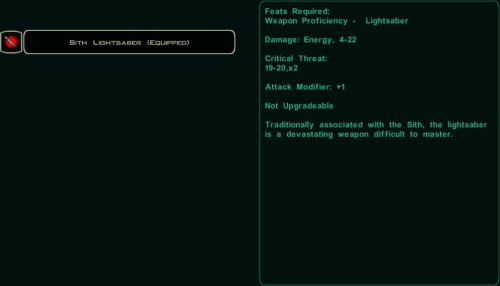
Edited dark jedi lightsaber to sith lightsaber with new description and value.
How to install: just add g_w_drkjdisbr001.uti to override folder.
How to get this item? type g_w_drkjdisbr001 on cheat code.
enjoy.
117 downloads
(0 reviews)0 comments
Updated
-
Hk 50 skin for Hk 47
By Blackrock
This mod is for Kotor 2
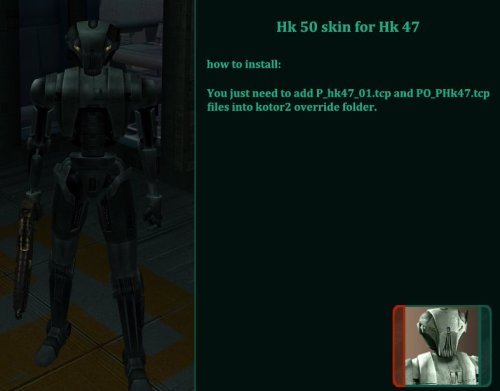
Hk50 skin for Hk 47, actually i used original hk 50 skin from the game but for portrait i recolored it's original icon.
enjoy.
62 downloads
(0 reviews)0 comments
Updated
-
Cathalan Improvement Project
By OzilsEyes
Cathalan Improvement Project
By OzilsEyes
What started out as a learning tool for myself, actually turned into quite a fun project... CATHALAN! Orange returns (Sorry!).
I was really eager to brush up on my TSL modding skills, I'm fairly new to modding in general. I'd downloaded Cathalan and tried it years back, realising I could never complete it & it was just a buggy mess. When I started working on it, I couldn't believe my eyes (not because of the brightness of the orange either!). It needed a LOT of TLC. It really had the potential when Jaevyn first released it, it was a new planet, new quests, new characters, new items... but, it was let down by the amount of bugs and to an extent, incompletable content.
I think I've now got it to a state, where it's actually a viable mod to add to your playthrough, If you've never actually completed the story, please take the time to do so, it's actually got quite a cool ending, which I enjoyed the first time I played through it after finally fixing half the quests. I firmly believe the community is driven by great ideas & great mods, the original creator, once had a great idea & tried to make it work. I don't know the history of Jaevyn or Cathalan, I know it's had it's rough patches, example: copyrighted music.
In this post, I'll run through all the changes I have made, there may be spoilers to please, read at your own discretion.
Now compatible with:
TSLRCM
M4-78EP
Coruscant: Jedi Temple Mod
Expanded Galaxy Mod
Compatibility install with TSLRCM, M4-78EP & Coruscant will update the galaxy map to include 'Cathalan'. As the game restraints are 16 planet slots, this is not possible with the Expanded Galaxy Mod. To get around this, I have added an additional NPC who spawns on the Ebon Hawk, he has a shop (different items based on main story progression), medical table, some lore & fun dialogs. SM-K1 (Definitely not named like this because it looks like an abbreviation of my dogs name: Smokey)
On the expanded galaxy compatibility install, go to the security computer on the ebon hawk, choose 'Device Memory', a cutscene will occur where SM-K1's hologram will appear:
He will give you a list of uncharted planets, one being Cathalan which you will be able to travel to.
Installation:
Please note: You do not need to have the original Cathalan installed to play this mod, if you do have it installed do not worry just run the installation as normal.
Download the package, unzip & run the holopatcher.exe
Options:
1. Install Cathalan Improvement Project - Compatibility with the base game + TSLRCM + M4-78EP
2. Install Compatibility with Coruscant: Jedi Temple Mod - Compatible with use with Coruscant: Jedi Temple Mod
3. Install Compatibility with Expanded Galaxy Project - Compatible with Expanded Galaxy Project
Choose your preferred option, then let the installer run. Start up your game.
It's advised to start a new game BUT it should be compatible with existing saves.
Uninstallation:
Holopatcher will back up your files when installing, you can use the installation / backup folder to re-place your old files.
Fixes, changes & additions
General Improvements:
Quests:
Level specific improvements:
451CAT - Keralt High Level
452CAT - Keralt Middle Level
453CAT - Entertainment Promenade
454CAT - Keralt Lower Level
455CAT - Warrior Base
456CAT - Wyvern Base
457CAT - Eastern Dark Lands
458CAT - Matterson District
459CAT - Western Dark Lands
460CAT - Outsiders Enclave
461CAT - The Crypts
462CAT - Keralt Sector 51
New load screens:
All the old load screens were (terrible) not great, so as part of the release I'd created new upscaled versions, they're all 2048x2048, relevant to the area & look a lot better.
Please note: These are subject to change, I've updated a few already since release.
Overall, working on the project was very fun, it gave me a good insight into modding KOTOR TSL, which is what it was intended to do. I decided to share the project as it's actually quite a fun playthrough, it gives you the benefit of a few extra levels, some credits, items etc. There is so much more I would have loved to do with this but I didn't want to change it too much other than fix the bugs and add a few things.
Please, if you do like the changes I've made or the work that has gone into the project, drop me a comment/message. React to this mod / show appreciation
Most of all, use it! Have fun!
Legal Disclaimer
=================
All materials and copyrights belong to LucasArts, Bioware and Obsidian Entertainment Inc. & I own none of the materials and are not making money for this. Please don't upload this on other sites, I will handle that. You may request use in other mods, pending approval; any mods using the assets should credit all the below parties.
Credits:
Tools used:
990 downloads
- tsl
- improvement project
- (and 1 more)
-
TSL Animated Galaxy Maps (10 Versions)
By OzilsEyes
TSL Animated Expanded Galaxy Map
=================================
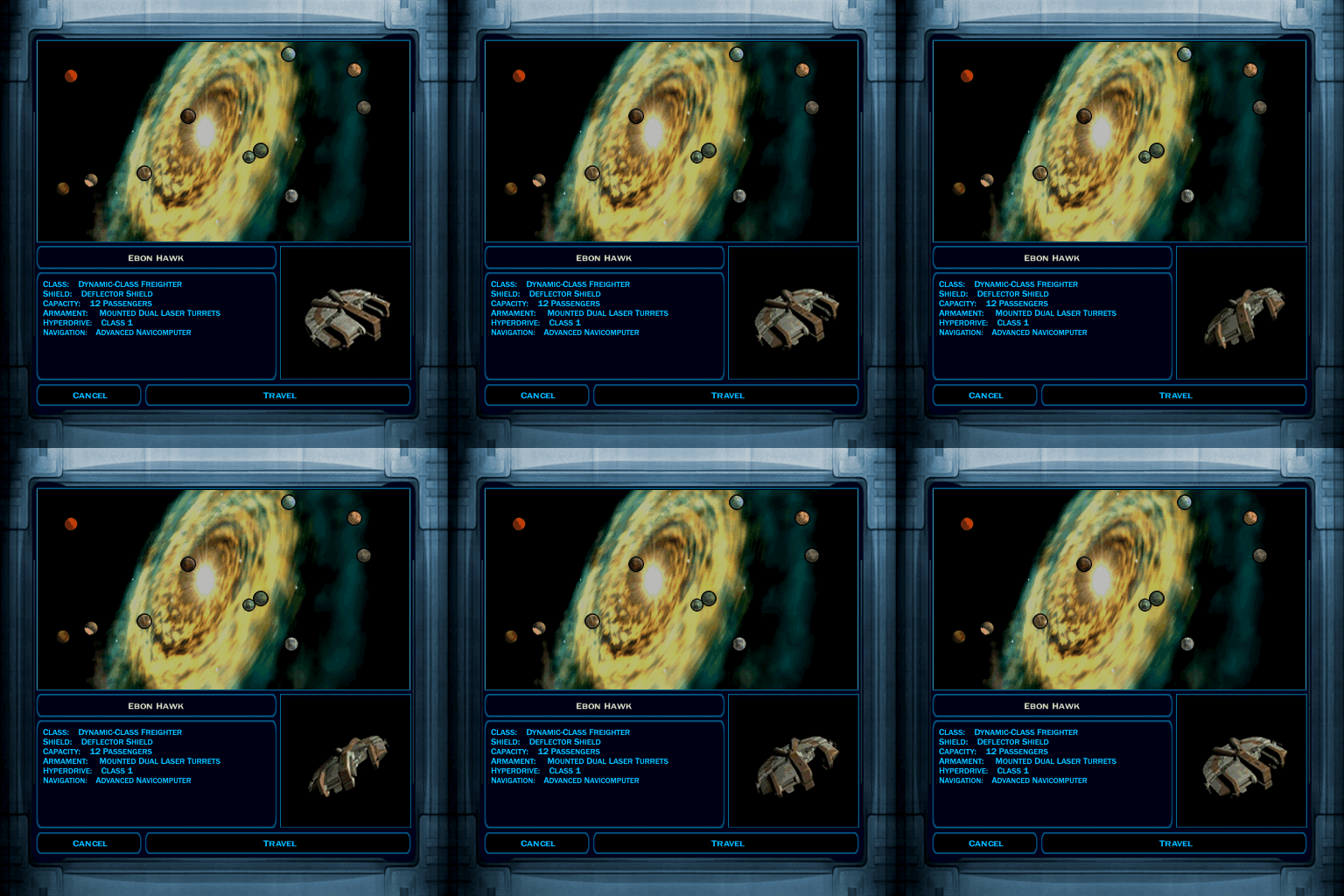
As part of the Cathalan Improvement Project, I made a few variants of the Animated Galaxy Map to release with the project.
I got a bit carried away and made several potential variants which I chose not to incorporate.
If you'd like any other versions making, feel free to reach out to me.
AUTHOR: OzilsEyes (DeadlyStream)
RELEASE: November 2024
Description
============
There are 10 versions I've included in the release:
Version 1 - TSL (Original TSL Planets ONLY)
Version 2 - TSL + M4-78
Version 3 - TSL + Coruscant
Version 4 - TSL + Expanded Galaxy
Version 5 - TSL + M4-78 + Coruscant
Version 6 - TSL + Cathalan
Version 7 - TSL + Cathalan + M4-78
Version 8 - TSL + Cathalan + Coruscant
Version 9 - TSL + Cathalan + Coruscant + M4-78
Version 10 - No Planets (Just the map + revolving Ebon Hawk)
Installation
=============
- Choose which version you want to use
- Extract the "LEH_scre03.tga" and the "LEH_scre03.txi" files into your override folder
I may upload these to steam workshop
Uninstallation
===============
Remove "LEH_scre03.tga" and the "LEH_scre03.txi" files from your override folder
Known Bugs
===========
No known bugs, there shouldn't be any.
Legal Disclaimer
=================
All materials and copyrights belong to LucasArts, Bioware and Obsidian Entertainment Inc. & I own none of the materials and are not making money for this. Please don't upload this on other sites, I will handle that. You may request use in other mods, pending approval; any mods using the assets should credit all the below parties.
Credits:
-------------
Thor110 for the Expanded Galaxy Project & Planet Icons (https://deadlystream.com/topic/6851-wipbeta-expanded-galaxy-project/)
Kexikus for the Coruscant Planet Icon (https://deadlystream.com/files/file/778-tsl-galaxy-map-fix-coruscant-addon-new-coruscant-icon-and-planet-textures/)
290 downloads
(0 reviews)0 comments
Updated
-

K2 Better Clothes
By GearHead
Clothes are no longer useless, with this mod installed they give you +1 Charisma and +2 Persuade. (Requires a new game.)
182 downloads
(0 reviews)0 comments
Submitted
-
K2 Alternative Voice Overs
By N-DReW25
A Mod for Star Wars Knights of The Old Republic 2
Author: N-DReW25
1.0.0 Release Date: 23.10.2024
Installation:
Each and every voice has to be installed ONE AT A TIME, for now there is no way to install all the voice options at once. All voices are OPTIONAL, if you don't like the new voice of a certain character you don't have to install that specific voice.
The "Voices" folder contains the modded VO, the "Listenable" contains the vanilla VO in .MP3 format so you can listen to the vanilla lines, and the "Backup" folder contains the vanilla VO and their folders just in-case you wish to uninstall this mod.
Batono Mercenary- To install the Batono Mercenary's new voice, go to the following directory: "Knights of the Old Republic II\StreamVoice\203" and delete the folder named "mercbat". Once that folder is deleted, open the "Voices" folder inside this mod and copy the modded "mercbat" folder and copy that to the 203 folder where the vanilla "mercbat" folder used to be.
Odis- To install Odis's new voice, go to the following directory: "Knights of the Old Republic II\StreamVoice\302" and delete the folder named "ODIS". Once that folder is deleted, open the "Voices" folder inside this mod and copy the modded "ODIS" folder and copy that to the 302 folder where the vanilla "ODIS" folder used to be.
Saedhe- To install Saedhe's new voice, go to the following directory: "Knights of the Old Republic II\StreamVoice\601" and delete the folder named "saedhe". Once that folder is deleted, open the "Voices" folder inside this mod and copy the modded "saedhe" folder and copy that to the 601 folder where the vanilla "saedhe" folder used to be.
You might be wondering the following question, why do I need to delete game files to install this?
That is because this mod uses the .MP3 audio format instead of the .WAV format Kotor 2 uses. Whilst it would be logical to make my modded audio files .WAV and simply make an installer to overwrite the vanilla .WAV files, the Steam version of Kotor 2 is known to ignore modded .WAV files thus breaking any mod that uses them... and since I use the Steam version it's very likely that replacing the vanilla .WAV files with modded .WAV files would simply break the audio files I was intending to replace.
It is also possible to rename all of my modded audio files to something new and use a TSLPatcher to edit the dialogue files to refer to my new audio names instead of the vanilla audio. However, that could pose the risk to compatibility with other mods, especially if they just dump dialogue files into the Override or if I make a mistake in my own TSLPatcher and the installer assigns the wrong audio to the wrong lines.
By deleting the folders that contain all of the vanilla audio and replacing those folders with identical folders containing replacement audio, the game will detect the modded .MP3s and will use the modded audio for all of the lines spoken by said NPC.
Description:
The two Kotor games are home to some of the best voice acting in video game history. There are some actors and actresses who voice only one character for their game and absolutely nail the performance, like Sara Kestelman who voiced Kreia. There are other actors and actresses who voice multiple characters, and even though it's the same actor voicing all these characters you would never realize that G0-T0, Captain Bostuco, Corrun Falt, Ponlar, Xarga, the Peragus Security Officer, and the Harbinger Captain were all voiced by Daran Norris.
But... then there are instances where an actor or actress voices more than one character and when you compare these characters you swear these characters share the exact same voice.
This mod intends to fix that phenomenon by replacing the voice of some characters who sound like they're the long lost twin of another character. This is NOT to say that the actors who voiced the characters affected by this mod did a bad job, not at all, and this mod does not aim to completely remove the voice of certain actors by removing every character they voiced for Kotor 2.
For example, if a voice actor voiced "Character X" and "Darth Vader" and Character X sounds like Darth Vader then the voice of Character X would be replaced in this mod whilst the voice of Darth Vader would remain untouched. Now replace "Character X" and "Darth Vader" with the Kotor 2 characters mentioned down below and you'll understand what I'm doing.
How does this mod replace already existing VO? It uses the "Voice Changer" feature of the ElevenLabs website to replace the "voice" of Kotor 2 VO with default generic AI voice samples provided by the Site. This means the exact same pace, tone, pronunciations, and accent from the original VO is preserved with only the audio sound of the voice being changed. The in-game result is a character whose voice is unique to that character.
Voices affected in the mod and video previews are found in this spoiler below:
Known Bugs:
This mod shouldn't have bugs but if there is Just PM me on Deadlystream.
If you use the "Verify integrity of game files" feature on Steam, then Steam might try to redownload the vanilla .WAV files you deleted to install this mod. If it does so, the game will use the .WAV files in-game instead of the .MP3 files thus disabling the modded VO. You'll need to reinstall the mod if you've done this.
Incompatibilities:
Please report any incompatibilities!
Permissions:
Do NOT claim credit for this mod and do not use assets from this mod without my permission.
Thanks:
Obsidian: For such an amazing sequel!
ElevenLabs Website: For the custom AI VO service!
Everyone who downloads the mod!
Legal:
THIS MODIFICATION IS NOT SUPPORTED BY BIOWARE/OBSIDIAN ENTERTAINMENT, LUCASARTS, DISNEY OR ANY LICENSERS/SPONSORS OF THE MENTIONED COMPANIES. USE OF THIS FILE IS AT YOUR OWN RISK AND THE ABOVE-MENTIONED COMPANIES OR THE AUTHOR IS NOT RESPONSIBLE FOR ANY DAMAGE CAUSED TO YOUR COMPUTER FOR THE USAGE OF THIS FILE.
145 downloads
(0 reviews)0 comments
Updated
-
File Reviews
-

Ellhaim 0
This mod sorta works. Except that the model is very transparent. Especially on the metal/darker details of her outfit/model. Kind of unusable imo. Just makes me feel like I'm playing the ghost of Talon.
-
Fantastic work!!! Quick question to any who read this: I'm a total rookie with modding, and in my most recent playthrough, when the camera executed the flyby when the HK-50s shot you down over the polar region(when they start speaking "Egotistical Boast") I saw the mod author's logo. Again, since I;m new to this, I likely made a mistake when I added them, so how can I correct it so I don't see the logo?
-

lorddli 2
does what it says on the tin and i like it
-
 1
1
-
-
Awesome mod! Some necessary powers filling out the pool, especially with Revitalize.
I don't know if this is cool, if not I will absolutely delete it... But I had AI upscale your icons so that they would work properly at high resolution (the images look basically identical, they're just 64x64 instead of 32x32). -
Nice job !
ou plutôt dans ce cas Beau travail ! -
This Mod fixes all of the problems that I have when I got back to play this game on newer systems.
The dev behind this mod was quick to answer any questions I had since I was a Linux user of this mod.
Great quality mod, that fixes issues I was having in Ultrawide such as the dialogue windows not working on the first step of a new conversation (Typical on Ultrawide) as well as improving general stability of the game.
Would recommend for anyone playing the game.
-
Ok, I hope this helps perfect it because it's a good idea on paper. I'll keep it as "matter-of-factly" as possible.
My experience with this mod: My setup already had TSLRCM+M478PE+PartySwap as a foundation already running. I installed this mod, created a fresh, new character to test it out, made it to the Telos Citadel Station, and after the "house arrest" sequence wrapped up and I was free to move, the quest triggers, unknown to me, were compromised. For example: The ambush on Dock Module 126? The 5 thugs that attack you spawned, I fought them and beat them, but the dialogue script failed to recognize the instance, leaving the TSF NPC in an infinite "text box loop" saying "don't let them hurt the droid; the instance didn't close properly and, naturally, the journal quest didn't update. I reloaded a save file just prior to that beat and it played out correctly a second time. When I showed the "modified holdout blaster" to Lt. Grenn to pick up the "suspicious goods" quest? that dialogue with Grenn played normally, however the journal didn't log the "suspicious goods" quest at all. So, the masked thug that's supposed to ambush you in the Entertainment Module immediately after that dialogue didn't spawn. Another tell-tale sign that something was wrong is that the Dobo Brothers' Merchant Room was completely inaccessible: The door would not open, full stop. Also, one of the doors to the cantina turned into a "one-way" exit. You could exit out of the cantina through it but not go back in. The other door worked fine. And for some reason, some NPCs appeared with no head whatsoever, (though I'm uncertain of this last bit is related.) To solve these problems on my setup, I purged my game's Override, performed a Steam Integrity Check, and re-installed all my mods in the proper order, except this one. I hope this helps you perfect it.
EDIT: To be clear, I don't use the Steam Workshop for anything whatsoever; I only use Steam to launch the game. All my mods were installed through their respective standalone TSLPatcher executable.
Edited by jmorenobothwell -
-
lorddli 2
Perfect companion mod to go along with KMRP
-
You are the pillar of this community
-
The Atton no guyliner with mid scruff is absolutely perfect! Love this!
-
This wonderful black magic fuckery has enabled me to play my favorite game of all time at 240fps without any issues and I am very happy about it. Thank you!
Edited by gilless429-
 1
1
-
-
Excellent addition! Everything worked great, and I love the different logs and the story they tell!
-
1
-
-

Synchro 21
These look great! Now I know what you meant about not being able to get portrait images out of your head

-
-






-
File Comments
-

By Radamanth77 · Posted
Hello, nice work here. Where can I get the .kpatch version of this mod? -

By paramano01 · Posted
I already deleted the game for other reasons. But this was definitely a mod conflict, not the fault of this mod. I had a pretty long mod list. I fixed it with downloading a Saul Karath texture mod, that resolved it. -
By paramano01 · Posted
KMRP especially together with k1cp makes the cutscenes to ALWAYS minimize, making the game's narrative unenjoyable. There's no fix, no other mod that works. Please try to find a solution for this. -
 Shem's Robes for Korriban Sith Students mod already does that.
 -

-