

Mods
1,060 files
-

Exar Kun Battle-suit
By xavier1985
-------------
Exar Kun battle Suit: Exar Kun Light Battle armour re-texture and stats modification.
by Xavier1985 (Ross jackson) ross.jackson1985@hotmail.co.uk
-------------
i was always displeased at Bioware's attempt at Exxar Kun's suit,
it was dissaponting to say the least. So i decided to re-texture the current
one to be mmore fittng in a Cannon sense.
-------------
Description:
-------------
Re-textured and enhanced version of the "Exar Kun Light Battle Suit"
see screen shots for visual.
The stats altered and added are as follows:
Defense Bonus: 9
Max Dexterity Bonus: +3
+3 vs. Light side
+3 vs. dark side
Skills:
Persuade +3
Awareness +3
Bonus feat:
weapon focus, proficiency & Specialization - Lightsaber
two weapon fighting, improved two weapon fighting, master two weapon fighting.
Strenght +4
Charisma +4
-------------
Install:
-------------
Extract all files to the "override" directory
-------------
Uninstall:
-------------
Delete the following files from the override directory:
g_a_class6006
ia_class6_006
PFBE06
PMBE06
-------------
Where to find the armour?:
-------------
if you wsh to get it legit style, it is in the vendor on the yavin 4 station.
if you wsh to get it there and then, type the follow into the console:
giveitem g_a_class6006
-------------
Permission:
-------------
You may NOT re-upload on any other site with out my permission
You MAY use this in any mods you wish to make, but you must gain permission from me first. (email below)
You may NOT alter the mod with out my permission.
-Xavier1985
ross.jackson1985@hotmail.co.uk
1,200 downloads
-

Broken Bottle for KotOR
By InSidious
Long, long ago, I made a mod called "Broken Bottle" for TSL. This is the very, very delayed K1 version.
Darth Insidious' Broken Bottle
------------------------------
Description:
------------
Bludgeoning Damage Bonus +2
On Hit Attribute Damage Constitution DC10
Attack Penalty -1
Attribute Penalty Dexterity -10
Decreased Skill Modifier Awareness -2
Reduced Saving Throws Reflex -4
The weapon has been equipped to the drunks in the Taris Upper City. To get in game type "di_bottle1" into the console, without the quotes.
A crude weapon, for a more uncivilised age, the broken bottle has been the prize weapon of drunks throughout the galaxy for millennia.
The preferred weapon of the Pot-Iid Monks, who practice the ancient martial art of Drun-K'fu,
in the right hands it can be a devastating weapon.
Installation:
-------------
Place all the files in the archive except this file into the Override folder in your SWKotOR folder.
Uninstallation:
---------------
Remove the aforementioned files.
Contact
-------
Got an issue with the mod? Object to its existence? Don't like the colour? Contact me either at www.lucasforums.com, or by emailing cringe909@hotmail.com
Legal Disclaimer:
-----------------
All materials and copyrights belong to LucasArts and Bioware.
KotOR Tool belongs to Fred Tetra, and NWNNSSCOMP belongs to Edward T. Smith.
Also, if you're going to re-use this, or any part of this mod in another
mod and upload that mod somewhere, you MUST seek my permission first. In the
unlikely event that I say no, don't go ahead and upload it anyway.
That is a sure-fire way to annoy me. Likewise if you intend to upload this mod
anywhere other than where it is now.
Thanks to:
----------
Darth333 for her scripting advice and tutorials,
T7Nowhere for his modelling tutorial,
The kind members of Holowan Labs,
LucasArts, Obsidian Entertainment and Bioware, for their truly brilliant Knights of the Old Republic franchise.
381 downloads
-
![More information about "[K1] Hi-Res Beam Effects"](https://deadlystream.com/downloads/screens/monthly_10_2014/thumb-ed536c870d2aedfa6601d1e29382bf0f-di_hrldf_9.jpg)
[K1] Hi-Res Beam Effects
By InSidious
Hi-Res Beam Effects for K1
==========================
by Darth InSidious
==================
Description
-----------
This mod replaces the Force Drain, cold ray, ion, and neural pacifier beam effects with higher resolution versions.
The mod does not replace the Death Field or Force Lightning effects effects.
Installation
------------
Just drop the files fx_beam01, fx_beam02, fx_beam03, and Fx_Drain.tga in this archive into your Override folder.
Uninstallation
--------------
Take the files out again.
Legal Disclaimer
----------------
All materials and copyrights belong to LucasArts, Bioware and Obsidian Entertainment Inc.,
Kotor Tool belongs to Fred Tetra, NWNSSCOMP belongs to Edward T. Smith.
I own none of the materials, and I'm not making any money out of this mod. It is to be distributed
as-is without alteration, unless by permission of the mod author. This mod is not to be distributed for profit, either.
Use it how you like, but if you're going to post it up somewhere, or make a derivate mod, or use it in another mod, you must
ask me first.
Thanks to:
----------
Quanon and Zhaboka for the feedback on the original TSL hi-res beam effects;
Fred Tetra for the truly awesome KotOR tool and his nwnsscomp conversion;
Holowan in general for being helpful, friendly and all the rest of the good stuff it is ;
KotORFiles, for being simply the best website in the history of the internet...Propaganda? What's that? ;
Lucasarts and Bioware for KotOR, and Obsidian, too, for TSL, without which, I couldn't have made this .
82,889 downloads
- kotor mod
- kotor mods
- (and 8 more)
-
Playable Mission Vao
By Ferc Kast
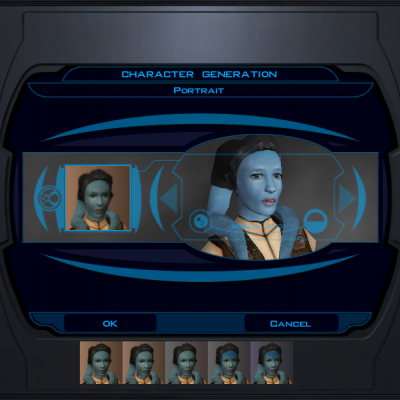
This mod will make Mission Vao a playable head at the game's start. It does not use the original head, but uses a Twi'lek head as the base to resemble her using parts of the original texture. This mod includes Sith Eyes and tattoos as you transition to the dark side. There are also custom portraits to reflect the head's transitions. Enjoy!
784 downloads
(1 review)0 comments
Submitted
-

Playable Twi'leks
By Ferc Kast
This mod will make a Lethan Twi'lek female and Tukian Twi'lek male playable heads to choose at the start of the game. This mod includes custom heads, Sith Eyes and tattoos when you are on the dark side. There are also new custom portraits to reflect the head's transitions.
Note: This mod does not affect any Twi'lek NPC heads. Enjoy!
3,283 downloads
-

Hide Weapons in Cutscenes - K1 Version
By Darth Hayze
Note: I was unable to get my laptop to take a screenshot, or run the game in windowed mode, allowing the taking of screenshots. I did test, it works the same as the TSL version.
========================================================
A KNIGHTS OF THE OLD REPUBLIC II: (THE SITH LORDS) MODIFICATION
Hide Weapons in Animations - K1 version
========================================================
Author: Darth Hayze
PM: Contact me at the Deadly Stream Forums or on ModDB
Name: Hide Weapons in Animations - K1 version
Filename: hidden_weapons.rar
Date Released: 9/21/12
1. Description:
----------
This mod removes the weapons from characters hands during certain animations, making cutscenes look smoother. Based upon the K2 mod.
2. Install:
----------
(It is highly recommended that you update your game to version 2.10 (the 1.0b update) before installing this mod.)
Extract "hidden_weapons.rar", taking care to insure that both the "install*.exe" file and "tslpatchdata" folder are extracted to the same folder, which can be anywhere, as long it isn't the main 'SWKotOR2' folder.
Run install.exe and click install
Note: a new folder named "backup" will be created during instalation within the folder the installer was run from. If you plan on uninstalling this mod this folder and the files therein must not be deleted as they are used during the uninstall process.
3. Uninstall:
----------
The files listed below may have been modified during the installation of this mod:
Within "...SWKotOR2\Override"
animations.2da
Backups of any file that was altered were made during installation and placed in a folder called "backup" within the folder the installer was run from.
To uninstall;
1) Open the "backup" folder that was created during installation and replace the files listed above under each heading with the files contained within.
4. Bugs:
----------
I am unaware of any bugs, if installed correctly. Please let me know if you encounter any.
6. Distribution Notes:
----------
This mod may not be modified or distributed without the explicit permission of the author, which is me.
7. Thanks:
----------
My thanks go out to modders everywhere
THIS MODIFICATION IS PROVIDED AS-IS AND IS NOT SUPPORTED BY BIOWARE/OBSIDIAN ENTERTAINMENT OR LUCASARTS OR ANY LICENSERS/SPONSORS OF THE MENTIONED COMPANIES. USE OF THIS FILE IS AT YOUR OWN RISK AND THE ABOVE MENTIONED COMPANIES OR THE AUTHOR IS NOT RESPONSIBLE FOR ANY DAMAGE CAUSED TO YOUR COMPUTER FOR THE USAGE OF THIS FILE.
5,575 downloads
-

K1 GloomWalker/Twinkey Robe Pack
xxxxxxxxxxxxxxxxxxxxxxxxxxxxxxxxxxxxxxxxxxxxxxxxxxxxxxxxxx
KNIGHTS OF THE OLD REPUBLIC
xxxxxxxxxxxxxxxxxxxxxxxxxxxxxxxxxxxxxxxxxxxxxxxxxxxxxxxxxx
Title: GloomWalker's RobePack
Author: TwinkeyRunaway
Date Released: 8/11/12 (may vary depending on how long it takes kotor filefront to load it)
Contact me at "www.youtube.com/user/twinkeyrunaway" if you want to ask for permission or stuff.
Description: Well what we have here is 3 weeks of hard work, also known as the GloomWalker's Robepack. Originally intended
to be called the TwinkeyRunaway pack(and for various reasons was changed) this is a pack 14 robes produced by myself in
my free time. The models themselves aren’t changed but the skins and stats for the robes are. I wanted to use TSL patcher for this
release, however I don't think everyone wants all the robes for the game. Instead I have them in separate folders so you can choose
what you want. Each robe is different and provides something better than the original game robes. All robes are textured with the highest
quality I can perform on my current laptop. I made sure they all have unique appearances and will look good on males/females.
(or so says my beta testers :/ )
All 14 robes have been beta tested and nerfed to the point to reasonable stats.
To install, pick the robes you want and drop the contents into the override folder. For example If I want to install the 105th legion robes
(found in the "105th Legion" folder) I go into the "105th Legion" folder and drop its contents into the "override" folder in your kotor main
dictionary. After that start the game and load your savefile. Hit the tidal key " ` " button in game and type "giveitem g_a_jedirobe20" and
then hit enter. Go into your inventory and see if it is there. Now to get the other robes, as I have said you need to pick and choose
which ones you want from this pack and put them in the override folder, and you will notice they are all numbered with the uti files
"g_a_jedirobeXX" with the XX's representing a number of 20-34. Doesn't take a rocket scientist to know that you type
"giveitem g_a_jedirobeXX" with the XX's being replaced by the number of your robe.
xxxxxxxxxxxxxxxxxxxxxxxxxxxxxxxxxxxxxxxxxxxxxxxxxxxxxxxxxxxxxxxxxxxxxxxxxxxxxxxxxxxxxxxxxxxxxxxxxxxxxxxxxxxxxxxxx
Permissions:
This is my first Robe pack and my first mod. I appreciate anyone who has downloaded this and it would encourage
me to do more in the future if you guys gave feedback. You may not use these or any part of them to produce your own
work. If I, Darth Jaden, Shem, inyri forge, LDR, varsitypuppet and others can make our own things, you can to. If you want to use these
your going to have to ask and get my approved permission and give credit as well. Its pretty much what any modder would appreciate
xxxxxxxxxxxxxxxxxxxxxxxxxxxxxxxxxxxxxxxxxxxxxxxxxxxxxxxxxxxxxxxxxxxxxxxxxxxxxxxxxxxxxxxxxxxxxxxxxxxxxxxxxxxxxxxxx
Included Robes/short descriptions:
105th Jedi robes "g_a_jedirobe20"
Descrition: 105th legion robes are my shout out to the 501st.
Forest Robes "g_a_jedirobe21"
Description: Camo type robes made to look like they are meant for forest type planets like kashyyyk.
Lost Jedi Master robes "g_a_jedirobe22"
Description: Old and beat up robes belonging to a lost jedi master. The force flows heavily through these.
Scouting Robes "g_a_jedirobe23"
Description: Spacer type jedi robe scheme. Sort of based on the scout class with a light tan type color scheme and custom logos.
Jedi Hunter robes "g_a_jedirobe24"
Description: The only sith robes included in this pack. But I must say these are problay one of the coolest looking ones.
BioTech robes "g_a_jedirobe25"
Description: Developed by republic scientists, this robe will give you good reistance against certain attacks while staying reasonable.
Probaly the most cool looking on I made.
Jedi Master Kaz robe "g_a_jedirobe26"
Description: This belongs to a great jedi pilot. It has a very unique design.
Fur Coated Robes "g_a_jedirobe27"
Description: Furry type jedi robes made by wookies.
Geroge Lucas Robes "g_a_jedirobe29"
Description: A robe based on one of george lucas's plaid shirts.
Spotted fur Robes "g_a_jedirobe30"
Description: This robe is vibrant and shows the fashionable side of jedi robes
Floral Art Jedi Robes "g_a_jedirobe31"
Description: Based on chinese floral art, this robe will look most beautiful on a female. a darker version for males in conjunction.
Mandolorian Jedi robes "g_a_jedirobe32"
Description: Mandolorian type blood paint and symbol decorates this robe. It will give you reasonable strength.
Scottish Pride Jedi robes "g_a_jedirobe33"
Description: based on scottish plaids.
DarthMalak robes "g_a_jedirobe34"
Description: Re-textured and made to look like the dark lord himself made these for his followers.
BetaTesters and requests by:
DeadPixel
Joe
LDR
Tom
BigPhil
DragonsEgg
Dread Advocate
Credits:
Gloomwalkers for helping test out stuff
My main man Jesus for keeping me going on this.
Maxus for making the majority of textures for me to use.
TwinkeyRunaway
Deadpixel for helping with symbols
visit gwtor.com/forums or http://www.youtube.com/user/GWGamerz for more cool stuff.
THIS MODIFICATION IS NOT MADE, DISTRIBUTED, OR SUPPORTED BY BIOWARE, OR LUCASARTS ENTERTAINMENT
COMPANY LLC. ELEMENTS TM & © LUCASARTS ENTERTAINMENT COMPANY LLC AND/OR ITS LICENSORS.
807 downloads
-

Custom Class Clothing
By Fair Strides
Custom Class Clothing by Fair Strides
Contact info:
Fair Strides at deadlystream.com
Fair Strides 2 at Lucasforums.com
Introduction:
This was a request by Roachbugg at Lucasforums. He liked the looks of the default class clothing, with the exception of the Soldier class(He prefferred the Republic Trooper armor), and he wanted them to be made more useful. Something to give you a reason to wear the default clothing. The items are spawned, dependant on your class, in a footlocker in the first room on the Endar Spire, after talking with Trask. Look behind the couches.
Installation:
Just run the custom class clothing.exe to install the mod. To uninstall, just copy and paste everything in the tslpatchdata folder into your override, and hit 'yes to all', then hit the delete key on your keyboard.
Bugs:
Not really a bug, but a work-around I had to do. The .uti didn't want to cooperate so I had to set it up so that you have the Republic Trooper armor equipped by default, but you only get the bonuses if you equip the special armor.
Credits:
Roachbugg for the request.
Permissions:
You have the given right to modify these files any way you wish, for personal or public use, but if for public use please contact me to let me ahead of time and to see what's been changed. Disregard this requirement after 4/30/2060.
NOTE: I am willing, if people wish and I can contact the authors, to make multiple versions, so that this is compatible with the Enhanced Ebon Hawk Dialogue mod, and/or the Super skip Taris mod.
2,435 downloads
-
![More information about "[K1] Taris Sith Base Dialogue Enhancement"](https://deadlystream.com/downloads/screens/thumb-3703b4cd02d2cff431f8151769b270e5-swkotor_2012-06-23_01-33-08-73.jpg)
[K1] Taris Sith Base Dialogue Enhancement
By CarboCation
One of my favorite features of Kotor is the fact that the game allows a variety of responses from the PC. This mechanic allows us the players to create the PCs personality from the many different dialogue options that Bioware has provided for us.
Unfortunately, due to the sheer number of conversations in the game, many of the side conversations are rather limited in options. This forced me to make up the PC's dialogue in my head and then select the most similar available dialogue.
This mod makes adjustments and additions to some of the dialogue in the Sith base on Taris. I've given the PC more dialogue options, and moved around some of the NPC responses to more appropriate parts in the overall dialogue.
I also feel that it is important to mention that none of the basic speaking NPC's scripts have changed, but they have been moved around. This is to prevent unvoiced lines from appearing in any of the dialogue.
3,871 downloads
-
Jedi From The Start
By darthbdaman
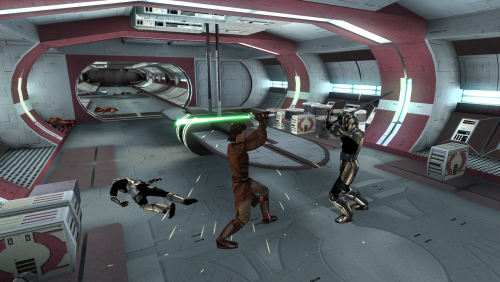
Revises the opening of the game, so that the player may begin as a Jedi Apprentice, in a seamless, lore-friendly manner. Removes all fourth wall breaking tutorial messages from the game.
Description
Upon starting the game, instead of Trask waking the player, you will be presented with new dialogue options to potentially select a Jedi Class.
You may choose to remain as your base class, and become a Jedi on Dantooine as normal, if you wish.
If you choose to become a Jedi, you will immediately level up, and be able to acquire your new feats and powers.
Starting equipment has been adjusted, and will be generated after this level up, allowing your new feats and skills to be accounted for.
Jedi characters are given a crystal in their footlocker, and can build a Lightsaber at the workbench. They choose its style and color there.
You then proceed through the Endar Spire sequence as normal, albeit without Trask. Out of character tutorial messages have all been removed.
Jedi characters will have a new Lightsaber duel, and recieve additional items.
Early dialogues with party members and NPC's have been adjusted to accurately reflect whether the player is a Jedi or not.
Additional Force Persuade checks have been added to many of the characters found throughout Taris.
A new path to purchase T3-M4 before completing the Swoop Race, through a Force Persuade check, has been added. This is available to non-Jedi through Persuade as well.
Upon arriving on Dantooine, the opening dialogue with the council is altered slightly.
The inital training sections, from the Jedi Code to Lightsaber construction is removed, and the player is immediately tasked to Cleanse the Tainted Grove.
After this point the game proceeds as normal, without major alterations.
If the player chooses not to become a Jedi at the start of the game, then very little changes, besides the removal of Trask and tutorial messages.
On Dantooine, a non-Jedi player will be able to construct a Double-bladed or Short Lightsaber, and choose the color of their lightsaber freely.
They will also be given an Apprentice robe after constructing a Lightsaber.
Install/Uninstall
Run the installer.exe file. If you are on Linux or Mac, appropriate HoloPatcher installers can be found on DeadlyStream.
If updating from a version from before v4.0.0, you must reinstall your game to properly uninstall the mod. You cannot install this mod on top of an old version.
You must start a new game after updating to this version. The mod has been substantially reworked.
There is a version setup for a manual installation. This version cannot be used with most other mods. It is not recommended. You cannot use this with the Community Patch. Your game will break
See the docs folder for more information.
Compatibility
Most mods should be compatible, unless they make major edits to the Endar Spire, Taris NPC dialogue, or Dantooine Jedi Training.
Fully compatible with KotOR 1 Community Patch. Install Jedi from the Start after. Fully compatible with Unofficial K1CP Tweak Pack. Do not install the "tar02_janice021.dlg" or "tar09_recept091.dlg" files from Persuade Fixes. They will remove my Force Persuade checks, and Jedi from the Start includes equivalent changes. Fully compatible with Restored Content for K1CP. Install Jedi from the Start after. Fully compatible with Taris Dueling Arena Adjustment. Fully compatible with JC's Jedi Tailor. Fully compatible with Carth's Republic Uniform and Flight Suit. SWToR Style Training Sabers will overwrite my changes to the Dantooine Lightsaber Training, but should not cause any issues. Not compatible with KotOR 1 Restoration. This mod is increasingly outdated. Use Restored Content for K1CP instead. Not compatible with Tutorial Remover. This mod includes its functionality. Not compatible with Trask Ulgo Without Tutorials. Not compatible with Recruit T3-M4 Early. This mod includes equivalent functionality. Not compatible with JC's Robe Adjustment. This mod includes most of its functionality. Recommended Mods
KotOR 1 Community Patch is strongly recommended. JC's Jedi Tailor is highly recommended. Thanks to JC for letting me include most of his Robe Adjustment mod. JC's Extra Saber Colors is highly recommended. You will be able to choose additional lightsaber color options when you create a character with this mod installed. Consular Sentinel Class Skill Swap (or KotOR 1 Community Patch which includes it) is recommended if you want the Sentinel class to be somewhat meaningful. Trask Ulgo Without Tutorials is recommended if you want a vanilla friendly tutorial remover instead. Special Thanks/Acknowledgements
Talchia and Achilles for the original Padawan mods that inspired this one. KOTOR Tool – Fred Tetra DeNCS – JdNoa & Dashus DLGEditor – tk102 K-GFF – tk102 TSL Patcher – stoffe KotOR Scripting Tool - Blue Holocron Toolset and HoloPatcher – Cortisol & th3w1zard1 Credits
DarthParametric - Scripts from KOTOR 1 Community Patch JCarter426 - JC's Robe Adjustment Mirrors
Nexus ModPub Other Links
Nexus ModPub Deadlystream YouTube Twitch Discord Twitter darth@darthbdaman.com Jedi from the Start by darthbdaman is licensed under CC BY-SA 4.0
22,240 downloads
-

Endar Spire Dialogue Enhancement
By CarboCation
I've always felt that the dialogue in Kotor was a little too simple and lacked much of the variety that Kotor II has.
This mod adds a little more flavor to the Endar Spire by restructuring, altering and adding some dialogue options for the PC. For those of you looking for more substance in your mods I've also added some light and dark side points to certain dialogue options.
You may notice that there are more dark side dialogue options than light side. This is because I believe in the Jedi teachings that the dark side is much easier to follow than the light. Although, I may come back and add more light side options in the future.
This is my very first mod and took me a few hours so please leave me some feedback
3,646 downloads
-
![More information about "[K1] Sith Stalker armor"](https://deadlystream.com/downloads/screens/monthly_12_2016/thumb-b43f2a9507b67f75808bc6eb7a96f47e-dm_sith_stlk1.jpg)
[K1] Sith Stalker armor
By DeadMan
Sith Stalker Armor for SW:KotOR
Not so long ago reapper (with my little help) have released his Sith Stalker armor mod. It’s great, but only for TSL. And many people would like to see this armor in K1.
So, this mod will add TFU Sith Stalker armor to the first KotOR game. I didn’t integrated it into storyline, so you’ll have to use cheats to get it. Just type ‘giveitem dm_sith_stlk’ (without quotes) in your console and enjoy.
Credits:
Shiftee – original model for Jedi Academy
reapper – model rigging
UberBlack – texture.
Permissions:
Under NO CIRCUMSTANCES ANY OF MY MODS TO BE UPLOADED TO STEAM WORKSHOP.
Anything else - be my guest, use like you want, just give credit to me.
3,714 downloads
-

Bith Musician Items
By Ӄhrizby
Who hasn't found it entertaining to play with the Bith's four instruments you can cheat to get in the game? Sure it made no sense that they shot blaster bolts from your feet, there was just something funny about them! This was originally just meant as a fun mod to make use of those items, but it's expanded to more than that. I researched actual Star Wars music and instruments and matched each instrument from the game to the closest one I could find, giving them better names and backgrounds than 'Bith Clarinet' and such. Three of them are based on the sonic rifle and the last is a pistol. I fixed the models so they fit better in the actual player's hands, and I made a custom ammunition; They shoot music staffs with changing music notes on them, doing sonic damage, as they play music clips from Star Wars. Now the part I'm rather proud of (Humbly, of course ); there's a chance of stun on all the weapons, but instead of being stunned, the enemies break out in dance! I also made a second version of each instrument, called 'broken' instruments, that you simply use as melee instruments to beat enemies. I tried to make all the weapons powerful enough to be fun even later in the game, but not be God items. I kept going with the Bith theme, and made a new armor called 'Bith Musician Suit' that makes you look like you're wearing the uniform the Bith musicians in the game wear, to complete your dreams of being a Star Wars cantina musician. It isn't as protective as armor but I think the stats are fair and make up for it. There are also two extra items I included just for fun, they're not actually for player use but they're part of the storyline I'll add in a later version. They are holographic versions of two of the weapons.
As of now you have to cheat to get any of the items. I am still in the process of working this mod, but because it's taking a while I'm releasing just the items, rather than waiting an unknown amount of time for everything to be finished. Things to look forward to in future updates include: A fairly detailed storyline, including a new quest, leading to the aquirement of each of the items through three planets, with new characters, including the crime boss Jawa the Hutt; New musical themed items, such as earplugs; A holo-terminal having special uses, including obtaining new armors; And more!
496 downloads
-
![More information about "[k1]Vibrosword replacement pack"](https://deadlystream.com/downloads/screens/monthly_12_2016/thumb-452bd6aaaaa633326cd22eff792a26d9-screenshot.jpg)
[k1]Vibrosword replacement pack
By DeadMan
This is just a K1 version of my Vibrosword replacement pack, so I will quote the original description:
Permissions:
Under NO CIRCUMSTANCES ANY OF MY MODS TO BE UPLOADED TO STEAM WORKSHOP.
Anything else - be my guest, use like you want, just give credit to me.
3,664 downloads
-
![More information about "[K1] Saber&Melee weapon sound mod"](https://deadlystream.com/downloads/screens/monthly_12_2016/thumb-d14d673e4589c0826a75185e45594a72-shot1.jpg)
[K1] Saber&Melee weapon sound mod
By DeadMan
Saber&Melee Weapon Sound Mod for KotOR
Author: DeadMan
This is K1 version of my sound mod, so I'll just qoute the description from TSL version:
3,906 downloads
-

Yuthura Ban as PC
By Ferc Kast
This mod makes Yuthura Ban a selectable playable head at the character generation. It includes custom Sith eyes, transitions, portraits & the ability to equip masks/headgear.
2,187 downloads
(0 reviews)0 comments
Updated
-

Captain America's Gear
By Dak Drexl
Captain America's Gear - ReadMe
Description:
This gives you Captain America's Shield, pistol, and suit to use. Ask Dak Vesser if he has had any interesting finds and then dig them up on Korriban for yourself!
Installation:
Just drop the files into your override.
Notes:
To get the items, talk to Dak Vesser. Ask about the valley and them ask if he has found anything interesting in the digs.
Installation: Just drop the files into your override.
Bugs/Incompatibilites:
Incompatible with other mods that modify Dak Vesser's dialog.
Permissions:
You can use this in any of your mods but I would appreciate it if you'd let me know about it and credit me for my work. Contact me at dakdrexl@gmail.com or at Dak Drexl on LucasForums or DeadlyStream.
Enjoy!
1,482 downloads
-
MedHypo Mod
By Rtas Vadum
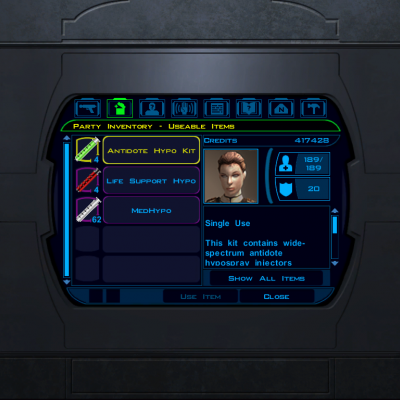
Considering the animation for using healing items is an injection of sorts, this changes the icons for said items to reflect that, along with changing their names to include "Hypo".
890 downloads
-

Xia Terashai Set
By ChAiNz.2da
** Co-Author: RedHawke **
Originally meant to be a custom made mod for JediKnight72482, he was gracious enough to allow me to release this publicly. This set includes custom Armor & a new model of Shortsaber. Stylized after Xia Terashai's history, these items are geared towards stealth and scoundrel type abilities. Due to time restraints (and me being lazy), the skin for the armor is naturally meant for the Asian skin-tone female PC's. Perhaps later I may release a booster pack including the other 2 flesh tones, but for now I have included Master Files for the Robe & Hilt skins (layered .psd & .tif formats). So...in lieu of waiting for something that may not happen, you can edit your own
This mod also includes RedHawke's Bastila Clothes for the PC mod. Without it, Xia's robes wouldn't have been possible. He was kind enough to allow me to include the entire mod just so it would be easier for everyone to install. So not only do you get my Xia items, you get his truly outstanding robes as well! I urge you to read his readme file (included) for proper descriptions, instructions and "how to's".
Xia Terashai Set
Special:
Upgradeable Items, Xia Terashai's Robes & Shortsaber(s)
Xia was an average swordsman, but had great patience. Her greatest skill, however, was her ability in steath. She could seemingly disappear and strike suddenly with deadly precision. Because of this, she stylized herself after the ancient ninja, even styling her two lightsabers after ninja-to. The Jedi Council claimed that it was too 'Sith-like', so Xia left the Order to follow her own path.
After she left the Order she found herself joining fellow ex-Jedi Keldan Arcturus on his anti-Sith privateer ship. She would help him on his missions to track down various threats to the Republic and the Jedi Order, although the Jedi Council wanted nothing to do with Keldan and his mercenaries.
It is unknown what happened to Xia. Even Keldan had no clue where she had disappeared to.
USAGE:
1- with cheats enabled, type "~" (without quotes) and enter:
giveitem xia_robes - Xia Terashai's Robes (Uses 39th Texture)
giveitem xia_saber - Xia Terashai's Shortsaber
giveitem xia_sbcrstl39 - Terashai's Shortsaber Crystal
giveitem g3_a_clothes01 - Armored Clothing I (Uses Default Texture)
giveitem g3_a_clothes02 - Armored Clothing II (Uses 2nd Texture)
giveitem g3_a_clothes03 - Armored Clothing III (Uses 3rd Texture)
giveitem g3_a_clothes04 - Armored Clothing IV (Uses 4th Texture, If Present)
giveitem g3_a_clothes05 - Armored Clothing V (Uses 5th Texture, If Present)
2- Press "ENTER"
** For the Anti-Console,
ChAiNz.2da's Items:
-------------------
Xia's Items (Robes & 2 short sabers) can be found on Selven the Bounty Hunter's corpse (Taris female with attitude).
RedHawke's Items:
-----------------
The 3 cloths variants as well as some New Upgradeable Armored Clothing also in the 3 Clothes Color variants can be found in the Taris Apartment Footlocker after you use the Workbench the First time. So you can use whichever texture on whichever Female PC you want.
I also added in a Clothing and Armored Clothing using variant 4 and variant 5 in case you want to do add svösh's good/evil Bastila's Clothing to your PC, if you don't they should appear as the default Bastila clothes texture according to your class if you wear them as listed above. (instructions found in RedHawke's readme)
STATS:
---------
()- Xia Terashai Shortsaber:
-Keen
-Attack +2
-Blaster Bolt Deflection +2
-On Hit - Stun, DC 10, 50% for 2 rounds
-Bonus Feat: Sneak Attack - I, II, III
-Upgradeable
()- Xia Terashai Robes:
-Skill Focus - Stealth
-Stealth +10
-Defense Bonus 5
-Immunity - Sneak Attack
-Bonus Feat - Scoundrel's Luck (base, improved, master)
-Awareness +5
-Upgradeable
-UPGRADE - Defense Bonus 5
-UPGRADE - Dmg. Reduction +3, Soak 15
This file also contains an updated upcrystals.2da, based off of Darkkender's updated upcrystals.2da that was based off.... oh nevermind Let's just say it's updated heheh
()- compatible saber mods:
- ChAiNz.2da's Longsaber Crystal Pack mod
- ChAiNz.2da's Revan's Items mod
- ChAiNz.2da's Revan's Longsaber mod
- ChAiNz.2da's Segan Wyndh's Sabers mod
- T7's Lightsaber 6 Pack mod
- T7's Qui-Gon Lightsaber mod
- Seprithro's Weapon Pack mod
- RedHawke's Revan/Sith/Bastila Item Pack mod
- RedHawke's Revan The White/StarForge/Booster Pack1 mod
- RedHawke's & Maverick187's Lightsaber Pack mod
- Maverick187's Blade of Balance mod
- Maverick187's White Double-bladed Saber mod
- Maverick187's Maverick's Curved Hilt mod
- +Darkkender's Tomb of Jesset Dal'Kest mod
- +illuzion69's Nemisis Lightsaber mod
- Tanesh's Mekel Recruit mod
- +sketch42's Exar Kun's DoubleBladed Prototype Lightsaber
1,401 downloads
-

LB Waraxe Set
By ChAiNz.2da
This mod offers a set of Gamorrean Model War Axes, each fully upgradeable and wieldable with ONE hand. (nothing like having an axe in one hand and a lightsaber in the other)
LB Waraxe Set
Special:
Upgradeable Items, Lizbeth Waraxe & Borden Waraxe
Crude in form and lacking finesse, this axe set was the prize weapons of the Iridorian assasin "Lizbeth Borden". Somewhat of a mystery, the axes' properties are as diverse and eccentric as was their original owner. Though truth be known, no one (on their receiving end) has lived long enough in it's presence to thoroughly analyze them.
USAGE:
With cheats enabled, type "~" (without quotes) and enter:
giveitem borden_waraxe
giveitem lizbeth_waraxe
Press "ENTER"
** For the Anti-Console:
Just drop the "tat18_12gurke_01.utc" file in your override directory. Gurke the Gamorrean will have the Borden Waraxe equipped when you encounter him in the Dune Sea on Tatooine!
BE WARNED and BE PREPARED! His stats are buffed up, so if you want these you're gonna have to fight for them. Upon killing him (yes...kill, no persuade), he'll drop the axe set and some upgrades. Luckily for you Gamorreans aren't too bright and this one in particular forgot to put them in
883 downloads
-
Segan Wyndh's Longsabers
By ChAiNz.2da
Never quite willing to 'conform' to the Jedi's traditionalist ways, Segan Wyndh, a gifted engineer, was always looking to improve upon the Jedi's antiquated "tools". Though his armor was a marvel in design, he prided himself with his lightsaber technology.
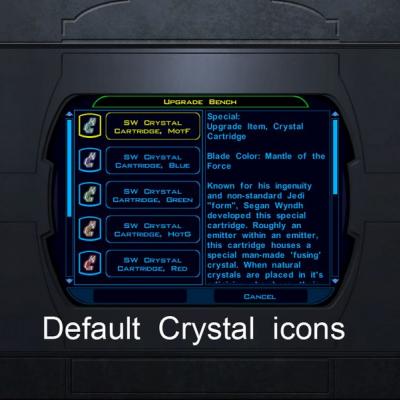
Unique in construction & functionality, this lightsaber utilizes a crystal 'cartridge' system. Harnessing the beams of both natural and a special man-made fusing crystal, Segan was able to produce a beam with powerful effects.
Chastised by his peers and often 'warned' by the Council of his non-standard ways, Segan set off on his own after the Exar Kun Wars.
Perhaps influenced by the Dark Side, or clouded by his own feelings of disgust & disdain, Segan's whereabouts became a mystery, along with his engineering marvels.
It was rumored Segan was last seen on Taris, though reports were never confirmed...
Crystal Cartridge:
Known for his ingenuity and non-standard Jedi "form", Segan Wyndh developed this special cartridge. Roughly an emitter within an emitter, this cartridge houses a special man-made 'fusing' crystal. When natural crystals are placed in it's adjoining chambers, their beams are channeled through this fusing chamber. The combined beams, when channeled through the saber's unique emitter array, has varied but often more powerful effects.
The construction of the focusing crystal and it's cartridge technology have been all but lost since Segan's untimely demise. Though rumors have spread similiar technologies have been utilized by the Sith Lord, Darth Revan himself...
USAGE:
Though cheats are very convenient, trust me when I say it would be worth your efforts to get them "naturally". When you visit Manaan, talk to the "Shady" Rodian in the East Central Area. Depending on what you've accomplished on Manaan, certain dialogue options will come available, and a 'favor' will be asked...
I will say it involves the Swoop Races, so if you're not too thrilled I strongly suggest visiting Darth333's site and downloading her Easy Swoop Racing mod. You can get it at:
http://www.jumpstationz.com/ModsArchive/Darth333/EZswoop.zip
Though I would suggest talking to him BEFORE going to the swoop races. It's not necessary, but the dialogue will make much more sense.
In any case, if you're just not interested, here's the cheat codes:
1- with cheats enabled, type "~" (without quotes) and enter:
For the Saber w/crystal:
giveitem sws_blue
giveitem sws_green
giveitem sws_heart
giveitem sws_mantle
giveitem sws_red
giveitem sws_violet
giveitem sws_yellow
For the Crystal:
giveitem sw_sbrcrstl30 (blue)
giveitem sw_sbrcrstl31 (green)
giveitem sw_sbrcrstl32 (HotG)
giveitem sw_sbrcrstl33 (MotF)
giveitem sw_sbrcrstl34 (red)
giveitem sw_sbrcrstl35 (violet)
giveitem sw_sbrcrstl36 (yellow)
2- Press "ENTER"
STATS:
------
+2 Attack
Keen
Massive Criticals - 1d6
Blaster Bolt Deflection +2
Upgradeable
** IMPORTANT, this mod utilizes an "upcrystals.2da" file. If you are using another mod that uses this file, DO NOT overwrite it with this one included! Some editing of your existing "upcrystals.2da" will be involved. HOWEVER, I've tried very hard to make mine compatible with popular saber mods. Below is a list of mods that my included "upcrystals.2da" will work with (safe to overwrite):
compatible saber mods:
-ChAiNz.2da's Longsaber Crystal Pack mod
-ChAiNz.2da's Revan's Items mod
-ChAiNz.2da's Revan's Longsaber mod
-T7's Lightsaber 6 Pack mod
-T7's Qui-Gon Lightsaber mod
-Seprithro's Weapon Pack mod
-RedHawke's Revan/Sith/Bastila Item Pack mod
-RedHawke's Revan The White/StarForge/Booster Pack1 mod
-RedHawke's & Maverick187's Lightsaber Pack mod
-Maverick187's Blade of Balance mod
-Maverick187's White Double-bladed Saber mod
1,339 downloads
-

Segan Wyndh Jedi Armor
By ChAiNz.2da
This mod offers a re-skinned (male & female) version of the Cinnagar Plate Armor (with some goodies and no armor proficiencies required). Other than the pockets (which I've tried my best to at least look kewl), I've always thought this armor looked the best. Especially for the "No Fru-Fru Robe Wearing battle" Jedi's
This armor does NOT interfere with Jedi's Force Powers!
Segan Wyndh's Armor
Special:
Upgradeable Item, Segan Wyndh's Jedi Armor
Designed with the Jedi in mind, this unique armor was thought to have originated during the Exar Kun Wars. Providing the protection most often reserved for the most elite of soldiers, this armor is deceptively light, allowing the Jedi's Force Powers to work uninhibited...
USAGE:
With cheats enabled, type "~" (without quotes) and enter:
giveitem g_a_segwyn87
** For the Anti-Console,
Just drop the "dpad_swa_rncr.uti" & "tar05_corpsepile.utp" files into your Kotor Override folder. You'll find the items in the Rancor's body pile on Taris (Sewers).
STATS:
---------
- Base Armor 8 (10) (12 after upgrades, w/o dex bonus)
- Defense Bonus +2 (10 total)
- Uncanny Dodge I
- Awareness +3
- Immunity Sneak Attack
- Regeneration +2, requires upgrade
- Uncanny Dodge II, requires upgrade
- Improved Saves +1 (universal), requires upgrade
- Damage Reduction Bonus+5, Soak(5), requires upgrade
- Defense Bonus +2, requires upgrade
- Immunity Critical Hits, requires upgrade
- NO restriction to Force Powers!!
** IMPORTANT - this mod uses a baseitems.2da file. If you are already using a mod that uses this file some editing will be required (see below). If not, just drop that puppy in your Kotor Override directory and you're set!
I've also included instructions on how to edit your baseitem.2da file within the readme...
2,100 downloads
-

Longsaber Crystal Pack
By ChAiNz.2da
This pack allows the player place a special color crystal in a (normal) lightsaber to make it into the longer, more menacing looking Malak's model. All colors are included in the pack as well as HotG and MotF crystals. Each crystal comes with their own custom icon to easily distinguish them from the standard ones!
For 'this' pack there are no 'additional' bonuses, HotG and MotF however retain their default extra stats behavior. These crystals can be used along with the standard upgrade crystals, as well as any normal length saber. DO NOT place these in a short saber (or a double-saber for those curious) you will LOSE the saber if you press the assemble button!
USAGE:
With cheats enabled, type "~" (without quotes) and enter:
For The Crystals:
giveitem g_w_sbrcrstl60 - (Blue)
giveitem g_w_sbrcrstl61 - (Green)
giveitem g1_w_sbrcrstl62 - (HotG)
giveitem g1_w_sbrcrstl63 - (MotF)
giveitem g_w_sbrcrstl64 - (Violet)
giveitem g_w_sbrcrstl65 - (Red)
giveitem g_w_sbrcrstl66 - (Yellow)
For the Lightsaber with Crystal:
giveitem g_w_mksbrblu60 - (Blue)
giveitem g_w_mksbrgre61 - (Green)
giveitem g1_w_mksbrhog62 - (HotG)
giveitem g1_w_mksbrmof63 - (MotF)
giveitem g_w_mksbrvio64 - (Violet)
giveitem g_w_mksbrred65 - (Red)
giveitem g_w_mksbryel66 - (Yellow)
** For the Anti-Console,
Just drop the placeable file "tar_troop_pack.utp" in your Override. The crystals (2ea color, 1ea HotG MotF) will be found in the backpack of the Sith trooper just outside the Hideout on Taris.
1,387 downloads
(1 review)0 comments
Submitted
-

Juhani's Dark Robe
By ChAiNz.2da
Just as svösh, I too have always like Juhani, Jedi-Tank, but no matter what she wore...it never looked quite 'right'. UNTIL I stumbled upon svösh's Juhani Sanctuary Threads mod.
Me having some weird fascination with 'shiny' armors, I asked permission to do a re-skin into something she may have worn when on a "hostile negotiations" mission.
There are MANY small details, but try not to strain too hard looking for them. The patterns are "hidden reflective", meaning in game depending on the angle and light available...different patterns can be seen! Nifty huh?
USAGE:
With cheats enabled, type "~" (without quotes) and enter:
giveitem jrobe - (svösh's, Juhani's Sanctuary Threads)
giveitem j_darkrobe - (re-skin ChAiNZ's, Juhani's Dark Robe)
** For the Anti-Console, (How it's intended)
When you speak to Juhani for the first time on the Ebon Hawk, she will give you the Sanctuary Threads (check your inventory after you're through talking)
For the Dark Robe, after you 'redeem' Juhani at the Grove speak to Belaya, the jedi inside the enclave. She will ask you to do 'something' (not a sidequest).
**- You must NOT kill Juhani at the Grove or you can't get the Dark Robe, nor would you really need them.
STATS:
===================
Juhani's Dark Robe
Special:
Upgradeable Item, Juhani's Dark Robe
These robes were given to Juhani as a gift upon acceptance of her Jedi training. Well aware of her insecurities, the enclave provided these custom robes to aid in her diplomatic missions. Unfortunately, Juhani's 'fall' prevented her from ever adorning these robes...until now.
Defense Bonus +5
Wisdom +2
Strength +2
Dexterity +2
Defense +3, requires upgrade
Dmg. Reduction +5, soak 10, requires upgrade
Skill Bonus- Stealth +3, requires upgrade
Improved Saves (Specific-All) +2, requires upgrade
EXTRA SUPER SPECIAL THANKS TO:
[] svösh, for whom without his exquisite skins (and permission), this mod wouldn't have been possible. Thank you for allowing me to do this svösh. Your amazing skills and talents are matched only by your generous spirit and "go for it" attitude! I am grateful...
[] Darth333 for the Easy Warping Armband and the "give script" I dissected.
2,566 downloads
(3 reviews)0 comments
Submitted
-

Bastila's Revelation Robes
By ChAiNz.2da
Ummmm...even Jedi's like to look sexy sometimes don't they??
No really, I kept seeing requests for Leia's Slave Girl Outfit (no I'm not skinning one....yet...) so I came up with this alternate design. Bastila's default clothing was the closest match I've seen, but svösh's skin was WAY much better looking. I opted to ask permission to use his version instead mostly out of the "eyecandy" factor. I just made some extra "skin" for the skin and a few shiny things...
The Revelation Robes are suited for a battle hardened Bastila. They are upgradeable with some extra buffs so you can keep her in these duds pretty much throughout the whole game.
**NOTE- these robes are intended for Bastila ONLY. If placed on any other character, the stats will remain but your character will be wearing the games default clothing model for that particular class. ie- Carth can wear them...but he won't be in drag heheh
USAGE:
With cheats enabled, type "~" (without quotes) and enter:
giveitem g_a_clothes02 - (original svösh teal)
giveitem g_a_clothes03 - (original svösh red)
giveitem bast_rev_t - (re-skin ChAiNZ teal)
giveitem bast_rev_r - (re-skin ChAiNz red)
** For the Anti-Console,
Bastila will be wearing the original svösh teal when you meet up in the hideout on Taris. The Revelation Robes (Teal) will be in the Party Inventory. When you encounter her on the unknown planet, she will battle you in the original svösh red.
Out of respect for svösh, the original author, I did not change this. If you wish to battle "evil" Bastila 'wearing' the Revelation Robes...MORE editing will be required...(instructions included in the readme).
STATS:
---------
Special:
Upgradeable Item, Revelation Robes
This garment was given to Bastila as a gift from the Jedi Enclave out of appreciation for her role in the mission to capture Revan. A rare cortosis weave accents the robes, giving it a metallic glint.
Defense +5
Wisdom +3
Improved Saves (Universal) +2
Damage Immunity 10% - requires upgrade
Poison Immunity - requires upgrade
Critical Hits Immunity - requires upgrade
Defense Bonus +2 - requires upgrade
EXTRA SUPER SPECIAL THANKS TO:
[] svösh, for whom without his exquisite skins (and permission), this mod wouldn't have been possible. Thank you for allowing me to do this svösh. Your amazing skills and talents are matched only by your generous spirit and "go for it" attitude! I am grateful...
4,374 downloads
-
File Reviews
-

Caim 0
Whoever made this mod is a godsend! It fixes almost everything that needs fixing for modern systems in 2026 for KOTOR 1, including issues for AMD users like me. It has saved me so many nerve cells. So now I can finally play with Soft Shadows and Frame Buffer Effects, except the Grass — sometimes for grass to work properly you need to restart your game. In my opinion this is the best KOTOR mod right now, no exaggeration.
Edited by Caim -
I'm just happy that I can finally play the game on PC with real, native, proper controller support. The fact that TSL received that massive update which added native controller support but the original KOTOR was left with mouse/keyboard years later (which was ridiculous) is finally resolved with this.
-

Stuck 0
-
I'm very eager to give it a try but I just can't. I installed KMRP, used KPM patcher with only 2 patches - KMRP and High FPS Fixes.
Then I run your install.cmd and all I get is this:
INSTALL FAILED: Executable compatibility check failed at 47 required hook site(s).
0x004F1A3E: expected [B8 14 00 00 00], found [6A 85 05 C2 9E]
0x004F1A43: expected [0F B6 D0 3B 4C 96 38], found [CE EB 19 56 C1 7C 49]
0x0054EC5B: expected [C7 02 14 00 00 00], found [34 50 71 50 DE 29]
0x00552C9A: expected [8D 7E 38 B9 15 00 00 00 F3 AB], found [66 3F 2E 33 9D 15 28 89 29 00]
0x00552F8A: expected [8D 6E 38], found [DA 7B 54]
0x00552FD6: expected [83 FF 14], found [A7 5A 68]
0x005A54A0: expected [0F B6 F0 3B 54 B1 38], found [F6 AB 63 77 5A C7 1D]
0x005A54AA: expected [83 F8 14], found [75 93 66]
...and 39 more mismatched hook site(s).
Another executable patch or a different KOTOR binary layout is using code this mod needs. No changes were made.Press any key to continue . . .
Edited by WarlordThorvald
I had bunch of graphic mods and old widescreen fix installed before, but deleted it and restored original exe - no luck.
Then I just deleted my game and re-downloaded it (steam version), installed KMRP and patched clean version of the game with KPM - and result is the same.
I am at loss here. -
Does exactly was it says it does!
An observation: Having this active requires it to be installed dead last after EVERYTHING ELSE. If, say, I were to add"High FPS Fixes" or other patches through KotorPatchManager with "...Progression" already active, I lose the ability to back out of the level-up screen(effectively restoring the vanilla game's constraints where it would not let you exit the level-up UI to return to normal gameplay at all until you leveled up.)
This I confirmed via live testing/gameplay last night: I had to uninstall and re-install "....progression" after adding the KPM patches so it effectively sits at the very END of the installation order. This fixed the issue and I could back out of the level-up screen freely.
FYI I'm using KMRP 1.5.1 and KPM in my setup.
-
 1
1
-
-

Ellhaim 0
This mod sorta works. Except that the model is very transparent. Especially on the metal/darker details of her outfit/model. Kind of unusable imo. Just makes me feel like I'm playing the ghost of Talon.
-
Fantastic work!!! Quick question to any who read this: I'm a total rookie with modding, and in my most recent playthrough, when the camera executed the flyby when the HK-50s shot you down over the polar region(when they start speaking "Egotistical Boast") I saw the mod author's logo. Again, since I;m new to this, I likely made a mistake when I added them, so how can I correct it so I don't see the logo?
-

lorddli 2
does what it says on the tin and i like it
-
1
-
-
Awesome mod! Some necessary powers filling out the pool, especially with Revitalize.
I don't know if this is cool, if not I will absolutely delete it... But I had AI upscale your icons so that they would work properly at high resolution (the images look basically identical, they're just 64x64 instead of 32x32). -
Nice job !
ou plutôt dans ce cas Beau travail ! -
This Mod fixes all of the problems that I have when I got back to play this game on newer systems.
The dev behind this mod was quick to answer any questions I had since I was a Linux user of this mod.
Great quality mod, that fixes issues I was having in Ultrawide such as the dialogue windows not working on the first step of a new conversation (Typical on Ultrawide) as well as improving general stability of the game.
Would recommend for anyone playing the game.
-
1
-
-
Ok, I hope this helps perfect it because it's a good idea on paper. I'll keep it as "matter-of-factly" as possible.
My experience with this mod: My setup already had TSLRCM+M478PE+PartySwap as a foundation already running. I installed this mod, created a fresh, new character to test it out, made it to the Telos Citadel Station, and after the "house arrest" sequence wrapped up and I was free to move, the quest triggers, unknown to me, were compromised. For example: The ambush on Dock Module 126? The 5 thugs that attack you spawned, I fought them and beat them, but the dialogue script failed to recognize the instance, leaving the TSF NPC in an infinite "text box loop" saying "don't let them hurt the droid; the instance didn't close properly and, naturally, the journal quest didn't update. I reloaded a save file just prior to that beat and it played out correctly a second time. When I showed the "modified holdout blaster" to Lt. Grenn to pick up the "suspicious goods" quest? that dialogue with Grenn played normally, however the journal didn't log the "suspicious goods" quest at all. So, the masked thug that's supposed to ambush you in the Entertainment Module immediately after that dialogue didn't spawn. Another tell-tale sign that something was wrong is that the Dobo Brothers' Merchant Room was completely inaccessible: The door would not open, full stop. Also, one of the doors to the cantina turned into a "one-way" exit. You could exit out of the cantina through it but not go back in. The other door worked fine. And for some reason, some NPCs appeared with no head whatsoever, (though I'm uncertain of this last bit is related.) To solve these problems on my setup, I purged my game's Override, performed a Steam Integrity Check, and re-installed all my mods in the proper order, except this one. I hope this helps you perfect it.
EDIT: To be clear, I don't use the Steam Workshop for anything whatsoever; I only use Steam to launch the game. All my mods were installed through their respective standalone TSLPatcher executable.
Edited by jmorenobothwell -
-
lorddli 2
Perfect companion mod to go along with KMRP
-
You are the pillar of this community
-





-
File Comments
-

By vault13deathclaw · Posted
I would love to have that, but I honestly have no idea how it works. I would certainly welcome any help for that. -

By The_Chaser_One · Posted
Are you planning a Holopatcher installation when you're done with it? Would be easier for people, rather than have to manually do everything. -
 For anyone running HR Menus at 1440p or 4K: the feat and Force power tree icons on the level-up screen stay at their 640x480 size, because the engine hardcodes the tree row height in swkotor.exe (it ignores the .gui PROTOITEM), so no .gui edit can fix it. I made a small exe patch that scales them by the same menu height / 480 factor HR Menus uses for everything else: https://deadlystream.com/files/file/3161-k1-high-res-feat-power-trees/ Install it after UniWS + HR Menus. Thanks for HR
 -

By paramano01 · Posted
Compatibility modes just give me a black screen and i can't even exit the game properly. -
 In my case cutscenes stopped minimizing after I set compatibility mode to Win XP Service Pack 2.
-