Search the Community
Showing results for tags 'padawan'.
Found 4 results
-
View File [TSL] Lily's Jedi Robe Fixes ===================================================== [TSL] Lily's Jedi Robe Fixes ===================================================== Mod for Knights of the Old Republic II - The Sith Lords Author: Lily File Name: Lilys_Jedi_Robe_Fixes.zip Latest Version: 1.0 --- 1. DESCRIPTION: This mod fixes several visual issues with the Jedi robe body models. Padawan Robes: - Added color to the neckpiece, which was solid black by default - Fixed incorrect UV mapping on fingers - Fixed a gap/hole in the back of the female robe - Fixed robe clipping through the legs during run animations - Fixed a black spot appearing on the back of the torso The Padawan Robes are based on PapaZinos's "Robes With Shadows For TSL" and includes all of the fixes from that mod. Master Robes: - Adjusted boot and leg proportions The Master Robes option uses models based on DeadMan's "Movie-style Jedi Master robes" mod. You need the textures from that mod (or another mod that provides textures for it) installed before using this option - the textures will be mapped incorrectly with default textures. --- 2. INSTALLATION: Run Install.exe and select your KotOR 2 game directory. There are two installation options: - Padawan Robes: Fixes models for the Padawan robe. These are based on PapaZinos's "Robes With Shadows For TSL" and include all of the fixes from that mod. Any texture files will work. - Master Robes: Fixes models for the Master robe. These are based on DeadMan's "Movie-style Jedi Master robes" models, so you must have the textures from that mod (or another mod that provides textures for it) installed first. You can install one or both options. Run the installer once per option. A "backup" folder is created by the installer in the same directory. Don't delete it if you plan to uninstall later. --- 3. UNINSTALLATION: Run Install.exe, select your KotOR 2 directory, and use the "Tools > uninstall/restore backup" option to revert all changes made by this mod. --- 4. KNOWN ISSUES: None. If you find any bugs or problems, please report them. --- 5. MOD COMPATIBILITY: This mod installs model files to your Override folder: Padawan option: PFBIM.mdl, PFBIM.mdx, PMBIM.mdl, PMBIM.mdx Master option: PFBNM.mdl, PFBNM.mdx, PMBNM.mdl, PMBNM.mdx No 2DA files, scripts, or other game files are modified. Any mod that also replaces these model files will conflict with this one. If you use the Master Robes option, install DeadMan's "Movie-style Jedi Master robes" (or a compatible texture mod) first. Do not use the Steam Workshop for KotOR. It will almost certainly end with compatibility issues. --- 6. SUPPORT: My mods are free to use. You do not need to pay for them, but if you would like to say thanks, you can buy me a coffee! --- 7. PERMISSIONS: Please let me know if you plan on using any of the files in my mod for your own mod. The answer is "yes you may", but I would like to know what you are doing with it! Do not directly reupload this mod anywhere else. --- 8. THANKS: - PapaZinos - Robes With Shadows For TSL - DeadMan - Movie-style Jedi Master robes - bead-v - MDLEdit - Cortisol - Holocron Toolset & HoloPatcher - Fair Strides - TSLPatcher - seedhartha - KotOR Blender THIS MODIFICATION IS NOT SUPPORTED BY BIOWARE/OBSIDIAN ENTERTAINMENT OR LUCASARTS OR ANY LICENSORS/SPONSORS OF THE MENTIONED COMPANIES. USE THIS FILE AT YOUR OWN RISK. Submitter Lily Submitted 10/16/2026 Category Mods TSLRCM Compatible Yes
-
![More information about "[TSL] Lily's Jedi Robe Fixes"](https://deadlystream.com/downloads/screens/monthly_2026_10/20260918101346_1.thumb.jpg.0b1374ca54996ce81ee7838e4216ffac.jpg)
Version 1.0.0
19 downloads
===================================================== [TSL] Lily's Jedi Robe Fixes ===================================================== Mod for Knights of the Old Republic II - The Sith Lords Author: Lily File Name: Lilys_Jedi_Robe_Fixes.zip Latest Version: 1.0 --- 1. DESCRIPTION: This mod fixes several visual issues with the Jedi robe body models. Padawan Robes: - Added color to the neckpiece, which was solid black by default - Fixed incorrect UV mapping on fingers - Fixed a gap/hole in the back of the female robe - Fixed robe clipping through the legs during run animations - Fixed a black spot appearing on the back of the torso The Padawan Robes are based on PapaZinos's "Robes With Shadows For TSL" and includes all of the fixes from that mod. Master Robes: - Adjusted boot and leg proportions The Master Robes option uses models based on DeadMan's "Movie-style Jedi Master robes" mod. You need the textures from that mod (or another mod that provides textures for it) installed before using this option - the textures will be mapped incorrectly with default textures. --- 2. INSTALLATION: Run Install.exe and select your KotOR 2 game directory. There are two installation options: - Padawan Robes: Fixes models for the Padawan robe. These are based on PapaZinos's "Robes With Shadows For TSL" and include all of the fixes from that mod. Any texture files will work. - Master Robes: Fixes models for the Master robe. These are based on DeadMan's "Movie-style Jedi Master robes" models, so you must have the textures from that mod (or another mod that provides textures for it) installed first. You can install one or both options. Run the installer once per option. A "backup" folder is created by the installer in the same directory. Don't delete it if you plan to uninstall later. --- 3. UNINSTALLATION: Run Install.exe, select your KotOR 2 directory, and use the "Tools > uninstall/restore backup" option to revert all changes made by this mod. --- 4. KNOWN ISSUES: None. If you find any bugs or problems, please report them. --- 5. MOD COMPATIBILITY: This mod installs model files to your Override folder: Padawan option: PFBIM.mdl, PFBIM.mdx, PMBIM.mdl, PMBIM.mdx Master option: PFBNM.mdl, PFBNM.mdx, PMBNM.mdl, PMBNM.mdx No 2DA files, scripts, or other game files are modified. Any mod that also replaces these model files will conflict with this one. If you use the Master Robes option, install DeadMan's "Movie-style Jedi Master robes" (or a compatible texture mod) first. Do not use the Steam Workshop for KotOR. It will almost certainly end with compatibility issues. --- 6. SUPPORT: My mods are free to use. You do not need to pay for them, but if you would like to say thanks, you can buy me a coffee! --- 7. PERMISSIONS: Please let me know if you plan on using any of the files in my mod for your own mod. The answer is "yes you may", but I would like to know what you are doing with it! Do not directly reupload this mod anywhere else. --- 8. THANKS: - PapaZinos - Robes With Shadows For TSL - DeadMan - Movie-style Jedi Master robes - bead-v - MDLEdit - Cortisol - Holocron Toolset & HoloPatcher - Fair Strides - TSLPatcher - seedhartha - KotOR Blender THIS MODIFICATION IS NOT SUPPORTED BY BIOWARE/OBSIDIAN ENTERTAINMENT OR LUCASARTS OR ANY LICENSORS/SPONSORS OF THE MENTIONED COMPANIES. USE THIS FILE AT YOUR OWN RISK. -
Version 4.0.0
22,229 downloads
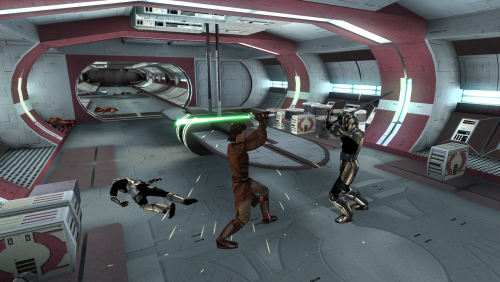
Revises the opening of the game, so that the player may begin as a Jedi Apprentice, in a seamless, lore-friendly manner. Removes all fourth wall breaking tutorial messages from the game. Description Upon starting the game, instead of Trask waking the player, you will be presented with new dialogue options to potentially select a Jedi Class. You may choose to remain as your base class, and become a Jedi on Dantooine as normal, if you wish. If you choose to become a Jedi, you will immediately level up, and be able to acquire your new feats and powers. Starting equipment has been adjusted, and will be generated after this level up, allowing your new feats and skills to be accounted for. Jedi characters are given a crystal in their footlocker, and can build a Lightsaber at the workbench. They choose its style and color there. You then proceed through the Endar Spire sequence as normal, albeit without Trask. Out of character tutorial messages have all been removed. Jedi characters will have a new Lightsaber duel, and recieve additional items. Early dialogues with party members and NPC's have been adjusted to accurately reflect whether the player is a Jedi or not. Additional Force Persuade checks have been added to many of the characters found throughout Taris. A new path to purchase T3-M4 before completing the Swoop Race, through a Force Persuade check, has been added. This is available to non-Jedi through Persuade as well. Upon arriving on Dantooine, the opening dialogue with the council is altered slightly. The inital training sections, from the Jedi Code to Lightsaber construction is removed, and the player is immediately tasked to Cleanse the Tainted Grove. After this point the game proceeds as normal, without major alterations. If the player chooses not to become a Jedi at the start of the game, then very little changes, besides the removal of Trask and tutorial messages. On Dantooine, a non-Jedi player will be able to construct a Double-bladed or Short Lightsaber, and choose the color of their lightsaber freely. They will also be given an Apprentice robe after constructing a Lightsaber. Install/Uninstall Run the installer.exe file. If you are on Linux or Mac, appropriate HoloPatcher installers can be found on DeadlyStream. If updating from a version from before v4.0.0, you must reinstall your game to properly uninstall the mod. You cannot install this mod on top of an old version. You must start a new game after updating to this version. The mod has been substantially reworked. There is a version setup for a manual installation. This version cannot be used with most other mods. It is not recommended. You cannot use this with the Community Patch. Your game will break See the docs folder for more information. Compatibility Most mods should be compatible, unless they make major edits to the Endar Spire, Taris NPC dialogue, or Dantooine Jedi Training. Fully compatible with KotOR 1 Community Patch. Install Jedi from the Start after. Fully compatible with Unofficial K1CP Tweak Pack. Do not install the "tar02_janice021.dlg" or "tar09_recept091.dlg" files from Persuade Fixes. They will remove my Force Persuade checks, and Jedi from the Start includes equivalent changes. Fully compatible with Restored Content for K1CP. Install Jedi from the Start after. Fully compatible with Taris Dueling Arena Adjustment. Fully compatible with JC's Jedi Tailor. Fully compatible with Carth's Republic Uniform and Flight Suit. SWToR Style Training Sabers will overwrite my changes to the Dantooine Lightsaber Training, but should not cause any issues. Not compatible with KotOR 1 Restoration. This mod is increasingly outdated. Use Restored Content for K1CP instead. Not compatible with Tutorial Remover. This mod includes its functionality. Not compatible with Trask Ulgo Without Tutorials. Not compatible with Recruit T3-M4 Early. This mod includes equivalent functionality. Not compatible with JC's Robe Adjustment. This mod includes most of its functionality. Recommended Mods KotOR 1 Community Patch is strongly recommended. JC's Jedi Tailor is highly recommended. Thanks to JC for letting me include most of his Robe Adjustment mod. JC's Extra Saber Colors is highly recommended. You will be able to choose additional lightsaber color options when you create a character with this mod installed. Consular Sentinel Class Skill Swap (or KotOR 1 Community Patch which includes it) is recommended if you want the Sentinel class to be somewhat meaningful. Trask Ulgo Without Tutorials is recommended if you want a vanilla friendly tutorial remover instead. Special Thanks/Acknowledgements Talchia and Achilles for the original Padawan mods that inspired this one. KOTOR Tool – Fred Tetra DeNCS – JdNoa & Dashus DLGEditor – tk102 K-GFF – tk102 TSL Patcher – stoffe KotOR Scripting Tool - Blue Holocron Toolset and HoloPatcher – Cortisol & th3w1zard1 Credits DarthParametric - Scripts from KOTOR 1 Community Patch JCarter426 - JC's Robe Adjustment Mirrors Nexus ModPub Other Links Nexus ModPub Deadlystream YouTube Twitch Discord Twitter darth@darthbdaman.com Jedi from the Start by darthbdaman is licensed under CC BY-SA 4.0 -
View File Jedi From The Start Revises the opening of the game, so that the player may begin as a Jedi Apprentice, in a seamless, lore-friendly manner. Removes all fourth wall breaking tutorial messages from the game. Description Upon starting the game, instead of Trask waking the player, you will be presented with new dialogue options to potentially select a Jedi Class. You may choose to remain as your base class, and become a Jedi on Dantooine as normal, if you wish. If you choose to become a Jedi, you will immediately level up, and be able to acquire your new feats and powers. Starting equipment has been adjusted, and will be generated after this level up, allowing your new feats and skills to be accounted for. Jedi characters are given a crystal in their footlocker, and can build a Lightsaber at the workbench. They choose its style and color there. You then proceed through the Endar Spire sequence as normal, albeit without Trask. Out of character tutorial messages have all been removed. Jedi characters will have a new Lightsaber duel, and recieve additional items. Early dialogues with party members and NPC's have been adjusted to accurately reflect whether the player is a Jedi or not. Additional Force Persuade checks have been added to many of the characters found throughout Taris. A new path to purchase T3-M4 before completing the Swoop Race, through a Force Persuade check, has been added. This is available to non-Jedi through Persuade as well. Upon arriving on Dantooine, the opening dialogue with the council is altered slightly. The inital training sections, from the Jedi Code to Lightsaber construction is removed, and the player is immediately tasked to Cleanse the Tainted Grove. After this point the game proceeds as normal, without major alterations. If the player chooses not to become a Jedi at the start of the game, then very little changes, besides the removal of Trask and tutorial messages. On Dantooine, a non-Jedi player will be able to construct a Double-bladed or Short Lightsaber, and choose the color of their lightsaber freely. They will also be given an Apprentice robe after constructing a Lightsaber. Install/Uninstall Run the installer.exe file. If you are on Linux or Mac, appropriate HoloPatcher installers can be found on DeadlyStream. If updating from a version from before v4.0.0, you must reinstall your game to properly uninstall the mod. You cannot install this mod on top of an old version. You must start a new game after updating to this version. The mod has been substantially reworked. There is a version setup for a manual installation. This version cannot be used with most other mods. It is not recommended. You cannot use this with the Community Patch. Your game will break See the docs folder for more information. Compatibility Most mods should be compatible, unless they make major edits to the Endar Spire, Taris NPC dialogue, or Dantooine Jedi Training. Fully compatible with KotOR 1 Community Patch. Install Jedi from the Start after. Fully compatible with Unofficial K1CP Tweak Pack. Do not install the "tar02_janice021.dlg" or "tar09_recept091.dlg" files from Persuade Fixes. They will remove my Force Persuade checks, and Jedi from the Start includes equivalent changes. Fully compatible with Restored Content for K1CP. Install Jedi from the Start after. Fully compatible with Taris Dueling Arena Adjustment. Fully compatible with JC's Jedi Tailor. Fully compatible with Carth's Republic Uniform and Flight Suit. SWToR Style Training Sabers will overwrite my changes to the Dantooine Lightsaber Training, but should not cause any issues. Not compatible with KotOR 1 Restoration. This mod is increasingly outdated. Use Restored Content for K1CP instead. Not compatible with Tutorial Remover. This mod includes its functionality. Not compatible with Trask Ulgo Without Tutorials. Not compatible with Recruit T3-M4 Early. This mod includes equivalent functionality. Not compatible with JC's Robe Adjustment. This mod includes most of its functionality. Recommended Mods KotOR 1 Community Patch is strongly recommended. JC's Jedi Tailor is highly recommended. Thanks to JC for letting me include most of his Robe Adjustment mod. JC's Extra Saber Colors is highly recommended. You will be able to choose additional lightsaber color options when you create a character with this mod installed. Consular Sentinel Class Skill Swap (or KotOR 1 Community Patch which includes it) is recommended if you want the Sentinel class to be somewhat meaningful. Trask Ulgo Without Tutorials is recommended if you want a vanilla friendly tutorial remover instead. Special Thanks/Acknowledgements Talchia and Achilles for the original Padawan mods that inspired this one. KOTOR Tool – Fred Tetra DeNCS – JdNoa & Dashus DLGEditor – tk102 K-GFF – tk102 TSL Patcher – stoffe KotOR Scripting Tool - Blue Holocron Toolset and HoloPatcher – Cortisol & th3w1zard1 Credits DarthParametric - Scripts from KOTOR 1 Community Patch JCarter426 - JC's Robe Adjustment Mirrors Nexus ModPub Other Links Nexus ModPub Deadlystream YouTube Twitch Discord Twitter darth@darthbdaman.com Jedi from the Start by darthbdaman is licensed under CC BY-SA 4.0 Submitter darthbdaman Submitted 06/19/2012 Category Mods K1R Compatible No