

Mods
1,062 files
-

Juhani's Dark Robe
By ChAiNz.2da
Just as svösh, I too have always like Juhani, Jedi-Tank, but no matter what she wore...it never looked quite 'right'. UNTIL I stumbled upon svösh's Juhani Sanctuary Threads mod.
Me having some weird fascination with 'shiny' armors, I asked permission to do a re-skin into something she may have worn when on a "hostile negotiations" mission.
There are MANY small details, but try not to strain too hard looking for them. The patterns are "hidden reflective", meaning in game depending on the angle and light available...different patterns can be seen! Nifty huh?
USAGE:
With cheats enabled, type "~" (without quotes) and enter:
giveitem jrobe - (svösh's, Juhani's Sanctuary Threads)
giveitem j_darkrobe - (re-skin ChAiNZ's, Juhani's Dark Robe)
** For the Anti-Console, (How it's intended)
When you speak to Juhani for the first time on the Ebon Hawk, she will give you the Sanctuary Threads (check your inventory after you're through talking)
For the Dark Robe, after you 'redeem' Juhani at the Grove speak to Belaya, the jedi inside the enclave. She will ask you to do 'something' (not a sidequest).
**- You must NOT kill Juhani at the Grove or you can't get the Dark Robe, nor would you really need them.
STATS:
===================
Juhani's Dark Robe
Special:
Upgradeable Item, Juhani's Dark Robe
These robes were given to Juhani as a gift upon acceptance of her Jedi training. Well aware of her insecurities, the enclave provided these custom robes to aid in her diplomatic missions. Unfortunately, Juhani's 'fall' prevented her from ever adorning these robes...until now.
Defense Bonus +5
Wisdom +2
Strength +2
Dexterity +2
Defense +3, requires upgrade
Dmg. Reduction +5, soak 10, requires upgrade
Skill Bonus- Stealth +3, requires upgrade
Improved Saves (Specific-All) +2, requires upgrade
EXTRA SUPER SPECIAL THANKS TO:
[] svösh, for whom without his exquisite skins (and permission), this mod wouldn't have been possible. Thank you for allowing me to do this svösh. Your amazing skills and talents are matched only by your generous spirit and "go for it" attitude! I am grateful...
[] Darth333 for the Easy Warping Armband and the "give script" I dissected.
2,566 downloads
(3 reviews)0 comments
Submitted
-

Bastila's Revelation Robes
By ChAiNz.2da
Ummmm...even Jedi's like to look sexy sometimes don't they??
No really, I kept seeing requests for Leia's Slave Girl Outfit (no I'm not skinning one....yet...) so I came up with this alternate design. Bastila's default clothing was the closest match I've seen, but svösh's skin was WAY much better looking. I opted to ask permission to use his version instead mostly out of the "eyecandy" factor. I just made some extra "skin" for the skin and a few shiny things...
The Revelation Robes are suited for a battle hardened Bastila. They are upgradeable with some extra buffs so you can keep her in these duds pretty much throughout the whole game.
**NOTE- these robes are intended for Bastila ONLY. If placed on any other character, the stats will remain but your character will be wearing the games default clothing model for that particular class. ie- Carth can wear them...but he won't be in drag heheh
USAGE:
With cheats enabled, type "~" (without quotes) and enter:
giveitem g_a_clothes02 - (original svösh teal)
giveitem g_a_clothes03 - (original svösh red)
giveitem bast_rev_t - (re-skin ChAiNZ teal)
giveitem bast_rev_r - (re-skin ChAiNz red)
** For the Anti-Console,
Bastila will be wearing the original svösh teal when you meet up in the hideout on Taris. The Revelation Robes (Teal) will be in the Party Inventory. When you encounter her on the unknown planet, she will battle you in the original svösh red.
Out of respect for svösh, the original author, I did not change this. If you wish to battle "evil" Bastila 'wearing' the Revelation Robes...MORE editing will be required...(instructions included in the readme).
STATS:
---------
Special:
Upgradeable Item, Revelation Robes
This garment was given to Bastila as a gift from the Jedi Enclave out of appreciation for her role in the mission to capture Revan. A rare cortosis weave accents the robes, giving it a metallic glint.
Defense +5
Wisdom +3
Improved Saves (Universal) +2
Damage Immunity 10% - requires upgrade
Poison Immunity - requires upgrade
Critical Hits Immunity - requires upgrade
Defense Bonus +2 - requires upgrade
EXTRA SUPER SPECIAL THANKS TO:
[] svösh, for whom without his exquisite skins (and permission), this mod wouldn't have been possible. Thank you for allowing me to do this svösh. Your amazing skills and talents are matched only by your generous spirit and "go for it" attitude! I am grateful...
4,376 downloads
-

Revan's Longsaber
By ChAiNz.2da
After I had submitted the "Revan's Items" mod, someone (Lucied) had asked about making one using Malak's saber model.
Well...ask and you shall receive! Here I present to you...Revan's "gi-normous" saber hehe...
This "Long"saber has the same stats as my Revan's Lightsaber, with a different 'history' description.
USAGE:
At the console (cheats must be enabled) type:
giveitem g_w_lghtsbr26
OR, if you don't condone the console, the included placeable file (dan14_sherruk.utc) will put the saber on Sherruk's (Mandalorian with bad attitude) body once/if you kill him on Dantooine.
Stats:
1) Revan's Longsaber - upgradeable (DON"T REMOVE Star Forge Crystal)
- Keen
- Massive Criticals, 1d8
- Regeneration Force Points +1
- Enhancement +2
- Bonus Feat: Master Toughness
- Bonus Feat: Force Focus & Improved Force Focus
- Light**
** I found using the Light attribute makes for some pretty kewl visual effects. For example, flourish your weapon and approach a workbench, you should notice a light strobing effect. I thought it gave a more realistic effect. Also makes the lighting of your character more 'mysterious'...
*- I have received reports that this mod may affect Malak's saber as well when you confront him on the Star Forge.
1,963 downloads
-
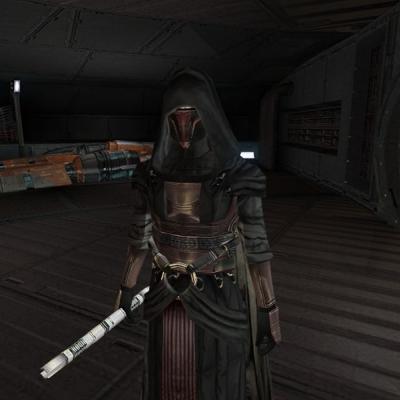
Revan Items
By ChAiNz.2da
This mod adds 3 custom Revan items (with history description). ALL upgradeable!!
-Revan's Robes
(in-game model with cape and hood),
-a single blade lightsaber
-and a double-bladed lightsaber.
PLUS, contains 3 different choices on where to find them (for those who don't like to use the console), complete with an in-game datapad to explain why you found them there.
PLEASE read the included readme file on instructions. ALSO, if you choose to use a placeable, it may be necessary to add all 3 items to your override. Otherwise you may get a 'null grenade' (or crash).
I tried not to make these uber-items, but some of the bonuses can be avoided by not upgrading. That and since it was my first mod, I couldn't resist. Most can be explained with the histories of the items, or by Revan's story itself (in-game).
Afterall, anything is possible in StarWars...
USAGE:
At the console (cheats must be enabled) type: giveitem g_w_lghtsbr25 - Revan's Lightsaber
giveitem g_w_dblsbr025 - Revan's Double-Bladed Lightsaber
giveitem revan_mod_robes - Revan's Robes
++IMPORTANT++ The zip file also contains placeables considering where you would like to find the items in game (for those who don't want to use the console). Just extract the contents of the particular placeable (location) files into your Override directory. ONLY CHOOSE 1 OF THE 3 PLACEABLES, otherwise you'll wind up with 3 complete sets! ALSO, if you choose to use a placeable, it may be necessary to add all 3 items to your override. Otherwise you may get a 'null grenade' (or crash). Contains placeables for:
Taris Undercity - Sith corpse where you find the Rakghoul serum
Taris Sith Base - Strongbox where you fight the Governor
Dantooine Ruins - On Nemo
Be sure to read the datapads (in-game) for the explanations of why you found the items there.
12,244 downloads
-
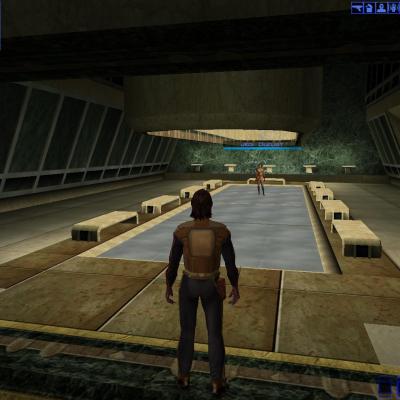
The Tale of Jebord Esio - Introduction (beta)
By JebusJM
The Tale of Jebord Esio is what it sounds like. You take on the role of young Jedi Knight, Jebord Esio, in a deadly mission to infiltrate the Sith. In the introduction, you will some of the core characters and start your main quest. Be sure to speak to a few of the Jedi scattered throughout your Academy, they might give you a few more quests to take on.
Coming soon:
Act 1 - Infiltration
Travel to the planet of Kashyyyk to unravel a mystery revolving around missing wookiees plus take upon the deadly task of infiltrating the Sith.
531 downloads
-

Dak's Sword Pack
By Dak Drexl
ReadMe - Dak's Sword Pack
Description:
This mod created 6 brand new swords for you to use in-game. Each sword is 100% unique to the game; each uses its own models and textures and comes with its own custom icon.
Notes:
You have to cheat to get the items in-game. Use the "giveitem" cheat to get the items labeled as follows:
Dak's Vibroblade: dd_daksword
Inverted Ryyk Blade: invryk
Sting: stingsword
Wookiee Warblade: dd_sparsword
Katar: dd_katar
Crystal Sword: dd_glasssw
Installation:
Just drop all the files into the override.
Permissions:
You can use any or all of these swords in your own mods. However, please give me credit for their creation. I would also
appreciate it if you would just let me know before you use them. E-mail me at dakdrexl@gmail.com or contact me at Dak
Drexl on LucasForums or Deadlystream.
Enjoy!
1,440 downloads
-
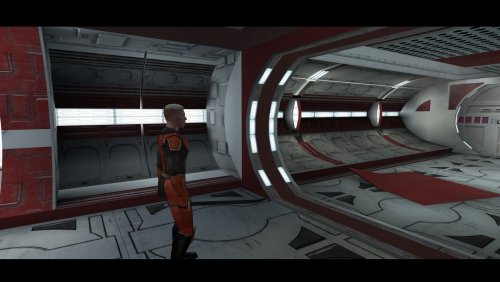
Dak's Vibroblade
By Dak Drexl
ReadMe - Dak's Vibroblade
Description:
Adds a sword, "Dak's Vibroblade", into the game. Has a unique model and its own custom icons.
Notes:
Use the cheat "giveitem dd_daksword" (without quotes) to get it.
This sword will be featured in an upcoming pack.
Permissions:
You can use this in your own mod if you want, but I would appreciate it if you would just let me know. Contact me at dakdrexl@gmail.com
or Dak Drexl on LucasForums.
Enjoy!
1,271 downloads
(0 reviews)0 comments
Updated
-

Restored K1 BIK movies
By zbyl2
This mod adds three BIK movies cut from final release back into the game, nothing big.
Restored movies are:
07_3 and 07_4 - Ebon Hawk escaping Sith's fighters. One is pleyd when you escape Taris, another when you arrive to the Star Forge.
05_9 - just before Carth talks to Admiral Dodoona, this movie with Ebon Hawk approaching the Star Forge is played.
5,017 downloads
-

Tatooine Job Office
By TimBob12
This is my first major mod for KOTOR.
This adds 3 new quests to Tatooine for the first KOTOR game. You can get these quests from the Jawa in the Czerka Office. The quests are:
The Missiing Supplies
The Missing Officer
The Missing Weapon
This adds several new NPCs to the game including some fairly difficult fights. There is also a new store where you can buy some new custom items which I have made.
All the script source is available and I have commented it all so that new modders can look and see how script functions can be used practically as each script has an explanation as to what it does.
There is the option to have a manual install although TSL Patcher is also available to make it compatible with most other mods.
Once again this is my first major mod so all feedback (good or bad) is appreciated.
Thank you and enjoy
TB12
3,409 downloads
-
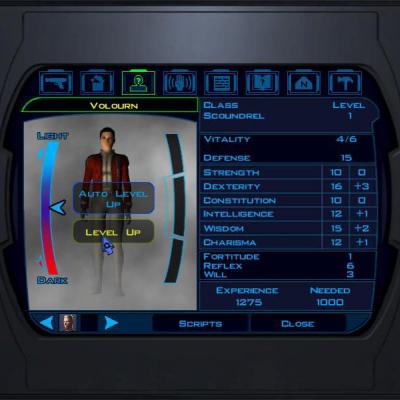
...A Leveling Fix
By Canderis
This is my solution to the level cap problem. Basically it doubles the time it takes to
level up. This may make the game harder, and it makes room for all of these great storyline
mods for k1.
1,002 downloads
-

Lightsaber Choices
When you first arrive at Dantooine, you start your training to be a Jedi, after a long dialog/cutscene of your player learning the ways of the force - Master Zhar sends you off to Master Dorak who will guide
you through choosing a lightsaber crystal.
You speak to Dorak and he tells you about the colours of a lightsaber, although you only get to choose, blue, green & yellow, what position within the order they're associated with and then you get to choose
your class and colour.
You go back to Zhar and then you make your lightsaber. Now here is where this little mod comes into effect, normally you'd go to the workbench, fiddle around with nothing and look like a total pleb while
doing it, by you I mean your PC not you personally - I'm sure you don't look like a pleb, anyway after that you then have a nice whatever colour you chose lightsaber.
What this mod does is, before you go over to the workbench, you'll have two questions to answer - the first is what kind of lightsaber you'd like and the choices are;
* Standard Lightsaber
* Double-Bladed Lightsaber
* Short lightsaber
The second question is which colour would you like, now it is important what you select here because you won't get the colour you told Dorak earlier you will get the colour you select now.
Anyway we now have more choices, you can select any default game colour you'd like instead of just blue, green or yellow. The choices are;
* Blue
* Green
* Yellow
* Red
* Purple
After selecting the type and colour of the lightsaber, your PC will go to the workbench and look like a pleb while fiddling with nothing, like normal.
If you already have a file called dan13_zhar.dlg in your override folder, or packaged into a .mod file, then you will have problems with this, if this is the case PM on Lucas Forums or mine (deadlystream.com)
with the name of the mod that file came from and I'll contact the author and see if I can make them compatible.
There shouldn't be any bugs or glitches with this but if you do find one please let me know.
Installation:
Copy the 'override' folder into your main KOTOR directory. To uninstall delete the files 'dan13_zhar.dlg' & 'deadly_g1 - g15.ncs' from your override folder.
7,571 downloads
-

Remove Restrictions for Force Powers by Armors
By MrPhil
Who likes Kotor more than TSL? Loads of people prefer K1 to K2 with the argument that the story s better. However, as K2 is getting a major rehauling by DStoney, Zbyl2, VarsityPuppet, Hassat Hunter... well K2 has gotten a lot of attention. This is mostly why MrPhil did this mod for K2. However, someone asked him that the mod might be done for K1.
So here s what you have today: a mod that aims to bring to you the true power of the force... This is no force unleashed and does not add any force powers to your game, but take a second to remember a detail in the game: whenever you d put an armor (medium/heavy), you would not be able to use force powers. As this goes against the canonicity of the Force, MrPhil decided to set things right. This mod has not been tested and the author would love to get constructive criticism. Please do not post if your sole goal is to comment about the mod unbalancing the game, unless you think there might be a better way to do so...
Last and not least: this mod's secondary objective is to remove the restriction even when you install a mod that adds force powers to the game. Just make sure that you install this one after and it should work.
NB: that's the same "review" I gave to kfiles, hence why I am speaking of myself at the 3rd person. So no, my ego hasn't grown...
16,750 downloads
-
File Reviews
-

Mephiles550 251
I cannot thank you enough for the sheer quality and convenience of this mod.
Patch after patch, mod after mod, hack after hack, just to get this mess of an old game to look decent on modern displays and hardware. Then one mad lad comes and makes a single gift basket of a patch for it that turns an incredibly tedious and frustratingly long process into a 5 second click-and-play experience. Hell, I'm so used to stuff just not working when trying to mod or fix this game so I expected issues with this, but your patch just does literally everything I need. And it works... omg it actually works lol finally something of this scale actually works without causing any problems in this god forsaken mishmash of game coding.
One small issue I've noticed on 4k resolutions anyway is that selecting small font option does not show the names of selected targets. Could you fix that in the next update? It works fine with regular font but I'd prefer small. Also maybe you could make the regular Xbox hud useable without a controller?5/5, Sincerest thanks
-

Red Hessian 10
A must have for a dark side character. Simon Templeman's voice fits perfectly.
-
A must-have for KOTOR 2, full stop. Like others have said here, this mod is expertly built and integrated into the base game/TSLRCM framework and polishes the end of the game, wrapping up that escape and giving the entire crew a proper closure to their journey. This one is a lock for all my future TSL mod builds. 10/10.
-
 1
1
-
-

Leilukin 346
Another great mod by WildKarrde that has earned a permanent spot in my personal mod build. Bao-Dur is one of the most underrated characters in TSL, so I have always been bothered by how vanilla TSL has Bao-Dur disappear throughout the end-game without explanation for what happaned to him, and the lack of even cut content to be able to restore to fix that. I am thrilled that there is finally an endgame story mod that gives Bao-Dur the love he deserves.
SpoilerI especially appreciate that the mod lets Bao-Dur live. Even though Chris Avellone said that Bao-Dur was supposed to die in the endgame, I honestly never liked the idea of Bao-Dur dying, because consider his story revolves around his trauma and guilt over Malachot V, I believe he deserves a chance to live and heal after the events of TSL, which I would find much more satisfying than killing Bao-Dur off. In my honest opinion, Bao-Dur's death would serve no story purpose other than explaining his disappearance in the endgame, so I am seriously glad to see a story mod meant for giving Bao-Dur more closure in the endgame avoids killing him off.
I also love the salute Bao-Dur gives the Exile when the Exile leaves Telos for Malachor, which perfectly captures the Bao-Dur and the Exile's relationship as comrades during both the Mandalorian Wars and the present day events of TSL.
Edited by Leilukin-
 1
1
-
-
Leilukin 346
Truly an incredible mod that makes a permanent spot in my personal mod build for how much it improves the ending, and how well-made the mod is. While TSLRCM did the best it could in restoring cut content to the end-game, there is still room for improvement for the ending, and TSL Expanded Ending proves that.
SpoilerI appreciate that TSL Expanded Ending gives the player more choices, such as the option if they want to destroy Malachor or not regardless of the player's alignment, if they want to find Revan or not, choosing to stay on Malachor if the player doesn't destroy it, etc. The mod also restores Handmaiden/Visas' ending conversation about wanting to follow the player even if the player chooses to destroy Malachor.
-
 1
1
-
-
Nice to see the Handmaiden's braids beneath her hood! Thanks for creating this mod!
-
1
-
-
Tested this out. This really does look like Nihilus has no face at all, thus making Nihilus look like what Avellone intended like you said! Good job!
Edited by DarthErdan -
Another seamless and great addition that I will keep in my load order.
Edited by vault13deathclaw -
An absolute must mod!
For years I thought it so frustrating that Bao-dur's disappearance was unexplained. I thought it strange that he would abandon the exile after everything they went through. Later I learned of the supposed fate of Bao-dur - running out into a mine?! - seriously!
Now with this mod it ties so much of the story together. It's as if Bao-dur stays behind on Telos to defend it. After all, in a conversation with the handmaiden she does make reference to Atris believing Bao-dur was the key to help Telos. And if you have the extended ending mod it reinforces the idea of the exile - aka Meetra - leaving those she cares about behind to strengthen the Republic for the war to come as she goes in search of Revan.
I really enjoyed this mod. Very well done WildKarrde for creating this mod. It was a much needed edition to a classic game. Definitely a gold star! Keep up the good work!💫
-
Your mod is the prime example of how the Restoration mod should be alongside the Sleheyron mod! 10/10
-
1
-
-

Caim 1
Whoever made this mod is a godsend! It fixes almost everything that needs fixing for modern systems in 2026 for KOTOR 1, including issues for AMD users like me. It has saved me so many nerve cells. So now I can finally play with Soft Shadows and Frame Buffer Effects, except the Grass — sometimes for grass to work properly you need to restart your game. In my opinion this is the best KOTOR mod right now, no exaggeration.
Edited by Caim-
1
-
-
I'm just happy that I can finally play the game on PC with real, native, proper controller support. The fact that TSL received that massive update which added native controller support but the original KOTOR was left with mouse/keyboard years later (which was ridiculous) is finally resolved with this.
-

Stuck 0
-
I'm very eager to give it a try but I just can't. I installed KMRP, used KPM patcher with only 2 patches - KMRP and High FPS Fixes.
Then I run your install.cmd and all I get is this:
INSTALL FAILED: Executable compatibility check failed at 47 required hook site(s).
0x004F1A3E: expected [B8 14 00 00 00], found [6A 85 05 C2 9E]
0x004F1A43: expected [0F B6 D0 3B 4C 96 38], found [CE EB 19 56 C1 7C 49]
0x0054EC5B: expected [C7 02 14 00 00 00], found [34 50 71 50 DE 29]
0x00552C9A: expected [8D 7E 38 B9 15 00 00 00 F3 AB], found [66 3F 2E 33 9D 15 28 89 29 00]
0x00552F8A: expected [8D 6E 38], found [DA 7B 54]
0x00552FD6: expected [83 FF 14], found [A7 5A 68]
0x005A54A0: expected [0F B6 F0 3B 54 B1 38], found [F6 AB 63 77 5A C7 1D]
0x005A54AA: expected [83 F8 14], found [75 93 66]
...and 39 more mismatched hook site(s).
Another executable patch or a different KOTOR binary layout is using code this mod needs. No changes were made.Press any key to continue . . .
Edited by WarlordThorvald
I had bunch of graphic mods and old widescreen fix installed before, but deleted it and restored original exe - no luck.
Then I just deleted my game and re-downloaded it (steam version), installed KMRP and patched clean version of the game with KPM - and result is the same.
I am at loss here.
Edit 2: Hey it seems you were right, tho I had editable exe already but edited for widescreen, that's why maybe there was mismatch. I used it with clean editable exe and all works, thanks a lot.
-
Does exactly was it says it does!
An observation: Having this active requires it to be installed dead last after EVERYTHING ELSE. If, say, I were to add"High FPS Fixes" or other patches through KotorPatchManager with "...Progression" already active, I lose the ability to back out of the level-up screen(effectively restoring the vanilla game's constraints where it would not let you exit the level-up UI to return to normal gameplay at all until you leveled up.)
This I confirmed via live testing/gameplay last night: I had to uninstall and re-install "....progression" after adding the KPM patches so it effectively sits at the very END of the installation order. This fixed the issue and I could back out of the level-up screen freely.
FYI I'm using KMRP 1.5.1 and KPM in my setup.
-
1
-
-


-
File Comments
-

By BottomlessThought23 · Posted
I'm developing all of my mods using the Editable Executable, which is technically the 1.03 GOG version. -

By EbonHawkStowaway999 · Posted
There was an old Messkell's mod from August 2004 "The Tomb of Naga Sadow" that did the same thing, but didn't require the player to have 10 points in Computer Use. Can it be reuploaded here? -
 Does this patch only work for the Steam version? The manifest.toml doesn't include the hash for the gog version.
 -
By vault13deathclaw · Posted
Sounds good :) I am not sure what souser means. If it is the source files for the galaxy map, then that is just there for people who want to make other mods that use those same files compatible. Anything that is for needed to play the mod should already be where it needs to be in the folders. If you are talking about something else, then please let me know. -
 Thanks!! I'm already working on it, since it's a mod that needs translating. Progress: the dialog.tlk, the override DLGs, and telos are already translated, as well as nar sha. I'm working on the .mod files for modules. I also have the M478 mod in Spanish from before; that's what I started with. Well, when I have it complete, I'll let you know and send it to you. PS: Regarding the souser maps folder, do I have to paste the contents into override? Or is it for something else? Sorry
-