

Mods
1,060 files
-
Darkkender's Tomb of Jesset Dal'Kest (and patch)
By JumpStationZ
Part of the...
Mod Name: Tomb of Jesset Dal'Kest
Author: Darkkender
Supporting Mods & Authors:
Chainz.2da & his Segan Wyndh Sabers & Jedi Armor,
Maverick187 & his White Double Saber,
Mono Giganto & his DL44 & E15 weapons.
Installation: This Mod includes a KMM, if you use this system. Otherwise, just add everything to override folder. If you have the mods mentioned above, just go ahead and override everything. The one exception to the override everything policy is the 2da files I tried to make everything as compatible as possible with most everything - except the Holowan Plugin and AIOFPM as time constraints kept me from that.
What this mod includes:
This mod expands on Chainz.2da's Segan Wyndh Jedi Armor adding 7 new armor types, it also expands on his Segan Wyndth Sabers adding 2 new sabers for that mod. Also included is my creature grenade mod and the Guardian of the Force lightsabers. If you have my recruit Darkkender mod installed, just overwrite all the files in there when prompted as all of the above by me are either compatible with or updates to some of the listed equipment.
This Mod features 2 new areas available on Korriban. If you team up with Lashowe to kill the Tukata Queen in the Valley of the Dark Lords, a Rune covered pillar will appear behind her at the cliff’s edge. Proceed to the activate the pillar and - oh my – you’re in the Tomb of Jesset Dal'Kest!
2da mentions:
This mod includes 3 2da files baseitems, spells, and upcrystals. At the time of release upcrystals has been updated from the one Chainz released with his sabers to include Maverick187's white double saber, Darth Nemesis saber, The Guardian of the Force sabers, 2 new Segan sabers White & Guardian, and sketh42's EKUN double saber.
Warning:
You should be at least level 16 prior to entering as everything is challenging. (Dry runs took me an estimated hour to complete with all lvl 20 heavily modded characters.)
Spoiler:
Take your time and explore the illusion of the Ebon Hawk before leaving. If you are using Redhawke's new construction bench, the workbench aboard will be compatible with this mod.
Special thanks goes out to the following for various reasons told above and untold;
Chainz.2da
Darth333
T7nowhere
Cchargrin
Fred Tetra
Maverick187
Mono Giganto
Contact:
Darkkender at Holowan Labs PM or look for me on the boards or [See read-me for contact e-mail].
Note: The patch has its own separate read me, folks. Read that additional read-me for more information.
616 downloads
(0 reviews)0 comments
Submitted
-
Effixian's PFHB05 from K2 to K1
By Effix
************************
Knights of the Old Republic
************************
TITLE: Effixian's PFHB05 from K2 to K1
AUTHOR: Effix(ian)
CONTACT: PM me on the forums or find me on Steam
*************
INSTALLATION
*************
Run the file "TSLPatcher - Install Effixian's PFHB05 from K2 to K1.exe".
************
DESCRIPTION
************
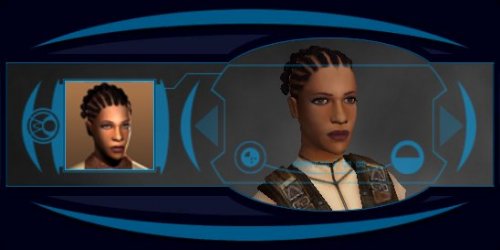
This mod adds a playable character PFHB05 from KotOR 2. As requested by LegendOfAB.
*****
BUGS
*****
None known.
*****
COMPATIBILITY
*****
This mod adds a player character labeled as PFHB09, which is not in the vanilla game. This mod is not compatible with mods that might do the same.
*************
UNINSTALLING
*************
1. Remove the following files from your Override folder:
pfhb09.mdl
pfhb09.mdx
PFHB09.tga
PFHB09d.tga
PFHB09d1.tga
PFHB09d2.tga
PFHB09d3.tga
PO_PFHB09.tga
PO_PFHB09d.tga
PO_PFHB09d1.tga
PO_PFHB09d2.tga
PO_PFHB09d3.tga
2. If you have never installed any mod with the TSL Patcher then you can remove appearance.2da, heads.2da and portraits.2da from the Override folder. Otherwise:
If you haven't installed any head mods after this mod you can get the following files from the mod's backup folder and put them back in your Override folder:
appearance.2da
heads.2da
portraits.2da
Doing this when you did add another head mod would result in the later head(s) no longer being available in the game, yet the associated files (listed at step 1.) would still be in the Override folder.
*******************
DISTRIBUTION NOTES
*******************
You may NOT: Use the material from this mod in your own mod without giving me credit, implying it was your creation.
You might: Use the material from this mod in your own mods if you simply ask me.
********
Thanks to
********
- Stoffe and Fred Tetra for the needed tools and tutorials
- bead-v's MDLEdit
- JCarter426 & Kexikus for sharing their knowledge of converting things with MDLEdit
-------------------
THIS MODIFICATION IS NOT MADE, DISTRIBUTED, OR SUPPORTED BY BIOWARE, OBSIDIAN, OR LUCASARTS ENTERTAINMENT COMPANY LLC. ELEMENTS TM & © LUCASARTS ENTERTAINMENT COMPANY LLC AND/OR ITS LICENSORS.
228 downloads
(1 review)0 comments
Submitted
-
Effixian's PMHH02 from K2 to K1
By Effix
************************
Knights of the Old Republic
************************
TITLE: Effixian's PMHH02 from K2 to K1
AUTHOR: Effix
CONTACT: PM me on the forums or find me on Steam
*************
INSTALLATION
*************
Run the file "TSLPatcher - Install Effixian's PMHH02 from K2 to K1.exe".
************
DESCRIPTION
************
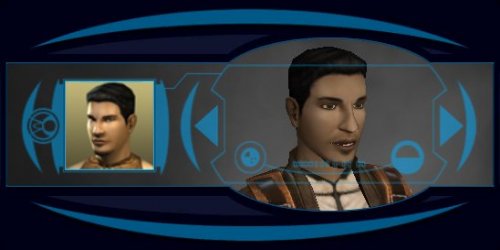
This mod adds a playable character PMHH02 from KotOR 2. As requested by Orbiterrr.
*****
BUGS
*****
None known.
*************
UNINSTALLING
*************
1. Remove the following files from your Override folder:
pmhh02.mdl
pmhh02.mdx
PMHH02.tga
PMHH02d.tga
PMHH02d1.tga
PMHH02d2.tga
PMHH02d3.tga
PO_PMHH2.tga
PO_PMHH2d.tga
PO_PMHH2d1.tga
PO_PMHH2d2.tga
PO_PMHH2d3.tga
2. If you have never installed any mod with the TSL Patcher then you can remove appearance.2da, heads.2da and portraits.2da from the Override folder. Otherwise:
If you haven't installed any head mods after this mod you can get the following files from the mod's backup folder and put them back in your Override folder:
appearance.2da
heads.2da
portraits.2da
Doing this when you did add another head mod would result in the later head(s) no longer being available in the game, yet the associated files (listed at step 1.) would still be in the Override folder.
*******************
DISTRIBUTION NOTES
*******************
You may NOT: Use the material from this mod in your own mod without giving me credit, implying it was your creation.
You might: Use the material from this mod in your own mods if you simply ask me.
********
Thanks to
********
- Stoffe and Fred Tetra for the needed tools and tutorials
- bead-v's MDLEdit
- JCarter426 & Kexikus for sharing their knowledge of converting things with MDLEdit
-------------------
THIS MODIFICATION IS NOT MADE, DISTRIBUTED, OR SUPPORTED BY BIOWARE, OBSIDIAN, OR LUCASARTS ENTERTAINMENT COMPANY LLC. ELEMENTS TM & © LUCASARTS ENTERTAINMENT COMPANY LLC AND/OR ITS LICENSORS.
357 downloads
-

Effixian's Mira Outfit for Bastila
By Effix
***************************
Knights of the Old Republic
***************************
TITLE: Effixian's Mira Outfit for Bastila
AUTHOR: Effix(ian)
CONTACT: PM me on the forums or find me on Steam
************
DESCRIPTION
************
This mod changes Bastila's default clothing to that of KotOR 2's Mira. Not compatible with other mods that change her default clothing. Requested by JediArchivist.
*************
INSTALLATION
*************
Unzip. Copy the files from the folder to the your game's Override folder.
*****
BUGS
*****
None.
*************
UNINSTALLING
*************
Remove from the Override folder:
- p_bastilabb.mdl
- p_bastilabb.mdx
- P_bastilaBB01.tga
*******************
DISTRIBUTION NOTES
*******************
You may not: Use the material from this mod in your own mod without giving me credit, implying it was your creation.
You might: Use the material from this mod in your own mods if simply you ask me.
*********
THANKS TO
*********
Fred Tetra for KotOR Tool
-------------------
THIS MODIFICATION IS NOT MADE, DISTRIBUTED, OR SUPPORTED BY BIOWARE, OBSIDIAN, OR LUCASARTS ENTERTAINMENT COMPANY LLC. ELEMENTS TM & © LUCASARTS ENTERTAINMENT COMPANY LLC AND/OR ITS LICENSORS.
624 downloads
(1 review)0 comments
Submitted
-
Effixian's PFHA04 from K2 to K1
By Effix
************************
Knights of the Old Republic
************************
TITLE: Effixian's PFHA04 from K2 to K1
AUTHOR: Effix
CONTACT: PM me on the forums or find me on Steam
*************
INSTALLATION
*************
Run the file "TSLPatcher - Install Effixian's PFHA04 from K2 to K1.exe".
************
DESCRIPTION
************
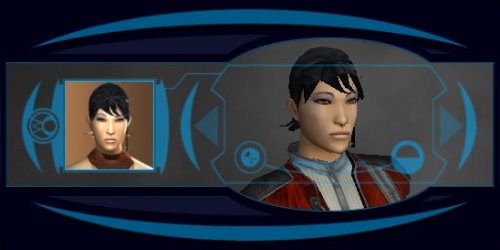
This mod adds the playable character PFHC04 from KotOR 2 to KotOR. As requested by Mad Bro Sheo.
*****
BUGS
*****
None known.
*****
COMPATIBILITY
*****
This mod adds a player character labeled as PFHC09, which is not in the vanilla game. This mod is not compatible with mods that might do the same.
*************
UNINSTALLING
*************
1. Remove the following files from your Override folder:
pfha09.mdl
pfha09.mdx
PFHA09.tga
PFHA09d.tga
PFHA09d1.tga
PFHA09d2.tga
PFHA09d3.tga
PO_PFHA09.tga
PO_PFHA09d.tga
PO_PFHA09d1.tga
PO_PFHA09d2.tga
PO_PFHA09d3.tga
2. If you have never installed any mod with the TSL Patcher then you can remove appearance.2da, heads.2da and portraits.2da from the Override folder. Otherwise:
If you haven't installed any head mods after this mod you can get the following files from the mod's backup folder and put them back in your Override folder:
appearance.2da
heads.2da
portraits.2da
Doing this when you did add another head mod would result in the later head(s) no longer being available in the game, yet the associated files (listed at step 1.) would still be in the Override folder.
*******************
DISTRIBUTION NOTES
*******************
You may NOT: Use the material from this mod in your own mod without giving me credit, implying it was your creation.
You might: Use the material from this mod in your own mods if you simply ask me.
********
Thanks to
********
- Stoffe and Fred Tetra for the needed tools and tutorials
- bead-v's MDLEdit
- JCarter426 & Kexikus for sharing their knowledge of converting things with MDLEdit
-------------------
THIS MODIFICATION IS NOT MADE, DISTRIBUTED, OR SUPPORTED BY BIOWARE, OBSIDIAN, OR LUCASARTS ENTERTAINMENT COMPANY LLC. ELEMENTS TM & © LUCASARTS ENTERTAINMENT COMPANY LLC AND/OR ITS LICENSORS.
462 downloads
-

Effixian's Atton from K2 to K1
By Effix
---------------------------------------------
Knights of the Old Republic
---------------------------------------------
TITLE: Effixian's Atton from K2 to K1
AUTHOR: Effix
CONTACT: PM me on the forums or find me on Steam
-------------------------
INSTALLATION
-------------------------
Run the file "TSLPatcher - Install Effixian's Atton from K2 to K1.exe".
-----------------------
DESCRIPTION
-----------------------
This mod adds a playable character with the head of Atton from KotOR 2.
As requested by phatshady on deadlystream.com.
----------
BUGS
----------
- The facial animations are not right.
- Sometimes a vertical line can be seen in between the right and left side of his face. It's not in the texture and not something I can fix.
--------------------------
UNINSTALLING
--------------------------
1. Remove the following files from your Override folder:
P_AttnH1.tga
P_AttnH1.txi
pmhc09.mdl
pmhc09.mdx
PMHC09.tga
PMHC09d.tga
PMHC09d1.tga
PMHC09d2.tga
PMHC09d3.tga
po_pmhc9.tga
po_pmhc9d.tga
po_pmhc9d1.tga
po_pmhc9d2.tga
po_pmhc9d3.tga
s_female2.mdl
s_female2.mdx
2. If you have never installed any mod with the TSL Patcher then you can remove appearance.2da, heads.2da and portraits.2da from the Override folder. Otherwise:
If you haven't installed any head mods after this mod you can get the following files from the mod's backup folder and put them back in your Override folder:
appearance.2da
heads.2da
portraits.2da
Doing this when you did add another mod will result in the later head(s) no longer being available in the game.
-------------------------------------
DISTRIBUTION NOTES
-------------------------------------
You can use the files from this mod in your own mod if you simply credit me.
----------------
Thanks to
----------------
- Stoffe and Fred Tetra for the needed tools and tutorials
- bead-v's MDLEdit
- JCarter426 & Kexikus for sharing their knowledge of converting things with MDLEdit
-------------------
THIS MODIFICATION IS NOT MADE, DISTRIBUTED, OR SUPPORTED BY BIOWARE, OBSIDIAN, OR LUCASARTS ENTERTAINMENT COMPANY LLC. ELEMENTS TM & © LUCASARTS ENTERTAINMENT COMPANY LLC AND/OR ITS LICENSORS.
1,087 downloads
-

Effixian's Female Underwear Alternative
By Effix
***************************
Knights of the Old Republic
***************************
TITLE: Effixian's Female Underwear Alternative
AUTHOR: Effix(ian)
CONTACT: PM me on the forums or find me on Steam
************
DESCRIPTION
************
This mod replaces the underwear body model of Bastila and all the female player characters with that of the Twi'lek model and uses a texture that is a mix of the Twin Suns, Twi'lek and Luxa textures from KotOR 2.
This mod contains 2 versions that you can choose from; one where the underwear is white but turns to black when the character is fully darkside. In the other version there's only black underwear.
The classes do not have different kinds of underwear.
*************
INSTALLATION
*************
Unzip. Copy the files from one of the folders to your game's Override folder.
*****
BUGS
*****
None.
*************
UNINSTALLING
*************
Remove from the Override folder:
- p_bastilaba.mdl
- p_bastilaba.mdx
- P_BastilaBA01.tga
- P_BastilaBAS01.tga
- PFBAL.mdl
- PFBAL.mdx
- pfbal01.tga
- pfbalA01.tga
- pfbalB01.tga
- pfbald01.tga
- PFBAM.mdl
- PFBAM.mdx
- pfbam01.tga
- pfbamA01.tga
- pfbamB01.tga
- pfbamd01.tga
- PFBAS.mdl
- PFBAS.mdx
- pfbas01.tga
- pfbasA01.tga
- pfbasB01.tga
- pfbasd01.tga
*******************
DISTRIBUTION NOTES
*******************
You may not: Use the material from this mod in your own mod without giving me credit, implying it was your creation.
You might: Use the material from this mod in your own mods if simply you ask me.
*********
THANKS TO
*********
Fred Tetra for KotOR Tool
-------------------
THIS MODIFICATION IS NOT MADE, DISTRIBUTED, OR SUPPORTED BY BIOWARE, OBSIDIAN, OR LUCASARTS ENTERTAINMENT COMPANY LLC. ELEMENTS TM & © LUCASARTS ENTERTAINMENT COMPANY LLC AND/OR ITS LICENSORS.
1,410 downloads
(1 review)0 comments
Submitted
-
![More information about "[K1] Yavin IV Planet Mod"](https://deadlystream.com/downloads/screens/monthly_2020_03/1.thumb.jpg.c52fcd2de9083f8c913ab2f258518b55.jpg)
[K1] Yavin IV Planet Mod
By MotOR Squad
Name: [K1] Yavin IV Planet Mod
Author: MotOR Squad + Master Zionosis
Translator: ĐeceptiKain
TSLPatcher: EGJason
Date: 05/03/08
E-Mail: masterzionosis@hotmail.co.uk
Contents:
1 Description
2 Installation
3 Uninstallation
4 Future Releases
5 Bugs
6 Adknowledgements
7 Permissions
8 Website
9 Spoilers
--------------------------------------------------------------------------------
1 Description
---------------
This mod will add an entire new planet to KotOR I, Yavin IV. They're are 10 new modules in total and a great new storyline.
2 Installation
-----------------
Simply run the new installer.
If you also want the MotOR Yavin launcher copy the Launcher folder to your KotOR directory.
3 Uninstallation
-----------------
Just remove all these files from the relevent folders in your K1 directory.
4 Future Releases
--------------------
-Voice Overs for non alien species
Of course if there is any bugs or errors these will be assessed as well.
5 Bugs
------
None that i know of, if you find any PM me at Holowan Labs please.
There is, however, the issues that crop up with other mods installed, most notably with Brotherhood Of Shadow. This patcher version may correct some issues with that, but probably not all. I reccomend that you install Yavin IV first, then Brotherhood Of Shadow.
6 Adknowledgements
------------------
A massive thanks to the original creators of the Yavin mod (MotOR) and allowing me to translate the mod.
A boatload of thanks to Fred Tetra for creating the awesome and simple to use kotor editing tool.
Also thank you ĐeceptiKain for your excellent work on the translations, without you this wouldn't have happened.
And a very appreciative thanks to the many friendly and informative people at the Lucasforums Holowan Laboratories board who have shown and or helped me to learn how to do stuff like this.
And another thank you to EGJason who got the mod to TSLPatcher state.
7 Permissions
-------------------
This mod may only be used/modified with my consent.
8 Website
-------------------
Visit my website to see what other mods I have created and what I will be doing in the future.
http://masterzionosiskotorsite.com
9 Spoilers
-------------------
There are quite a few puzzles, riddles and secrets in the mod, many that made me even think that the mod was 'broken', well I have play tested the entire mod and after going through the messy process of decompiling certain scripts I found out that the mod does work properly.
To complete certain things you will have to concentrate considerably on what you have recently done or aquired. If you do get completely stuck consult this table below
-The door that does not open in Exar Kun's Tomb in the Chamber Of Spirits is actually a mirage, you can walk through it after you have aquired the crystal of darkness.
-The most tricky part of the mod is the door puzzle, it is completeable but quite tricky to get your head round, it took me about 30 mins to figure it out, so if you figure it out straight away then maybe I'm just stupid. But here is the combination if you get stuck:
Open door 5, then open door 3, kill the spirits, then go back and open door 4, then door 1 will be open.
These are the only tricky parts I can remember, if you find any more don't hesitate to ask in the project thread at Lucasforums.
2,717 downloads
-

Redhawke White/Star Forge Booster Pack
By JumpStationZ
Part of the...
Author : RedHawke 12/21/05 V1.1 (06/05/04 V1.0)
Mod: The Revan The White/Star Forge Booster Pack (This Mod, updated to Use Patcher)
Mod: "Redhawke Booster Pack1a"
New In V1.1: Made the mod able to use the TSL Patcher Program, yes it does work on KotOR I, for complete compatability.
Install order for my 3 Item Packs is;
1. The Revan/Sith/Bastila Item Pack (Will be updated to use Patcher too)
2. The Blasters/Armor/Droid Item Pack (Patcher Not necessary no 2da files)
3. The Revan The White/Star Forge Booster Pack (This Mod, updated to Use Patcher)
============================================================================
You MUST have both of my Revan/Sith/Bastila and Blasters/Armor/Droid Upgrades item packs installed to your override directory for this Mod to work.
This enhances my 2 item packs by better scripting the items into the game, modifying some vendors, as well as adding some additional new items into the game. The New or Modified Items are listed below.
This Mod also allows your character, when wearing the Revan's or Star Forge lines of robes, to appear as Revan without the mask does, though sometimes your hair or head will clip through the hood and the darn cape has no animations but you still look cool. (Big thanks to Mono-Giganto for figuring out how to do this)
Installation Instructions:
-----------------------------
Extract the contents of the zip to a temporary folder, run the Patcher EXE follow the instructions, and you should be good to go.
NOTE: If you have the previous version installed and working you will not need to install this version, this is only updating the mod to use the Patcher Program for compatability.
Be sure to delete the file dan13_nemobody.utp from your override directory after installing this mod, or keep the file there for double the items on Nemos corpse. It won't hurt the game if you don't delete the file. :^)
Uninstallation Instructions:
-----------------------------
Simply delete all these files from your override directory, and restore any files from the backup directory made by the patcher program when you installed the mod.
---------------------------------------------------
New Giveitem Item Cheat Console Codes:
---------------------------------------------------
g_a_class5006 - Ulric Quel-Droma's Mesh Suit
g_a_mstrrobe07a - Star Forge Robes I (Full Masked Revan Appearance)
revan_whiterobe1 - Revan The White's Robes I (Full Masked Revan Appearance)
revan_whiterobe - Revan The White's Robes (Normal Appearance)
revan_sbrcrstlw - Revan's Heart Lightsaber Color Crystal
revan_lghtsbrw - Revan The White's Lightsaber
revan_dblsbrw - Revan The White's Double Lightsaber
revan_shortsbrw - Revan The White's Short Lightsaber
Acknowledgements:
------------------------------------------------
A boatload of thanks to Fred Tetra for creating the awesome and simple to use kotor editing tool.
A Big thanks to Mono-Giganto for figuring out how to have the PC wear Revans Robes without the mask!
And A Big...Big Thanks to Svosh, The Photoshop Master, for the Revan Model Map!
Also a very appreciative thanks to the many friendly and informative people at the Lucasforums Holowan Laboratories board who have shown and or helped me to learn how to do stuff like this.
Other Possible Bugs And Model Notes
---------------------------------------
The Revan model was not fully completed by Bioware that is why the cape as well as some of the animations are not complete, you'll notice other things like force lightning erupts from Revans feet instead of the hands this is due to the incomplete Revan model and not by any of us modders. As soon as the KOTOR model format is fully cracked you can sure bet Revan will have a flowing cape and shoot force lightning correctly.
The Modder Kristykristic has fixed this Force Power problem on the Revan Model get the corrected Models here... http://www.pcgamemods.com/mod/16834.html
Also before the confrentation with Malak on the Leviathan you should switch to the Revan Robes, or any other robes, that does not have the mask as the cutscene that plays when Malak talks to you won't load your PC's head properly if the Revan Robes that have the discuise ability is worn. When Revan's mask is removed you will not see your PC's face. This is why I created the Dark Ones' Robes specifically for the leviathan.
And lastly, Enjoy!
553 downloads
-

Recruitable Redhawke
By JumpStationZ
Part of the...
Author : RedHawke 08/05/04 V1.4
Updated: Deadlystream 2/25/2020 V1.4i
============================================================================
This recruit mod allows for the recruiting of a new character "RedHawke" into your KOTOR party.
This recruit mod has several recruit mod innovations built in, this mod allows the user to pick which NPC they wish to replace, this function is not easy to do, but I think it is well worth it, most KOTOR recruitable NPC mods usually fix who is replaced, but this one does not, and this mod also has an exit fot the NPC at a pre-determined point.
I hope you all enjoy the Mod!
------------------------------
Updated Installation Instructions (updated😞
Run Tslpatcher to install:
No longer requires any installation order to work with other Redhawke mods, nor any custom "compatible" files.
------------------------------
Incompatibilities (updated) :
upcrystals.2da (causes issues with other lightsaber mods)
global.jrl (may cause issues with other quest mods, use JRL Merger tool to make compatible or manual edit .jrl)
Any mods that edit the following files:
PMBJ09.tga
P_RH01.tga
w_dblsbr_093.mdx/mdl
w_lghtsbr_093.mdx/mdl
w_shortsbr_093.mdx/mdl
unk44_sparty.dlg
man26_selport.dlg
------------------------
Adknowledgements:
------------------------------------------------
A boatload of thanks to Fred Tetra for creating the awesome and simple to use kotor editing tool.
And A Big...Big Thanks to Svosh, The Photoshop Master, for allowing me to use the Evil Bastila clothes texture!
And Another Big...Big Thanks to Darth333 for her help, without which this mod would have not been possible!
And Thanks to Cchargin for the cool Kotor Mod Manager, KMM Program!
Also a very appreciative nod to the many friendly and informative people at the Lucasforums Holowan Laboratories board who have shown and or helped me to learn how to do stuff like this.
306 downloads
- recruitable
- recruitment
- (and 3 more)
-
Female Scoundrel 2-Piece Undies
By JumpStationZ
Part of the...
Author : RedHawke 04/08/04
============================================================================
This is a simple reskin to improve the female scoundrels underwear, it gives them a nicer two-piece style outfit.
I really disliked the original female scoundrels one piece underwear, so I modified these, I hope you enjoy them.
My first KOTOR Mod, this is a simple reskin to improve the female scoundrels underwear, it gives them a nicer two-piece style outfit. I really disliked the original female scoundrels one piece underwear, so I modified these, I hope you enjoy them.
Installation : Just extract pfbas01.tga, pfbasA01.tga, and pfbasB01.tga into your override directory, and that should do it.
Un-Installation : Just delete the aforementioned .tga files from your override directory.
And have fun with the new female scoundrel underwear. ;^)
My first KOTOR Mod, this is a simple reskin to improve the female scoundrels underwear,
it gives them a nicer two-piece style outfit.
I really disliked the original female scoundrels one piece underwear,
so I modified these, I hope you enjoy them
Credits:
RedHawke
Holowan labs
chainz.2da
267 downloads
(0 reviews)0 comments
Updated
-

The Lightsaber Pack
By JumpStationZ
The lightsaber pack is a collaborative effort by Maverick187 and myself, it consists of 10 custom Lightsabers, 7 are by Maverick187, and 3 are by me, and they are all fully placed in the game by me. This pack include's 7 lightsabers that were all concieved by the various creative minds of the people at The Holowan Labs at www.lucasforums.com, and with the suggestions of several of the people there Maverick187 created 7 lightsabers, each with their own unique custom stats, hilt, blade colors, and each saber has their creators specified unique histories. It also Includes a little extra backstory for my Recruitable RedHawke Mod listed above, including her special sabers.
++ INSTALLATION ++
1. If this is your first saber mod than extract all the files into your Override directory and you are free to go.
2. If you already have an edited upcrystals.2da file then listen carefully the upcrystals.2da file that is included with this saber pack works for: all of the sabers in the pack, the Holowan plug-in and all of it's sabers, Achillies Jeid Council sabers, any sabers created by RedHawke as well as my Blade of Balance lightsaber which can be found at pcgamemods.com.
3. If you just want to edit your current upcrystals.2da file, which ofcourse you will need KotOR tool for than enter the following lines into your upcrystals.2da file:
## Darksaber g_w_drkcrstl01 **** g_w_drksbr01 ****
## JadenKorr g_w_cataliststar **** **** g_w_jadenkorr001
## LordSith sith_lordcrstl01 **** lord_of_sith01 ****
## DarthBane g_w_banecrstl01 **** g_w_banesbr01 ****
## Everlast everlastcrstl01 **** g_w_everlast01 ****
## StarLS g_w_jedicrstl01 **** g_w_starsbr01 ****
## StarDS g_w_darkstar01 **** g_w_starsbr02 ****
&&
rhwke_sbrcrstl1 - Hawke's Talisman Lightsaber Color Crystal
rhwke_lghtsbr1 - RedHawke's Lightsaber
rhwke_shortsbr1 - RedHawke's Short Lightsaber
rhwke_dblsbr01 - RedHawke's Double Lightsaber
Acknowledgements:
------------------------------------------------
0. A boatload of thanks to Fred Tetra for creating the awesome and simple to use kotor editing tool.
1. HUGE thanks goes out to all of the people at the Holowan Labs for everything from help with these sabers to intially teaching me how to mod this game.
2. Big thanks goes out to Fred Tetra for his great KotOR tool and also tk102 for all of his very useful tools such as KSE and many source codes and such, also thanks goes out to Darth333 for making the warpband which made some testing a bit easier.
3. Lots of thanks goes out to svösh for letting me use his custom shader for some of the lightsaber hilts amongst other things, svösh has been a great help to me in many mods.
4. Of course thanks goes out to the people whom suggestede all of the sabers, ReLoaD2K, MattColejk, Emperor Pangasa, Omega-X, LukeKatarn, and PrtyLizardJedi.
5. Finally the guy who actually deserves most of the credit for this saber pack, RedHawke, whom put all of the sabers into the game where they were suggested to go and did so very sucessfully and also included some custom sabers of his own, without RedHawke this saber pack would not be possible.
799 downloads
- redhawke
- maverick187
- (and 3 more)
(0 reviews)0 comments
Updated
-
Agent Xim's Korriban Crystal Cave
By JumpStationZ
Part of the...
Description:
Dantooine has a crystal cave and all Korriban gets is Shyrack caves and a bunch of tombs? Problem solved! Now Korriban has its very own, brand-new cave full of crystals... and a couple critters too!
In the back of the Shyrack Caves, there's a passage... a passage to the inhospitable surface AND an access tunnel to the crystal cave. You'll be given the option of taking the side passage or backing away once you get to the passage.
Beware of the Deathadder Kinrath! Hack and Slash your way through a pile of Kinrath on steroids. Then, if you turn your attention to the recently deceased Dark Jedi Master's remains, you'll find a couple items that may help you on your way...
Installation:
Run Korriban Crystal Cave Install.exe
Enjoy!
Agent Xim
Changes to v1.1
- New texture for Deathadder Kinrath
- Updated to use TSLPatcher for installation
Acknowledgements
- Special thanks to Stoffe for TSLPatcher
(available from http://www.starwarsknights.com/tools.php)
931 downloads
-
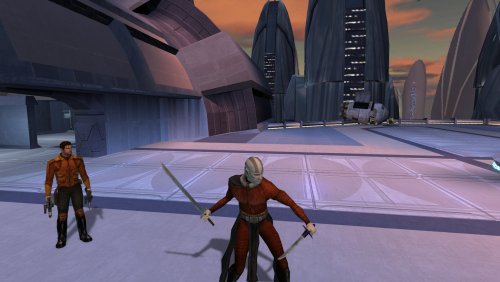
Darth Malak Animation Fix
By Alvar007
Darth Malak Animation Fix
By Alvar007
-------------------------------------------------------------------------
DESCRIPTION: This mod adds all the humanoid animations to Darth Malak that were missing on his model while keeping his original ones so that he can have all the animations that the common NPCs have. It also adds him to the selectable character menu with a custom portrait so that you can play with him from the beginning without using KSE.
Alternatively, you can use a disguise robe item that I have included to play with him or not whenever you want in the game.
INSTALLATION: Just run the .exe that comes with this download and select the game's installation main folder (NOT override).
To use the custom item you need to enable cheats and type "giveitem darthmalak_armor" without quotes in the console.
COMPATIBILITY: This mod should be compatible with any mod that doesn't change Darth Malak's model and/or appearance in any way.
BUGS: Before entering the character creation screen, make sure that Darth Malak is NOT in the preview of the class you want, otherwise the game will crash when you select him. Just reload the game until he is not there and then you can select him changing to his head (it will appear invisible given the fact that he is a full body model but he will show up fine in game).
-------------------------------------------------------------------------
THIS MODIFICATION IS PROVIDED AS-IS AND IS NOT SUPPORTED BY BIOWARE/OBSIDIAN ENTERTAINMENT, LUCASARTS, DISNEY OR ANY LICENSERS/SPONSORS OF THE MENTIONED COMPANIES. USE OF THIS FILE IS AT YOUR OWN RISK AND THE ABOVE MENTIONED COMPANIES OR THE AUTHOR IS NOT RESPONSIBLE FOR ANY DAMAGE CAUSED TO YOUR COMPUTER FOR THE USAGE OF THIS FILE.
628 downloads
-
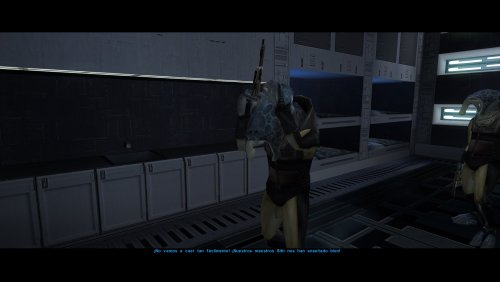
Custom Selkath Animation
By Alvar007
Custom Selkath Animation
By Alvar007
This is my first mod release, so I hope I'm doing everything all right.
-------------------------------------------------------------------------
DESCRIPTION: This mod adds a new entirely custom animation made by me to the TALK_FORCEFUL unused slot of the Selkath model. This will allow the Selkath to play an "angry talk" animation whenever it's called in their dialogues which is a bunch of times.
INSTALLATION: Just run the .exe that comes with this download and select the game's installation main folder (NOT override).
COMPATIBILITY: This mod should be compatible with any mod that doesn't alter the Selkath model and/or appearance in any way.
-------------------------------------------------------------------------
THIS MODIFICATION IS PROVIDED AS-IS AND IS NOT SUPPORTED BY BIOWARE/OBSIDIAN ENTERTAINMENT, LUCASARTS, DISNEY OR ANY LICENSERS/SPONSORS OF THE MENTIONED COMPANIES. USE OF THIS FILE IS AT YOUR OWN RISK AND THE ABOVE MENTIONED COMPANIES OR THE AUTHOR IS NOT RESPONSIBLE FOR ANY DAMAGE CAUSED TO YOUR COMPUTER FOR THE USAGE OF THIS FILE.
26,132 downloads
-

blade color Viridian Mantle of the Force & Cyan Heart of the Guardian (Optional Silver Heart of the Guardian)
By SovereignXII
A simple mod I've wanted to do for a while but just learned how to. Replaces the Mantle of the Force's colour with KOTOR 2's Viridian and swaps the Heart of the Guardian's colour for the Mantle/Cyan. Simply place the files into the override.
758 downloads
(1 review)0 comments
Updated
-

Ebon Hawk Camera Fix
By Mrtops
Ebon Hawk Camera Fix
by Mrtops
v1.0.1
About:
This mod replaces the camera placement in the Ebon Hawk, which is absurdly close to the character, with the default camera position used in the rest of the game.
Compatibility:
This mod should be compatible with any mod that does not change the camera placement in the Ebon Hawk.
Permissions:
You may use or redistribute this mod in any way you please, as long as credit is given.
Credits:
Fred Tetra for KotOR Tool
Stoffe / Fair Strides for TSLPatcher
xoreos for xoreos-tools
License:
THIS MODIFICATION IS PROVIDED AS-IS AND IS NOT SUPPORTED BY BIOWARE/OBSIDIAN ENTERTAINMENT, ASPYR, LUCASARTS, DISNEY OR ANY LICENSEES/SPONSORS OF THE MENTIONED COMPANIES. USE OF THIS MODIFICATION IS AT YOUR OWN RISK AND NEITHER THE ABOVE MENTIONED COMPANIES NOR THE AUTHORS ARE RESPONSIBLE FOR ANY DAMAGE CAUSED TO YOUR COMPUTER BY THE USAGE OF THIS MODIFICATION.
685 downloads
(1 review)0 comments
Updated
-

HD (16:9) Loadscreens and UI Fixes
By KnifeMaster
These are a set of HD loadscreens for the first Knights of the Old Republic game, made from JackInTheBox's high quality UI assets. I've also fixed a few miscellaneous problems regarding symmetry and alignment with Jack's assets, but I haven't made any unnecessary stylistic changes.
You must install the following mods BEFORE mine:
A widescreen patch, preferably UniWS
ndix UR's "KotOR High Resolution Menus"
Jack's "HD MENUS AND UI Assets"
Enjoy, and please do report any issues you find.
5,151 downloads
(2 reviews)0 comments
Updated
-

JC's Romance Enhancement: Biromantic Bastila for K1
By JCarter426
This mod allows those playing a female character to romance Bastila, an option available only for male player characters in the original release of the game. The female version of the romance will play out just as the male version,
through talking to Bastila as your player gains experience and by choosing certain dialogue options. The romance can also be ended just as the male romance can, by choosing or avoiding certain dialogue options.
Dialogue has been adjusted so that characters will not refer to a female player as a man. Some voiceovers have been spliced to create new lines for female players, while in other cases certain lines or parts of lines were removed.
This mod does not prevent one from pursuing the other romance options normally available to a female player; however, it does affect one dialogue with Bastila and Carth. In the original game, Bastila's path is always picked for male players and Carth's path is always picked for female players. With this mod, the character whose romance has progressed further will e favored instead, based on the player's choices up until that point.
Installation
You must start a new game to experience the full effects of this mod.
Extract files from the downloaded archive. Run INSTALL.exe. Click "Install Mod" and select your game directory. This mod only supports the English language version of the game at this time.
Uninstallation
During installation, TSLPatcher generates a backup folder and a log recording which files were affected.
Restore or delete all all module files affected by this mod. For each module, copy the corresponding .mod file from the backup folder to replace the one in your game's Modules folder if a backup was created, otherwise delete the .mod file from your game's Modules folder. Restore or delete all other files installed by this mod. For each file, check where it was installed, then replace it if a backup was created, otherwise delete it. Compatibility
This mod is compatbile with the KOTOR 1 Community Patch. Install K1CP before this mod.
This mod is compatible with my Pan-Galactic Flirting mod.
This mod is compatible with my Dark Sacrifice mod.
This mod is compatible with Leilukin's Carth Onasi and Male PC Romance mod, but installation order determines which changes will be used. Review the installation options for Leilukin's mod to decide which you would prefer. If you prefer Leilukin's changes, install this mod first. If you prefer this mod's changes, install Leilukin's mod first.
This mod includes bug fixes for Bastila's romance scripts. You should not install another mod to fix these bugs, as that would override this mod's changes that remove the gender checks.
This mod patches the following dialogue files:
k_hbas_dialog.dlg (Bastila's global dialogue) lev40_saul403.dlg unk44_evilbast.dlg k_sta_bastlast.dlg This mod may not be compatible with other mods that edit those dialogues. TSLPatcher is utilized for better compatibility, but conflicts are still possible. This mod must be installed after any mods that replace, rather than patch, these files. This mod will not be compatile with mods which install these files to a different location (e.g. Override instead of the respective module).
This mod creates the following voiceovers:
nglobebast06951_ nglobebast06952_ nglobebast06953_ nglobebast06954_ nm44acevil01901_ nm45aabast01901_ This mod will not be compatible with any mods utilizing those names for WAV or LIP files, unless they are for the same dialogue (e.g. Carth Onasi and Male PC Romance mod).
Credits
KOTOR Tool – Fred Tetra
TSLPatcher – stoffe & Fair Strides
CSLU Toolklit – Center for Spoken Language Understanding
DLGEditor – tk102
ERFEdit – stoffe & Fair Strides
K-GFF – tk102
LipSynchEditor – JdNoa
NWNSSCOMP – Torlack, stoffe, & tk102
Bug fix reconnaissance courtesy Markus Ramikin's Bastila Romance Scriptfix
Global variable reconnaissance with save files courtesy Amandalore the Ultimate
License
This work is licensed under a Creative Commons Attribution-NonCommercial 4.0 International License.
Donations
If you enjoy my mods and would like to show your support in a monetary manner, you may do so via PayPal at https://www.paypal.me/carterunited.
15,537 downloads
-
![More information about "[K1] Temple Main Floor - Missing Lamps Fix"](https://deadlystream.com/downloads/screens/monthly_2019_12/UWTMF_MLF_Cover.thumb.jpg.be1d1dfcd890bc6fdc0e8ad36c5fdc68.jpg)
fix [K1] Temple Main Floor - Missing Lamps Fix
By ebmar
[K1] Temple Main Floor - Missing Lamps Fix
Lights are always nice in a dark places. Though it'd be nicer to know where it came from...
What Happened?
Inside the Temple Main Floor, there are rooms with source of lights that comes from nowhere. I was terrified... thought at first they're missing the GIT reference for the placeables, appears they're not, as they're not placeables. With second thought, perhaps they're missing their render flag? Again, no lamp meshes with the room model as pointed by DarthParametric. Apparently, they are missing their lamps which caused by missing references for the objects. In essence, the lamp is not part of the room model nor a placeable, instead a reference model called by the room's.
What Does This Mod Do?
This mod adds the missing reference for the lamps to four of the rooms inside the Temple Main Floor module. Optionally, it can also readjust the facing point of two Rune Covered Pillars inside one of the room, which I think could improve the aesthetics and immersion that's missing from the original setup.
Here's a before-and-after screenshots of what this mod mainly does -
And the optional that readjust the pillars' facing point -
What Can You Do?
There's always room for improvements; reviews, critiques, comments, suggestions, questions and feedbacks are much appreciated. PM, write them on my feed or leave any on the mod's page as you please. And thank you! for downloading, and using this mod.
What You Should Do?
For best experience with the game itself, I suggest you to have KOTOR 1 Community Patch installed.
Hope you enjoy the mod as much as I do!
Installation: run the installer and choose INSTALL option, then hit the [Install Mod ->] button!
Uninstallation: remove these files from the Override folder -
m44aa_04a.mdl m44aa_04a.mdx m44aa_05a.mdl m44aa_05a.mdx m44aa_15a.mdl m44aa_15a.mdx m44aa_17a.mdl m44aa_17a.mdx Compatibility: will not be compatible with mods that edits and/or replace the relevant models, also mods that possibly changes the module layouts/LYT
The mod can be installed anytime - anywhere as the game's progress, and will have direct effect instantly
It is play-tested with the latest version of KotOR 1 Restoration/K1R and is compatible with it. At the other hand, it was only by far tested with K1:Community Patch/K1CP v1.7, though assets-wise, there's nothing to be conflicted with the 1.8 version
Redistribution: you can redistribute this mod or re-release it on any websites, just don't claim it as your own. Though I'd love to provide direct support to my work, which wouldn't be possible if they're scattered in the Unknown Regions. Be advised then, most likely I will not provide ones if I don't know where it re-hosted.
If you are to re-use an assets to a project you will be releasing, you don't have to ask for permission - but your generous intention is very much welcome. Inside this mod are resources which can be repurposed for your likings in one condition; please include the unmodified-original sources along with the release of the project. I'd love to know what others are up too, particularly if my work are included.
Said and done, give credits to BioWare & LucasArts with the release - as without them this enjoyment would be non-existent. A bit of appreciation to this peasant here is also a very warm welcome, welcome.
Credits:
The Almighty Force which gave me chance to finish the mod BioWare & LucasArts for developing one of the best RPG I've ever played DarthParametric for helpful insights, troubleshooting, and information regarding the model name in the first place, also for past-present knowledge which allows me to create mods and all his outstanding creation that I am a fan of JCarter426 and Inyri Forge for all their awesome work that I look up to - I learned a lot from their mods and been practicing a lot using their method ROTNR for Creating Module Files in KotOR tutorial which opened the gate for me to packaging a custom MOD/module Fred Tetra for the amazing KotOR Tool bead-v for MDLedit and KOTORmax stoffe for the magnificent TSL Patcher and ERFEdit Fair Strides for improving TSL Patcher functionality and the very helpful KotOR Toolset tk102 for K-GFF Notepad++team for Notepad++ All the Tool Makers wasn't mentioned - can't make it without y'all! All the inspiring streamers on DeadlyStream All the inspiring modders either active or inactive DeadlyStream for being a home; a place to hangout, to discuss and hosting my work DeadlyStream staffs for tirelessly improving and maintaining the site Snigaroo/Sniggles for hosting #mod_development on /r/kotor -eb
25,079 downloads
-
JC's Teal Hammerhead for K1
By JCarter426
Summary
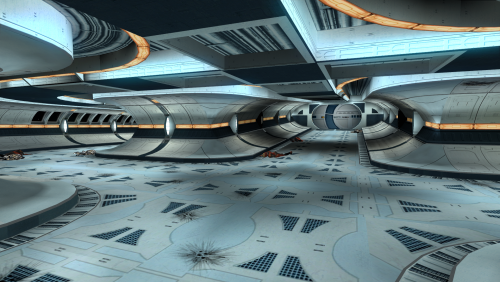
The Harbinger, the Hammerhead-class ship in Star Wars: Knights of the Old Republic II - The Sith Lords, has a distinctively different appearance from that of Republic ships in the first game.
This mod gives the ships in the first game the color scheme of the ships from the second game, changing the red to a more muted teal.
Installation
Copy the files from the mod directory Override to your game's Override folder (if you don't have one, make one).
Uninstallation
Remove the installed files.
Compatibility
This mod is incompatible with other mods that alter the Endar Spire/Hammerhead ship textures.
Credits
KOTOR Tool – Fred Tetra
tga2tpc – ndix UR
Permissions
Mod
JC's Teal Hammerhead for K1
Mod Author
JCarter426
Game
Star Wars: Knights of the Old Republic
Source of Ported Assets
Star Wars: Knights of the Old Republic II - The Sith Lords by Obsidian Entertainment
Attribution Preference
"Teal Hammerhead by JCarter426" or "uses JC's Teal Hammerhead textures" or some other reasonable phrasing.
This mod is released under the following licenses:
Attribution Only License Ported Content License
Attribution Only License (AOL)
* You've got mods! *
The creator of this mod has authorized the contents of this mod for public use. Other modders are free to use and edit materials from this mod and include them in other mods. This license applies to everyone equally and no further explicit permission from the original mod creator is required, provided the terms of this license are followed.
The user must provide clear attribution for the source and creator(s) of these materials, following the specified attribution preference. The file that contains this attribution must be included along with all the other mod contents.
(For example, crediting the original mod creator in your mod's description on a website, but not in any file someone would actually download, would be a violation.) The user must include any additional credits as indicated. This license applies only for the use of these materials in other mods (i.e. a form of software accessed within a video game). This license does not grant the user unlimited power to distribute these contents, edited or unedited, even if attribution is granted. These materials are being offered to encourage the creation of new mods that alter the game experience.
(For example, distributing these materials as a mod resource on another website, or uploading the entirety of the mod as a "new" mod without really changing anything, would not be in the spirit of this license.) Where appropriate, it would be nice to provide a link to the original mod and/ or tag the original mod creator. However, this is not mandated. This is just a polite suggestion.
Ported Content License (PCL)
This mod contains ported assets. The original source of these assets must be attributed in the same manner as the mod creator is.
(For example, "This mod contains assets ported from Star Wars: Knights of the old Republic II - The Sith Lords by Obsidian Entertainment.")
Disclaimers
FOR THE REPUBLIC!!!!!!!
Donations
If you enjoy my mods and would like to show your support in a monetary manner, you may do so via PayPal with this donation link.
For various legal and ethical reasons, this is entirely optional and is not a requirement to downloading or using any of my mods. I also do not create specific mods for hire.
I make mods as a hobby and will most likely do so regardless of any donations or lack thereof, but modding does take up a lot of my time and every bit helps.
395 downloads
(0 reviews)0 comments
Updated
-

Kylo Ren for KOTOR 1
By kira5z
Hey guys this is only my second mod for KOTOR,ive looked into Model importing but it doesnt seem to be very popular in this game.
That being said i still have a lot to learn.
I hope you enjoy what i post.
Please take care of me.
Thank you all.
547 downloads
-
![More information about "[K1] Legends - Elder Droid's Unique VO"](https://deadlystream.com/downloads/screens/monthly_2019_12/Legends_EDUVO_Logo.thumb.jpg.1ee87c9bc71a3550068fa973f7e8a6a4.jpg)
legends [K1] Legends - Elder Droid's Unique VO
By ebmar
This mod replace the default voice-over used by the Elder Droids with the Legends rendition.
# Background #
It was one fine evening when I take a walk inside the Elder's Settlement. I wonder how them droids sounds like, and then... why do they sounded like T3?
So I wanted to experience something else, then I remember back in the Ancient Ruins of Dantooine there was a similar droid there that has something different with it. Apparently it was speaking Rakatan's language that the PC did not recognized. I decided that I had to incorporate that with the droid then, hence the making of this mod.
# About this Mod #
This mod replace the default voice-over used by the Elder Droids with the Legends rendition. The sound was made using an inverted Rakatan's voice-over with added droid-like filters on top of it. By concept it gave an idea that the droids were speaking an epitome of language that the PC did not understand [in Bastila's voice], resulting in addition of changing the spoken line of the droids. It also changes the bubble-bark conversation to a cinematic one.
For a distinctive look at what the mod does, here is the preview -
# Final Remarks #
There's always room for improvements; critiques, comments, suggestions, questions and feedbacks for the next update are very much appreciated. PM, write them on my feed or leave any on the mod's page as you please. And thank you! for downloading, and playing this mod.
Hope you enjoy the mod as much as I do!
Installation: run the installer and choose INSTALL option, then hit the [Install Mod ->] button!
Uninstallation:
Choose the UNINSTALL option in the installation menu Additionally you may want to remove eb_elderdrd_ANGM.wav from the streamwaves folder Compatibility:
For maximum compatibility, install this mod at the latter stage of your mod's build Will not be compatible with any mods that hard-overwrite the Elder Settlement/unk_m42aa module Pay attention to the patcher's warning messages upon installing the mod. If it tells you that it found an instance of k_hdroid1_dialog.dlg and unk42_elddroidXYZ.utc in the Override folder, then there might be a compatibility issue indeed For this mod to be fully effective you should at least load a saved game before entering the Elder Settlement [unk_m42aa] module
The mod is play-tested with the latest version of KotOR 1 Restoration/K1R and is compatible with it. At the other hand, it was only by far tested with K1:Community Patch/K1CP v1.7, though assets-wise, there's nothing to be conflicted with the 1.8 version
Redistribution: do not redistribute this mod or re-release it on any websites. I'd love to provide direct support to my work, which wouldn't be possible if they're scattered in the Unknown Regions. If you are to re-use an assets to a project you will be releasing, you don't have to ask for permission - but your generous intention is very much welcome. I'd love to know what others are up too, particularly if my work are included. And then, make sure to give credits to BioWare & LucasArts with the release - as without them the enjoyment would be non-existent. A bit of appreciation to this lil' peasant work here is also a very warm welcome, welcome.
Credits:
The Almighty Force which gave me chance to finish the mod BioWare & LucasArts for developing one of the best RPG I've ever played DarthParametric for past-present knowledge which allows me to create mods and for all his outstanding creation that I am a fan of, also for the WAV header-converter stuff which makes the included custom VO went functional JCarter426 and Inyri Forge for all their awesome work that I look up to - I learned a lot from their mods and been practicing a lot using their method ROTNR for Creating Module Files in KotOR tutorial which opened the gate for me to packaging a custom MOD/module Fred Tetra for the amazing KotOR Tool The Audacity Team for Audacity Chrysocome and John Newbigin for dd stoffe for the magnificent TSL Patcher and Fair Strides for improving its features tk102 for K-GFF and DLGEditor Notepad++team for Notepad++ All the Tool Makers wasn't mentioned - can't make it without y'all! All the inspiring streamers on DeadlyStream All the inspiring modders either active or inactive DeadlyStream for being a home; a place to hangout, to discuss and hosting my work DeadlyStream staffs for tirelessly improving and maintaining the site Snigaroo/Sniggles for hosting #mod_development on Discord > r/kotor -eb
26,550 downloads
(2 reviews)0 comments
Updated
-
Custom Starting Equipment
By Sireyn
Adds unique, upgradeable clothing and improved basic weapons for each class in the starting container on the Endar Spire. Additional items are available based on skill checks. I have attempted to provide flavorful options without undermining early game balance.
Special thanks to DarthParametric for assisting with the scripting.
Class
Soldier : Soldier Armor, Light Repeating Blaster
Scout : Scout Gear, Blaster Carbine, Memory Package
Scoundrel : Scoundrel Flight Jacket, Heavy Blaster Pistol
Skill Checks
New Items
Soldier Armor : Defense 4, Treat Injury 1
[Armor Reinforcement] : Defense +2, (Require Light Armor)
[Mesh Underlay] : Defense +1, Saving Throws: Fortitude +1
Scout Gear : Defense 2, Resist Fire 5/-, Resist Cold 5/-
[Armor Reinforcement] : Defense +2, (Require Light Armor)
[Mesh Underlay] : Defense +1, Saving Throws: Reflex +1
Scoundrel Flight Jacket : Defense 1, Persuade +1
[Armor Reinforcement] : Defense +2
[Mesh Underlay] : Computer Use +1, Security +1
Demolition Gauntlets : Demolition +1, Saving Throws: Fortitude +1
Install
Extract contents of the mod's override folder into the game's override folder. "...\swkotor\override"
1,161 downloads
-

k1 Default Lightsaber Replacement
By InSidious
[K1] Default Lightsaber Replacement 1.2
Introduction
This mod replaces the default lightsaber hilt in the game.
Installation
Drop the contents of this archive into your override folder.
Uninstallation
Take them out again.
Known bugs
None.
Compatibility
This mod will, if installed, overwrite any other mod which replaces the default single lightsaber hilts.
Contact me
In case of bugs, queries, feedback, or comments,
I can be contacted at www.deadlystream.com.
Disclaimer
LucasArts and Bioware. own all the copyrights etc. It all belongs to them.
Permissions
This mod, or any derivate or part thereof, may not be uploaded to any website, ftp, server,
or as part of a torrent, except with the expressed permission of the author.
Thanks
Particular thanks to everyone who provided feedback and comments on this model during construction,
and who helped out with getting the mod to this stage, most particularly Fair Strides and VarsityPuppet.
1,306 downloads
-
File Reviews
-

Caim 0
Whoever made this mod is a godsend! It fixes almost everything that needs fixing for modern systems in 2026 for KOTOR 1, including issues for AMD users like me. It has saved me so many nerve cells. So now I can finally play with Soft Shadows and Frame Buffer Effects, except the Grass — sometimes for grass to work properly you need to restart your game. In my opinion this is the best KOTOR mod right now, no exaggeration.
Edited by Caim -
I'm just happy that I can finally play the game on PC with real, native, proper controller support. The fact that TSL received that massive update which added native controller support but the original KOTOR was left with mouse/keyboard years later (which was ridiculous) is finally resolved with this.
-

Stuck 0
-
I'm very eager to give it a try but I just can't. I installed KMRP, used KPM patcher with only 2 patches - KMRP and High FPS Fixes.
Then I run your install.cmd and all I get is this:
INSTALL FAILED: Executable compatibility check failed at 47 required hook site(s).
0x004F1A3E: expected [B8 14 00 00 00], found [6A 85 05 C2 9E]
0x004F1A43: expected [0F B6 D0 3B 4C 96 38], found [CE EB 19 56 C1 7C 49]
0x0054EC5B: expected [C7 02 14 00 00 00], found [34 50 71 50 DE 29]
0x00552C9A: expected [8D 7E 38 B9 15 00 00 00 F3 AB], found [66 3F 2E 33 9D 15 28 89 29 00]
0x00552F8A: expected [8D 6E 38], found [DA 7B 54]
0x00552FD6: expected [83 FF 14], found [A7 5A 68]
0x005A54A0: expected [0F B6 F0 3B 54 B1 38], found [F6 AB 63 77 5A C7 1D]
0x005A54AA: expected [83 F8 14], found [75 93 66]
...and 39 more mismatched hook site(s).
Another executable patch or a different KOTOR binary layout is using code this mod needs. No changes were made.Press any key to continue . . .
Edited by WarlordThorvald
I had bunch of graphic mods and old widescreen fix installed before, but deleted it and restored original exe - no luck.
Then I just deleted my game and re-downloaded it (steam version), installed KMRP and patched clean version of the game with KPM - and result is the same.
I am at loss here. -
Does exactly was it says it does!
An observation: Having this active requires it to be installed dead last after EVERYTHING ELSE. If, say, I were to add"High FPS Fixes" or other patches through KotorPatchManager with "...Progression" already active, I lose the ability to back out of the level-up screen(effectively restoring the vanilla game's constraints where it would not let you exit the level-up UI to return to normal gameplay at all until you leveled up.)
This I confirmed via live testing/gameplay last night: I had to uninstall and re-install "....progression" after adding the KPM patches so it effectively sits at the very END of the installation order. This fixed the issue and I could back out of the level-up screen freely.
FYI I'm using KMRP 1.5.1 and KPM in my setup.
-
 1
1
-
-

Ellhaim 0
This mod sorta works. Except that the model is very transparent. Especially on the metal/darker details of her outfit/model. Kind of unusable imo. Just makes me feel like I'm playing the ghost of Talon.
-
Fantastic work!!! Quick question to any who read this: I'm a total rookie with modding, and in my most recent playthrough, when the camera executed the flyby when the HK-50s shot you down over the polar region(when they start speaking "Egotistical Boast") I saw the mod author's logo. Again, since I;m new to this, I likely made a mistake when I added them, so how can I correct it so I don't see the logo?
-

lorddli 2
does what it says on the tin and i like it
-
1
-
-
Awesome mod! Some necessary powers filling out the pool, especially with Revitalize.
I don't know if this is cool, if not I will absolutely delete it... But I had AI upscale your icons so that they would work properly at high resolution (the images look basically identical, they're just 64x64 instead of 32x32). -
Nice job !
ou plutôt dans ce cas Beau travail ! -
This Mod fixes all of the problems that I have when I got back to play this game on newer systems.
The dev behind this mod was quick to answer any questions I had since I was a Linux user of this mod.
Great quality mod, that fixes issues I was having in Ultrawide such as the dialogue windows not working on the first step of a new conversation (Typical on Ultrawide) as well as improving general stability of the game.
Would recommend for anyone playing the game.
-
1
-
-
Ok, I hope this helps perfect it because it's a good idea on paper. I'll keep it as "matter-of-factly" as possible.
My experience with this mod: My setup already had TSLRCM+M478PE+PartySwap as a foundation already running. I installed this mod, created a fresh, new character to test it out, made it to the Telos Citadel Station, and after the "house arrest" sequence wrapped up and I was free to move, the quest triggers, unknown to me, were compromised. For example: The ambush on Dock Module 126? The 5 thugs that attack you spawned, I fought them and beat them, but the dialogue script failed to recognize the instance, leaving the TSF NPC in an infinite "text box loop" saying "don't let them hurt the droid; the instance didn't close properly and, naturally, the journal quest didn't update. I reloaded a save file just prior to that beat and it played out correctly a second time. When I showed the "modified holdout blaster" to Lt. Grenn to pick up the "suspicious goods" quest? that dialogue with Grenn played normally, however the journal didn't log the "suspicious goods" quest at all. So, the masked thug that's supposed to ambush you in the Entertainment Module immediately after that dialogue didn't spawn. Another tell-tale sign that something was wrong is that the Dobo Brothers' Merchant Room was completely inaccessible: The door would not open, full stop. Also, one of the doors to the cantina turned into a "one-way" exit. You could exit out of the cantina through it but not go back in. The other door worked fine. And for some reason, some NPCs appeared with no head whatsoever, (though I'm uncertain of this last bit is related.) To solve these problems on my setup, I purged my game's Override, performed a Steam Integrity Check, and re-installed all my mods in the proper order, except this one. I hope this helps you perfect it.
EDIT: To be clear, I don't use the Steam Workshop for anything whatsoever; I only use Steam to launch the game. All my mods were installed through their respective standalone TSLPatcher executable.
Edited by jmorenobothwell -
-
lorddli 2
Perfect companion mod to go along with KMRP
-
You are the pillar of this community
-





-
File Comments
-

By vault13deathclaw · Posted
I would love to have that, but I honestly have no idea how it works. I would certainly welcome any help for that. -

By The_Chaser_One · Posted
Are you planning a Holopatcher installation when you're done with it? Would be easier for people, rather than have to manually do everything. -
 For anyone running HR Menus at 1440p or 4K: the feat and Force power tree icons on the level-up screen stay at their 640x480 size, because the engine hardcodes the tree row height in swkotor.exe (it ignores the .gui PROTOITEM), so no .gui edit can fix it. I made a small exe patch that scales them by the same menu height / 480 factor HR Menus uses for everything else: https://deadlystream.com/files/file/3161-k1-high-res-feat-power-trees/ Install it after UniWS + HR Menus. Thanks for HR
 -

By paramano01 · Posted
Compatibility modes just give me a black screen and i can't even exit the game properly. -
 In my case cutscenes stopped minimizing after I set compatibility mode to Win XP Service Pack 2.
-