

Mods
1,060 files
-

Content Pack: Feats and Powers (K1 ver)
By TamerBill
Content Pack: Feats And Powers (K1 ver)
Version 1.7
Installation:
-Run the included TSLPatcher.exe and select your installation directory (the folder containing swkotor.exe, NOT the Override).
-You can use this version on a non-English copy, but the descriptions will still be in English.
Details:
-Content Pack: Feats and Powers is a collection of feats and powers for KotOR.
-It contains 28 new feats, in 17 separate feat chains.
-In addition, it contains 5 new force powers, in 2 separate power chains.
-Starting a new game is not required.
-Full details are included in the TSL Patcher writeup.
History:
-v1.00: Initial release
-v1.10: Added Dark Rage, Sadism and Sweet Release.
-v1.20: Added Constancy, Respite and Anti-Shield Protocol
-v1.30: Added Auto-Shield Protocol, Applied Knowledge and Last Stand
-v1.40: Added Resonance, Deep Resonance and Master Resonance. Also completely reworked Payday.
-v1.50: Added Mysterious Benefactor
-v1.60: Added Whirling Blade Combo, Thunderous Blade Combo and Heartstopper Combo
-v1.70: Added Rationing Technique and Intimidation Factor
Bug Fixes:
-v1.01: Fixed a bug preventing Shutdown and Overload from targeting blaster rifles.
-v1.02: Stopped T3 from being able to take the Payday and Killer Instinct feats.
-v1.11: Fixed a bug preventing Sith Lords from taking dark-side feats.
-v1.31: Fixed a bug preventing Auto-Shield Protocol from triggering.
-v1.32: Additional bug fixes.
-v1.61: Fixed the interaction between Overload and combo feats. Fixed some lingering bugs from the Steam conversion. Improved compatibility.
-v1.62: Refactored to improve compatibility.
-v1.63: Fixed a bug preventing Payday from triggering.
-v1.64: Restored the icons for Flashbang, Extra Kick and Shrapnel Burst.
-v1.65: Corrected some porting issues.
-v1.66: Improved compatibility.
-v1.67: Fixed a bug preventing the use of medpacs directly from the inventory screen. Fixed some small typos.
-v1.68: Fixed some vanilla-related bugs that made ability scores more effective than intended.
Permissions:
-Don't redistribute the mod without permission. I'm pretty reasonable.
Credits:
-By TamerBill
2,738 downloads
-

Effixian's PFHH01 from K2 to K1
By Effix
************************
Knights of the Old Republic
************************
TITLE: Effixian's PFHH01 from K2 to K1
AUTHOR: Effix
CONTACT: PM me on the forums or find me on Steam
*************
INSTALLATION
*************
Run the file "TSLPatcher - Install Effixian's PFHH01 from K2 to K1.exe".
************
DESCRIPTION
************
This mod adds a playable character PFHH01 from KotOR 2. As requested by Canthre.
*****
BUGS
*****
None known.
*************
UNINSTALLING
*************
1. Remove the following files from your Override folder:
pfhh01.mdl
pfhh01.mdx
PFHH01.tga
PFHH01d.tga
PFHH01d1.tga
PFHH01d2.tga
PFHH01d3.tga
PO_PFHH01.tga
PO_PFHH01d.tga
PO_PFHH01d1.tga
PO_PFHH01d2.tga
PO_PFHH01d3.tga
2. If you have never installed any mod with the TSL Patcher then you can remove appearance.2da, heads.2da and portraits.2da from the Override folder. Otherwise:
If you haven't installed any head mods after this mod you can get the following files from the mod's backup folder and put them back in your Override folder:
appearance.2da
heads.2da
portraits.2da
Doing this when you did add another head mod would result in the later head(s) no longer being available in the game, yet the associated files (listed at step 1.) would still be in the Override folder.
*******************
DISTRIBUTION NOTES
*******************
You may NOT: Use the material from this mod in your own mod without giving me credit, implying it was your creation.
You might: Use the material from this mod in your own mods if you simply ask me.
********
Thanks to
********
- Stoffe and Fred Tetra for the needed tools and tutorials
- bead-v's MDLEdit
- JCarter426 & Kexikus for sharing their knowledge of converting things with MDLEdit
-------------------
THIS MODIFICATION IS NOT MADE, DISTRIBUTED, OR SUPPORTED BY BIOWARE, OBSIDIAN, OR LUCASARTS ENTERTAINMENT COMPANY LLC. ELEMENTS TM & © LUCASARTS ENTERTAINMENT COMPANY LLC AND/OR ITS LICENSORS.
---------------------------------
My mods are free. If you would like to show your support then you can buy me a coffee at ko-fi.com/effix
367 downloads
(1 review)0 comments
Updated
-

TOR Ports: Pureblood Sith Female Player Head for K1
This mod adds a Pureblood Sith head and underwear model from The Old Republic MMO, ported to K1 as a selectable player head for female characters.
A few notes:
A unique underwear model is included, but because of the different way TOR and KOTOR mate heads to bodies, I had to add a neck stump to the torso to elevate the head to the right height. That makes for a pretty nasty transition at the seam line, but it should mostly only be visible in dialogue. Try not to have too many conversations while naked I guess. By default, the underwear is a sports bra and panties. For those wanting something a little more chaste, there’s an alternative modesty patch that provides a pair of shorts/hot pants instead. After running this installer, simply copy and paste the TPCs from the OPTIONAL folder to your Override folder, overwriting when prompted. Odyssey’s lack of proper specularity, much less the advanced (by comparison) graphical features of TOR, means you should expect that the textures will look pretty flat in KOTOR compared to how the originals look in TOR. KOTOR has a maximum bone limit per mesh of 17. This creates a problem for TOR meshes, as adding the eyelids to the face bone array pushes that to 18. I had to drop 2 bones to make it work. I chose the two nose corner bones, as they seemed the least important. I don't know what effect this may have on various facial animations, but probably nothing significant for mute player characters. Differences between how TOR and KOTOR handle animations mean that some of the bone weights are probably too strong, so expect some bad deformation occasionally. Especially when the game uses stunt animations in certain cutscenes. An example of this is the opening cutscene on the Endar Spire, where the eyelashes and eyebrows get a bit carried away. If you notice anything particularly egregious, post a comment with some notes of the specifics and a screenshot/video and I'll see if it can be mitigated. Dark Side transitions are included, but they are relatively mild. I'm not a big fan of the zombie look. Acknowledgements:
Original models and textures ported from The Old Republic MMO Thanks to @bead-v for KOTORMax and MDLEdit Thanks to @ndix UR for TGA2TPC Thanks to zaramot on the Xentax forums for the TOR GR2 Max import script741 downloads
(1 review)0 comments
Submitted
-

bug fix KOTOR Widescreen Fade Fix
By Doiinko
When fading, a portion of the screen fades out of sync with the rest of the screen while using widescreen resolutions. This is a simple fix to solve that issue.
To use:
1. Download
2. Move the file from the folder that corresponds to your display resolution into your override folder.
55,863 downloads
-

Effixian's PFHA03 from K2 to K1
By Effix
************************
Knights of the Old Republic
************************
TITLE: Effixian's PFHA03 from K2 to K1
AUTHOR: Effix
CONTACT: PM me on the forums or find me on Steam
*************
INSTALLATION
*************
Run the file "TSLPatcher - Install Effixian's PFHA03 from K2 to K1.exe".
************
DESCRIPTION
************
This mod adds the playable character PFHA03 from KotOR 2 to KotOR. As requested by Revha.
*****
BUGS
*****
None known.
*****
COMPATIBILITY
*****
This mod adds a player character labeled as PFHA10, which is not in the vanilla game. This mod is not compatible with mods that might do the same.
*************
UNINSTALLING
*************
1. Remove the following files from your Override folder:
pfha10.mdl
pfha10.mdx
PFHA10.tga
PFHA10d.tga
PFHA10d1.tga
PFHA10d2.tga
PFHA10d3.tga
PO_PFHA10.tga
PO_PFHA10d.tga
PO_PFHA10d1.tga
PO_PFHA10d2.tga
PO_PFHA10d3.tga
2. If you have never installed any mod with the TSL Patcher then you can remove appearance.2da, heads.2da and portraits.2da from the Override folder. Otherwise:
If you haven't installed any head mods after this mod you can get the following files from the mod's backup folder and put them back in your Override folder:
appearance.2da
heads.2da
portraits.2da
Doing this when you did add another head mod would result in the later head(s) no longer being available in the game, yet the associated files (listed at step 1.) would still be in the Override folder.
*******************
DISTRIBUTION NOTES
*******************
You may NOT: Use the material from this mod in your own mod without giving me credit, implying it was your creation.
You might: Use the material from this mod in your own mods if you simply ask me.
********
Thanks to
********
- Stoffe and Fred Tetra for the needed tools and tutorials
- bead-v's MDLEdit
- JCarter426 & Kexikus for sharing their knowledge of converting things with MDLEdit
-------------------
THIS MODIFICATION IS NOT MADE, DISTRIBUTED, OR SUPPORTED BY BIOWARE, OBSIDIAN, OR LUCASARTS ENTERTAINMENT COMPANY LLC. ELEMENTS TM & © LUCASARTS ENTERTAINMENT COMPANY LLC AND/OR ITS LICENSORS.
---------------------------------
My mods are free. If you would like to show your support then you can buy me a coffee at ko-fi.com/effix
283 downloads
(0 reviews)0 comments
Updated
-
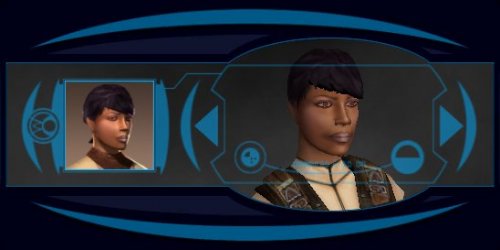
Effixian's PFHB02 from K2 to K1
By Effix
************************
Knights of the Old Republic
************************
TITLE: Effixian's PFHB02 from K2 to K1
AUTHOR: Effix
CONTACT: PM me on the forums or find me on Steam
*************
INSTALLATION
*************
Run the file "TSLPatcher - Install Effixian's PFHB02 from K2 to K1.exe".
************
DESCRIPTION
************
This mod adds a playable character PFHB02 from KotOR 2. As requested by PirateofRohan.
*****
BUGS
*****
None known.
*****
COMPATIBILITY
*****
This mod adds a player character labeled as PFHB10, which is not in the vanilla game. This mod is not compatible with mods that might do the same.
*************
UNINSTALLING
*************
1. Remove the following files from your Override folder:
pfhb10.mdl
pfhb10.mdx
PFHB10.tga
PFHB10.txi
PFHB10d.tga
PFHB10d1.tga
PFHB10d2.tga
PFHB10d3.tga
PO_PFHB10.tga
PO_PFHB10d.tga
PO_PFHB10d1.tga
PO_PFHB10d2.tga
PO_PFHB10d3.tga
2. If you have never installed any mod with the TSL Patcher then you can remove appearance.2da, heads.2da and portraits.2da from the Override folder. Otherwise:
If you haven't installed any head mods after this mod you can get the following files from the mod's backup folder and put them back in your Override folder:
appearance.2da
heads.2da
portraits.2da
Doing this when you did add another head mod would result in the later head(s) no longer being available in the game, yet the associated files (listed at step 1.) would still be in the Override folder.
*******************
DISTRIBUTION NOTES
*******************
You may NOT: Use the material from this mod in your own mod without giving me credit, implying it was your creation.
You might: Use the material from this mod in your own mods if you simply ask me.
********
Thanks to
********
- Stoffe and Fred Tetra for the needed tools and tutorials
- bead-v's MDLEdit
- JCarter426 & Kexikus for sharing their knowledge of converting things with MDLEdit
-------------------
THIS MODIFICATION IS NOT MADE, DISTRIBUTED, OR SUPPORTED BY BIOWARE, OBSIDIAN, OR LUCASARTS ENTERTAINMENT COMPANY LLC. ELEMENTS TM & © LUCASARTS ENTERTAINMENT COMPANY LLC AND/OR ITS LICENSORS.
---------------------------------
My mods are free. If you would like to show your support then you can buy me a coffee at ko-fi.com/effix
188 downloads
(0 reviews)0 comments
Updated
-

Czerka Armor and Appearance Fix
By garm343
Czerka Corp is one of the biggest business entities in the galaxy, employing billions of sentients on who knows how many planets. Yet in the vanilla version of K1, the developers made some weird (to my mind) decisions on how to depict the employees of this vast corporate empire. JC's Korriban: Back in Black mod recognized and corrected the odd decision the developers made to have Czerka employees wearing Sith military uniforms, but this weirdness regarding Czerka is not just limited to Korriban. On Tatooine, there are personnel identified as Czerka employees who are dressed as commoners. On both Tatooine and Kashyyyk there are Czerka guards patrolling their areas unarmed. It could be argued that these might be local contracted labor who therefore don't get uniforms, but I don't really picture this for security personnel, who serve as the only type of law enforcement in places like Anchorhead, or for the crews of the sandcrawlers, who operate specialized equipment that was imported to the planet. On Kashyyyk, a particularly dangerous planet, you would expect to have every security person armed and wearing armor to protect them from the wildlife and to deal with potential rebellion by the people they are enslaving. That's not to say there's absolutely no place for independent contractors, but I think those characters would be mostly people operating small businesses under license, like the bartenders in Dreshdae and Anchorhead, the weapons dealer in Dreshdae, or the Ithorians running the hunting club or the droid shop in Anchorhead. I also didn't like that only human and Twi'lek employees got uniforms, especially when the Ithorian on Kashyyyk held what seemed to be a very important position there. This mod seeks to address these issues by appropriately clothing all Czerka personnel and providing armor for those employees who should have it.
Version: 1.0 completed 10/17/20
Description: This mod makes several changes to the appearances and capabilities of characters employed by Czerka Corp:
1. All human and Twi'lek non-paramilitary Czerka personnel on every planet where Czerka operates wear Czerka uniforms. Czerka employees on Korriban wear standard Czerka uniforms instead of Sith military uniforms. The Czerka miners on Tatooine and Mission's brother Griff also wear Czerka uniforms.
2. The Rodians Greeta and Fodo and the Ithorian Janos wear varients of the Czerka uniform that are fitted for their respective species.
3. All Czerka personnel working in the paramilitary departments of the company such as security, slaving or hunting are appropriately armed for their jobs and also wear custom Czerka armor which displays an employee's rank by the number of stat bars on the chest (for men) or sleeves (for women). There are six ranks (loosely based on police ranks) in all. Rank determines the type of armor worn by the employee:
Stat Bars Rank Armor
0 Guard Czerka Light Armor
1 Constable Czerka Light Armor
2 Officer Czerka Mod I Armor
3 Sergeant Czerka Mod II Armor
4 Lieutenant Czerka Mod III Armor
Special Captain or higher Czerka Medium Armor
This armor can be obtained in game and worn by PCs. It comes in five varieties:
---------------------------------
Czerka Light Armor
Base Class: 4
Note: Basically just a standard combat suit bearing the Czerka colors and logo. No special features.
---------------------------------
Czerka Mod I Armor
Base Class: 4, Upgradable
Armor Reinforcement: +1 Defense Bonus
Mesh Underlay: Resist 5/- vs. Energy
---------------------------------
Czerka Mod II Armor
Base Class: 4, Upgradable
Armor Reinforcement: +2 Defense Bonus
Resist 10/- vs. Slashing
Mesh Underlay: Resist 10/- vs. Energy
Resist 5/- vs. Fire
----------------------------------
Czerka Mod III Armor
Base Class 4, Upgradable
Armor Reinforcement: +3 Defense Bonus
Resist 10/- vs. Slashing
Resist 10/- vs. Piercing
Mesh Underlay: Resist 15/- vs. Energy
Resist 10/- vs. Fire
-----------------------------------
Czerka Medium Armor
Base Class: 6, Upgradable
Attribute Bonus: +1 Dexterity
Armor Reinforcement: +2 Defense Bonus
Mesh Underlay: Resist 20/- vs. Universal
For everyone concerned that this mod will cause the all-green Czerka commander's uniform to disappear from the game (since only Captain Dehno and Commander Dern wear it in the original game), don't worry. That uniform has been reassigned to non-paramilitary personnel who work in supervisory positions like the mining team leader on Tatooine, the guy who manages the Czerka general store on Korriban, or Carth's friend Jordo who is apparently a cargo ship's captain.
Installation: Double-click on the installer icon and when prompted direct it to your game folder (“swkotor”, in most cases). After selecting the folder, the mod will install automatically.
Uninstallation: Delete the files in your Override folder that have the same names as the files found in the mod’s tslpatchdata folder. Replace the .2da files in the Override folder with the ones from the mod’s backup folder if you have previously-installed mods you want to keep that altered these .2da files.
Compatibility: This mod is compatible with any other mod that does not share the same .utc, .uti, .utp and .tga, file names as those found in this mod’s tslpatchdata folder. If any such files are present in your Override folder, this mod will not install properly. There may be incompatibilities of this mod's Korriban .utc files with JC's Korriban: Back in Black mod, but I am not certain, since JC's mod installs content at the module level and I do not know if that mod adds files into the Override folder or not. That's a level of modding I haven't yet learned.
Note on Screenshots Displayed for this Mod: This mod does not reskin weapons, it only gives weapons to personnel who should have them equipped. The blasters featured in the screenshots for this mod are not mine, but are from Sithspecter's excellent High Quality Blasters v 1.1 mod, which I have installed in my version of K1.
Also, the Screenshots folder that comes with the download includes some bonus content for your amusement. Enjoy!
Acknowledgements: This mod was made using the following tools:
TSL Patcher v. 1.2.10b1 by stoffe, updated by Fair Strides
ChangeEdit v. 1.0.5b1 by stoffe, updated by Fair Strides
KOTOR Tool v. 1.0.2210.16738 by Fred Tetra
GIMP v. 2.10.6
Many thanks to the authors and developers of these programs!
Thanks also to deadlystream.com, BioWare and LucasArts.
Note: Install this mod at your own risk. Neither the author of this mod, nor the companies and developers listed above assume any responsibility for any damage to the user’s computer. This mod is not supported by either BioWare or LucasArts.
548 downloads
-
![More information about "[K1] Revans Robes in Ebon Hawk hidden compartment."](https://deadlystream.com/downloads/screens/monthly_2020_10/20201013232354_1.thumb.jpg.497135e3026fea7c7e7ab5f39e117645.jpg)
robe [K1] Revans Robes in Ebon Hawk hidden compartment.
Simply adds Darth Revans robes (g_a_mstrrobe06 aka vanilla version) to the hidden compartment on the Ebon Hawk.
*after making the K2 version of this mod I realized this actually makes no sense at all, I guess davik somehow acquired them, lol*
*I'm going to try to think of a spot where they would make more sense for K1, but I will keep it up just for lol's.*
This mod literally makes ZERO sense, but use it as you see fit
IMPORTANT PLEASE READ!!!
This mod will only work if installed BEFORE you get on the Ebon Hawk for the first time on Taris.
Unfortunately, as far as I am aware, it's not possible to repopulate placeables in areas that have already been loaded.
If anyone knows a fix for this, please let me know.
Compatibility:
K1R Compatibility: I am leaving this as "No" for now since I have not tested it, if someone is willing to try it go ahead, but don't blame me for any issues it may ensue.
However, I would suspect it should be compatible with anything that does not replace ebcont002.utp
Install:
Extract then merge the Override folder with the one in swkotor\Override
OR just drop the single file "ebcont002.utp" into your Override folder
If you don't have an Override folder, just drop the provided "Override" folder wherever your swkotor.exe file is located.
Permissions: Upload, edit or translate this as you please, just give credit to me as the original author
Credits:
FRED TETRA for the amazing "KOTOR TOOL"
TK102 for the amazing "K-GFF"
rece_w for his very helpful "Kotor Modding Tutorials: Editing textures, uti, utc, utm, utp, dlg, Creating merchants (PC/Mac)" on youtube!
Have a good one!
1,001 downloads
(0 reviews)0 comments
Updated
-

KOTOR: PS4 Controller Support - DS4Windows Profile
By MadMax4q2
Noticing a severe lack of controller support for KOTOR using a PS4 dual shock 4 controller I made up this profile to use with DS4Windows controller mapping program.
The controllers touchpad + gyro support for mouse emulation works wonders for this game😉
Features:
DS4Windows Link: HERE
1,749 downloads
- controller
- ps4
- (and 3 more)
-

Manaan Merc Overhaul
By garm343
------------------------------------------------------------------------------------------------
MANAAN MERC OVERHAUL for Star WarsTM - Knights of the Old Republic
by garm343
------------------------------------------------------------------------------------------------
Version: 1.0.0 completed 9/9/20
Description:
This mod makes changes to the appearance of the various mercenaries the player will encounter while on Manaan. It adds armor to the mercenaries who appear unarmored in the vanilla version of the game and changes the armor visible on each merc to one that is appropriate for that merc’s culture. For example, the Mandalorian merc will now wear Mandalorian armor and the Echani mercs will wear Echani armor. This mod also changes the faces and hair of the Echani mercs so that they now look like Echani (white hair, silvery eyes, and pale complexions). The stun baton carried by the Twi’lek merc in the underwater base is replaced with a heavy blaster instead. This mod does not alter the Iridorian merc’s appearance as he is already wearing his armor.
Installation:
Double-click on the installer icon and when prompted direct it to your game folder (“swkotor”, in most cases). After selecting the folder, the mod will install automatically.
Uninstallation:
Delete the files in your Override folder that have the same names as the files found in the mod’s tslpatchdata folder. Replace the .2da files in the Override folder with the ones from the mod’s backup folder if you have previously-installed mods you want to keep that altered these .2da files.
Compatibility:
This mod is compatible with any other mod that does not share the same .utc, .tga, .mdl, and .mdx file names as those found in this mod’s tslpatchdata folder. If any such files are present in your Override folder, this mod will not install properly.
Acknowledgements:
This mod was made using the following tools:
TSL Patcher v. 1.2.10b1
ChangeEdit v. 1.0.5b1
KOTOR Tool v. 1.0.2210.16738
MDLedit v. 1.0.3
GIMP v. 2.10.6
Many thanks to the authors and developers of these programs!
Thanks also to deadlystream.com, BioWare and LucasArts.
Note: Install this mod at your own risk. Neither the author of this mod, nor the companies and developers listed above assume any responsibility for any damage to the user’s computer. This mod is not supported by either BioWare or LucasArts.
1,286 downloads
-
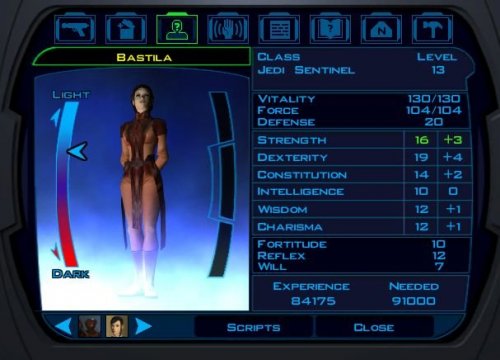
Kotor companion tweaks
By Myrthian
A few character adjustments to better fit the classes and default skillset/gear they have.
Carth: dual-wielding ranged soldier
- Removed: Power Attack
- Added: Rapid Shot
- Removed: Specialization: Blaster Pistol
To ensure he only has 1 lvl 4 feat in Improved Two-Weapon Fighting
- Removed: 1 point in Repair -> 0 Repair
- Added: 2 points in Demolition -> 2 Demolition
A soldier with 1 point each in cross-class skills is just weird
The point in Security makes sense to some degree, as he's the commanding officer on the Endar Spire
Mission: ranged/melee scoundrel hybrid
As every other companion has pretty clear-cut use-cases Mission will therefore become a true hybrid to spice things up, but
even then playing a backstabbing scoundrel is way too awkward in Kotor
- Removed: 2 INT points -> 12 INT
- Removed: 2 DEX points -> 14 DEX
- Added: 4 STR -> 14 STR
- Added 1 WIS -> 12 WIS
Mission is a smart girl
Being a rogue and having Scoundrel's Luck + Sneak Attack has to be offset by not adjusting HP and CON
Zaalbar: face-tank melee
- Removed: Improved Power Attack, as scouts don't get a feat at lvl 4
Bastilla: Jedi Sentinel
- Removed: Proficiency: Blaster Pistol
It always struck me as odd that Kotor Jedis have blaster training
- Removed: 2 DEX -> 16 DEX
- Added: 2 STR -> 14 STR
- Removed: 3 CHA -> 12 CHA
- Added: 2 CON -> 14 CON
As a force/melee hybrid she should actually have the stats for it
Jolee: Jedi Consular
- Removed: Proficiency: Blaster Pistol
- Removed: 2 DEX -> 14 DEX
- Removed: 1 WIS -> 14 WIS
- Removed: 1 CHA -> 14 CHA
Too many overall points by default, and as a consular his focus should be the force
Juhani: Jedi Guardian
- Removed: Proficiency: Blaster Pistol
- Added: Flurry
More choices for melee
- Removed: 2 WIS -> 10 WIS
- Removed: 1 CHA -> 12 CHA
- Removed: 2 INT -> 12 INT
- Added: 3 STR -> 16 STR
A melee build with force on the side
Canderous: yet another ranged soldier
- Removed: Power Attack
- Removed: 2 WIS -> 12
- Removed: 1 STR -> 14 STR
- Addded: 3 DEX -> 15 DEX
HK-47: ranged meatbag assassin
- Added: Rapid Shot
He was 1 feat short for being a lvl 6 combat droid
- Removed: 4 STR -> 12 STR
- Added: 2 DEX -> 16 DEX
- Added: 2 CON -> 12 CON
Compatibility:
- As far as I understand it tweaking character stats without touching anything else should be pretty compatible with everything
- I reckon it should work just fine with K1R, but as I did a test playthrough with the community patch instead of K1R I flagged it as no just to be safe
747 downloads
-

JC's Fashion Line I: Cloaked Hybrid Robes for K1
By JCarter426
Summary
This mod adds cloaks to the Jedi robes worn by the player and many NPCs, combining the body of the KOTOR 1 robes with the cloaks of the KOTOR 2 robes in a hybrid model.
There are three texture options: 100% Brown, Brown-Red-Blue, and Brown-Red-Blue Alternative. The Brown-Red-Blue textures maintain the color scheme of the K1 Jedi Robes. The 100% Brown textures look more like K2 textures, with different (brown) designs for the Jedi robes instead of different colors. The Brown-Red-Blue Alternative uses the K1 color scheme, but gives the red and blue robes dark grey cloaks.
All styles come with or without gloves for your player character and some non-player characters. If you choose a gloveless option, your hands will be bare and match your usual skin tone.
Installation
Automatic Installation (Recommended)
Extract files from the downloaded archive. Run Fashion_I_Cloaked_Hybrid_Robes_K1.exe. Select one of the six install options:
a) 100% Brown
b) 100% Brown (No Gloves)
c) Brown-Red-Blue
d) Brown-Red-Blue (No Gloves)
e) Brown-Red-Blue Alternative
f) Brown-Red-Blue Alternative (No Gloves) Click "Install Mod" and select your game directory (default name SWKotOR). Manual Installation
Extract files from the downloaded archive. If you do not have an override folder, make one in your game directory (default name SWKotOR). Select one of the three folders in tslpatchdata:
h_bbb – 100% Brown
h_brb – Brown-Red-Blue
h_brb-a – Brown-Red-Blue Alternative Copy all files from the selected folder to your override folder except appearance.2da and the .ini and .rtf files. The gloveless options require patching appearance.2da and are not supported by the manual installation.
Uninstallation
Remove the installed files or replace from backups if necessary. Uninstallation
Remove the installed files or replace from backups if necessary. Compatibility
This mod is not compatible with my Cloaked Jedi Robes mod; you have to pick one or the other.
This mod is compatible with my Cloaked Party Robes mod, if you install it after installing this mod.
This mod is likely not compatible with other mods that alter the Jedi robes.
This mod uses my Supermodel Port for K1. This makes it super cripplingly incompatible with any other mods that alter the game's supermodels (the S_Female and S_Male files) unless the other mods utilize my Supermodel Port assets. These edits are necessary to give the player supermodels the bones required for the cloaks to animate.
This mod's supermodels include my Supermodel Fixes for K1. So you don't have to worry about using that, or if these files are overwriting those. Use this mod's files.
These supermodel edits somewhat alter some animations in the game. These adjustments were necessary to prevent the old stuff from clipping with the new stuff. It's essentially what Obsidian did when they added the new bones to the supermodel, but I've reversed the changes a bit to bring the animations closer to the original K1 style.
Some models aren't so happy with the new rig. I've made some hotfixes for such cases where I can, but they won't be compatible with other mods that alter these models. I've instructed TSLPatcher not to overwrite these.
P_JuhaniBB.mdl and P_JuhaniBB.mdx are two such files that will be skipped. If you use the Juhani Catlike Head Mod, I suggest that you use my version because I happened to fix the same thing that mod fixes anyway. You can copy those two files manually from tslpatchdata to Override.
The gloveless options only support appearances from the original game release. If you use a modded player appearance, they'll still wear gloves.
While this mod adds skirt bones to the player supermodels, at this time it does not add the bones or the necessary animations to the cutscene models. So the skirt flaps may appear stiff in scenes that use those.
Credits
KOTOR Tool – Fred Tetra
TSLPatcher – stoffe, Fair Strides
NWMax – Joco
KOTORMax & MDLEdit – bead-v
waifu2x – nagadomi
This mod contains assets ported from Star Wars: Knights of the Old Republic II - The Sith Lords by Obsidian Entertainment.
Permissions
I hereby grant nobody except myself permission to upload some or all of this mod anywhere for any reason. For any reason. I have uploaded a separate mod resource with essentially all of these assets free for anyone who wants to use them. But I want to keep them separate for simplicity's sake, so this release here is strictly a mod.
I have uploaded a separate mod resource with essentially all of these assets free for anyone who wants to use them. But I want to keep them separate for simplicity's sake, so this release here is strictly a mod.
Disclaimers
OBSIDIAN IS THE NEW BLACK. DON'T WEAR BIOWARE AFTER LABOR DAY.
Donations
If you enjoy my mods and would like to show your support in a monetary manner, you may do so via PayPal with this donation link.
For various legal and ethical reasons, this is entirely optional and is not a requirement to downloading or using any of my mods. I also do not create specific mods for hire.
I make mods as a hobby and will most likely do so regardless of any donations or lack thereof, but modding does take up a lot of my time and every bit helps.
3,530 downloads
-

Spare Mission and Zaalbar
By Scarrab
====================
Spare Mission and Zaalbar v 1.2
====================
Created by DarknessSquall (aka Scarrab) 8/31/20
SPOILER WARNING FOR DARK SIDE PLAYTHROUGHS!
.
.
.
.
.
.
====================
Description
====================
This mod adds options for Dark Side ending players to keep Mission (and by extension, Zaalbar) as a party member, or to non-lethally remove Mission from the party while keeping Zaalbar. The default options that end in violence remain in the game.
====================
Long Description
====================
One of the most common complaints I've noticed about the Dark Side ending is that there's no way to avoid killing Mission. And the only way to keep Zaalbar alive is temporary as well, since he turns on you as soon as he realizes what happened. Some people refuse to go dark side for that reason - myself included! The way the game forces you to kill her really doesn't feel good, especially since Zaalbar has sworn his loyalty to you; killing Mission will obviously jeopardize that. Mission says she doesn't believe you'll kill her, and the only way to handle that is to...kill her?
The violence felt unnecessary, and possibly out of character, depending on how you play the game.
That's where this mod comes in. For dark side players at the end of the game, two new options have been added, bringing a grand total of three options for dealing with Mission & Zaalbar:
1) Retain them both as party members
2) Remove Mission as a selectable party member without killing her, but retain Zaalbar
3) The vanilla options to kill Mission & Zaalbar, which still function exactly as they do in the base game
My goal was to write the dialogue and script the events in the most lore-friendly, in-character, way possible, so that the mod felt seamlessly integrated into the game. If I have succeeded, first-time players won't even notice that a mod is running. Mission seemed very opposed to the idea of swearing loyalty you, but she also wasn't going to run away or attack you willingly. I believe that in this situation, where's she's stuck between a rock and a hard place, there are ways to avoid the situation ending in violence.
Also, if anyone is worried about messing up their alignment - you will not gain light side points for choosing any of the options in this mod. Nothing about the situation really feels like a "light side" act, to me, after all.
====================
Installation
====================
Manual install: Open the folder called "Manual Install", then place unk41_mission.dlg, nm10ackand01052_.lip, nm20aagrif05041_.lip, and nm40aamiss08014_.lip in your Override folder, which is located in your Knights of the Old Republic installation directory.
Automatic install: Open the folder called "Automatic Install", then run TSLPatcher.exe and follow the on-screen instructions.
====================
Technical Description
====================
This mod consists of only a single .DLG file edit, but it gets the job done. Three of Mission's voice lines from other parts of the game are reused, so the corrosponding .LIP files are also needed, otherwise her mouth won't move for those lines.
====================
Compatibility
====================
This mod is not compatible with jc2's "Save Mission" mod or Tanesh's "Recruit Mekel" mod
As long as you aren't using a mod that modifies unk41_mission.dlg, there shouldn't be any problems. If you're not sure, check for the presence of unk41_mission.dlg in your Override folder before installing this mod.
====================
Known Issues
====================
If Mission and Zaalbar have already been killed, you can't go back in time and bring them back. Load an earlier save to when they were still alive.
If you choose to keep Mission as a party member, you can still talk to her like normal, and she'll give the same usual responses and act like nothing happened. Chalk it up to her mind being overly optimistic as a coping method, and/or her still being in denial about you having turned to the dark side.
If you left Zaalbar on Kashyyyk and never allowed him to rejoin your party, I believe your only option will be to kill Mission. I haven't personally tested this.
====================
Uninstallation
====================
Automated uninstall: Not supported!
Manual uninstall: Navigate to the Override folder in your KotOR installation directory and delete unk41_mission.dlg, nm10ackand01052_.lip, nm20aagrif05041_.lip, and nm40aamiss08014_.lip.
====================
Version History
====================
v1.2 - 9/3/20 Added checks for Zaalbar's presence, and a fixed a serious bug where you couldn't kill Mission
v1.1 - 9/2/20 Improved the player's dialogue options
v1.0 - 8/31/20 Initial release
====================
Permissions
====================
This mod should only be available for download on NexusMods.com and DeadlyStream.com.
You may only upload this mod to another website for the purpose of preservation if it is no longer available for download on BOTH of those websites, and if you credit me as the original author.
You may not include this mod in any mod compilation without my permission.
You may edit this mod for your own personal use, but you may not upload a modified version of it to the internet.
====================
Thanks & Credits
====================
jc2 - Created the "Save Mission" mod, inspiring me to create v1.0 of my mod. Then, we had a good conversation about more ideas, inspiring me to release the v1.1 update
Michele - Messaged me about the "Recruit Mekel" compatibility issue, which led me to discover a few serious bugs, leading to the release of the v1.2 update
DarthParametric, JCarter426 - Gave me detailed and extremely helpful answers when I asked for information on the Deadly Stream forum
Death a Barbar - and all the other dark side players who requested a mod like this
Fred Tetra - created the KOTOR Tool
TK102 - created the DLGeditor
stoffe - created TSLPatcher
All Star Wars fans - except for fans that believe KOTOR is non-canon now (just kidding...mostly...)
3,162 downloads
-
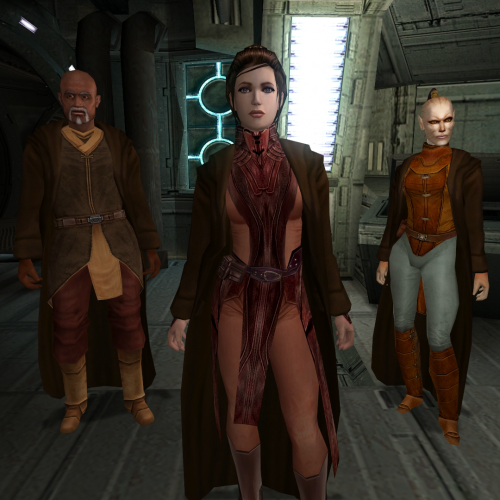
JC's Fashion Line I: Cloaked Party Robes for K1
By JCarter426
Summary
This mod alters the appearance of Jedi robes worn by party members in Star Wars: Knights of the Old Republic, giving them new models based on their basic clothing with added cloaks.
Installation
Note: If you intend to use this mod in conjunction with either my Cloaked Jedi Robes or Cloaked Hybrid Robes, they should be installed first.
Extract files from the downloaded archive. Run Fashion_I_Cloaked_Party_Robes_K1.exe. Select one of the installation options:
a) 100% Brown
b) Brown-Red-Blue Click "Install Mod" and select your game directory (default name SWKOTOR). Uninstallation
Remove the installed files or replace from backups if necessary. Compatibility
This mod uses my Supermodel Port for K1. This makes it super cripplingly incompatible with any other mods that alter the game's supermodels (the S_Female and S_Male files) unless the other mods utilize my Supermodel Port assets. These edits are necessary to give the player supermodels the bones required for the cloaks to animate.
This mod's supermodels include my Supermodel Fixes for K1. So you don't have to worry about using that, or if these files are overwriting those. Use this mod's files.
These supermodel edits somewhat alter some animations in the game. These adjustments were necessary to prevent the old stuff from clipping with the new stuff. It's essentially what Obsidian did when they added the new bones to the supermodel, but I've reversed the changes a bit to bring the animations closer to the original K1 style.
Some models aren't so happy with the new rig. I've made some hotfixes for such cases where I can, but they won't be compatible with other mods that alter these models. I've instructed TSLPatcher not to overwrite these.
P_JuhaniBB.mdl and P_Juhani.mdx are two such files that will be skipped. If you use the Juhani Catlike Head Mod, I suggest that you use my version because I happened to fix the same thing that mod fixes anyway. You can copy those two files manually from tslpatchdata to Override.
While this mod adds skirt bones to the player supermodels, at this time it does not add the bones or the necessary animations to the cutscene models. So the skirt flaps may appear stiff in scenes that use those.
Credits
KOTOR Tool – Fred Tetra
TSLPatcher – stoffe, with updates by Fair Strides
NWMax – Joco
KOTORMax & MDLEdit – bead-v
waifu2x – nagadomi
This mod contains assets ported from Star Wars: Knights of the Old Republic II – The Sith Lords by Obsidian Entertainment.
Permisisons
I hereby grant nobody except myself permission to upload some or all of this mod anywhere for any reason. For any reason.
I have uploaded a separate mod resource with essentially all of these assets free for anyone who wants to use them. But I want to keep them separate for simplicity's sake, so this release here is strictly a mod.
Disclaimers
OBSIDIAN IS THE NEW BLACK. DON'T WEAR BIOWARE AFTER LABOR DAY.
Donations
If you enjoy my mods and would like to show your support in a monetary manner, you may do so via PayPal with this donation link.
For various legal and ethical reasons, this is entirely optional and is not a requirement to downloading or using any of my mods. I also do not create specific mods for hire.
I make mods as a hobby and will most likely do so regardless of any donations or lack thereof, but modding does take up a lot of my time and every bit helps.
3,696 downloads
-

JC's Extra Saber Colors for K1
By JCarter426
Summary
This mod adds five new lightsaber colors to Star Wars: Knights of the Old Republic, including the colors that were introduced in Star Wars: Knights of the Old Republic II – The Sith Lords. The new colors are cyan, orange, pink, silver, and viridian.
The orange and cyan blades are similar to but visually distinct from Heart of the Guardian and Mantle of the Force. In KOTOR 2, the Heart of the Guardian and Mantle of the Force textures are simply reused, but I decided to retain the idea that these are unique crystals, so they are a little different from the standard orange and cyan.
There is one item drop for each new color.
Cyan: in some rubble near Juhani's haunt in the grove on Dantooine.
Orange: on the corpse of Shaela Nur in the Tomb of Naga Sadow on Korriban.
Pink: in the crystal cave on Dantooine.
Silver: carried by an elite Sand People warrior in the desert on Tatooine near the entrance to their territory.
Viridian: on the corpse of poor Nemo inside the ruins on Dantooine.
Additionally, Suvam Tan on Yavin will sell the new crystals. He will have at least one and up to three of each color when he restocks his store. I thought it would be weird if he sold only the new colors, so for extra flavor he will also sell crystals in the original colors (blue, red, green, yellow, and violet).
I have also swapped the placement of the other crystals in the cave around so they match the appearance of the crystal formations from which you receive them better. The blue crystal comes from the crystal formation that looks blue, etc.
The lightsaber blade textures are based on the template I developed for my Lightsaber Visual Effects mod. I suggest that you also use that mod for aesthetic consistency.
There are two versions of the mod: one that uses the original hilt models, and one that uses Hi Poly Tin Cans courtesy @VarsityPuppet.
Installation
Extract files from the downloaded archive. Run Extra_Saber_Colors_K1.exe. Click "Install Mod" and select your game directory (default name SWKOTOR). Optionally, copy the files from the Alternate Viridian folder to Override if you want to use the alternate version that is closer to the original KOTOR 2 viridian texture, replacing the previously installed files. Uninstallation
Remove the installed files or replace from backups if necessary. Compatibility
Ths mod uses TSL Patcher for compatibility, but various subtleties may make it incompatible with other lightsaber mods or mods that affect the same areas.
This mod patches the following:
upcrystals.2da danm14ac danm14ae korr_m39aa liv_m99aa tat_m18aa This mod must be installed after any non-TSL Patcher mods that edit those.
On Tatooine, one instance of g_tuskenmale003 (Elite Warrior) has been replaced by a new creature file so only one of them will drop a silver crystal. The other instance of this creature is unaffected
This mod utilizes the following model variations for lightsaber crystals and hilts:
200 206 207 208 209 This mod is compatible with my Darksaber mod.
Credits
KOTOR Tool – Fred Tetra
TSL Patcher – stoffe, with updates by Fair Strides
ERFEdit – stoffe, with updates by Fair Strides
K-GFF – tk102
NWNSSCOMP – Torlack, stoffe, & tk102
Saber – Andrew Kramer & VideoCopilot.net
tga2tpc – ndix UR
Permissions
I hereby grant nobody except myself permission to upload some or all of this mod anywhere for any reason. For any reason.
If you would like to include any part of this mod in anything, then please contact me for permission.
Disclaimers
IT'S SO DENSE, EVERY SINGLE IMAGE HAS SO MANY THINGS GOING ON...
Donations
If you enjoy my mods and would like to show your support in a monetary manner, you may do so via PayPal with this donation link.
For various legal and ethical reasons, this is entirely optional and is not a requirement to downloading or using any of my mods. I also do not create specific mods for hire.
I make mods as a hobby and will most likely do so regardless of any donations or lack thereof, but modding does take up a lot of my time and every bit helps.
8,667 downloads
-

Black Vulkar Base Engine Lab Bench For Swoop Accelerator
This mod makes a minor alteration to the Engine Lab room of the lower Black Vulkar base level to remove the Swoop Accelerator from the ground and put it on a bench. Said bench is moved from the other side of the room, where normally it impedes clear access to Kandon and his crew if the situation ends in combat. This has the side benefit of (hopefully) reducing pathing issues if the whole party tries to charge into melee combat.
Additionally, several minor aesthetic fixes to the room are included. The cutting tools that normally have a static plasma (?) beam have been given some animation, and a number of pipes that had missing backfaces causing geometry culling issues have had those added. These fixes are also incorporated into the K1 Community Patch as of v1.9, so it is fully compatible with that as long as you install this mod afterwards.
Installation Instructions
The mod requires a GIT edit to reposition the accelerator (i.e. uses TSLPatcher), so simply run the installer.
Known Issues
There may some pathing issues if you try to loot the accelerator from certain angles. I've positioned it close to the front edge of the bench to minimise this from the most likely (direct) approach, but coming from the sides of the bench, especially towards the back wall end, may not work as desired.
Acknowledgements
Thanks to @bead-v for MDLEdit and KOTORMax.27,621 downloads
-
![More information about "[K1] "Fork" Short Lightsabers"](https://deadlystream.com/downloads/screens/monthly_2020_07/di_of_fsls_1.thumb.png.989e3bd79b19da10986f2b40d5c80866.png)
[K1] "Fork" Short Lightsabers
By InSidious
Coauthored with oldflash.
Now available for KotOR I, a mere thirteen years after the original TSL release, thanks to the magic of MDLEdit.
This mod adds a whole set of new short lightsabres - one for each lightsabre colour available in the game,
and their crystals to the game. They can be found by the workbench in the Enclave on Dantooine,
but only after you leave the Enclave for the first time after becoming a Jedi.
The box is spawned when you speak to the droid at the exit from the Enclave and it says
“The Council has decreed you may come and go as you please” for the first time.
For the mod to work, you need to have not been to Dantooine yet, or at least, not undergone Jedi training.
Installation
Just double-click on the "Install "Fork" Short Lightsabres" icon to begin the installation. Do not attempt manual installation - it will not work.
Don't worry about fiddling with the Source Scripts or Screenshots folders - they are not required for the mod to run.
Known Conflicts
As far as I know, this mod shouldn't conflict with many that are out there,
but will conflict with any mod which alters the file dan13_jdroid.dlg.
So far as I am aware, the only mod to alter that file was a robe mod which is no longer available,
so this issue shouldn’t arise.
Known Bugs
None that I know of at present. Again, please let me know if you find any.
480 downloads
-

Workbench Upgrade Screen Camera Tweak for K1
This is a simple edit of the camera model for the workbench upgrade screen that alters some of the camera angles/positions to zoom in a bit closer to certain weapon types, most notably lightsabers, so you can get a better look at the models when running the game at higher resolutions. Mostly intended for those using modded weapons.
Installation Instructions
Simply drop the MDL/MDX in your Override folder.
Known Issues
Requires ndix UR's KOTOR High Resolution Menus mod to work as intended. Only tested at 1080p. Results may vary at other resolutions/aspect ratios. Modded weapons that are excessively large will likely go off-screen, but they probably do that already.
Acknowledgements
Thanks to @bead-v for MDLEdit and KOTORMax. Thanks to @ndix UR for the High Res Menus mod.46,866 downloads
-

Movie-Style Holograms For Twisted Rancor Trio Puzzle
This mod replaces the 2D billboard holograms used in the Twisted Rancor Trio puzzle in the Taris Lower City Apartments with full 3D holograms, coloured blue like in the movies (and TSL). Also fixes some missing sound effects that were intended to play when activating each hologram.
You may also be interested in my Movie-Style Rakatan Holograms and Movie-Style Holograms for Endgame Cutscenes mods.
Changes:
Replaces Bith 2D sprite with four separate animated 3D Bith models, each with a different instrument Replaces singer 2D sprite with animated 3D model (two different anims) with semi-custom texture to look like the original Adds emitter VFX Only switch emitter light on when activated instead of always on Repairs broken activation sound effects Known Issues:
Because meshes do not self-occlude, there are some artefacts when viewing from certain angles. Requires a save before entering the Taris Lower City Apartments (East) for the first time due to GIT changes. Acknowledgements:
Thanks to @bead-v for KOTORMax and MDLEdit Thanks to @ndix UR for TGA2TPC Thanks to @CarthOnasty for the original idea, which I shamelessly stole (I did wait 2 years though)27,755 downloads
-
![More information about "[K1] No more unrealistic visual effects"](https://deadlystream.com/downloads/screens/monthly_2020_06/1.thumb.png.bbbe88739c78c2408fd996e141ce95c1.png)
[K1] No more unrealistic visual effects
By KnifeMaster
This mod was inspired by Shem's Realistic Visual Effects from way back when. For those of you who don't remember, Shem's mod removed speed blur, glowing hands during melee attacks, force wave and sparkly healing animations. I've decided to take things a step farther and remove everything that could be considered unrealistic, such as:
- the brief green glow that occurs after being poisoned
- anything visual associated with friendly powers (valor, force resistance, shield, etc.)
- glowing or smoking hands when using certain powers
- the shield-like stasis effect
- swirling white lines indicating confusion
- the black 'scorch' effect that appears on the ground after some explosions (which is realistic, admittedly, but looks like hell)
- the 'goo' effect that appears after smashing Kinrath eggs (which is also realistic, but, much like the 'scorch' effect, looks horrific in-game)
- animated scopes (power blast, sniper shot, etc.)
Why do something like this? Personally, I can't stand the glowing, sparkling and otherwise silly or ugly visual indicators in KotOR. This sort of thing might be useful for anyone looking to create machinimas... which probably aren't a thing anymore, but oh well. I've also included a couple optional extras: a blank texture that replaces the blue nebula thing - which can be seen during a variety of in-game cutscenes and typically looks pretty bad - and also a reworked camera. The edited camera definitely isn't for everyone, but to me it looks more modern without going totally overboard. I've adjusted it so that there are no differences between the default, combat and Ebon Hawk camera angles.
This probably isn't compatible with other mods that alter 'visualeffects.2da' or 'spells.2da'. I don't use K1R, so I'm not sure whether or not there are any conflicts. It will work with the Community Patch, however, but you must install my mod afterwards. And finally, a huge thanks to Fred Tetra for his KotOR Tool. Enjoy.
1,044 downloads
-

Visas as PC for K1
By Ahsana
This mod allows you to play as Visas in KOTOR 1.
This "incognito" Revan is a master of obscuring herself behind masks and veils to a degree of sophistication unmatched by other Revans, for she utilizes the disguise within the disguise. As Lord Revan, she wears a veil beneath her mask to double-obscure her true face, making her nigh unrecognizable. People who knew her before she forgot she was Darth Revan are able to spot her immediately, but whether this is because of or in spite of the veil, is anyone's guess. Whether this Revan's injuries after Malak's betrayal led to blindness, or whether she simply instinctively knows she must cover her eyes at all times to quicken the recovery of her Force abilities, is also anyone's guess. Or perhaps the veil provides Revan a subconscious means of expressing lost identity and blindness to the past.
----------------
HOW TO INSTALL :
After downloading the zip and extracting...
1. Open the folder with the option you prefer:
UndK2 -----This gives Visas the standard underclothing from K2 (default), as well as the standard dark side black bodysuit underclothing when she falls to the dark side. It also includes her dark side heads and portraits from K2. (There are a few options to look at after installing if you want to furthur customize--for instance if you don't want the black bodysuit when she turns to the dark side. There are also further instructions in that folder.) UndTwiAsnLrg ----- This gives the large body model for the Twilek Assassin from K2 for Visas's underclothes, consistent throughout the game (it doesn't change when she falls to the dark side). It doesn't include dark side heads or portraits (that stays the same throughout the game too). There are screencaps in the UndTwiAsnLrg folder that show what it looks like. UndTwiAsnMed ----- This gives the medium body model for the Twilek Assassin from K2 for Visas's underclothes, consistent throughout the game (it doesn't change when she falls to the dark side). It doesn't include dark side heads or portraits (that stays the same throughout the game too). There are screencaps in the UndTwiAsnLrg folder that show what it looks like. (Note: All options include Visas's normal robes/attire.)
2. Double-click on TSLPatcher.exe within that folder (e.g. for the UndTwiAsnMed option, double-click on TSLPatcher.exe within the UndTwiAsnMed folder) to install. Read and follow the instructions given by the installer (which can be found in the info.rtf file that is within any of the 'tslpatchdata' folders).
Instructions summary:
Select your Star Wars Knights of the Old Republic folder housing your game when TSLPatcher asks you to choose the folder to install into.
TSL Patcher will then instantly put all texture (tga) and model (mdl/mdx) files into your Override folder and insert a new row into each of your appearance.2da, heads.2da and portraits.2da files for Visas. If one or more of these 2da files isn’t in your Override folder already, TSLPatcher will insert the absent file(s) and add the new row for Visas in.
3. Play as Visas.
----------------
BACK UP FILES
If any of the tga or mdl/mdx files being added into your Override happen to have the same name as files already there, the installer will overwrite them. However, they are not lost, as the installer will also create a backup folder inside the folder you ran it (TSLPatcher.exe) from, in which it will store the original copy of the file for you to retrieve.
If you already had appearance.2da, heads.2da and/or portraits.2da in your Override folder, keep the backed up one(s) in case you wish to uninstall Visas as a PC for K1 later. Instructions for how to do that are included when you download this mod.
----------------
Possible "bug":
- This may change the appearance of what people are wearing when you flip through the character menu when starting a new game. It doesn't affect game play, it simply looks strange in the menu.
----------------
E> TY to the developers of KOTOR Tool, TSLPatcher, MDLedit, and all the other tools that make modding KOTOR possible, as well as to DeadlyStream and all the people who answer questions.
768 downloads
(1 review)0 comments
Updated
-

Ep. IX Rey's Lightsaber for K1
By kane001
*Note: If you still have not seen Star Wars: Episode IX – The Rise of Skywalker and are sensitive to spoilers, please watch the movie before installing this mod.
I apologize for some of the low quality images, I use the GOG version of the game without any graphics mods so the in-game screenshots aren't very representative of how the lightsaber actually looks in-game.
1. Description:
This mod adds Rey's lightsaber (and saber crystal) from the end of episode IX to KOTOR.
2. How to Access:
Rey's saber crystal can be purchased from Yuka Laka's droid shop on Tatooine for 10000 credits. From there, place it into any lightsaber's colour crystal slot.
The lightsaber can also be spawned in using the console command: "giveitem sa_reysaber" or "giveitem sa_reycrystal" for the crystal.
3. Installation Instructions (PC):
Download and extract the zip file. Run TSLPatcher.
4. Compatibility:
This mod uses lightsaber slot and lightsaber crystal slot 34. Any other mods that occupy these slots will be incompatible with this mod.
5. Other notes:
This mod was converted from a lightsaber hilt within Plasma's Lightsaber Hilt Collection mod for Star Wars Jedi Knight: Jedi Academy. Plasma has me given me permission to convert his mod to KOTOR and upload it. All credit for the model and texture goes to him, I only converted it to KOTOR and created the KOTOR lightsaber icon. Please check out his original mod at: https://jkhub.org/files/file/3552-lightsaber-hilt-collection/
The icon for Rey's lightsaber crystal was borrowed from Kaidon Jorn's Schematic Lightsaber Mod. He indicated that as long as he was credited for the original work, it could be used in other mods.
This is my first mod, so please let me know if you have any problems or suggestions!
6. Very special thanks to:
The original mod author:
- Plasma
Everyone who helped teach and guide me along the way:
- Stormie97
- DarthParametric
- Rooxon
The creator of the lightsaber crystal icon:
- Kaidon Jorn
The creators of the excellent modding tools I used during the creation of this mod:
- Fred Tetra (Kotor Tool)
- stoffe (TSL Patcher)
- bead-v (KOTORmax, MDLEdit)
- mrwonko (GLM Importer and Exporter)
- Fair Strides (TSL Patcher)
- ndix UR (tga2tpc)
Lastly, a special thank you to anyone and everyone who installs this mod, hope you enjoy it!
7. Redistribution:
This mod may redistributed as long as proper credit is given to myself for the porting process and lightsaber icon, Plasma for the original lightsaber hilt model and texture, as well as Kaidon Jorn for the lightsaber crystal icon.
8. Legal:
This modification is provided as-is and is not supported by BioWare Corp or LucasArts in any capacity. Please use this file at your own risk, neither I nor BioWare or LucasArts are responsible for any damages to your equipment incurred by the usage of this file.
734 downloads
- episode ix
- hilt
- (and 4 more)
-

ROTJ Luke Lightsaber Pack by Evasto
*Notice*: This mod is not my own work and is being uploaded to Deadlystream with the permission of the original mod author. After having reached out to Evasto via email, I can confirm his approval via the following:
"...if you want to upload it to Deadlystream.com you're more than welcome to. I haven't done anything with KOTOR in a very long time so while I have revisited Luke's lightsaber since then, it was for a Fallout 4 mod rather than KOTOR. If I ever go back to KOTOR I might use the models & textures I made for Fallout 4 to update the mod (as well as the ROTJ Vader), in which event I'd upload 'em to the Nexus, but who knows when or if that'll happen."
Information of note: This mod contains files that work in BOTH Kotor 1 and TSL. Each version of the hilt has a folder included with files for installing in TSL. Please see the installation instructions for more information.
The following description is taken from the Readme file included:
DESCRIPTION: "This mod is quite possibly one of the more ambitious mods I have made to date. This hilts in this pack belong to our favorite Jedi, Luke Skywalker, who built a new lightsaber following the loss of his father's at Cloud City. This mod doesn't, however, deliver just one hilt. You get three (four, counting a texture variant) variations of the familiar lightsaber wielded by Luke. All three replace the green lightsaber, and also comes with a new green blade texture for your enjoyment.
Oh, but wait, that's not all! All three of these hilts have a TSL Version, so you can enjoy these hilts in both KOTOR 1 and 2. Also, for the first variant, I've included an alternate texture which makes the usually copper neck black, giving you essentially four lightsabers to play with. Enjoy the mod!"
INSTALLATION INSTRUCTIONS: Place the necessary files into your KOTOR 1 or KOTOR 2 Override folder. Keep in mind, these hilts overwrite the default green hilt so you can only have one at a time. Just choose the one you like and extract the proper files to the correct Override folder. (The TSL compatible versions are filed into their own folder, so if you want to use one for TSL, just take the hilt's TSL Version files and pop them into the KOTOR 2 Override folder.) If you don't have an Override folder, be sure to make one. Also, when extracting the files, make sure "Use Folder Names" is unchecked or else the files will be extracted into a seperate folder."
BUGS: None
PERMISSIONS: This mod may not be distributed on other sites without the express permission of the author (Evasto), and without credit given to the original creator of the mod.
THIS MODIFICATION IS PROVIDED AS-IS AND IS NOT SUPPORTED BY BIOWARE OR LUCASARTS OR ANY LICENSERS/SPONSORS OF THE MENTIONED COMPANIES. USE OF THIS FILE IS AT YOUR OWN RISK AND THE ABOVE MENTIONED COMPANIES OR THE AUTHOR IS NOT RESPONSIBLE FOR ANY DAMAGE CAUSED TO YOUR COMPUTER FOR THE USAGE OF THIS FILE.
I want to give a very special thank you to Evasto for allowing me to help preserve a mod that has been a long time favorite of mine.
678 downloads
- luke
- luke skywalker
- (and 12 more)
-

KOTOR1 HD ICON PACK ver1.0
By JackInTheBox
Pretty much, what is says, the mod contains higher resolution versions for most of the item icons in KOTOR 1. Namely - Armor, Weapons, Headgear, Shields and other Usables, Droid Gear, Belts, Implants and other miscellaneous items. Feel free to modify and reuse. Giving Credit is appreciated. Would have liked to include crystals too, but oh well. Maybe next update. Needless to say this works best with stuff like:
KotOR High Resolution Menus 1.4 by "ndix" -
Cheers and Happy Playing!!!
9,757 downloads
-

Sith Soldiers to Sith Commandos
By Elwood288
Changes sith soldiers so they use the sith commando model from Kotor 2.
Install: Everything to the override folder!
533 downloads
-
File Reviews
-

Caim 0
Whoever made this mod is a godsend! It fixes almost everything that needs fixing for modern systems in 2026 for KOTOR 1, including issues for AMD users like me. It has saved me so many nerve cells. So now I can finally play with Soft Shadows and Frame Buffer Effects, except the Grass — sometimes for grass to work properly you need to restart your game. In my opinion this is the best KOTOR mod right now, no exaggeration.
Edited by Caim -
I'm just happy that I can finally play the game on PC with real, native, proper controller support. The fact that TSL received that massive update which added native controller support but the original KOTOR was left with mouse/keyboard years later (which was ridiculous) is finally resolved with this.
-

Stuck 0
-
I'm very eager to give it a try but I just can't. I installed KMRP, used KPM patcher with only 2 patches - KMRP and High FPS Fixes.
Then I run your install.cmd and all I get is this:
INSTALL FAILED: Executable compatibility check failed at 47 required hook site(s).
0x004F1A3E: expected [B8 14 00 00 00], found [6A 85 05 C2 9E]
0x004F1A43: expected [0F B6 D0 3B 4C 96 38], found [CE EB 19 56 C1 7C 49]
0x0054EC5B: expected [C7 02 14 00 00 00], found [34 50 71 50 DE 29]
0x00552C9A: expected [8D 7E 38 B9 15 00 00 00 F3 AB], found [66 3F 2E 33 9D 15 28 89 29 00]
0x00552F8A: expected [8D 6E 38], found [DA 7B 54]
0x00552FD6: expected [83 FF 14], found [A7 5A 68]
0x005A54A0: expected [0F B6 F0 3B 54 B1 38], found [F6 AB 63 77 5A C7 1D]
0x005A54AA: expected [83 F8 14], found [75 93 66]
...and 39 more mismatched hook site(s).
Another executable patch or a different KOTOR binary layout is using code this mod needs. No changes were made.Press any key to continue . . .
Edited by WarlordThorvald
I had bunch of graphic mods and old widescreen fix installed before, but deleted it and restored original exe - no luck.
Then I just deleted my game and re-downloaded it (steam version), installed KMRP and patched clean version of the game with KPM - and result is the same.
I am at loss here. -
Does exactly was it says it does!
An observation: Having this active requires it to be installed dead last after EVERYTHING ELSE. If, say, I were to add"High FPS Fixes" or other patches through KotorPatchManager with "...Progression" already active, I lose the ability to back out of the level-up screen(effectively restoring the vanilla game's constraints where it would not let you exit the level-up UI to return to normal gameplay at all until you leveled up.)
This I confirmed via live testing/gameplay last night: I had to uninstall and re-install "....progression" after adding the KPM patches so it effectively sits at the very END of the installation order. This fixed the issue and I could back out of the level-up screen freely.
FYI I'm using KMRP 1.5.1 and KPM in my setup.
-
 1
1
-
-

Ellhaim 0
This mod sorta works. Except that the model is very transparent. Especially on the metal/darker details of her outfit/model. Kind of unusable imo. Just makes me feel like I'm playing the ghost of Talon.
-
Fantastic work!!! Quick question to any who read this: I'm a total rookie with modding, and in my most recent playthrough, when the camera executed the flyby when the HK-50s shot you down over the polar region(when they start speaking "Egotistical Boast") I saw the mod author's logo. Again, since I;m new to this, I likely made a mistake when I added them, so how can I correct it so I don't see the logo?
-

lorddli 2
does what it says on the tin and i like it
-
1
-
-
Awesome mod! Some necessary powers filling out the pool, especially with Revitalize.
I don't know if this is cool, if not I will absolutely delete it... But I had AI upscale your icons so that they would work properly at high resolution (the images look basically identical, they're just 64x64 instead of 32x32). -
Nice job !
ou plutôt dans ce cas Beau travail ! -
This Mod fixes all of the problems that I have when I got back to play this game on newer systems.
The dev behind this mod was quick to answer any questions I had since I was a Linux user of this mod.
Great quality mod, that fixes issues I was having in Ultrawide such as the dialogue windows not working on the first step of a new conversation (Typical on Ultrawide) as well as improving general stability of the game.
Would recommend for anyone playing the game.
-
1
-
-
Ok, I hope this helps perfect it because it's a good idea on paper. I'll keep it as "matter-of-factly" as possible.
My experience with this mod: My setup already had TSLRCM+M478PE+PartySwap as a foundation already running. I installed this mod, created a fresh, new character to test it out, made it to the Telos Citadel Station, and after the "house arrest" sequence wrapped up and I was free to move, the quest triggers, unknown to me, were compromised. For example: The ambush on Dock Module 126? The 5 thugs that attack you spawned, I fought them and beat them, but the dialogue script failed to recognize the instance, leaving the TSF NPC in an infinite "text box loop" saying "don't let them hurt the droid; the instance didn't close properly and, naturally, the journal quest didn't update. I reloaded a save file just prior to that beat and it played out correctly a second time. When I showed the "modified holdout blaster" to Lt. Grenn to pick up the "suspicious goods" quest? that dialogue with Grenn played normally, however the journal didn't log the "suspicious goods" quest at all. So, the masked thug that's supposed to ambush you in the Entertainment Module immediately after that dialogue didn't spawn. Another tell-tale sign that something was wrong is that the Dobo Brothers' Merchant Room was completely inaccessible: The door would not open, full stop. Also, one of the doors to the cantina turned into a "one-way" exit. You could exit out of the cantina through it but not go back in. The other door worked fine. And for some reason, some NPCs appeared with no head whatsoever, (though I'm uncertain of this last bit is related.) To solve these problems on my setup, I purged my game's Override, performed a Steam Integrity Check, and re-installed all my mods in the proper order, except this one. I hope this helps you perfect it.
EDIT: To be clear, I don't use the Steam Workshop for anything whatsoever; I only use Steam to launch the game. All my mods were installed through their respective standalone TSLPatcher executable.
Edited by jmorenobothwell -
-
lorddli 2
Perfect companion mod to go along with KMRP
-
You are the pillar of this community
-





-
File Comments
-

By vault13deathclaw · Posted
I would love to have that, but I honestly have no idea how it works. I would certainly welcome any help for that. -

By The_Chaser_One · Posted
Are you planning a Holopatcher installation when you're done with it? Would be easier for people, rather than have to manually do everything. -
 For anyone running HR Menus at 1440p or 4K: the feat and Force power tree icons on the level-up screen stay at their 640x480 size, because the engine hardcodes the tree row height in swkotor.exe (it ignores the .gui PROTOITEM), so no .gui edit can fix it. I made a small exe patch that scales them by the same menu height / 480 factor HR Menus uses for everything else: https://deadlystream.com/files/file/3161-k1-high-res-feat-power-trees/ Install it after UniWS + HR Menus. Thanks for HR
 -

By paramano01 · Posted
Compatibility modes just give me a black screen and i can't even exit the game properly. -
 In my case cutscenes stopped minimizing after I set compatibility mode to Win XP Service Pack 2.
-