

Mods
1,042 files
-

Build-A-Bastila
By TK-664
Players who take in Bastila as their Sith apprentice probably find themselves disappointed that she isn't exactly the same as when she left your party, mechanically speaking. I don't claim to offer the optimal dark Jedi Sentinel builds here, but it's hard beating the atrocious vanilla stat allocation for last place.
Receive Bastila exactly how she first joined you in the Taris apartments or select from a list of available presets. You can switch your chosen build at any point during the game before reaching the Rakatan temple summit. Simply run the patcher again and pick a new spec.
This mod should be installed first, before any mods that affect party member Bastila at the Rakatan temple. If said mods are already installed then they must be reinstalled after this one.
KTool..........................................................Fred Tetra
TSLPatcher.....................................................stoffe & Fair Strides
ERFEdit........................................................stoffe & Fair Strides
K-GFF..........................................................TK102
Thanks to @DarthParametric and @ebmar for helping me how to approach this for maximum user-friendliness.
640 downloads
(1 review)0 comments
Updated
-

Gamorrean Animations Pack
By Alvar007
Gamorrean Animations Pack
By Alvar007
-------------------------------------------------------------------------
DESCRIPTION: This mod adds a bunch of animations to the Gamorreans that were specified in the dialogue files but were missing in the model files.
The added animations are the following:
· Two grenade throwing animations retargeted from the male humanoid supermodel.
· One shield activation animation retargeted from the male humanoid supermodel.
· One inject animation retargeted from the male humanoid supermodel.
· One new custom TALK_FORCEFUL animation used in conversations.
INSTALLATION: Just run the .exe that comes with this download and select the game's installation main folder (NOT override).
COMPATIBILITY: This mod will work as long as you don't have any modifications in your gamorrean model files or their apprearance.2da rows.
BUGS: The combat parry and dodge animations for the player when facing the gamorreans will look as if they were facing a melee humanoid user due to the fact that I had to change their modeltype. Unfortunately there is no way around this.
-------------------------------------------------------------------------
THIS MODIFICATION IS PROVIDED AS-IS AND IS NOT SUPPORTED BY BIOWARE/OBSIDIAN ENTERTAINMENT, LUCASARTS, DISNEY OR ANY LICENSERS/SPONSORS OF THE MENTIONED COMPANIES. USE OF THIS FILE IS AT YOUR OWN RISK AND THE ABOVE MENTIONED COMPANIES OR THE AUTHOR IS NOT RESPONSIBLE FOR ANY DAMAGE CAUSED TO YOUR COMPUTER FOR THE USAGE OF THIS FILE.
560 downloads
(0 reviews)0 comments
Submitted
-
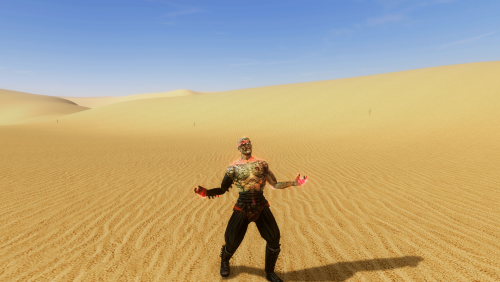
Sion Force Heal K1
By Alvar007
New Force Power: Sion Force Heal
By Alvar007
-------------------------------------------------------------------------
DESCRIPTION: This mod adds a new Force Power to K1 based on Darth Sion's Force Rage Heal we can see in K2 and the end of a combat round. I've also added a custom effect texture for when the Force Power is being casted.
Includes:
· Ported animation.
· Ported icon and custom description.
INSTALLATION: Just run the .exe that comes with this download and select the game's installation main folder (NOT override).
COMPATIBILITY: This mod replaces the lightsaber throw loop animation with the rage one, so as long as you don't have any other mods replacing the S_Male02 supermodel files it should work fine. In case you do, you could merge them together, provided that they are not using the same animation already.
BUGS: The animation can get cancelled if you are running while casting the Force Power.
-------------------------------------------------------------------------
THIS MODIFICATION IS PROVIDED AS-IS AND IS NOT SUPPORTED BY BIOWARE/OBSIDIAN ENTERTAINMENT, LUCASARTS, DISNEY OR ANY LICENSERS/SPONSORS OF THE MENTIONED COMPANIES. USE OF THIS FILE IS AT YOUR OWN RISK AND THE ABOVE MENTIONED COMPANIES OR THE AUTHOR IS NOT RESPONSIBLE FOR ANY DAMAGE CAUSED TO YOUR COMPUTER FOR THE USAGE OF THIS FILE.
462 downloads
(0 reviews)0 comments
Submitted
-
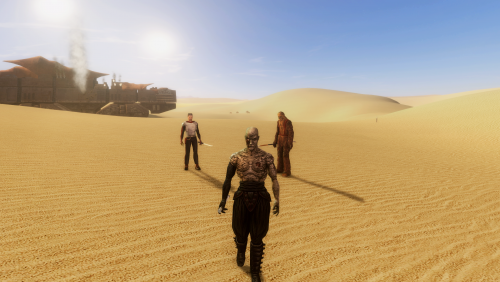
Darth Sion K1 Port
By Alvar007
Darth Sion K1 Port
By Alvar007
-------------------------------------------------------------------------
DESCRIPTION: This mod allows you to play as the Sith Lord Darth Sion from TSL. There is also a custom item robe that you can equip to play as him whenever you want in the game.
INSTALLATION: Just run the .exe that comes with this download and select the game's installation main folder (NOT override).
To use the custom item you need to enable cheats and type "giveitem darthsion_k1" without quotes in the console.
COMPATIBILITY: The item will only work if you didn't modify your appearance.2da before installing this mod. Otherwise you can change the .uti manually to make it work: just open the .uti with K-GFF Editor and change the "subtype" value in the second STRUCT ID inside PropertiesList (the one that has the PropertyName as 59 and not the other one with a value of 1 in that field) from 509 to whatever the row label is in your appearance.2da file. You will have to open it with Kotor Tool after patching it to know this.
BUGS: None that I'm aware of.
-------------------------------------------------------------------------
THIS MODIFICATION IS PROVIDED AS-IS AND IS NOT SUPPORTED BY BIOWARE/OBSIDIAN ENTERTAINMENT, LUCASARTS, DISNEY OR ANY LICENSERS/SPONSORS OF THE MENTIONED COMPANIES. USE OF THIS FILE IS AT YOUR OWN RISK AND THE ABOVE MENTIONED COMPANIES OR THE AUTHOR IS NOT RESPONSIBLE FOR ANY DAMAGE CAUSED TO YOUR COMPUTER FOR THE USAGE OF THIS FILE.
320 downloads
-

Jedi Diversity on the Star Forge
This mod changes the appearances of the Jedi that appear on the Star Forge, since the majority of them are clones. Now every Jedi has a unique appearance, including the addition of some extra alien races with models taken from TOR.
Installation:
Run INSTALL.exe.
It is recommended that you use this mod in conjunction with my Diversified Jedi Captives on the Star Forge mod, since this mod doesn’t alter the appearances of the captives on Deck 4. The use of my Dark Jedi Wear Robes mod is also recommended. It is also highly recommended that you use the K1 Community Patch, which makes a number of small edits to the Star Forge cutscenes (amongst a whole host of other fixes). Just be sure to install that first.
Warning: This mod requires that at least one of the following mods be installed in order to function:
JC's Fashion Line I: Cloaked Jedi Robes for K1
JC's Fashion Line I: Cloaked Hybrid Robes for K1
JC's Fashion Line I: Cloaked Party Robes for K1
This is non-negotiable! JC’s added TSL supermodels from one of those mods must be present for the models in this mod to work.
To Do List:
The two Jedi that Malak toys with when you first encounter him at the end of Deck 3 are being choked, but don't have any SFX for it. I may add in some SFX for those at some point in the future, possibly in conjunction with/derived from a K1CP update.
Credits/Acknowledgements:
Thanks to @JCarter426 for the cloaked robes modder's resource. Thanks to @bead-v for KOTORMax and MDLEdit. Thanks to @ndix UR for TGA2TPC. Thanks to @Darth_Sapiens for the Cubemap Pack modder's resource. Nautolan, Kel Dor, and Rodian head models ported from The Old Republic MMO. Thanks to zaramot on the Xentax forums for the TOR GR2 Max import script.2,627 downloads
-

K1 Party Herding Armband
A simple armband utility mod that I made for my own use when testing K1CP, because I was constantly annoyed at party members lagging behind and preventing me from transitioning to the next module. When activated it jumps the other two party members to the current party leader (i.e. whoever is using the armband). I figured other people might have a use for it as well.
Installation:
Run INSTALL.exe to install the mod. Add dp_ptyhrd_arm to your inventory via console or KSE. Equip to one of your armband inventory slots and activate by selecting it in the utility item slot in the UI (as you would a shield or adrenal).
Credits:
Icon taken from The Old Republic (and sloppily upscaled).
468 downloads
-

Dark Side Ending Cutscene Enhancement
This mod replaces the terrible low poly and sprite-based crowd in the Dark Side ending with a full 3D crowd. Due to engine limitations, these are static in order to preserve the frame rate, but the original only has some slight wobbling of the sprites anyway. The two animated Sith Officers that walk up and salute still remain, as in the original version, although they have been tweaked so that the transition from walking to saluting is a little less janky. Both now also bow in a later shot, as intended. Two doors that were missing have been added (also to the regular Temple Summit module) so Bastila and Revan have an obvious path to the dais besides Force Leap. Some of the level geometry has been consolidated to improve performance, since models with high individual mesh counts seem to tank the frame rate. As of v1.2, all the vanilla lightmaps have been completely replaced with entirely new higher resolution ones, cleaning up artefacts and adding in a lot of missing shadows.
Known Issues / To-Do List:
Currently, the DS credit sequence does not play in fullscreen when movies are enabled due to the requirement for additional exe patching not currently done by any existing widescreen patch. I have provided info about this to ndix UR for incorporation into his high res menu patcher, but there is no ETA on an update for that. In the meantime, for those willing to crack open a hex editor, here are the offsets you need to edit with your own resolution values in the CD/GOG exe:
0x28F9E0 – E0 01 0x28F9E5 – 80 02 0x28F9FA – 80 02 0x28FA04 – E0 01 Credits and Thanks:
@bead-v for MDLEdit and KOTORMax.
@ndix UR for TGA2TPC, TPCView, MDLOps 1.x.
@seedhartha for KOTORBlender for Blender 2.8+, especially for adding the lightmap baking feature.
Thanks to @ebmar for offering his 2¢ on various aspects and for prompting me to dig this one back out of the "on hiatus" pile.
Thanks to @N-DReW25 for suggesting the addition of the doors.
Skybox textures in screenshots/video are from @Kexikus's High Quality Skyboxes II.
17,324 downloads
-
![More information about "[K1] Alignment Fancy Bits"](https://deadlystream.com/downloads/screens/monthly_2022_01/AFBv101_Cover.thumb.jpg.a467bc6304cab93d2471f742029ffc85.jpg)
special effects [K1] Alignment Fancy Bits
By ebmar
This mod adds fancy VFX and SFX alignment change both to the dark side and light side in two available style; TOR and TSL.
-= BACKGROUND =-
Not much of a background -- just my curiosity fueled with @DarthParametric's invaluable insights and assistance trying something never been done [at least to release stage until this mod was attempted] and documented previously to K1 based on its successors; The Sith Lords and The Old Republic.
-= ABOUT THIS MOD =-
TOR style -- adds IN-cutscenes VFX and SFX based on TOR's TSL style -- adds POST-cutscenes VFX and SFX based on TSL's TOR style no SFX -- adds ONLY IN-cutscenes VFX based on TOR's TSL style no SFX -- adds ONLY POST-cutscenes VFX based on TSL's * Preview [v1.0.1] --
To its VFX base it's using ported TSL models and texture [for the dark side ones] provided by DarthParametric. As for the SFX, I had them ported from TSL -- originally comes as mus_s_darkshort and mus_s_lightshort.
-- provided as well user-friendly uninstaller for convenience purpose.
-= KNOWN ISSUES =-
TOR style -- at some potential cases [depending on how the cutscenes were set up] the SFX and/or VFX won't show up if the camera/frame far-off from the Player. In SFX's case -- because Players' presence on-screen's needed as they're the medium for the SFX output TSL style -- as using a spawned placeable's OnHeartbeat [which checks for and] to trigger the VFX and SFX for ONLY every ~3 seconds, they will not fired instantly. Delays are to be expected with this one. Also, as I didn't include ratio check to DS and LS gains sometimes you'll see LS status with DS' VFX/SFX and vice-versa. That often happens if there are multiple alignment sets in one continuous cutscenes There are module-specifics scripts that alter the alignment which is outside the scope of this mod -- at least at this current stage. With that in mind sometimes you won't see the mod's working although there are alignment change's happening
-= FINAL REMARKS =-
There's always room for improvements; reviews, critiques, comments, suggestions, questions and feedbacks are much appreciated. PM me here, write them on my feed or leave any on the mod's page as you please. And thank you! for downloading, and using this mod.
Hope you enjoy the mod as much as I do!
-= INSTALLATION =-
Run the installer, pick only one of the available options then hit the [Install Mod ->] button!
-= UNINSTALLATION =-
Available in the _uninstall folder -- make sure to read the Readme first!
-= COMPATIBILITY =-
Is NOT compatible with mods that share the provision; doing same thing, same assets etc and/or anything that hard-overwrites 2DAs coming from this mod.
-= REDISTRIBUTION =-
I'd love to provide direct support to my work, which wouldn't be possible if they're scattered in the Unknown Regions -- so be considerate to not redistribute this mod or re-release it on any websites.
If you're to use the assets from this mod - please be kindly to ask for permission first -- that way I know what's up, and if it's interesting enough I might offer to be involved, hahah. Or at least we'll talk. Cheers!
-= CREDITS =-
The Almighty Force BioWare, Obsidian Entertainment and LucasArts for Knights of the Old Republic/The Sith Lords/The Old Republic DarthParametric for ported TSL assets, indispensable insights and assistance on this project as well the past-present knowledge, and his creation that I took learn from. He helped me as well with providing some useful information for the uninstaller Sdub for bringing my attention to v1.0.0's game-breaking issue -- hence the mod's update JCarter426 for SithCodec and Odyssey++ -- -- and Inyri Forge for all their awesome work that I look up to. Had learned a lot from their mods and been practicing using their methods Fred Tetra for KotOR Tool bead-v for MDLedit ndix UR for tpcview stoffe for TSL Patcher and Fair Strides for the updates [bundled with K1CP] VarsityPuppet for 2DA Editor Alpha TK102 for K-GFF djh269 for K1 saves [entire playthrough] that's really helpful for testing of this mod Tool Makers wasn't mentioned -- can't make it without y'all! Members of DeadlyStream All active/inactive modders that direct/indirectly influenced me to get into modding DS for being a home -- a place to hangout, to discuss and hosting my work DS staffs for tirelessly improving and maintaining the site Snigaroo/Sniggles for hosting #mod_development which essential during mod's early stage creative-process - eb
788 downloads
-

KOTOR Widescreen Logos
By Publicola
This is intended as a one-stop shop for all widescreen logos available for KOTOR 1. Upscaled vanilla style, Origin logos, and a TOR-style variant made by GOG; they're all here. All logos provided are 1024x1024, large enough for even ultra high-def widescreen setups.
This is *not* a widescreen mod. This is a logo replacer intended for people who are already using a widescreen mod like UniWS.
(Check out the subreddit mod build and follow the directions!)
Instructions:
- Download and unzip the mod.
- Look through the 'screenshots' folder (or check out the images provided above) to compare the different options and pick one for yourself.
- Find your chosen folder, copy the image (logo_sw_02.tga) file within that folder, and paste it to the Override folder in KOTOR 1.
-------------
Credits:
01 K1CP Logo: this was the version seen above -- a higher resolution version of the original KOTOR logo, used by @DarthParametric as the logo for the 'Kotor 1 Community Patch' (K1CP). DarthParametric made a similar 'Vanilla Logo - Upscaled' available in their 'K1 Main Menu Widescreen Fix' mod, as did @Riisis in the 'HD Logo and Bigger Hud' mod. (Here's a screenshot of the first one; here's a screenshot of the second one). I much prefer the version used on the front page of K1CP, as it is a fair bit brighter with a bit more color saturation.
02 Origin Logo: this was the logo used by the Origin release of the game, recolored by them to match the TSL game's logo.
03 Origin Logo - Darker Color: I tried to match the original coloration of the first game, a slightly less 'bleached' look.
04 Origin Logo - Vanilla Stye: I tried to match the original size of the separator element (the part with the 'of the').
05 Origin Logo - Vanilla, Darker: I tried to match both the style and coloration of the original logo with the Origin graphics
06 TOR Logo: this was the logo used by the GOG release of the game. It was made available by DarthParametric as an optional logo replacer for his 'K1 Main Menu Widescreen Fix 1.2'. (Specifically look under 'OPTIONAL' > 'TOR-Style Logo - Centered'). He kindly made the original available via Discord, from which I made this logo image.
3,195 downloads
(1 review)0 comments
Updated
-
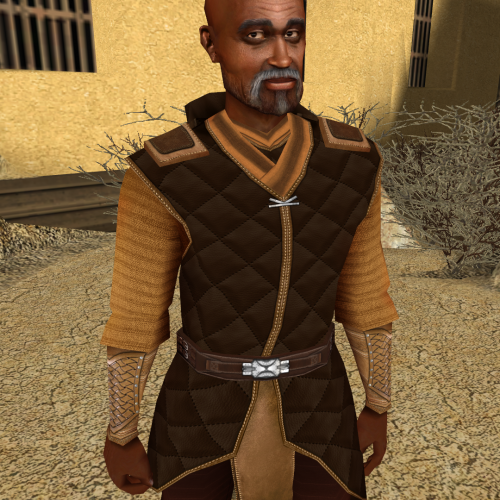
Jolee Bindo HD
By Dark Hope
This mod will replace and update Jolee Bindo texture files.
The head has not been published. It contains materials from another author. I can send it in a personal message.
25,053 downloads
-
No New Level Sound
By olegkuz1997
No New Level Sound
=================================
MOD AUTHOR: Olegkuz1997
FOR WHICH GAMES: For Star Wars Knights of the Old Republic
Description:
----------------
This simple and primitive mod I made because I could not find it anywhere else. Its essence is simple: it removes from the game that nasty and annoying "bell" sound of a new level, which will follow you everywhere until you actually raise your level (when you enter a location, load the game, etc.). Comes in handy for those who intend to save levels on Taris. After all, we have eyes, and we can't help but notice the huge arrow on our character icon. Give your ears a break at last. Useful, eh?
Installation:
----------------
Drop wave file in your game’s Override folder
To Uninstall:
----------------
Take them out again.
Known Bugs:
-----------------
They do not and cannot exist.
Legal Disclaimer:
-------------------
All materials and copyrights belong to LucasArts, Bioware and Obsidian Entertainment Inc.,
I own none of the materials, and I'm not making any money out of this mod. It is to be distributed as-is without alteration, unless by permission of the mod author. This mod is not to be distributed for profit, either. Use it however you like, but if you're going to post it up somewhere, or make a derivative mod, or use it in another mod, please put a line in the readme, mentioning me.
319 downloads
(1 review)0 comments
Submitted
-

I Don't Want to Be a Jedi
Description:
A tiny mod for KotOR 1 that gives the player the option to avoid becoming a Jedi and remain a Soldier, Scout, or Scoundrel for the entire game.
It adds two new replies towards the end of the second conversation with the Jedi Council. As you can see from the screenshot, the new replies start with "[Refuse Jedi Training]", so there should be no confusion as to what they do or which ones they are.
If you choose not to be a Jedi, that conversation leads directly into the "corruption in the grove" quest, skipping over several parts of the Jedi training quest.
Scripts are included to enable cross-classing as a non-Jedi. So, for example, a Scout can cross-class as a Soldier, etc.
The option to cross-class as a non-Jedi is given through subtitles at the end of that second conversation with the Council.
To avoid cross-classing as a non-Jedi, simply choose "No" when asked if you want to cross-class.
Note that there is no second opportunity to cross-class or become a Jedi. If you change your mind later or you misclick, you'll have to reload or use a save editor.
If you're wondering why anyone would want to do this, some people might want to do a "challenge run" without lightsabers or Force powers. Others might want to roleplay a trooper, smuggler, or bounty hunter-type character who refuses to use the Force.
If you're wondering how this might be explained from a story standpoint, considering that the PC is regularly referred to as Padawan or Jedi, my explanation is that the PC is a "nominal Jedi". The PC is Force Sensitive and the Council considers them a (stubborn, uncooperative, foolish, and possibly evil) member of the Jedi Order, but the PC refuses to cultivate their Force abilities (in any obvious way), to wear robes, or to use lightsabers. Other than the Council and a few others who insist on treating the PC as a Jedi because they "should be a Jedi", NPCs are playing along. Or they don't know any better. They encounter a Force Sensitive or someone who seems like a Jedi, and assume that they must be one.
File Index:
dan13_vandar.dlg
dan13_zhar.dlg
A bunch of custom scripts
Installation:
Open the I Don't Want to Be a Jedi 3.0 archive and extract the loose .dlg files and .ncs scripts into your Override folder. Ignore the "Source Scripts" folder.
Uninstallation:
Remove the .dlg files found in the archive from your Override folder. The scripts won't do anything without the .dlg files, so you can leave them or delete them.
Credits:
Fred Tetra for KotOR Tool
Fair Strides for DLG Editor
Dotalink for the cross-classing as a non-Jedi idea
Bioware for making KotOR in the first place
1,023 downloads
-

Lite Alien 01 Restoration
By N-DReW25
A Mod for Star Wars Knights of The Old Republic
Author: N-DReW25
1.0.0 Release Date: 30.09.2021
Installation:
Simply click on the TSLPatcher.exe, select your option, click install and sit back and watch the TSLPatcher do its magic.
The alien is HD by default, the "Different Resolutions" folder contains a backup of the HD texture, a texture which matches the same resolution as every other NPC in the game and a Lite texture which is a low-res texture which matches the other Lite NPCs.
Uninstallation:
Depends on what you've chosen to install.
Copy the files within the generated "backup" folder and place the file inside your modules folder, make sure you overwrite.
Description:
In the game files exists several "Lite" low-poly Alien NPC models, these are the Quarren (N_alien02_low), the Chadra-Fan (N_alien03_low) and the Gran (N_alien05_low).
In the Taris section of the texture files exists a file called "LTS_Crowd01.tga" which most likely contains an early draft of the Duel Arena spectator crowd, on this texture exists two strange aliens, one which looks like a Gand and another which could only be described as a pink punk.
In the model files, I found an unused model called "N_alien01_low" which lacked a texture but looked suspiciously like the pink punk from the crowd texture... this leads me to believe that the pink punk was going to be "N_alien01_low" whereas the Gand would've been "N_alien01_low".
This mod gives "N_alien01_low" a texture and restores the NPC in several places in the game, you can find him on:
* Dantooine as Kni
* Manaan as a Shady Pazaak Dealer
* Tatooine as the guy who gives you the Gizka
I could've added this alien in more places, though I thought seeing the same low-poly Lite NPC over and over again would get old real quick. I might add this guy in more locations based on suggestions and popular demand.
Whilst I am confident no Legends material has named this alien species YET... I have chosen a name for it. it's called a "Pyrath". This name was chosen by me, @N-DReW25, simply because this guy doesn't exist in either Star Wars Legends or Canon and in the words of Effix: it's simply a generic filler alien. I chose the name "Pyrath" as this species would be from the planet "Pyr" which is in same system as Manaan. By choosing this name, there might be a way to create some form of connection between Selkath and the "Pyrath" species.
Known Bugs:
This mod shouldn't have bugs but if there is Just PM me on Deadlystream.
Incompatibilities:
Would be incompatible with any mods which modify dan14_kni.utc, ebo46_jorulkurax.dlg, man26_shady.utc, man26_shady.dlg or tat17_jorul.utc
Report any unknown incompatibilities to me on Deadlystream.com
Permissions:
Do NOT claim credit for this mod and do not use assets from this mod without my permission.
Thanks to:
DarthParametric: For contributing the N_alien01_low's UV texture layout, for which this mod wouldn't be possible without! In addition, also helping me with a 2DA oversight which, again, saved the mod tremendously in the end.
Mephiles550: Contributing to the Forum thread/suggesting that N_alien04_low was a gand.
Jango32: Contributing to the Forum thread/suggesting that N_alien04_low was a gand.
Effix: Contributing to the Forum thread.
Mr Ardvark: For reporting a critical TSLPatcher bug in 1.0.0
Bioware: For such an amazing game
Fred Tetra: For Kotor Tool
Stoffee: For TSLPatcher
Everyone who downloads the mod!
Legal:
THIS MODIFICATION IS NOT SUPPORTED BY BIOWARE/OBSIDIAN ENTERTAINMENT, LUCASARTS, DISNEY OR ANY LICENSERS/SPONSORS OF THE MENTIONED COMPANIES. USE OF THIS FILE IS AT YOUR OWN RISK AND THE ABOVE-MENTIONED COMPANIES OR THE AUTHOR IS NOT RESPONSIBLE FOR ANY DAMAGE CAUSED TO YOUR COMPUTER FOR THE USAGE OF THIS FILE.
333 downloads
- restoration
- restored content
- (and 2 more)
-

Stylized Portraits by Tinman888
By DylanRPG
These are beautiful portraits of the KOTOR PC and companions by Reddit user u/Tinman888 . This mod was made with the artist's permission.
There's two folders in the Override - PC and Companions, in case you just want to use one or the other. As you can see from the preview, the PC portrait is one size fits all, and will appear as such regardless of your character's gender or appearance.
I really loved the style of the portraits done here and just had to have them in my game, so I set about converting the images, and now you can all enjoy them too.
15,028 downloads
-

Android GUI fixes
By Spulifan
Modifies some UI elements of the KotOR Android port.
There are three .gui files in the package:
ftchrgen.gui - Fixes the Feats selection menu not fully showing the last row of feats. areatransition.gui - Moves the Area transition UI element to the center of the screen, makes it slightly bigger and centers the text. xymipc210x7.gui - Moves the Combat message UI element to the center of the screen INSTALL
Copy .gui files to android/data/com.aspyr.swkotor/files/override
(I also recommend installing KOTOR Widescreen Fade Fix)
Please note that I can't guarantee these edits will have the intended result on your device.
Tools used:
Visual KotOR GUI Editor (KGE) 0.0.4
K-GFF 1.3
509 downloads
(0 reviews)0 comments
Submitted
-

Terminal texture
By Dark Hope
Animated terminal texture. When creating, I was guided by the terminal interface. Texture resolution 3072x3072. The resolution in the game is 1024x1024.
To Install
1. Download
2. Copy all files to the Knights of the Old republic's Override folder.
(Example location - C:\Program Files (x86)\Steam\steamapps\common\swkotor\Override)
3. When/if prompted to overwrite files, press okay.
4. If you like the mod; leave a comment or endorse! (It would be much appreciated) Made with love.
43,097 downloads
-

Three-Tiered Jedi Robes
THREE-TIERED JEDI ROBES, or VANILLA ROBES REDONE
This mod is a simple retexture and tiering of the Jedi (and Dark Jedi) robes already present in the game. Now Jedi, Knight, and Master robes come in all three colors (brown, red, blue), and their Dark variants (black, grey) with matching icons.
The Vanilla Brown Jedi Robe is now the base texture for all Jedi/tier 1 robes. The Vanilla Red Jedi Robe is now the base texture for all Jedi Knight/tier 2 robes. The Vanilla Blue Jedi Robe is now the base texture for all Jedi Master/tier 3 robes.
This decision was based on a variety of factors and contradicts N-DReW's Dark Jedi Robes mod, although the inspiration is heartily and sincerely felt. My justification is that the Blue Jedi Robe model is the most unique of the three--it has a higher collar and seems set apart from the rest. As Jedi Master Robes offer the best defense in the game save for Qel-Droma or Star Forge, I decided this distinction was warranted.
Compatibility note: because of the relabeling of the textures to make the tier system work, this mod is technically not compatible with @constantinople33 magnificent Lore-Friendly Qel-Droma Robes mod. However if you're using this mod you'd likely want to be using that, so.
In order to fix this, simply rename those textures from PMBI05/PFBI05 to PMBI06/PFBI06, then open the UTI file and change the texture number from 5 to 6.
Sincerest thanks to @heyorange, @N-DReW25, and @Zhaboka for their support and input throughout the modding process. And of course thanks to Deadly Stream itself for being a haven of knowledge and community.
May the Force be with you always.
424 downloads
- jedi robes
- dark jedi
- (and 1 more)
(1 review)0 comments
Submitted
-
.thumb.png.014d337f6680c65cf01dab8d60108907.png)
Knights of the Old XBOX
By N-DReW25
A Mod for Star Wars Knights of The Old Republic
Author: N-DReW25
1.2.0 Release Date: 27.01.2024
Installation:
Alongside the "Readme.txt" file will be the following folders:
"Audio Mods"
"Movie Cutscene Mods"
"Override Mods"
* To install Audio Mods: Open the Audio Mods folder, open the Taris Sith Raid XBOX VO folder, open the Streamwaves and copy all 4 .WAV files to this directly (swkotor\streamwaves\m02aa\prer99) and overwrite the vanilla files.
* To install Movie Cutscene Mods: Open the Movie Cutscene Mods folder, select which mod you'd like to install and simply copy the .BIK file into your swkotor "movies" folder and overwrite the original .BIK files.
* To install Override Mods: Open the Override Mods folder, select which mod you'd like to install and copy the files within the mod folder into your swkotor "Override" folder. You cannot install both Dark Jedi mods as they use the same files, please pick only one Dark Jedi mod to install.
Uninstallation:
Depends on what you've chosen to uninstall.
* For Audio Mods, open the "Backup (Vanilla Files)" and copy the .WAVs inside to the prer99 folder and overwrite the Xbox .WAVs you added.
* For Movie Cutscene Mods, open the "Backup (Vanilla Cutscenes)" folder and copy the .BIKs inside to your swkotor movies folder and overwrite the Xbox .BIKs.
* For Override mods, delete the files you copied into your Override.
Description:
As you may know, or may even remember, Star Wars Knights of the Old Republic was released on July 15 2003 whilst the PC edition was released on November 19 2003. Obviously, the original Xbox console from 2003 has gone out of fashion a LONG time ago and 95% of the Kotor Modding and Gaming Community in general have migrated over to the glorious PC Master- *Cough* I mean, to the PC.
But did you know that Bioware gave Kotor one final improvement before releasing the full game to the PCs? if you've actually played Kotor on the original Xbox (Or maybe even the Xbox 360, Xbox One or even the Xbox Series X) then you'll recall how on the Console edition of Kotor had a variety of oddities like lower resolution textures, different appearances for NPCs, incorrect appearances for NPCs, alternative VO, bugs/glitches, Yavin 4 being locked behind DLC and more...
This mod pack is similar to my TSL Mini Mod Collection mod, every update to the KOTOX will include more Xbox inspired mods for the player to install and experience.
Known Bugs:
This mod shouldn't have bugs but if there is Just PM me on Deadlystream.
Incompatibilities:
Would be incompatible with any mods which modify the Taris Sith Raid dlg, the legal and Revan's death .BIKs and any Dark Jedi texture mods.
Report any unknown incompatibilities to me on Deadlystream.com.
Permissions:
Do NOT claim credit for this mod and do not use assets from this mod without my permission.
Thanks to:
l2daorch: For contributing the Taris Sith Raid audio!
DarthParametric: For contributing the Xbox textures!
DrMcCoy and DarthParametric (again): For helping me with Xoreo's Tools!
Effix: For helping me operate the Command Prompt!
Asxdefter on YouTube: For his 2010 playthrough of Kotor on the Xbox 360. His Kotor videos were a massive inspiration for making this mod!
BlueShadePlays on YouTube: For their 2017 playthrough of Kotor on the Xbox One. As the Xbox One Kotor has 1080p support, their Kotor videos provided HD crystal clear footage of the Xbox features which I recreated in this mod!
Bioware: For such an amazing game!
JCarter428: For SithCodec!
Stoffee: For TSLPatcher!
Fred Tetra: For Kotor Tool!
Legal:
THIS MODIFICATION IS NOT SUPPORTED BY BIOWARE/OBSIDIAN ENTERTAINMENT, LUCASARTS, DISNEY OR ANY LICENSERS/SPONSORS OF THE MENTIONED COMPANIES. USE OF THIS FILE IS AT YOUR OWN RISK AND THE ABOVE-MENTIONED COMPANIES OR THE AUTHOR IS NOT RESPONSIBLE FOR ANY DAMAGE CAUSED TO YOUR COMPUTER FOR THE USAGE OF THIS FILE.
956 downloads
-

Weapons & Armor, Uncut
By TK-664
...Expand your arsenal with the newly unearthed lost artifacts of the Old Republic...
Welcome! I gladly present this mod which restores nearly all the equipable items cut from KotOR due to some reason or another. Most of them are pretty standard fare, but they no doubt bring even more variety to the game's inventory and are absolutely full of flavour, I'm sure you restoration afficionados out there will appreciate it.
While the items themselves are official, come up by BioWare, their implementation was done at my discretion, though I did take care to follow developer notes wherever I could find them.
Some small features have been brought over from Misc. Nitpicks (visit to see details)
INSTALLING
Run the TSLPatcher and choose between one of the two options, the default package or the "Plus" package. The latter includes some tasteful (disclaimer: bias) changes done by me and more restorations of items I deemed useless or redundant (ie: Teta's Royal Band).
I should warn you to choose your option carefully because you'll only be able to switch it after uninstalling the previous one clean, which for most mods with module injections, if not done right away with the proper backups will turn from a tedious matter to a near impossible one. In most cases this can only be cleanly achieved though a reinstall of the game.
I also recommend installing my own K1 Armor Nitpicks or JC's Mandalorian Armor for K1 (these are compatible with each other by the way) as they will compliment this mod well. All icons were designed to look good alongside vanilla ones and I won't be doing high resolution versions for them. If the authors of any HD icon packs want to include icons for this mod they're hereby allowed to, I'll link them here.
Ignore any warnings about skipping files during installation, that's normal patcher procedure. Errors are not, however.
COMPATIBILITY
"Weapons & Armor, Uncut" is compatible with the K1 Community Patch but I wouldn't advise to install it alongside the Restoration Project due to overlaps.
If using the "Plus" install then any mod that changes any .uti files inside this tslpatchdata folder will be overwritten in that regard. I can't vouch for virtually every mod in existence (were you expecting me to do that?) but all my other stuff is compatible.
This mod only works with the English version of Knights of the Old Republic. I did not use string references anywhere, but if there is enough demand for localization support then I will redo it that way and leave the translation to the interested party.
KOTOR Tool..................................................................................Fred Tetra
TSLPatcher...................................................................stoffe & Fair Strides
ERFEdit.........................................................................stoffe & Fair Strides
DLGEditor............................................................................................TK102
K-GFF...................................................................................................TK102
DeNCS................................................................................JdNoa & Dashus
1,739 downloads
-

Recruit HK-47 on Taris
By brents742
Recruit HK-47 on Taris v2.1
======================================
By brents742
============
Description
===========
-This mod allows for recruiting HK-47 into your party as early as possible (Taris) in a way that does not interfere with the story arc.
-Yuka Laka is trapped on Taris by the Sith Quarantine! Taking refuge in either Kebla Yurt's store or the Alien Apartments of Upper City South depending on what you chose.
Yuka needs credits and he needs them fast, so he offers HK-47 for purchase on Taris if the player has enough credits. How will he escape and make it back to Anchorhead???
-Some additional dialog has been added to Yuka Laka on Taris and Tatooine.
-HK-47 will appear in your Taris apartment after being recruited.
-Nothing has been removed from the game. If you want to wait until Tatooine for HK-47 to enter your party as normal, you can still do that.
-This mod simply adds the ability to purchase HK-47 from Yuka Laka on Taris instead of waiting to do so on Tatooine.
Version Notes
=============
v1.0 - 8/10/2021
- Initial release
v2.0 - 9/17/2021
- Reconfigured installer to give options for various installations involving K1 Restoration and K1 Community Patch. Thanks to N-Drew25 and Ebmar for their help with this!
- Added options for where the player would like HK-47 to be recruited from (Kebla Yurt's store or the Alien Apartments in Taris Upper City South)
- Reduced pricing structure for HK-47 to better reflect an affordable yet not inconsequential price. (2500/2000/1750/1500)
v2.1 - 1/31/2022
- Updated compatibility for K1 Community Patch
Requirements
============
IMPORTANT: If you plan to use the K1 Restoration or K1 Community Patch, these mods should be installed BEFORE installation of this mod.
This mod can be installed to the base game without any additional mods.
Installation
============
Run TSLPatcher.exe and select the option that best describes your specific installation. Choosing the wrong one will make the mod not work properly, partially, or at all depending.
The patcher will make backups of any existing files you may have that are the same as files this mod uses.
Keep track of this backup folder - which will be located wherever you have the TSLPatcher.exe running from.
Override Warnings: -k_ptar_opengate.ncs may flag if it is already present due to my Recruit T3-M4 Early mod. This is fine.
-tat17_08yuka_01.dlg will flag as being overriden in installations where K1 Restoration is involved. This is fine.
There should not be any others, but should you run across any, log them and the mods you are using and please PM me so I can work further on compatibility.
Getting Started
===============
A new save is required for this mod to work properly. Short of that, a save before leaving the Endar Spire.
IMPORTANT: Loading an existing save will have the game call up cached information for the module Yuka Laka and HK-47 appear in (tar_m02ac or tar_m02aa depending on your installation) and they will not appear.
Timing
======
If you do not purchase HK-47 before going to Davik's estate, your next available opportunity will be on Tatooine as normal.
Compatibility
=============
IMPORTANT - This mod makes changes/adds the following modules to the game:
tar_m02aa.mod
tar_m02ac.mod
tar_m02af.mod
tat_m17ac.mod
Both K1 Restoration and K1 Commmunity Patch were specifically in mind when designing this mod as they also make changes to some of the above modules.
If you run across a mod that this mod seems to conflict with,
please let me know and I will work to update this mod to address it.
What Specifically does this mod do?
===================================
-k_ptar_opengate.ncs (found in your override folder after installation of this mod, or already existing if you have my Recruit T3-M4 early mod, allows for three party members to exit the Outcast camp, as vanilla only included MoveTo instructions for the Hendar scene to two party members as that is all you were meant to have at that point in the game.
-m02aa.git was modified (within tar_m02aa.mod) to spawn Yuka Laka and HK-47 to spawn in the Alien Apartments via UTC.
-m02ac.git was modified (within tar_m02ac.mod) to spawn Yuka Laka and HK-47 to spawn in Kebla Yurt's shop via UTC.
-m02af.git was modified (within tar_m02af.mod) to place a waypoint for HK-47 to appear in your Taris apartment like the rest of your party members.
-m17ac.git was modified (within tat_m17ac.mod) to reflect the location of a trigger that will remove the HK-47 UTC from Yuka Laka's shop if and only if he has already been purchased on Taris.
-tar_m02ac.mod
& tar_m02aa.mod -Modified to include the necessary scripts present within tat_m17ac (Yuka Laka's Anchorhead shop) to allow for the proper recruitment of HK-47.
-Modified to include dlg files (tar17_08hk57_01 and tar17_08yuka_01 respectively) that mimic the same dlg files in tat_m17ac but changed where needed to reflect the Sith Occupation of Taris.
-Modified to include utc files (tar17_08hk57_01 and tar17_08yuka_01 respectively) that mimic the same utc files in tat_m17ac.
-k_act_hk47bought.ncs is a script that was created to set boolean KES_HK1 to indicate HK-47 has been purchased on Taris.
-Added scripts to check if the player has the needed credits for the new purchase options as well as for taking those credits off the player once purchased. Check the source folder for specifics on this if needed.
-tat_m17ac.mod -Modified Yuka Laka's dlg file (tat17_08yuka_01) to give Taris specific dialog if HK-47 was purchased on Taris. Otherwise, regular dialog will trigger.
-New trigger UTT file created that will fire script k_ptat_killhk47.ncs that removes the HK-47 UTC from Yuka Laka's shop if and only if he has already been purchased on Taris.
-k_con_hk47join.ncs checks to see if KES_HK1 boolean is true, and ensures Taris specific dialog only fires the first time the player speaks with Yuka Laka on Tatooine.
-k_act_hk47join2.ncs flags HK-47 as having been purchased locally so Yuka Laka (Tatooine version) does not mistakenly believe he still has an HK-47 unit to sell you. Also sets Yuka Laka as having been talked to for the first time to prohibit Taris conversation every time you speak to him.
-Created the following Booleans:
KES_HK1 boolean - flags when HK-47 has been purchased on Taris. This is reflected in globalcat.2da changes that TSLPatcher makes during install.
Permissions and Disclaimers
===========================
I, brents742, reserve the right as author of this mod for sole permission to upload some or all of this mod
anywhere for any reason.
If you would like to include any part of this mod in anything, then please
contact me for permission.
The user of the mod is responsible for any damage to their game that may result from using this mod.
Users are encouraged to make relevant backups and do their research on existing mods they have installed
to double check compatibility. All efforts have been made to ensure this mod is as unobtrusive as possible
but ultimate responsibility lies with the end user to check for possible conflicts before installing.
Special Thanks
==============
N-Drew25 and Ebmar for their assistance in reorganizing the installer for best practice installation methods.
Fred Tetra - KOTOR Tool
TK102 - DLG Editor
Stoffe and Fair Strides - TSLPatcher
Prydeless for their pink lightsaber mod that inspired me to begin modding to begin with.
The entirety of the DeadlyStream modding forums for their inexhaustible resources and information
that allows anyone with a computer and an idea to sit down and learn how to make their first mod.
Lucasarts, Bioware, and Obsidian for making a game I am still funneling dozens of hours into
nearly two decades after its initial release.
Contact
=======
PM me on Nexus or DeadlyStream or alternatively post on the mod itself and I will get back to you.
911 downloads
-

Dantooine Additional NPC Overhaul
THE DANTOOINE ADDITIONAL NPC OVERHAUL
Changes key NPCs (not related to the Sandrals or Matales) to have unique -- or at least unique-adjacent -- heads and appearances.
For Dantooine this means the following:
Various ambient Jedi get their heads swapped from primary to secondary commoners--no more duplicates who won't talk to you. This includes one Courtyard Jedi who is now an orange Twi'lek--call it a diversity win.
Crattis is made orange to help set him apart from Karl.
Sol'aa has his green Xbox appearance restored so nobody can call me prejudiced against Twi'leks or the colour green.
Elise (the droid kriffer) gets blonde hair and red lipstick. She's lonely and deserves nice things maybe.
Lur Arka gets a unique red Twi'lek head based off of Xor's unique Twi'lek head. He also will be wearing a darker clothing variant just to make him stand out a bit more.
For the quests proper:
Nemo gets a new head based off a mix between Vrook and the Old Commoner head he had before. Corpse changed to match.
Jon the farmer gets a new (blond) head with facial hair, based off PMHC03.
Sherruk gets a unique red Mandalorian appearance where Mandalorian symbols are featured prominently on his chestplate as well as his back.
Rickard Lusoff gets a unique head based off PMHA05, as well as a skintone-on-glove-appropriate smuggler's outfit, to give him that hunter-loanshark look he was always meant to have. (For best results, pair with DarthParamedic's TOR Ports: Handon's Enhanced Waistline).
Big ups to the modding community who love the game as much for what it is as what it could be.
All work is mine and may only be used with permission. I didn't spend hours bouncing between Kotor Tool, GIMP, various image upscaling websites, and a new override folder just to have the credit stolen.
497 downloads
- dantooine
- jedi enclave
- (and 3 more)
-

Starcrossed: A Unique Shen and Rahasia Mod
STARCROSSED: A UNIQUE SHEN AND RAHASIA MOD
This mod attempts to combat the clone effect in KotOR by giving our two starcrossed lovers unique heads--or at least heads that haven't been used by 5+ NPCs before you've even set foot on Dantooine.
Shen Matale now has a head based on PMHA04, while Rahasia Sandral's takes it's shape from PFHB04. I tried to select the heads based on personality and vibe while keeping the original guidelines.
Nurik and Ahlan have been switched to the alternate Old Commoner models of their respective races, and just for some extra spice, they're all color-coded with clothing.
Casus's body now uses an edited version of the Chewed Human Noble Corpse--as far as I know it isn't used anywhere else in the game, so this mod straight-up replaces it. If it is, just prepare yourself for a dead skeletal body wearing green instead of red.
That's all. Just run the installer. For the changes to fully take effect, it's recommended you load a save prior to landing on Dantooine/completing your Jedi trials.
Then presto, Attichitcuk's your father.
655 downloads
- kotor
- matale-sandral feud
- (and 2 more)
(1 review)0 comments
Submitted
-

Upscaled OG Icons
By Sdub
Upscaled OG Icons
by Sdub
Version:
1.0
Description:
This mod is an upscale of all item/armor/weapon icons to 256x256, along with some force power icons. There could be a few extra extra thrown in for good measure. You really cannot tell on the force icons but I felt, why not toss them in?
This mod was made with @ndix UR high resolution menus in mind. At first it was for personal use because I didn't like the pixilation, but decided to release it.
I must be honest these are not the greatest and have some of their own issues, like being somewhat smudged. But mostly helps with pixilation. The difference will be hard to tell in the screenshots.
Additional note, if you use the KOTOR Save Editor, you may need to run it in full screen due to the new icon size.
Installation:
Extract files to override
Uninstallation:
Delete files placed in override
Compatibility:
This mod is compatible with any mod as long as it doesn't already replace these files.
K1R Compatible:
Yes
Tools Used:
waifu2x
Big thanks to the KOTOR Modding Discord
3,327 downloads
-

Tower Of Hanoi Puzzle Bypass
By Sdub
Tower of Hanoi Bypass
by Sdub
Version:
1.0
Description:
I absolutely hate the Tower of Hanoi puzzle in Korriban, I sought to make a way to bypass it that kinda made some lore sense. So with the assistance of @DarthParametric this mod was born.
In this version for now until I have more time, you will need a Computer Use skill of 10 or more for the dialogue selection to show up.
Future Plans will include a more more scaled roll for your level with a failure message.
Installation:
Place Files into your override folder
Uninstallation:
Delete files that you placed in your override
Compatibility:
Would not be able to work with any other mod that edits kor39_pillar.dlg
K1R Compatible:
Yes
Tools Used:
DLG Editor
KOTOR Scripting Tool
Big thanks to the KOTOR Modding Discord
1,091 downloads
(3 reviews)0 comments
Updated
-

Annoying Tach Sound Replaced By Bruh Sound Effect #2
By Gregson
Did this for myself earlier to amazing results. Figured i'd put it up here for others to use.
To Install just go to the games local files > streamsounds > Paste
When it asks to replace the file in the destination say yes.
242 downloads
(0 reviews)0 comments
Updated
-
File Reviews
-
This wonderful black magic fuckery has enabled me to play my favorite game of all time at 240fps without any issues and I am very happy about it. Thank you!
Edited by gilless429 -
Excellent addition! Everything worked great, and I love the different logs and the story they tell!
-
 1
1
-
-

Synchro 20
These look great! Now I know what you meant about not being able to get portrait images out of your head

-
-
Incredible that it's taken this long to use grass and shadows again. Incredible.
-
1
-
-
Worked great!
-
The camera effect has always annoyed me so much, this makes running around the ship vastly better!
-
It's a small change but the visions look so much better now!
-
Worked great, no more running all over!
-
 1
1
-
-
Really fun addition to the game, and no bugs encountered! Worked great combined with Easy Pazaak, as directed here I installed this first then added the file from EP to override. Definitely will include in future playthroughs!
-
 1
1
-
-
I wish I'd known about this sooner! Such a great QOL tool that makes creating/editing such a breeze. Would've saved me soooo many hours if I had been using it prior (curse you broken Kotor tool! XD).
-

diegodb 32
An mod that did the (a couple of years ago) impossible. He solved one of the most pertiment bugs for the K1 users, the enabling of Soft Shadows, Frame Buffer Effects and all the bugs in the metalic surfaces, reflections and all.
To me even the Standalone version of this mod is mandatory. Congratulations goes to the modder
-
1
-
-
Darn shame this never got rated! The HQ Rodian mod is great, but this really makes them stand out!
-

J 171
Restores/fixes the original effects!
-
1
-
-
Synchro 20
The best way to get KOTOR scaled up for modern resolutions. Works great on my superultrawide
-



-
File Comments
-

By Anemone4466 · Posted
Tise mod removes most default Jedi feats (set to -1 in the jcn_granted, jsn_granted and jgd_granted columns of feat.2da) and gives bonus picks to buy them back. Those picks are set in rfeatgain.2da (jcn_reg = 10, jsn_reg = 10, jgd_reg = 11). The game reads that for character creation and when you train a companion as a Jedi. The file can't limit it to the player, so Atton, Mira and the Handmaiden also get 10 or 11 free picks. Fixing it would need a script change, not just 2DA edits. If -
 Congrats on this addon! EDIT: I have already installed all of the mods as shown in the comments section of WildeKarrde's Bao-Dur Departure mod section, and I am wondering if I have to do a clean install for this addon to work.
 -
 So I decided to hop on the band wagon and I've released the work I did on Bao-Dur's sacrifice in the form of an addon to this mod. My mod takes place on Malachor V and it adds the "make my sacrifice" matter line to the end of the hologram sequence, I think it will pair well when installed with this mod.
 -

By WildKarrde · Posted
Looking at the Extended Enclave DLG for that scene (pcdead_ebo2.dlg in 020EBO), it looks like Bao-Dur's lines there are the same as TSLRCM (krehand1.dlg in 650DAN): For my mod, I repurposed the lines from the scene while reading the party's mind on the way to Malachor (pcdead2.dlg in 003EBO): I edited pcdead2.dlg to remove those lines, so there shouldn't be any duplicates of those lines. If there are, then they already would have been duplicating pcdead2.dlg. Please let me know i -

By Darth_Lardy · Posted
Fantastic mod. The Mando fights in the cave, holy crap were those hard. I don’t really have a critique other than some of the items found are OP as fuuuckk lol. Created an account just so I could let you know I enjoyed the mod.
-