


Phall
-
Posts
5 -
Joined
-
Last visited
Phall's Achievements


-
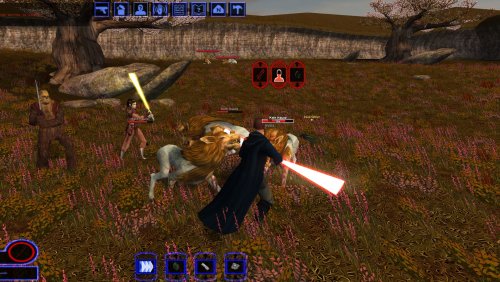
View File K1 Nameplates World of Warcraft-style nameplates for KOTOR: every enemy gets its own health bar, and loot and usable objects are always labelled. KOTOR shows one overhead name and health bar at a time, only for the creature under your cursor or your target. It flickers away and is hard to click. This mod gives every hostile you could click its own plate: Red plates on every visible enemy within 60 m; neutral and friendly creatures on hover or target. A framed, larger target plate with health in percent. Other plates fade while you have a target. Damage chips, distance scaling and stacking instead of overlap. Click a plate to select or attack, just like clicking the model. Object labels: remains, containers and items on the ground in gold while they hold loot, "[empty]" once looted, terminals and workbenches in cyan. Scenery and invisible script objects get no label. Only while the HUD is up (never in dialogs, menus or cutscenes). F6 turns it off and on. Everything is configurable in nameplates.ini. Install: copy dinput8.dll and nameplates.ini into the game folder (next to swkotor.exe). Delete them to uninstall. It doesn't touch swkotor.exe, Override or saves: everything happens in memory while the game runs, and it checks the game code before every hook, so on an exe it doesn't recognise it does nothing. Compatibility: KOTOR 1 patch 1.03 on Windows. Tested on Steam, with the KOTOR Editable Executable and on the stock exe. GOG should work but is untested, so please report either way. Any resolution, with or without UniWS, High Resolution Menus and the 4 GB patch. Works with ReShade. Conflicts only with other mods that ship a dinput8.dll. Not for KOTOR 2. Troubleshooting: nameplates.log in the game folder says whether the hooks installed. For bug reports, set Debug=1 in nameplates.ini, reproduce the problem and include the log and a screenshot. Engine addresses come from Lane Dibello's KOTOR Patch Manager address database. Thanks, Lane! Source (MIT): https://github.com/phalladar/k1-nameplates Submitter Phall Submitted 10/27/2026 Category Mods K1R Compatible No
-
Version 1.0
20 downloads
World of Warcraft-style nameplates for KOTOR: every enemy gets its own health bar, and loot and usable objects are always labelled. KOTOR shows one overhead name and health bar at a time, only for the creature under your cursor or your target. It flickers away and is hard to click. This mod gives every hostile you could click its own plate: Red plates on every visible enemy within 60 m; neutral and friendly creatures on hover or target. A framed, larger target plate with health in percent. Other plates fade while you have a target. Damage chips, distance scaling and stacking instead of overlap. Click a plate to select or attack, just like clicking the model. Object labels: remains, containers and items on the ground in gold while they hold loot, "[empty]" once looted, terminals and workbenches in cyan. Scenery and invisible script objects get no label. Only while the HUD is up (never in dialogs, menus or cutscenes). F6 turns it off and on. Everything is configurable in nameplates.ini. Install: copy dinput8.dll and nameplates.ini into the game folder (next to swkotor.exe). Delete them to uninstall. It doesn't touch swkotor.exe, Override or saves: everything happens in memory while the game runs, and it checks the game code before every hook, so on an exe it doesn't recognise it does nothing. Compatibility: KOTOR 1 patch 1.03 on Windows. Tested on Steam, with the KOTOR Editable Executable and on the stock exe. GOG should work but is untested, so please report either way. Any resolution, with or without UniWS, High Resolution Menus and the 4 GB patch. Works with ReShade. Conflicts only with other mods that ship a dinput8.dll. Not for KOTOR 2. Troubleshooting: nameplates.log in the game folder says whether the hooks installed. For bug reports, set Debug=1 in nameplates.ini, reproduce the problem and include the log and a screenshot. Engine addresses come from Lane Dibello's KOTOR Patch Manager address database. Thanks, Lane! Source (MIT): https://github.com/phalladar/k1-nameplates -
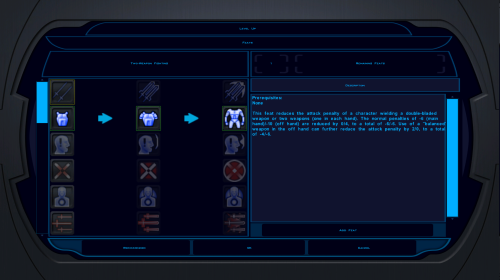
View File K1 High-Res Feat & Power Trees Makes the feat and Force power selection icons readable at high resolutions. KotOR High Resolution Menus rescales the menus for your resolution, but the feat and Force power trees (character creation and level-up) keep the 640x480 sizes hardcoded in the game's executable: 40 px rows, 32 px icons and arrows. At 1440p and 4K the icons are tiny specks in a list built for icons several times larger. This patch scales the rows, icons and arrows by the same factor High Resolution Menus uses for everything else (menu height / 480), so the trees keep their original proportions. 1080p: 90 px rows · 1440p: 120 px · 4K: 180 px Reads your resolution from High Resolution Menus' changes to the exe. No questions asked. Changes 8 values in swkotor.exe and nothing in Override. It checks every byte it touches first and refuses unknown executables. It makes a backup, and Uninstall.bat restores the originals. Tested alongside K1 Area Map Fixes and the 4 GB patch. Requirements, in this order: KOTOR Editable Executable (Steam only), UniWS, KotOR High Resolution Menus, then this. Install: double-click Install.bat. Run it again if you later change resolution. Source and byte-level documentation: https://github.com/phalladar/k1-hires-feat-trees Submitter Phall Submitted 10/26/2026 Category Mods K1R Compatible No
-
 For anyone running HR Menus at 1440p or 4K: the feat and Force power tree icons on the level-up screen stay at their 640x480 size, because the engine hardcodes the tree row height in swkotor.exe (it ignores the .gui PROTOITEM), so no .gui edit can fix it. I made a small exe patch that scales them by the same menu height / 480 factor HR Menus uses for everything else: https://deadlystream.com/files/file/3161-k1-high-res-feat-power-trees/ Install it after UniWS + HR Menus. Thanks for HR Menus, it's a great mod.
-
Version 1.0.0
42 downloads
Makes the feat and Force power selection icons readable at high resolutions. KotOR High Resolution Menus rescales the menus for your resolution, but the feat and Force power trees (character creation and level-up) keep the 640x480 sizes hardcoded in the game's executable: 40 px rows, 32 px icons and arrows. At 1440p and 4K the icons are tiny specks in a list built for icons several times larger. This patch scales the rows, icons and arrows by the same factor High Resolution Menus uses for everything else (menu height / 480), so the trees keep their original proportions. 1080p: 90 px rows · 1440p: 120 px · 4K: 180 px Reads your resolution from High Resolution Menus' changes to the exe. No questions asked. Changes 8 values in swkotor.exe and nothing in Override. It checks every byte it touches first and refuses unknown executables. It makes a backup, and Uninstall.bat restores the originals. Tested alongside K1 Area Map Fixes and the 4 GB patch. Requirements, in this order: KOTOR Editable Executable (Steam only), UniWS, KotOR High Resolution Menus, then this. Install: double-click Install.bat. Run it again if you later change resolution. Source and byte-level documentation: https://github.com/phalladar/k1-hires-feat-trees
