

Mods
906 files
-
Holowan Duplisaber Beta
Making lightsabers is incredibly easy!
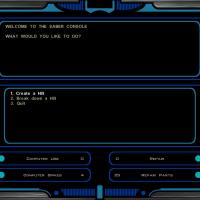
1. Go to the Workbench and select "Use Saber Console"
2. Choose "Create a hilt", choose a model and a color
3. The hilts are like a lightsaber crystal. Just equip it into the crystal spot and voila!
It comes with its own installer, but I assure you it's not malicious.
If you run into incorrect colors, simply switch out the crystal at a workbench and rebuild the lightsaber.
HOLOWAN DUPLISABER v.215b
Chainz.2da
Darth Deadman Evasto Inyri Forge OldFlash Qui-Don Jorn Quanon Seprithro Svosh T7Nowhere TriggerGod VarsityPuppet
This mod expands the current lightsaber selection to include 59 different hilts, 13 different colors and long-bladed lightsabers.
There are 59 total saber hilts to choose from, and they are available in 13 different colors, making for 767 possibilities.
Future versions will integrate the saber hilts into the game as prizes and earnable or collectible items.
Installation:
Just click "Install" and wait for the progress bar to finish. If the installer closes early, the installation was not successful.
Using the mod:
Once in game, go to any workbench and you should have the option to open up the Saber Console. From the Saber Console, you can choose any hilt and the color of that hilt. This will give you a "hilt" item that you can use at a workbench to create a lightsaber. Simply switch out the color crystal for the desired hilt and it will change your lightsaber. Due to the nature of the game engine, you can even change the type of the weapon based on the hilt you choose. Changing from short to long to single to double is as easy as switching out a hilt.
Disclaimer: This mod was built to be compatible with all mods (TSLRCM and M4-78 included). Any errors you encounter either come from a conflict caused by another mod or are a result of an installation error.
DO NOT MESS WITH THE FILE FOLDERS. DOING SO WILL RUIN THE INSTALLATION.
Credits:
This mod was made from saber mods for which I asked for permission to use or were already open for free use. Each lightsaber is marked in-game with its original designer in its description.
Thanks to:
Bioware - Documentation on GFF and 2da formats.
Designers -Chainz.2da Darth Deadman Evasto Inyri Forge OldFlash Qui-Don Jorn Quanon Seprithro Svosh T7Nowhere TriggerGod
Fair Strides - For integrating the mdlops replacer into my dev version of the project.
18,905 downloads
- Lightsaber
- USM
- (and 1 more)
-

[TSL] Fixed Proficiency/Focus Feat Icons
NOTE: Do NOT use this with the most recent version of TSLRCM, as we fixed it in the feat.2da. Installing this ontop of TSLRCM will re-add the bug!
Author:
Kainzorus Prime
Mod Name:
Proficiency/Focus Feat Icons Fix
*************************
Under NO circumstances is this, or any of my other,
mod(s) to be posted on ANY site other than by myself.
*************************
1. Info
===========
This mod fixes the oversight present since the first KotOR, which set the icons for weapon proficiency feats to use the ones meant for weapon focus feats, and vice versa.
2. Installation:
=========
Drop all the files into the override. Overwrite as necessary.
3. Credits:
===========
Special thanks to:
Holowan Laboratories - For all the great resources.
4. DISCLAIMER:
===============
This Mod is not supported by LucasArts, Bioware or Obsidian.
Please do not contact them for support of this mod.
Copyright:
Star Wars: Knights of the Old Republic, characters, items, etc. are trademarks
and copyrights owned by their respective trademark and copyright holders.
Star Wars: Knights of the Old Republic: The Sith Lords, characters, items, etc. are
trademarks and copyrights owned by their respective trademark and copyright holders.
Bioware and the Odyssey Engine are trademarks of Bioware Corp.
Obsidian are trademarks of Obsidian Entertainment.
All trademarks and copyrights contained in this document are owned by their
respective trademark and copyright holders.
1,536 downloads
-

TSL Player Character Height Adjustment
By L0ki194
Name: TSL Player Character Height Adjustment
=====================================
Author: L0ki194
================
Description:
=============
This mod is exactly the same as my K1 Player Character Height Adjustment mod (Link to that mod: http://deadlystream.com/forum/files/file/397-k1-player-character-height-adjustment/ ), except for TSL. Huge thanks to Kainzorus Prime for letting me know that the Large, Medium, and Small body types were still in the TSL files. Turns out they were just mish-mashed around in the models section on Kotor Tool.
Legal:
======
This mod is not supported by BioWare, Obsidian, or LucasArts. Do not contact them for mod support.
Enjoy!
1,546 downloads
-

[TSL] Clone Wars Armors
Authors:
Kainzorus Prime, Darth DeadMan, Fair Strides
Mod Name:
[TSL] Clone Wars Armor Pack
*************************
Under NO circumstances is this, or any of my other,
mod(s) to be posted on ANY site other than by myself.
*************************
1. Info
===========
This mod will add variety of clone armors and two variants of DC-15 rifle to your game. You can either get them from the corpse of a Republic Trooper corpse aboard the Harbinger, or use the console commands.
2. Installation:
=========
Run the TSL Patcher and sit back, the installer will handle everything, including compatibility with other mods.
3. Usage
=========
All armors, ten DC-15A and ten DC-15S rifles can be found on a Republic Trooper corpse aboard the Harbinger, marked “Republic Quartermaster Corpse”, found in the Crew Quarters.
Item codes are as follows:
clone_clean - Clean Episode III Armor
clone_dirty - Weathered Episode III Armor
clone_blue - 501st Legion Armor
clone_red - Shocktrooper Armor
clone_green - 442nd Siege Battalion Armor
clone_yellow - 212th Attack Battalion Armor
clone_grey - 41st Elite Legion Armor
clone_star - 327th Star Corps Armor
clone_neyo - 91st Reconnaissance Corps Armor
clone_shadow - Shadowtrooper Armor
clone_para - Paratrooper Armor
clone_marine - Galactic Marine Armor
clone_gree - Commander Gree’s Armor
clone_cody - Commander Cody’s Armor
clone_bacara - Commander Bacara’s Armor
clone_bly - Commander Bly’s Armor
clone_deviss - Captain Deviss’s Armor
clone_commando - Commando Armor
clone_boss - Delta-38’s Armor
clone_sev - Delta 07’s Armor
clone_fixer - Delta 40’s Armor
clone_scorch - Delta 62’s Armor
clone_classic - Clean Episode II Armor
clone_captain - Clone Captain Armor
clone_commander - Clone Commander Armor
clone_sergeant - Clone Sergeant Armor
clone_lieutenant - Clone Lieutenant Armor
arc_basic - ARC Trooper Armor
arc_red - ARC Captain Armor
arc_blue - ARC Lieutenant Armor
arc_yellow - ARC Commander Armor
dc_15a - DC-15A Blaster Rifle
dc_15s - DC-15S Blaster Carbine
4. Credits:
===========
Special thanks to:
MarcusLeCoy - Original 501st Legion texture.
Dark_Cuillere - Original Commander Cody texture.
Ruku - Most of original Episode III Clone textures.
Pahricida - Original DC-15A model and textures.
SoM3 - Original DC-15s model and textures.
Holowan Laboratories - For all the great resources.
5. DISCLAIMER:
===============
This Mod is not supported by LucasArts, Bioware or Obsidian.
Please do not contact them for support of this mod.
Copyright:
Star Wars: Knights of the Old Republic, characters, items, etc. are trademarks
and copyrights owned by their respective trademark and copyright holders.
Star Wars: Knights of the Old Republic: The Sith Lords, characters, items, etc. are
trademarks and copyrights owned by their respective trademark and copyright holders.
Bioware and the Odyssey Engine are trademarks of Bioware Corp.
Obsidian are trademarks of Obsidian Entertainment.
All trademarks and copyrights contained in this document are owned by their
respective trademark and copyright holders.
5,286 downloads
-

[TSL] Prequel Robe Replacement
Author:
Kainzorus Prime, Darth DeadMan
Mod Name:
TSL Prequel Robes Replacement 1.0
*************************
Under NO circumstances is this, or any of my other,
mod(s) to be posted on ANY site other than by myself.
*************************
1. Info
===========
This mod replaces the Padawan-type robes with the styles seen in Episode I-III. Includes new icons.
2. Installation:
=========
Copy the files from the Main Mod folder into the Override. Overwrite all if prompted. Install optional components from specified folders into the Override as you want.
3. Credits:
===========
Special thanks to:
Holowan Laboratories - For all the great resources.
4. DISCLAIMER:
===============
This Mod is not supported by LucasArts, Bioware or Obsidian.
Please do not contact them for support of this mod.
Copyright:
Star Wars: Knights of the Old Republic, characters, items, etc. are trademarks
and copyrights owned by their respective trademark and copyright holders.
Star Wars: Knights of the Old Republic: The Sith Lords, characters, items, etc. are
trademarks and copyrights owned by their respective trademark and copyright holders.
Bioware and the Odyssey Engine are trademarks of Bioware Corp. Obsidian are trademarks of Obsidian Entertainment. All trademarks and copyrights contained in this document are owned by their respective trademark and copyright holders.
10,800 downloads
-

Peragus Mining Gear
Author:
Kainzorus Prime
Mod Name:
Peragus Mining Gear 1.01
*************************
Under NO circumstances is this, or any of my other,
mod(s) to be posted on ANY site other than by myself.
*************************
1. Info
===========
This mod changes the miner uniform found in the Peragus tunnels into gear that both looks fitting for space mining, as well as slightly boosting its stats. However, it also requires proficiency in light armors to be used now.
2. Installation:
=========
Copy the files into the Override folder. Overwrite existing if necessary.
3. Credits:
===========
Special thanks to:
Holowan Laboratories - For all the great resources.
4. DISCLAIMER:
===============
This Mod is not supported by LucasArts, Bioware or Obsidian.
Please do not contact them for support of this mod.
Copyright:
Star Wars: Knights of the Old Republic, characters, items, etc. are trademarks
and copyrights owned by their respective trademark and copyright holders.
Star Wars: Knights of the Old Republic: The Sith Lords, characters, items, etc. are
trademarks and copyrights owned by their respective trademark and copyright holders.
Bioware and the Odyssey Engine are trademarks of Bioware Corp.
Obsidian are trademarks of Obsidian Entertainment.
All trademarks and copyrights contained in this document are owned by their
respective trademark and copyright holders.
5,367 downloads
-

Coruscant Scene No Overlay
==== Coruscant Scene No Overlay by Hassat Hunter ====
Since the start of TSLRCM the mod has added an overlay effect to the cutscene with the Jedi Masters on Coruscant (leaving the Jedi Temple on Telos).
While this makes sense, since the recording *is* a holo recording, I am of the personal opinion that this time correctness should be overseen.
As the blue overlay really ruins a lot of the archatecture, the scene, and it's just much better to look at as it was originally.
This mods disables the overlays, while keeping all the fixes added in TSLRCM, all the way up to TSLRCM 1.8.3.
This mod contains both overlay-less files for TSLRCM as well as for Handmaiden4Female-Disiciple4Males.
==(Un)Install Instructions==
* Drop holorec.dlg in the override folder. Use the TSRLCM version if using TSLRCM 1.8.3 without Handmaiden4Female-Disiciple4Males. If you do use that mod, use the Handmaiden4Females folder version instead.
Remove the file from your override to return to the original overlayed cutscene.
==Version History==
1.0 release
==Known Issues==
None known.
==Distributing This Mod==
This mod may not be modified or distributed without the explicit permission of the author.
==Contact Info==
Find me at the deadlystream forums (http://www.deadlystream.com/forum).
==Thanks To==
* The TSLRCM Staff for making TSLRCM and getting me into modding for TSL. Although nothing has been done here but extracting .
* Obsidian for KOTOR2:TSL.
==Legal Stuff==
THIS MODIFICATION IS PROVIDED AS-IS AND IS NOT SUPPORTED BY LUCASARTS, OBSIDIAN ENTERTAINMENT, THE TSLRCM CREW OR ANY LICENSERS/SPONSORS OF THE MENTIONED COMPANIES. USE OF THIS FILE IS AT YOUR OWN RISK AND THE ABOVE MENTIONED COMPANIES OR THE AUTHOR IS NOT RESPONSIBLE FOR ANY DAMAGE CAUSED TO YOUR COMPUTER FOR THE USAGE OF THIS MOD.
1,437 downloads
-

Power Cost Correction
==== Power Cost Correction by Hassat Hunter ====
Fixes 3 power cost disrepancies in spells.2da, not fixed in 1.8.3;
* Master Healing will costs 30 now instead of 25 (same as heal and cure)
* Master Energy Resistance costs 20 now instead of 15 (same as energy resistance and improved energy resistance).
* Push costs 25 now instead of 20 (same as whirlwind and wave).
There are 2 more disrepancies, between the control spells (for sentients and beasts), where the control power costs 10 more than the stun, but this seems intentional. All other trees the 2 or 3 powers have equal costs.
==Install Instructions==
* Drop spells.2da in your override. Backup the original existing file if you want to change back to the original situation.
==Version History==
1.0 release
==Known Issues==
None known.
==Distributing This Mod==
This mod may not be modified or distributed without the explicit permission of the author.
==Contact Info==
Find me at the deadlystream forums (http://www.deadlystream.com/forum).
==Thanks To==
* The TSLRCM Staff for making TSLRCM and getting me into modding for TSL. Although nothing has been done here but extracting .
* Obsidian for KOTOR2:TSL.
==Legal Stuff==
THIS MODIFICATION IS PROVIDED AS-IS AND IS NOT SUPPORTED BY LUCASARTS, OBSIDIAN ENTERTAINMENT, THE TSLRCM CREW OR ANY LICENSERS/SPONSORS OF THE MENTIONED COMPANIES. USE OF THIS FILE IS AT YOUR OWN RISK AND THE ABOVE MENTIONED COMPANIES OR THE AUTHOR IS NOT RESPONSIBLE FOR ANY DAMAGE CAUSED TO YOUR COMPUTER FOR THE USAGE OF THIS MOD.
22,149 downloads
-

Coruscant - Jedi Temple Compatibility
==== Coruscant - Jedi Temple compatibility patch by Hassat Hunter ====
These few files allow you to use the Coruscant - Jedi Temple mod combined with the Handmaiden 4 Females mod, and the M4-78EP mod!
==Install Instructions==
* M4-78EP: Install M4-78EP FIRST(!), then the Coruscant - Jedi Temple mod. Afterwards, drop the 3 files in the M4-78EP folder (a_galaxymap.ncs, tr_leave_ehawk.ncs and galaxymap_p.gui) in your override, overwriting the existing files.
* Handmaiden for females: Install both mods (in either order) then drop the file inside the Handmaiden4Females folder (k_sup_galaxymap.ncs) in your override, overwriting existing file.
* If you want to install the expansion, drop the changes.ini from inside here into tslpatcherdata of that mod before installing. This prevents the planet to be called "Finding The HK Factory"
==Version History==
1.0 release
1.1 Galaxymap_p.gui added. Modified changes.ini added for Expansion mod.
==Known Issues==
None known.
==Distributing This Mod==
This mod may not be modified or distributed without the explicit permission of the author.
==Contact Info==
Find me at the deadlystream forums (http://www.deadlystream.com/forum).
==Thanks To==
* The TSLRCM Staff for making TSLRCM and getting me into modding for TSL. Although nothing has been done here but extracting .
* Obsidian for KOTOR2:TSL.
==Legal Stuff==
THIS MODIFICATION IS PROVIDED AS-IS AND IS NOT SUPPORTED BY LUCASARTS, OBSIDIAN ENTERTAINMENT, THE TSLRCM CREW OR ANY LICENSERS/SPONSORS OF THE MENTIONED COMPANIES. USE OF THIS FILE IS AT YOUR OWN RISK AND THE ABOVE MENTIONED COMPANIES OR THE AUTHOR IS NOT RESPONSIBLE FOR ANY DAMAGE CAUSED TO YOUR COMPUTER FOR THE USAGE OF THIS MOD.
13,601 downloads
-

Broken Bottle
By InSidious
Bludgeoning Damage Bonus +2
On Hit Attribute Damage Constitution DC10
Attack Penalty -1
Attribute Penalty Dexterity -10
Decreased Skill Modifier Awareness -2
Reduced Saving Throws Reflex -4
To get in game type "di_bottle1" into the console, without the quotes.
A crude weapon, for a more uncivilised age, the broken bottle has been the prize weapon of drunks throughout the galaxy for millennia.
The preferred weapon of the Pot-Iid Monks, who practice the ancient martial art of Drun-K'fu,
in the right hands it can be a devastating weapon.
140 downloads
- kotor 2 mods
- tsl mods
- (and 6 more)
-

Camera Angle Options
By InSidious
N.B.: Although uploaded for TSL, this mod may be used for either KotOR or KotOR II: TSL.
This mod alters the default camera angles used by the game so that outside dialogues
and cutscenes, your character will be viewed more distantly, as is more common in RPGs
like 'NeverWinter Nights', 'Dungeon Siege' and 'Diablo'.
There are four different options to choose from:
Option I, No Combat - This option gives you a camera angle slightly closer to the
character than normal which will show the upper half of your
character from an angle above the player, but does not affect
the camera angle while in combat.
Option I, Combat - The same as above, but does affect the camera angle while in combat.
Option II, No Combat - The same height, but a greater distance from the character,
showing the whole of the character. This option does not affect
the camera angle while in combat.
Option II, Combat - The same as above, but this option does affect the camera angle while in combat.
1,488 downloads
- kotor 2 mods
- tsl mods
- (and 5 more)
-

Combat Stance Swap
By InSidious
I made a very similar mod to this a long time ago, but it seems it disappeared with PCGM and I no longer seem to have a copy.
What it does is swap around the default flourish/stances used for melée weapons - the single blade flourish is replaced with the stun baton flourish and vice versa, the Echani-style flourish replaces the two melée weapon flourish and vice versa, and the double-blade flourish is replaced by the "Natural Attack" (or "Rocky Mode" ) flourish...Just look at the screenshot for details.
1,048 downloads
- kotor 2 mods
- tsl mods
- (and 5 more)
-

Concept Loading Screens
By InSidious
A very long time ago, a guy called Nur Ab Sal realised that the KotOR II loading screens were ugly, and decided to replace them with the concept art Obsidian drew up, instead.
He did so, but his mod disappeared when PCGameMods was destroyed, and so I decided to repeat the job myself, because I got bored of the normal loading screens. I couldn't get all the same concept art as Nur Ab Sal, and in a few places had to improvise - nevertheless, where his mod replaced around 28 of roughly 80 loading screens, this mod will replace around 40, and is therefore worthy of release.
1,705 downloads
- concept art
- loading screens
- (and 8 more)
-

Darth Nihilus Robes
By InSidious
These robes will make you look like Darth Nihilus, and have some very powerful stats.
They were made on request for somebody, although I forget who now (sorry).
You can get them in-game on Darth Nihilus'corpse, or by typing into the console 'giveitem a_robe_99'.
I made this mod a long, long time ago, so the chances are that it's not compatible with TSLRCM.
1,280 downloads
(1 review)0 comments
Submitted
-

Fork Short Lightsabers
By InSidious
Co-authored with oldflash.
This mod adds a whole set of new short lightsabres - one for each lightsabre colour available in the game, and their crystals to the game. They can be found in the Enclave Sublevel on Dantooine, in the secure storage area.
1,243 downloads
- short lightsabers
- lightsaber mod
- (and 8 more)
-

Lightsaber and Force Form Band
By InSidious
This mod consists of an arm-band for KotOR II which allows the user to give themselves any force or lightsaber form
they wish, regardless of class or place in the plot. This is meant to be a cheat item, so the player will have to
cheat it into the game. The code is “giveitem di_forms”, without the quotes.
WARNING: This mod may cause problems with learning forms from the Jedi Masters.
647 downloads
- kotor 2 mod
- kotor 2 mods
- (and 7 more)
(0 reviews)0 comments
Submitted
-

Modder's Resource: Shuttle
By InSidious
By JCarter and Darth InSidious
This isn't a mod so much as a modder's resource.
JCarter426 discovered a "shuttle interior" in the game files area
that was never used by Obsidian, and I've made up some module files
so you can get to it.
The "module" folder is exclusively for the use of modders, and is not
needed to make the mod run; it is only if you want to edit things that
you will need this folder.
332 downloads
- kotor 2 shuttle
- tsl shuttle
- (and 8 more)
(2 reviews)0 comments
Submitted
-

Qu Rahn's Lightsaber
By InSidious
This mod adds a new lightsaber to the game, based on that of Qu Rahn, as seen in the Dark Forces games. It has an animated blade, that shifts colour between blue and green. It must be cheated into the game. The code for the saber crystal is “di_lcrys_12”, without the quotes. There is only a standard lightsaber model – do not attempt to use the crystal in a short or doublesaber, as this will crash your game.
1,730 downloads
-

Remote is Workbench and Lab Station
By InSidious
This mod makes it so that you can use Remote as a workbench or lab station while on the move, in case you need to upgrade something or use a few components on the move.
1,006 downloads
-

Sword of Gith
By InSidious
This mod is a new sword model, based on the Silver Sword of Gith
from Neverwinter Nights 2 and its expansion, Mask of the Betrayer.
The weapon is not available in-game as it's a bit too high-fantasy
to fit.
To get it, type "giveitem di_sog" into the console.
312 downloads
- kotor 2
- kotor 2 mods
- (and 8 more)
(0 reviews)0 comments
Submitted
-

Azgath N'Dul's Tomb Patch
By InSidious
Kemar Elim will now appear on Onderon after you arrive back there the second time, enabling
the completion of the sidequest. He's out of the way of the soldiers, so you may have to
search a little to find him. Also, be warned that you can _only_ start the quest the first time you
go to Onderon. If you try to do so the second time, he won't speak to you.
I've also cleaned things up with the holocron in the tomb a bit, so that it's less...messy. Hopefully,
this will eliminate any errors.
4,811 downloads
-

Azgath N'Dul's Tomb
By InSidious
This mod adds a new tomb to the Valley of the Dark Lords - the tomb of Azgath N'Dul.
You will find it between the tombs of Ajunta Pall and Tulak Hord.
A couple of robes will come out funny if you are using oldflash's Final Touch - The Chatos Robes, the Sith Lord Robes and the Robes of Azgath N'Dul.
This is because of a model change that mod introduces.
They won't crash your game, but they will look a bit odd.
This mod adds: ten new robes, three new armours, four new weapons, two weapons I've released separately before,
a new belt, a new pair of gloves and a new Force Power, not to mention many other items that can be created by the Force Transmutation Device.
I've tried to keep the stats fairly balanced, but that's by my judgment.
N.B.: Robes included in this mod may not be compatible with robe mods which you have installed.
Please be sure to download kyrie's changes.ini fix before installing this mod (click here), and then the 2.2 patch.
9,976 downloads
-

Extended Carth Meeting
By danil-ch
1. Description:
----------
This is an improved version of the Carth audience.
*Restored the option to deny Carth an audience.
*Additional changes based on developer notes.
*Bug fixes and tweaks to this scene to make it run smoothly.
Female Revan version
This mod scene:
2. Install:
----------
(It is highly recommended that you update your game to version 2.10 (the 1.0b update) before installing this mod.) TSLRCM 1.8.3 Required
This is a mod for TSLRCM, it will not work otherwise. So have that installed.
To install, extract the Main Patch folder to anywhere you like, as long as it is not the SWKotOR2 folder. Simply run 'install.exe' from within the "Main Patch" folder.
3. Uninstall:
----------
There has been a backup made of the modified files, within a folder titled 'backup' in the 'Main Patch" folder. Simply copy the 205TEL.mod into your Modules folder, 205TEL_loc.mod into lips folder and you will have reverted to TSLRCM 1.8.3
4. Bugs:
----------
This has been tested several times to make sure nothing weird happens. If you find anything, let me know.
5. Thanks:
----------
Thanks go the entire TSLRCM team, your work has been outstanding.
THIS MODIFICATION IS PROVIDED AS-IS AND IS NOT SUPPORTED BY BIOWARE/OBSIDIAN ENTERTAINMENT OR LUCASARTS OR ANY LICENSERS/SPONSORS OF THE MENTIONED COMPANIES. USE OF THIS FILE IS AT YOUR OWN RISK AND THE ABOVE MENTIONED COMPANIES OR THE AUTHOR IS NOT RESPONSIBLE FOR ANY DAMAGE CAUSED TO YOUR COMPUTER FOR THE USAGE OF THIS FILE.
4,195 downloads
-

Realistic Nar Shaddaa Skybox Mod - Loadscreens
By L0ki194
Mod Name: "Realistic Nar Shaddaa Skybox Loadscreens"
==============================================
Author: L0ki194
=================
Tired of seeing the old skybox in the loadscreens in Nar Shaddaa, but you're using the Realistic Skybox mod? This mod replaces the original Loadscreens with ones that show the "Realistic Nar Shaddaa Skybox Mod" by Sharen Thrawn.
These were made a LOOOOOONG time ago. But, I decided to release these in case no-one saw the original request thread (http://www.lucasforums.com/showthread.php?t=211704).
========
Credits:
- Sharen Thrawn, the author of the Realistic Nar Shaddaa Skybox mod.
===========
Bugs: None, though probably incompatable with something of the same nature.
Installation:
Dump the TGA files in your override.
NOTE: There is an alternate loadscreen for 302NAR (Refugee Area) that shows more of the Skybox.
3,020 downloads
-

Bodies Stay (TSL)
By jonathan7
AUTHORS: Space Alex and jonathan7
EMAIL: contact via release thread at www.lucasforums.com- KotOR section
NAME: [bETA] Bodies Stay
CREDITS: Fred Tetra - a legend.
FILENAME: Bodies Stay
FILE SIZE: Around 1MB Unzipped
DATE RELEASED: 05/02/2009
DESCRIPTION: This mod stops bodies disappearing when you kill them.
INSTALLATION INSTRUCTIONS: Run the patcher…It is set in patcher format so you will need to already have an appearance.2da in your Override. (Default - C:\Program Files\LucasArts\SWKotOR2\Override ) and you will need to select that appearance.2da
COMMENTS: This is a beta, and you will need a decent PC, if you only scrape playing KotOR requirements, don’t use this. Space Alex deserves most of the credit! He found the setting required to keep bodies!
BUGS: Should be none
PERMISSIONS: Give credit to Space Alex and myself in your readme
THIS MODIFICATION IS PROVIDED AS-IS AND IS NOT SUPPORTED BY
BIOWARE/OBSIDIAN ENTERTAINMENT
OR LUCASARTS OR ANY LICENSERS/SPONSORS OF THE MENTIONED COMPANIES. USE OF
THIS FILE IS AT
YOUR OWN RISK AND THE ABOVE MENTIONED COMPANIES OR THE AUTHOR IS NOT
RESPONSIBLE FOR ANY
DAMAGE CAUSED TO YOUR COMPUTER FOR THE USAGE OF THIS FILE.
4,654 downloads
-
File Reviews
-
lorddli 2
I know I'm calling a lot of mods in here essential... but this mod is really essential!

Kudos to all!
-
lorddli 2
Essential bit of restoration here, really makes Korriban feel more complete.
-
Another fantastic mod that has earned a permanent spot in my builds for TSL! Not only does this resolve the Bao-Dur plot hole, but it keeps the pacing of the endgame gauntlet tight and cohesive. With this mod, he transition to the HK Factory is incredibly seamless. In Vanilla TSLRCM, when you take control of HK-47 to shut down/commandeer the factory, you spawn in the underground military base from where you escape in the orbital shuttle and have to take the turbo-lift down. Once you do that you can't get back up. Cool, but....one time I got crazy and took HK-47 all the way back out to the surface landing pad because I could. Now I'm no programmer and I can't say if that was on purpose or not, but I get the feeling that should not be possible that late in the game. With this mod, that is resolved in the best way: You see HK-47 actually take the turbolift down to the Military base sub-level in a superbly integrated cut-scene, and once it's finished, you're locked in, preventing any "sequence breaks." From there you just play the factory normally. Well done!
Edited by jmorenobothwell -
Delighted! The only thing I’d still love to have is a small tooltip showing the XP still needed and the HP when hovering over the character’s portrait.
Otherwise, it’s perfect! -

phKoon 0
F*cking great for getting immersion further. Must-have for me.
Also, is there a bug where the saber lighting reflection only works inside the Ebon Hawk when the blade is turning off?
-
phKoon 0
Best of it: it's a .exe, you just open it and click a button to patch.
A must-have for anyone who just want to play the vanilla experience in a modern-day PC, but without the hassle of searching, downloading and installing dozens of mods or altering the game.
(I also recommend the New_Lightsaber_Blade_Model_K1 1.0.0 mod if you want better lightsaber effects, but that requires just a little bit more of fiddling, as it needs TSLPatcher)
Edited by phKoon -
Hello and thank you, this is truly an amazing mod and now I'm happy to kick back and relax with a controller in my hand, awesome job! Btw is there any chance importing the Xbox achievements to the Steam version? I know nobody would see that in our Steam profile but it would still be cool to have an achievement built in if that's possible? Otherwise no biggie, thank you for this amazing mod!
-
Simple but lovely reskin
-
lorddli 2
as essential as it gets; well done to everyone involved!
-
lorddli 2
Fantastic and essential change to Kotor 2 imo. God this bugged me so much lol
-
lorddli 2
this is a positive review.
-

Leilukin 347
As a KotOR modder whose majority of mods involve editing DLG files, NeoDLG is the best DLG editor to date and it is not even a contest.
Firstly, NeoDLG (and Vriff's other Neo tools) support macOS and Linux, which means users of macOS or Linux (like me) are able to enjoy the software without using a compatibility layer like WINE.
NeoDLG's feature of exporting TSLPatcher/HoloPatcher instructions for dynamic DLG file patching is a real game changer for modding dialogue. In the old way of using DLGEditor to edit a DLG file then using ChangeEdit to generate the TSLPatcher output, if you add new dialogue nodes to a DLG file, the indices of those new nodes are fixed. This means a different mod that also adds new modes to the same DLG file can end up sharing the same dialogue node indices, causing the two mods to conflict.
On the other hand, NeoDLG's patcher instruction export feature makes use of 2DAMEMORY so the indices of new dialogue nodes are not fixed, thus TSLPatcher and HoloPatcher 2.0 (earlier versions of HoloPatcher does not support DLG dynamic patching) can patch DLG files when adding new dialogue new modes in a dynamic matter, which improves compatibility with other mods that patch the same DLG files. Not to mention, NeoDLG exports the patcher instructions faster than ChangeEdit when generating the GFF output.
-
 1
-
 1
-
-
I would say this is essential for those who wants to make sure KOTOR runs well on current day rig. I wish something like this exists for KOTOR 2 as well, Aspyr did a great job fixing alot of its compatibility issue but other issues like graphics issue, widescreen UI being super squished, captions/subtitles font being too small on higher resolution and the unintuitive controller UI, I like how OP just straight up ported the XBOX UI to the game, I believe that is something KOTOR 2 could use.
Anyway, thank you for your effort RaymanGT, this is a great mod.
-
 1
-
-
Working perfectly!!! 🔥
-
No words can do this or any model in this "High Poly" series justice, so I'll simply say: This is next-level. Full stop. I've deployed the entire series you have in my current KOTOR mod build and it looks.......WOW!!!!🔥🔥
-


-
File Comments
-
 I believe it would be "KOTOR Weapons Overhaul!" But that other one might be the issue, too... really, I'm doing my best guesses here.
-

By ShaneisDog · Posted
Awesome thanks a bunch! -
Thanks for the report. I have found out that the cause of the issue was in Handmaiden's dialogue tree during the cutscene where Atton warns the party members. I'll update the mod to fix the issue soon, but as a hotfix, you can put this attached attwarn2.dlg file in your game's Override folder, and reload a save before the cutscene of Atton warning the party mmbers after defeating Twin Suns in the cantina. attwarn2.dlg
-
By ShaneisDog · Posted
Both are in English and I don't have any mods downloaded except TSLRCM and this mod -
Did you play KotOR 2 and TSLRCM in English? Aside from TSLRCM and my mod, are you using any other mods? If so, list all of them.
-