Search the Community
Showing results for tags 'HOTOR'.
Found 2 results
-
Version .215b
18,867 downloads
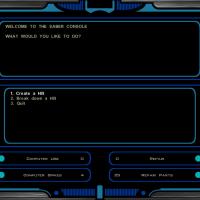
Making lightsabers is incredibly easy! 1. Go to the Workbench and select "Use Saber Console" 2. Choose "Create a hilt", choose a model and a color 3. The hilts are like a lightsaber crystal. Just equip it into the crystal spot and voila! It comes with its own installer, but I assure you it's not malicious. If you run into incorrect colors, simply switch out the crystal at a workbench and rebuild the lightsaber. HOLOWAN DUPLISABER v.215b Chainz.2da Darth Deadman Evasto Inyri Forge OldFlash Qui-Don Jorn Quanon Seprithro Svosh T7Nowhere TriggerGod VarsityPuppet This mod expands the current lightsaber selection to include 59 different hilts, 13 different colors and long-bladed lightsabers. There are 59 total saber hilts to choose from, and they are available in 13 different colors, making for 767 possibilities. Future versions will integrate the saber hilts into the game as prizes and earnable or collectible items. Installation: Just click "Install" and wait for the progress bar to finish. If the installer closes early, the installation was not successful. Using the mod: Once in game, go to any workbench and you should have the option to open up the Saber Console. From the Saber Console, you can choose any hilt and the color of that hilt. This will give you a "hilt" item that you can use at a workbench to create a lightsaber. Simply switch out the color crystal for the desired hilt and it will change your lightsaber. Due to the nature of the game engine, you can even change the type of the weapon based on the hilt you choose. Changing from short to long to single to double is as easy as switching out a hilt. Disclaimer: This mod was built to be compatible with all mods (TSLRCM and M4-78 included). Any errors you encounter either come from a conflict caused by another mod or are a result of an installation error. DO NOT MESS WITH THE FILE FOLDERS. DOING SO WILL RUIN THE INSTALLATION. Credits: This mod was made from saber mods for which I asked for permission to use or were already open for free use. Each lightsaber is marked in-game with its original designer in its description. Thanks to: Bioware - Documentation on GFF and 2da formats. Designers -Chainz.2da Darth Deadman Evasto Inyri Forge OldFlash Qui-Don Jorn Quanon Seprithro Svosh T7Nowhere TriggerGod Fair Strides - For integrating the mdlops replacer into my dev version of the project.- 137 comments
- 22 reviews
-
- 6
-

-

-
- Lightsaber
- USM
- (and 1 more)
-
View File Holowan Duplisaber Beta Making lightsabers is incredibly easy! 1. Go to the Workbench and select "Use Saber Console" 2. Choose "Create a hilt", choose a model and a color 3. The hilts are like a lightsaber crystal. Just equip it into the crystal spot and voila! It comes with its own installer, but I assure you it's not malicious. If you run into incorrect colors, simply switch out the crystal at a workbench and rebuild the lightsaber. HOLOWAN DUPLISABER v.215b Chainz.2da Darth Deadman Evasto Inyri Forge OldFlash Qui-Don Jorn Quanon Seprithro Svosh T7Nowhere TriggerGod VarsityPuppet This mod expands the current lightsaber selection to include 59 different hilts, 13 different colors and long-bladed lightsabers. There are 59 total saber hilts to choose from, and they are available in 13 different colors, making for 767 possibilities. Future versions will integrate the saber hilts into the game as prizes and earnable or collectible items. Installation: Just click "Install" and wait for the progress bar to finish. If the installer closes early, the installation was not successful. Using the mod: Once in game, go to any workbench and you should have the option to open up the Saber Console. From the Saber Console, you can choose any hilt and the color of that hilt. This will give you a "hilt" item that you can use at a workbench to create a lightsaber. Simply switch out the color crystal for the desired hilt and it will change your lightsaber. Due to the nature of the game engine, you can even change the type of the weapon based on the hilt you choose. Changing from short to long to single to double is as easy as switching out a hilt. Disclaimer: This mod was built to be compatible with all mods (TSLRCM and M4-78 included). Any errors you encounter either come from a conflict caused by another mod or are a result of an installation error. DO NOT MESS WITH THE FILE FOLDERS. DOING SO WILL RUIN THE INSTALLATION. Credits: This mod was made from saber mods for which I asked for permission to use or were already open for free use. Each lightsaber is marked in-game with its original designer in its description. Thanks to: Bioware - Documentation on GFF and 2da formats. Designers -Chainz.2da Darth Deadman Evasto Inyri Forge OldFlash Qui-Don Jorn Quanon Seprithro Svosh T7Nowhere TriggerGod Fair Strides - For integrating the mdlops replacer into my dev version of the project. Submitter VarsityPuppet Submitted 04/23/2014 Category Mods TSLRCM Compatible