

Mods
1,052 files
-

KOTOR 1 Community Patch
The K1 Community Patch (K1CP) is a compilation of previous bugfix mods and a multitude of new original fixes put together with the intention of resolving the many and various issues that KOTOR has. This includes some well-known game breaking bugs/softlocks, broken quests, inaccessible content, as well as lesser issues such as problems in conversations, visual inconsistencies, player annoyances, etc. The intention is for the changes to be as seamless as possible, fixing and improving things whilst still retaining the original developer intent.
A huge thanks to all of the mod authors who created these mods, and allowed them to be included in this patch! Unfortunately, the individual list of changes has grown far too long to be included in this post. However, you can view a detailed breakdown of each author's individual contributions in the included readme file and a summary of the changes the current version has made since the previous release in the changelog file.
List of Contributing Authors (alphabetical):
A Future Pilot blennus danil-ch darthbdaman DarthParametric Ebmar Frykas Gimmick5000 jc2 JCarter426 Kainzorus Prime Kexikus KOTOR 1 Restoration Team Leilukin Markus Ramikin N-DReW25 ndix UR R2-X2 Red Hessian Salk th3w1zard1 Thrak Farelle WildKarrde Installation:
Run INSTALL.exe and navigate to your K1 install folder. Generally speaking, this mod should be installed before anything else, except mods that do hard edits/overwrites of 2DA, TLK or MOD (module) files.
Warning: Never run the installer from inside the archive! Always extract the archive onto your hard drive first.
N.B.: With the advent of version 1.10.0, K1CP has migrated away from the use of TSLPatcher and switched to HoloPatcher. This allows for additional patching functionality and resolves some bugs encountered with TSLPatcher. HoloPatcher is also multi-platform. The bundled installer is the Windows version, but Mac and Linux users can download the appropriate installer for their system here.
It is highly recommended that you do not install the game on your system's C drive, especially in Program Files. Windows can have permissions issues when trying to install the mod to a C drive destination. If you are using the Steam version of the game and have installed Steam in its default Program Files location, we advise creating a new Steam Library on a different drive and moving the game there via the game's Properties pop-up in Steam.
Translation:
The mod now has translations in French and Russian, available as separate patches. To use, first download the base K1CP v1.10.0 archive and extract it to your harddrive. Download your translation patch of choice and extract its contents into K1CP's tslpatchdata folder. Proceed to install the mod as normal.
Traduction (Français - Harlockin):
Le mod a maintenant des traductions en français et en russe, disponibles sous forme de patchs séparés. Pour l'utiliser, téléchargez d'abord l'archive de base de K1CP v1.10.0 et extrayez-la sur votre disque dur. Téléchargez le patch de traduction de votre choix et extrayez son contenu dans le dossier tslpatchdata de K1CP. Procédez à l'installation du mod comme d'habitude.
Переводы (Русский - olegkuz1997):
Мод теперь включает в себя переводы на французский и русский языки, доступные в виде отдельных патчей. Для использования сперва скачайте базовый архив K1CP v1.10.0 и распакуйте его на жесткий диск. Скачайте нужный вам патч с переводом и извлеките его содержимое с заменой в папку tslpatchdata K1CP. После чего приступите к установке мода как обычно.
Compatibility/Known Issues:
K1CP uses module injection in an attempt to remain as compatible as possible with other mods. This may result in issues with mods that simply put files in the Override folder. It is recommended that you consult the individual authors of any large scale mods, particularly those that edit DLGs and scripts, as to whether their work is compatible with K1CP. Some mods will likely require updates, some may need to be installed in a specific order, whilst others may be fundamentally incompatible.
K1CP currently only supports the English language version of the game, and makes a number of edits to the TLK file in English. If anyone is able to provide translations of these changes to other languages, please let us know.
The KOTOR 1 Restoration (K1R) mod is incompatible with K1CP, however there is ongoing work to re-create the K1R mod for K1CP: https://deadlystream.com/files/file/2345-restored-content-for-k1cp-demo/
These are the currently known bugs/issues with KOTOR or the mod that the K1CP is looking to resolve:
https://github.com/KOTORCommunityPatches/K1_Community_Patch/issues
If you find any others, especially with changes/additions K1CP makes, please report them on the Github issue page or here on Deadly Stream so they can be addressed. Be sure to include as much information as possible, including a list of all the other mods you have installed, the order you installed them in, steps to reproduce the problem, along with screenshots and save files, if appropriate. You may also be directed to provide the install log file, a list of the contents of your Override folder, and specific MOD files from your modules folder.
Uninstallation:
Given the complexity of this mod, a clean install of KOTOR is the recommended approach for uninstalling K1CP. However, HoloPatcher does provide uninstall Shell (Bash) and PowerShell scripts which will work as long as K1CP was the most recent mod installed.
Permissions:
Due to this mod being a compilation from many different authors, please do not distribute/rehost it.
Acknowledgements:
All of the mod authors who have helped make this patch a reality - thank you! - especially for agreeing to distribution outside of Deadly Stream Fred Tetra - For KOTOR Tool tk102 - For DLGEditor and K-GFF JdNoa/Dashus - For DeNCS stoffe - For TSLPatcher/ChangeEdit/TalkEd bead-v - For MDLEdit and KOTORMax ndix UR - For TGA2TPC, TPCView, and MDLOps v1.0+ seedhartha - For KOTORBlender fork for Blender 2.8+ Cortisol - For Holocron Toolset and HoloPatcher/PyKotor th3w1zard1 - For additional customisation and feature improvement of HoloPatcher Fair Strides - For various tools and updates to older tools DrMcCoy - For Xoreos Tools Snigaroo - For maintaining mod builds at https://kotor.neocities.org/modding/mod_builds/ danil-ch - For the original info.rtf template Many thanks to ebmar, Salk, and KnifeMaster for providing numerous bug reports and beta testing certain fixes THIS MODIFICATION IS PROVIDED AS-IS AND IS NOT SUPPORTED BY BIOWARE/OBSIDIAN ENTERTAINMENT, LUCASARTS, DISNEY OR ANY LICENSEES/SPONSORS OF THE MENTIONED COMPANIES. USE OF THIS MODIFICATION IS AT YOUR OWN RISK AND NEITHER THE ABOVE MENTIONED COMPANIES NOR THE AUTHORS ARE RESPONSIBLE FOR ANY DAMAGE CAUSED TO YOUR COMPUTER BY THE USAGE OF THIS MODIFICATION.
315,993 downloads
-

KotOR 1 Restoration
By ZM90
~~~~~~~~~~~~~~~~~~~~~~~~~~~~~~~~~~~~~~~~~~
» KotOR 1 Restoration 1.2 Read-Me
~~~~~~~~~~~~~~~~~~~~~~~~~~~~~~~~~~~~~~~~~~
NAME: KotOR 1 Restoration 1.2
TYPE: Restoration
VERSION: 1.2
SIZE - Unzipped: 145 Megabytes, Zipped: 47.2 Megabytes
DATE RELEASED: May 31, 2016
KOTOR 1 RESTORATION FORUMS: http://deadlystream.com/forum/forum/31-kotor1-restoration-k1r/
~~~~~~~~~~~~~~~~~~~~~~~~~~~~~~~~~~~~~~~~~~
» DESCRIPTION
~~~~~~~~~~~~~~~~~~~~~~~~~~~~~~~~~~~~~~~~~~
WARNING: IN ALMOST ALL CASES, IT IS RECOMMENDED TO INSTALL THE K1R RESTORATION BEFORE ANY OTHER MODS!!! THE ONLY EXCEPTION SO FAR IS KAINZORUS PRIME'S NPC OVERHAUL...
The KotOR 1 Restoration Mod is an attempt to restore almost all the content that was cut from the game Star Wars: Knights of the Old Republic by BioWare Corp. Of course, these restorations will be within reason and things that were cut because they did not fit with the plot, and cannot be made to fit with the plot, will most definitley NOT be restored.
~~~~~~~~~~~~~~~~~~~~~~~~~~~~~~~~~~~~~~~~~~
» INTEGRATED MODS
~~~~~~~~~~~~~~~~~~~~~~~~~~~~~~~~~~~~~~~~~~
~~~~~~~~~~~~~~~~~~~~~~~~~~~~~~~~~~~~~~~~~~
» RESTORED CONTENT
~~~~~~~~~~~~~~~~~~~~~~~~~~~~~~~~~~~~~~~~~~
~~~~~~~~~~~~~~~~~~~~~~~~~~~~~~~~~~~~~~~~~~
» BUG FIXES/CHANGE LOG FOR 1.2
~~~~~~~~~~~~~~~~~~~~~~~~~~~~~~~~~~~~~~~~~~
»» Original game:
»» K1R Bugs:
~~~~~~~~~~~~~~~~~~~~~~~~~~~~~~~~~~~~~~~~~~
» BUG FIXES/CHANGE LOG FOR 1.1
~~~~~~~~~~~~~~~~~~~~~~~~~~~~~~~~~~~~~~~~~~
There weren't too many bugs in KotOR 1, thus there is such a short list.
~~~~~~~~~~~~~~~~~~~~~~~~~~~~~~~~~~~~~~~~~~
» INSTALLATION
~~~~~~~~~~~~~~~~~~~~~~~~~~~~~~~~~~~~~~~~~~
An installation which involves the TSL Patcher has been made ready for your use and is the simplest and easiest way to carry out installation.
Alternatively, a secondary installer has been made for convenience. It will not patch the files like the TSL Patcher will, but it should be less of a headache for most users. HOWEVER, IT WILL NEED TO BE INSTALLED BEFORE ANY OTHER MODS!!!
Note: The K1R team is not responsible for any incompatibility issues that may arise from the use of this mod in conjunction with other mods. Also, in order to provide the best feedback for us we recommend that you play K1R with NO other mods installed.
Note 2: If using the TSL Patcher AND your game is in English, before installing, copy the dialog.tlk file bundled with this package into the KotOR directory. This will give you the grammar and typo fixes to the vanilla text.
~~~~~~~~~~~~~~~~~~~~~~~~~~~~~~~~~~~~~~~~~~
»»»» TSL PATCHER INSTALLATION
~~~~~~~~~~~~~~~~~~~~~~~~~~~~~~~~~~~~~~~~~~
1) Double click K1R_1.2_Installer.exe found in the main directory of the unpacked folder.
2) Click the button labeled Install Mod.
3) Click yes to the box that'll pop up... if you wish to proceed with installation.
4) Watch as all the little file names and progress reports scroll by and wait until the installer is complete.
~~~~~~~~~~~~~~~~~~~~~~~~~~~~~~~~~~~~~~~~~~
» BUG REPORTING
~~~~~~~~~~~~~~~~~~~~~~~~~~~~~~~~~~~~~~~~~~
There are 2 ways to report bugs:
1: Post your issues in the Bug Reporting Thread.
2: PM your issues to Fair Strides at Deadlystream.
TO REPORT THROUGH PM
1) Go to DeadlyStream (http://deadlystream.com/) and search for the user Fair Strides ( http://deadlystream.com/forum/user/9107-fair-strides/ )
2) Send a private message with as much detail as possible of what is occurring in your game. He will likely report back to you within a week.
TO REPORT THROUGH THE BUG THREAD:
1) Go to the Bug Thread ( http://deadlystream.com/forum/topic/4457-k1r-12-impressions-and-bug-reports-read-me-first/ )
2) Reply quoting and answering all of the questions as they apply to your issue.
~~~~~~~~~~~~~~~~~~~~~~~~~~~~~~~~~~~~~~~~~~
» VOICE ACTOR
~~~~~~~~~~~~~~~~~~~~~~~~~~~~~~~~~~~~~~~~~~
Pazaak Tournament Mandalorians...Zhaboka
Filters for Zaerdra's lines......Zhaboka
Filters for sea floor lines......Zhaboka
Thanks Zhaboka. You really brought life to the characters, and those parts would be pretty lame without you.
~~~~~~~~~~~~~~~~~~~~~~~~~~~~~~~~~~~~~~~~~~
» CONTRIBUTORS
~~~~~~~~~~~~~~~~~~~~~~~~~~~~~~~~~~~~~~~~~~
A BIG thanks to all of you!
~~~~~~~~~~~~~~~~~~~~~~~~~~~~~~~~~~~~~~
» TEAM MEMBERS
~~~~~~~~~~~~~~~~~~~~~~~~~~~~~~~~~~~~~~
- ZM90, Team Leader
- Mandalore, Team Member
- Jatku, Team Member
- Fallen Guardian, Team Member
- LDR, Team Member
- Fair Strides, Team Member and main producer of the 1.1 update (and 1.2 update)
- Malkior, Beta Tester
- LiliArch, Beta Tester (though, putting them on a test is more like setting off a permacrete detonator in an apartment... )
- GrandmasterArcturus, 1.2 Beta-tester and LPer
~~~~~~~~~~~~~~~~~~~~~~~~~~~~~~~~~~~~~~
» SPECIAL THANKS
~~~~~~~~~~~~~~~~~~~~~~~~~~~~~~~~~~~~~~
To the tool creators of the community
~ Kotor Tool.....................A VERY special thanks to Fred Tetra
~ K-GFF GFF Editor/DLGEditor.....tk102
~ Lipsynch Editor................JDNoa
~ DeNCS Script Decompiler........JDNoa
~ AniCAM.........................JDNoa
~ ERF Editor/TSLPatcher..........stoffe (and later Fair Strides)
And a shoutout for SithRevan (RIP) for beginning the restoration crusade for KotOR 1.
~~~~~~~~~~~~~~~~~~~~~~~~~~~~~~~~~~~~~~
» REDISTRIBUTION
~~~~~~~~~~~~~~~~~~~~~~~~~~~~~~~~~~~~~~
The K1R 1.2 OFFICIAL may NOT be redistributed in any way without the explicit permission of the K1R team and the proper credit given.
~~~~~~~~~~~~~~~~~~~~~~~~~~~~~~~~~~~~~~
» LEGAL
~~~~~~~~~~~~~~~~~~~~~~~~~~~~~~~~~~~~~~
THIS MODIFICATION IS PROVIDED AS-IS AND IS NOT SUPPORTED BY BIOWARE CORP/OBSIDIAN ENTERTAINMENT OR LUCASARTS OR ANY LICENSERS/SPONSORS OF THE AFOREMENTIONED COMPANIES. USE OF THIS FILE IS AT YOUR OWN RISK AND THE AFOREMENTIONED COMPANIES OR THE AUTHORS ARE NOT RESPONSIBLE FOR ANY DAMAGE CAUSED TO YOUR COMPUTER FOR THE USAGE OF THIS FILE.
106,685 downloads
-
Adaptive Starter Locker
This mod allows you to get your basic build online much earlier. Right at the beginning of the game, in fact. It hooks into the OnOpen function of the chest on the Endar Spire that you have to open at the beginning of the game as part of the tutorial. This chest normally contains some basic equipment related to your class, but it leaves a lot to be desired. This simply adds some basic rules: - If you have Two Weapon Fighting, you will find two Short Swords and Two Blasters in the chest (normally just one of each). - If you have Weapon Proficiency: Blaster Rifles, you will find a Blaster Rifle in the chest (which used to only be available to Soldiers). - If you have Weapon Proficiency: Heavy Weapons, you will find a Light Repeating Blaster in the chest (which is normally first reachable at a shop on Taris for 550 credits). - If you have Implants 1, you will find a Cardio Regulator in the chest. - Finally, with the optional Early Lightsaber Compatibility mod, if you have Weapon Proficiency: Lightsaber, you will find a Blue Lightsaber in the chest as well (I didn't fold this into the main mod, because most mods that give you Jedi levels from the start also handle giving you a lightsaber). Also, you may not have known this, I always forget, but if you start with at least 1 point in Stealth, you'll be given a Stealth Field Generator here as well. This is just vanilla behavior, that isn't modified here. Note that since this hooks into OnOpen, it doesn't check your proficiencies until it opens. Thus you can save beforehand and alter your proficiencies with KSE to get more or all of this. (Made with the assistance of AI; Presented under open source MIT license) Compatibility and Installation: This is a TSLpatcher mod, so it should have broad compatibility with basically everything. And installation is as easy as double-clicking the TSLpatcher.exe in the download and then using the prompt to find your "swkotor" game folder.11 downloads
(0 reviews)0 comments
Submitted
-
Sentinel Rebalance
This mod makes the Sentinel much more powerful, while still remaining balanced through a lack of specific focus. +1 extra skill point per Sentinel level (the one thing that actually makes this class unique). Two extra feats at Sentinel levels 7 and 13 (Like the Guardian). Extra Force powers at Sentinel levels 7 and 15, for 23 total (two more than Guardian, two less than Consular). Sentinel can spend feats on Force Focus and Improved Force Focus, but is not granted them automatically (like a Consular is). Sentinel can spend feats on Force Jump and Advanced Force Jump, but is not granted them automatically (like a Guardian is). Master Force Focus and Master Force Jump remain exclusive to Consular and Guardian respectively.
(Made with the assistance of AI; presented under the open source MIT license) Compatibility and Installation:
This is a TSLpatcher mod, so it should have broad compatibility with basically everything.
And installation is as easy as double-clicking the TSLpatcher.exe in the download and then using the prompt to find your "swkotor" game folder.
5 downloads
(0 reviews)0 comments
Submitted
-
Really Repeating Blaster Attacks
This replaces the old "heartbeat" style implementation of Repeating Blaster Attacks Restored (RBAR), and replaces it with a KPM-powered engine-based system. It hooks into the attack sequence itself... and simply increases the number of Main Attacks by 1, if you're holding a Repeating Blaster. That's it. No messy effects or anything. Stacks properly with Master Speed and Rapid Shot, for five full attacks per round with all of them stacked. (Made with the assistance of AI; presented under the open source MIT license) Requirements and Compatibilities: This installer requires the KOTOR Patch Manager (KPM) runtime. KOTOR Modern Restoration Project (KMRP) is supported and includes the required runtime, but KMRP itself is not technically required.... But seriously, you should be using it, it's incredible. Ironically, it actually should be compatible with the original RBAR. That old heartbeat system basically casts a hidden force power on the player that increments a different value... so these effects would actually stack, if you wanted Repeating Blasters to just be ridiculously good. lol But, of course, you'd fall into the old problems of it breaking on save/load and area transition, intermittently not working at all, and having a limited ability to stack with Master Force Speed. Really, the only thing this should be directly incompatible with is something that also hooks into the attack sequence engine-side. And I'm not aware of anything like that. Since it uses the old "if the weapon you're using is BaseID 23 or 24 trick" to determine if it's a Repeating Blaster, this should even have direct compatibility with mods that add new repeating blasters (unless they, for some reason, add them as an entirely new weapon type). Recommended Installation: 1. Download and install KMRP. 2. Download this mod. 3. Run install.cmd. 4. Enjoy! (To uninstall, simply run uninstall.cmd) Advanced Installation (with KMRP): 1. Download the latest version of KPM. Extract the files. 2. Download the .kpatch version of this mod, and place it in the patches folder. 2. In the bin folder, run KPatchLauncher.exe 3. Use the options at the top to navigate to your swkotor folder, and the KPM folder called patches. 4. Download and install KMRP (You do not need to close KPM). 5. In KPM, select this mod and KMRP (and it's controller support, and any other patches you want except for the 4GB patch, save game memory leak, and Movie Patch, as they are included in or not compatible with KMRP). 6. Click "Apply." 9. ENJOY!7 downloads
-
Extended Progression
This is the mod you've all been waiting for. Designed using KPM patcher. The problem is simple; you can't level your character on Taris, because if you did, you would lose out on Jedi levels later. You can reach Dantooine at level 8 if you do everything on Taris... meaning you'll only ever get 12 levels of Jedi, because the level cap is a hard 20. This fixes that. Finally. Basically, instead of looking at your Character Level to determine if you can level up, this mod makes it so that the game looks at the Class Level. So you can be a level 8 Soldier... and still level to Jedi Guardian Class Level 20, for a total level of 28. This uses KPM's mapping system for levels past 20, which just continues curves already defined by vanilla behavior. It raises the level cap to 40, meaning you could theoretically reach level 20 in your original class and still level to 20 in your Jedi class as well. This also includes a fix for the old problem of not being able to back out of the level screen once you've pressed level up. And that's all in V1, Jedi Extended Progression. V2, Selectable Class Progression, takes it a step beyond that. After you gain your Jedi Class, you will from then on be asked which Class you want to level, up to level 20 for each of the two classes. It does this as minimally as possible, with a simple dialogue box that comes up after you press Level Up. I have included both options, in case people want to preserve a more vanilla feel. With V1 you can literally just play the game like normal, nothing at all changes until you eventually surpass Character Level 20. And nothing really changes then, except that you can keep levelling to Class Level 20. With V2 you could ignore being a Jedi entirely. The single level of Jedi you get on Dantooine is mandatory, but if you want to just keep levelling as a Soldier, Scout, or Scoundrel, you can. Up to level 20 in that Class. Note that you only need ONE of these files. (Coded with the assistance of AI; presented under the open source MIT license ) Requirements and Compatibilities: This installer requires the KOTOR Patch Manager (KMP) runtime. KOTOR Modern Restoration Project (KMRP) is supported and includes the required runtime, but KMRP itself is not technically required.... But seriously, you should be using it, it's incredible. Note that this should not be used alongside KMP's LevelUpLimit patch, as this modifies it for my purposes. Besides that, this should be pretty broadly compatible, as it only modifies Level Up initiation behavior. Safe to use in previous saves, should insert its functionality with no issue no matter where you are in the story. Recommended Installation: 1. Download and install KMRP. 2. Download this mod. 3. Run install.cmd. 4. Enjoy! (To uninstall, simply run uninstall.cmd) Advanced Installation: 1. Download the latest version of KPM. 2. Extract the folder, and in the resulting bin folder, run KPatchLauncher.exe 3. Use the options at the top to navigate to your swkotor folder, and the KPM folder called patches. 4. Download and install KMRP (You do not need to close KPM). 5. In KPM, select KMRP (and it's controller support, and any other patches you want except for the 4GB patch, save game memory leak, and Movie Patch, as they are included in or not compatible with KMRP; and LevelUpLimit as it is not compatible with this mod). 6. Click "Apply." 7. Download this mod. 8. Run install.cmd 9. ENJOY!23 downloads
(0 reviews)0 comments
Submitted
-
Smart Auto Level
Vanilla auto-levelling and recommendations... aren't great. The game doesn't make good choices, and late-game characters that have used them extensively are just simply worse than characters levelled by hand. This doesn't aim to perfectly min-max every character. What it does aim to do is take into account their strengths and focus on those. But the heuristic is a little bit smarter than "has good STR so increase STR and get Melee Weapons stuff." In fact, if you auto-level Canderous, you'll find that he moves towards Heavy Ranged weapons over time, increasing his Dex and getting the proper ranged specializations. This is because of the character's feats that point in that direction (you won't find any "Character = Canderous thus Heavy Ranged" code in here, it builds this all from the character as they exist). Trying it out on my player character, I actually ended up with something pretty close to the build I usually use. (Made with the assistance of AI; presented under the open source MIT license) Requirements and Compatibilities: This installer requires the KOTOR Patch Manager (KMP) runtime. KOTOR Modern Restoration Project (KMRP) is supported and includes the required runtime, but KMRP itself is not technically required.... But seriously, you should be using it, it's incredible. This completely bypasses the vanilla recommendation system, and does not modify any .2da files. It is compatible with mods that modify the starting state of characters, or modify the amount of skills, feats, or powers that Classes get (I'm using it with Companion Fix). It is compatible with mods that reuse vanilla feats in other classes, and mods that change level requirements for feats. It has basic detection for feats and powers that are added to to the game, but they aren't weighted intelligently in the system and just fall towards the bottom of the list, unless I design specific compatibility for them. So far I've only built in compatibility for the mods below (just the one so far, but I welcome requests): - K2 Powers for K1 Recommended Installation: 1. Download and install KMRP. 2. Download this mod. 3. Run install.cmd. 4. Enjoy! (To uninstall, simply run uninstall.cmd) Advanced Installation (with KMRP): 1. Download the latest version of KPM. Extract the files. 2. Download the .kpatch version of this mod, and place it in the patches folder. 2. In the bin folder, run KPatchLauncher.exe 3. Use the options at the top to navigate to your swkotor folder, and the KPM folder called patches. 4. Download and install KMRP (You do not need to close KPM). 5. In KPM, select this mod and KMRP (and it's controller support, and any other patches you want except for the 4GB patch, save game memory leak, and Movie Patch, as they are included in or not compatible with KMRP). 6. Click "Apply." 9. ENJOY!6 downloads
(0 reviews)0 comments
Submitted
-
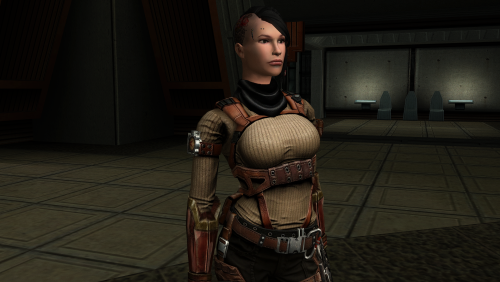
Female scout uniform
By Dark Hope
The mod replaces the PFBBM01 model and textures.
To Install
1. Download: PFBBM01
2. Copy all files to the Knights of the Old republic's Override folder.
(Example location - C:\Program Files (x86)\Steam\steamapps\common\swkotor\Override)
3. When/if prompted to overwrite files, press okay.
4. If you like the mod; leave a comment or endorse! (It would be much appreciated) Made with love.
47 downloads
-
Portraits Remade | K1
By J
170+ portraits to replace party and player portraits.
5 stage lightside/darkside transitions.
Install
- extract the .TPC files to the game's override folder
How Were These Made
Kotor Blender and ImageMagick.
I will be releasing the scripts to easily generate matching portraits.
Blender and KotorBlender plugin will need to be install but the portrait generation process does not require blender knowledge.
15 downloads
(0 reviews)0 comments
Submitted
-
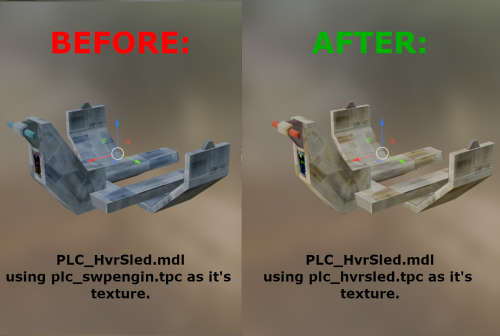
PLC_HvrSled.mdl texture correction - K1
By FF97
Hello everyone!
This mod assigns the unused texture of the same name to the hover sled model (PLC_HvrSled), instead of the Swoop Engine texture (PLC_Swpengin) used by default.
14 downloads
- texture
- placeables
- (and 1 more)
(0 reviews)0 comments
Submitted
-
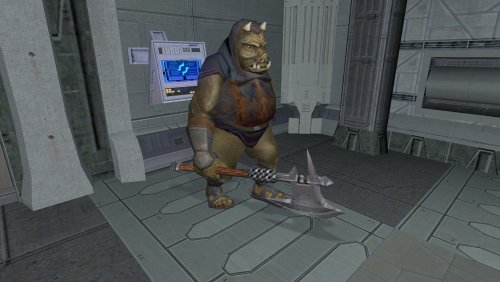
Gamorrean Axe Model and Texture Improvement - K1 Version
By FF97
Hello everyone!
This mod gives the Gamorreans a separate axe model with its own texture, instead of using UVs spread across a tiny area of the creature like the default version.
Credits: "4x Upscale+ Character Textures & Model Fixes (TSL)" - The C_Drdwar model in this mod or rather, the way the "rifle texture bug" was fixed gave me insight into the "reference" model node method.
15 downloads
(0 reviews)0 comments
Submitted
-
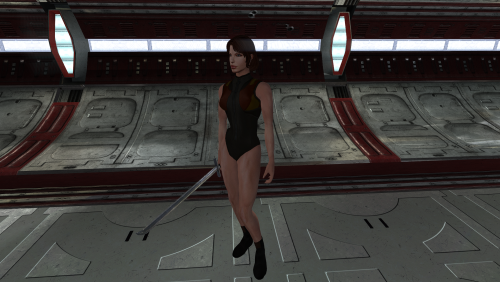
High poly underwear
By Dark Hope
The mod replaces the model and textures. Installation after the heads are installed.
To Install
1. Download: Underwear
2. Copy all files to the Knights of the Old republic's Override folder.
(Example location - C:\Program Files (x86)\Steam\steamapps\common\swkotor\Override)
3. When/if prompted to overwrite files, press okay.
4. If you like the mod; leave a comment or endorse! (It would be much appreciated) Made with love.
75 downloads
(1 review)0 comments
Updated
-
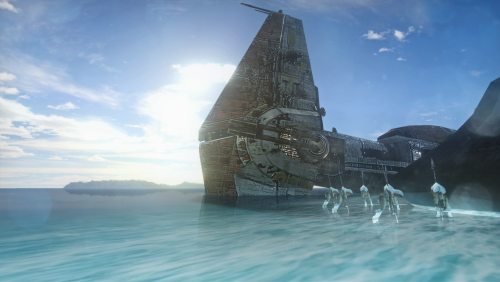
Chinese Translation For "A Crashed Republic Cruiser on a Nameless World 1.1.0"/"未知星球的坠毁巡洋舰"中文补丁
此文件为模组“未知星球的坠毁巡洋舰”的简体中文补丁,用户需先下载模组文件,再使用本补丁进行覆盖。
原模组链接:
A Crashed Republic Cruiser on a Nameless World - Mods - Deadly Stream
模组授权:
非常感谢模组上传者“LDR”授予的汉化许可。
注意:
此模组并不包含KOTOR1本体的汉化,游戏本体汉化现处于公开测试阶段,相关信息在国内各大主流游戏/视频平台均有发布,请自行寻找。
This file is the Simplified Chinese patch for mod “A Crashed Republic Cruiser on a Nameless World.”
you must download the original mod first, then overwrite with the files of this patch.
Original mod:
A Crashed Republic Cruiser on a Nameless World - Mods - Deadly Stream
Mod Permissions:
Many thanks to the mod uploader, “LDR,” for granting permission to create and distribute this patch.
Note:
This patch does not include a chinese translation patch of the KOTOR1 base game.
The base game translation patch is currently in open beta testing, and related information has been posted on major chinese gaming and video platforms.
Please search for it yourself.
5 downloads
(0 reviews)0 comments
Updated
-
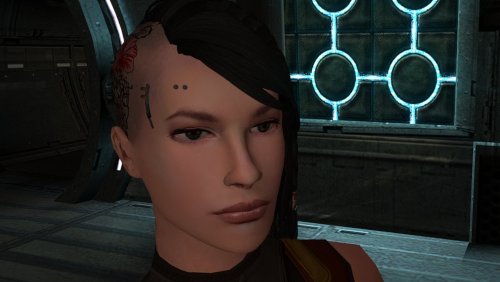
High poly PFHC04
By Dark Hope
The mod replaces the PFHC05 model and textures.
To Install
1. Download: PFHC05
2. Copy all files to the Knights of the Old republic's Override folder.
(Example location - C:\Program Files (x86)\Steam\steamapps\common\swkotor\Override)
3. When/if prompted to overwrite files, press okay.
4. If you like the mod; leave a comment or endorse! (It would be much appreciated) Made with love.
48 downloads
(0 reviews)0 comments
Submitted
-
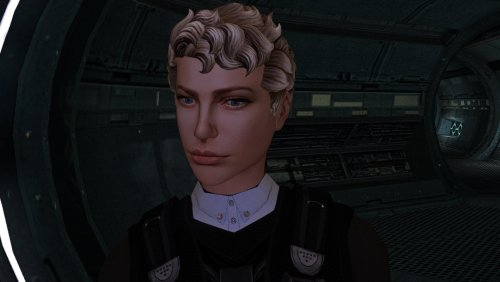
High poly PFHC04
By Dark Hope
The mod replaces the PFHC04 model and textures.
To Install
1. Download: PFHC04
2. Copy all files to the Knights of the Old republic's Override folder.
(Example location - C:\Program Files (x86)\Steam\steamapps\common\swkotor\Override)
3. When/if prompted to overwrite files, press okay.
4. If you like the mod; leave a comment or endorse! (It would be much appreciated) Made with love.
53 downloads
(0 reviews)0 comments
Submitted
-
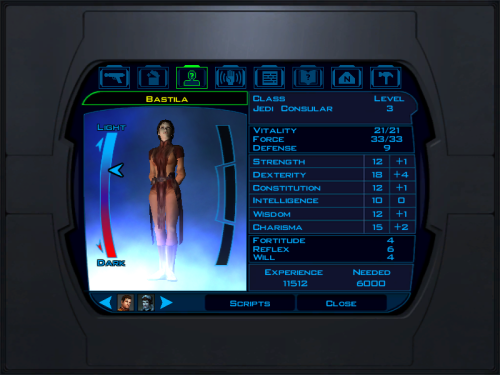
Swap Jolee and Bastila Classes
By dodrarikaan
Swap Jolee and Bastila Classes
Game: KOTOR 1
Author: Dodrari Kaan
Version: 1.0.0
GitHub: https://github.com/danielstegink/Kotor.SwapJoleeAndBastilaClasses
It occurred to me that Bastila's and Jolee's classes don't make a lot of sense for them. Jolee is an ex-Padawan who has tried just about every career path in the galaxy. Meanwhile, Bastila is a (relatively) sheltered Jedi prodigy with unique Force powers. This mod swaps their classes, and it slightly modifies their stats and abilities. I didn't change their starting lightsabers to ensure compatibility with any mods that modify those lightsabers.
Instructions
If you have any mods that modify Bastila's and Jolee's character files, such as offthegridmorty's "Bastila Has TSL Battle Meditation", install those first
Use the TSLPatcher
Permissions
Use this mod however you want. Just make sure to credit me.
Compatibility
This mod uses GFF to modify Bastila's and Jolee's classes and abilities. It may overwrite any changes made to these files by other mods, but it should be compatible with any mods that don't have any overlapping changes on these files.
Special Thanks
Fred Tetra - Kotor Tool
Stoffe - TSLPatcher
Disclaimer
THIS MODIFICATION IS NOT MADE, DISTRIBUTED, OR SUPPORTED BY BIOWARE, OR LUCASARTS ENTERTAINMENT COMPANY LLC. ELEMENTS TM & © LUCASARTS ENTERTAINMENT COMPANY LLC AND/OR ITS LICENSORS.
14 downloads
-
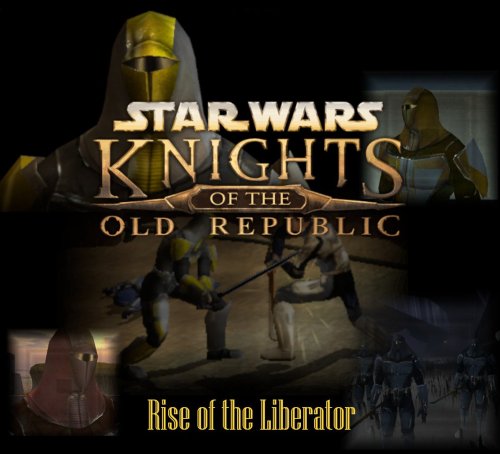
Rise of the Liberator
By dodrarikaan
Rise of the Liberator
Game: KOTOR 1
Author: Dodrari Kaan
Version: 1.0.0
GitHub: https://github.com/danielstegink/Kotor.RiseOfTheLiberator
Within the world of Kotor, there are hints that the Mandalorians are stirring, that a new Mandalore is rising to claim the mantle after the fall of Mandalore the Ultimate. Now, with Rise of the Liberator, that mystery has a name and a face. Face the Mandalorians of Kotor as you haven't faced them before, with new types, new equipment, new maps, and a mighty foe waiting for you at the end of the galaxy!
This mod adds 2 new maps to the Rakata homeworld, where a new Mandalore and a small army of Mandalorians wait for you. Additionally, Mandalorian encounters throughout the game hint at the rise of this new Mandalore, transforming the Mandalorian experience into a proper sub-plot. Encounter new Mandalorian types, each with a unique armor that comes in both heltmetless and helmeted versions, and face the final boss to claim a very special weapon.
Instructions
Install BoS:SR (https://deadlystream.com/files/file/761-brotherhood-of-shadow-solomons-revenge) Use the TSLPatcher Permissions
Use this mod however you want. Just make sure to credit me.
Compatibility
This mod should be compatible with the Jagi Mandalorian and Sherruk with Lightsabers mods.
This mod uses GFF and overrides to modify the following characters and items. Any mods that modify the same may not be compatible:
Bendak's Blaster dan14ac_mand04 in danm14ac (one of Sherruk's cronies) tat18_ in tat_m18aa (one of Jagi's minions) tat_thug3 in tat_m18aa (the GenoHaradan Mandalorian) kas25_mandcomm in kas_m25aa (the Mandalorian Commander in the Shadowlands) kas25_mandalor03 in kas_m25aa (one of the Mandalorians in the Shadowlands) kas25_mandalor04 in kas_m25aa (one of the Mandalorians in the Shadowlands) kas25_mandalor06 in kas_m25aa (one of the Mandalorians in the Shadowlands) kas25_mandalor07 in kas_m25aa (one of the Mandalorians in the Shadowlands) mikastore in korr_m33aa (Mika Dorin's merchant inventory in Dreshdae) g_mandalor004 in unk_m41ad (the Mandalorian Captain on the Rakata homeworld) m41ad.git in unk_m41ad (the map for the area around the Ancient Temple on the Rakata Homeworld) mand_armor_red (the Mandalorian Scout Armor in BoS:SR) g_a_class9004 (the unused Mandalorian Heavy Armor item) g_a_class9010 (the Mandalorian Assault Armor item) This mod adds item texture variations which may overlap with texture variations added by other mods
D9 Heavy Armor - Texture Variations 21, 22, 23, 24, 25, 26 Lightsaber, Shortsaber and Doublesaber - Texture Variation 21 Lightsaber Crystal - Texture Variation 22 Special Thanks
Fred Tetra - Kotor Tool
tk102 - DLG Editor, K-GFF
Stoffe and Fair Strides - ERFEdit
Fair Strides - MdlOps
Stoffe - TSLPatcher
ndix UR - TPCView
SilverEdge9 - Brotherhood of Shadow: Solomon's Revenge
Vriff and Synchro - Kotorblender
Disclaimer
THIS MODIFICATION IS NOT MADE, DISTRIBUTED, OR SUPPORTED BY BIOWARE, OR LUCASARTS ENTERTAINMENT COMPANY LLC. ELEMENTS TM & © LUCASARTS ENTERTAINMENT COMPANY LLC AND/OR ITS LICENSORS.
35 downloads
-
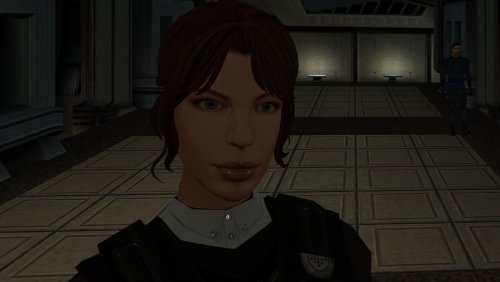
High poly PFHC03
By Dark Hope
The mod replaces the PFHC03 model and textures.
To Install
1. Download: PFHC03
2. Copy all files to the Knights of the Old republic's Override folder.
(Example location - C:\Program Files (x86)\Steam\steamapps\common\swkotor\Override)
3. When/if prompted to overwrite files, press okay.
4. If you like the mod; leave a comment or endorse! (It would be much appreciated) Made with love.
70 downloads
(0 reviews)0 comments
Submitted
-
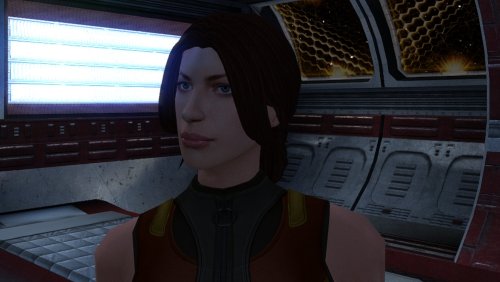
High poly PFHC01
By Dark Hope
The mod replaces the PFHC01 model and textures.
To Install
1. Download: PFHC01
2. Copy all files to the Knights of the Old republic's Override folder.
(Example location - C:\Program Files (x86)\Steam\steamapps\common\swkotor\Override)
3. When/if prompted to overwrite files, press okay.
4. If you like the mod; leave a comment or endorse! (It would be much appreciated) Made with love.
72 downloads
(0 reviews)0 comments
Updated
-
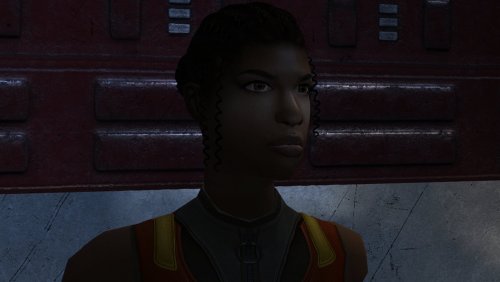
High poly PFHB05
By Dark Hope
The mod replaces the PFHB05 model and textures.
To Install
1. Download: PFHB05
2. Copy all files to the Knights of the Old republic's Override folder.
(Example location - C:\Program Files (x86)\Steam\steamapps\common\swkotor\Override)
3. When/if prompted to overwrite files, press okay.
4. If you like the mod; leave a comment or endorse! (It would be much appreciated) Made with love.
52 downloads
(0 reviews)0 comments
Submitted
-
Force Lightning Is Dangerous | K1
By J
Makes force shock, lightning and storm more dangerous and chaotic to the caster. If an enemy passes a will save, against these powers, the damage is halved. With this mod, half of the damage is directed back at the caster. Light/dark alignment modifies the damage taken, plus any resistance/immunity. A fully darkside aligned character will take 0 damage reflected back at them. A fully lightside character will take all reflected damage. This makes the Energy Resistance power, shields, and electrical resist/immunity gear more important. Unfortunately k1 only has one item while K2 has plenty. You can still spam force storm but you need to build for it.
Install:
- install Alignment Affects Force Powers [K1] first
- then install this mod
Credit:
- offthegridmorty - for allowing me to include the alignment modifier for compatibility with Alignment Affects Force Powers [K1]
16 downloads
(0 reviews)0 comments
Updated
-
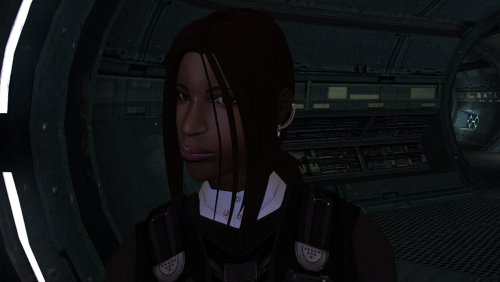
High poly PFHB04
By Dark Hope
The mod replaces the PFHB04 model and textures.
To Install
1. Download: PFHB04
2. Copy all files to the Knights of the Old republic's Override folder.
(Example location - C:\Program Files (x86)\Steam\steamapps\common\swkotor\Override)
3. When/if prompted to overwrite files, press okay.
4. If you like the mod; leave a comment or endorse! (It would be much appreciated) Made with love.
51 downloads
(0 reviews)0 comments
Submitted
-
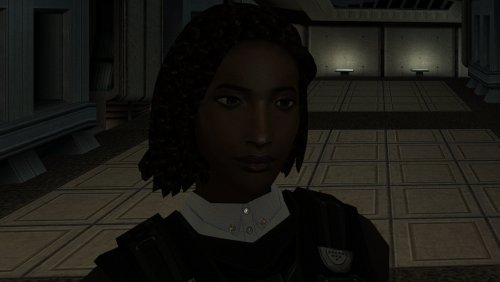
High poly PFHB03
By Dark Hope
The mod replaces the PFHB03 model and textures.
To Install
1. Download: PFHB03
2. Copy all files to the Knights of the Old republic's Override folder.
(Example location - C:\Program Files (x86)\Steam\steamapps\common\swkotor\Override)
3. When/if prompted to overwrite files, press okay.
4. If you like the mod; leave a comment or endorse! (It would be much appreciated) Made with love.
50 downloads
(0 reviews)0 comments
Submitted
-
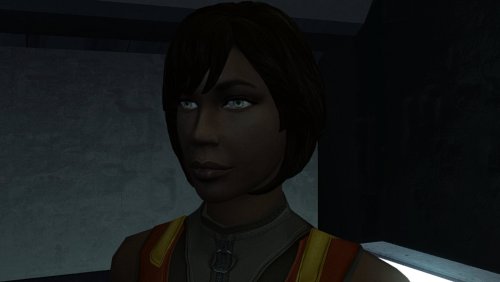
High poly PFHB02
By Dark Hope
The mod replaces the PFHB02 model and textures.
To Install
1. Download: PFHB02
2. Copy all files to the Knights of the Old republic's Override folder.
(Example location - C:\Program Files (x86)\Steam\steamapps\common\swkotor\Override)
3. When/if prompted to overwrite files, press okay.
4. If you like the mod; leave a comment or endorse! (It would be much appreciated) Made with love.
74 downloads
(0 reviews)0 comments
Updated
-
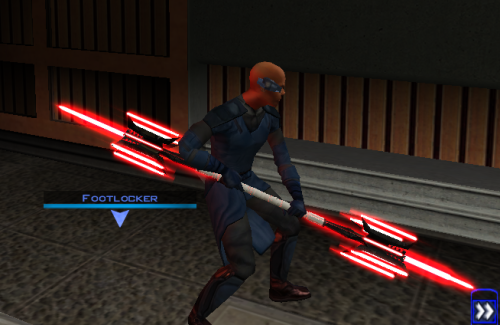
Lightmace and 2h Lightmace
By EwokKotor
Thought I already uploaded this here but I forgot so if anyone is interested here you go!
The readme's in the zipped files are outdate. Please refer to the standalone ReadMe file or the below instructions regarding instalaltions.
To install: *Steps 3 and 4 may not be necessary, try running without doing them first, but if the game crashes do steps 3+ 4 and try again.*
1: Drop all files except readme.txt swkotor.ini files and upcrystals.2da into override folder.
2:
A) If you don't an upcrystals.2da file in your override folder, just copy the one provided into your override folder.
If you do already have an upcrystals.2da file in your override folder,
- Insert a new row at the end of the table.
- Copy the last row from the table provided, paste it into the new row you just created.
- Save the file.
*3: In your folder that contains your swkotor.exe (usually named Star Wars - KotOR) locate the file named swkotor.ini and rename it BACKUPswkotor.ini so that you can revert to it later if you desire.
*4: Paste the swkotor.ini file included with this download into that same folder ( Star Wars - KotOR)
--note you can use either included .ini but if using WINDOWEDswkotor.ini rename it to swkotor.ini
They are basically the same but one is set for fullscreen and the other windowed mode.
----
Uninstall:
1) Delete files from override folder.
2) Delete the .ini file you added, and rename the one you re-named as BACKUPswkotor.ini to it's original name.
To get items in game:
1) Enter the cheat menu (~)
2) Type giveitem g_w_lghtsbr45 or giveitem_g_w_dblsbr045 and press enter.
----------
A giant shoutout and thanks to JCarter426 over on the DeadlyStream forums for helping me solve the rendering issue!
Credits:
This Mod contains source assets from other creators, all credit due to them for their original works. Permissions have been attained and followed per the licenses of their works.
I own the $10 unlimited commercial license for 'Goblin Iron Mace - fantasy PBR game ready weapon' by Dominik Maral. https://cubebrush.co/orders/159g6hh95g?token=Eqyy2xDzWuarI9uPcWMzEVscuvTHnBazuWAxvQSkWTc
This mod also uses FinBass' 'Battle Mace 3D Model' available at
https://sketchfab.com/3d-models/battle-mace-07bfd5d2ff694f94b2f2f77c465fa0f5 a big thanks to them for making this available for free with a CC Attribution license.
Also as always a big thanks to Crazy34 for making their lightsaber blades with ambient lighting available as a modders resource for the rest of the community to incorporate into their mods. Check out their mod here: https://deadlystream.com/files/file/1855-new_lightsaber_blades_modders_res/
Credit and thanks also to Kaidon Jorn as from my understanding the hilts used by Crazy's mod come from him "Lightsaber Hilts models and textures and icons are created by Kaidon Jorn "
Also a giant thanks, along with credit go to J for making their Glitched Lightsaber Hilt Fix - TSL ASPYR 2.0 mod available as a modders resource! Without this I couldn't have solved the rendering issues. Make sure to go support their work at https://deadlystream.com/files/file/2735-glitched-lightsaber-hilt-fix-tsl-aspyr/
Full credit goes to the original developers, artists, and respective intellectual property rights holders (Lucasfilm, Pandemic Studios, and BioWare). This is a strictly non-profit, fan-made educational project intended exclusively as a technical proof-of-concept demonstrating asset handling for the KOTOR modding community. Furthermore, I do not own or claim rights to any of the third-party tools used or described in this project; all rights belong entirely to their respective developers.
Permissions regarding use of this model: Feel free to use as you see fit, but please give due credit.
----------
Purpose:
This mod is a prototype WORK IN PROGRESS. It adds a new weapon type, the lightmace (and a 2h version), to the game. I plan to fine tune the hilt textures later.
IF you have any color requests please comment as I can easily make different colors with my script (also available for download).
17 downloads
-
File Reviews
-
Fantastic work!!! Quick question to any who read this: I'm a total rookie with modding, and in my most recent playthrough, when the camera executed the flyby when the HK-50s shot you down over the polar region(when they start speaking "Egotistical Boast") I saw the mod author's logo. Again, since I;m new to this, I likely made a mistake when I added them, so how can I correct it so I don't see the logo?
-

lorddli 2
does what it says on the tin and i like it
-
 1
1
-
-
Awesome mod! Some necessary powers filling out the pool, especially with Revitalize.
I don't know if this is cool, if not I will absolutely delete it... But I had AI upscale your icons so that they would work properly at high resolution (the images look basically identical, they're just 64x64 instead of 32x32). -
Nice job !
ou plutôt dans ce cas Beau travail ! -
This Mod fixes all of the problems that I have when I got back to play this game on newer systems.
The dev behind this mod was quick to answer any questions I had since I was a Linux user of this mod.
Great quality mod, that fixes issues I was having in Ultrawide such as the dialogue windows not working on the first step of a new conversation (Typical on Ultrawide) as well as improving general stability of the game.
Would recommend for anyone playing the game.
-
Ok, I hope this helps perfect it because it's a good idea on paper. I'll keep it as "matter-of-factly" as possible.
My experience with this mod: My setup already had TSLRCM+M478PE+PartySwap as a foundation already running. I installed this mod, created a fresh, new character to test it out, made it to the Telos Citadel Station, and after the "house arrest" sequence wrapped up and I was free to move, the quest triggers, unknown to me, were compromised. For example: The ambush on Dock Module 126? The 5 thugs that attack you spawned, I fought them and beat them, but the dialogue script failed to recognize the instance, leaving the TSF NPC in an infinite "text box loop" saying "don't let them hurt the droid; the instance didn't close properly and, naturally, the journal quest didn't update. I reloaded a save file just prior to that beat and it played out correctly a second time. When I showed the "modified holdout blaster" to Lt. Grenn to pick up the "suspicious goods" quest? that dialogue with Grenn played normally, however the journal didn't log the "suspicious goods" quest at all. So, the masked thug that's supposed to ambush you in the Entertainment Module immediately after that dialogue didn't spawn. Another tell-tale sign that something was wrong is that the Dobo Brothers' Merchant Room was completely inaccessible: The door would not open, full stop. Also, one of the doors to the cantina turned into a "one-way" exit. You could exit out of the cantina through it but not go back in. The other door worked fine. And for some reason, some NPCs appeared with no head whatsoever, (though I'm uncertain of this last bit is related.) To solve these problems on my setup, I purged my game's Override, performed a Steam Integrity Check, and re-installed all my mods in the proper order, except this one. I hope this helps you perfect it.
EDIT: To be clear, I don't use the Steam Workshop for anything whatsoever; I only use Steam to launch the game. All my mods were installed through their respective standalone TSLPatcher executable.
Edited by jmorenobothwell -
-
lorddli 2
Perfect companion mod to go along with KMRP
-
You are the pillar of this community
-
The Atton no guyliner with mid scruff is absolutely perfect! Love this!
-
This wonderful black magic fuckery has enabled me to play my favorite game of all time at 240fps without any issues and I am very happy about it. Thank you!
Edited by gilless429-
 1
1
-
-
Excellent addition! Everything worked great, and I love the different logs and the story they tell!
-
1
-
-

Synchro 21
These look great! Now I know what you meant about not being able to get portrait images out of your head

-
-
Incredible that it's taken this long to use grass and shadows again. Incredible.
-
1
-
-




-
File Comments
-
 Shem's Robes for Korriban Sith Students mod already does that.
 -

-
 Try it and add the "Unique Party Robes" last.
 -

By BottomlessThought23 · Posted
Hey man, glad you're happy with this, I was worried about stepping on your toes. I love your mod! -
 That's awesome!! This is exactly what I was dreaming of when I first found out about the original idea behind repeaters, and that shoddy scripting workaround I made was always only a consolation prize - the best I could do, but it never fully made me happy.
-