

Mods
1,052 files
-
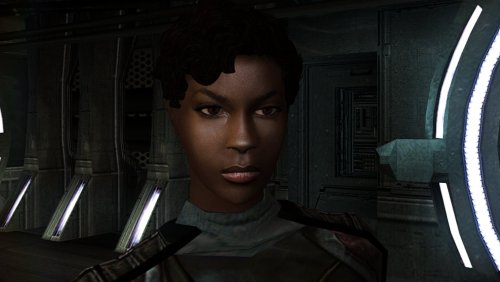
High poly PFHB01
By Dark Hope
The mod replaces the PFHB01 model and textures.
To Install
1. Download: PFHB01
2. Copy all files to the Knights of the Old republic's Override folder.
(Example location - C:\Program Files (x86)\Steam\steamapps\common\swkotor\Override)
3. When/if prompted to overwrite files, press okay.
4. If you like the mod; leave a comment or endorse! (It would be much appreciated) Made with love.
74 downloads
-
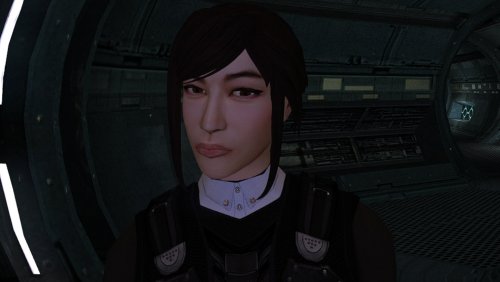
High poly PFHA05
By Dark Hope
The mod replaces the PFHA05 model and textures.
To Install
1. Download: PFHA05
2. Copy all files to the Knights of the Old republic's Override folder.
(Example location - C:\Program Files (x86)\Steam\steamapps\common\swkotor\Override)
3. When/if prompted to overwrite files, press okay.
4. If you like the mod; leave a comment or endorse! (It would be much appreciated) Made with love.
108 downloads
(0 reviews)0 comments
Updated
-

Scaled Kotor | Widescreen + UI Scaling
By J
Expands supported resolutions and scales all Menus/HUD.
Install
- Use with Kotor Patch Manager: https://github.com/LaneDibello/Kotor-Patch-Manager
- Editable K1 Executable or GOG version required
- Copy Scaled Kotor textures and font files to override directory
- Apply Scaled Kotor patch with patch manager and then click launch.
- Alt Tab Patch and Movie Patch are recommended.
- Change resolution in game
- please report any bugs
Recommended
- K1 Modern Driver Compatibility Patch
Source: https://github.com/J0-o/ScaledKotorWidescreenPatch
Credits:
HD UI Menu Pack - The menu background outlines were combined with custom menu borders
Vriff - Supplied the custom font scaling system
325 downloads
-
![More information about "[K1] HD Female Twi'leks + NPC Diversity + Playable Female Twi'leks"](https://deadlystream.com/downloads/screens/monthly_2026_09/Untitled-5.thumb.png.825cd65aa1f41bb1266ad35609de16ba.png)
[K1] HD Female Twi'leks + NPC Diversity + Playable Female Twi'leks
By Lily
=====================================================
[K1] HD Female Twi'leks + NPC Diversity + Playable Female Twi'leks
=====================================================
Mod for Knights of the Old Republic 1
Author: Lily
File Name: K1_HD_Female_Twilek_Diversity_and_PCs_v3.zip
Latest Version: 1.3.0
---
1. DESCRIPTION:
This mod overhauls the female Twi'lek NPCs in KotOR 1 and adds 26 new playable female Twi'lek heads.
NPC Overhaul:
- Upscaled and updated dancer outfits.
- Body skin tones all match head skin tones.
- Added specular highlights to body textures.
- Added specular highlights with a bump map to the heads, giving female lekku the same light-reactive shine male Twi'leks have. Eyes and lips also get a subtle shine.
- NPCs now use different lekku positioning per head, so they no longer all look like pure reskins.
- Gives a unique appearance to:
- Yuthura Ban when encountered on Dantooine
- Zaerdra - Hidden Beks bodyguard, Taris
- Lyn Sekla - dancer, Taris
- Janice Nall - droid shop owner, Taris
- Kandon's Bodyguard - Black Vulkar Base
- Malare - Bastila's quest
- Lena - Mission's quest
- Zoriis Bafka - swoop racer, Tatooine
- Casandra Mateil - swoop racer, Manaan
- Zeena - swoop racer, Manaan
Playable Heads:
- 26 playable female Twi'lek models, including every female Twi'lek NPC.
- A number of completely new heads.
- Dark side transitions.
- Every playable head comes with a Handmaiden-style underwear model with matching skin tones.
Find the KotOR II version here!
---
2. INSTALLATION:
Run Install.exe and select your KotOR 1 game directory.
There are 3 installation options.
- Default Installation: Includes playable Twi'lek models and replacements for NPC Twi'leks. You probably want this one.
- Playable Twi'leks ONLY: Includes only models for the player character, NPC Twi'leks will remain unchanged
- NPC replacement ONLY: Replaces models for NPC Twi'leks, does not add any playable characters
If you use the default installation, you DO NOT need to install NPC replacement ONLY or Playable Twi'leks ONLY.
You should be safe to reinstall this mod on top of itself without any problems.
You will probably want to use a widescreen mod such as this
Without a high resolution, the bump mapping looks pretty bad.
A "backup" folder is created by the installer in the same directory. Don't delete it if you plan to uninstall later.
---
3. UNINSTALLATION:
Run Install.exe, select your KotOR 1 directory, and use the "Tools > uninstall/restore backup" option to revert all changes made by this mod.
---
4. KNOWN ISSUES:
If you have met any of the NPCs, they will not have their unique appearance. You should use a save from beforehand.
If you find any bugs or problems, please report them.
---
5. MOD COMPATIBILITY:
Installing this should not break any other mods or have any conflicts, including K1R.
This mod only touches female Twi'lek head/body models, textures, and appearance-related files - no dialogue, scripting, or module changes. Should be compatible with all other mods other than any other mods that have changed the female Twi'lek appearances, this mod will obviously stop the old appearances from showing. All files should have unique names, so this should not overwrite other mods, and it would just take Appearance.2da changes (or an uninstallation) to revert.
Notably, this mod conflicts with KotOR 1 Twi'lek Female NPC Diversity
That mod directly installs to the override folder instead of into modules, so you will need to uninstall that mod if you want to see the NPC appearances from this mod. However, if you wish to keep any appearances from that mod or any other female Twi'lek NPC mods, you can install those after this one to overwrite specific NPCs without an issue.
Do not use the Steam Workshop for KotOR. It will almost certainly end with compatibility issues.
---
6. SUPPORT:
My mods are free to use. You do not need to pay for them, but if you would like to say thanks, you can buy me a coffee!
---
7. PERMISSIONS:
Please let me know if you plan on using any of the files in my mod for your own mod. The answer is "yes you may", but I would like to know what you are doing with it!
Do not directly reupload this mod anywhere else.
---
8. THANKS:
- Dark Hope - HD Twilek base textures
- Leilukin & SpaceAlex - Dahnis Unique Look
- Effixian - Red Twi'lek head
- DarthParametric - Twi'lek high boots model
- redrob41 - Original Twi'lek head/body model fixes, original underwear, dancer, assassin models
- bead-v - MDLEdit
- Fred Tetra - KotOR Tool
- Cortisol - Holocron Toolset & HoloPatcher
- Fair Strides - TSLPatcher
- seedhartha - KotOR Blender
- ndix UR - tga2tpc
- ??? - A couple playable heads are originally from a decade-old modpack with no credits. If you are or know the author, let me know and I can credit the author/remove them.
THIS MODIFICATION IS NOT SUPPORTED BY BIOWARE/OBSIDIAN ENTERTAINMENT OR LUCASARTS OR ANY LICENSORS/SPONSORS OF THE MENTIONED COMPANIES. USE THIS FILE AT YOUR OWN RISK.
176 downloads
-
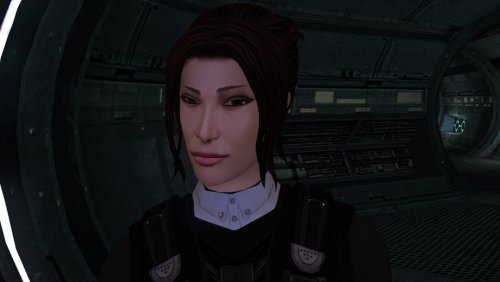
High poly PFHA04
By Dark Hope
The mod replaces the PFHA04 model and textures.
To Install
1. Download: PFHA04
2. Copy all files to the Knights of the Old republic's Override folder.
(Example location - C:\Program Files (x86)\Steam\steamapps\common\swkotor\Override)
3. When/if prompted to overwrite files, press okay.
4. If you like the mod; leave a comment or endorse! (It would be much appreciated) Made with love.
104 downloads
(0 reviews)0 comments
Updated
-
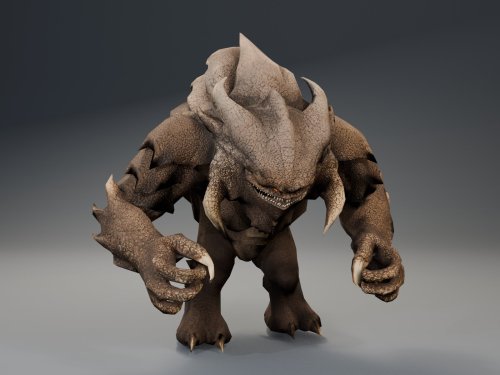
HQ Terentatek Replacement
By ShaolinGhost
AI DISCLOSURE & FEEDBACK
I use AI often in my workflows to assist with creating my mods, including handling monotonous and repetitive tasks. You should assume that anything I post has had AI assistance in some way.
As I stated in my Dathomir WIP post, I expect discussion of my projects to remain professional and focused on the actual artwork, performance, and gameplay. Constructive criticism that helps improve the art or gameplay is welcome. Derogatory statements about AI will be ignored. I am here to improve the finished product, and I will not change my workflow to accommodate personal objections to AI.
HQ Terentatek Replacement — KOTOR I
Version 1.0.0 by ShaolinGhost
Bring a new look and movement set to KOTOR I’s Terentateks. This replacement pairs a custom creature model and 4K textures with converted Star Wars: The Old Republic animations, including claw-slashing attacks, idle and movement cycles, damage reactions, death and roar motions.
The replacement covers every creature using the original Terentatek appearance throughout the base game, including Kashyyyk, Korriban and scripted transformations. Existing encounter scripts, quests, statistics, loot and native soundset assignments are preserved. Campaign roars occur when the original game scripts or animation system request them.
Requirements
KOTOR I for PC. No additional mods, runtime DLLs, custom launcher or executable patches are required. TSLPatcher is included for Windows installation. The 4096 × 4096 textures require additional graphics memory.
Installation
Close the game and extract the entire ZIP into its own folder outside the game directory. Run TSLPatcher.exe, select Install Mod, and choose the KOTOR I folder containing swkotor.exe. Do not select Override. Wait for installation to finish and check the log for errors. Keep the installer and its backup folder. The installer merges the Terentatek appearance settings into an existing appearance.2da and preserves unrelated changes. Do not manually copy the supplied appearance.2da into Override. A new game is not required for this appearance replacement; restart the game after installing.
Compatibility
Install after other appearance-table mods. Mods that replace the same Terentatek appearance or the same model and texture resources conflict. Creatures assigned a separate appearance by another mod are outside this replacement’s scope. K1R compatibility has not been tested; the required compatibility field is therefore marked No.
This release contains no test maps, test creatures, saves or plot scripts. The gallery includes four Blender model renders showing the front, profile, claw attack and roar, plus one in-game screenshot from the development test area. Render lighting differs from in-game lighting.
Uninstallation
Restore the files from this installation’s backup folder. Remove files created by the installer only when no previous version was backed up. See README.txt for the complete file list and appearance.2da instructions. Uninstall in reverse installation order to avoid discarding later mods’ table changes.
Credits
ShaolinGhost — custom creature model, textures and mod release. BioWare / Electronic Arts — SWTOR skeleton and animation source assets, converted for KOTOR I. BioWare / LucasArts — KOTOR I and its creature sounds. stoffe and Fair Strides — TSLPatcher. MDLOps contributors, the Blender project and the KOTOR modding community. Permissions
Please contact ShaolinGhost on Deadly Stream before redistributing or using the custom model and textures in another release. Rights to original game assets remain with their respective owners. This is a free, unofficial modification and is not made, distributed or supported by BioWare, Electronic Arts, LucasArts, Lucasfilm or Disney.
123 downloads
- terentatek
- creature
- (and 3 more)
-
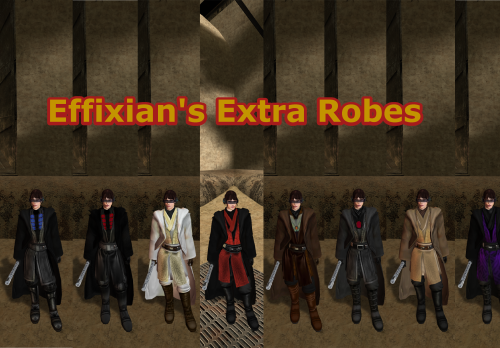
Movie Style Effixians Extra Robes
Upon finding Effixian's Extra JC's Jedi Robes mod, I instantly fell in love as I loved all the designs and it added new robes to Kotor, as this game was very much lacking in terms of unique robes unlike TSL, However I also loved the K1 Movie style Jedi Robes by N-DReW25, and wanted to use both mods ,but no patches existed to make the two mods compatible, so I pulled a Thanos and decided to do it myself which led me to making this mod. All these textures were made by me, with the help of other textures for the K2 movie style robes mod by Deadman. I hope you enjoy this mod.
INSTALLATION: 1. you must install JC's Jedi robes mod by JCarter426 for this to work properly:
2. you have to install the K1 Movie style Master robes by N-DReW25:
3. then install Effixian's Extra Robes mod by Effix:
4. then finally drop the files for this mod into the Override folder, Replace any files if prompted.
CREDITS:
Thanks to:
DeadMan for making the OG TSL mod
JCarter426 for his Cloaked Jedi robes mod
N-DReW25 for his master robes mod for K1
Effix for his Extra Robes mod
Dark Hope for allowing me to use her Electromesh texture for this mod
Hope you enjoy this mod -SebastianTheBlueBird
55 downloads
(0 reviews)0 comments
Submitted
-
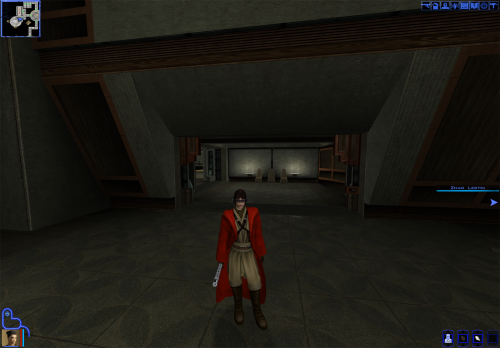
Qel Droma Movie Style Jedi Robes retexture mod
similar to my Red-Brown-Blue retexture for K1 Movie-Style Jedi Master Robes by N-DReW25, this mod changes the look of the Qel Droma Robes for Kotor 1 utilizing Effixian's Qel-Droma Robes Reskin for JC's Cloaked Jedi Robes 1.0.2.
INSTALLATION
1. you must install JC's Cloaked Jedi Robes for everything to work properly:
2. install the same Qel Droma robes mod by Effixian:
3. then install the Movie Style Master Robes mod by N-DReW25:
and finally you can then install this mod
to Properly install this mod, delete all mods with the names starting with PFBI05 and PMBI05 in the Master Robes mod folder because they are in tpc format and this mod is in .tga format meaning it won't work while the .tpc files are in you're override folder.
Hope you enjoy this mod -Sebastian The Blue Bird.
16 downloads
(0 reviews)0 comments
Updated
-
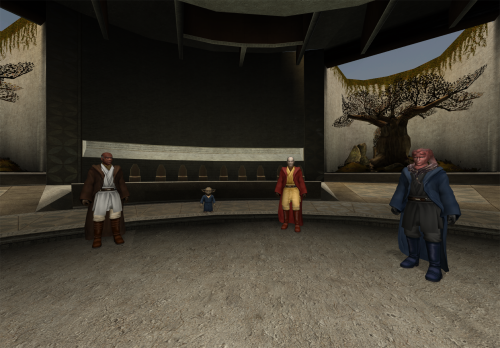
Red-Brown-Blue retexture for K1 Movie-Style Jedi Master Robes 1.1.0
I make my deadly stream debut with this retexture. As soon as I saw the K1 Movie-Style Jedi Master Robes by N-DReW25 I fell in love because a mod I loved in TSL was finally put into K1. Download it here:
However recently I had the thought of "what if I made the robes to look like the Red Brown and Blue robes from JC's Fashion Line I: Cloaked Jedi Robes for K1 1.4 which you can also download here if you want that mod instead:
it turned out to be quite successful. I used the white and black robes from the OG movie style robes mod by DeadMan and made new textures from the red blue and qel Droma Robes which I will upload separately Initially I made it just for myself but I decided to share it on Deadly Stream for others to enjoy, I hope you like my first mod.
INSTALLATION:
Step 1: you must install the original mod by N-DReW25 for this mod to work properly which also requires JC's Jedi robes mod I have left the links for both mods above the installation.
Step 2: to install this retexture, first you must look through the names of all files from this mod, then delete all .tpc files with the same name as all files in this mods folder as this mod's files are in .tga format and tpc files appear first in Kotor, meaning if you just put this mods files in the Override, the mod would not work because the .tpc files are still in the Override folder (I would have just made the mod files .tpc files but this is my first mod and I don't know how to do that im a complete noob)
Once you have put the retexture files in the override and deleted the .tpc files with the same name you are good to go enjoy my first mod and let me know if you come across any bugs.
-Sebastian the Blue Bird
20 downloads
-
K1 High FPS Fixes -> (Outdated: New patch for k1&2 linked in description)
By D3M0
NEW:
This patch is now outdated and link to new one is in description that works with both K1 and K2!
K1 High FPS Fixes
Fixes several problems in Knights of the Old Republic that appear when playing above 60 FPS.
Included fixes:
Dialogue letterbox timing
Post-combat movement freeze
Free-look mouse sensitivity
Animated textures such as rivers, waterfalls, and flashing mines
Lightsaber trails
Tree leaves and similar moving effects
Water ripples and force fields
Should make the animations and timings feel as close as possible to their speed when played at 60fps. No longer do you need to lock your frame rate to enjoy the game.
Tested up to 240 FPS.
But should work at even higher fps though let me know if any issues arise.
Requirements:
Kotor Patch Manager 0.6.3 or 0.7.0
KOTOR 1.03
If your swkotor.exe has already been modified by widescreen, 4 GB patch, or other executable patches, I have an experimental adapter available on Github. It's also compatible with other kpatches. Also let me know if any issues happen with the adapter.
Do not install the standalone versions of these fixes alongside this combined version, such as J's post combat fix or my individual fixes on my GitHub or previous deadlystream post. Source code and alt download available below.
Links:
New patch for both K1 + K2!
Alternative Download - GitHub Releases
Source Code - GitHub
136 downloads
(0 reviews)0 comments
Updated
-
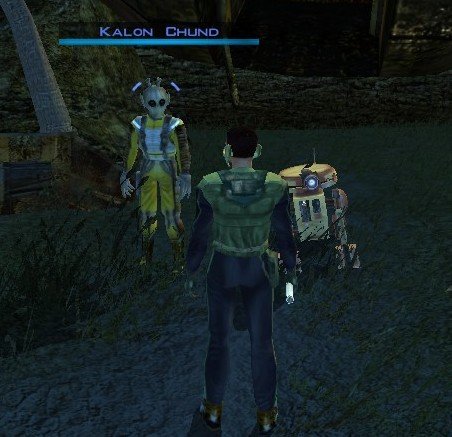
Stranded Merchant
By dodrarikaan
Stranded Merchant
Game: KOTOR 1
Author: Dodrari Kaan
Version: 1.0.0
GitHub: https://github.com/danielstegink/Kotor.StrandedMerchant
We get a lot of stuff on the Rakata homeworld, most of which we don't need. It's kind of annoying since it bogs down our inventory and we don't get to buy any more cool stuff.
Enter a new NPC on the Nameless World: Kalon Chund, a stranded merchant hiding in the safety of the crashed starship outside the Elder's settlement. He has a huge inventory for you to choose from, and his assistant Scrapper is more than happy to buy any junk you've accumulated over the course of the game.
Instructions
Use the TSLPatcher
Permissions
Use this mod however you want. Just make sure to credit me.
Compatibility
This mod uses GFF to modify the area outside the Elder's settlement (unk_m41ab), removing the ship parts and one of the plasma vents. Any mods that affect the same area may not be compatible.
Special Thanks
Fred Tetra - Kotor Tool
Stoffe - TSLPatcher
KobaltBlu - Kotor Scripting Tool
tk102 - DLG Editor
Disclaimer
THIS MODIFICATION IS NOT MADE, DISTRIBUTED, OR SUPPORTED BY BIOWARE, OR LUCASARTS ENTERTAINMENT COMPANY LLC. ELEMENTS TM & © LUCASARTS ENTERTAINMENT COMPANY LLC AND/OR ITS LICENSORS.
33 downloads
(0 reviews)0 comments
Submitted
-
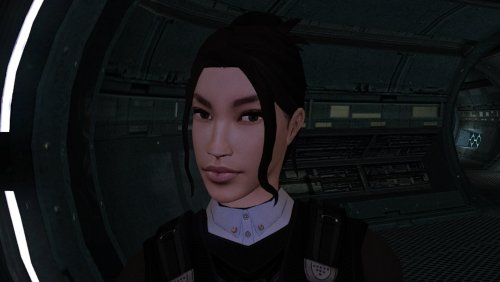
High poly PFHA02
By Dark Hope
The mod replaces the PFHA02 model and textures.
To Install
1. Download: PFHA02
2. Copy all files to the Knights of the Old republic's Override folder.
(Example location - C:\Program Files (x86)\Steam\steamapps\common\swkotor\Override)
3. When/if prompted to overwrite files, press okay.
4. If you like the mod; leave a comment or endorse! (It would be much appreciated) Made with love.
108 downloads
(0 reviews)0 comments
Updated
-
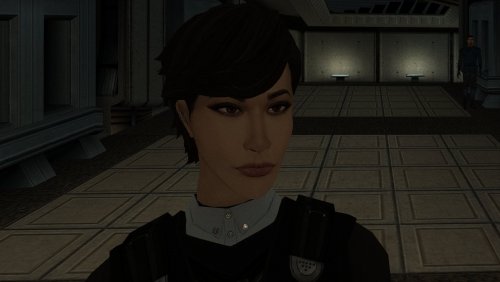
High poly PFHA01
By Dark Hope
The mod replaces the PFHA01 model and textures.
To Install
1. Download: PFHA01
2. Copy all files to the Knights of the Old republic's Override folder.
(Example location - C:\Program Files (x86)\Steam\steamapps\common\swkotor\Override)
3. When/if prompted to overwrite files, press okay.
4. If you like the mod; leave a comment or endorse! (It would be much appreciated) Made with love.
134 downloads
(0 reviews)0 comments
Updated
-
KMRP - KOTOR Modern Restoration Patch
By RaymanGT
KMRP - KOTOR MODERN RESTORATION PATCH
Any resolution, properly scaled UI, controller support and engine fixes for KOTOR 1
Any resolution | 800x600 to 8K | 4:3 | 16:10 | 16:9 | 21:9 | 32:9 | Windows, macOS and Linux
━━━━━━━━━━━━━━━━━━━━━━━━━━━━━━━━━━━━━━━━
HOTFIX 1.5.1
A hotfix for 1.5.0, for Windows and for Linux with Proton.
If you play on Linux or SteamOS you need this version: 1.5.0 does not start there. Run the 1.5.1 installer over your existing install; there is no need to restore first. The macOS version is not affected and stays at 1.5.0.
Linux and SteamOS. The game starts again under Proton. SteamOS is tested and working. Mods in Override always win. Load screen mods, texture mods and custom fonts work again. In 1.5.0 they were ignored whenever KMRP had a file of the same name. Translations. Their own fonts are used, with all their letters, at the right size. Tested with the Polish translation. Controller. Changing the resolution in the game no longer ends it, A plays the selected card in Pazaak, and movement no longer stutters with PadForge, DS4Windows and similar tools. Installer on Linux. It finds your Steam game by itself, and Restore Original completes. Temp folder. KMRP no longer leaves 177 MB behind at every start. Windows 7. The "ordinal 40 not found in Cabinet.dll" error is removed. On Linux and SteamOS, set KOTOR's controller layout in Steam to Gamepad. Otherwise the game gets no controller. The installer reminds you.
━━━━━━━━━━━━━━━━━━━━━━━━━━━━━━━━━━━━━━━━
WHAT IS KMRP?
Vanilla KOTOR was built around fixed pixel sizes and interface layouts designed for resolutions such as 640x480.
On modern displays this causes tiny text, overlapping list entries, undersized icons, broken map scaling and other interface problems.
KMRP fixes these problems in the game engine itself.
One installer, one click, and one click to undo everything. It changes how the game looks, fits and controls, and nothing about its story, quests or balance.
━━━━━━━━━━━━━━━━━━━━━━━━━━━━━━━━━━━━━━━━
WHAT IS NEW IN 1.5
No resolution to choose. The game starts at your display's own resolution. Its Screen Resolution setting lists every size and refresh rate your display supports, and a change takes effect at once, with no restart and no patching again. Controller support, built in. A controller works on every screen, with the right button pictures for your pad (Xbox or PlayStation), rumble and a Controller Layout screen. Xbox-style HUD. Modelled on the console version. On by default, can be switched off. Above 60 frames per second. An option installs D3M0's High FPS Fixes, switched on by itself above 60 Hz. macOS. The Steam game, on Intel and Apple Silicon Macs, with its own installer. swkotor.exe is no longer rewritten. On Windows the changes are applied in memory each time the game starts, through KOTOR Patch Manager's runtime. ━━━━━━━━━━━━━━━━━━━━━━━━━━━━━━━━━━━━━━━━
WHAT IT FIXES
Readable text with properly scaled list rows Inventory, Abilities and Store icons and rows scale correctly Item stack counts remain visible with larger fonts, in the inventory and in shops Popups and check boxes grow with the screen Long item description crash fixed, along with several rare crashes Area map fills its frame, fog of war covers the complete map, markers scale and are clicked where you see them HUD minimap follows your character Movies play at the game's resolution, with no switch to 640x480, and are not cropped on wide screens HD art: higher-quality portraits, item icons and menu art Every shape from 4:3 to 32:9 is covered, from 800x600 up to 8K: 66 common resolutions have menus built for them, and any other size gets menus fitted to it.
━━━━━━━━━━━━━━━━━━━━━━━━━━━━━━━━━━━━━━━━
PLATFORMS
Windows: the Steam, GOG and disc 1.03 versions. The installer checks the game's file before doing anything and refuses any other build. macOS: the Steam game, on Intel and Apple Silicon Macs. The macOS version stays at 1.5.0. Linux: the Windows installer through Proton. SteamOS is tested and working with 1.5.1. No Steam Deck itself was tested. ━━━━━━━━━━━━━━━━━━━━━━━━━━━━━━━━━━━━━━━━
INSTALLATION
Install other content mods (K1CP, K1R and so on) first. Start the game once so its settings file exists. Run the KMRP installer and press Start Patching. There is no resolution to pick. To undo everything, run it again and press Restore Original. Linux and SteamOS: run the installer with protontricks-launch --appid 32370, then set KOTOR's controller layout in Steam to Gamepad.
If you use KOTOR Patch Manager, KMRP's two patches are listed there and other patches can be added beside them.
━━━━━━━━━━━━━━━━━━━━━━━━━━━━━━━━━━━━━━━━
INSTALLER OPTIONS
Controller support, and with it the Xbox-style HUD High FPS Fix (D3M0's High FPS Fixes) HD item icons Map-note corrections (Derslok) Driver compatibility for lighting, fog and shadows on modern graphics cards (Synchro) ━━━━━━━━━━━━━━━━━━━━━━━━━━━━━━━━━━━━━━━━
COMPATIBILITY
KMRP 1.0 was tested with KOTOR 1 Community Patch 1.10.0 and KOTOR 1 Restoration 1.2. KMRP 1.5.1 was tested with KOTOR 1 Community Patch 1.10.0 and with the Polish translation.
Since 1.5.1, files that other mods put in the Override folder always win over KMRP's.
━━━━━━━━━━━━━━━━━━━━━━━━━━━━━━━━━━━━━━━━
CREDITS
ndix UR: KOTOR High Resolution Menus 1.5 Synchro: K1 Modern Driver Compatibility 1.2.0, and published area-map research Derslok: K1 Area Map Fixes D3M0: High FPS Fixes Lane Dibello and the KOTOR Patch Manager project: the runtime KMRP's patches run on MadDerp: Party Portraits JackInTheBox: KOTOR 1 HD Icon Pack 1.0 RaymanGT: HD menu and UI asset set Xelu: Free Controller & Key Prompts Bundled work is included with its authors' permission or under its licence. Full notices are in the repository.
━━━━━━━━━━━━━━━━━━━━━━━━━━━━━━━━━━━━━━━━
SOURCE AND CHANGELOG
github.com/RayesDiyab/KMRP-KOTOR-Modern-Restoration-Patch
Licence: GPL-3.0. Unofficial; you must own the game.
2,540 downloads
-
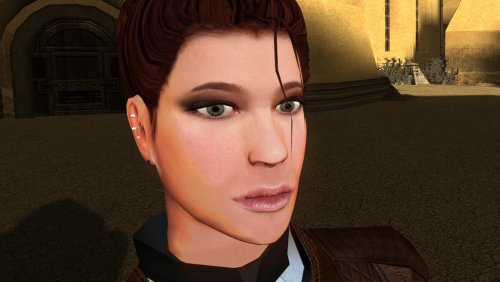
High poly PFHC02
By Dark Hope
The mod replaces the PFHC02 model and textures.
To Install
1. Download: PFHC02
2. Copy all files to the Knights of the Old republic's Override folder.
(Example location - C:\Program Files (x86)\Steam\steamapps\common\swkotor\Override)
3. When/if prompted to overwrite files, press okay.
4. If you like the mod; leave a comment or endorse! (It would be much appreciated) Made with love.
138 downloads
-
KOTOR 1 High FPS Post-Combat Fix
By D3M0
Fixes a high FPS bug in Star Wars: Knights of the Old Republic that can prevent or delay player movement for a short time immediately after combat ends when playing above 60 FPS.
The download includes two alternative versions of the fix. Only one should be installed at a time.
PostCombatFix.kpatch fixes the post-combat movement issue while effectively having no delay. This one is more experimental and I don't know if there are any major issues.
PostCombatFix60fps.kpatch fixes the same issue but keeps the same delay as if it was 60fps to keep behavior intended and prevent any issues from the no delay version.
These were made at the time of Kotor Patch Manager 0.6.3.
Installation:
Install Kotor Patch Manager 0.6.3.
Place the .kpatch file you want to use in Kotor Patch Manager’s patches folder.
Open Kotor Patch Manager and install the patch.
Do not install both versions at the same time.
72 downloads
(0 reviews)0 comments
Updated
-
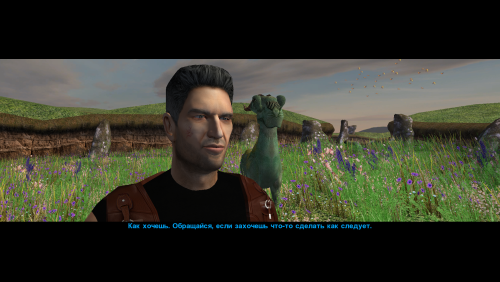
Narve's New High Poly Canderous Head
By Narve
This mod changes the head (model and texture) of Canderous Ordo. An optional portrait for Canderous is also included, which you can use if desired.
When modeling the head, I was inspired by the actor Clancy Brown; I think his characterization suits the role of Canderous very well.
The mod contains four main files:
p_candh.mdl and p_candh.mdx - the model,
P_CandH01.tga and P_CandH01.txi - the texture.
One additional file, PO_pcanderous.tga, is Canderous's portrait; you can choose to use it or not, as you wish. This portrait is in the same style as the portraits from my other party member portrait mod.
How to install:
Unpack and copy files to the Knights of the Old Republic's Override folder.
Note:
This is a new model that is significantly different from the vanilla version. Both the geometry and the UV map are different. No retextures from the vanilla head will fit this model! And, of course, the texture from this mod will not fit Canderous' vanilla head.
If anyone asks: the body texture is from this mod by wonderful Dark Hope.
Thanks:
I would like to thank Elayerfawkes45 for the original high-poly mesh, which I used as a starting point for my head model.
49 downloads
-
K1 Area Map Fixes - High Resolution Area Map & Map Marker Fix
By Derslok
K1 AREA MAP FIXES
High Resolution Area Map & Map Marker Fix
TL;DR
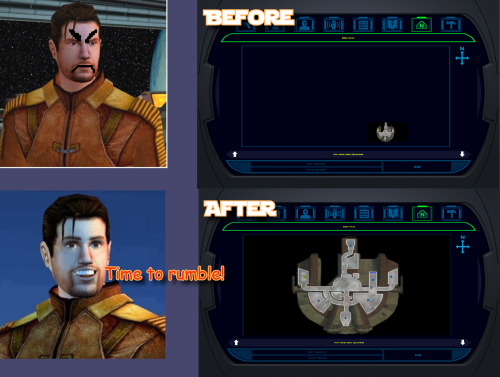
When playing KOTOR 1 at widescreen or high resolution, the area map screen becomes broken: the map sits shrunken in a corner instead of filling its frame. This mod resolves that issue. It also corrects 250 map note positions that BioWare positioned incorrectly in 2003.
The mod does not change your resolution. It fixes the map after another tool has configured the game for your resolution, requiring UniWS and KotOR High Resolution Menus to be installed first, in that order. Steam users need the KOTOR Editable Executable before either of those; GOG users do not.
Installation is straightforward: unzip the folder and double-click Install.bat. The installer finds the game and reads resolution from the exe automatically, requiring no configuration. Uninstall.bat restores your original exe.
Detailed installation instructions are provided below.
What This Fixes
At widescreen and high resolutions, the area map renders at its original size in a corner of the frame. This mod:
Rescales the map to fill the frame Positions all three marker types correctly, scaling icons up at very high resolutions for visibility Corrects 250 map notes BioWare left in incorrect positions One additional fix: KotOR High Resolution Menus patcher (the .exe version) leaves the area map offset to one side. This patcher detects and fixes that issue, with Uninstall.bat undoing all changes.
Requirements
Required, in this order
KOTOR Editable Executable (Steam only)
https://deadlystream.com/files/file/1320-kotor-editable-executable/
Steam ships a locked swkotor.exe that no mod can edit. This provides an unlocked copy for your game folder.
On GOG, skip this step. GOG's v1.03 swkotor.exe is already an unlocked file, byte-for-byte identical apart from 16 bytes of unused header padding. Begin at step 2. UniWS
https://www.wsgf.org/article/universal-widescreen-uniws-patcher
Enables the game to run at your screen resolution. Select "Star Wars: KOTOR" from the list, choose 1024x768 interface, specify your game folder, enter your screen resolution, and patch. KotOR High Resolution Menus (k1hrm) by ndix UR
https://deadlystream.com/files/file/1159-kotor-high-resolution-menus/
Redraws all menus for your resolution. Run its patcher, then copy the menu files for your resolution into your game's Override folder. Then install this mod last.
If those links become unavailable, search DeadlyStream for the mod names.
Resolutions Supported
The mathematics is automatically checked against all 49 resolutions k1hrm supports, from 800x600 up to 15360x8640. Four of them have been actually played:
Resolution Aspect 2560x1600 16:10 1920x1080 16:9 3840x2400 16:10 1600x1200 4:3 Everything else is checked but not visually verified, including ultrawide (21:9 and 32:9). If you run ultrawide, feedback is genuinely welcomed, either positive or negative. Should be working.
Installation
Install the requirements above first, in that order. Steam needs all three; GOG needs UniWS and k1hrm only. Unzip this mod's folder somewhere. Do not run from inside the zip; it will stop and instruct you to unzip first. Double-click Install.bat. Wait until completion. It may take a moment to process. That's the entire process. It finds your game folder independently and reads resolution from the exe, so it never requests user input.
Compatibility
Tested and Working
KOTOR 1 Community Patch (K1CP) 1.10.0. Checked by measurement: K1CP moves 35 waypoints and none is a map note, so all 250 note corrections still match. The complete stack was played at 2560x1600 with K1CP, k1hrm and this mod together, everything working correctly. K1 Ultrawide Letterbox Fix. Both install orders were tested; it must go before this mod. The reverse order causes its patcher to refuse running and blame your game build, which is misleading — your build is fine. Uninstall in reverse: this mod first, theirs second. 4 GB (Large Address Aware) patch. Confirmed with the real NTCore tool; it leaves everything this mod uses untouched. Apply it before this mod: nothing breaks if done afterwards, but Uninstall.bat restores the exe from the backup taken at install time, so uninstalling this mod later would quietly remove the 4 GB patch. GOG retail v1.03. Played at 3840x2400; area map and HUD minimap both correct. Compatible
3440x1440 Enhanced HUD/UI and Menus. Note it is a replacement for k1hrm's own 3440x1440 set, not an addition. Its map frame is identical to k1hrm's, so this mod's checks pass on either. Its bundled exe carries the k1hrm centering defect described above, which this patcher detects and fixes. Override art and texture mods, including HD UI Menu Pack, Pretty Good! Icons, HD portraits, Main Menu Widescreen Fix and KOTOR Widescreen Fade Fix. No shared ground with anything this mod writes. Anything not modifying the game exe will probably work. Larger Text Fonts. Works alongside this mod. Note it is separately known to break item stack counts independently; that is not caused by this mod. Works, With One Setting Turned Off
Kotor Patch Manager (KPM). Fine alongside this mod as long as you switch off its KotorUniResPatch. Everything else KPM does is unaffected. That one patch is an alternative to this mod rather than an addition: it rescales the same area map at runtime using the same shared constants, so with both active the map gets scaled twice and comes out wrong, and no install order fixes that. This patcher warns you if it spots KPM's files in your game folder rather than refusing to run, because having KPM installed doesn't mean that particular patch is switched on. Expected to Work, Not Tested
True Controller Support. It is a dinput8.dll ASI that works at the process level and touches none of the same bytes, so no reason for conflict, but it has not been tested. Not Tested
No-CD executables. If yours still measures 4,042,752 bytes the patcher will accept it, but nothing here has been checked against one. Incompatible
Flawless Widescreen. It injects into the running process and leaves nothing on disk, so this mod cannot detect it and cannot warn you. Do not use together with this stack. WSGF themselves recommend UniWS and k1hrm for KOTOR 1 and reserve Flawless Widescreen for KOTOR 2. Maybe support will be added in the future.
Not Supported
4-CD retail build. Probably patchable in principle, but there is no such binary here to test against and its spare code space is not guaranteed to match. The patcher refuses anything that is not 4,042,752 bytes. Uninstallation
Double-click Uninstall.bat. It restores your original swkotor.exe, exactly as it was. UniWS and k1hrm stay installed, so your game still runs at your resolution, just without the map fixes.
You can drag your game folder onto Uninstall.bat the same way as with install, which helps if you have two separate KOTOR installations.
Your original exe is copied somewhere safe before anything is changed:
%LOCALAPPDATA%\K1AreaMapFixes\backup Paste that into File Explorer's address bar to access it. It is kept out of the download folder and out of the game folder deliberately, so deleting the download cannot cost you your original game file.
If you have already deleted the mod folder and want to uninstall, download the mod again and run Uninstall.bat from the new copy. It will find the backup.
If you installed the K1 Ultrawide Letterbox Fix, uninstall this mod first and theirs second.
What the Patcher Does
It is built to refuse rather than guess.
Copies your swkotor.exe to %LOCALAPPDATA%\K1AreaMapFixes\backup before changing anything. Reads your resolution out of the exe instead of asking, then cross-checks it against Override\map.gui, so it will tell you if UniWS and k1hrm disagree with each other. That mismatch is the most common failure in this category of mod. Refuses an executable that is not the expected build, an install where UniWS or k1hrm has not been run, and a second install on top of itself. Refuses to run from inside the zip, so your backup cannot end up in a temp folder Windows later deletes. Warns you if it finds Kotor Patch Manager in your game folder. After writing, re-reads the file from disk and runs 25 checks against it, including one that no byte outside the intended ranges changed. If any check fails it says so and points you at the backup. It does not report success on a write it has not verified. Writes an install record next to the backup listing every step, its offsets, and hashes of the exe before and after. Every run also writes last-run-log.txt next to Install.bat, so if something goes wrong there is a file to attach to a report rather than a command to re-run.
Technical Details
Every offset this mod writes is documented in More info\TECHNICAL.txt in the download, and the full source is in More info\source\. It is published so that a collision with another executable patcher can be diagnosed by someone other than the author, which is the precedent k1hrm set by publishing its own offsets.
A few things worth knowing without reading all of it:
The patcher only accepts the 4,042,752-byte executable, which is what you have after the Editable Executable (or GOG's own exe) plus UniWS and k1hrm. Anything else is refused rather than written into on the assumption that the spare space matches. The exe grows by 8 KB. That is a reserved region added at the end of the resource section, holding the 250-entry note correction table, and it is the only change to the file's size. The two float constants the area map divides by are shared with the HUD minimap, so they are not rewritten in place. Editing them directly turns the minimap black. Scaled private copies are written elsewhere instead, and only the area map's own operands are pointed at them. The note corrections are keyed on each note's position in the game world rather than on module or index numbers, which is why they survive mods that edit module files.
Credits
ndix UR
KotOR High Resolution Menus, and hires_patcher.pl, which the map scaling here is derived from. Required, and not included here.
wsgf.org
UniWS. Required, and not included here.
LaneDibello
Kotor Patch Manager, whose published address database was a useful cross-check against findings worked out here independently.
PyKotor
For reading the game's file formats.
Everyone at DeadlyStream who documented this engine over the last decade.
License
GPL version 3 or later. The full text is in More info\LICENSE.
The resolution work this builds on is ndix UR's hires_patcher.pl, also GPLv3. None of it is included in this download; you install it yourself, as step 3 of the requirements.
281 downloads
-
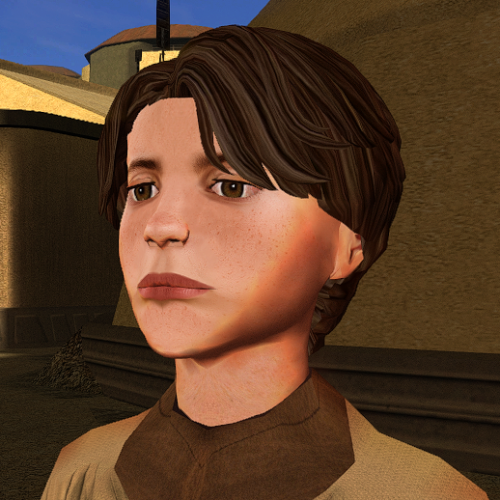
ChildM
By Dark Hope
The mod replaces the ChildM model and textures.
To Install
1. Download: ChildM
2. Copy all files to the Knights of the Old republic's Override folder.
(Example location - C:\Program Files (x86)\Steam\steamapps\common\swkotor\Override)
3. When/if prompted to overwrite files, press okay.
4. If you like the mod; leave a comment or endorse! (It would be much appreciated) Made with love.
112 downloads
-
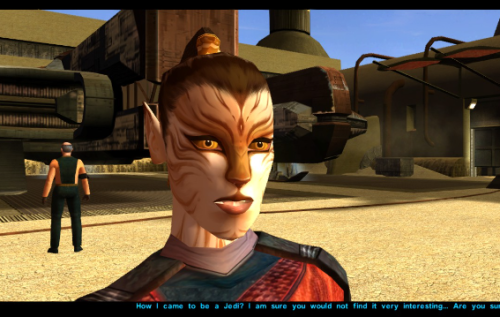
model and skin Juhani - Model and Texture Edits
By servicebutch
Just a personal mod made public after a few requests on reddit. Let me know if you have any issues.
Completely re-textured Juhani's face to unbald her and give her a more cat-like appearance.
Made a few edits to her model in blender to make her chin smaller and flatten her nose to reflect the more feline re-texture.
Install
Drop all three files into your Override folder and enjoy
Uninstall
Just delete the files in Override, shouldn't be any issues.
265 downloads
- model editing
- retexture
- (and 2 more)
-
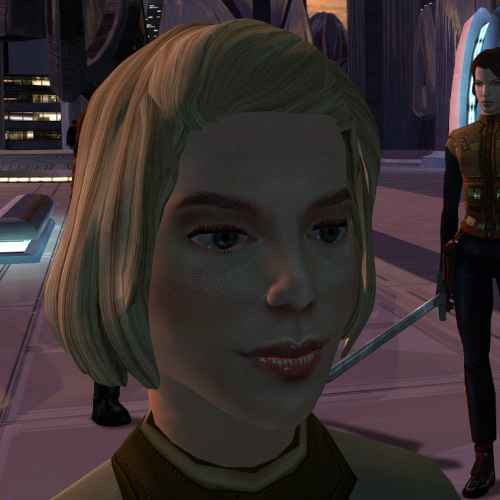
ChildF
By Dark Hope
The mod replaces the ChildF model and textures.
To Install
1. Download: ChildF
2. Copy all files to the Knights of the Old republic's Override folder.
(Example location - C:\Program Files (x86)\Steam\steamapps\common\swkotor\Override)
3. When/if prompted to overwrite files, press okay.
4. If you like the mod; leave a comment or endorse! (It would be much appreciated) Made with love.
127 downloads
-
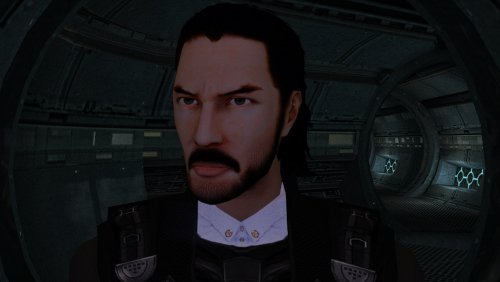
PMHC04
By Dark Hope
The mod replaces the PMHC04 model and textures. Adjusted model by ShaolinGhost "Keanu Reeves Inspired Player Head (K1) 1.1.1" Artifacts have been fixed and the model has been adjusted to fit cutscenes.
Thanks to DarthParametric for consultation.
To Install
1. Download: PMHC04
2. Copy all files to the Knights of the Old republic's Override folder.
(Example location - C:\Program Files (x86)\Steam\steamapps\common\swkotor\Override)
3. When/if prompted to overwrite files, press okay.
4. If you like the mod; leave a comment or endorse! (It would be much appreciated) Made with love.
131 downloads
-
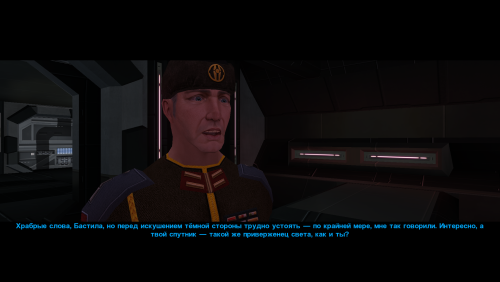
Saul Karath Retexture
By Narve
A small mod that improves the textures for Saul Karath.
His model is so low-low-poly that I felt like I was retexturing characters for Pirates of the Caribbean once again.😆
Unpack and copy all files to the Knights of the Old Republic's Override folder.
88 downloads
-
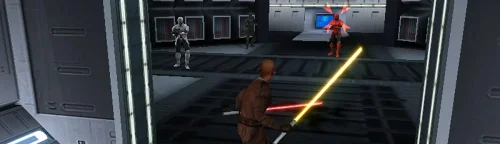
Sith Soldiers Recolored
By dodrarikaan
Sith Soldiers Recolored
Game: KOTOR 1
Author: Dodrari Kaan
GitHub: https://github.com/danielstegink/Kotor.SithSoldiersRecolored
A Future Pilot released a mod a while back called "Sith Soldier Texture Restoration" that restores the white Sith soldier armor texture. The Wookieepedia article on Sith Troopers lists several types of Sith soldiers that have different armor colors. I like the idea of the Sith soldiers having color-coded armor, so I went through and recolored them based on the article and my own personal preferences.
1) Regular troopers wear silver armor
2) Elite Troopers wear red armor
3) Heavy Troopers wear white armor
4) Grenadiers wear black armor
5) Advanced Troopers wear gold armor (yes, this is a SWTOR reference)
Instructions
Use the TSLPatcher
Permissions
Use this mod however you want. Just make sure to credit me.
Compatibility
This mod uses TSLPatcher to modify all of the Sith Soldier entries in the Appearance 2DA, as well as several Sith troopers throughout the game. Any mods that modify the same may not be compatible.
Special Thanks
Fred Tetra - Kotor Tool
Stoffe - TSLPatcher
A Future Pilot - Sith Soldier Texture Restoration
Disclaimer
THIS MODIFICATION IS NOT MADE, DISTRIBUTED, OR SUPPORTED BY BIOWARE, OR LUCASARTS ENTERTAINMENT COMPANY LLC. ELEMENTS TM & © LUCASARTS ENTERTAINMENT COMPANY LLC AND/OR ITS LICENSORS.
27 downloads
(0 reviews)0 comments
Submitted
-
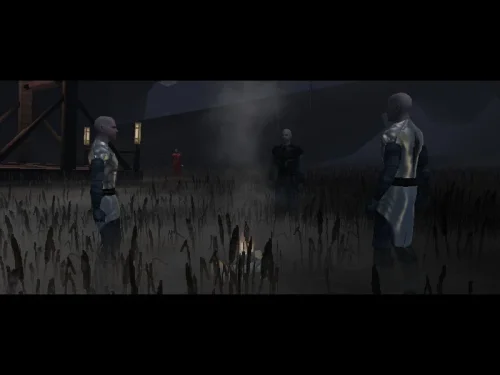
Bandon Robes
By dodrarikaan
Bandon Robes
Game: KOTOR 1
Author: Dodrari Kaan
Version: 1.0.0
GitHub: https://github.com/danielstegink/Kotor.BandonRobes
It annoyed me that Darth Bandon and the Sith Masters have cool armor that we cannot have, especially since Bandon drops a named armor set.
Now, the 2DA constraints mean there is no way to get the "Bandon" style armor without losing another type of armor in the game. So, I changed Bandon and the Sith Masters to wear regular robes with a custom texture that imitates their original armors. It deserves to be noted that because he is still an apprentice, the Sith Governor on Taris doesn't have the armor equipped.
The Sith Master "armor" is slightly more powerful than normal Jedi Master robes, and can be acquired from the Sith Master in the Rakata Temple. Darth Bandon's named armor set is now a set of Jedi Robes with the same bonuses as his original armor, and includes upgrade capability.
Instructions
Use the TSLPatcher
Permissions
Use this mod however you want. Just make sure to credit me.
Compatibility
This mod uses TSLPatcher to modify Darth Bandon and Sith Master files throughout the game. It also modifies the player and companion entries in the Appearance 2DA. Any mods that modify the same may not be compatible.
This mod adds item texture variations which may overlap with texture variations added by other mods
Jedi Master Robe - Texture Variations 20, 21
Special Thanks
Fred Tetra for the Kotor Tool
Stoffe for TSLPatcher
Gimp for being an awesome graphics editor
Disclaimer
THIS MODIFICATION IS NOT MADE, DISTRIBUTED, OR SUPPORTED BY BIOWARE, OR LUCASARTS ENTERTAINMENT COMPANY LLC. ELEMENTS TM & © LUCASARTS ENTERTAINMENT COMPANY LLC AND/OR ITS LICENSORS.
18 downloads
(0 reviews)0 comments
Submitted
-
File Reviews
-
Fantastic work!!! Quick question to any who read this: I'm a total rookie with modding, and in my most recent playthrough, when the camera executed the flyby when the HK-50s shot you down over the polar region(when they start speaking "Egotistical Boast") I saw the mod author's logo. Again, since I;m new to this, I likely made a mistake when I added them, so how can I correct it so I don't see the logo?
-
lorddli 2
does what it says on the tin and i like it
-
 1
1
-
-
Awesome mod! Some necessary powers filling out the pool, especially with Revitalize.
I don't know if this is cool, if not I will absolutely delete it... But I had AI upscale your icons so that they would work properly at high resolution (the images look basically identical, they're just 64x64 instead of 32x32). -
Nice job !
ou plutôt dans ce cas Beau travail ! -
This Mod fixes all of the problems that I have when I got back to play this game on newer systems.
The dev behind this mod was quick to answer any questions I had since I was a Linux user of this mod.
Great quality mod, that fixes issues I was having in Ultrawide such as the dialogue windows not working on the first step of a new conversation (Typical on Ultrawide) as well as improving general stability of the game.
Would recommend for anyone playing the game.
-
Ok, I hope this helps perfect it because it's a good idea on paper. I'll keep it as "matter-of-factly" as possible.
My experience with this mod: My setup already had TSLRCM+M478PE+PartySwap as a foundation already running. I installed this mod, created a fresh, new character to test it out, made it to the Telos Citadel Station, and after the "house arrest" sequence wrapped up and I was free to move, the quest triggers, unknown to me, were compromised. For example: The ambush on Dock Module 126? The 5 thugs that attack you spawned, I fought them and beat them, but the dialogue script failed to recognize the instance, leaving the TSF NPC in an infinite "text box loop" saying "don't let them hurt the droid; the instance didn't close properly and, naturally, the journal quest didn't update. I reloaded a save file just prior to that beat and it played out correctly a second time. When I showed the "modified holdout blaster" to Lt. Grenn to pick up the "suspicious goods" quest? that dialogue with Grenn played normally, however the journal didn't log the "suspicious goods" quest at all. So, the masked thug that's supposed to ambush you in the Entertainment Module immediately after that dialogue didn't spawn. Another tell-tale sign that something was wrong is that the Dobo Brothers' Merchant Room was completely inaccessible: The door would not open, full stop. Also, one of the doors to the cantina turned into a "one-way" exit. You could exit out of the cantina through it but not go back in. The other door worked fine. And for some reason, some NPCs appeared with no head whatsoever, (though I'm uncertain of this last bit is related.) To solve these problems on my setup, I purged my game's Override, performed a Steam Integrity Check, and re-installed all my mods in the proper order, except this one. I hope this helps you perfect it.
EDIT: To be clear, I don't use the Steam Workshop for anything whatsoever; I only use Steam to launch the game. All my mods were installed through their respective standalone TSLPatcher executable.
Edited by jmorenobothwell -
-
lorddli 2
Perfect companion mod to go along with KMRP
-
You are the pillar of this community
-
The Atton no guyliner with mid scruff is absolutely perfect! Love this!
-
This wonderful black magic fuckery has enabled me to play my favorite game of all time at 240fps without any issues and I am very happy about it. Thank you!
Edited by gilless429-
 1
1
-
-
Excellent addition! Everything worked great, and I love the different logs and the story they tell!
-
1
-
-
Synchro 21
These look great! Now I know what you meant about not being able to get portrait images out of your head

-
-
Incredible that it's taken this long to use grass and shadows again. Incredible.
-
1
-
-




-
File Comments
-
 Shem's Robes for Korriban Sith Students mod already does that.
 -

-
 Try it and add the "Unique Party Robes" last.
 -
By BottomlessThought23 · Posted
Hey man, glad you're happy with this, I was worried about stepping on your toes. I love your mod! -
 That's awesome!! This is exactly what I was dreaming of when I first found out about the original idea behind repeaters, and that shoddy scripting workaround I made was always only a consolation prize - the best I could do, but it never fully made me happy.
-