Synchro
-
Posts
24 -
Joined
-
Last visited
-
Days Won
3
2 Followers

Recent Profile Visitors
1,713 profile views

.thumb.png.d8b108d1620cfd7d697f7271e60714db.png)


Synchro's Achievements





-
Hi @Narve, great write-up! I’m the author of the modern driver compatibility patch @Vriff mentioned, and I dug into the engine side of what you ran into. It’s the renderer’s design, not due to an authoring or tooling issue as far as I can tell. There are two different kinds of “bump” in K1, and the .txi chooses between them: bumpyshinytexture + bumpmaptexture is environment-mapped bump. The bump map only distorts the cube map reflection; it never affects lighting. The reflection is weighted by your diffuse alpha: dark alpha shows it, white alpha hides it. That’s why you found alpha controls shine and bump together. In this mode they’re the same effect. bumpmaptexture alone is real lit bump, but only from a dynamic light. The engine picks the single strongest light that isn’t ambient-only and has a dynamic type, and bump-lights against that. Without that kind of light nearby, you see no bump at all. The wet highlight is masked by dark alpha, and without an env map, dark alpha also reads as transparency, which is probably the issue you hit. For the Ebon Hawk: with bumpyshinytexture in its .txi and a mostly white alpha, the bump has nothing to show through, so its content can’t matter. Without that line, a lightmapped mesh with tangent space is meant to get lit bump on top of the lightmap near a dynamic light (renderbmlmtype 0 picks a diffuse-only version, otherwise it adds a specular highlight). But that path looks unfinished in the PC release. It loads its vertex program in NVIDIA’s older format through an interface that expects the newer one, and most drivers reject that. So near a dynamic light the hull may not draw at all, and away from one it falls back to the plain lightmap. I haven’t confirmed this in game yet. One catch worth mentioning: in the unmodified game, lit bump on creatures and other non-lightmapped meshes only ever ran on NVIDIA cards. Are you on NVIDIA? If so, you’re seeing what the game was built to show. PS: I wouldn’t use it to test bump on heads quite yet. Reading the code for this, I found it skips lit bump on skinned meshes that use bumpmaptexture without bumpyshinytexture, and I’m fixing that. The lightmapped bump path needs more than shading, because the game’s own vertex program for it doesn’t load. It’s next on my list. The game has two shading backends, one for NVIDIA and one for ATI. The patch is built on the ATI one so it runs on every card, and the ATI backend never had these modes. The NVIDIA one did, so I’m porting them from it.The ATI path handled most of these rendering modes differently, and the patch was built off of them instead of replicating the NV_register_combiners implementation. If you’d like to experiment with the shading itself, every shader the patch generates can be overridden by dropping an ARB fragment program into override/shaders The lightmapped bump modes will become overridable the same way once they exist.
-
 These look great! Now I know what you meant about not being able to get portrait images out of your head
 -
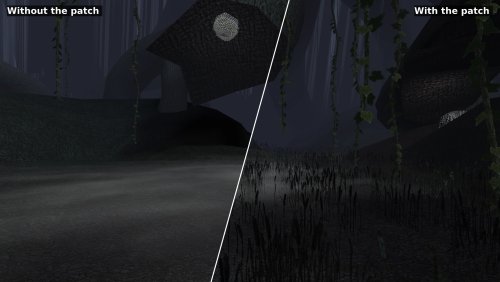 Hey there! I can take a look and see what could be going on. Worth noting that the latest release of the patch fixes a pretty major issue with the metallic shading, so if you aren't running the latest version give that a try. EDIT: I've taken a look and I don't see anything wrong on the outside of the Hawk on v1.2.2. I'd suggest giving that a go first. If it still shows up, can you send a screenshot my way? (including a debug log if you can, the ini file will explain how to enable debugging)
 -
 That's a fair question, and it comes down to a couple of things: At the moment the ModInstaller only has the ability to manage loose file mods, of which there are still a fair few out there! (maybe 60% of the mod builds are loose file mods) Unlike on Windows: loose mod installs on Linux are a bit of a nightmare and require a lot of prep-work, and careful consideration to make sure that case mismatches (This vs this) aren't an issue. For example: to get a mod prepped at the moment you'll need to extract it somewhere, ensure all of the files are the same case, make sure whatever is inside your override folder is the same case so that if you expect to overwrite something you can, and then you can install the mod. And even once you do that, there's no easy way to undo or restore any backups unless you're doing them all yourself. Next: you also need to make sure you're using a pre-release version of HoloPatcher to make sure it also doesn't mess up the case on any files.. The ModInstaller handles the loose file mod side of things: it's able to track loose file mods you've installed as well as handle collisions when there is a naming problem (only really an issue on Linux). It also opens mod archives directly, so you don't even need to extract them somewhere. (You can also handle tpc and tga duplicates too!) So the idea at the moment is to give Linux users (and Windows/Mac users too!) the ability to manage loose file mods in a more convenient way. Now to your point about TSLPatcher or HoloPatcher support: That is part of the final plan, but there is a lot more work to it than just integrating holopatcher and being done with it. Rakata (the library that I built, and what the the organiser is built on) only supports K1 at the moment, and it is almost ready to actually be able to support having a patching engine built on top of it, but it isn't quite ready for prime time yet. The plan is to build out support for Cortisol's Kotor Patching Language. Then write adapters for both old style TSLPatcher mods and HoloPatcher mods, so all variants can be supported properly. What this means is that loose mods and patcher mods will both able to be managed by the same application, and would give you the ability to uninstall/reinstall disable, etc. quite easily. Early days! But things are looking pretty positive. Keep an eye out for my saveeditor that is also almost ready to release as an initial version. It will support live session editing (when paired with a patch via KPM) and a plethora of other useful features (including rakata-lint, a verification engine that is designed to catch crashes before you deploy mods or in the future, edit game assets)
- 2 comments
-
- 1
-

-
- modding tool
- installer
- (and 3 more)
-
No prob! Enjoy not looking into HK's empty eyes any longer (As a sidenote, BioWare really knocked the Dantooine caves out of the park)
-
View File Rakata ModInstaller Easily manage, install, and revert loose-file mods. Features: Opens a mod as the zip, 7z or rar it downloaded as, or as a folder you already unpacked. No unpacking first. Works out which files are actually game content. Readmes, screenshots and packaging are left behind, and a mod shipping alternate versions of the same file asks you to pick one. Every install is recorded and can be taken back later. Uninstall leaves a file alone if something has changed it since, so it will not step on a patcher mod's work or on a later mod's. Finds duplicates already sitting in your Override. A name capitalised two ways, or one texture shipped as both a TPC and a TGA. Only one of each is ever loaded, and the game picks it arbitrarily. Shows what every layer of the game holds for a given file, so you can see a loose file quietly shadowing a copy inside a module archive. Finds your installation on its own. Steam, GOG and retail, on Windows, Linux and macOS, for both KotOR 1 and KotOR 2. If you play on Linux or a Steam Deck, this fixes something quiet Mod builds are ordered lists, and later mods are meant to overwrite parts of earlier ones. On Windows that happens by itself, because the filesystem does not care whether a file is called `Appearance.2da` or `appearance.2da`. On Linux it does care. Both files end up in Override, the game loads whichever one it reaches first, and the overwrite prompt the build guide told you to expect never appears. Your install order silently did not happen. This installs by name with a common lowercase filename, so the overwrite you meant is the one you get. What it does not do TSLPatcher mods. Those do not copy files into place. They merge rows into 2DA files that are already there, add entries to the talk table and write inside module archives. This recognises them and says so instead of half-installing them. Keep using HoloPatcher for those. (for now) Tested against The loose-file mods from the community build lists, and a full modded install. Additionally tested on Linux by @Leilukin and on macOS by @FTD Thanks for your help testing! Requirements The window fits a 1280x800 screen, so it works on a Steam Deck without too much squeezing. On Windows: Windows 10+ 64-bit On macOS: macOS 10.12+ for Intel Macs and 11.0+ for Apple Silicon Macs On Linux: Any recent Linux distro with glibc 2.35+ About Rakata Rakata is a clean-room Rust workspace for reading, writing and validating KotOR game data, written from scratch against notes taken from the engine rather than from anybody else's code. This installer is one tool built on top of it. It is free and open-source under GPL-3.0, and the source along with the format documentation is at https://codeberg.org/Synchro/rakata LLM Disclosure This project made use of an LLM during development, in the following capacities: Brainstorming: exploring possible approaches and design directions Decompilation assistance: help interpreting reverse-engineered code Code comments: refining and clarifying existing comments Skeletons and fixes: generating initial code scaffolding and minor fixes. All LLM-assisted output was modified and reviewed by a human before being committed. Submitter Synchro Submitted 09/13/2026 Category Modding Tools
-
- 1
-

-
- modding tool
- installer
- (and 3 more)
-
 Do you have any luck if you try the latest version of Modern Driver Compatibility? I fixed some pretty major shader bugs I initially missed. What kind of issues were you running into with those mods installed? Rendering issues? Or a straight up crash.
 -
Version 1.1.0
25 downloads
Easily manage, install, and revert loose-file mods. Features: Opens a mod as the zip, 7z or rar it downloaded as, or as a folder you already unpacked. No unpacking first. Works out which files are actually game content. Readmes, screenshots and packaging are left behind, and a mod shipping alternate versions of the same file asks you to pick one. Every install is recorded and can be taken back later. Uninstall leaves a file alone if something has changed it since, so it will not step on a patcher mod's work or on a later mod's. Finds duplicates already sitting in your Override. A name capitalised two ways, or one texture shipped as both a TPC and a TGA. Only one of each is ever loaded, and the game picks it arbitrarily. Shows what every layer of the game holds for a given file, so you can see a loose file quietly shadowing a copy inside a module archive. Finds your installation on its own. Steam, GOG and retail, on Windows, Linux and macOS, for both KotOR 1 and KotOR 2. If you play on Linux or a Steam Deck, this fixes something quiet Mod builds are ordered lists, and later mods are meant to overwrite parts of earlier ones. On Windows that happens by itself, because the filesystem does not care whether a file is called `Appearance.2da` or `appearance.2da`. On Linux it does care. Both files end up in Override, the game loads whichever one it reaches first, and the overwrite prompt the build guide told you to expect never appears. Your install order silently did not happen. This installs by name with a common lowercase filename, so the overwrite you meant is the one you get. What it does not do (yet) TSLPatcher mods. Those do not copy files into place. They merge rows into 2DA files that are already there, add entries to the talk table and write inside module archives. This recognises them and says so instead of half-installing them. Keep using HoloPatcher for those. (for now) Tested against The loose-file mods from the community build lists, and a full modded install. Additionally tested on Linux by @Leilukin and on macOS by @FTD Thanks for your help testing! Requirements The window fits a 1280x800 screen, so it works on a Steam Deck without too much squeezing. On Windows: Windows 10+ 64-bit On macOS: macOS 10.12+ for Intel Macs and 11.0+ for Apple Silicon Macs On Linux: Any recent Linux distro with glibc 2.35+ About Rakata Rakata is a clean-room Rust workspace for reading, writing and validating KotOR game data, written from scratch against notes taken from the engine rather than from anybody else's code. This installer is one tool built on top of it. It is free and open-source under GPL-3.0, and the source along with the format documentation is at https://codeberg.org/Synchro/rakata LLM Disclosure This project made use of an LLM during development, in the following capacities: Brainstorming: exploring possible approaches and design directions Decompilation assistance: help interpreting reverse-engineered code Code comments: refining and clarifying existing comments Skeletons and fixes: generating initial code scaffolding and minor fixes. All LLM-assisted output was modified and reviewed by a human before being committed.- 2 comments
-
- 4
-

-
-
- modding tool
- installer
- (and 3 more)
-
 The best way to get KOTOR scaled up for modern resolutions. Works great on my superultrawide
 -
Hey there! Thanks for trying the patch out! I will take a look and see if I can reproduce the issue on my end, keep an eye out for a fix. EDIT: Have reproduced the issue and have a fix! The same issue also killed HK-47's eyes as well as a couple other issues. I should have a new release up shortly. Released!
-
Glad it works! Worst case you can always use the standalone version if you prefer using k1-hrm over KPM and KotorUniResPatch
-
Thanks! In terms of increasing the resolution of the game, this patch only handles the world shading, framebuffer, and shadow rendering aspects of the graphics pipeline. What you're looking for if you are already using the Kotor Patch Manager is the standard download (not standalone). You'd need to place the kpatch that is in the standard zip into the same directory as your other patches (where the levelcap, marked empty containers, etc. are), once you refresh the interface in the patch manager it will be on the list and all you need to do is check it's checkbox, it'll be properly deployed and activated when you launch the game. J's https://github.com/J0-o/KotorUniResPatch has some additional patches that will give you things like extended resolution selection and proper GUI scaling, which is what you're looking for. (same idea, place the kpatches in his releases into your patches folder and select them in KPM) The standalone version is designed for an install where you went through patching with uniws, and k1hrm. At the moment; KPM won't detect your game when it is patched in that manner, so applying patches with it is off the table. In theory though, It *should* be able to co-exist with KPM also active but I haven't tested for that, so YMMV. If it works let me know, I can stick that in the README for people who want to try the same thing
-
Not rude at all, you're right that it takes more effort than it should. Good news: I have a solution ready for the next version of the patch! The next release has a standalone install that's two files dragged into your game folder, nothing else. No patch manager, and it doesn't care what's already been done to your executable, so it should go straight onto the install you already have with no issues. Both the KPM and standalone versions will continue to be supported equally. Ideally we will be making some improvements to KPM soon to help make the install process less of a pain. Thanks for sticking with it, and sorry for the runaround. EDIT: @PoopaPapaPalpatine @Greedyspree v1.2.0 has a standalone version you can download, which should sidestep any issues with KPM you where having
-
Yeah, unfortunately the Kotor Patch Manager needs a clean executable (you can use a gog one or the editable exe, both work), the best way to get widescreen support back in that scenario is to use @J's https://github.com/J0-o/KotorUniResPatch patches. They work quite well, but depending on what you already have installed you may need to undo existing overrides in order for everything to look right. (e.g. the high resolution menu mods) They've properly scaled pretty much every interface in the game to look right (and even unlocked the in game resolution menu) This does have me thinking that it might be a good idea to have a standalone version of this mod that can be dropped in to existing modbuild installs or installs with other pre-patched executables. Stay tuned for something on that, I'll see if I can take a look at what is needed on the weekend.
-
Thanks for the comment! In this case I mean that you need to launch the game with the patch manager as opposed to applying the patch and then launching the game as normal afterwards, you only need to apply the patch once The patch manager on Windows currently handles injection only through the manager, so it injects everything when the game is launched through it. On Linux there is a separate mode that installs a proxy dll that handles that for you (When I get the chance I intend to send some patches for KPM to enable that mode on Windows too)