Search the Community
Showing results for tags 'installer'.
Found 8 results
-
Version 1.3
36 downloads
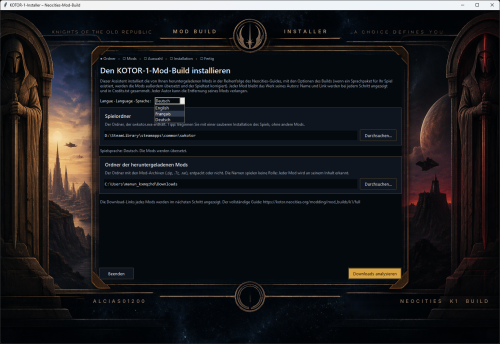
This installer sets up the KOTOR 1 mod build from the Neocities guide (https://kotor.neocities.org/modding/mod_builds/k1/full) in the guide's order, with the build's options. It does not contain any mod. You download each mod yourself from its author's page: the installer opens the pages for you, tells you which file to take, recognises the archives in your Downloads folder by their content (names don't matter), and installs everything in order with HoloPatcher. Read the guide first Reading the Neocities guide is strongly recommended: https://kotor.neocities.org/modding/mod_builds/k1/full It explains each mod of the build and tells you which file to download when a page offers several. The installer shows this too (click a mod in the list), but the guide is the reference: if in doubt, trust the guide. A wrong file is the most common reason why a mod stays "not found". Why this installer • Simple: one program to run, no mod manager to set up. It opens the download pages for you, tells you which file to take for each mod, and copes with renamed archives or files downloaded twice. • Fast: on a clean game, the 180+ mods of the build installed in about 3 minutes, instead of the hours a manual install takes (the optional HD cutscenes add a minute or less on an SSD). • Good-looking: a window styled after the game's own menus. • A touch of magic: it recognises each mod by its content, reads your game's language to pick the right version, and credits every author at every step. Features • Recognises 180+ mods from their archives (.zip, .7z, .rar), even renamed. • Installs them in the guide's order, with the build's settings preselected; every option can be changed before installing. • Shows each mod's name and author at every step and writes them, with their links, to Credits.txt. • Reads your game's language: ◦ French game: the French language pack is added (translated mods, fixes to the French game text, optional French HD cutscenes). ◦ German game: the German language pack is added (translated mods, optional German HD cutscenes). This pack is a preview: it was translated with the help of AI and has not yet been reviewed by native speakers. ◦ Spanish game: the Spanish language pack is added (translated mods, optional Spanish HD cutscenes). This pack is also a preview, translated with the help of AI and not yet reviewed by native speakers. ◦ Italian game: the Italian language pack is added (translated mods, optional Italian HD cutscenes). This pack is also a preview, translated with the help of AI and not yet reviewed by native speakers. ◦ English game (and any other language for now): the mods are installed as their authors made them. On English games, KOTOR Dialogue Fixes is installed first. When a mod exists in your language (e.g. Manaan Fast Travel System), the installer picks up that version. • Interface in English, French, German, Spanish or Italian. • KMRP (KOTOR Modern Restoration Patch) is part of the download list and is run automatically at the end of the installation. • Optional HD cutscenes: French, German, Spanish or Italian HD cutscenes for games in those languages, Naelavok's KotOR 1 Remastered (AI Upscaled) Cutscenes for the other languages (or as an alternative). Testers wanted Every new version and every language pack needs players to try it on a real game. If you install the build with this installer, your feedback is the best help you can give: what worked, what didn't, and the installateur_k1.log file written in your game folder if something went wrong. German, Spanish and Italian speakers are especially welcome to report mistakes in their language pack. Coming next • Reviews of the German, Spanish and Italian packs by native speakers. • Automatic maintenance is planned, so that the installer always offers the latest versions of the build's mods. Antivirus Some antivirus programs flag the installer with a generic detection of Python programs (PyInstaller). It is a false positive. VirusTotal reports: • Zip v1.3 (1/62, generic machine-learning detection only): VirusTotal report • Installer exe v1.3 (5/64, heuristic and machine-learning detections only): VirusTotal report Microsoft Defender may report "Trojan:Win32/Wacatac.C!ml": the "!ml" means a machine-learning guess, not a known virus. The file has been submitted to Microsoft as a false positive. Until it is cleared, you may need to allow the installer in Windows Security (Virus & threat protection > Protection history > Allow). Requirements • KOTOR 1 (Steam or GOG) on a clean install, without mods. • 7-Zip, preferably a recent version (https://www.7-zip.org), for the .7z and .rar archives. It is found wherever it is installed. • About 15 GB of free space (more with the optional HD cutscenes). How to use Unzip, run Installateur_K1.exe and follow the pages: game folder, downloads, choices, installation. KMRP is run automatically at the end. Full instructions are in README_EN.txt (LISEZMOI.txt in French, LIESMICH.txt in German). Credits and permissions • Every mod remains the work of its author. The installer only installs what you download from the authors' own pages. Any author can ask for their mod to be removed from the installer. • The build and its order come from the Neocities guide (KOTOR Community Portal). • Tools: HoloPatcher / PyKotor (th3w1zard1, LGPL-3.0), TSLPatcher (stoffe, Fair Strides). • KMRP: RaymanGT (GPL-3.0). • Installer and French, German, Spanish and Italian language packs by Alcias01200, made with the help of Claude (Anthropic AI). Background image created by Alcias01200 with Microsoft Copilot (AI), retouched. Changelog • 1.3 - Italian game support: Italian language pack (preview), Italian interface, optional Italian HD cutscenes. 7-Zip is now found wherever it is installed, and an unreadable archive shows a clear message (old 7-Zip, 7-Zip not found) instead of being silently ignored; the 7-Zip used is written in the log. Spanish pack 0.9.1 (about thirty lines changed by the mods now show the mod's text), French pack 1.1.3 (one more typo fixed in the French game text). Language packs are now chosen by version number. • 1.2.2 - English games: KOTOR Dialogue Fixes (Salk & Kainzorus Prime) added as the first mod, with the choice between "Corrections only" and "PC Response Moderation". • 1.2.1 - Updated for KOTOR 1 Twi'lek Male NPC Diversity 1.2 (its upscaled textures and original necks are now installer options); French pack 1.1.2. • 1.2 - Spanish game support: Spanish language pack (preview), Spanish interface, optional Spanish HD cutscenes; KMRP is now part of the download list and is run automatically at the end of the installation. • 1.1 - German game support: German language pack (preview), German interface, optional German HD cutscenes. • 1.0.1 - HD cutscenes for non-French games (Naelavok's KotOR 1 Remastered Cutscenes); Leviathan Differentiated Dialogue for non-French games; English date in the log, accents read correctly. • 1.0 - First release: English and French games, English and French interface. -
View File KOTOR 1 Mod Build Installer (Neocities guide) This installer sets up the KOTOR 1 mod build from the Neocities guide (https://kotor.neocities.org/modding/mod_builds/k1/full) in the guide's order, with the build's options. It does not contain any mod. You download each mod yourself from its author's page: the installer opens the pages for you, tells you which file to take, recognises the archives in your Downloads folder by their content (names don't matter), and installs everything in order with HoloPatcher. Read the guide first Reading the Neocities guide is strongly recommended: https://kotor.neocities.org/modding/mod_builds/k1/full It explains each mod of the build and tells you which file to download when a page offers several. The installer shows this too (click a mod in the list), but the guide is the reference: if in doubt, trust the guide. A wrong file is the most common reason why a mod stays "not found". Why this installer • Simple: one program to run, no mod manager to set up. It opens the download pages for you, tells you which file to take for each mod, and copes with renamed archives or files downloaded twice. • Fast: on a clean game, the 180+ mods of the build installed in about 3 minutes, instead of the hours a manual install takes (the optional HD cutscenes add a minute or less on an SSD). • Good-looking: a window styled after the game's own menus. • A touch of magic: it recognises each mod by its content, reads your game's language to pick the right version, and credits every author at every step. Features • Recognises 180+ mods from their archives (.zip, .7z, .rar), even renamed. • Installs them in the guide's order, with the build's settings preselected; every option can be changed before installing. • Shows each mod's name and author at every step and writes them, with their links, to Credits.txt. • Reads your game's language: ◦ French game: the French language pack is added (translated mods, fixes to the French game text, optional French HD cutscenes). ◦ German game: the German language pack is added (translated mods, optional German HD cutscenes). This pack is a preview: it was translated with the help of AI and has not yet been reviewed by native speakers. ◦ Spanish game: the Spanish language pack is added (translated mods, optional Spanish HD cutscenes). This pack is also a preview, translated with the help of AI and not yet reviewed by native speakers. ◦ Italian game: the Italian language pack is added (translated mods, optional Italian HD cutscenes). This pack is also a preview, translated with the help of AI and not yet reviewed by native speakers. ◦ English game (and any other language for now): the mods are installed as their authors made them. On English games, KOTOR Dialogue Fixes is installed first. When a mod exists in your language (e.g. Manaan Fast Travel System), the installer picks up that version. • Interface in English, French, German, Spanish or Italian. • KMRP (KOTOR Modern Restoration Patch) is part of the download list and is run automatically at the end of the installation. • Optional HD cutscenes: French, German, Spanish or Italian HD cutscenes for games in those languages, Naelavok's KotOR 1 Remastered (AI Upscaled) Cutscenes for the other languages (or as an alternative). Testers wanted Every new version and every language pack needs players to try it on a real game. If you install the build with this installer, your feedback is the best help you can give: what worked, what didn't, and the installateur_k1.log file written in your game folder if something went wrong. German, Spanish and Italian speakers are especially welcome to report mistakes in their language pack. Coming next • Reviews of the German, Spanish and Italian packs by native speakers. • Automatic maintenance is planned, so that the installer always offers the latest versions of the build's mods. Antivirus Some antivirus programs flag the installer with a generic detection of Python programs (PyInstaller). It is a false positive. VirusTotal reports: • Zip v1.3 (1/62, generic machine-learning detection only): VirusTotal report • Installer exe v1.3 (5/64, heuristic and machine-learning detections only): VirusTotal report Microsoft Defender may report "Trojan:Win32/Wacatac.C!ml": the "!ml" means a machine-learning guess, not a known virus. The file has been submitted to Microsoft as a false positive. Until it is cleared, you may need to allow the installer in Windows Security (Virus & threat protection > Protection history > Allow). Requirements • KOTOR 1 (Steam or GOG) on a clean install, without mods. • 7-Zip, preferably a recent version (https://www.7-zip.org), for the .7z and .rar archives. It is found wherever it is installed. • About 15 GB of free space (more with the optional HD cutscenes). How to use Unzip, run Installateur_K1.exe and follow the pages: game folder, downloads, choices, installation. KMRP is run automatically at the end. Full instructions are in README_EN.txt (LISEZMOI.txt in French, LIESMICH.txt in German). Credits and permissions • Every mod remains the work of its author. The installer only installs what you download from the authors' own pages. Any author can ask for their mod to be removed from the installer. • The build and its order come from the Neocities guide (KOTOR Community Portal). • Tools: HoloPatcher / PyKotor (th3w1zard1, LGPL-3.0), TSLPatcher (stoffe, Fair Strides). • KMRP: RaymanGT (GPL-3.0). • Installer and French, German, Spanish and Italian language packs by Alcias01200, made with the help of Claude (Anthropic AI). Background image created by Alcias01200 with Microsoft Copilot (AI), retouched. Changelog • 1.3 - Italian game support: Italian language pack (preview), Italian interface, optional Italian HD cutscenes. 7-Zip is now found wherever it is installed, and an unreadable archive shows a clear message (old 7-Zip, 7-Zip not found) instead of being silently ignored; the 7-Zip used is written in the log. Spanish pack 0.9.1 (about thirty lines changed by the mods now show the mod's text), French pack 1.1.3 (one more typo fixed in the French game text). Language packs are now chosen by version number. • 1.2.2 - English games: KOTOR Dialogue Fixes (Salk & Kainzorus Prime) added as the first mod, with the choice between "Corrections only" and "PC Response Moderation". • 1.2.1 - Updated for KOTOR 1 Twi'lek Male NPC Diversity 1.2 (its upscaled textures and original necks are now installer options); French pack 1.1.2. • 1.2 - Spanish game support: Spanish language pack (preview), Spanish interface, optional Spanish HD cutscenes; KMRP is now part of the download list and is run automatically at the end of the installation. • 1.1 - German game support: German language pack (preview), German interface, optional German HD cutscenes. • 1.0.1 - HD cutscenes for non-French games (Naelavok's KotOR 1 Remastered Cutscenes); Leviathan Differentiated Dialogue for non-French games; English date in the log, accents read correctly. • 1.0 - First release: English and French games, English and French interface. Submitter Alcias01200 Submitted 11/25/2026 Category Mods K1R Compatible No
-
Version 1.1.0
46 downloads
Easily manage, install, and revert loose-file mods. Features: Opens a mod as the zip, 7z or rar it downloaded as, or as a folder you already unpacked. No unpacking first. Works out which files are actually game content. Readmes, screenshots and packaging are left behind, and a mod shipping alternate versions of the same file asks you to pick one. Every install is recorded and can be taken back later. Uninstall leaves a file alone if something has changed it since, so it will not step on a patcher mod's work or on a later mod's. Finds duplicates already sitting in your Override. A name capitalised two ways, or one texture shipped as both a TPC and a TGA. Only one of each is ever loaded, and the game picks it arbitrarily. Shows what every layer of the game holds for a given file, so you can see a loose file quietly shadowing a copy inside a module archive. Finds your installation on its own. Steam, GOG and retail, on Windows, Linux and macOS, for both KotOR 1 and KotOR 2. If you play on Linux or a Steam Deck, this fixes something quiet Mod builds are ordered lists, and later mods are meant to overwrite parts of earlier ones. On Windows that happens by itself, because the filesystem does not care whether a file is called `Appearance.2da` or `appearance.2da`. On Linux it does care. Both files end up in Override, the game loads whichever one it reaches first, and the overwrite prompt the build guide told you to expect never appears. Your install order silently did not happen. This installs by name with a common lowercase filename, so the overwrite you meant is the one you get. What it does not do (yet) TSLPatcher mods. Those do not copy files into place. They merge rows into 2DA files that are already there, add entries to the talk table and write inside module archives. This recognises them and says so instead of half-installing them. Keep using HoloPatcher for those. (for now) Tested against The loose-file mods from the community build lists, and a full modded install. Additionally tested on Linux by @Leilukin and on macOS by @FTD Thanks for your help testing! Requirements The window fits a 1280x800 screen, so it works on a Steam Deck without too much squeezing. On Windows: Windows 10+ 64-bit On macOS: macOS 10.12+ for Intel Macs and 11.0+ for Apple Silicon Macs On Linux: Any recent Linux distro with glibc 2.35+ About Rakata Rakata is a clean-room Rust workspace for reading, writing and validating KotOR game data, written from scratch against notes taken from the engine rather than from anybody else's code. This installer is one tool built on top of it. It is free and open-source under GPL-3.0, and the source along with the format documentation is at https://codeberg.org/Synchro/rakata LLM Disclosure This project made use of an LLM during development, in the following capacities: Brainstorming: exploring possible approaches and design directions Decompilation assistance: help interpreting reverse-engineered code Code comments: refining and clarifying existing comments Skeletons and fixes: generating initial code scaffolding and minor fixes. All LLM-assisted output was modified and reviewed by a human before being committed.- 2 comments
-
- 4
-

-

-
- modding tool
- installer
- (and 3 more)
-
View File Rakata ModInstaller Easily manage, install, and revert loose-file mods. Features: Opens a mod as the zip, 7z or rar it downloaded as, or as a folder you already unpacked. No unpacking first. Works out which files are actually game content. Readmes, screenshots and packaging are left behind, and a mod shipping alternate versions of the same file asks you to pick one. Every install is recorded and can be taken back later. Uninstall leaves a file alone if something has changed it since, so it will not step on a patcher mod's work or on a later mod's. Finds duplicates already sitting in your Override. A name capitalised two ways, or one texture shipped as both a TPC and a TGA. Only one of each is ever loaded, and the game picks it arbitrarily. Shows what every layer of the game holds for a given file, so you can see a loose file quietly shadowing a copy inside a module archive. Finds your installation on its own. Steam, GOG and retail, on Windows, Linux and macOS, for both KotOR 1 and KotOR 2. If you play on Linux or a Steam Deck, this fixes something quiet Mod builds are ordered lists, and later mods are meant to overwrite parts of earlier ones. On Windows that happens by itself, because the filesystem does not care whether a file is called `Appearance.2da` or `appearance.2da`. On Linux it does care. Both files end up in Override, the game loads whichever one it reaches first, and the overwrite prompt the build guide told you to expect never appears. Your install order silently did not happen. This installs by name with a common lowercase filename, so the overwrite you meant is the one you get. What it does not do TSLPatcher mods. Those do not copy files into place. They merge rows into 2DA files that are already there, add entries to the talk table and write inside module archives. This recognises them and says so instead of half-installing them. Keep using HoloPatcher for those. (for now) Tested against The loose-file mods from the community build lists, and a full modded install. Additionally tested on Linux by @Leilukin and on macOS by @FTD Thanks for your help testing! Requirements The window fits a 1280x800 screen, so it works on a Steam Deck without too much squeezing. On Windows: Windows 10+ 64-bit On macOS: macOS 10.12+ for Intel Macs and 11.0+ for Apple Silicon Macs On Linux: Any recent Linux distro with glibc 2.35+ About Rakata Rakata is a clean-room Rust workspace for reading, writing and validating KotOR game data, written from scratch against notes taken from the engine rather than from anybody else's code. This installer is one tool built on top of it. It is free and open-source under GPL-3.0, and the source along with the format documentation is at https://codeberg.org/Synchro/rakata LLM Disclosure This project made use of an LLM during development, in the following capacities: Brainstorming: exploring possible approaches and design directions Decompilation assistance: help interpreting reverse-engineered code Code comments: refining and clarifying existing comments Skeletons and fixes: generating initial code scaffolding and minor fixes. All LLM-assisted output was modified and reviewed by a human before being committed. Submitter Synchro Submitted 09/13/2026 Category Modding Tools
-
- 1
-
-
- modding tool
- installer
- (and 3 more)
-
View File KOTORModSync Please see http://github.com/th3w1zard1/KOTORModSync for the main repo. Please report any bugs or problems you encounter. While I test this heavily, it's difficult to find any and all problems when incorporating 200+ mod's instructions across dozens of operating systems and platform combinations. If you happen to notice something odd or out of place, please report them. KOTORModSync is a multi-mod installer for KOTOR games that makes it easier to install and manage mods. I usually install the Reddit mod build every year or so. The process takes about an hour and it's repetitive moving files, running tslpatcher, deleting specific files, and occasionally renaming some files. The last time I installed the modbuild I made a mistake on a single different step, 3 times in a row. Most mistakes require a full restart from the beginning. This is tedious, so I decided to create an installer creator in C# to simplify the process. Goals Mod creators work really hard on their mods. It's the least we can do to install them and use them, right? However, who wants to reinstall to vanilla and spend several hours reinstalling mods, just to add 1 or 2 extra mods on top of it? Other mod managers I've tried were either too difficult to configure, require significant changes to a hard-to-understand configuration file, or only provided limited functionality for defining new mods. KOTOR mods definitely can have complex dependency relationships with each other in regard to compatibility, due to the nature and age of TSLPatcher. Usage If you are an end user just wanting to install some mods, simply load up the instruction files provided, choose the mods you want from the left list and any options, and press 'Start main install' Watch Xuul's tutorial video here: Effortless Modding with Kotor Mod Sync: The Ultimate Guide for Star Wars KOTOR Mods (youtube.com) If you are a mod developer, this program contains a full-blown instruction editor that'll allow you to quickly create instructions for your mod and define its compatibility with other mods. See Dependencies/Restrictions and InstallBefore/InstallAfter explanation - Pastebin.com for more information. See the video tutorial here: Creating involved instructions for KOTORModSync - YouTube Features Can install the https://kotor.neocities.org/ mod builds in about 20 minutes from a vanilla install. Supports TSLPatching on mac/linux without wine! Select the individual mods you want for an install - the dependencies and incompatibilities will automatically be chosen and sorted. This means end users don't have to worry about specific instructions regarding other mods in the list. All the compatibility steps are handled internally by KOTORModSync and the default instructions files provided here. An end user simply can select the mods they want to install in the left list, and any customizations if they like, and simply press 'Install All' to have everything installed automatically. This program has a built-in GUI editor and an installer packed into one. Modbuild creators can create instructions with little to no knowledge of the format and easily share them with end users. End users can install everything from the instruction file with a simple click of a button. Edit any instructions and verify the configuration with built-in tools. Some support to dry run an install. A flexible configuration editor and parser utilizing TOML syntax. This is very user-friendly and similar to INI which TSLPatcher already uses and most modders are used to. Create instructions files with complex dependency structures for multiple mods, and have end users install everything exactly according to the instructions created. No more manually copying/deleting files: KOTORModSync handles all of that for your end user. Platforms KOTORModSync is a cross-platform 32-bit and 64-bit .NET application. It is compatible with the following operating systems: Windows 7 and 8: Compatible if running .NET Framework 4.6.2 or higher. Windows 10 and 11: Fully compatible with any Windows release. Linux and Mac: Fully compatible - choose one of the two that match your operating system. Users do not need to download any additional runtimes: everything is self-contained within the application. Linux You may need additional X11 libraries. In order to get this working on WSL, for example, I had to install the following packages: sudo apt install libsm6 libice6 libx11-dev libfontconfig1 libx11-6 libx11-xcb1 libxau6 libxcb1 libxdmcp6 libxcb-xkb1 libxcb-render0 libxcb-shm0 libxcb-xfixes0 libxcb-util1 libxcb-xinerama0 libxcb-randr0 libxcb-image0 libxcb-keysyms1 libxcb-sync1 libxcb-xtest0 Then you can simply run in a terminal like this: ./KOTORModSync If you run into problems with the Linux or Mac builds, please contact me and I'll try to get a fix ready for the next release. Credit Snigaroo This man saved me a countless amount of hours. I'd still be struggling through game glitches and mod-specific instructions I didn't understand. Actually, I'd probably still be on Dantooine trying to determine why I'm getting visual glitches and crashes which he solved with the one-word message 'grass'. Cortisol Created HoloPatcher and the PyKotor library that KOTORModSync uses to patch mods. These projects are the main reason KOTORModSync can be supported on Mac/Linux. While the PyKotor/HoloPatcher projects have had some issues, this guy was more or less available for comment if I had questions on how I could fix any remaining problems myself. JCarter426 There were so many KOTOR-specific things to learn, without his help I'd still be trying to deserialize encapsulated resource files. His time and patience were incredibly useful to the project and this project would be impossible without him. Testers: Lewok from r/KOTOR Thank you for helping test that obnoxious UAC elevation problem legacy Windows apps like TSLPatcher have. Other notable users Fair-Strides Provided the perl source code of TSLPatcher on GitHub, and generally maintained the TSLPatcher project in Stoffe's absence. Stoffe Creator of TSLPatcher Thank you to the entire KOTOR modding community for what you do. KOTORModSync - Official Documentation.txt Submitter th3w1zard1 Submitted 06/11/2023 Category Modder's Resources
- 30 replies
-
- 1
-
-
- tools
- configuration
- (and 8 more)
-

Version v1.1.0b4
11,889 downloads
Please see http://github.com/th3w1zard1/KOTORModSync for the main repo. NOTE: This project is on hiatus due to real life commitments. Please see https://discord.gg/qfKG3yfeZ5 for updates. Please report any bugs or problems you encounter. While I test this heavily, it's difficult to find any and all problems when incorporating 200+ mod's instructions across dozens of operating systems and platform combinations. If you happen to notice something odd or out of place, please report them. KOTORModSync is a multi-mod installer for KOTOR games that makes it easier to install and manage mods. I usually install the Reddit mod build every year or so. The process takes about an hour and it's repetitive moving files, running tslpatcher, deleting specific files, and occasionally renaming some files. The last time I installed the modbuild I made a mistake on a single different step, 3 times in a row. Most mistakes require a full restart from the beginning. This is tedious, so I decided to create an installer creator in C# to simplify the process. Goals Mod creators work really hard on their mods. It's the least we can do to install them and use them, right? However, who wants to reinstall to vanilla and spend several hours reinstalling mods, just to add 1 or 2 extra mods on top of it? Other mod managers I've tried were either too difficult to configure, require significant changes to a hard-to-understand configuration file, or only provided limited functionality for defining new mods. KOTOR mods definitely can have complex dependency relationships with each other in regard to compatibility, due to the nature and age of TSLPatcher. Usage If you are an end user just wanting to install some mods, simply load up the instruction files provided, choose the mods you want from the left list and any options, and press 'Start main install' Watch Xuul's tutorial video here: Effortless Modding with Kotor Mod Sync: The Ultimate Guide for Star Wars KOTOR Mods (youtube.com) If you are a mod developer, this program contains a full-blown instruction editor that'll allow you to quickly create instructions for your mod and define its compatibility with other mods. See Dependencies/Restrictions and InstallBefore/InstallAfter explanation - Pastebin.com for more information. See the video tutorial here: Creating involved instructions for KOTORModSync - YouTube Features Can install the https://kotor.neocities.org/ mod builds in about 20 minutes from a vanilla install. Supports TSLPatching on mac/linux without wine! Select the individual mods you want for an install - the dependencies and incompatibilities will automatically be chosen and sorted. This means end users don't have to worry about specific instructions regarding other mods in the list. All the compatibility steps are handled internally by KOTORModSync and the default instructions files provided here. An end user simply can select the mods they want to install in the left list, and any customizations if they like, and simply press 'Install All' to have everything installed automatically. This program has a built-in GUI editor and an installer packed into one. Modbuild creators can create instructions with little to no knowledge of the format and easily share them with end users. End users can install everything from the instruction file with a simple click of a button. Edit any instructions and verify the configuration with built-in tools. Some support to dry run an install. A flexible configuration editor and parser utilizing TOML syntax. This is very user-friendly and similar to INI which TSLPatcher already uses and most modders are used to. Create instructions files with complex dependency structures for multiple mods, and have end users install everything exactly according to the instructions created. No more manually copying/deleting files: KOTORModSync handles all of that for your end user. Platforms KOTORModSync is a cross-platform 32-bit and 64-bit .NET application. It is compatible with the following operating systems: Windows 7 and 8: Compatible if running .NET Framework 4.6.2 or higher. Windows 10 and 11: Fully compatible with any Windows release. Linux and Mac: Fully compatible - choose one of the two that match your operating system. Users do not need to download any additional runtimes: everything is self-contained within the application. Linux You may need additional X11 libraries. In order to get this working on WSL, for example, I had to install the following packages: sudo apt install libsm6 libice6 libx11-dev libfontconfig1 libx11-6 libx11-xcb1 libxau6 libxcb1 libxdmcp6 libxcb-xkb1 libxcb-render0 libxcb-shm0 libxcb-xfixes0 libxcb-util1 libxcb-xinerama0 libxcb-randr0 libxcb-image0 libxcb-keysyms1 libxcb-sync1 libxcb-xtest0 Then you can simply run in a terminal like this: ./KOTORModSync If you run into problems with the Linux or Mac builds, please contact me and I'll try to get a fix ready for the next release. Credit Snigaroo This man saved me a countless amount of hours. I'd still be struggling through game glitches and mod-specific instructions I didn't understand. Actually, I'd probably still be on Dantooine trying to determine why I'm getting visual glitches and crashes which he solved with the one-word message 'grass'. Cortisol Created HoloPatcher and the PyKotor library that KOTORModSync uses to patch mods. These projects are the main reason KOTORModSync can be supported on Mac/Linux. While the PyKotor/HoloPatcher projects have had some issues, this guy was more or less available for comment if I had questions on how I could fix any remaining problems myself. JCarter426 There were so many KOTOR-specific things to learn, without his help I'd still be trying to deserialize encapsulated resource files. His time and patience were incredibly useful to the project and this project would be impossible without him. Testers: Lewok from r/KOTOR Thank you for helping test that obnoxious UAC elevation problem legacy Windows apps like TSLPatcher have. Other notable users Fair-Strides Provided the perl source code of TSLPatcher on GitHub, and generally maintained the TSLPatcher project in Stoffe's absence. Stoffe Creator of TSLPatcher Thank you to the entire KOTOR modding community for what you do. KOTORModSync - Official Documentation.txt- 25 comments
- 9 reviews
-
- 12
-
-
-
-
- tools
- configuration
- (and 8 more)
-
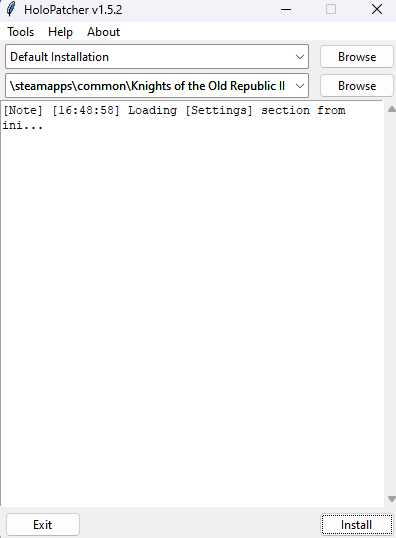
 Howdy! Apologies if this is an issue that someone has already seen and fixed, but I haven't been able to find anything about it online and it's my first time using HoloPatcher. I'm trying to install a mod for TSL (leilukin's Handmaiden and Female Exile one). I've unzipped the mod, opened up the installer, and set the start and end points, but when I hit install it just gives me the message pictured and sits there. The install button becomes pressable again, but it doesn't do anything further. The mod's description does show up before I hit install, so I'm fairly certain I have the directories set up properly. I tried leaving it overnight, in case it was just taking a while, but there was no change. I didn't manage to find any mention of this issue on the mod's Nexus page itself, and I didn't want to bother the author, since they seem to be exasperated with the number of people asking about other issues. If anyone knows what's going on with the installer that would be a great help, but if not I'd take any advice on installing it manually. I've done that before; I'm just not sure how to go about it with this specific mod.
-
Can someone please help me, does any one have the installer for the TSL Coruscant Jedi Temple Mod, I can't find it anywhere except for Gamefront which I can't download off (I've tried the proxy sites, they don't work.) Please help