

Mods
1,043 files
-
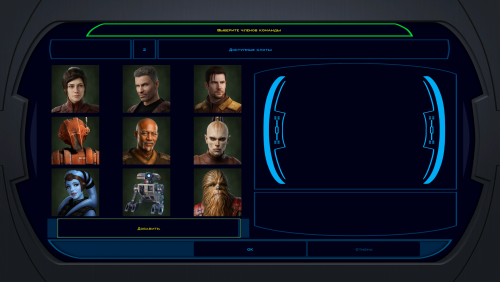
New portraits for PartyMembers
By Narve
Hello! This is my first time submitting a mod.
These are improved and unified portraits of the party members. I tried to stay within their canon images, while giving them high-quality images in a consistent style.
How to install:
Unpack and copy all files to the Knights of the Old Republic's Override folder.
40 downloads
(0 reviews)0 comments
Submitted
-
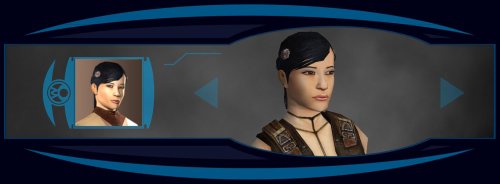
Effixian's PFHA05 from K2 to K1
By Effix
---------------------------------
Knights of the Old Republic
---------------------------------
TITLE: Effixian's PFHA05 from K2 to K1
AUTHOR: Effix
CONTACT: PM me on the forums or find me on Steam or Discord
------------------
INSTALLATION
------------------
Run the file "TSLPatcher - Install Effixian's PFHA05 from K2 to K1.exe".
-----------------
DESCRIPTION
-----------------
This mod adds a playable character PFHA05 from KotOR 2.
The head is very similar to K1's PFHA05, only the hair is different.
-----------------
KNOWN BUGS
-----------------
The head clips a bit through the hair in one spot.
------------------
UNINSTALLING
------------------
1. Remove the following files from your Override folder:
pfhax05.mdl
pfhax05.mdx
PFHAX05.tga
PFHAX05.txi
PFHAX05D.tga
PFHAX05D1.tga
PFHAX05D2.tga
PFHAX05D3.tga
po_PFHAX05.tga
po_PFHAX05d.tga
po_PFHAX05d1.tga
po_PFHAX05d2.tga
po_PFHAX05d3.tga
2. If you have never installed any mod with the TSL Patcher then you can remove appearance.2da, heads.2da and portraits.2da from the Override folder. Otherwise:
If you haven't installed any mod after this mod you can get the following files from the mod's backup folder and put them back in your Override folder:
appearance.2da
heads.2da
portraits.2da
Doing this when you did add another mod would result in the later mod(s) no longer working.
--------------------------
DISTRIBUTION NOTES
--------------------------
You can use the files from this mod in your own mod if you simply credit me.
------------
Thanks to
------------
- Stoffe and Fred Tetra for the needed tools and tutorials
- bead-v's MDLEdit
- JCarter426 & Kexikus for sharing their knowledge on converting things with MDLEdit
-------------------
THIS MODIFICATION IS NOT MADE, DISTRIBUTED, OR SUPPORTED BY BIOWARE, OBSIDIAN, OR LUCASARTS ENTERTAINMENT COMPANY LLC. ELEMENTS TM & © LUCASARTS ENTERTAINMENT COMPANY LLC AND/OR ITS LICENSORS.
34 downloads
(0 reviews)0 comments
Submitted
-
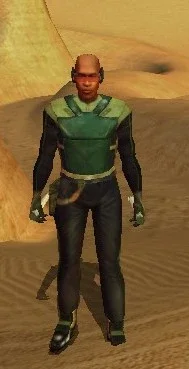
Krayt Dragon Armor
By dodrarikaan
Krayt Dragon Armor
Game: KOTOR 1
Author: Dodrari Kaan
GitHub: https://github.com/danielstegink/Kotor.KraytDragonArmor
This mod adds two new items to the Hunting Lodge store on Tatooine.
Krayt Dragon Armor is extremely expensive, and offers very strong defense.
Wraid Bone Wristguards offer minor defense.
Instructions
Use the TSLPatcher
Permissions
Use this mod however you want. Just make sure to credit me.
Compatibility
This mod uses TSLPatcher to modify Fazza Utral's inventory on Tatooine. Any mods that modify the same may not be compatible.
This mod adds item texture variations which may overlap with texture variations added by other mods
D5 Light Armor - Texture Variation 20
Forearm - Texture Variation 20
This mod is compatible with K1R and K1CP.
Special Thanks
Fred Tetra - Kotor Tool
Stoffe - TSLPatcher
Disclaimer
THIS MODIFICATION IS NOT MADE, DISTRIBUTED, OR SUPPORTED BY BIOWARE, OR LUCASARTS ENTERTAINMENT COMPANY LLC. ELEMENTS TM & © LUCASARTS ENTERTAINMENT COMPANY LLC AND/OR ITS LICENSORS.
20 downloads
(0 reviews)0 comments
Submitted
-
Dexterity Adds Ranged Damage
By Atlas_Kotor
Description
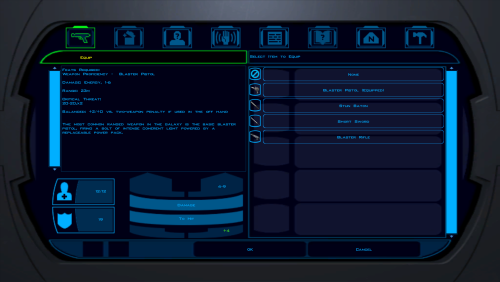
In vanilla Knights of the Old Republic Strength adds damage with melee weapons but Dexterity adds no damage with ranged weapons, meaning that ranged weapons fall off very quickly and ranged weapon builds are very weak.
This mod patches swkotor.exe so that ranged weapons use your Dexterity modifier for bonus damage the same way melee uses Strength.
The change is engine-wide, so it applies to the player, party members, and all NPCs.
This was made by reverse engineering the game's code.
Installation instructions
Extract the prepatched swkotor.exe to your /swkotor/ folder and replace it
Use this mod however you want, you don't need any permissions from me.
96 downloads
-
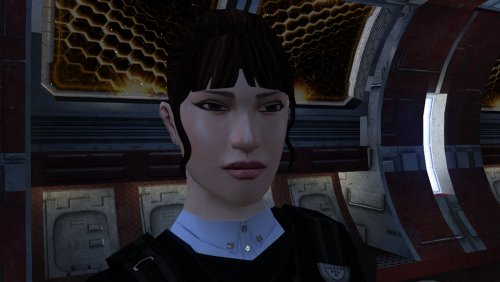
PFHA04 DP
By Dark Hope
The mod replaces the PFHA04 model and textures.
Thanks to DarthParametric, without him this mod would not have seen the light of day.
To Install
1. Download: PFHA04
2. Copy all files to the Knights of the Old republic's Override folder.
(Example location - C:\Program Files (x86)\Steam\steamapps\common\swkotor\Override)
3. When/if prompted to overwrite files, press okay.
4. If you like the mod; leave a comment or endorse! (It would be much appreciated) Made with love.
108 downloads
- darthparametric
- dark hopa
- (and 1 more)
(0 reviews)0 comments
Updated
-
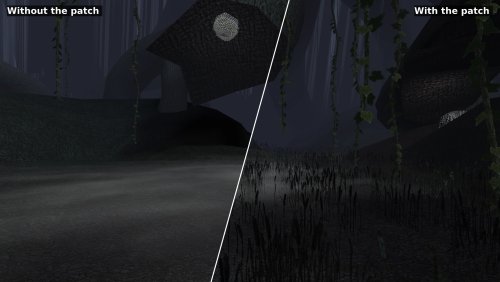
K1 Modern Driver Compatibility Patch
By Synchro
Restores Knights of the Old Republic's full lighting on current graphics drivers, and stops the grass from stretching into the sky.
See every fix side by side: https://synchro.codeberg.page/kotor-modern-driver-compatibility/what-it-fixes.html
Why the game looks wrong
KOTOR lights its world with one of two methods from 2003, one from ATI and one from NVIDIA. AMD's and Intel's Windows drivers offer neither, so the game falls back to a path meant for cards with no per-pixel lighting, which is also where the grass bug comes from. The patch rebuilds the game's lighting on a method every current driver supports, and puts every card on it.
What it restores
Grass that stays on the ground Light from the room on lightmapped walls and floors Reflections on metal, armour and water, including cube map reflections on Intel cards Fog, where the game meant to have it Soft shadows, glow, motion blur, film grain and Force power distortion Bump lighting on creatures, which the game only ever drew on NVIDIA cards
What it also fixes
The glow around lights and the edges of soft shadows no longer shimmer as the camera moves. The game did this on the hardware of its day too. The brightness slider works, cutscenes included, on drivers that refuse the game's request to change brightness, NVIDIA's on Windows among them. For modders: normal maps, bump lighting on lightmapped surfaces, and reflective skins with a flat reflection map never drew on any card. They do now. The Cube Map Fix and Soft Shadows Fix are part of this patch. Don't install them alongside it.
Requirements
KotOR version 1.03: GOG, Steam, or a CD copy with the common 1.03 no-CD executable KotOR Patch Manager 0.7.2 or later: https://github.com/LaneDibello/Kotor-Patch-Manager Install guide: https://synchro.codeberg.page/kotor-modern-driver-compatibility/installing.html
If the Patch Manager won't accept your swkotor.exe because another tool has modified it, use the standalone download instead: https://synchro.codeberg.page/kotor-modern-driver-compatibility/installing-standalone.html
Settings
You don't need to change anything to play. K1DriverCompat.ini, beside the game, lists every setting with an explanation, and with the Mod Options patch installed the game's options screen has menus for them.
By default the patch draws the game as a GeForce card of the time did. Set look to ati to see it as an ATI Radeon did. In the game's own content the two differ only a little.
Settings: https://synchro.codeberg.page/kotor-modern-driver-compatibility/settings.html
The two looks: https://synchro.codeberg.page/kotor-modern-driver-compatibility/looks.html
Replacement Shaders
Modders can replace any of the patch's shading programs with their own, with nothing to rebuild. Put a plain text ARB fragment program in override/shaders/, named after the program it replaces, and the patch uses it in place of its own. The log records each replacement it loads, and warns about any file that matches no program.
Guide: https://synchro.codeberg.page/kotor-modern-driver-compatibility/replacement-shaders.html
Reporting issues
Open an issue at https://codeberg.org/Synchro/kotor-modern-driver-compatibility/issues or post in the comments here, and attach logs/K1DriverCompat.log from your game folder.
Thanks
@Lane and @J, who tested this on cards and installs I do not own. Nearly everything here is a claim about how some particular driver behaves, and a claim like that is worth nothing until somebody with that hardware runs it and reports back. This would not have been finishable without them.
Lane also wrote the KotOR Patch Manager, which this patch is built for.
@Vriff, Who took reference screenshots on period-correct hardware. They show what the game looked like on the cards it was written for, which is what the patch strives to match.
Full documentation: https://synchro.codeberg.page/kotor-modern-driver-compatibility/
Source: https://codeberg.org/Synchro/kotor-modern-driver-compatibility
LLM Disclosure
This project made use of an LLM during development, in the following capacities:
- Brainstorming: exploring possible approaches and design directions
- Decompilation assistance: help interpreting and structuring reverse-engineered code
- Code comments: refining and clarifying existing comments
- Skeletons and fixes: generating initial code scaffolding and minor fixes
All LLM-assisted output was modified and reviewed by a human before being committed.
420 downloads
-
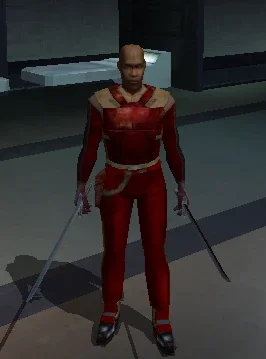
Republic Mod Armor Recolored
By dodrarikaan
Republic Mod Armor Recolored
Game: KOTOR 1
Author: Dodrari Kaan
Github: https://github.com/danielstegink/Kotor.RepublicModArmorRecolored
Modifies the Republic Mod Armor on Taris to use the Red/Orange color scheme of the Bonadan Alloy Heavy Suit. This makes it look more like something the Republic troops would wear, and implies that Carth is wearing it in Kotor 2.
Instructions
Copy the contents of the For Override folder into the Override folder.
Compatibility
This mod is compatible with K1R and K1CP.
Permissions
Use this mod however you want. Just make sure to credit me.
Special Thanks
Fred Tetra - Kotor Tool
Disclaimer
THIS MODIFICATION IS NOT MADE, DISTRIBUTED, OR SUPPORTED BY BIOWARE, OR LUCASARTS ENTERTAINMENT COMPANY LLC. ELEMENTS TM & © LUCASARTS ENTERTAINMENT COMPANY LLC AND/OR ITS LICENSORS.
15 downloads
(0 reviews)0 comments
Submitted
-
Kudos Pazaak Counter Overflow Fix
By Bekzhan
Fixes an overflow in Kudos's Pazaak progression counter on Tatooine. After the player's 128th win against Kudos, tat_fazzpazzstate overflows to -128. While the counter remains negative, Kudos is effectively stuck in his novice state for the next 128 wins, reverting to his initial dialogue branch, tier-1 deck and stake. Once the counter wraps back to 0, his normal progression starts over from the beginning.
This mod caps the counter at its final meaningful state once Kudos's normal progression is complete. It also restores overflowed negative values to that final state the next time the reset script runs.
Normal progression through the first ten wins is unchanged.
Installation instructions
Copy: k_ptat_paz_rese2.ncs into your game's Override folder.
To uninstall, remove k_ptat_paz_rese2.ncs from the Override folder.
Main features
Prevents tat_fazzpazzstate from overflowing after 128 wins. Preserves Kudos's normal progression through the first ten wins. Freezes the counter at its final meaningful state once progression is complete. Automatically repairs already-overflowed negative counter values when the script next runs. Does not alter Kudos's Pazaak decks, wagers, rewards or game balance.
Compatibility
Compatible with vanilla KotOR, K1R and K1CP. The mod does not alter Pazaak decks, wagers or rewards. It may conflict with another mod that modifies k_ptat_paz_rese2.ncs or deliberately extends tat_fazzpazzstate beyond its vanilla progression.
Tested with tat_fazzpazzstate already overflowed: one final 75-credit game occurred, after which the variable was restored to 10 and subsequent games returned to the permanent high-tier state.
The original bug can be reproduced by playing 128+ games against Kudos or by manipulating tat_fazzpazzstate with KotOR Savegame Editor.
Discovered during an apparently unreasonable amount of legitimate Pazaak grinding.
Notes
Already-overflowed saves: If the counter has already overflowed, one final 75-credit game may occur before the fix takes effect. After that game, the counter is restored to 10 and subsequent games return to Kudos's permanent high-tier deck state.
Vanilla note: In the unmodded PC game, Kudos's permanent high-tier wager is only 50 credits, while his overflowed novice-state wager is 75. As a result, the original overflow can actually be advantageous for credit grinding in vanilla. This fix restores the intended permanent high-tier behavior regardless of wager values and is therefore most beneficial with K1CP (which increases the late-game stake to 500) or other mods that increase Kudos's late-game stake.
23 downloads
(0 reviews)0 comments
Updated
-
PFHB02 DP
By Dark Hope
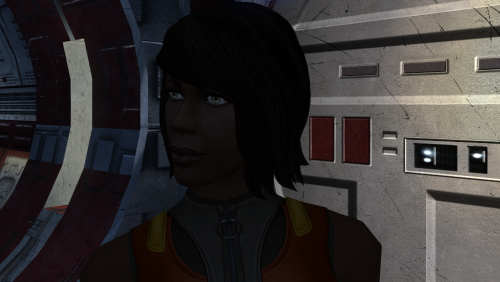
The mod replaces the PFHB02 model and textures.
Thanks to DarthParametric, without him this mod would not have seen the light of day.
To Install
1. Download: PFHB02
2. Copy all files to the Knights of the Old republic's Override folder.
(Example location - C:\Program Files (x86)\Steam\steamapps\common\swkotor\Override)
3. When/if prompted to overwrite files, press okay.
4. If you like the mod; leave a comment or endorse! (It would be much appreciated) Made with love.
97 downloads
- pfhb02
- darthparametric
- (and 1 more)
-
Curved Hilt Ambient Glow Lightsabers
By EwokKotor
Credit:
A Very special Thanks and Credit to Crazy34 for their "New_Lightsaber_Blades_Modder's_Res_v1" on which this mod is based! Full Credit goes to them as the models and textures used to make this mod come directly from their source material! A special thanks again to them for making these resources available to modders.
Check out their mod here:
Also check out their full release of their mod here:
Credit also very much goes to Kaidon Jorn and Sithspectre for their contributions to Crazy 34's mod as well! Without them none of these mods would be possible so please make sure to go check out all of their work also!
Description:
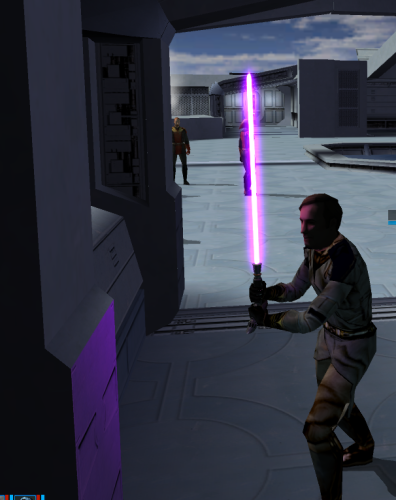
This Mod adds 7 new colored (well 6 colored technically) crooked hilt (think Count Dooku) lightsabers with ambient glow to Kotor 1.
To Install:
First drag all the files from the folder of the color you wish to add into your override folder.
Second if you don't already have an upcrystals.2da in your override folder drag the included .2da file to your override. If you do already have an upcrystals.2da file, add 7 rows to the bottom of your existing .2da file and paste in rows 7-13 from the included .2da into these new rows (make sure to update the row numbers if needed!)
--Note that if you don't update the upcrystals.2da the new lightsabers will appear in game but won't be customizable at a workbench.
Compatibility:
This mod should be fully compatible with Crazy34's mod, as all the lightsabers should be in unused variant slots by his mod. I am unsure about compatibility with other lightsaber mods. I believe it should work without having his mod installed, but this is not verified and again I cannot endorse his mod enough I wouldn't play without it.
Permissions:
As far as I am concerned feel free to use this mod however you see fit! Just please make sure to give due credit!
-----
Blender Tutorial for texture swapping and ambient lighting coming soon stay tuned!
-----
Full credit goes to the original developers, artists, and respective intellectual property rights holders (Lucasfilm, Pandemic Studios, and BioWare). This is a strictly non-profit, fan-made educational project intended exclusively as a technical proof-of-concept demonstrating asset handling for the KOTOR modding community. Furthermore, I do not own or claim rights to any of the third-party tools used or described in this project; all rights belong entirely to their respective developers.
17 downloads
(0 reviews)0 comments
Submitted
-
Albino Kath Hound Armor
By dodrarikaan
Albino Kath Hound Armor
Game: KOTOR 1
Author: Dodrari Kaan
GitHub: https://github.com/danielstegink/Kotor.AlbinoKathHoundArmor
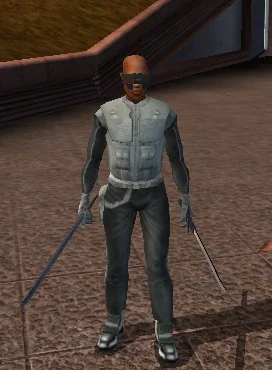
When you defeat the Albino Kath Hound on Dantooine, it will drop some of its hide as an item. If you bring this to Kni at the Jedi Enclave, he will be able to turn it into a new Force-resistant light armor.
Instructions
Use the TSLPatcher
Compatibility
This mod modifies Kni's dialogue as well as the Albino Kath Hound's inventory on Dantooine. Any mods that modify the same may not be compatible.
This mod adds item texture variations which may overlap with texture variations added by other mods
D4 Light Armor - Texture Variation 20
This mod is compatible with K1R and K1CP.
Permissions
Use this mod however you want. Just make sure to credit me.
Special Thanks
Fred Tetra - Kotor Tool
KobaltBlu - Kotor Scripting Tool
Stoffe - TSLPatcher
tk102 - DLG Editor
Disclaimer
THIS MODIFICATION IS NOT MADE, DISTRIBUTED, OR SUPPORTED BY BIOWARE, OR LUCASARTS ENTERTAINMENT COMPANY LLC. ELEMENTS TM & © LUCASARTS ENTERTAINMENT COMPANY LLC AND/OR ITS LICENSORS.
19 downloads
(0 reviews)0 comments
Updated
-
Repair Gloves
By dodrarikaan
Repair Gloves
Game: KOTOR 1
Author: Dodrari Kaan
GitHub: https://github.com/danielstegink/Kotor.RepairGloves
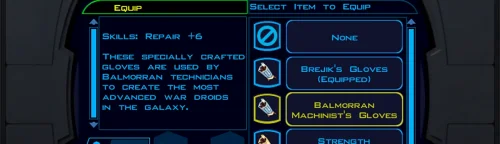
HK-47's quest line requires an extremely high Repair rank to complete, and must be completed before you start the Leviathan arc. With the worst possible build (Soldier/Guardian, minimal Intelligence, no Force Valor or Gearhead feats), it's impossible to get a high enough Repair rank before level 15, which I consider the ideal level for doing Leviathan. To fix this, Karal Kaar on Dantooine now sells a pair of gloves that provide the necessary bonus to Repair.
Instructions
Use the TSLPatcher
Permissions
Use this mod however you want. Just make sure to credit me.
Compatibility
This mod uses TSLPatcher to modify Karal Kaar's inventory on Dantooine. Any mods that modify the same may not be compatible.
This mod is compatible with K1R and K1CP.
Special Thanks
Fred Tetra - Kotor Tool
Stoffe - TSLPatcher
Disclaimer
THIS MODIFICATION IS NOT MADE, DISTRIBUTED, OR SUPPORTED BY BIOWARE, OR LUCASARTS ENTERTAINMENT COMPANY LLC. ELEMENTS TM & © LUCASARTS ENTERTAINMENT COMPANY LLC AND/OR ITS LICENSORS.
23 downloads
(0 reviews)0 comments
Updated
-
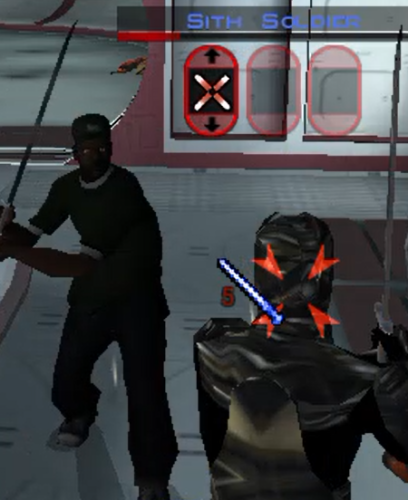
SanAndreasKotor
By EwokKotor
Adds playable Sweet, Ryder, and OG Loc to KOTOR 1. Mouths should be weighted for dialogue. Any feedback much appreciated!
Special thanks to huckpie for their permission to use the source files from their San Andreas Guitar Hero World Tour mods on Nexus, as I lacked the assets and tools to port the vanilla San Andreas Files into Blender. Go check out their mods on Nexus!
Planning on releasing Big Smoke later potentially with voiced lines for the Player character, although right now experiencing some trouble with audio breaking the game at certain points but stay tuned! If not will at the least release the model.
18 downloads
-
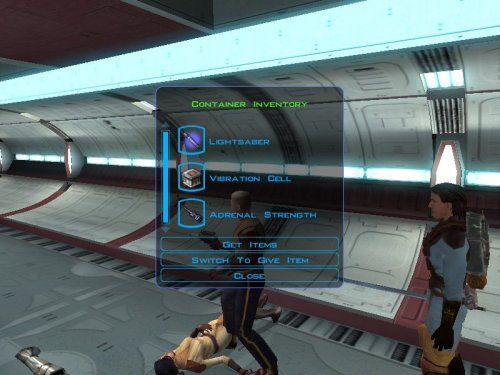
Lightsaber on endar spire
By Kalendarzak
Description:
When i was playing ,,Drop Those Lightsaber'' mod it doesn't have two items, vibration cell and simulant, only lightsaber, i was little pissed of because i needed upgrade for vibroblade. So i create this mod to add lightsabers and vibration cell
This is my first mod so pls tell how was it and is it working. When i tested it, it was working.
HolocronToolset was only used
Installation instructions:
Just drop files from ,,Override'' to Kotor 1 Override
Main features:
The mod ads two lightsaber in endar spire, one red lightsaber and one blue lightsaber, with vibration cell (this upgrade to vibroblade) and simulant. You can get this items from this jedi and sith that are fighting in endar spire.
Requirements:
If your mods don't change anything with jedi and sith on endar spire than it should work
Shout outs:
The original creator and helper of mod that my mod was based on (Drop Those Lightsabers) is ChilledTwo, ebmar and Mellowtron11.
82 downloads
(0 reviews)0 comments
Submitted
-
Harder malak fight on leviathan
By Kalendarzak
Description
This mod gives stats to malak like he was in star forge but in leviathan, by that im mean that if he have 29 strenght in star forge than he have 29 strenght in leviathan, Its all the same stats like in star forge except Force points
Installation instructions
Just put files from Override in this mod to Override in kotor 1 main directory
Requirements
Be good
Shout outs
The mod was inspired by mod called ,,Shem Improved Malak'' by Shem
19 downloads
(0 reviews)0 comments
Submitted
-
.thumb.webp.1dbe4720f674ce2e15a47e888abec9d1.webp)
Harder fight with Saul
By Kalendarzak
Description
The mod increase stats of enemy's in Leviathan
Installation instructions
Just drop files from Override from this mod to Override that is from Kotor 1 main directory
Main features
The mod increase stats of Saul, Dark jedi and Saul Guard
Shout outs
The mod was inspired on mod called ,,Shem's Improved Malak'' by ,,Shem''
20 downloads
(0 reviews)0 comments
Submitted
-
.thumb.jpg.b952bf0a044d596c3338c0f2cdb4ce9f.jpg)
Trask as a jedi
By Kalendarzak
Description
In endar spire instead of having trask you are having a Jedi Guardian with same voice and dialogs only like him
Installation instructions
Put files from Override from this mod to Override in kotor 1 main directory
20 downloads
(0 reviews)0 comments
Submitted
-
KOTOR1-Engine-Fixes
By VexFlint
KOTOR 1 engine fixes — grass rendering, two crashes, and game speed
Hey all. I've been poking at swkotor.exe for a while and ended up finding a handful of engine bugs worth sharing. The patches are now merged into the KotOR Patch Manager, so they're available to anyone.
Quick note on me: I'm not a reverse engineering person by trade, I'm a student. Most of this came from trial and error — build a patched exe, play it, watch it break, go back and try again. All the function names I was working from come from Lane's KOTOR 1 reverse engineering project, and without those this would have been impossible.
The grass one
If you've ever turned Grass off in the graphics options because it looked like this — long streaks and beams flying across the sky, especially on Dantooine — that was a bug, not your hardware.
RenderGrassPolys draws grass through one of three code paths depending on what your graphics driver supports. Two of those three hand OpenGL the wrong pointer: instead of the buffer holding the grass blade positions, they pass the address of a field that's never filled in. So the game reads whatever happens to be sitting in memory there and treats it as the coordinates of the grass. Hence the streaks.
The third path — the one used when your driver reports GL_ATI_fragment_shader — does it correctly. That's why this was never widely reported: plenty of setups take the good path and never see a problem. If your machine takes one of the others, grass has been broken for you this whole time. In at least one case it was because KOTOR 1 was running on integrated graphics rather than the dedicated GPU.
Lane confirmed this independently by forcing his own game down the broken path and reproducing it exactly.
There were two more issues in the same function: a memory leak of OpenGL state that broke lighting on things drawn after grass, and a double free of the grass buffer that was corrupting the heap. Both fixed.
The crashes
Two 0xC0000005 crashes, both from the same underlying problem. The renderer keeps three lists sized for exactly 5000 textures and looks things up in them using the ID number the graphics driver assigns. Those numbers keep climbing as you change areas — the driver doesn't reuse them — so after enough loading the game indexes past the end of the list and writes into memory that isn't its own.
More likely on heavily modded installs. Both spots are now bounds-checked.
Worth being clear: this stops the crash, it doesn't raise the 5000 limit. Textures past that point are skipped instead of drawn. A proper fix is possible but needs more work.
Game speed
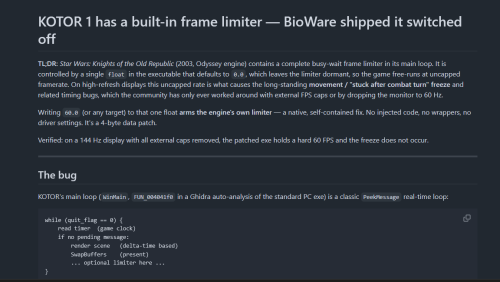
KOTOR ties simulation speed to framerate, so on a modern machine it runs fast. The engine already contains a frame limiter, but the value that switches it on defaults to zero, so it never runs. Setting it makes the game pace itself using its own code — no driver cap or 60Hz monitor mode needed.
This is also why the post-combat movement freeze gets rarer with a cap. The direct fix for that is J's Post-Combat Movement Fix, separately available in KPM.
How to get it
Through the KotOR Patch Manager (recommended) — three patches, now merged upstream:
Texture Bucket Memory Safety — the two crash fixes Grass Buffer Double Free Grass Rendering Fix KPM injects at runtime, so your executable isn't modified and you can turn individual fixes on and off.
Or a standalone script if you'd rather patch the exe directly — it also includes the frame cap and the 4GB flag, writes a backup first, and has a --revert that restores the original bytes exactly. Link in my signature.
Either way: this needs the KOTOR Editable Executable from here on DeadlyStream if you're on Steam, since the shipped exe is encrypted. GOG's is usually fine already. The script checks and refuses anything it doesn't recognise.
Turn Grass back on once it's applied. That's the point.
Compatibility
No game content is touched, only the executable — so Community Patch, mod builds, texture packs and so on are all unaffected. Widescreen (UniWS) and the HR menu patch are fine too; apply those first and this last.
Tested on the standard PC v1.03 / editable-exe layout with a ~180 mod build (the Spoiler-Free build from the neocities guide) on AMD hardware. Should apply to GOG as well — that build is the same apart from a signature — but I haven't tested it there myself.
Credits
Lane's KOTOR 1 (GoG) reverse engineering work supplied every function name I used. Finding a bug in RenderGrassPolys is only possible once something tells you that's what the function is called. He also reviewed the patches and caught two real mistakes in my first attempt — one of which was silently breaking shadows.
Synchro is working on a much broader fix in the same area, porting the old ATI-specific shader paths to modern ARB equivalents, which fixes cubemaps, bump maps and more besides. Worth watching — it addresses the root of why so much of this game renders oddly on current hardware.
Thanks also to J, Vriff and JC in the OpenKotOR Discord for the testing and the sanity checks.
Happy to answer questions. If you've had grass turned off for years, give it a try.
kotor_patch.py
161 downloads
-
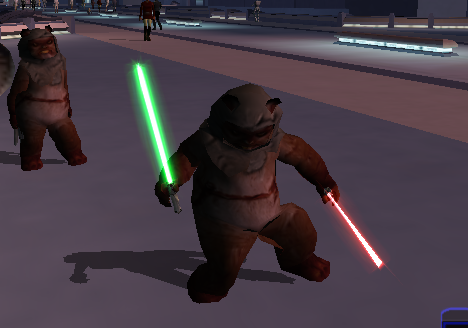
Playable Ewok with 2 Hand Animations
By EwokKotor
This is a total overhaul of my previous Ewok Mod using the method I used on my Jawa mod so that the Ewok now has 2 handed weapon animations. Aware of small glitch where because Ewok is too fat 2h lightsaber clips through model slightly. Can be fixed easily probably will later.
This Kotor 1 mod adds a playable custom ewok mdl that can be placed into the override folder to replace some npcs or used in conjunction with KSE as a playable character with combat animations. No 2 hand mele combat animations at this time.
This .Zip file contains a ReadMe.txt a brief tutorial.txt on how to recreate the mod process, the custom .tga files for the textures, and finally the custom .mdl and .mdx files that can be dropped into override following the instructions in the ReadMe file. I also included a link to how to recreate the process incase anyone is interested.
Disclaimer: This mod utilizes a modified asset from the community-maintained SWBF2 Mod Tools SDK 2020 available at ModDB, alongside original assets from Star Wars: Knights of the Old Republic. Full credit goes to the original developers, artists, and respective intellectual property rights holders (Lucasfilm, Pandemic Studios, and BioWare). This is a strictly non-profit, fan-made educational project intended exclusively as a technical proof-of-concept demonstrating asset handling for the KOTOR modding community. Furthermore, I do not own or claim rights to any of the third-party tools used or described in this project; all rights belong entirely to their respective developers
18 downloads
(0 reviews)0 comments
Submitted
-
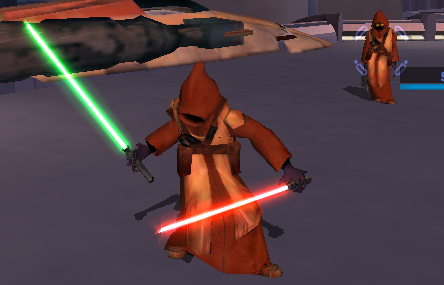
Playable Jawa
By EwokKotor
See comment below for new optional addon files.
This mod adds a playable Jawa to K1. Shoutout to DarthParametric for helping me to figure out the bug on the prototype!
Simply drop the files into Override to install.
Feel free to use this mod in your own works but plz give credit.
Video on process coming soon.
19 downloads
-
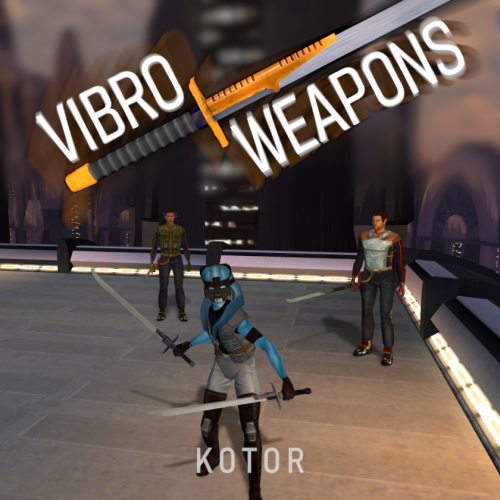
HQ Vibro Weapons + Effects - K1
By J
Vibro Weapons with vibration effects.
All vanilla vibroswords, vibroblades, and vibro double-blades updated.
Toasty Fresh vibro models were used as a base and each texture was color matched to the vanilla style. Vibration and motion blur effects were added to the blades.
6 Vibroblades
Vibroblade - g_w_vbroshort01
Krath Blood Blade - g_w_vbroshort02
Echani Vibroblade - g_w_vbroshort03
Sanasiki's Blade - g_w_vbroshort04 g_w_vbroshort05 g_w_vbroshort06 g_w_vbroshort07
Mission's Vibroblade - g_w_vbroshort08
Prototype Vibroblade - g_w_vbroshort09
7 Vibroswords
VibroSword - g_w_vbroswrd01
Krath Dire Sword - g_w_vbroswrd02
Sith Tremor Sword - g_w_vbroswrd03
Echani Foil - g_w_vbroswrd04
Bacca's Ceremonial Blade - g_w_vbroswrd05 g_w_vbroswrd06 g_w_vbroswrd07 g_w_vbroswrd08
Baragwin Assault Blade - g1_w_vbroswrd01
GenoHaradan Poison Blade - geno_blade
4 Vibro Double- Blades
Vibro Double-Blade - g_w_vbrdblswd01
Sith War Sword - g_w_vbrdblswd02
(not used)Echani Double-Brand - g_w_vbrdblswd03
Yusanis' Brand - g_w_vbrdblswd04 g_w_vbrdblswd05 g_w_vbrdblswd06 g_w_vbrdblswd07
Credit:
KoTOR Weapon Model Overhaul by Toasty Fresh - 3 models/textures were used as base
KOTOR Blender
166 downloads
- vibrosword
- weapons
- (and 2 more)
(0 reviews)0 comments
Submitted
-
.thumb.png.e1132444dd8587c72edc645e18adc5a5.png)
Quanon & Dark Hope Twi'lek Pack
By N-DReW25
A Mod for Star Wars Knights of The Old Republic
Author: N-DReW25
1.0.0 Release Date: 18.07.2026
Installation:
Please install the K1 Community Patch FIRST before this mod!
Simply click on the HoloPatcher.exe, click install, and sit back and watch the HoloPatcher do its magic!
Description:
On January 4th 2017 the modder Dark Hope released her HD Twilek female 1 mod which updates the female Twi'lek appearance textures with high quality HD textures. On March 1st 2017 the modder Quanon would then release his Quanons Twilek Outfits mod which added high quality HD dancer outfit textures for the female Twi'leks.
With Quanon's mod, the idea is that you would install Dark Hope's textures first and then his mod on top to create a sort of HD hybrid between the two textures.
But on January 21st 2023 Dark Hope would go on to update her HD Twilek female 1 mod with new textures that used DarthParametric's K1 Thigh-High Boots For Female Twi'lek Body Modder's Resource.
Since both Quanon and Dark Hope have given modders permission to use their mods with proper credit given to them, I have decided to take their Twi'lek textures and make a pack which would allow you to use all three mods at once without having to pick one or the other.
Dark Hope's HD Twilek female mod from 2017 will replace the three generic Twi'lek female appearances with HD textures for their outfits and heads.
4 new Twi'lek appearances have been added which use the default Twi'lek heads but use Quanons Twilek Outfits for their outfits.
3 new Twi'lek appearances have been added which use Dark Hope's HD Twilek female mod from 2023 which add new outfit textures with Thigh-High Boots and head textures.
With this mod installed, there are now 10 Twi'lek female variations that each use a combination of Quanon's textures, Dark Hope's 2017 textures, and Dark Hope's 2023 textures.
Known Bugs:
This mod shouldn't have any bugs but if you find any please report them to me.
Incompatibilities:
Incompatible with DarthParametric's K1 Thigh-High Boots For Female Twi'lek Body Modder's Resource (it is also included in the mod).
KotOR 1 Twi'lek Female NPC Diversity must be installed AFTER the Quanon & Dark Hope Twi'lek Pack.
Lyn Sekla "Legends" must be installed AFTER the Quanon & Dark Hope Twi'lek Pack.
[K1] Janice Nall "Legends" and the Incomplete Droids must be installed AFTER the Quanon & Dark Hope Twi'lek Pack.
Galaxy of Faces must be installed AFTER the Quanon & Dark Hope Twi'lek Pack.
The NPC Diversity Pack must be installed BEFORE the Quanon & Dark Hope Twi'lek Pack.
Please report any further incompatibilities!
Permissions:
As both Quanon and Dark Hope have given their permission for modder's to use their work, you can use assets from this mod as long as you give credit to the original authors.
Thanks to:
Dark Hope: For creating the 2017 and 2023 versions of the HD Twilek female 1 mod!
Quanon: For creating Quanons Twilek Outfits!
DarkParametric: For both making K1 Thigh-High Boots For Female Twi'lek Body and making it a modder's resource!
Bioware: For such an amazing game!
Fred Tetra: For Kotor Tool!
Cortisol: For HoloPatcher!
Everyone who downloads the mod!
Legal:
THIS MODIFICATION IS NOT SUPPORTED BY BIOWARE/OBSIDIAN ENTERTAINMENT, LUCASARTS, DISNEY OR ANY LICENSERS/SPONSORS OF THE MENTIONED COMPANIES. USE OF THIS FILE IS AT YOUR OWN RISK AND THE ABOVE-MENTIONED COMPANIES OR THE AUTHOR IS NOT RESPONSIBLE FOR ANY DAMAGE CAUSED TO YOUR COMPUTER FOR THE USAGE OF THIS FILE.
76 downloads
-
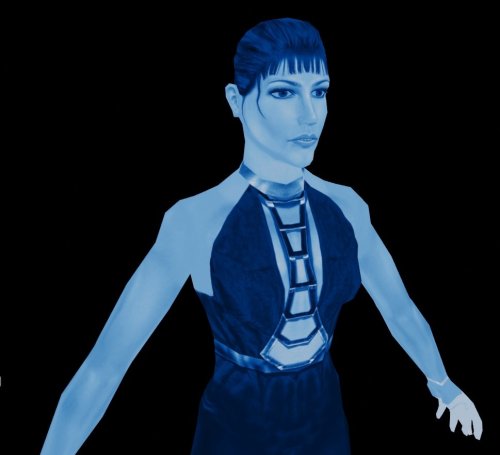
Twisted Rancor Trio (Movie-Style Holograms For Twisted Rancor Trio Puzzle 1.0.0)
By Dark Hope
I created textures for the Movie-Style Holograms For Twisted Rancor Trio Puzzle 1.0.0 mod.
1. Download: DP_Holo.rar
2. Copy all files to the Knights of the Old Republic's Override folder.
(Example location - C:\Program Files (x86)\Steam\steamapps\common\swkotor\Override)
3. Delete the .tpc files with the same name..
4. If you like the mod; leave a comment or endorse! (It would be much appreciated) Made with love.
196 downloads
-
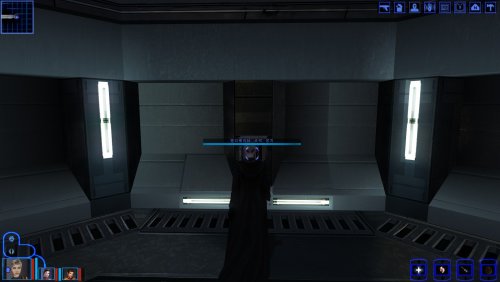
korean patched dialog.tlk for k1cp
By Revanknight
The existing Korean patch for KOTOR only supports the vanilla dialogue and could cause some game-breaking errors, so I added the K1CP additions to dialog.tlk.
기존 한글 패치가 바닐라 기준으로 만들어져서 커뮤니티 패치를 설치하면 진행이 막히기도 합니다. 이 파일을 넣어야 커뮤니티 패치를 한 버전에서 한글이 전부 출력되고 진행도 막히지 않습니다.
-설치법-
게임 경로에다 dialog.tlk를 넣으세요. 기존 한글 패치의 dialog.tlk는 지우던가, 이걸로 덮어쓰던가 하시면 됩니다.
* 바닐라 버전으로 하실거면 기존 한글패치를 넣어주세요
The original patch was made and distributed by Nasher
https://blog.naver.com/PostView.naver?blogId=alagondar&logNo=224289552113&navType=by
40 downloads
-
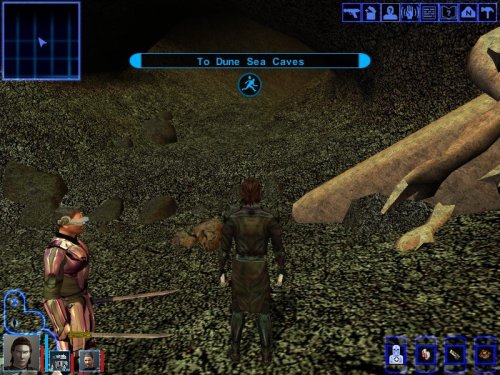
TATOOINE - THE LOST TEMPLE
By JuniorModder
V1.1 update
This version has been tested and ensured for compatibility for the following mods:
K1R v1.2
K1CP v1.10.0
K1CP+RP Demo v0.13.0
Sleheyron Story Mode and Battle Arena v3.3
STAR WARS: KNIGHTS OF THE OLD REPUBLIC
TATOOINE - THE LOST TEMPLE v1.1
A restoration and expansion project for Star Wars: Knights of the Old Republic.
“While searching Tatooine for clues to the Star Map, the player can venture beyond the familiar path to uncover a long-forgotten temple buried beneath the Dune Sea.”
This mod restores and expands the Tatooine Eastern Dune Sea ruins, adding new quests, characters, items, dialogue, and enemies.
Features:
- Restores m19aa module.
-New loading screen and minimap.
-New quest and datapads.
- New enemies, NPCs and dialogue.
-New items.
This mod requires HoloPatcher or TSLPatcher to install correctly.
Run HoloPatcher.exe and allow the installer to place all files into your Knights of the Old Republic installation directory.
Known Issues
This mod modifies globalcat.2da, and global.jrl; compatibility with other mods editing these files depends on proper patching and install order.
Due to an unpolished walkmesh in the restored area, party members may occasionally become stuck in walls, terrain, or beneath the map. In most cases, this can be resolved by repositioning the character and moving in different directions until they break free.
Some stalagmites and cave geometry appear to float above the terrain. This is a limitation of the original area models and would require edits to the 3D geometry to fully correct.
During the swoop bike repair sequence, the Sandperson and swoop bike disappear after the screen fades back in rather than during the fade to black as originally intended. This is a cosmetic issue only and does not affect gameplay or quest progression.
Tools used:
- HoloPatcher
- ChangeEdit / TSLPatcherConfig
- Holocron Toolset
- DLG Editor
- K-GFF Editor
- GIMP
-"Lost Modules Pack" by InSidious
Special thanks to the Knights of the Old Republic modding community for providing a rich library of modding tutorials and resources, and keeping the game alive through years of restoration and expansion projects.
Created by Caleb Behrens (JuniorModder)
2026
407 downloads
-
File Reviews
-

lorddli 1
Perfect companion mod to go along with KMRP
-
You are the pillar of this community
-
The Atton no guyliner with mid scruff is absolutely perfect! Love this!
-
This wonderful black magic fuckery has enabled me to play my favorite game of all time at 240fps without any issues and I am very happy about it. Thank you!
Edited by gilless429-
 1
1
-
-
Excellent addition! Everything worked great, and I love the different logs and the story they tell!
-
 1
1
-
-

Synchro 20
These look great! Now I know what you meant about not being able to get portrait images out of your head

-
-
Incredible that it's taken this long to use grass and shadows again. Incredible.
-
1
-
-
Worked great!
-
The camera effect has always annoyed me so much, this makes running around the ship vastly better!
-
It's a small change but the visions look so much better now!
-
Worked great, no more running all over!
-
 1
1
-
-
Really fun addition to the game, and no bugs encountered! Worked great combined with Easy Pazaak, as directed here I installed this first then added the file from EP to override. Definitely will include in future playthroughs!
-
1
-
-
I wish I'd known about this sooner! Such a great QOL tool that makes creating/editing such a breeze. Would've saved me soooo many hours if I had been using it prior (curse you broken Kotor tool! XD).
-

diegodb 32
An mod that did the (a couple of years ago) impossible. He solved one of the most pertiment bugs for the K1 users, the enabling of Soft Shadows, Frame Buffer Effects and all the bugs in the metalic surfaces, reflections and all.
To me even the Standalone version of this mod is mandatory. Congratulations goes to the modder
-
1
-
-



-
File Comments
-

By Sith Holocron · Posted
@mackmitchell94 I have forwarded your post to Marius Fett. Hopefully you two can figure out what your issue is. Good luck! -

By mackmitchell94 · Posted
I've changed my mind, I think the main issue is Marius Fetts wearable sith uniforms modifying the PMBJL files when I'm using JC's Jedi robes with the party robes, along with the Master robes only option of DMs Movie robes ! Here's my list: Marius Fetts wearable sith uniforms Bastilla Romance Fix Canon Galaxy Map Fix K1 Animated Galaxy map texture K1 Dark Jedi Wear JC's Cloaks Stormie 97 Juhani Saber Patch Collar Fixes For Jc Cloak Mods Heyorange's collar -
By Sith Holocron · Posted
@mackmitchell94 I don't think it's this mod that's causing your issue. Please list all mods you've installed with the game. -
By mackmitchell94 · Posted
How do I uninstall this mod? It's causing a bug in tulak hord's tomb where Jorak is invisible . Names Differ: N_SithComM pmbjl is the error in the crash report . -

By tgritzmodder · Posted
This probably seems like an odd question but does this only work after the star forge? Like, say you complete the temple of the ancients but wanted to roam a bit before heading to the final battle. Is that doable?
-