

Mods
1,058 files
-
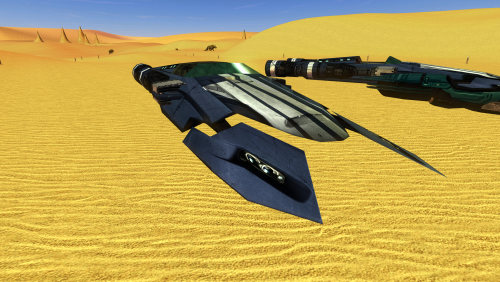
Speeder
By Dark Hope
New textures for speeder.
To Install
1. Download: Speeder.rar
2. Copy all files to the Knights of the Old republic's Override folder.
(Example location - C:\Program Files (x86)\Steam\steamapps\common\swkotor\Override)
3. When/if prompted to overwrite files, press okay.
4. If you like the mod; leave a comment or endorse! (It would be much appreciated) Made with love
342 downloads
-
AxC's Recover Nemo's Body
By AxConsortium
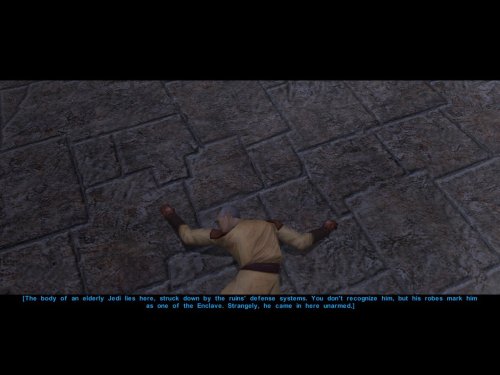
In the game, the Council acknowledges they sent a Jedi to investigate the ruins, but he has not returned. They do nothing about it, never mention him again, and simply send you instead and call it a day. Consequently, we can do nothing either, except rob the corpse of his belongings and leave him in his tomb.
This small immersion mod allows you to recover the body of Nemo from the Dantooine ruins. Or not. The choice is yours.
Bring him not to the apathetic Council, but to Deesra, who trains under Master Dorak to one day become Chronicler of the Jedi Order. He will properly document Nemo's fate and attend to his burial.
A short quest begins once you search Nemo's remains and decide to take his body back to the Enclave. You may also choose to deliberately leave him there, as the Council always intended, and the quest will auto-complete, affirming your decision.
Upon completion, you receive a purple crystal that once belonged to Nemo himself. In my opinion, a fitting way to obtain this signature crystal before leaving Dantooine for the first time.
Note:
Due to how the game works, it's best to install this mod before entering the Dantooine Ruins for the first time. Otherwise, the dialogue after interacting with the corpse may not trigger naturally. As a failsafe, I've added an additional dialogue option with the Ancient Droid. After finishing your business in the ruins, ask him questions and a new line will appear: "Did you kill the Jedi over there?". This allows you to investigate the body the same way as after searching him.
Bugs:
Nothing major, but if installed on an existing save and using the failsafe route, the body may only disappear after you revisit the location.
Installation:
Use the HoloPatcher installer included in the archive.
Credits:
Fred Tetra, for KOTOR Tool
TK102, for DLGEditor
Torlack, stoffe & TK102, for NWNSSCOMP
JdNoa & Dashus, for DeNCS
Cortisol, for Holocron Toolset and HoloPatcher
270 downloads
-
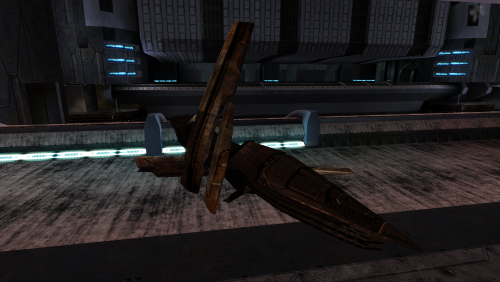
Swoop bikes
By Dark Hope
New textures for Swoop Bikes.
Textures with elements from the Vurt's KotOR Visual Resurgence mod.
To Install
1. Download: SwpBike.rar
2. Copy all files to the Knights of the Old republic's Override folder.
(Example location - C:\Program Files (x86)\Steam\steamapps\common\swkotor\Override)
3. When/if prompted to overwrite files, press okay.
4. If you like the mod; leave a comment or endorse! (It would be much appreciated) Made with love
320 downloads
-
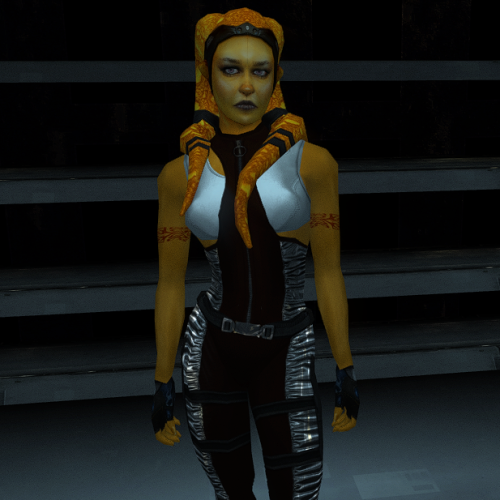
Janice Nall and the Incomplete Droids
By Dark Hope
New textures for Janice Nall and the Incomplete Droids.
Requires [K1] Janice Nall "Legends" and the Incomplete Droids 1.1.1 to be installed.и link
To Install
1. Download: Janice Nall and the Incomplete Droids.rar
2. Copy all files to the Knights of the Old republic's Override folder.
(Example location - C:\Program Files (x86)\Steam\steamapps\common\swkotor\Override)
3. When/if prompted to overwrite files, press okay. Delete eb_JNallB01.tpc, C_IncDrd01.tpc, eb_JNallH.tpc
4. If you like the mod; leave a comment or endorse! (It would be much appreciated) Made with love.
314 downloads
- incomplete droids
- janice nall
- (and 1 more)
-
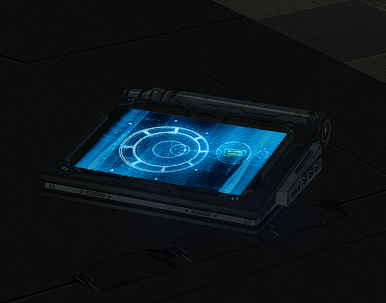
K1 DarthParametric's Datapad
By Dark Hope
New models and textures for the datapad.
Models created by DarthParametric.
To Install
1. Download: DarthParametric's Datapad.rar
2. Copy all files to the Knights of the Old republic's Override folder.
(Example location - C:\Program Files (x86)\Steam\steamapps\common\swkotor\Override)
3. When/if prompted to overwrite files, press okay.
4. If you like the mod; leave a comment or endorse! (It would be much appreciated) Made with love.
406 downloads
-
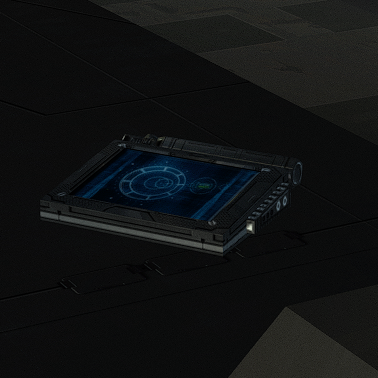
Animated datapad
By Dark Hope
New animated texture.
To Install
1. Download
2. Copy all files to the Knights of the Old republic's Override folder.
(Example location - C:\Program Files (x86)\Steam\steamapps\common\swkotor\Override)
3. When/if prompted to overwrite files, press okay.
4. If you like the mod; leave a comment or endorse! (It would be much appreciated) Made with love.
302 downloads
(0 reviews)0 comments
Updated
-

star map AxC's Dantooine Star Map Placement Fix
By AxConsortium
n the original game, the Star Map on Dantooine is positioned awkwardly off-center, despite the room clearly being designed for it to be in the middle. Thanks to a Reddit user who spotted this, I couldn't ignore it any longer. This mod corrects the placement so the Star Map now sits properly at the room's center.
An additional optional file does the same for the Ancient Droid, centering him in his chamber as well.
This mod will only apply it's changes on saves, where the ruins were not yet entered.
Credits:
WilliamDarkstar4, for the unfortunate discovery that drove me to this
Fred Tetra, for KOTOR Tool
TK102, for DLGEditor
Torlack, stoffe & TK102, for NWNSSCOMP
JdNoa & Dashus, for DeNCS
Cortisol, for Holocron Toolset
216 downloads
(0 reviews)0 comments
Updated
-
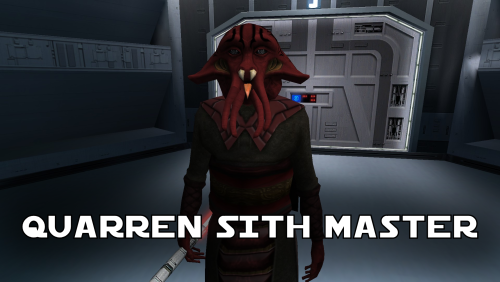
Quarren Sith Master
By N-DReW25
A Mod for Star Wars Knights of The Old Republic
Author: N-DReW25
1.1.0 Release Date: 05.02.2026
Installation:
Simply click on the HoloPatcher.exe, select your swkotor directory, click install and sit back and watch the HoloPatcher do its magic.
Description:
In the 19th Century, European Colonizers would use non-European collaborators to help pacify and/or assimilate non-European cultures into their Empires.
The European Colonizers and the non-European target for colonization might have major linguistic and cultural differences making dialogue between the two groups almost impossible, but by taking a non-European collaborator of the Europeans and using them as an intermediary between the two groups the non-European group might become more suspectable to the Europeans through the use of the non-European collaborator who is closer to the non-European group than they are to the Europeans.
A random example of this might be the Italians using the Arabs to help them colonize the Somalis. The Italians want to colonize Somalia but they do not speak Somali and aren't at all culturally similar, whereas the Somalis would more than likely know Arabic and would be more culturally similar to Arabs so using Arabs to help Italians colonize the Somalis would be a viable tactic.
This concept of wanting to colonize a group that is different from you so you instead use a culturally similar group to make it easier for you to colonize the original group is central to this mod.
On Manaan, the Sith Empire is secretly training Selkath youths into becoming Dark Jedi and Sith Agents to one day stage a coup against the Manaan government to take over their planet and exploit their precious resources. Similar to the real life example above the same hurdles that applied to Europeans and non-Europeans still apply to the Sith in this scenario.
The Sith Empire is predominantly human and are shown to be quite racist to non-human species throughout the game. The Selkath are an aquatic alien species so not only is there a differing alien culture the Sith have to deal with but the Selkath primarily live underwater.
The leader behind this Sith plot to train Selkath youth is a human Sith Master who appears as a generic Sith Master in-game. This mod changes this NPC so that the Sith Master is now an alien Quarren, another aquatic alien species.
With this mod installed, it makes much more sense as to why the Sith are trying to train and convert Selkath youth to the Sith when the mastermind behind this plot is a fellow aquatic alien who would be much more culturally similar to his Selkath students and would be a much easier leader for the Selkath to blindly follow despite this master serving an empire that would be racist towards them all.
Known Bugs:
This mod shouldn't have any bugs but if you find any please feel free to report them on Deadlystream.com.
A third install was planned but could not be implemented due to a bizarre bug. The third option was a version of the vanilla dialogue which had an AI filter over it to make it sound like the Quarren from Kotor II (this same method was used in the ROR mod for the Quarren Jedi Master). This could not be added as the VO in-game would be sped up with the pitch increased for reasons unknown to me. This install has been included in the mod but cannot currently be installed, when this bug can be fixed I will add the ability to install it.
Incompatibilities:
Please report any incompatibilities!
Permissions:
Do NOT claim credit for this mod and do not use assets from this mod without my permission.
The textures for this mod comes from Quanon's Big Sellout, a modder's resource that was published on LucasForums back in the day. These are the same textures that are used in Quanon's Sith Quarren PC mod found on NexusMods.
As these textures came from Quanon's Big Sellout, they can be used in your mod though I strongly advise you credit Quanon as the original artist and acknowledge Quanon's Big Sellout to avoid people thinking you stole it from the Sith Quarren PC mod.
Thanks to:
Quanon: For making the original textures and including it in your Big Sellout modder's resource!
Marius Fett: For fixing the Death Field animation bug which projected the lightning from his feet instead of his hands!
ElevenLabs Website: For the custom AI VO service!
Bioware: For such an amazing game!
Obsidian Entertainment: For creating the original Quarren models, textures, and VO!
Fred Tetra: For Kotor Tool!
th3w1zard1: For HoloPatcher!
Everyone who downloads the mod!
Legal:
THIS MODIFICATION IS NOT SUPPORTED BY BIOWARE/OBSIDIAN ENTERTAINMENT, LUCASARTS, DISNEY OR ANY LICENSERS/SPONSORS OF THE MENTIONED COMPANIES. USE OF THIS FILE IS AT YOUR OWN RISK AND THE ABOVE-MENTIONED COMPANIES OR THE AUTHOR IS NOT RESPONSIBLE FOR ANY DAMAGE CAUSED TO YOUR COMPUTER FOR THE USAGE OF THIS FILE.
319 downloads
-
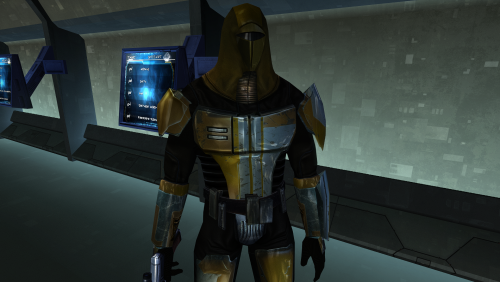
Vurt's Mandalorian Neo-Crusaders
By Dark Hope
This mod will replace and update Mandalorian Neo-Crusaders texture files. The Vurt textures have been edited. Seams have been refined, and details have been added and removed.
Thanks to Vurt for the wonderful textures. It was a pleasure working with them.
To Install
1. Download: N_Mandalorian (Vurt's KotOR Visual Resurgence).rar
2. Copy all files to the Knights of the Old republic's Override folder.
(Example location - C:\Program Files (x86)\Steam\steamapps\common\swkotor\Override)
3. When/if prompted to overwrite files, press okay.
4. If you like the mod; leave a comment or endorse! (It would be much appreciated) Made with love.
430 downloads
- vurts
- mandalorian
- (and 4 more)
-
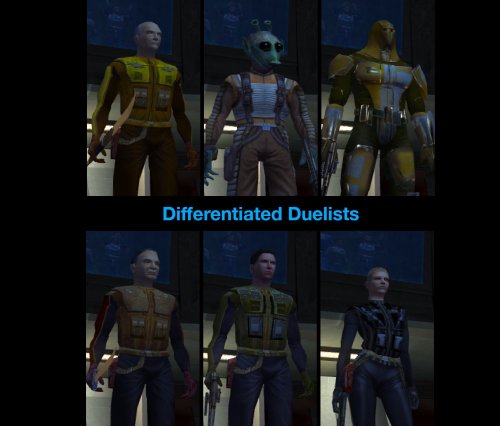
Differentiated Duelists
Rebalance of the Taris duelists.
SUMMARY
This mod re-equips and rebalances the Taris duelists, aiming to give them more variety, smooth out their difficulty curve, and make the fights a bit more challenging and engaging overall.
Almost all duelists have had their stats or equipment tweaked to some degree to make them more distinct in both appearance and combat while ensuring a natural progression in difficulty throughout the fights. Twitch has undergone the most extensive changes and should now be significantly more challenging. Each of the human duelists gets a different set of level-appropriate light armor, instead of all wearing the same armor as they do in vanilla. Certain duelists have had their AI tweaked for improved behavior. Detailed changes to each duelist are listed below.
This mod is not intended to dramatically alter the difficulty of the dueling arena but will make it harder overall.
Note this mod will only work on saves from before entering the Taris cantina for the first time.
DETAILS
INSTALLATION
Run HoloPatcher.exe and select an install option. The default option installs the mod to the Override folder. An alternative option is included which installs to the Modules folder. If you don’t have any mods which edit these NPCs in Override but do have mods which edit them in Modules, you can use the alternative install option to prevent overwriting them. See compatibility notes for more details.
Direct the installer to your game folder then press install. Unaltered copies of any modified files will be placed inside the backup folder in the location of HoloPatcher.exe.
If you receive the following warning while running the alternative install option: “A resource located at ‘…\Override\…’ is shadowing this mod’s changes in Modules\tar_m02ae.mod!” then you should install the default option instead.
If you have Effixian’s Taris Arena Changes installed, run the compatibility patch after running the default install option.
UNINSTALLATION
To uninstall from the default install option:
Remove the following files from Override: tar02_bendak021.utc, tar02_gerlon021.utc, tar02_ice021.utc, tar02_marl021.utc, tar02_twitch021.utc, tar02_deadeye022.utc, m_ai_dueler.ncs, m_att_dueler.ncs, m_dmg_dueler.ncs, m_htb_dueler.ncs, m_per_dueler.ncs, m_rnd_dueler.ncs, m_spn_dueler.ncs, and m_udf_dueler.ncs. If any files were created inside the backup folder, move them to Override.
To uninstall from the alternative install option:
Remove tar_m02ae.mod from the Modules folder and, if present, replace with the tar_m02ae.mod in the backup folder.
COMPATIBILITY
Two install options are included to allow compatibility with different sets of mods that edit the same NPCs. If you are using any other mods which edit the duelist NPCs in the Override folder, you should use the default install option. However if the only other mods you have which edit these NPCs do so in the Modules folder, you can use the alternative install option to prevent overwriting them. See list of which mods are compatible with which options below.
Installs to Override (use the default option if using any of these mods):
Effixian’s Taris Arena Changes by Effix NOTE: Install order critical! Taris Arena Changes > Differentiated Duelists > Patch Bendak Starkiller Emblem Armour by redrob14 Installs to Modules (use the alternative option if using any of these mods and none of the previously listed mods):
K1 NPC Diversity Pack - N-DReW25 NOTE: If you prefer the armors from this mod, install it after Differentiated Duelists. Galaxy of Faces - N-DReW25 If unsure, install using the default option after any other mods that edit these NPCs to ensure its full changes take effect.
Twitch, Ice, and Bendak will not be affected by combat AI changes from other mods.
PERMISSIONS
Feel free to do whatever you want with this mod as long as credit is provided.
CREDITS
offthegridmorty
HoloPatcher - Cortisol, th3w1zard1
TSLPatcher - stoffe, Fair Strides
KOTOR Tool - Fred Tetra
DeNCS - JdNoa, Dashus
Mods in screenshots:
High Quality Blasters by Sithspecter
HD Fire and Ice by Cinder Skye
JC’s Blaster Visual Effects by JCarter426
Taris Dueling Arena Adjustment by DarthParametric
Taris Reskin Pack by Quanon
Ultimate Character Overhaul by ShiningRedHD
Ultimate Taris High Resolution by ShiningRedHD
241 downloads
- difficulty
- combat
- (and 4 more)
-
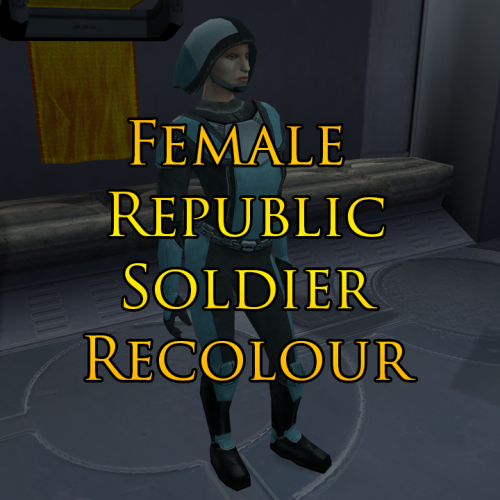
Female Republic Soldier Recolour (For JC's Republic Soldier Fix)
By Marius Fett
This mod is a simple recolour which alters the colour palette of the female Republic Soldiers to resemble the female soldiers represented in the LS endgame cutscene by the Stunt_Crowd02 texture. The blue used is slightly paler than the reference material, as I felt it looked a bit nicer.
Installation: Download and install JC's Republic Soldier Fix first:
The new textures included in my mod will NOT work on the vanilla female Republic Soldier model. They will ONLY work if you use JC's new model included in his mod.
Once installed, replace the textures from JC's mod with my own. There are two separate folders included in the download and whether you take the files from one or both depends on whether you've used the option to replace player clothing with JC's mod or not.
The textures in the NPC's folder will also work for KotOR 2, if you've downloaded the KotOR 2 version of JC's mod.
Thanks: Big thanks to JC for his original mod which not only corrected errors on the male Republic Soldier model, but also replaced the female model with a nicer one using the male version as a base.
Permissions: This mod may not be uploaded either in its entirety or in part to any site other than DeadlyStream other than by myself or by someone who has already obtained permission.
No part of this mod may be included in other works without permission being obtained via Private Message on DeadlyStream first.
THIS MODIFICATION IS PROVIDED AS-IS AND IS NOT SUPPORTED BY BIOWARE/OBSIDIAN ENTERTAINMENT OR LUCASARTS OR ANY LICENSERS/SPONSORS OF THE MENTIONED COMPANIES. USE OF THIS FILE IS AT YOUR OWN RISK AND THE ABOVE MENTIONED COMPANIES OR THE AUTHOR IS NOT RESPONSIBLE FOR ANY DAMAGE CAUSED TO YOUR COMPUTER FOR THE USAGE OF THIS FILE.
71 downloads
(0 reviews)0 comments
Submitted
-
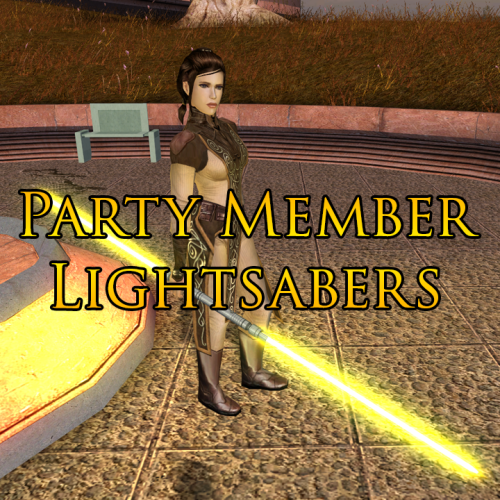
Party Member Lightsabers
By Marius Fett
This mod adds unique lightsabers to the game for each of the Jedi party members. Bastila, Jolee and Juhani each get a new lightsaber which they will have when joining your party and will also use in any cutscenes in which their weapons are pre-determined.
Massive thanks to Plasma, who originally created these hilt models for Jedi Academy and permitted me to release my ported versions for the KotOR community to enjoy too.
Thanks to Crazy34 for making his lightsaber blades with ambient lighting available as a modders resource for the rest of the community to incorporate into their mods.
Thanks to DarthParametric for allowing the use of his modified version of the k_ptar_lootbreji script to allow the player to keep the benefits from the Community Patch’s version of this script in addition to having the benefit from my own alteration which grants Bastila’s new lightsaber to the player.
488 downloads
-
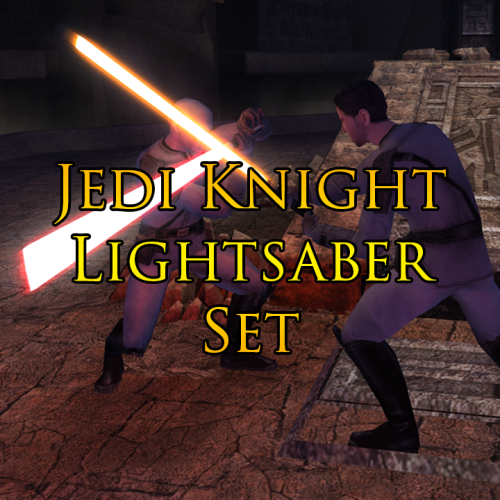
Jedi Knight Lightsaber Set (K1)
By Marius Fett
This mod adds seven new lightsabers to the game based on those present in the game Jedi Knight: Dark Force II. Each lightsaber is fully upgradeable, but available in only one colour each, based on the colour they were in the original game.
The lightsabers can be obtained as follows:
Dantooine:
Qu Rahn and Maw’s lightsabers are both lootable from Sherruk once he is defeated. He will wield them against you during the fight.
Korriban:
Yun’s lightsaber can be obtained from Kel Algwinn, by either killing him yourself or reporting him to Master Uthar. Choosing the light side option of sending him to the Jedi gets you nothing. Pic’s lightsaber can be looted from Mekel after his death, either in the Sith Academy, or in the Tomb of Tulak Hord. Sariss’s lightsaber can be looted from Lashowe after her death, either in the Sith Academy, or in the Valley of the Dark Lords. Boc’s lightsaber can be looted from Shaardan after his death, either in the Sith Academy, or in the Tomb of Ajunta Pall. Jerec’s lightsaber can be looted from Jorak Uln after his death in the Tomb of Tulak Hord, or the crystal will be added to your inventory at the same time as his writings, should he survive the encounter. Massive thanks to Plasma, who originally created these hilt models for Jedi Academy and permitted me to release my ported versions for the KotOR community to enjoy too.
Thanks to Crazy34 for making his lightsaber blades with ambient lighting available as a modders resource for the rest of the community to incorporate into their mods.
Thanks to DarthParametric for allowing the use of his modified version of k38_jor_givetab.ncs to allow the player to keep the benefits from the Community Patch’s version of this script in addition to having the benefit from my own alteration which grants Jerec’s crystal to the player.
369 downloads
-
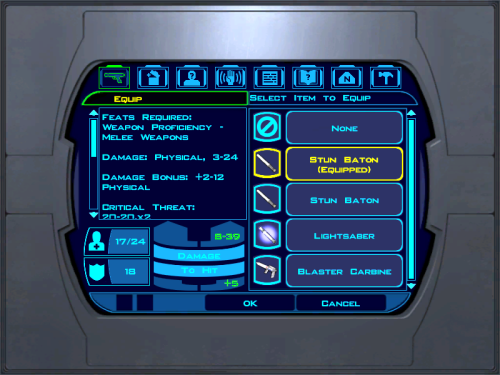
Stun Baton Mod
This mod makes the stun baton much stronger.
Installation: drop both files into the override folder.
This mod changes the stun baton so that it does 3-24 damage plus an additional 2-12 physical. Also, it has a 50% chance to stun for 6 seconds.
67 downloads
(0 reviews)0 comments
Submitted
-
![More information about "[K1] Mandalore the Unknown"](https://deadlystream.com/downloads/screens/monthly_2025_11/0.thumb.JPG.6dc4dd29780906efac2fa5c8fac23e49.JPG)
[K1] Mandalore the Unknown
By Raven-Fal
[K1] Mandalore the Unknown
Author: RavenFal
Release Date: 11/28/2025
"Yes, that's him. I toyed with calling him dar'Mand'alor, loosely translating Mandalore the Unknown." ―Abel G. Peña This mod changes the Mandalorian Captain found by the Temple on the Unknown World to be “Mandalore the Unknown”, the self-proclaimed Mandalore referenced several times in KOTOR by HK-47 and the Mandalorians on Kashyyyk, but never seen in-game. Per the campaign guide, Canderous defeated him between games and took his armor and helmet as a way to honor him, combining the helmet with Mandalore the Ultimate's mask (which is why Manalore's helmet in KOTOR 2 looks so different compared to the mask from the comics). This mod moves that confrontation earlier in the timeline, allowing players to experience Canderous acquiring his armor from KOTOR 2 and letting him (or anyone in your party who can equip heavy armor) to rock up to the Star Forge wearing one of the coolest armor sets from either game.
“Mandalore the Unknown” is wearing an upgradeable armor set with the appearance of Mandalore's Armor from KOTOR 2. Upon his defeat, he'll drop this armor instead of the “Mandalorian Assault Armor” the Mandalorian Captain drops in the base game. The appearance is set up as a disguise, and so it will work for both male and female characters. He also drops a datapad that explains why he was sending teams of Mandalorians to hunt in the Shadowlands, what he's doing on the Unknown World, and changes up events a little more to make to him the one who made the modifications to Mandalore's mask.
I have also included optional files to change Mandalore the Ultimate from SilverEdge9's Brotherhood of Shadow: Solomon's Revenge mod to also have the appearance of Mandalore from KOTOR 2. The mask looted from the “Non-Canon” chest remains unaltered and has its original appearance.
This mod is not compatible with any mod that alters g_mandalor004.utc (the Mandalorian Captain on the Unknown World).
To Install the main mod:
1. Run the “Install.exe” program from the mod folder.
To Install Optional files to change the appearance of Mandalore the Ultimate in BOSSR:
1. Copy all files from the “Optional – BOSSR Mandalore Replacement” folder into your Override folder.
To Uninstall the main mod:
1. Delete the following files from your Override folder:
bos_mandhelm.uti
g_a_mandotsl.uti
g_mandalor004.utc
mandotsl_datapad.uti
p_mandalorebb.mdl
p_mandalorebb.mdx
P_MandB.tga
2. Replace the “appearance.2da” file from your Override folder with the “appearance.2da” file saved in the “backup” folder found in the main mod folder.
To Uninstall the Optional files for BOSSR:
1. Delete the following files from your Override folder:
brg_mandalore.utc
msp_mandalore.utc
myp_mandalore.utc
mzp_mandalore.utc
Credits:
SilverEdge9 for the original Brotherhood of Shadow: Solomon's Revenge files.
221 downloads
(0 reviews)0 comments
Submitted
-
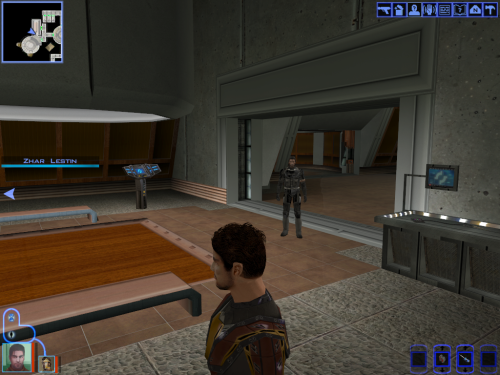
Carth head remesh higher poly and retextured (v2)
I modified Carth's head and retextured him i used this image as a model. I added more animated hair to this one. If you don't like it try this other i made without additional animated hair.
145 downloads
-
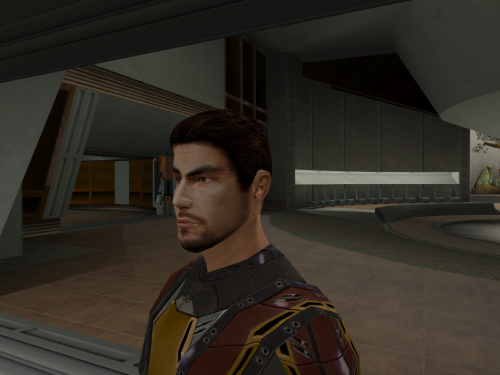
Carth head remesh higher poly and retextured
I modified Carth's head and retextured him i used this image as a model.
I made one with additional animated hair here
91 downloads
(0 reviews)0 comments
Updated
-
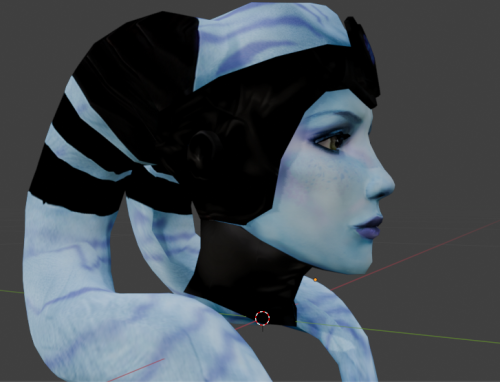
Higher poly and retextured Mission's head
I remade Mission's textures and mesh.
I also remade mission's brother and i'm waiting for the permission to upload it since it use a mod that remesh the twileks males.
208 downloads
-
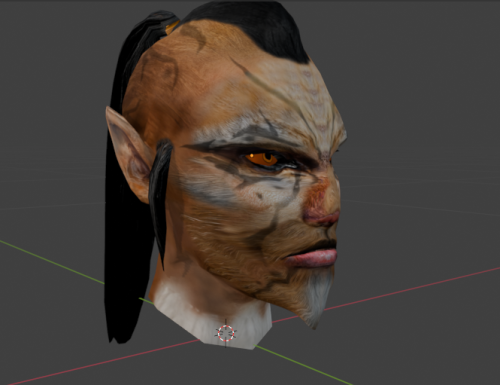
Juhani High poly new head
I remodeled Juhani so she look more Cathar using this nice mod from Stormie97. Thanks to Stormie97 for the permission to upload mine. You don't need his mod for mine to work but have a look at his work.
118 downloads
(0 reviews)0 comments
Updated
-
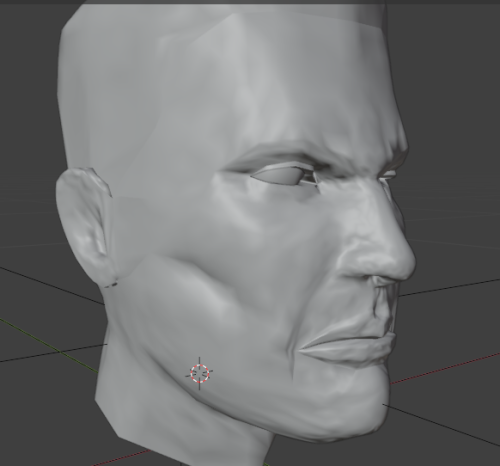
Canderous's head higher poly and retextured
I remeshed Canderous and retextured him i inspired myself with this artwork. I uploaded 2 versions of my textures. one more like the original textures and the other more like the image. I did not remade him AS the image but i was inspired.
155 downloads
(1 review)0 comments
Updated
-
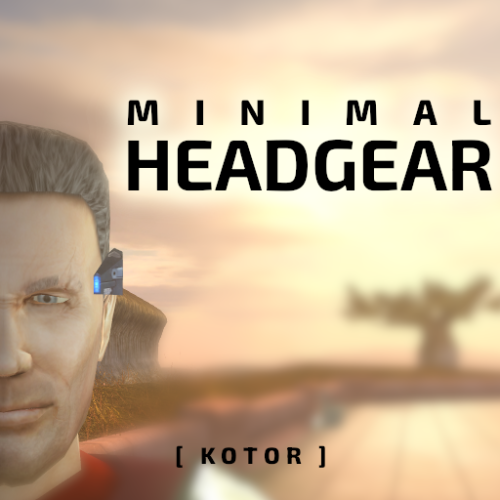
Minimal Headgear - K1
By J
Replaces all headgear to be much smaller. The breath mask is the only one that covers the face but it has been slimmed down and made less pointy.
414 downloads
-
-
True Ajunta
By N-DReW25
A Mod for Star Wars Knights of The Old Republic
Author: N-DReW25
1.0.0 Release Date: 15.11.2025
Installation:
Install the Kotor 1 Community Patch FIRST before this mod.
Simply click on the HoloPatcher.exe, select your swkotor directory, click install and sit back and watch the HoloPatcher do its magic.
If you want Ajunta Pall to appear transparent, please copy the textures from the "Transparent Skins" folder into your Override folder and overwrite the non-transparent skins that were installed by the HoloPatcher.
Description:
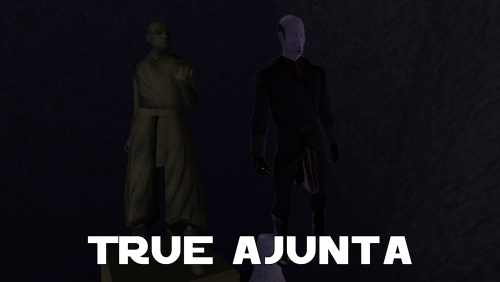
Ajunta Pall is a long dead Sith Lord who you encounter in Kotor I as a Force Ghost. The problem with Ajunta's depiction as a Force Ghost, other than George Lucas' (and later Disney's) retcons to how Force Ghosts work, is that Bioware was lazy when it came to making Ajunta's appearance and gave him a generic Dark Jedi model with a basic reskin that makes his robes a whitish blue color and they also gave him an energy shield effect to make him appear more ghostly.
There have been two mods over the years that turn Ajunta Pall's appearance from an underpaid Bioware intern's first draft into something that you'd actually expect a Sith's Force Ghost to look like.
In 2007, we saw the Ajunta Pall Unique Appearance mod by SilverEdge9 that reskinned the cut Jedi Council robe model and Deadeye Duncan's head to make Ajunta look like a creepy old Sith Lord. And in 2018, we saw the Spectral Ajunta Pall Canonical Appearance mod by VarsityPuppet that added a unique model that's heavily inspired by the TOR MMO that makes Ajunta look like he was a strong Sith Warrior during his lifetime.
These two mods are great, but my problem with the Ajunta Pall mods was caused by the Kotor Mod Builds managed by Snigaroo. In his builds, he lists SilverEdge9's Ajunta Pall Unique Appearance as being faithful to Ajunta Pall's canonical appearance. What is Ajunta Pall's canonical appearance? The statue inside his tomb, of course.
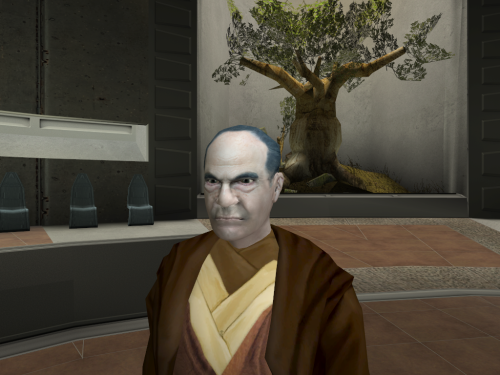
But when you look at the statue and compare it to SilverEdge9's Ajunta Pall, you will quickly realize that SilverEdge9's depiction of Ajunta is in no way inspired by the statue. The Ajunta Pall statue uses the old Asian man head and the Nemo Jedi robes whilst SilverEdge9's Ajunta Pall uses Deadeye Duncans head and the cut Jedi Council robes.
My mod, the True Ajunta mod, adds what I think is Ajunta Pall's *actual* canonical appearance to the game. This mod gives Ajunta a reskinned old Asian man head and a reskinned Nemo robe so that Ajunta *actually* resembles the statue inside the tomb.
As for the mention of Snigaroo's Mod Build here, should Snigaroo not approve of how my mod handles Ajunta he won't be adding it to the Build despite my opinion that my mod is a more accurate canonical representation of Ajunta than SilverEdge9's mod - ultimately it is his decision whether to include, or not include, mods in the Builds and should he not include this mod I do not want you, the player, to harass him for that decision.
Known Bugs:
This mod shouldn't have any bugs but if you find any please report it to me on Deadlystream.
Incompatibilities:
Obviously incompatible with any mod that modifies Ajunta Pall's appearance.
Please report any further incompatibilities!
Permissions:
Do NOT claim credit for this mod and do not use assets from this mod without my permission.
The texture of Ajunta Pall's robes, on the other hand, is free to use as it came from the K1EP Modder's Resource
Thanks to:
SilverEdge9: For making the Ajunta Pall Unique Appearance mod from which I borrowed the source code which removes Ajunta Pall's shield!
VarsityPuppet: For making the Spectral Ajunta Pall Canonical Appearance mod!
Sniggles: For adding SilverEdge9's mod to his Mod Build which inspired me to make this mod!
Bioware: For such an amazing game!
Fred Tetra: For Kotor Tool!
th3w1zard1: For HoloPatcher!
Everyone who downloads the mod!
Legal:
THIS MODIFICATION IS NOT SUPPORTED BY BIOWARE/OBSIDIAN ENTERTAINMENT, LUCASARTS, DISNEY OR ANY LICENSERS/SPONSORS OF THE MENTIONED COMPANIES. USE OF THIS FILE IS AT YOUR OWN RISK AND THE ABOVE-MENTIONED COMPANIES OR THE AUTHOR IS NOT RESPONSIBLE FOR ANY DAMAGE CAUSED TO YOUR COMPUTER FOR THE USAGE OF THIS FILE.
251 downloads
- ajunta
- ajunta palls blade
- (and 6 more)
-
Vorn Daasraad's Krayt Dragon Pearl
By Raven-Fal
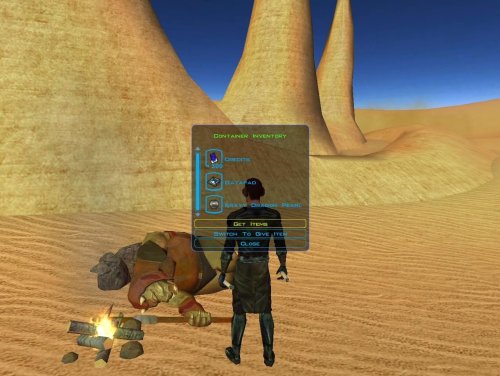
This mod allows you to loot a Krayt Dragon Pearl off of Vorn Daasraad's body (he's the Gamoreon Genoharadan target on Tatooine). This mod will only work on a save file from before Vorn Daasraad has been spawned.
I always thought it was odd that you couldn't get a Krayt Dragon Pearl from Vorn, since the whole reason he's on Tatooine is because he's hunting a Krayt Dragon. You even
see the dragon's dead body if you attack him with his own droid.
Now you can get a 2nd Krayt Dragon Pearl without being a total jerk to Komad Fortuna. Or a 3rd, if you're okay with being a jerk. Of course, since Vorn is a Genoharadan target, you'll still have to get Dark Side points if you want the extra Pearl. Keeps things within the original spirit of the game.
Installation:
Drop the file into your Override Folder.
267 downloads
(0 reviews)0 comments
Submitted
-
Switch Animated Energy Shields PATCH
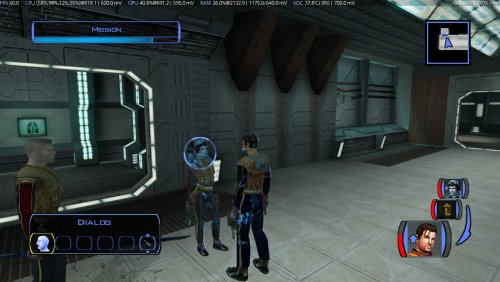
Just a couple of TXI files to support Dark Hope's Animated Energy Shields mod on the switch. Couldn't have gotten these working properly without the help of Sith Holocron. Thanks for that.
Posting this so anyone who wanted the animations on the switch now can have them.
Installation is simple, just drop the TXI files into the override/Textures folder in atmosphere after installing Dark Hopes Animated Energy Shields.
Shouldn't require a new game to be made, and should be compatible with everything out there except anything that modifies the energy shield textures.
To uninstall, simply remove the TXI files.
60 downloads
(0 reviews)0 comments
Submitted
-
File Reviews
-

Stuck 0
-
I'm very eager to give it a try but I just can't. I installed KMRP, used KPM patcher with only 2 patches - KMRP and High FPS Fixes.
Then I run your install.cmd and all I get is this:
INSTALL FAILED: Executable compatibility check failed at 47 required hook site(s).
0x004F1A3E: expected [B8 14 00 00 00], found [6A 85 05 C2 9E]
0x004F1A43: expected [0F B6 D0 3B 4C 96 38], found [CE EB 19 56 C1 7C 49]
0x0054EC5B: expected [C7 02 14 00 00 00], found [34 50 71 50 DE 29]
0x00552C9A: expected [8D 7E 38 B9 15 00 00 00 F3 AB], found [66 3F 2E 33 9D 15 28 89 29 00]
0x00552F8A: expected [8D 6E 38], found [DA 7B 54]
0x00552FD6: expected [83 FF 14], found [A7 5A 68]
0x005A54A0: expected [0F B6 F0 3B 54 B1 38], found [F6 AB 63 77 5A C7 1D]
0x005A54AA: expected [83 F8 14], found [75 93 66]
...and 39 more mismatched hook site(s).
Another executable patch or a different KOTOR binary layout is using code this mod needs. No changes were made.Press any key to continue . . .
Edited by WarlordThorvald
I had bunch of graphic mods and old widescreen fix installed before, but deleted it and restored original exe - no luck.
Then I just deleted my game and re-downloaded it (steam version), installed KMRP and patched clean version of the game with KPM - and result is the same.
I am at loss here. -
Does exactly was it says it does!
An observation: Having this active requires it to be installed dead last after EVERYTHING ELSE. If, say, I were to add"High FPS Fixes" or other patches through KotorPatchManager with "...Progression" already active, I lose the ability to back out of the level-up screen(effectively restoring the vanilla game's constraints where it would not let you exit the level-up UI to return to normal gameplay at all until you leveled up.)
This I confirmed via live testing/gameplay last night: I had to uninstall and re-install "....progression" after adding the KPM patches so it effectively sits at the very END of the installation order. This fixed the issue and I could back out of the level-up screen freely.
FYI I'm using KMRP 1.5.1 and KPM in my setup.
-
 1
1
-
-

Ellhaim 0
This mod sorta works. Except that the model is very transparent. Especially on the metal/darker details of her outfit/model. Kind of unusable imo. Just makes me feel like I'm playing the ghost of Talon.
-
Fantastic work!!! Quick question to any who read this: I'm a total rookie with modding, and in my most recent playthrough, when the camera executed the flyby when the HK-50s shot you down over the polar region(when they start speaking "Egotistical Boast") I saw the mod author's logo. Again, since I;m new to this, I likely made a mistake when I added them, so how can I correct it so I don't see the logo?
-

lorddli 2
does what it says on the tin and i like it
-
1
-
-
Awesome mod! Some necessary powers filling out the pool, especially with Revitalize.
I don't know if this is cool, if not I will absolutely delete it... But I had AI upscale your icons so that they would work properly at high resolution (the images look basically identical, they're just 64x64 instead of 32x32). -
Nice job !
ou plutôt dans ce cas Beau travail ! -
This Mod fixes all of the problems that I have when I got back to play this game on newer systems.
The dev behind this mod was quick to answer any questions I had since I was a Linux user of this mod.
Great quality mod, that fixes issues I was having in Ultrawide such as the dialogue windows not working on the first step of a new conversation (Typical on Ultrawide) as well as improving general stability of the game.
Would recommend for anyone playing the game.
-
Ok, I hope this helps perfect it because it's a good idea on paper. I'll keep it as "matter-of-factly" as possible.
My experience with this mod: My setup already had TSLRCM+M478PE+PartySwap as a foundation already running. I installed this mod, created a fresh, new character to test it out, made it to the Telos Citadel Station, and after the "house arrest" sequence wrapped up and I was free to move, the quest triggers, unknown to me, were compromised. For example: The ambush on Dock Module 126? The 5 thugs that attack you spawned, I fought them and beat them, but the dialogue script failed to recognize the instance, leaving the TSF NPC in an infinite "text box loop" saying "don't let them hurt the droid; the instance didn't close properly and, naturally, the journal quest didn't update. I reloaded a save file just prior to that beat and it played out correctly a second time. When I showed the "modified holdout blaster" to Lt. Grenn to pick up the "suspicious goods" quest? that dialogue with Grenn played normally, however the journal didn't log the "suspicious goods" quest at all. So, the masked thug that's supposed to ambush you in the Entertainment Module immediately after that dialogue didn't spawn. Another tell-tale sign that something was wrong is that the Dobo Brothers' Merchant Room was completely inaccessible: The door would not open, full stop. Also, one of the doors to the cantina turned into a "one-way" exit. You could exit out of the cantina through it but not go back in. The other door worked fine. And for some reason, some NPCs appeared with no head whatsoever, (though I'm uncertain of this last bit is related.) To solve these problems on my setup, I purged my game's Override, performed a Steam Integrity Check, and re-installed all my mods in the proper order, except this one. I hope this helps you perfect it.
EDIT: To be clear, I don't use the Steam Workshop for anything whatsoever; I only use Steam to launch the game. All my mods were installed through their respective standalone TSLPatcher executable.
Edited by jmorenobothwell -
-
lorddli 2
Perfect companion mod to go along with KMRP
-
You are the pillar of this community
-
The Atton no guyliner with mid scruff is absolutely perfect! Love this!
-
This wonderful black magic fuckery has enabled me to play my favorite game of all time at 240fps without any issues and I am very happy about it. Thank you!
Edited by gilless429-
 1
1
-
-






-
File Comments
-
 So this is a really old mod of mine from almost a decade ago, hence why K1R was a requirement. I'll probably update this mod again to have modern install standards, though for now there are two alternatives for you. 1) the NPC Diversity Pack mod which instead requires the K1CP mod and it adds female Dark Jedi alongside up to 400 or so changes to the vanilla NPCs to make them unique. 2) the RC-K1CP mod which is the modern day restored content mod for Kotor 1 which, as
 -
 Weapon Model Overhaul Texture Rework и High Quality Blasters for Modders
 -
By JasonRyder · Posted
What are the mods for the lightsabers and melee weapons shown in the screenshots? -
I think K1R is outdated and currently abandoned. There's a restoration demo mod out that does a bunch of what K1R did instead
-
any chance of an updated version that doesn't require K1R? gotta have that diversity
-