Search the Community
Showing results for tags 'model fix'.
Found 11 results
-
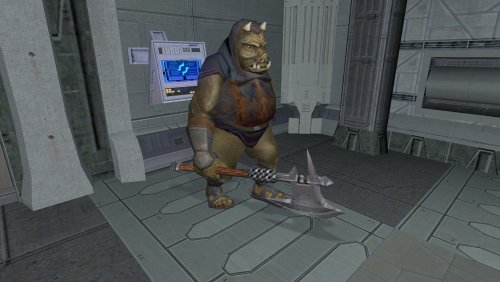
View File Gamorrean Axe Model and Texture Improvement - K1 Version Hello everyone! This mod gives the Gamorreans a separate axe model with its own texture, instead of using UVs spread across a tiny area of the creature like the default version. Credits: "4x Upscale+ Character Textures & Model Fixes (TSL)" - The C_Drdwar model in this mod or rather, the way the "rifle texture bug" was fixed gave me insight into the "reference" model node method. Submitter FF97 Submitted 10/10/2026 Category Mods K1R Compatible Yes
-
Version 1.0.0
18 downloads
Hello everyone! This mod gives the Gamorreans a separate axe model with its own texture, instead of using UVs spread across a tiny area of the creature like the default version. Credits: "4x Upscale+ Character Textures & Model Fixes (TSL)" - The C_Drdwar model in this mod or rather, the way the "rifle texture bug" was fixed gave me insight into the "reference" model node method. -
Version 1.0.0
18 downloads
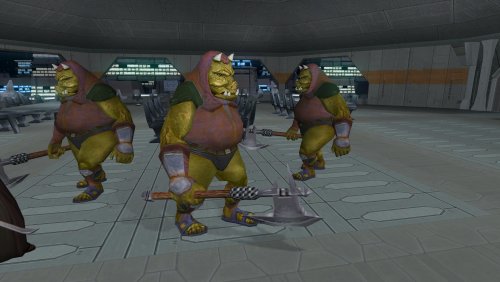
Hello everyone! This mod gives the Gamorreans a separate axe model with its own texture, instead of using UVs spread across a tiny area of the creature like the default version. Credits: "4x Upscale+ Character Textures & Model Fixes (TSL)" - The C_Drdwar model in this mod or rather, the way the "rifle texture bug" was fixed gave me insight into the "reference" model node method. -
View File Gamorrean Axe Model and Texture Improvement - TSL Version Hello everyone! This mod gives the Gamorreans a separate axe model with its own texture, instead of using UVs spread across a tiny area of the creature like the default version. Credits: "4x Upscale+ Character Textures & Model Fixes (TSL)" - The C_Drdwar model in this mod or rather, the way the "rifle texture bug" was fixed gave me insight into the "reference" model node method. Submitter FF97 Submitted 10/09/2026 Category Mods TSLRCM Compatible Yes
-
![More information about "[TSL] HD Female Twi'leks + NPC Diversity + Playable Female Twi'leks"](https://deadlystream.com/downloads/screens/monthly_2026_08/Untitled-5.thumb.png.21f9c26623ffeaef67cfbac75b8615b7.png)
Version 1.3.0
293 downloads
===================================================== [TSL] HD Female Twi'leks + NPC Diversity + Playable Female Twi'leks ===================================================== Mod for Knights of the Old Republic II - The Sith Lords Author: Lily File Name: TSL_HD_Female_Twilek_Diversity_and_PCs_v3.zip Latest Version: 1.3.0 --- 1. DESCRIPTION: This mod overhauls the female Twi'lek NPCs in KotOR 2 and adds 26 new playable female Twi'lek heads. NPC Overhaul: - Upscaled and updated dancer outfits. - Body skin tones all match head skin tones. - Added specular highlights to body textures. - Added specular highlights with a bump map to the heads, giving female lekku the same light-reactive shine male Twi'leks have. Eyes and lips also get a subtle shine. - NPCs now use different lekku positioning per head, so they no longer all look like pure reskins. - The mercenary droidmaster on Telos Surface and Borna Lys on Nar Shaddaa now each have a unique head texture pulled from the new playable set, plus a backup head, so their default appearance doesn't clone the player. - Includes a patch for Leilukin's "Dahnis Unique Look" mod, giving their textures an HD look. Playable Heads: - 26 playable female Twi'lek models, including every female Twi'lek NPC. - A number of completely new heads. - Dark side transitions. - Every playable head comes with a Handmaiden-style underwear model, a dancer outfit model, and an assassin-style clothing model, all with matching skin tones. Find the KotOR 1 version here! --- 2. INSTALLATION: Run Install.exe and select your KotOR 2 game directory. There are 4 installation options. - Default Installation: Includes playable Twi'lek models and replacements for NPC Twi'leks. You probably want this one. - Playable Twi'leks ONLY: Includes only models for the player character, NPC Twi'leks will remain unchanged - NPC replacement ONLY: Replaces models for NPC Twi'leks, does not add any playable characters - Dahnis Patch: Updates the look for Dahnis based on Leilukin's Dahnis Unique Look mod. Install that mod first! If you use the default installation, you DO NOT need to install NPC replacement ONLY or Playable Twi'leks ONLY. The Dahnis patch NEEDS to be installed separately - it is NOT included in any other option. You should be safe to reinstall this mod on top of itself without any problems. A "backup" folder is created by the installer in the same directory. Don't delete it if you plan to uninstall later. --- 3. UNINSTALLATION: Run Install.exe, select your KotOR 2 directory, and use the "Tools > uninstall/restore backup" option to revert all changes made by this mod. --- 4. KNOWN ISSUES: If you decide to install only PCs and then later decide to add the NPCs, you should use the default installation option the second time. Installing PCs ONLY and then NPCs ONLY will prevent the backup head from working properly. If you do this, just run the default installation and it should work. If you have already visited Nar Shaddaa, Borna will not have her updated appearance. You should use a save from before arriving. If you find any bugs or problems, please report them. --- 5. MOD COMPATIBILITY: Should be compatible with all other mods, including TSLRCM. This mod only touches female Twi'lek head/body models, textures, and appearance-related files - no dialogue, scripting, or module changes. If you have any other mods that have changed the female Twi'lek appearances, this mod will obviously stop the old appearances from showing. All files should have unique names, so this should not overwrite other mods, and it would just take Appearance.2da changes (or an uninstallation) to revert. If you use Leilukin's "Dahnis Unique Look" mod, install that mod first, then run this mod's Dahnis Patch. Do not use the Steam Workshop for KotOR. It will almost certainly end with compatibility issues. --- 6. SUPPORT: My mods are free to use. You do not need to pay for them, but if you would like to say thanks, you can buy me a coffee! --- 7. PERMISSIONS: Please let me know if you plan on using any of the files in my mod for your own mod. The answer is "yes you may", but I would like to know what you are doing with it! Do not directly reupload this mod anywhere else. --- 8. THANKS: - Dark Hope - HD Twilek base textures - Leilukin & SpaceAlex - Dahnis Unique Look - Effixian - Red Twi'lek head - DarthParametric - Twi'lek high boots model - redrob41 - Original Twi'lek head/body model fixes - Fred Tetra - KotOR Tool - Cortisol - Holocron Toolset & HoloPatcher - Fair Strides - TSLPatcher - ??? - A couple playable heads are originally from a decade-old modpack with no credits. If you are or know the author, let me know and I can credit the author/remove them. THIS MODIFICATION IS NOT SUPPORTED BY BIOWARE/OBSIDIAN ENTERTAINMENT OR LUCASARTS OR ANY LICENSORS/SPONSORS OF THE MENTIONED COMPANIES. USE THIS FILE AT YOUR OWN RISK. -
 View File [TSL] HD Female Twi'leks + NPC Diversity + Playable Female Twi'leks ===================================================== [TSL] HD Female Twi'leks + NPC Diversity + Playable Female Twi'leks ===================================================== Mod for Knights of the Old Republic II - The Sith Lords Author: Lily File Name: TSL_HD_Female_Twilek_Diversity_and_PCs_v2.zip Latest Version: 1.2 --- 1. DESCRIPTION: This mod overhauls the female Twi'lek NPCs in KotOR 2 and adds 26 new playable female Twi'lek heads. NPC Overhaul: - Upscaled and updated dancer outfits. - Body skin tones all match head skin tones. - Added specular highlights to body textures. - Added specular highlights with a bump map to the heads, giving female lekku the same light-reactive shine male Twi'leks have. Eyes and lips also get a subtle shine. - NPCs now use different lekku positioning per head, so they no longer all look like pure reskins. - The mercenary droidmaster on Telos Surface and Borna Lys on Nar Shaddaa now each have a unique head texture pulled from the new playable set, plus a backup head, so their default appearance doesn't clone the player. - Includes a patch for Leilukin's "Dahnis Unique Look" mod, giving their textures an HD look. Playable Heads: - 26 playable female Twi'lek models, including every female Twi'lek NPC. - A number of completely new heads. - Dark side transitions. - Every playable head comes with a Handmaiden-style underwear model, a dancer outfit model, and an assassin-style clothing model, all with matching skin tones. Find the KotOR 1 version here! --- 2. INSTALLATION: Run Install.exe and select your KotOR 2 game directory. There are 4 installation options. - Default Installation: Includes playable Twi'lek models and replacements for NPC Twi'leks. You probably want this one. - Playable Twi'leks ONLY: Includes only models for the player character, NPC Twi'leks will remain unchanged - NPC replacement ONLY: Replaces models for NPC Twi'leks, does not add any playable characters - Dahnis Patch: Updates the look for Dahnis based on Leilukin's Dahnis Unique Look mod. Install that mod first! If you use the default installation, you DO NOT need to install NPC replacement ONLY or Playable Twi'leks ONLY. The Dahnis patch NEEDS to be installed separately - it is NOT included in any other option. You should be safe to reinstall this mod on top of itself without any problems. A "backup" folder is created by the installer in the same directory. Don't delete it if you plan to uninstall later. --- 3. UNINSTALLATION: Run Install.exe, select your KotOR 2 directory, and use the "Tools > uninstall/restore backup" option to revert all changes made by this mod. --- 4. KNOWN ISSUES: If you decide to install only PCs and then later decide to add the NPCs, you should use the default installation option the second time. Installing PCs ONLY and then NPCs ONLY will prevent the backup head from working properly. If you do this, just run the default installation and it should work. If you have already visited Nar Shaddaa, Borna will not have her updated appearance. You should use a save from before arriving. If you find any bugs or problems, please report them. --- 5. MOD COMPATIBILITY: Should be compatible with all other mods, including TSLRCM. This mod only touches female Twi'lek head/body models, textures, and appearance-related files - no dialogue, scripting, or module changes. If you have any other mods that have changed the female Twi'lek appearances, this mod will obviously stop the old appearances from showing. All files should have unique names, so this should not overwrite other mods, and it would just take Appearance.2da changes (or an uninstallation) to revert. If you use Leilukin's "Dahnis Unique Look" mod, install that mod first, then run this mod's Dahnis Patch. Do not use the Steam Workshop for KotOR. It will almost certainly end with compatibility issues. --- 6. SUPPORT: My mods are free to use. You do not need to pay for them, but if you would like to say thanks, you can buy me a coffee! --- 7. PERMISSIONS: Please let me know if you plan on using any of the files in my mod for your own mod. The answer is "yes you may", but I would like to know what you are doing with it! Do not directly reupload this mod anywhere else. --- 8. THANKS: - Dark Hope - HD Twilek base textures - Leilukin & SpaceAlex - Dahnis Unique Look - Effixian - Red Twi'lek head - DarthParametric - Twi'lek high boots model - redrob41 - Original Twi'lek head/body model fixes - Fred Tetra - KotOR Tool - Cortisol - Holocron Toolset & HoloPatcher - Fair Strides - TSLPatcher - ??? - A couple playable heads are originally from a decade-old modpack with no credits. If you are or know the author, let me know and I can credit the author/remove them. THIS MODIFICATION IS NOT SUPPORTED BY BIOWARE/OBSIDIAN ENTERTAINMENT OR LUCASARTS OR ANY LICENSORS/SPONSORS OF THE MENTIONED COMPANIES. USE THIS FILE AT YOUR OWN RISK. Submitter Lily Submitted 08/20/2026 Category Mods TSLRCM Compatible Yes
 -
Version 1.3.0
1,348 downloads
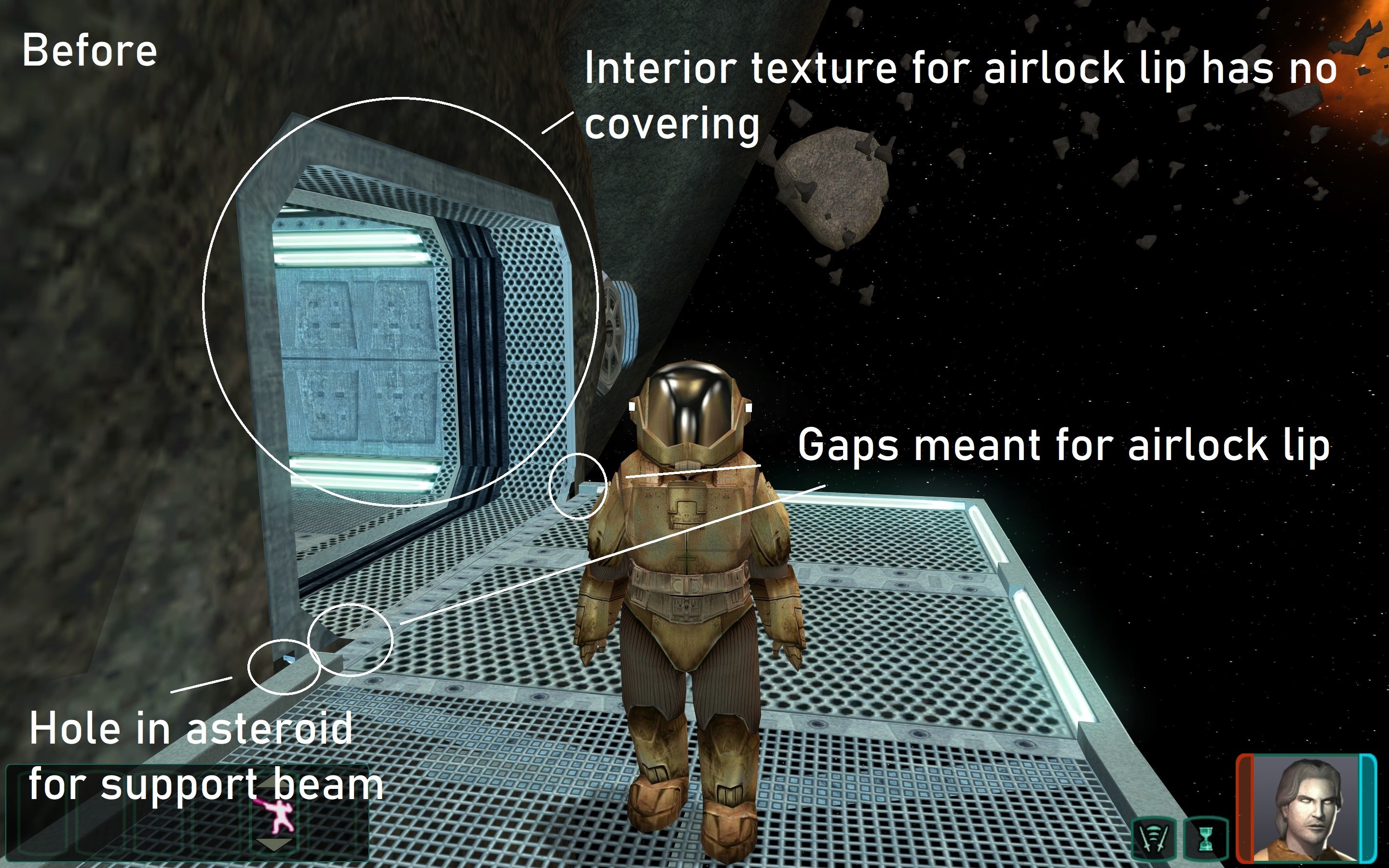
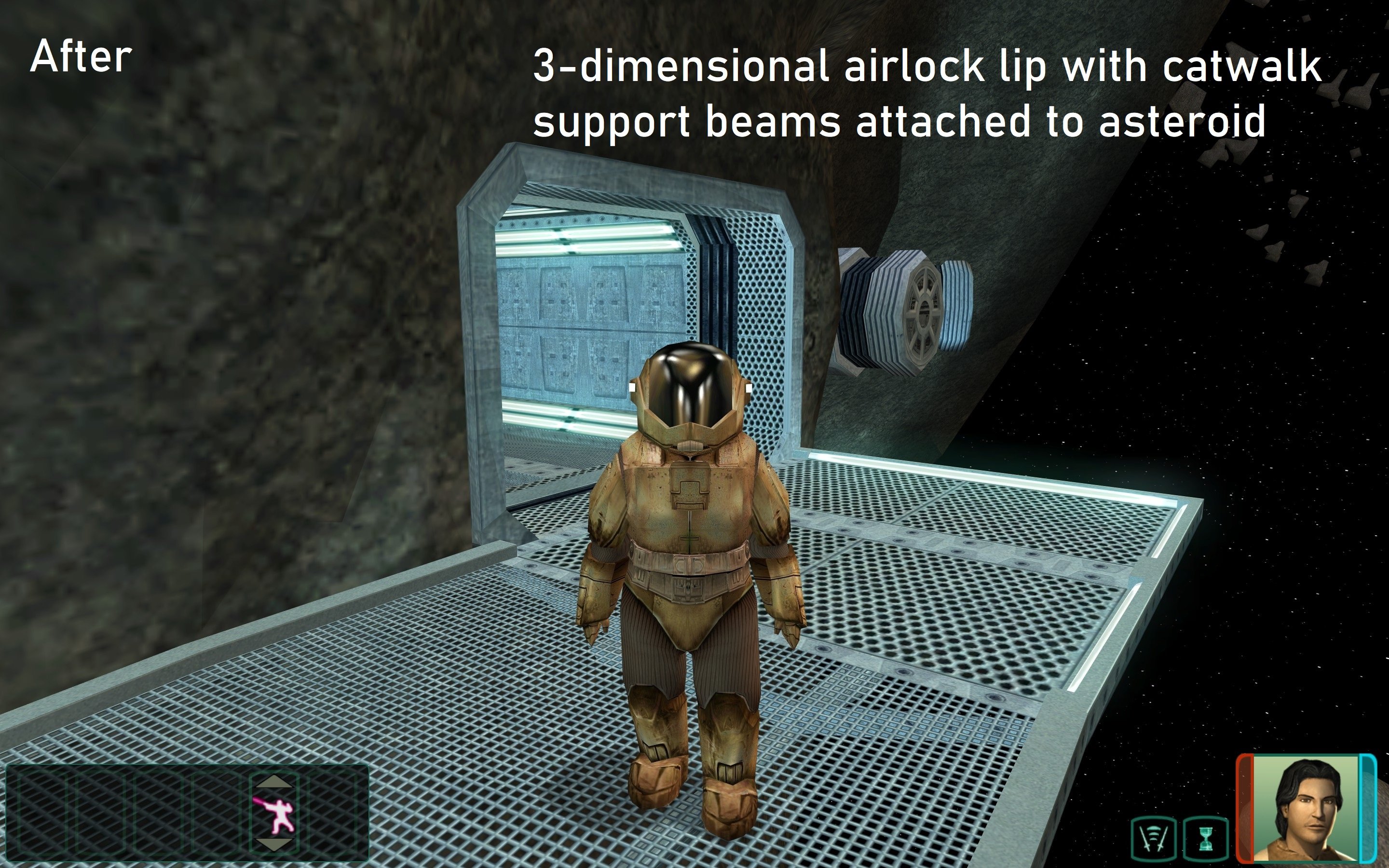
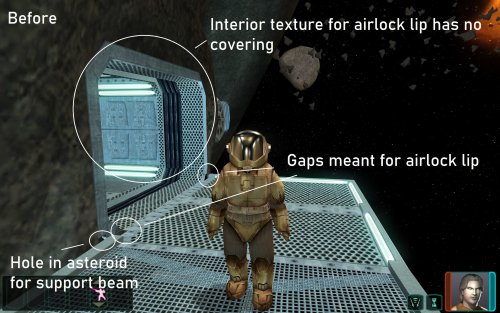
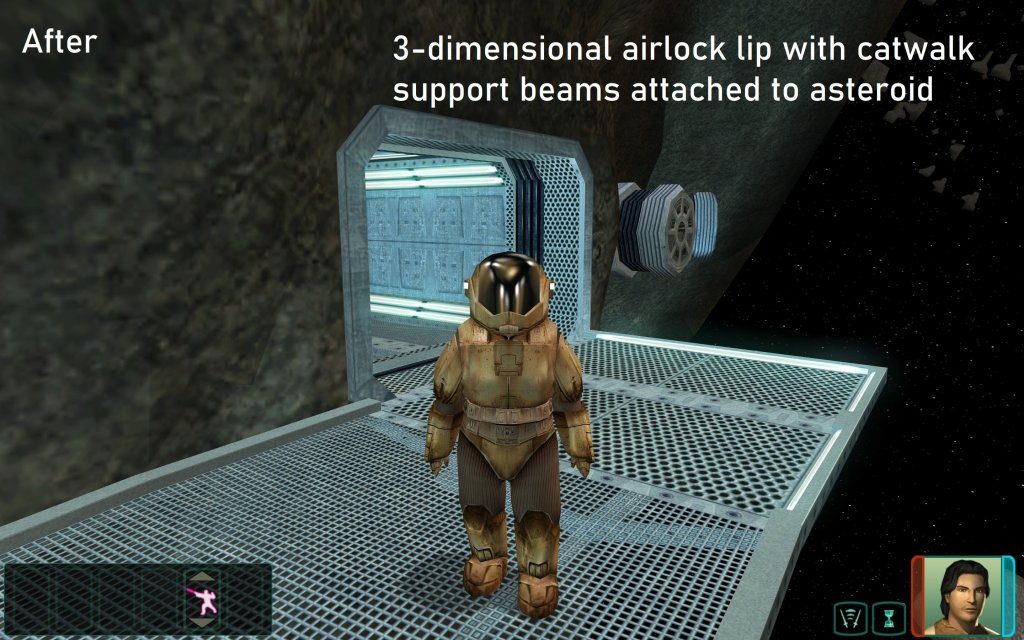
How did the Peragian miners die? Probably the lack of oxygen. Peragus is facing many structural issues, from the gaps in the floors, walls, and ceilings, and other model errors, many of which expose the facility to the vacuum of space. It may be too late for the miners, but it's not too late for you! Let's get to work on patching things up. This mod builds upon the work started by DarthParametric with "Peragus Administration Level Room Model Fixes 1.0.0". I have recreated and improved upon the fixes of that mod from scratch, as well as included fixes to a very large number of other model issues. If you currently have the other mod installed, you should remove "[TSL]_Peragus_Administration_Level_Room_Model_Fixes" from your override upon installing this mod in order to avoid any mod conflicts. Installation: Download the 7z file and extract to your override folder, found in the same directory as your main game executable. For Steam installations, this would be "Steam\steamapps\common\Knights of the Old Republic II". 7z files can be extracted with Archive Utility on macOS, or with free programs such as PeaZip on Windows and Linux. If you are updating from a previous version of the mod, just delete the old "Peragus_Model_Fixes" folder from your override. The version number is included in the folder name. Uninstallation: Remove the folder "Ultimate_Peragus_Model_Fixes_v1.3" from your override. Included Files: Compatibility: Users should expect full compatibility with any other mods, so long as they do not modify/replace the above files. This mod works very well alongside "Peragus Large Monitor Adjustment 1.0" by Sith Holocron, and will correct the same asteroid image and text displacement issue from the asteroid exterior. It will similarly work well alongside other Peragus mods which affect textures or placeable models and lighting, such as VarsityPuppet's "Peragus Tweak 1.4", "A Darker Peragus REDUX 1.0" by Malkior, and "...A Darker Peragus 2.0" by Canderis. It is also compatible with backdrop improvement mods such as Kexikus' "TSL Backdrop Improvements 1.4", Vasilii Zaytsev's "Improved Peragus Asteroid Fields 1.2", and Replacement Peragus II Artwork by Trench 1.0 uploaded by Sith Holocron. This mod is not compatible with DarthParametric's "Peragus Administration Level Room Model Fixes 1.0.0", but fixes the same issues (and many more). Acknowledgments: Big thanks to Fred Tetra for making file extraction easy with KotORTool and Symmetric, Purifier, Ndix UR, and seedhartha for making importing to Blender simple using KotORBlender. I would also like to thank DarthParametric for making "Peragus Administration Level Room Model Fixes 1.0.0". Thanks to DarthRaindrops for pointing out the UV mapping issue for the column texture. This modification is not supported by Obsidian Entertainment, Lucasarts, Disney or any licensers/sponsors thereof. Use of this modification is at your own risk and neither the aforementioned companies nor the author may be held responsible for any damages caused to your computer via this modification's usage.- 9 comments
-
- 10
-

-

-

-
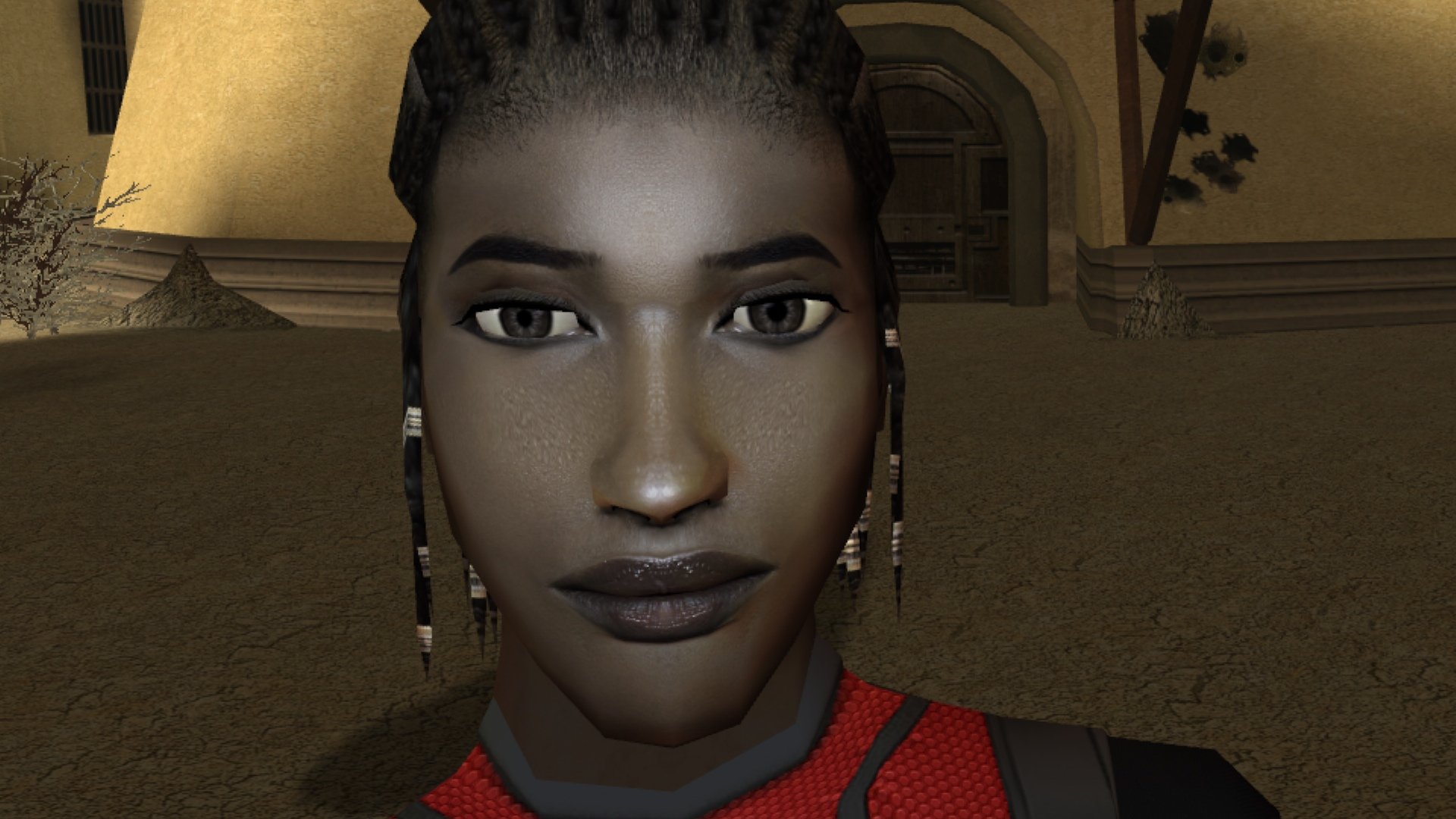
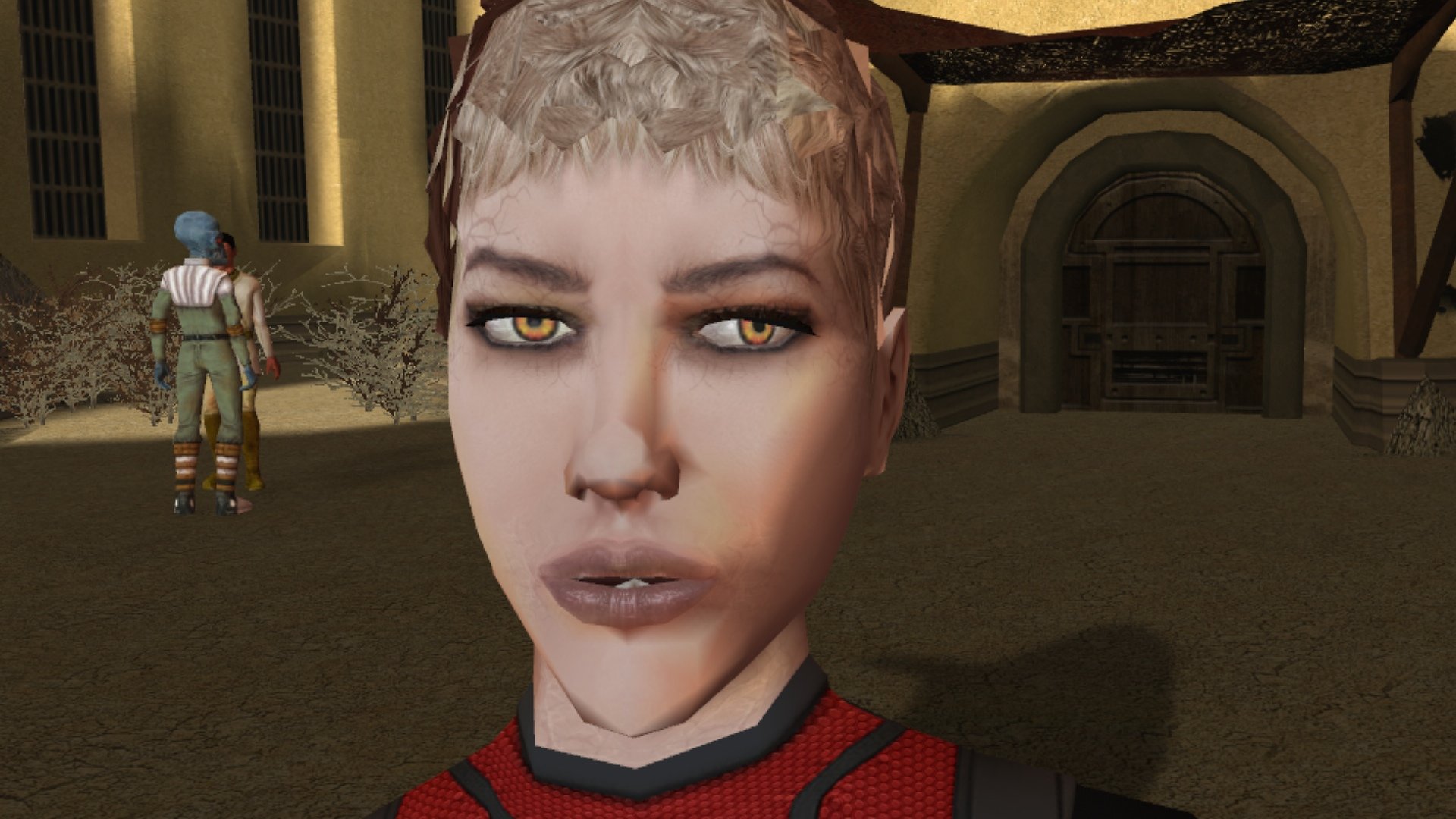
Good day. Sorry if not at the address. Found a problem with the eyes in this model when creating the texture. Is it possible to fix this. I do not think this is so conceived. A similar story with this model. PFHC04. Plus, something incomprehensible is going on with her teeth.


-
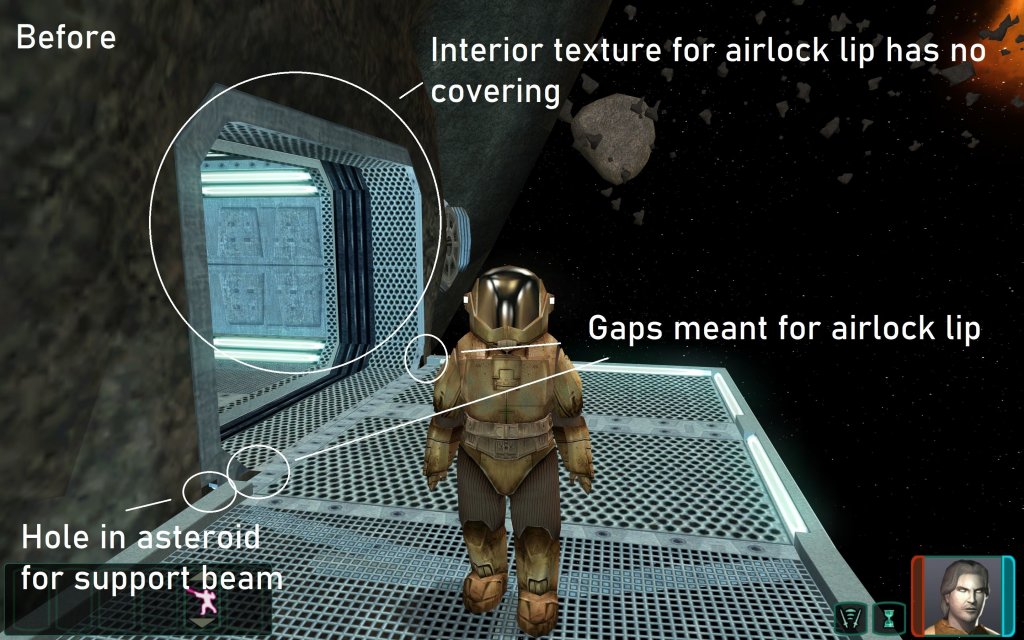
View File Ultimate Peragus Models Repair How did the Peragian miners die? Probably the lack of oxygen. Peragus is facing many structural issues, from the gaps in the floors, walls, and ceilings, and other model errors, many of which expose the facility to the vacuum of space. It may be too late for the miners, but it's not too late for you! Let's get to work on patching things up. This mod builds upon the work started by DarthParametric with "Peragus Administration Level Room Model Fixes 1.0.0". I have recreated and improved upon the fixes of that mod from scratch, as well as included fixes to a very large number of other model issues. If you currently have the other mod installed, you should remove "[TSL]_Peragus_Administration_Level_Room_Model_Fixes" from your override upon installing this mod in order to avoid any mod conflicts. Installation: Download the 7z file and extract to your override folder, found in the same directory as your main game executable. For Steam installations, this would be "Steam\steamapps\common\Knights of the Old Republic II". 7z files can be extracted with Archive Utility on macOS, or with free programs such as PeaZip on Windows and Linux. If you are updating from a previous version of the mod, just delete the old "Peragus_Model_Fixes" folder from your override. The version number is included in the folder name. Uninstallation: Remove the folder "Ultimate_Peragus_Model_Fixes_v1.3" from your override. Included Files: Compatibility: Users should expect full compatibility with any other mods, so long as they do not modify/replace the above files. This mod works very well alongside "Peragus Large Monitor Adjustment 1.0" by Sith Holocron, and will correct the same asteroid image and text displacement issue from the asteroid exterior. It will similarly work well alongside other Peragus mods which affect textures or placeable models and lighting, such as VarsityPuppet's "Peragus Tweak 1.4", "A Darker Peragus REDUX 1.0" by Malkior, and "...A Darker Peragus 2.0" by Canderis. It is also compatible with backdrop improvement mods such as Kexikus' "TSL Backdrop Improvements 1.4", Vasilii Zaytsev's "Improved Peragus Asteroid Fields 1.2", and Replacement Peragus II Artwork by Trench 1.0 uploaded by Sith Holocron. This mod is not compatible with DarthParametric's "Peragus Administration Level Room Model Fixes 1.0.0", but fixes the same issues (and many more). Acknowledgments: Big thanks to Fred Tetra for making file extraction easy with KotORTool and Symmetric, Purifier, Ndix UR, and seedhartha for making importing to Blender simple using KotORBlender. I would also like to thank DarthParametric for making "Peragus Administration Level Room Model Fixes 1.0.0". Thanks to DarthRaindrops for pointing out the UV mapping issue for the column texture. This modification is not supported by Obsidian Entertainment, Lucasarts, Disney or any licensers/sponsors thereof. Use of this modification is at your own risk and neither the aforementioned companies nor the author may be held responsible for any damages caused to your computer via this modification's usage. Submitter PapaZinos Submitted 02/25/2022 Category Mods TSLRCM Compatible Yes
-
View File Party Model Fixes For K1, Part II Those of you familiar with Party Model Fixes by redrob41 know it is a cool mod that fixes up some of the game's models for your K1 party members. Cool enough that I figured it was time for a sequel -- we are going to do even more fixing up of our compatriots: Carth: His unique outfit has a holster which hung by some leather that was missing a texture on one side, rendering it invisible from certain angles. This fixes up that issue, alongside some bonus texture mapping fixes to his opposite pouch and jacket, including the collar fix that redrob41 worked on in their original mod. Zaalbar: Our wookiee friend had some hairs that went missing depending on the angle, again due to missing textures on the opposite sides of some geometry. This fixes that right up, alongside some other messy texture mapping for some of his fur. Jolee: Sometimes Jolee likes to just hang out in a swim suit, socks, and... some kind of bizarre ankle brace. I could not tell you what it does, but it is unlikely to be doing its job given that it disappears when viewed from the other side. This fixes up another classic case of one-sided texture syndrome, and makes some small improvements to texture mapping. Mission: Originally Mission was set to just use adult models when wearing various armors, likely due to time constraints. Therefore, I have made some alternate armor models more suitable for a kid to use. These are just edited versions of the vanilla models, with similar texture mapping, so it is all very vanilla-looking and compatible with any texture mods. This will add the new models to your game and set her appearance.2da row to use them. Her unique models in vanilla are fixed up less noticeably to reflect the changes, and include similar texture mapping fixes to the arms that redrob41 did. This mod is intended to be installed after redrob41's Party Model Fixes, but does not require it to work. All changes will be applied immediately, and do not require that you start a new game. Installation: Download the included .7z file and extract it anywhere of your choosing on your computer. You can unzip a .7z file with tools such as Archive Utility on MacOs, or by with free programs like PeaZip on Windows and Linux. Simply run this installer, directing it to the location of your main game folder with the executable. For Steam installations, this would be "Steam\steamapps\common\swkotor". The installer is an .exe file, which Windows can run natively. Mac and Linux users might consider checking out Cortisol's HoloPatcher -- a new tool that is meant as a cross-platform alternative to traditional KotOR mod installers. Alternatively, executable files can be run on Mac or Linux with programs using tools such as Wine. If you are having trouble with either of those options, I have included some instructions for manual installation in the download's "ReadMe" file. If you happened to have previously installed another mod which placed an appearance.2da file in your override folder, the installer will give you a warning reporting as much upon completion. This is of no concern -- so long as you get no other warnings or errors, the mod is installed correctly and ready-to-go. The mod will overwrite any conflicting model files (.mdl/.mdx) in your override folder, but not any appearance.2da file it finds there, merely edit the existing one. Be sure to back up anything you want to keep ahead of time. The Included Files list below contains all the files that will be installed to the override folder. Uninstallation: Delete all of the files listed below from your override folder. If you had an appearance.2da file in your override folder prior to installing, you can find a backup version in the mod's "backup" folder, which was automatically created during installation, and place that in your override. If you are unsure whether or not a previous mod had put that file there or not, it is better to make use of the backup. Included Files: Compatibility: This mod is fully compatible with any mod which does not replace any of the model files (.mdl/.mdx) listed above. Files that edit appearance.2da are compatible so long as they do not change Mission's armor model cells. If you intend to install Party Model Fixes by redrob41, I recommend doing so before installing this mod, or what you install here will be overwritten. Expect compatibility with most any texture/reskin mods -- so long as they do not replace models (.mdl/.mdx files) as well as textures, there should be no conflict. Acknowledgments: Thanks to seedhartha, NdixUR, Symmetric, and Purifier for making importing to Blender simple using KotORBlender, and Cortisol for making file extraction easy with the Holocron Toolset. I would also like to thank Stoffe and Fair Strides for making inter-mod compatibility infinitely more feasible with TSLPatcher. Shout-out to ConansHair for pointing out that weird bright spot on Zaalbar's rump. This modification is not supported by Obsidian Entertainment, Lucasarts, Disney or any licensers/sponsors thereof. Use of this modification is at your own risk and neither the aforementioned companies nor the author may be held responsible for any damages caused to your computer via this modification's usage. Submitter PapaZinos Submitted 04/26/2023 Category Mods K1R Compatible Yes
-

Version 1.0.1
3,736 downloads
Those of you familiar with Party Model Fixes by redrob41 know it is a cool mod that fixes up some of the game's models for your K1 party members. Cool enough that I figured it was time for a sequel -- we are going to do even more fixing up of our compatriots: Carth: His unique outfit has a holster which hung by some leather that was missing a texture on one side, rendering it invisible from certain angles. This fixes up that issue, alongside some bonus texture mapping fixes to his opposite pouch and jacket, including the collar fix that redrob41 worked on in their original mod. Zaalbar: Our wookiee friend had some hairs that went missing depending on the angle, again due to missing textures on the opposite sides of some geometry. This fixes that right up, alongside some other messy texture mapping for some of his fur. Jolee: Sometimes Jolee likes to just hang out in a swim suit, socks, and... some kind of bizarre ankle brace. I could not tell you what it does, but it is unlikely to be doing its job given that it disappears when viewed from the other side. This fixes up another classic case of one-sided texture syndrome, and makes some small improvements to texture mapping. Mission: Originally Mission was set to just use adult models when wearing various armors, likely due to time constraints. Therefore, I have made some alternate armor models more suitable for a kid to use. These are just edited versions of the vanilla models, with similar texture mapping, so it is all very vanilla-looking and compatible with any texture mods. This will add the new models to your game and set her appearance.2da row to use them. Her unique models in vanilla are fixed up less noticeably to reflect the changes, and include similar texture mapping fixes to the arms that redrob41 did. This mod is intended to be installed after redrob41's Party Model Fixes, but does not require it to work. All changes will be applied immediately, and do not require that you start a new game. Installation: Download the included .7z file and extract it anywhere of your choosing on your computer. You can unzip a .7z file with tools such as Archive Utility on MacOs, or by with free programs like PeaZip on Windows and Linux. Simply run this installer, directing it to the location of your main game folder with the executable. For Steam installations, this would be "Steam\steamapps\common\swkotor". The installer is an .exe file, which Windows can run natively. Mac and Linux users might consider checking out Cortisol's HoloPatcher -- a new tool that is meant as a cross-platform alternative to traditional KotOR mod installers. Alternatively, executable files can be run on Mac or Linux with programs using tools such as Wine. If you are having trouble with either of those options, I have included some instructions for manual installation in the download's "ReadMe" file. If you happened to have previously installed another mod which placed an appearance.2da file in your override folder, the installer will give you a warning reporting as much upon completion. This is of no concern -- so long as you get no other warnings or errors, the mod is installed correctly and ready-to-go. The mod will overwrite any conflicting model files (.mdl/.mdx) in your override folder, but not any appearance.2da file it finds there, merely edit the existing one. Be sure to back up anything you want to keep ahead of time. The Included Files list below contains all the files that will be installed to the override folder. Uninstallation: Delete all of the files listed below from your override folder. If you had an appearance.2da file in your override folder prior to installing, you can find a backup version in the mod's "backup" folder, which was automatically created during installation, and place that in your override. If you are unsure whether or not a previous mod had put that file there or not, it is better to make use of the backup. Included Files: Compatibility: This mod is fully compatible with any mod which does not replace any of the model files (.mdl/.mdx) listed above. Files that edit appearance.2da are compatible so long as they do not change Mission's armor model cells. If you intend to install Party Model Fixes by redrob41, I recommend doing so before installing this mod, or what you install here will be overwritten. Expect compatibility with most any texture/reskin mods -- so long as they do not replace models (.mdl/.mdx files) as well as textures, there should be no conflict. Acknowledgments: Thanks to seedhartha, NdixUR, Symmetric, and Purifier for making importing to Blender simple using KotORBlender, and Cortisol for making file extraction easy with the Holocron Toolset. I would also like to thank Stoffe and Fair Strides for making inter-mod compatibility infinitely more feasible with TSLPatcher. Shout-out to ConansHair for pointing out that weird bright spot on Zaalbar's rump. This modification is not supported by Obsidian Entertainment, Lucasarts, Disney or any licensers/sponsors thereof. Use of this modification is at your own risk and neither the aforementioned companies nor the author may be held responsible for any damages caused to your computer via this modification's usage.