Search the Community
Showing results for tags 'Model'.
-
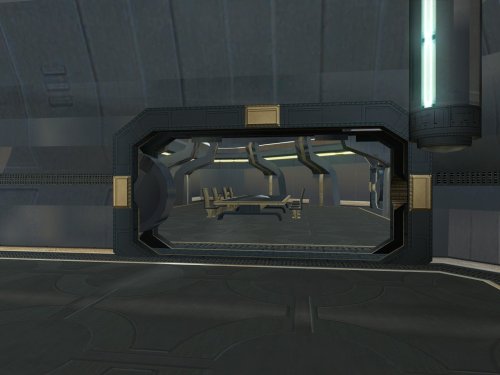
View File Goto's Yacht Model Fixes Goto's yacht has numerous model issues, including holes open to space, doors which visibly clip through walls, and rooms that disappear when you walk too far away. This pack fixes many of these issues, bringing the yacht to a quality level suitable for a wealthy Exchange boss. Thank you for downloading, and I hope you enjoy this mod! ------------------------------------------------------------------- INSTALLATION If you are using The Sith Lords Restored Content Mod (TSLRCM), install it first. Run "INSTALL.exe" for this mod, and follow the prompts. It is normal to see a warning that 351nar.mod already exists and has been skipped. If you are using The Sith Lords Restored Content Mod (TSLRCM) from the Steam Workshop, see this guide for how to combine installer-based mods with the Workshop: https://steamcommunity.com/sharedfiles/filedetails/?id=488641307. ------------------------------------------------------------------- COMPATIBILITY This mod is compatible with The Sith Lords Restored Content Mod (TSLRCM) (https://deadlystream.com/files/file/578-tsl-restored-content-mod/) and the KotOR 2 Community Patch (K2CP) (https://deadlystream.com/files/file/1280-kotor-2-community-patch/). It is also compatible with "TSL Backdrop Improvements" by Kexikus (https://deadlystream.com/files/file/949-tsl-backdrop-improvements/) as well as mods that reskin the yacht. It is not compatible with mods which edit the same area models. For best results, this mod requires a save from before boarding the yacht. ------------------------------------------------------------------- CREDITS KotorBlender by seedhartha tpcview and tga2tpc by ndix UR K-GFF by tk102 TSL Patcher by stoffe and Fair Strides ERFEdit by stoffe and Fair Strides Kotor Tool by Fred Tetra Holocron Toolset by Cortisol and th3w1zard1 Thanks to Snigaroo for requesting a fix for the holes in the yacht's bridge, which kicked off this whole exercise. ------------------------------------------------------------------- VERSION HISTORY 1.0 - Initial Release ------------------------------------------------------------------- DISCLAIMER AND PERMISSIONS This modification is provided as-is and is not supported by Disney, Lucasarts, or Obsidian. Use at your own risk. The author shall not be held responsible for damage to your game installation, computer, or saved games resulting from the use of this mod. Material from this mod may be used as the basis for mods which make additional edits to the same area models as long as appropriate credit is given to this mod's author. Other uses require the author's permission. This mod shall not be reposted, in whole or in part, on any sites other than Deadly Stream without the author's permission. Submitter WildKarrde Submitted 10/15/2026 Category Mods TSLRCM Compatible Yes
-
Version 1.0
13 downloads
Goto's yacht has numerous model issues, including holes open to space, doors which visibly clip through walls, and rooms that disappear when you walk too far away. This pack fixes many of these issues, bringing the yacht to a quality level suitable for a wealthy Exchange boss. Thank you for downloading, and I hope you enjoy this mod! ------------------------------------------------------------------- INSTALLATION If you are using The Sith Lords Restored Content Mod (TSLRCM), install it first. Run "INSTALL.exe" for this mod, and follow the prompts. It is normal to see a warning that 351nar.mod already exists and has been skipped. If you are using The Sith Lords Restored Content Mod (TSLRCM) from the Steam Workshop, see this guide for how to combine installer-based mods with the Workshop: https://steamcommunity.com/sharedfiles/filedetails/?id=488641307. ------------------------------------------------------------------- COMPATIBILITY This mod is compatible with The Sith Lords Restored Content Mod (TSLRCM) (https://deadlystream.com/files/file/578-tsl-restored-content-mod/) and the KotOR 2 Community Patch (K2CP) (https://deadlystream.com/files/file/1280-kotor-2-community-patch/). It is also compatible with "TSL Backdrop Improvements" by Kexikus (https://deadlystream.com/files/file/949-tsl-backdrop-improvements/) as well as mods that reskin the yacht. It is not compatible with mods which edit the same area models. For best results, this mod requires a save from before boarding the yacht. ------------------------------------------------------------------- CREDITS KotorBlender by seedhartha tpcview and tga2tpc by ndix UR K-GFF by tk102 TSL Patcher by stoffe and Fair Strides ERFEdit by stoffe and Fair Strides Kotor Tool by Fred Tetra Holocron Toolset by Cortisol and th3w1zard1 Thanks to Snigaroo for requesting a fix for the holes in the yacht's bridge, which kicked off this whole exercise. ------------------------------------------------------------------- VERSION HISTORY 1.0 - Initial Release ------------------------------------------------------------------- DISCLAIMER AND PERMISSIONS This modification is provided as-is and is not supported by Disney, Lucasarts, or Obsidian. Use at your own risk. The author shall not be held responsible for damage to your game installation, computer, or saved games resulting from the use of this mod. Material from this mod may be used as the basis for mods which make additional edits to the same area models as long as appropriate credit is given to this mod's author. Other uses require the author's permission. This mod shall not be reposted, in whole or in part, on any sites other than Deadly Stream without the author's permission. -
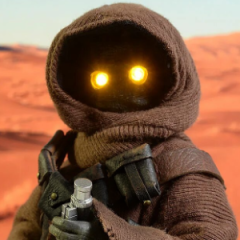
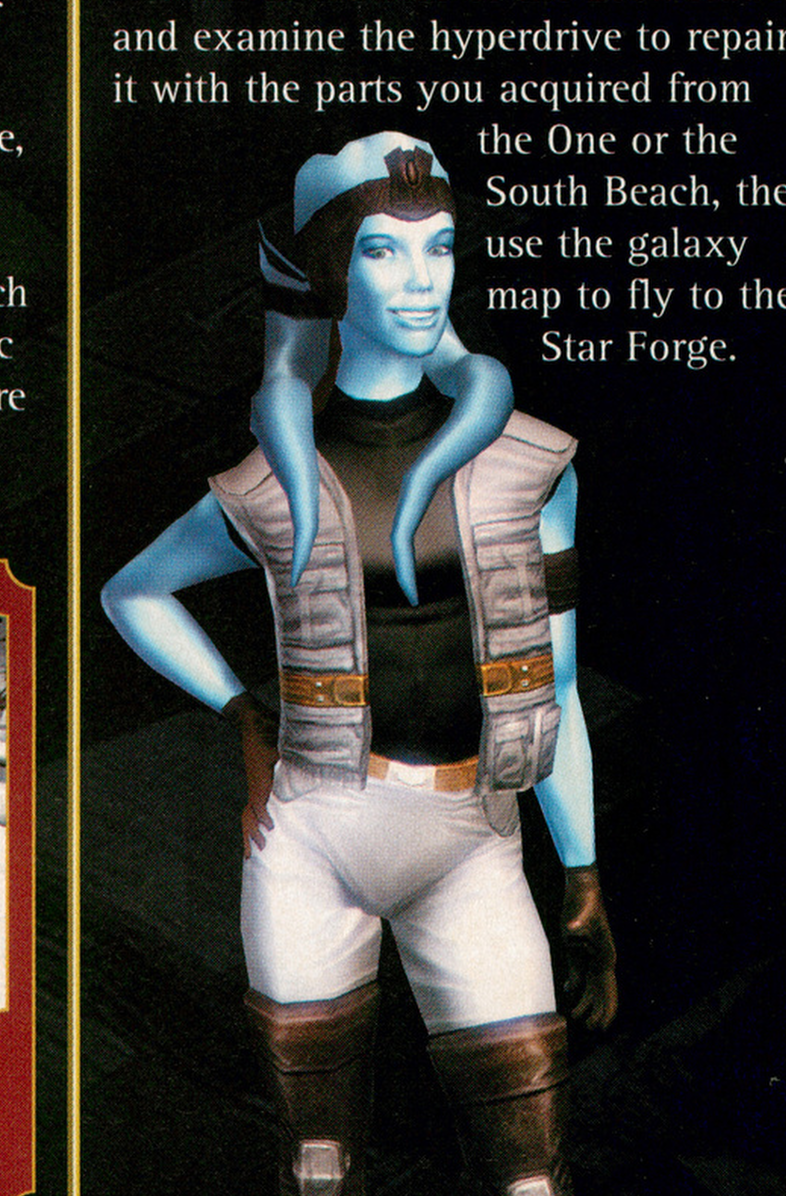
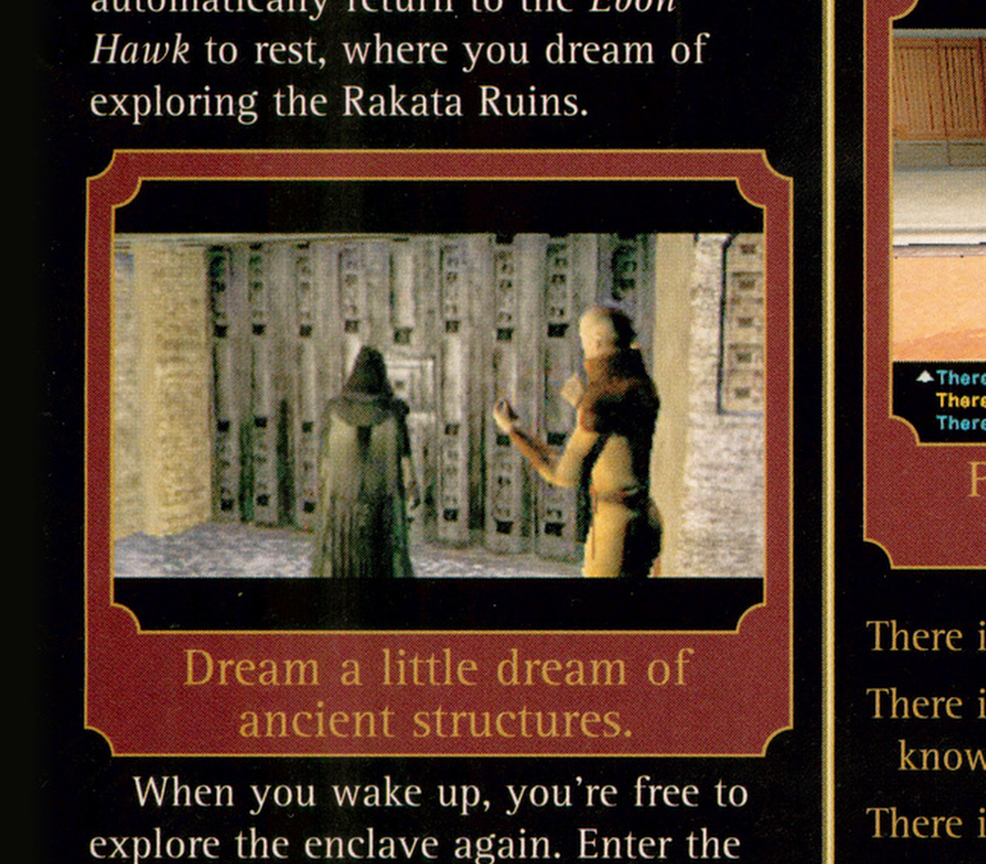
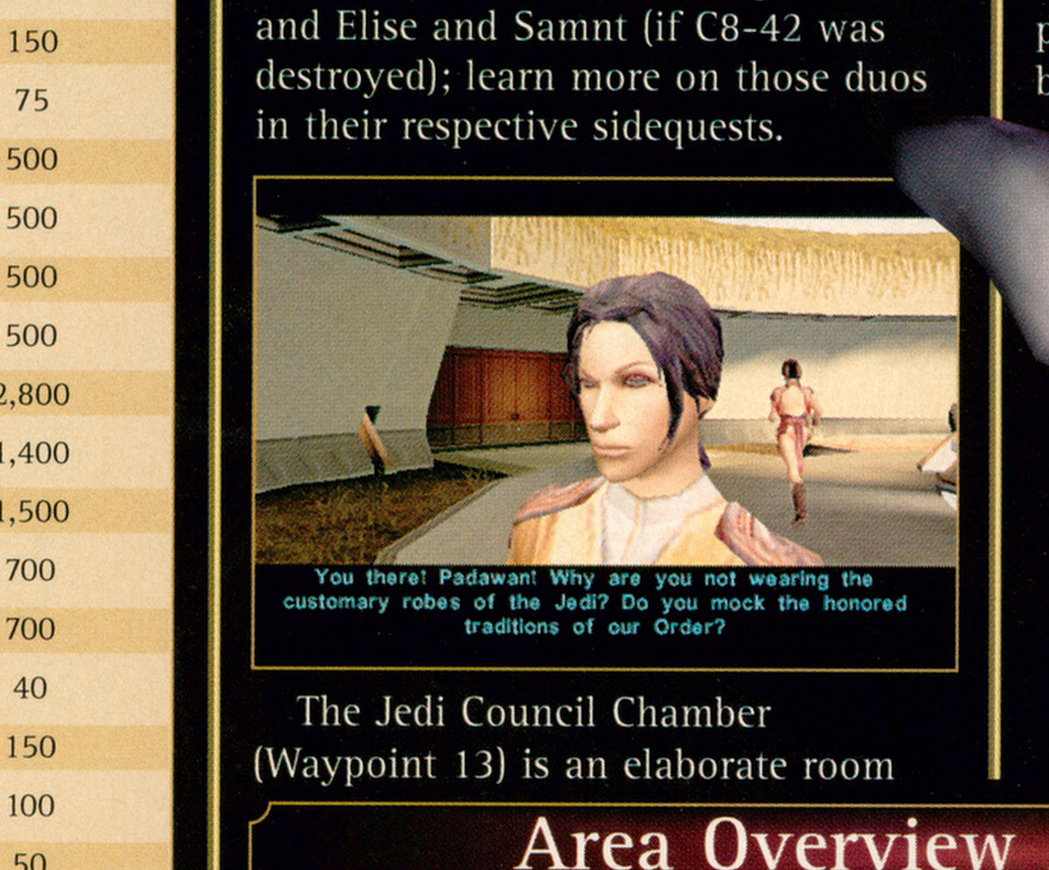
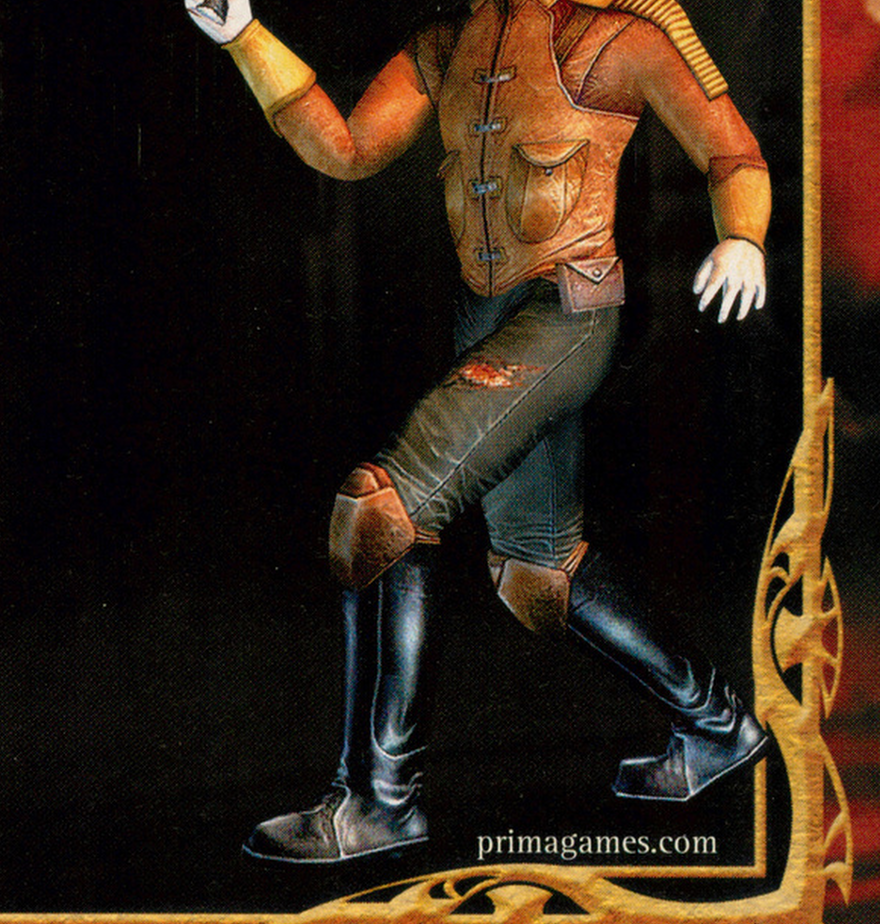
I got back to Kotor and Kotor 2 modding and texturing after many years and just want to share some of my work. All those years, I didn't realize the "hoversled" PLC had the wrong textures applied. Screenshots from the K1 Official Game Guide book I thought looked interesting. I also fixed the Gammorean's axe model/UVs. KotOR0002a.tga
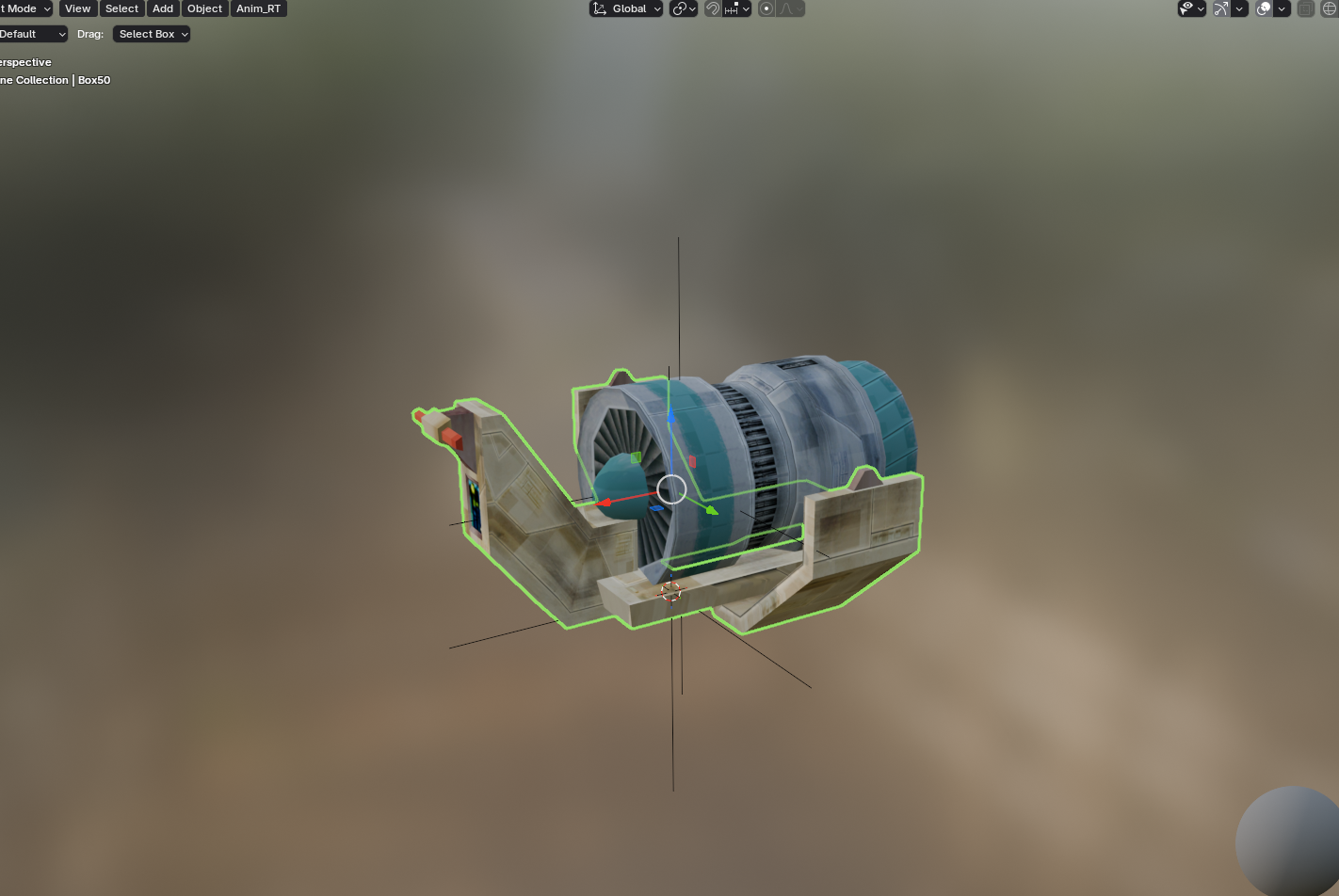
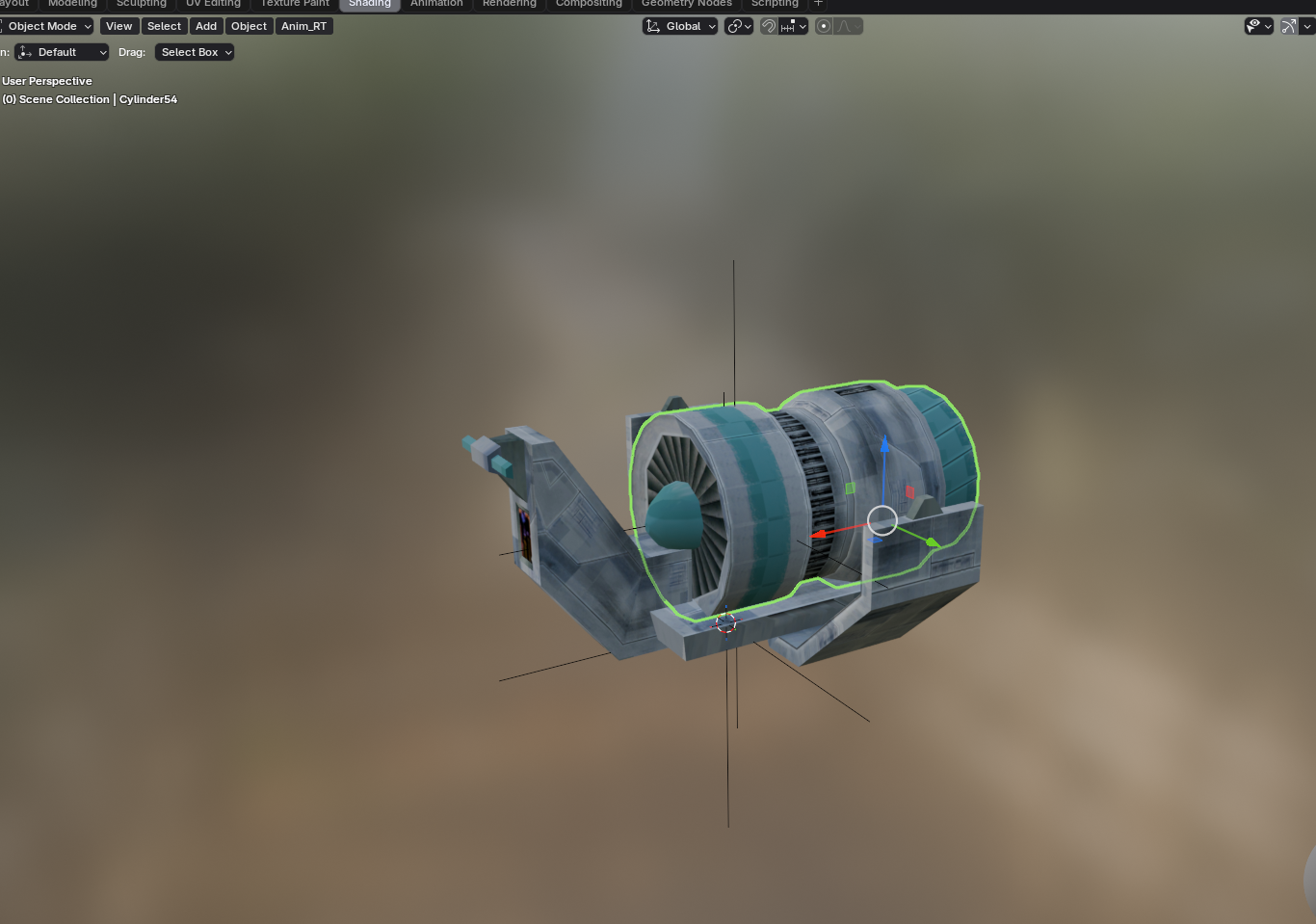
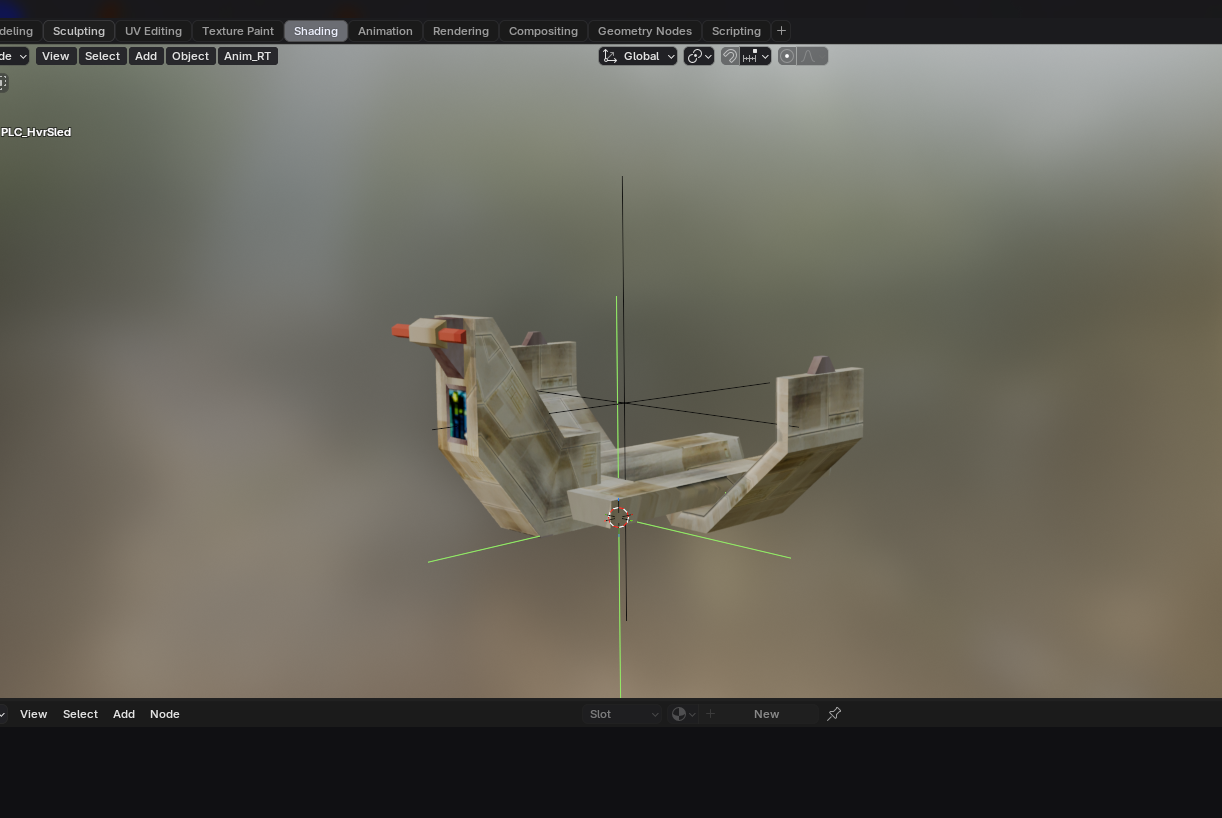
-
![More information about "[TSL] Lily's NPC Overhaul - HD Models & Added Diversity"](https://deadlystream.com/downloads/screens/monthly_2026_08/20260826160016_1.thumb.jpg.5545ed435507f3bcbe00441f7407d740.jpg)
Version 1.0.0
224 downloads
===================================================== [TSL] Lily's NPC Overhaul - HD Models & Added Diversity ===================================================== Mod for Knights of the Old Republic II - The Sith Lords Author: Lily File Name: NPC_Overhaul.zip Latest Version: 1.0 --- 1. DESCRIPTION: Tired of nearly every basic human NPC looking the same? This mod overhauls the human NPC (commoner) appearances in KotOR II. Heads: - Tweaks several of the models to adjust hair and fix some UV mapping. - 39 head textures are included, 35 reworked and 4 extra ones. They look much more distinct than the vanilla ones. - The heads are more evenly distributed across characters so, for example, 75% of white male heads were previously "white male 1" and now it should evenly by spread across all of the white male heads. - Ralon on Dantooine is given his unique appearance that I guess they made and forgot to give him... Clothing: - 11 updated clothing texture sets for the standard male and female commoner outfits. --- 2. INSTALLATION: Run Install.exe and select your KotOR 2 game directory. There are 2 installation options. - Heads: includes 39 updated heads with unique looks and gives human NPCs more unique appearances. - Clothing: includes 11 updated clothing textures for both male and female NPCs. These two options are independent and can be installed in either order, or separately. A "backup" folder is created by the installer in the same directory. Don't delete it if you plan to uninstall later. --- 3. UNINSTALLATION: Run Install.exe, select your KotOR 2 directory, and use the "Tools > uninstall/restore backup" option to revert all changes made by this mod. --- 4. KNOWN ISSUES: If you have already visited Dantooine, Ralon may not have his updated appearance. You should use a save from before arriving. If you find any bugs or problems, please report them. --- 5. MOD COMPATIBILITY: Should be compatible with all mods other than ones that also attempt to change commoner NPC appearances. Compatible with TSLRCM. Do not use the Steam Workshop for KotOR. It will almost certainly end with compatibility issues. --- 6. SUPPORT: My mods are free to use. You do not need to pay for them, but if you would like to say thanks, you can buy me a coffee! --- 7. PERMISSIONS: Please let me know if you plan on using any of the files in my mod for your own mod. The answer is "yes you may", but I would like to know what you are doing with it! Do not directly reupload this mod anywhere else. --- 8. THANKS: - Dark Hope - Uses assets from her various commoner head mods. MOST of the clothing uses Dark Hope's textures. Pretty much all credit for the clothing portion of this mod goes to her other than swapping her alternate textures into the additional slots that KotOR II uses! Thank you! https://deadlystream.com/profile/16561-dark-hope/content/?type=downloads_file&change_section=1 https://deadlystream.com/files/file/2516-npc-clothing-m/ https://deadlystream.com/files/file/2515-npc-clothing-f/ - Vurt - Some of the clothing textures - redrob41 - Original model fixes - Fred Tetra - KotOR Tool - Cortisol - Holocron Toolset & HoloPatcher - Fair Strides - TSLPatcher - seedhartha - KotOR Blender THIS MODIFICATION IS NOT SUPPORTED BY BIOWARE/OBSIDIAN ENTERTAINMENT OR LUCASARTS OR ANY LICENSORS/SPONSORS OF THE MENTIONED COMPANIES. USE THIS FILE AT YOUR OWN RISK. -
![More information about "[TSL] HD Female Twi'leks + NPC Diversity + Playable Female Twi'leks"](https://deadlystream.com/downloads/screens/monthly_2026_08/Untitled-5.thumb.png.21f9c26623ffeaef67cfbac75b8615b7.png)
Version 1.3.0
270 downloads
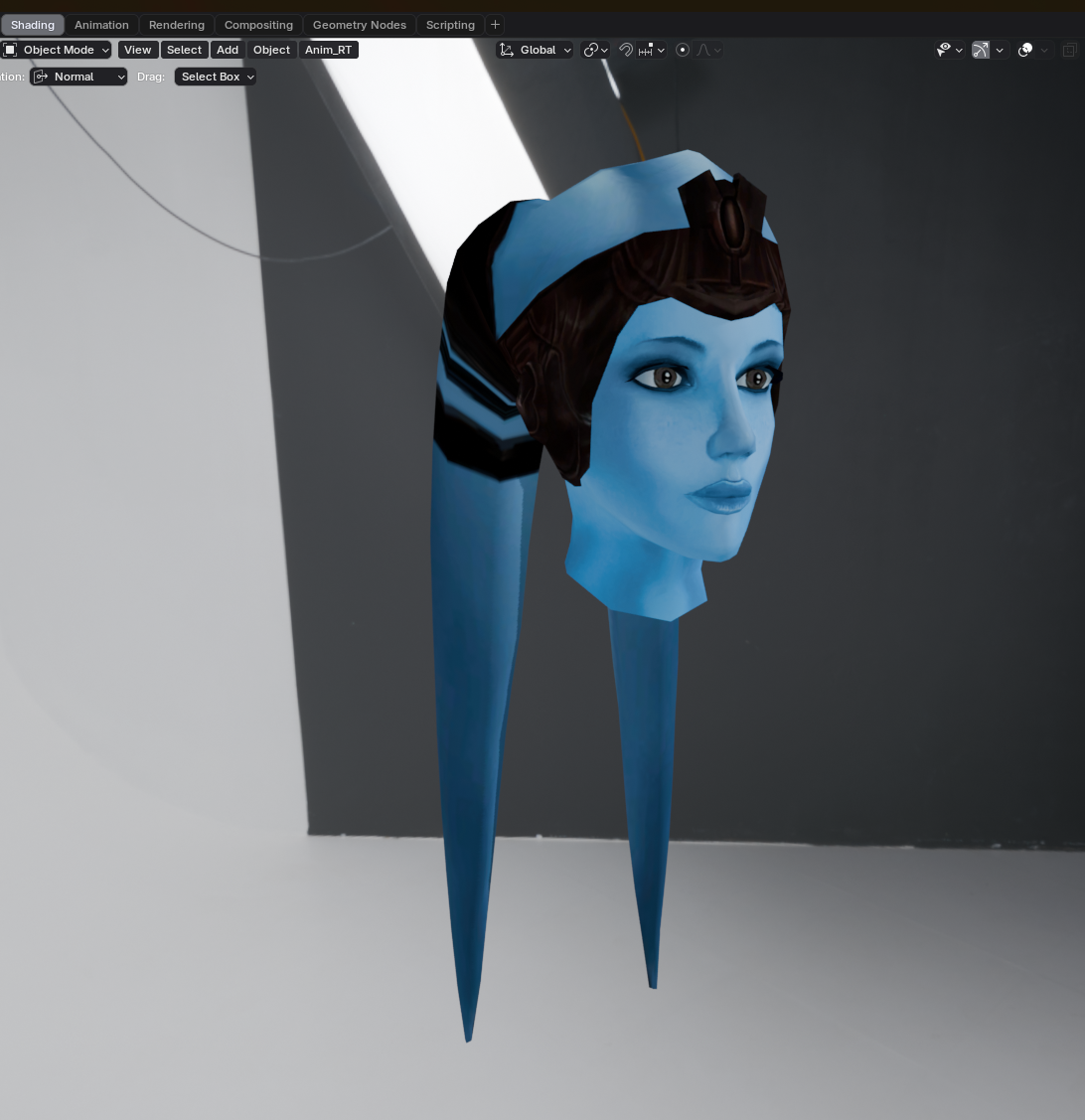
===================================================== [TSL] HD Female Twi'leks + NPC Diversity + Playable Female Twi'leks ===================================================== Mod for Knights of the Old Republic II - The Sith Lords Author: Lily File Name: TSL_HD_Female_Twilek_Diversity_and_PCs_v3.zip Latest Version: 1.3.0 --- 1. DESCRIPTION: This mod overhauls the female Twi'lek NPCs in KotOR 2 and adds 26 new playable female Twi'lek heads. NPC Overhaul: - Upscaled and updated dancer outfits. - Body skin tones all match head skin tones. - Added specular highlights to body textures. - Added specular highlights with a bump map to the heads, giving female lekku the same light-reactive shine male Twi'leks have. Eyes and lips also get a subtle shine. - NPCs now use different lekku positioning per head, so they no longer all look like pure reskins. - The mercenary droidmaster on Telos Surface and Borna Lys on Nar Shaddaa now each have a unique head texture pulled from the new playable set, plus a backup head, so their default appearance doesn't clone the player. - Includes a patch for Leilukin's "Dahnis Unique Look" mod, giving their textures an HD look. Playable Heads: - 26 playable female Twi'lek models, including every female Twi'lek NPC. - A number of completely new heads. - Dark side transitions. - Every playable head comes with a Handmaiden-style underwear model, a dancer outfit model, and an assassin-style clothing model, all with matching skin tones. Find the KotOR 1 version here! --- 2. INSTALLATION: Run Install.exe and select your KotOR 2 game directory. There are 4 installation options. - Default Installation: Includes playable Twi'lek models and replacements for NPC Twi'leks. You probably want this one. - Playable Twi'leks ONLY: Includes only models for the player character, NPC Twi'leks will remain unchanged - NPC replacement ONLY: Replaces models for NPC Twi'leks, does not add any playable characters - Dahnis Patch: Updates the look for Dahnis based on Leilukin's Dahnis Unique Look mod. Install that mod first! If you use the default installation, you DO NOT need to install NPC replacement ONLY or Playable Twi'leks ONLY. The Dahnis patch NEEDS to be installed separately - it is NOT included in any other option. You should be safe to reinstall this mod on top of itself without any problems. A "backup" folder is created by the installer in the same directory. Don't delete it if you plan to uninstall later. --- 3. UNINSTALLATION: Run Install.exe, select your KotOR 2 directory, and use the "Tools > uninstall/restore backup" option to revert all changes made by this mod. --- 4. KNOWN ISSUES: If you decide to install only PCs and then later decide to add the NPCs, you should use the default installation option the second time. Installing PCs ONLY and then NPCs ONLY will prevent the backup head from working properly. If you do this, just run the default installation and it should work. If you have already visited Nar Shaddaa, Borna will not have her updated appearance. You should use a save from before arriving. If you find any bugs or problems, please report them. --- 5. MOD COMPATIBILITY: Should be compatible with all other mods, including TSLRCM. This mod only touches female Twi'lek head/body models, textures, and appearance-related files - no dialogue, scripting, or module changes. If you have any other mods that have changed the female Twi'lek appearances, this mod will obviously stop the old appearances from showing. All files should have unique names, so this should not overwrite other mods, and it would just take Appearance.2da changes (or an uninstallation) to revert. If you use Leilukin's "Dahnis Unique Look" mod, install that mod first, then run this mod's Dahnis Patch. Do not use the Steam Workshop for KotOR. It will almost certainly end with compatibility issues. --- 6. SUPPORT: My mods are free to use. You do not need to pay for them, but if you would like to say thanks, you can buy me a coffee! --- 7. PERMISSIONS: Please let me know if you plan on using any of the files in my mod for your own mod. The answer is "yes you may", but I would like to know what you are doing with it! Do not directly reupload this mod anywhere else. --- 8. THANKS: - Dark Hope - HD Twilek base textures - Leilukin & SpaceAlex - Dahnis Unique Look - Effixian - Red Twi'lek head - DarthParametric - Twi'lek high boots model - redrob41 - Original Twi'lek head/body model fixes - Fred Tetra - KotOR Tool - Cortisol - Holocron Toolset & HoloPatcher - Fair Strides - TSLPatcher - ??? - A couple playable heads are originally from a decade-old modpack with no credits. If you are or know the author, let me know and I can credit the author/remove them. THIS MODIFICATION IS NOT SUPPORTED BY BIOWARE/OBSIDIAN ENTERTAINMENT OR LUCASARTS OR ANY LICENSORS/SPONSORS OF THE MENTIONED COMPANIES. USE THIS FILE AT YOUR OWN RISK. -
![More information about "[K1] HD Female Twi'leks + NPC Diversity + Playable Female Twi'leks"](https://deadlystream.com/downloads/screens/monthly_2026_09/Untitled-5.thumb.png.825cd65aa1f41bb1266ad35609de16ba.png)
Version 1.3.0
171 downloads
===================================================== [K1] HD Female Twi'leks + NPC Diversity + Playable Female Twi'leks ===================================================== Mod for Knights of the Old Republic 1 Author: Lily File Name: K1_HD_Female_Twilek_Diversity_and_PCs_v3.zip Latest Version: 1.3.0 --- 1. DESCRIPTION: This mod overhauls the female Twi'lek NPCs in KotOR 1 and adds 26 new playable female Twi'lek heads. NPC Overhaul: - Upscaled and updated dancer outfits. - Body skin tones all match head skin tones. - Added specular highlights to body textures. - Added specular highlights with a bump map to the heads, giving female lekku the same light-reactive shine male Twi'leks have. Eyes and lips also get a subtle shine. - NPCs now use different lekku positioning per head, so they no longer all look like pure reskins. - Gives a unique appearance to: - Yuthura Ban when encountered on Dantooine - Zaerdra - Hidden Beks bodyguard, Taris - Lyn Sekla - dancer, Taris - Janice Nall - droid shop owner, Taris - Kandon's Bodyguard - Black Vulkar Base - Malare - Bastila's quest - Lena - Mission's quest - Zoriis Bafka - swoop racer, Tatooine - Casandra Mateil - swoop racer, Manaan - Zeena - swoop racer, Manaan Playable Heads: - 26 playable female Twi'lek models, including every female Twi'lek NPC. - A number of completely new heads. - Dark side transitions. - Every playable head comes with a Handmaiden-style underwear model with matching skin tones. Find the KotOR II version here! --- 2. INSTALLATION: Run Install.exe and select your KotOR 1 game directory. There are 3 installation options. - Default Installation: Includes playable Twi'lek models and replacements for NPC Twi'leks. You probably want this one. - Playable Twi'leks ONLY: Includes only models for the player character, NPC Twi'leks will remain unchanged - NPC replacement ONLY: Replaces models for NPC Twi'leks, does not add any playable characters If you use the default installation, you DO NOT need to install NPC replacement ONLY or Playable Twi'leks ONLY. You should be safe to reinstall this mod on top of itself without any problems. You will probably want to use a widescreen mod such as this Without a high resolution, the bump mapping looks pretty bad. A "backup" folder is created by the installer in the same directory. Don't delete it if you plan to uninstall later. --- 3. UNINSTALLATION: Run Install.exe, select your KotOR 1 directory, and use the "Tools > uninstall/restore backup" option to revert all changes made by this mod. --- 4. KNOWN ISSUES: If you have met any of the NPCs, they will not have their unique appearance. You should use a save from beforehand. If you find any bugs or problems, please report them. --- 5. MOD COMPATIBILITY: Installing this should not break any other mods or have any conflicts, including K1R. This mod only touches female Twi'lek head/body models, textures, and appearance-related files - no dialogue, scripting, or module changes. Should be compatible with all other mods other than any other mods that have changed the female Twi'lek appearances, this mod will obviously stop the old appearances from showing. All files should have unique names, so this should not overwrite other mods, and it would just take Appearance.2da changes (or an uninstallation) to revert. Notably, this mod conflicts with KotOR 1 Twi'lek Female NPC Diversity That mod directly installs to the override folder instead of into modules, so you will need to uninstall that mod if you want to see the NPC appearances from this mod. However, if you wish to keep any appearances from that mod or any other female Twi'lek NPC mods, you can install those after this one to overwrite specific NPCs without an issue. Do not use the Steam Workshop for KotOR. It will almost certainly end with compatibility issues. --- 6. SUPPORT: My mods are free to use. You do not need to pay for them, but if you would like to say thanks, you can buy me a coffee! --- 7. PERMISSIONS: Please let me know if you plan on using any of the files in my mod for your own mod. The answer is "yes you may", but I would like to know what you are doing with it! Do not directly reupload this mod anywhere else. --- 8. THANKS: - Dark Hope - HD Twilek base textures - Leilukin & SpaceAlex - Dahnis Unique Look - Effixian - Red Twi'lek head - DarthParametric - Twi'lek high boots model - redrob41 - Original Twi'lek head/body model fixes, original underwear, dancer, assassin models - bead-v - MDLEdit - Fred Tetra - KotOR Tool - Cortisol - Holocron Toolset & HoloPatcher - Fair Strides - TSLPatcher - seedhartha - KotOR Blender - ndix UR - tga2tpc - ??? - A couple playable heads are originally from a decade-old modpack with no credits. If you are or know the author, let me know and I can credit the author/remove them. THIS MODIFICATION IS NOT SUPPORTED BY BIOWARE/OBSIDIAN ENTERTAINMENT OR LUCASARTS OR ANY LICENSORS/SPONSORS OF THE MENTIONED COMPANIES. USE THIS FILE AT YOUR OWN RISK. -

![More information about "[TSL] Curvier Handmaiden-Style Underwear for Female Player, Handmaiden, Mira, and Visas"](https://deadlystream.com/downloads/screens/monthly_2026_08/20260821142214_1.thumb.jpg.fca2064aa971070642209846cd7ea8f8.jpg)
Version 1.2.0
129 downloads
===================================================== [TSL] Curvier Handmaiden-Style Underwear for Female Player, Handmaiden, Mira, and Visas ===================================================== Mod for Knights of the Old Republic II - The Sith Lords Author: Lily File Name: Curvier_Female_PC_Party_Underwear_v2.zip Latest Version: 1.2.0 --- 1. DESCRIPTION: Replaces the default underwear model for female player characters, Handmaiden, Mira, and Visas with a curvier Handmaiden-style underwear model. Custom textures are included for each character, with matching dark side transition variants. --- 2. INSTALLATION: Run Install.exe and select your KotOR 2 game directory. There are 7 installation options. - Default Installation: Updates the new underwear model for female player characters and all three party members. You probably want this one. - Player characters ONLY: Updates player character models to the new underwear model. - Party members ONLY: Updates party member models to the new underwear model. - Visas ONLY: Updates Visas to the new underwear model. - Mira ONLY: Updates Mira to the new underwear model. - Handmaiden ONLY: Updates Handmaiden to the new underwear model. - PFHC03 Patch: Updates the look for PFHC03 if you use Effixian's PFHC03 Restoration mod. Install that mod first! If you use the default installation, you do NOT need to install any of the individual options separately. The PFHC03 Patch NEEDS to be installed separately - it is NOT included in any other option. You should be safe to reinstall this mod on top of itself without any problems. You can mix and match installation options if you want everything except the Visas replacement, for example. A "backup" folder is created by the installer in the same directory. Don't delete it if you plan to uninstall later. --- 3. UNINSTALLATION: Run Install.exe, select your KotOR 2 directory, and use the "Tools > uninstall/restore backup" option to revert all changes made by this mod. --- 4. KNOWN ISSUES: None. If you find any bugs or problems, please report them. --- 5. MOD COMPATIBILITY: All files should have unique names. This mod only touches body models, textures, and appearance entries - no dialogue, scripting, or module changes. Should be compatible with all other mods, including TSLRCM. Anything that changes the underwear texture for female players or Handmaiden, Mira, or Visas will conflict. If you use Effixian's PFHC03 Restoration mod, install it first, then run this mod's PFHC03 Patch. Do not use the Steam Workshop for KotOR. It will almost certainly end with compatibility issues. --- 6. Support: My mods are free to use. You do not need to pay for them, but if you would like to say thanks, you can buy me a coffee! --- 7. PERMISSIONS: Please let me know if you plan on using any of the files in my mod for your own mod. The answer is "yes you may", but I would like to know what you are doing with it! Do not directly reupload this mod anywhere else. --- 8. THANKS: - redrob41 - Original underwear model - Effixian - PFHC03 Restoration - bead-v - MDLEdit - Fred Tetra - KotOR Tool - Cortisol - Holocron Toolset & HoloPatcher - Fair Strides - TSLPatcher - seedhartha - KotOR Blender - ndix UR - tga2tpc THIS MODIFICATION IS NOT SUPPORTED BY BIOWARE/OBSIDIAN ENTERTAINMENT OR LUCASARTS OR ANY LICENSORS/SPONSORS OF THE MENTIONED COMPANIES. USE THIS FILE AT YOUR OWN RISK. -
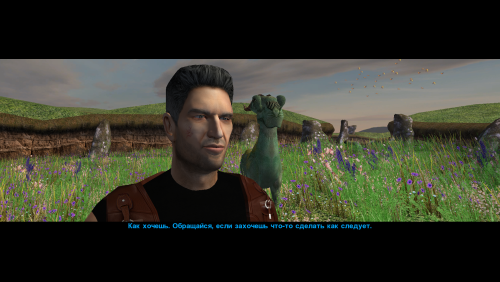
Version 1.0.0
49 downloads
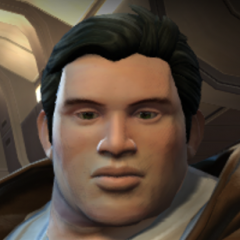
This mod changes the head (model and texture) of Canderous Ordo. An optional portrait for Canderous is also included, which you can use if desired. When modeling the head, I was inspired by the actor Clancy Brown; I think his characterization suits the role of Canderous very well. The mod contains four main files: p_candh.mdl and p_candh.mdx - the model, P_CandH01.tga and P_CandH01.txi - the texture. One additional file, PO_pcanderous.tga, is Canderous's portrait; you can choose to use it or not, as you wish. This portrait is in the same style as the portraits from my other party member portrait mod. How to install: Unpack and copy files to the Knights of the Old Republic's Override folder. Note: This is a new model that is significantly different from the vanilla version. Both the geometry and the UV map are different. No retextures from the vanilla head will fit this model! And, of course, the texture from this mod will not fit Canderous' vanilla head. If anyone asks: the body texture is from this mod by wonderful Dark Hope. Thanks: I would like to thank Elayerfawkes45 for the original high-poly mesh, which I used as a starting point for my head model. -
View File [K1] HD Female Twi'leks + NPC Diversity + Playable Female Twi'leks ===================================================== [K1] HD Female Twi'leks + NPC Diversity + Playable Female Twi'leks ===================================================== Mod for Knights of the Old Republic 1 Author: Lily File Name: K1_HD_Female_Twilek_Diversity_and_PCs_v1.zip Latest Version: 1.2.0 --- 1. DESCRIPTION: This mod overhauls the female Twi'lek NPCs in KotOR 1 and adds 26 new playable female Twi'lek heads. NPC Overhaul: - Upscaled and updated dancer outfits. - Body skin tones all match head skin tones. - Added specular highlights to body textures. - Added specular highlights with a bump map to the heads, giving female lekku the same light-reactive shine male Twi'leks have. Eyes and lips also get a subtle shine. - NPCs now use different lekku positioning per head, so they no longer all look like pure reskins. - Gives a unique appearance to: - Yuthura Ban when encountered on Dantooine - Zaerdra - Hidden Beks bodyguard, Taris - Lyn Sekla - dancer, Taris - Janice Nall - droid shop owner, Taris - Kandon's Bodyguard - Black Vulkar Base - Malare - Bastila's quest - Lena - Mission's quest - Zoriis Bafka - swoop racer, Tatooine - Casandra Mateil - swoop racer, Manaan - Zeena - swoop racer, Manaan Playable Heads: - 26 playable female Twi'lek models, including every female Twi'lek NPC. - A number of completely new heads. - Dark side transitions. - Every playable head comes with a Handmaiden-style underwear model with matching skin tones. Find the KotOR II version here! --- 2. INSTALLATION: Run Install.exe and select your KotOR 1 game directory. There are 3 installation options. - Default Installation: Includes playable Twi'lek models and replacements for NPC Twi'leks. You probably want this one. - Playable Twi'leks ONLY: Includes only models for the player character, NPC Twi'leks will remain unchanged - NPC replacement ONLY: Replaces models for NPC Twi'leks, does not add any playable characters If you use the default installation, you DO NOT need to install NPC replacement ONLY or Playable Twi'leks ONLY. You should be safe to reinstall this mod on top of itself without any problems. You will probably want to use a widescreen mod such as this Without a high resolution, the bump mapping looks pretty bad. A "backup" folder is created by the installer in the same directory. Don't delete it if you plan to uninstall later. --- 3. UNINSTALLATION: Run Install.exe, select your KotOR 1 directory, and use the "Tools > uninstall/restore backup" option to revert all changes made by this mod. --- 4. KNOWN ISSUES: If you have met any of the NPCs, they will not have their unique appearance. You should use a save from beforehand. If you find any bugs or problems, please report them. --- 5. MOD COMPATIBILITY: Installing this should not break any other mods or have any conflicts, including K1R. This mod only touches female Twi'lek head/body models, textures, and appearance-related files - no dialogue, scripting, or module changes. Should be compatible with all other mods other than any other mods that have changed the female Twi'lek appearances, this mod will obviously stop the old appearances from showing. All files should have unique names, so this should not overwrite other mods, and it would just take Appearance.2da changes (or an uninstallation) to revert. Notably, this mod conflicts with KotOR 1 Twi'lek Female NPC Diversity That mod directly installs to the override folder instead of into modules, so you will need to uninstall that mod if you want to see the NPC appearances from this mod. However, if you wish to keep any appearances from that mod or any other female Twi'lek NPC mods, you can install those after this one to overwrite specific NPCs without an issue. Do not use the Steam Workshop for KotOR. It will almost certainly end with compatibility issues. --- 6. SUPPORT: My mods are free to use. You do not need to pay for them, but if you would like to say thanks, you can buy me a coffee! --- 7. PERMISSIONS: Please let me know if you plan on using any of the files in my mod for your own mod. The answer is "yes you may", but I would like to know what you are doing with it! Do not directly reupload this mod anywhere else. --- 8. THANKS: - Dark Hope - HD Twilek base textures - Leilukin & SpaceAlex - Dahnis Unique Look - Effixian - Red Twi'lek head - DarthParametric - Twi'lek high boots model - redrob41 - Original Twi'lek head/body model fixes, original underwear, dancer, assassin models - bead-v - MDLEdit - Fred Tetra - KotOR Tool - Cortisol - Holocron Toolset & HoloPatcher - Fair Strides - TSLPatcher - seedhartha - KotOR Blender - ndix UR - tga2tpc - ??? - A couple playable heads are originally from a decade-old modpack with no credits. If you are or know the author, let me know and I can credit the author/remove them. THIS MODIFICATION IS NOT SUPPORTED BY BIOWARE/OBSIDIAN ENTERTAINMENT OR LUCASARTS OR ANY LICENSORS/SPONSORS OF THE MENTIONED COMPANIES. USE THIS FILE AT YOUR OWN RISK. Submitter Lily Submitted 09/10/2026 Category Mods K1R Compatible Yes
-
View File Narve's New High Poly Canderous Head This mod changes the head (model and texture) of Canderous Ordo. An optional portrait for Canderous is also included, which you can use if desired. When modeling the head, I was inspired by the actor Clancy Brown; I think his characterization suits the role of Canderous very well. The mod contains four main files: p_candh.mdl and p_candh.mdx - the model, P_CandH01.tga and P_CandH01.txi - the texture. One additional file, PO_pcanderous.tga, is Canderous's portrait; you can choose to use it or not, as you wish. This portrait is in the same style as the portraits from my other party member portrait mod. How to install: Unpack and copy files to the Knights of the Old Republic's Override folder. Note: This is a new model that is significantly different from the vanilla version. Both the geometry and the UV map are different. No retextures from the vanilla head will fit this model! And, of course, the texture from this mod will not fit Canderous' vanilla head. If anyone asks: the body texture is from this mod by wonderful Dark Hope. Thanks: I would like to thank Elayerfawkes45 for the original high-poly mesh, which I used as a starting point for my head model. Submitter Narve Submitted 09/02/2026 Category Mods K1R Compatible Yes
-
View File [TSL] Lily's NPC Overhaul - HD Models & Added Diversity ===================================================== [TSL] NPC Overhaul - HD Models & Added Diversity ===================================================== Mod for Knights of the Old Republic II - The Sith Lords Author: Lily File Name: NPC_Overhaul.zip Latest Version: 1.0 --- 1. DESCRIPTION: Tired of nearly every basic human NPC looking the same? This mod overhauls the human NPC (commoner) appearances in KotOR II. Heads: - Tweaks several of the models to adjust hair and fix some UV mapping. - 39 head textures are included, 35 reworked and 4 extra ones. They look much more distinct than the vanilla ones. - The heads are more evenly distributed across characters so, for example, 75% of white male heads were previously "white male 1" and now it should evenly by spread across all of the white male heads. - Ralon on Dantooine is given his unique appearance that I guess they made and forgot to give him... Clothing: - 11 updated clothing texture sets for the standard male and female commoner outfits. --- 2. INSTALLATION: Run Install.exe and select your KotOR 2 game directory. There are 2 installation options. - Heads: includes 39 updated heads with unique looks and gives human NPCs more unique appearances. - Clothing: includes 11 updated clothing textures for both male and female NPCs. These two options are independent and can be installed in either order, or separately. A "backup" folder is created by the installer in the same directory. Don't delete it if you plan to uninstall later. --- 3. UNINSTALLATION: Run Install.exe, select your KotOR 2 directory, and use the "Tools > uninstall/restore backup" option to revert all changes made by this mod. --- 4. KNOWN ISSUES: If you have already visited Dantooine, Ralon may not have his updated appearance. You should use a save from before arriving. If you find any bugs or problems, please report them. --- 5. MOD COMPATIBILITY: Should be compatible with all mods other than ones that also attempt to change commoner NPC appearances. Compatible with TSLRCM. Do not use the Steam Workshop for KotOR. It will almost certainly end with compatibility issues. --- 6. SUPPORT: My mods are free to use. You do not need to pay for them, but if you would like to say thanks, you can buy me a coffee! --- 7. PERMISSIONS: Please let me know if you plan on using any of the files in my mod for your own mod. The answer is "yes you may", but I would like to know what you are doing with it! Do not directly reupload this mod anywhere else. --- 8. THANKS: - Dark Hope - Uses assets from her various commoner head mods. MOST of the clothing uses Dark Hope's textures. Pretty much all credit for the clothing portion of this mod goes to her other than swapping her alternate textures into the additional slots that KotOR II uses! Thank you! https://deadlystream.com/profile/16561-dark-hope/content/?type=downloads_file&change_section=1 https://deadlystream.com/files/file/2516-npc-clothing-m/ https://deadlystream.com/files/file/2515-npc-clothing-f/ - Vurt - Some of the clothing textures - redrob41 - Original model fixes - Fred Tetra - KotOR Tool - Cortisol - Holocron Toolset & HoloPatcher - Fair Strides - TSLPatcher - seedhartha - KotOR Blender THIS MODIFICATION IS NOT SUPPORTED BY BIOWARE/OBSIDIAN ENTERTAINMENT OR LUCASARTS OR ANY LICENSORS/SPONSORS OF THE MENTIONED COMPANIES. USE THIS FILE AT YOUR OWN RISK. Submitter Lily Submitted 08/26/2026 Category Mods TSLRCM Compatible Yes
-
Version 1.0.0
786 downloads
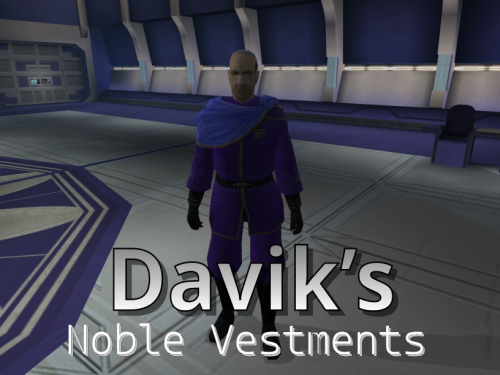
Description: As I've explored all the mods which adjust and improve the textures and models for various objects and people in the game, I've noticed that surprisingly little attention has been given to modifying the appearance or look of one NPC in particular: Davik Kang, the crime lord and leader of the Exchange crime syndicate on Taris. While he doesn't have much actual screen time, he is quite important to much of the Taris section of the game. Although the tastes and opinions of people will vary wildly on this, I always felt like his appearance was rather "clunky" as he always seemed to be wearing his armor. Despite the fact that this is understandable, it would seem more fitting for an important crime-lord and de-facto important "noble" of Taris to be dressed rather formal or fancy given how others of his profession and rank are typically dressed. It would not be far-fetched to assume one in his position could wear a robe or formal jacket with body armor underneath for protection while maintaining a more "polished" look on the outside. I've included a custom skin and ported model from Kotor II for Davik's outer vestments, as well as a sharper-textured tpc file for his head that is included in the K2 game files. Installation: Just run the TSLPatcher the direct it to your game file To Uninstall: Remove the files from your Override folder and add the backup .2da file to it Copyright: Anyone is welcome to use my models and textures, just please ask first and be sure to give me credit UPDATE: New version includes texture of his robe without the military medals, as requested Thanks to: Effix, N-DReW25, Thor110, and others for giving me the basics of porting models and assigning textures in the game Legal: THIS MODIFICATION IS NOT SUPPORTED BY BIOWARE/OBSIDIAN ENTERTAINMENT, LUCASARTS, DISNEY OR ANY LICENSERS/SPONSORS OF THE MENTIONED COMPANIES. USE OF THIS FILE IS AT YOUR OWN RISK AND THE ABOVE-MENTIONED COMPANIES OR THE AUTHOR IS NOT RESPONSIBLE FOR ANY DAMAGE CAUSED TO YOUR COMPUTER FOR THE USAGE OF THIS FILE. -
View File [TSL] Curvier Handmaiden-Style Underwear for Female Player, Handmaiden, Mira, and Visas ===================================================== [TSL] Curvier Handmaiden-Style Underwear for Female Player, Handmaiden, Mira, and Visas ===================================================== Mod for Knights of the Old Republic II - The Sith Lords Author: Lily File Name: Curvier_Female_PC_Party_Underwear_v1.zip Latest Version: 1.1 --- 1. DESCRIPTION: Replaces the default underwear model for female player characters, Handmaiden, Mira, and Visas with a curvier Handmaiden-style underwear model. Custom textures are included for each character, with matching dark side transition variants. --- 2. INSTALLATION: Run Install.exe and select your KotOR 2 game directory. There are 7 installation options. - Default Installation: Updates the new underwear model for female player characters and all three party members. You probably want this one. - Player characters ONLY: Updates player character models to the new underwear model. - Party members ONLY: Updates party member models to the new underwear model. - Visas ONLY: Updates Visas to the new underwear model. - Mira ONLY: Updates Mira to the new underwear model. - Handmaiden ONLY: Updates Handmaiden to the new underwear model. - PFHC03 Patch: Updates the look for PFHC03 if you use Effixian's PFHC03 Restoration mod. Install that mod first! If you use the default installation, you do NOT need to install any of the individual options separately. The PFHC03 Patch NEEDS to be installed separately - it is NOT included in any other option. You should be safe to reinstall this mod on top of itself without any problems. You can mix and match installation options if you want everything except the Visas replacement, for example. A "backup" folder is created by the installer in the same directory. Don't delete it if you plan to uninstall later. --- 3. UNINSTALLATION: Run Install.exe, select your KotOR 2 directory, and use the "Tools > uninstall/restore backup" option to revert all changes made by this mod. --- 4. KNOWN ISSUES: None. If you find any bugs or problems, please report them. --- 5. MOD COMPATIBILITY: All files should have unique names. This mod only touches body models, textures, and appearance entries - no dialogue, scripting, or module changes. Should be compatible with all other mods, including TSLRCM. Anything that changes the underwear texture for female players or Handmaiden, Mira, or Visas will conflict. If you use Effixian's PFHC03 Restoration mod, install it first, then run this mod's PFHC03 Patch. Do not use the Steam Workshop for KotOR. It will almost certainly end with compatibility issues. --- 6. Support: My mods are free to use. You do not need to pay for them, but if you would like to say thanks, you can buy me a coffee! --- 7. PERMISSIONS: Please let me know if you plan on using any of the files in my mod for your own mod. The answer is "yes you may", but I would like to know what you are doing with it! Do not directly reupload this mod anywhere else. --- 8. THANKS: - redrob41 - Original underwear model - Effixian - PFHC03 Restoration - bead-v - MDLEdit - Fred Tetra - KotOR Tool - Cortisol - Holocron Toolset & HoloPatcher - Fair Strides - TSLPatcher - seedhartha - KotOR Blender - ndix UR - tga2tpc THIS MODIFICATION IS NOT SUPPORTED BY BIOWARE/OBSIDIAN ENTERTAINMENT OR LUCASARTS OR ANY LICENSORS/SPONSORS OF THE MENTIONED COMPANIES. USE THIS FILE AT YOUR OWN RISK. Submitter Lily Submitted 08/21/2026 Category Mods TSLRCM Compatible Yes
-
![More information about "[TSL] Folklore Mandalorians"](https://deadlystream.com/downloads/screens/monthly_2026_08/Untitled-1.thumb.jpg.ed2021d17e7e3ab55cd9630e30cc2ddf.jpg)
Version 1.0.0
148 downloads
===================================================== [TSL] Folklore Mandalorians ===================================================== Mod for Knights of the Old Republic II - The Sith Lords Author: Lily File Name: TSL_Folklore_Mandalorians.zip Latest Version: 1.0 --- 1. DESCRIPTION: This mod is a port of Attackperson35's Folklore Mandalorians mod to KotOR 2. It replaces the Mandalorian NPC models and textures. Features: - Glowing visor with a different color per texture variant. - Edited jetpack model. - Edited helmet. - Remapped textures on the main model. - Remeshed shoulderplates that no longer clip the model. - 7 texture variants. --- 2. INSTALLATION: Run Install.exe and select your KotOR 2 game directory. A "backup" folder is created by the installer in the same directory. Don't delete it if you plan to uninstall later. Double check that you do not have both an old .tga/.txi file pair AND a new .tpc file for the armor textures If you do, one is going to take priority over the other. You can use Remove Duplicate TGA-TPC to accomplish this quickly. --- 3. UNINSTALLATION: Run Install.exe, select your KotOR 2 directory, and use the "Tools > uninstall/restore backup" option to revert all changes made by this mod. --- 4. KNOWN ISSUES: None. If you find any bugs or problems, please report them. --- 5. MOD COMPATIBILITY: This mod only replaces the Mandalorian male and female models (N_Mandalorian.mdl/mdx, N_Mandalorianf.mdl/mdx) and seven texture files (N_Mandalorian01-07.tpc). No 2DA, dialogue, or scripting changes are made. It should be compatible with all other mods, including TSLRCM. Any mod that also modifies Mandalorian model or texture files will conflict with this one. Note: the models in this mod are remapped specifically for the included textures. Other textures applied to these models may not display correctly. Do not use the Steam Workshop for KotOR. It will almost certainly end with compatibility issues. --- 6. SUPPORT: My mods are free to use. You do not need to pay for them, but if you would like to say thanks, you can buy me a coffee! --- 7. PERMISSIONS: Do not directly reupload this mod anywhere else. Ask before using any assets. --- 8. THANKS: - Attackperson35 - Folklore Mandalorians (original KotOR 1 mod) - Vurt - Vurt's Visual Resurgence (textures) - Dark Hope - Textures - DarthDeadMan - Head and jetpack 3D models - Fred Tetra - KotOR Tool - Cortisol - Holocron Toolset & HoloPatcher - Fair Strides - TSLPatcher THIS MODIFICATION IS NOT SUPPORTED BY BIOWARE/OBSIDIAN ENTERTAINMENT OR LUCASARTS OR ANY LICENSORS/SPONSORS OF THE MENTIONED COMPANIES. USE THIS FILE AT YOUR OWN RISK. -
![More information about "[TSL] Armor Class 4, 5 & 6 Remodel"](https://deadlystream.com/downloads/screens/monthly_2026_08/20260820104814_1.thumb.jpg.91c70495978fda2fbe562710fc25d73a.jpg)
Version 1.0.0
328 downloads
===================================================== [TSL] Armor Class 4, 5 & 6 Remodel ===================================================== Mod for Knights of the Old Republic II - The Sith Lords Author: Lily Latest Version: 1.0 --- 1. DESCRIPTION: This mod replaces the armor body models for classes 4, 5, and 6 in KotOR 2, giving them a more armored look. The original KotOR 1 models were made by Attackperson35. This mod adds the models to KotOR 2, including Bao-Dur variants. Textures are sourced from Dark Hope's and Vurt's armor texture mods with small tweaks. The included textures are from those two mods combined - if you prefer a different look, you can install the models only and drop in textures from whatever. Class 4 (Light Armor): The shoulder pads from the original models have been kept. Shin guards, knee pads, and armguards have been removed - this is light armor, and the extra plating looked out of place on it. Affects: Light Combat Suit, Combat Suit, Mandalorian Combat Suit, Zabrak Combat Suit, Echani Light Armor, Massassi Ceremonial Armor, Mandalorian Heavy Suit, Electromesh Suit, and any other armor sharing the class 4 body. Class 5 (Medium Armor): Includes shoulder pads, wrist guards, and shin guards. Affects: Heavy Combat Suit, Bonadan Alloy Heavy Suit, Zabrak Battle Armor, Ubese Environmental Suit, Echani Shield Suit, Reinforced Fiber Armor, Zabrak Field Armor, Ulic Qel Droma's Mesh Suit, Armored Flight Suit, and any other armor sharing the class 5 body. Class 6 (Medium Armor): Includes shoulder pads, wrist guards, and shin guards. Affects: Khoonda Militia Armor, Military Suit, Echani Battle Armor, Cinnagar War Suit, Sith Battle Suit, Verpine Fiber Mesh, Exar Kun's Light Battle Suit, Heavy Cinnagar War Suit, Verpine Fiber Ultramesh, and any other armor sharing the class 6 body. --- 2. INSTALLATION: Run Install.exe and select your KotOR 2 game directory. Each armor class has two installation options: - Models: Installs new armor body models. - Textures: Installs the included texture selection. You can install models only, textures only, or both. Installing models without textures will use whatever textures you already have installed. Double check that you do not have both an old .tga/.txi file pair AND a new .tpc file for the armor textures If you do, one is going to take priority over the other. You can use Remove Duplicate TGA-TPC to accomplish this quickly. A "backup" folder is created by the installer in the same directory. Don't delete it if you plan to uninstall later. --- 3. UNINSTALLATION: Run Install.exe, select your KotOR 2 directory, and use the "Tools > uninstall/restore backup" option to revert all changes made by this mod. --- 4. KNOWN ISSUES: None. If you find any bugs or problems, please report them. --- 5. MOD COMPATIBILITY: This mod replaces armor body models and their associated textures only. No 2da files, scripts, or dialogue are changed. Should be compatible with all other mods, including TSLRCM. Models replaced: - Class 4: PFBCL, PFBCM, PFBCS, PMBCL, PMBCM, PMBCS, BAODUR_BC - Class 5: PFBDL, PFBDM, PFBDS, PMBDL, PMBDM, PMBDS, BAODUR_BD - Class 6: PFBEL, PFBEM, PFBES, PMBEL, PMBEM, PMBES, BAODUR_BE Any mod that replaces these same files will conflict. Do not use the Steam Workshop for KotOR. It will almost certainly cause compatibility issues. --- 6. SUPPORT: My mods are free to use. You do not need to pay for them, but if you would like to say thanks, you can buy me a coffee! --- 7. PERMISSIONS: Do not directly reupload this mod anywhere else. Ask before using any assets. --- 8. THANKS: - Attackperson35 - Original KOTOR 1 armor models (classes 4, 5, and 6) - Dark Hope - HD armor textures: Class 4 textures Class 5 textures Class 6 textures - Vurt - Vurt's Visual Resurgence armor textures - redrob41 - Original Bao-Dur body model fixes - bead-v - MDLEdit - Cortisol - Holocron Toolset & HoloPatcher - Fair Strides - TSLPatcher THIS MODIFICATION IS NOT SUPPORTED BY BIOWARE/OBSIDIAN ENTERTAINMENT OR LUCASARTS OR ANY LICENSORS/SPONSORS OF THE MENTIONED COMPANIES. USE THIS FILE AT YOUR OWN RISK. -
View File [TSL] Armor Class 4, 5 & 6 Remodel ===================================================== [TSL] Armor Class 4, 5 & 6 Remodel ===================================================== Mod for Knights of the Old Republic II - The Sith Lords Author: Lily Latest Version: 1.0 --- 1. DESCRIPTION: This mod replaces the armor body models for classes 4, 5, and 6 in KotOR 2, giving them a more armored look. The original KotOR 1 models were made by Attackperson35. This mod adds the models to KotOR 2, including Bao-Dur variants. Textures are sourced from Dark Hope's and Vurt's armor texture mods with small tweaks. The included textures are from those two mods combined - if you prefer a different look, you can install the models only and drop in textures from whatever. Class 4 (Light Armor): The shoulder pads from the original models have been kept. Shin guards, knee pads, and armguards have been removed - this is light armor, and the extra plating looked out of place on it. Affects: Light Combat Suit, Combat Suit, Mandalorian Combat Suit, Zabrak Combat Suit, Echani Light Armor, Massassi Ceremonial Armor, Mandalorian Heavy Suit, Electromesh Suit, and any other armor sharing the class 4 body. Class 5 (Medium Armor): Includes shoulder pads, wrist guards, and shin guards. Affects: Heavy Combat Suit, Bonadan Alloy Heavy Suit, Zabrak Battle Armor, Ubese Environmental Suit, Echani Shield Suit, Reinforced Fiber Armor, Zabrak Field Armor, Ulic Qel Droma's Mesh Suit, Armored Flight Suit, and any other armor sharing the class 5 body. Class 6 (Medium Armor): Includes shoulder pads, wrist guards, and shin guards. Affects: Khoonda Militia Armor, Military Suit, Echani Battle Armor, Cinnagar War Suit, Sith Battle Suit, Verpine Fiber Mesh, Exar Kun's Light Battle Suit, Heavy Cinnagar War Suit, Verpine Fiber Ultramesh, and any other armor sharing the class 6 body. --- 2. INSTALLATION: Run Install.exe and select your KotOR 2 game directory. Each armor class has two installation options: - Models: Installs new armor body models. - Textures: Installs the included texture selection. You can install models only, textures only, or both. Installing models without textures will use whatever textures you already have installed. Double check that you do not have both an old .tga/.txi file pair AND a new .tpc file for the armor textures If you do, one is going to take priority over the other. You can use Remove Duplicate TGA-TPC to accomplish this quickly. A "backup" folder is created by the installer in the same directory. Don't delete it if you plan to uninstall later. --- 3. UNINSTALLATION: Run Install.exe, select your KotOR 2 directory, and use the "Tools > uninstall/restore backup" option to revert all changes made by this mod. --- 4. KNOWN ISSUES: None. If you find any bugs or problems, please report them. --- 5. MOD COMPATIBILITY: This mod replaces armor body models and their associated textures only. No 2da files, scripts, or dialogue are changed. Should be compatible with all other mods, including TSLRCM. Models replaced: - Class 4: PFBCL, PFBCM, PFBCS, PMBCL, PMBCM, PMBCS, BAODUR_BC - Class 5: PFBDL, PFBDM, PFBDS, PMBDL, PMBDM, PMBDS, BAODUR_BD - Class 6: PFBEL, PFBEM, PFBES, PMBEL, PMBEM, PMBES, BAODUR_BE Any mod that replaces these same files will conflict. Do not use the Steam Workshop for KotOR. It will almost certainly cause compatibility issues. --- 6. SUPPORT: My mods are free to use. You do not need to pay for them, but if you would like to say thanks, you can buy me a coffee! --- 7. PERMISSIONS: Do not directly reupload this mod anywhere else. Ask before using any assets. --- 8. THANKS: - Attackperson35 - Original KOTOR 1 armor models (classes 4, 5, and 6) - Dark Hope - HD armor textures: Class 4 textures Class 5 textures Class 6 textures - Vurt - Vurt's Visual Resurgence armor textures - redrob41 - Original Bao-Dur body model fixes - bead-v - MDLEdit - Cortisol - Holocron Toolset & HoloPatcher - Fair Strides - TSLPatcher THIS MODIFICATION IS NOT SUPPORTED BY BIOWARE/OBSIDIAN ENTERTAINMENT OR LUCASARTS OR ANY LICENSORS/SPONSORS OF THE MENTIONED COMPANIES. USE THIS FILE AT YOUR OWN RISK. Submitter Lily Submitted 08/21/2026 Category Mods TSLRCM Compatible Yes
-
View File [TSL] HD Rodians ===================================================== [TSL] HD Rodians ===================================================== Mod for Knights of the Old Republic II - The Sith Lords Author: Lily File Name: HD_Rodians_TSL.zip Latest Version: 1.0 --- 1. DESCRIPTION: This mod ports Stormie97's High Quality Aliens: Rodians from KotOR 1 to KotOR 2, with Dark Hope's HD retextures included and tweaked. - Replaces the original low-poly Rodian model with Stormie97's custom high-poly version. - Five HD texture variants for Rodian NPCs. - Adds an environment map for specular sheen. - All four Rodian appearance entries updated in appearance.2da. - Sitting Rodian placeable updated in placeables.2da. --- 2. INSTALLATION: Run Install.exe and select your KotOR 2 game directory. A "backup" folder is created by the installer in the same directory. Don't delete it if you plan to uninstall later. --- 3. UNINSTALLATION: Run Install.exe, select your KotOR 2 directory, and use the "Tools > uninstall/restore backup" option to revert all changes made by this mod. --- 4. KNOWN ISSUES: None. If you find any bugs or problems, please report them. --- 5. MOD COMPATIBILITY: This mod only touches the Rodian model, Rodian textures, and the relevant rows in appearance.2da and placeables.2da - no dialogue, scripting, or other module changes. Should be compatible with all other mods, including TSLRCM. If you have any other mods that change Rodian appearances, this mod will obviously stop the old appearances from showing. All files should have unique names, so this should not overwrite other mods, and it would just take Appearance.2da changes (or an uninstallation) to revert. Do not use the Steam Workshop for KotOR. It will almost certainly end with compatibility issues. --- 6. SUPPORT: My mods are free to use. You do not need to pay for them, but if you would like to say thanks, you can buy me a coffee! --- 7. PERMISSIONS: Do not directly reupload this mod anywhere else. Ask before using any assets. --- 8. THANKS: - Stormie97 - High Quality Aliens: Rodians - Dark Hope - Rodian HD Retexture - bead-v - MDLEdit - Cortisol - Holocron Toolset & HoloPatcher - Fair Strides - TSLPatcher THIS MODIFICATION IS NOT SUPPORTED BY BIOWARE/OBSIDIAN ENTERTAINMENT OR LUCASARTS OR ANY LICENSORS/SPONSORS OF THE MENTIONED COMPANIES. USE THIS FILE AT YOUR OWN RISK. Submitter Lily Submitted 08/21/2026 Category Mods TSLRCM Compatible Yes
-
![More information about "[TSL] HD Rodians"](https://deadlystream.com/downloads/screens/monthly_2026_08/20260821112801_1.thumb.jpg.ce1b722df7b5c30541478f89b6d4b4c9.jpg)
Version 1.0.0
67 downloads
===================================================== [TSL] HD Rodians ===================================================== Mod for Knights of the Old Republic II - The Sith Lords Author: Lily File Name: HD_Rodians_TSL.zip Latest Version: 1.0 --- 1. DESCRIPTION: This mod ports Stormie97's High Quality Aliens: Rodians from KotOR 1 to KotOR 2, with Dark Hope's HD retextures included and tweaked. - Replaces the original low-poly Rodian model with Stormie97's custom high-poly version. - Five HD texture variants for Rodian NPCs. - Adds an environment map for specular sheen. - All four Rodian appearance entries updated in appearance.2da. - Sitting Rodian placeable updated in placeables.2da. --- 2. INSTALLATION: Run Install.exe and select your KotOR 2 game directory. A "backup" folder is created by the installer in the same directory. Don't delete it if you plan to uninstall later. --- 3. UNINSTALLATION: Run Install.exe, select your KotOR 2 directory, and use the "Tools > uninstall/restore backup" option to revert all changes made by this mod. --- 4. KNOWN ISSUES: None. If you find any bugs or problems, please report them. --- 5. MOD COMPATIBILITY: This mod only touches the Rodian model, Rodian textures, and the relevant rows in appearance.2da and placeables.2da - no dialogue, scripting, or other module changes. Should be compatible with all other mods, including TSLRCM. If you have any other mods that change Rodian appearances, this mod will obviously stop the old appearances from showing. All files should have unique names, so this should not overwrite other mods, and it would just take Appearance.2da changes (or an uninstallation) to revert. Do not use the Steam Workshop for KotOR. It will almost certainly end with compatibility issues. --- 6. SUPPORT: My mods are free to use. You do not need to pay for them, but if you would like to say thanks, you can buy me a coffee! --- 7. PERMISSIONS: Do not directly reupload this mod anywhere else. Ask before using any assets. --- 8. THANKS: - Stormie97 - High Quality Aliens: Rodians - Dark Hope - Rodian HD Retexture - bead-v - MDLEdit - Cortisol - Holocron Toolset & HoloPatcher - Fair Strides - TSLPatcher THIS MODIFICATION IS NOT SUPPORTED BY BIOWARE/OBSIDIAN ENTERTAINMENT OR LUCASARTS OR ANY LICENSORS/SPONSORS OF THE MENTIONED COMPANIES. USE THIS FILE AT YOUR OWN RISK. -
View File [TSL] Folklore Mandalorians ===================================================== [TSL] Folklore Mandalorians ===================================================== Mod for Knights of the Old Republic II - The Sith Lords Author: Lily File Name: TSL_Folklore_Mandalorians.zip Latest Version: 1.0 --- 1. DESCRIPTION: This mod is a port of Attackperson35's Folklore Mandalorians mod to KotOR 2. It replaces the Mandalorian NPC models and textures. Features: - Glowing visor with a different color per texture variant. - Edited jetpack model. - Edited helmet. - Remapped textures on the main model. - Remeshed shoulderplates that no longer clip the model. - 7 texture variants. --- 2. INSTALLATION: Run Install.exe and select your KotOR 2 game directory. A "backup" folder is created by the installer in the same directory. Don't delete it if you plan to uninstall later. Double check that you do not have both an old .tga/.txi file pair AND a new .tpc file for the armor textures If you do, one is going to take priority over the other. You can use Remove Duplicate TGA-TPC to accomplish this quickly. --- 3. UNINSTALLATION: Run Install.exe, select your KotOR 2 directory, and use the "Tools > uninstall/restore backup" option to revert all changes made by this mod. --- 4. KNOWN ISSUES: None. If you find any bugs or problems, please report them. --- 5. MOD COMPATIBILITY: This mod only replaces the Mandalorian male and female models (N_Mandalorian.mdl/mdx, N_Mandalorianf.mdl/mdx) and seven texture files (N_Mandalorian01-07.tpc). No 2DA, dialogue, or scripting changes are made. It should be compatible with all other mods, including TSLRCM. Any mod that also modifies Mandalorian model or texture files will conflict with this one. Note: the models in this mod are remapped specifically for the included textures. Other textures applied to these models may not display correctly. Do not use the Steam Workshop for KotOR. It will almost certainly end with compatibility issues. --- 6. SUPPORT: My mods are free to use. You do not need to pay for them, but if you would like to say thanks, you can buy me a coffee! --- 7. PERMISSIONS: Do not directly reupload this mod anywhere else. Ask before using any assets. --- 8. THANKS: - Attackperson35 - Folklore Mandalorians (original KotOR 1 mod) - Vurt - Vurt's Visual Resurgence (textures) - DarthDeadMan - Head and jetpack 3D models - Fred Tetra - KotOR Tool - Cortisol - Holocron Toolset & HoloPatcher - Fair Strides - TSLPatcher THIS MODIFICATION IS NOT SUPPORTED BY BIOWARE/OBSIDIAN ENTERTAINMENT OR LUCASARTS OR ANY LICENSORS/SPONSORS OF THE MENTIONED COMPANIES. USE THIS FILE AT YOUR OWN RISK. Submitter Lily Submitted 08/21/2026 Category Mods TSLRCM Compatible Yes
-
View File [TSL] HD Female Twi'leks + NPC Diversity + Playable Female Twi'leks ===================================================== [TSL] HD Female Twi'leks + NPC Diversity + Playable Female Twi'leks ===================================================== Mod for Knights of the Old Republic II - The Sith Lords Author: Lily File Name: TSL_HD_Female_Twilek_Diversity_and_PCs_v2.zip Latest Version: 1.2 --- 1. DESCRIPTION: This mod overhauls the female Twi'lek NPCs in KotOR 2 and adds 26 new playable female Twi'lek heads. NPC Overhaul: - Upscaled and updated dancer outfits. - Body skin tones all match head skin tones. - Added specular highlights to body textures. - Added specular highlights with a bump map to the heads, giving female lekku the same light-reactive shine male Twi'leks have. Eyes and lips also get a subtle shine. - NPCs now use different lekku positioning per head, so they no longer all look like pure reskins. - The mercenary droidmaster on Telos Surface and Borna Lys on Nar Shaddaa now each have a unique head texture pulled from the new playable set, plus a backup head, so their default appearance doesn't clone the player. - Includes a patch for Leilukin's "Dahnis Unique Look" mod, giving their textures an HD look. Playable Heads: - 26 playable female Twi'lek models, including every female Twi'lek NPC. - A number of completely new heads. - Dark side transitions. - Every playable head comes with a Handmaiden-style underwear model, a dancer outfit model, and an assassin-style clothing model, all with matching skin tones. Find the KotOR 1 version here! --- 2. INSTALLATION: Run Install.exe and select your KotOR 2 game directory. There are 4 installation options. - Default Installation: Includes playable Twi'lek models and replacements for NPC Twi'leks. You probably want this one. - Playable Twi'leks ONLY: Includes only models for the player character, NPC Twi'leks will remain unchanged - NPC replacement ONLY: Replaces models for NPC Twi'leks, does not add any playable characters - Dahnis Patch: Updates the look for Dahnis based on Leilukin's Dahnis Unique Look mod. Install that mod first! If you use the default installation, you DO NOT need to install NPC replacement ONLY or Playable Twi'leks ONLY. The Dahnis patch NEEDS to be installed separately - it is NOT included in any other option. You should be safe to reinstall this mod on top of itself without any problems. A "backup" folder is created by the installer in the same directory. Don't delete it if you plan to uninstall later. --- 3. UNINSTALLATION: Run Install.exe, select your KotOR 2 directory, and use the "Tools > uninstall/restore backup" option to revert all changes made by this mod. --- 4. KNOWN ISSUES: If you decide to install only PCs and then later decide to add the NPCs, you should use the default installation option the second time. Installing PCs ONLY and then NPCs ONLY will prevent the backup head from working properly. If you do this, just run the default installation and it should work. If you have already visited Nar Shaddaa, Borna will not have her updated appearance. You should use a save from before arriving. If you find any bugs or problems, please report them. --- 5. MOD COMPATIBILITY: Should be compatible with all other mods, including TSLRCM. This mod only touches female Twi'lek head/body models, textures, and appearance-related files - no dialogue, scripting, or module changes. If you have any other mods that have changed the female Twi'lek appearances, this mod will obviously stop the old appearances from showing. All files should have unique names, so this should not overwrite other mods, and it would just take Appearance.2da changes (or an uninstallation) to revert. If you use Leilukin's "Dahnis Unique Look" mod, install that mod first, then run this mod's Dahnis Patch. Do not use the Steam Workshop for KotOR. It will almost certainly end with compatibility issues. --- 6. SUPPORT: My mods are free to use. You do not need to pay for them, but if you would like to say thanks, you can buy me a coffee! --- 7. PERMISSIONS: Please let me know if you plan on using any of the files in my mod for your own mod. The answer is "yes you may", but I would like to know what you are doing with it! Do not directly reupload this mod anywhere else. --- 8. THANKS: - Dark Hope - HD Twilek base textures - Leilukin & SpaceAlex - Dahnis Unique Look - Effixian - Red Twi'lek head - DarthParametric - Twi'lek high boots model - redrob41 - Original Twi'lek head/body model fixes - Fred Tetra - KotOR Tool - Cortisol - Holocron Toolset & HoloPatcher - Fair Strides - TSLPatcher - ??? - A couple playable heads are originally from a decade-old modpack with no credits. If you are or know the author, let me know and I can credit the author/remove them. THIS MODIFICATION IS NOT SUPPORTED BY BIOWARE/OBSIDIAN ENTERTAINMENT OR LUCASARTS OR ANY LICENSORS/SPONSORS OF THE MENTIONED COMPANIES. USE THIS FILE AT YOUR OWN RISK. Submitter Lily Submitted 08/20/2026 Category Mods TSLRCM Compatible Yes
-
View File Playable Ewok with 2 Hand Animations This is a total overhaul of my previous Ewok Mod using the method I used on my Jawa mod so that the Ewok now has 2 handed weapon animations. Aware of small glitch where because Ewok is too fat 2h lightsaber clips through model slightly. Can be fixed easily probably will later. This Kotor 1 mod adds a playable custom ewok mdl that can be placed into the override folder to replace some npcs or used in conjunction with KSE as a playable character with combat animations. No 2 hand mele combat animations at this time. This .Zip file contains a ReadMe.txt a brief tutorial.txt on how to recreate the mod process, the custom .tga files for the textures, and finally the custom .mdl and .mdx files that can be dropped into override following the instructions in the ReadMe file. I also included a link to how to recreate the process incase anyone is interested. Disclaimer: This mod utilizes a modified asset from the community-maintained SWBF2 Mod Tools SDK 2020 available at ModDB, alongside original assets from Star Wars: Knights of the Old Republic. Full credit goes to the original developers, artists, and respective intellectual property rights holders (Lucasfilm, Pandemic Studios, and BioWare). This is a strictly non-profit, fan-made educational project intended exclusively as a technical proof-of-concept demonstrating asset handling for the KOTOR modding community. Furthermore, I do not own or claim rights to any of the third-party tools used or described in this project; all rights belong entirely to their respective developers Submitter EwokKotor Submitted 07/21/2026 Category Mods K1R Compatible Yes
-
Version 3.0.0
18 downloads
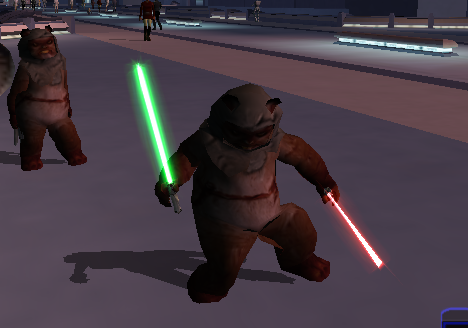
This is a total overhaul of my previous Ewok Mod using the method I used on my Jawa mod so that the Ewok now has 2 handed weapon animations. Aware of small glitch where because Ewok is too fat 2h lightsaber clips through model slightly. Can be fixed easily probably will later. This Kotor 1 mod adds a playable custom ewok mdl that can be placed into the override folder to replace some npcs or used in conjunction with KSE as a playable character with combat animations. No 2 hand mele combat animations at this time. This .Zip file contains a ReadMe.txt a brief tutorial.txt on how to recreate the mod process, the custom .tga files for the textures, and finally the custom .mdl and .mdx files that can be dropped into override following the instructions in the ReadMe file. I also included a link to how to recreate the process incase anyone is interested. Disclaimer: This mod utilizes a modified asset from the community-maintained SWBF2 Mod Tools SDK 2020 available at ModDB, alongside original assets from Star Wars: Knights of the Old Republic. Full credit goes to the original developers, artists, and respective intellectual property rights holders (Lucasfilm, Pandemic Studios, and BioWare). This is a strictly non-profit, fan-made educational project intended exclusively as a technical proof-of-concept demonstrating asset handling for the KOTOR modding community. Furthermore, I do not own or claim rights to any of the third-party tools used or described in this project; all rights belong entirely to their respective developers -
View File Robes With Shadows For TSL There is nothing more central to a Jedi's life than a cool outfit, except maybe a sweet saber to boot. So why put on robes with missing textures on their backsides when you could be impressing Sith Lords with your nice getup? Why settle for the shadow of a limberjack when a cool silhouette is half the reason you don the cloak? Let's fix up the game's robes! This mod will provide you with some fixed up versions of all the game's robe models -- that's both the thicker and thinner variants of the Jedi robe, the Jal Shey armor, Kreia and Visas' robes, and the Handmaiden's hooded robe. All models will have various issues fixed up, as well as fitting shadows. Any outfit that uses one of these models, regardless of texture/color, will be improved for you, and that includes any new robes from any other mods (just make sure they don't replace one of the listed models in the below Included Files). Fans of Movie-style Jedi Master robes by DeadMan or of svösh's Robe Collar should read the Compatibility section below for how to install the included patch that makes these mods work together. This mod also fixes the floating shadow head issue when dual-wielding melee weapons, as well as a minor game error caused by a mismatched model name. As of version 1.3, I have also fixed a base game glitch where female robe models had twitching hands -- the animation's clipping fix is still there, just without the twitching issue. And since it's 2024, I figured what the heck: as a bonus, all included models are now higher-poly (slightly). The boots, as well as some spots by the knees and shoulders which looked especially blocky now look smoother and more in tune with the rest of the model. See the above pictures for the difference. Installation: Download the 7z file and extract to your override folder, found in the same directory as your main game executable. For Steam installations, this would be "Steam\steamapps\common\Knights of the Old Republic II\override". 7z files can be extracted with Archive Utility on macOS, or with programs like PeaZip on Windows and Linux. For those who have the Aspyr patch, once in-game, I recommend turning on soft shadows if you have not already (OPTIONS->GRAPHICS->ADVANCED GRAPHICS->SOFT SHADOWS). Note that this may impact game performance. If you have TSLRCM installed, check the Included Files section below for any file listed with an asterisk (*). These files are already in your override after installing TSLRCM, so you should delete those versions in order for the new ones to work. The new versions already include all the changes made in the base TSLRCM version, and I have included a folder labeled "TSLRCM backup" which contains those older versions should you need to back them up. If you installed TSLRCM via Steam, you can find the relevant files to delete in "Steam\steamapps\workshop\485537937\override". Uninstallation: Place the files included in the "TSLRCM backup" folder into your override if using TSLRCM, and then remove "Ultimate_Robes_Repair_For_TSL" from your override. Included Files: Compatibility: This mod is fully compatible with any mod which does not replace any of the files listed above. If a mod does include any such models, you will have to pick which version to use, and remove the other from your override. If using TSLRCM, make sure to install that mod first, and make sure that any files listed with an asterisk above are successfully replaced by this mod. See the Installation section for more details. This mod is compatible with head mods such as Visas Reduced Model Clipping. Any texture mods that add new or alter robe skins are compatible with this mod. However, many robe mods will attempt to replace model files (.mdl/.mdx) as well, rather than just textures (.tga/.tpc), so keep an eye out for what files are included with other mods. For fans of Movie-style Jedi Master robes, DeadMan was gracious enough to allow me to create a compatibility patch for anyone who would like to use that mod alongside this one. Simply take the files included in the Compatibility Patch folder out into your override in place of the versions included in the main mod folder. Make sure these versions also replace the ones used in the Movie-style mod and TSLRCM. I have similarly created a patch for svösh's Robe Collar and any mods which use it. The patch merges all of our edits. Installation is the same as for the Movie-style patch. It should work for mods such as Achilles TSL Robe Mod (TSLRCM Edition). Compatible mods include Jedi Journeyman Robes by Stormie97, which uses a different model as its basis, and much of Effixian's work, such as Effixian's Lore Keeper's Robes, Strider Robes, and Handmaiden Clothing Reskin. Acknowledgments: Thanks to seedhartha, NdixUR, Symmetric, and Purifier for making importing to Blender simple using KotORBlender, and Cortisol for making file extraction easy with the Holocron Toolset. I would also like to thank DeadMan and svösh for allowing me to make use of their models to create a compatibility patch for this mod and their respective ones. I would also like to thank muitafruita for pointing out some additional issues with Kreia's robe models that needed fixing, and DarthParametric for being the one to recognize how to fix them. This modification is not supported by Obsidian Entertainment, Lucasarts, Disney or any licensers/sponsors thereof. Use of this modification is at your own risk and neither the aforementioned companies nor the author may be held responsible for any damages caused to your computer via this modification's usage. Submitter PapaZinos Submitted 05/10/2022 Category Mods TSLRCM Compatible Yes
-
Version 1.0.0
110 downloads
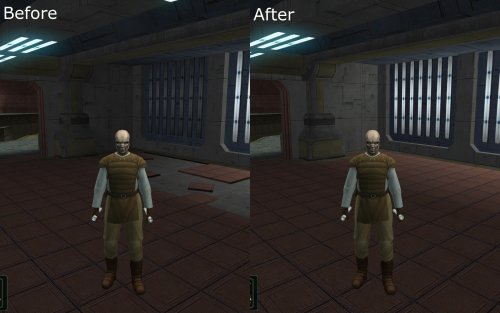
This is a modders' resource -- not intended for general use. It includes alternate versions of the four submodules in the enclave sublevel from TSL that had damage baked into their room models, now restored to their pre-bombing condition. That includes removing rubble, replacing flickering/dead lights, and cutting back on vegetative overgrowth. Lightmapping looks good too. I've exported the models in both K1 and TSL formats, default is TSL because I made this for Thor110's Expanded Galaxy Project, but K1 versions are in a subfolder. I've also included a VIS file for the module which is a merge of Thor110's additions for Visibility File Fixes with new edits of my own, particularly to compensate for the removal of some rubble in the rotunda with the glass dome which at least partially obscured submodules getting unloaded. I would use the exact same VIS even for the vanilla module, though. Usage: Just add the included models to your mod project. I did include versions for K1 ports, which you can find in the "K1" subfolder. Don't forget the VIS. You don't need to ask for permission to use these, just give credit in the description/readme. Included Files: Acknowledgments: Thanks to seedhartha for making modeling for these games simple using KotORBlender, and Cortisol for making file extraction easy with the Holocron Toolset. I would also like to thank Thor110 for buffing up the module's vis for his Visibility File Fixes mod, and allowing me to include those edits in this version. I also want to shout-out his Expanded Galaxy Project, the reason I made these in the first place. This modification is not supported by Obsidian Entertainment, Lucasarts, Disney or any licensers/sponsors thereof. Use of this modification is at your own risk and neither the aforementioned companies nor the author may be held responsible for any damages caused to your computer via this modification's usage. -
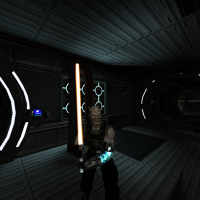
1,145 downloads
Hello everyone! This mod replaces the existing (and hopelessly outdated) lightsaber models with better new versions. In addition, the blade textures are replaced with flickering textures that are more similar to the original trilogy. NOTE: The models were created by ROOXON for Jedi Academy. I converted them to work in Kotor 2. ROOXON has given me permission to convert the models.