Search the Community
Showing results for tags 'hd texture'.
-
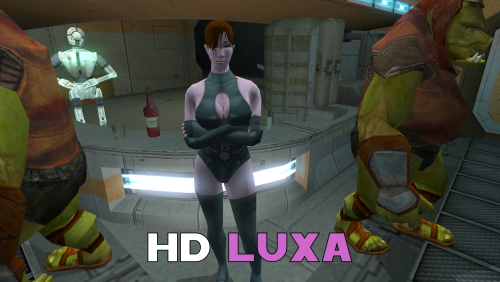
Version 1.1.0
111 downloads
A Mod for Star Wars Knights of The Old Republic II Author: N-DReW25 1.1.0 Release Date: 29.08.2026 Installation: Select which HD texture you would like to install. For "HD Grenn" and "HD Zhugs" open the "For Override" folder and drag/copy the textures within and drop/paste them into your Kotor II Override folder. Delete the files "N_DolGrenH.tpc" and/or "N_Duros04.tpc" and "N_Duros05.tpc" if they are present. For the "Normal" install of "HD Luxa" open the "For Override" folder and drag/copy the textures within and drop/paste them into your Kotor II Override folder. Delete the files "N_Lala_XuA01.tpc" and "N_Lala_XuH.tpc" if they are present. For the "Thigh High Boots" install of "HD Luxa" you must first install DarthParametric's "TSL Thigh-High Boots For Female Twi'lek Body (Modder's Resource)" mod. Once that mod is installed, open the "For Override" folder and drag/copy the textures within and drop/paste them into your Kotor II Override folder. Delete the files "N_Lala_XuA01.tpc" and "N_Lala_XuH.tpc" if they are present. Uninstallation: Delete the N_DolGrenH.tga, N_Lala_XuA01.tga, N_Lala_XuH.tga, N_Duros04.tga, and/or N_Duros05.tga files from your Override folder. Description: This pack is a compilation of edits made by N-DReW25 to the released work of the modder Dark Hope to resemble Kotor II characters. Whilst Dark Hope did make the original textures for Kotor I, it was N-DReW25 who made these textures for Kotor II. As Dark Hope is focusing her current work on Kotor I mods please do not bother her about this mod. This pack contains HD textures for Lieutenant Dol Grenn, the Zhug Brothers, and Luxa. For Lieutenant Dol Grenn, his head in Kotor II was made via photo sourcing elements of other old male heads from Kotor I. Most of his face and beard comes from Davik, his eyebrows and sideburns are Davik's eyebrows and sideburns that are recolored brown, and most of his hair is Deadeye Duncan's hair that has also been recolored brown. Using this exact same method described above, I was able to photo source elements of Dark Hope's Davik and Deadeye Duncan heads to make a HD Lieutenant Grenn head. For Luxa, her head was a recolored Kotor I player head whilst her body was a reskinned Twi'lek outfit. I recolored Dark Hope's PFHA01 HD mod and one of her Twi'lek dancer body textures to resemble Luxa. I also made an alternative Luxa version for DarthParametric's TSL Thigh-High Boots For Female Twi'lek Body (Modder's Resource) mod. For the Zhug Brothers, I photo sourced elements of RedRob41's Zhug Brother upscale, imposed them onto Dark Hope's Duros, and recolored elements of Dark Hope's Duros to resemble the Kotor II Zhug Brothers. Known Bugs: This mod shouldn't have bugs but if you find any report them to me on Deadlystream. Incompatibilities: Would be incompatible with any mods which add N_DolGrenH.tga, N_DolGrenH.tpc, N_Lala_XuA01.tga, N_Lala_XuA01.tpc, N_Lala_XuH.tga, N_Lala_XuH.tpc, N_Duros04.tga, N_Duros04.tpc, N_Duros05.tga, and N_Duros05.tpc. Permissions: As Dark Hope gave free permission for anyone to use her mods and the assets I photo sourced from RedRob41's mod is a modder's resource, you are therefore allowed to use this mod as it was made using her work. Thanks to: Dark Hope: For giving everyone free permission to use her work! RedRob41: For making his 4x Upscale+ Character Textures & Model Fixes mod a modder's resource! Bioware: For such an amazing game! Obsidian Entertainment: For such an amazing sequel! Fred Tetra: For Kotor Tool! And everyone who downloads the mod! Legal: THIS MODIFICATION IS NOT SUPPORTED BY BIOWARE/OBSIDIAN ENTERTAINMENT, LUCASARTS, DISNEY OR ANY LICENSERS/SPONSORS OF THE MENTIONED COMPANIES. USE OF THIS FILE IS AT YOUR OWN RISK AND THE ABOVE-MENTIONED COMPANIES OR THE AUTHOR IS NOT RESPONSIBLE FOR ANY DAMAGE CAUSED TO YOUR COMPUTER FOR THE USAGE OF THIS FILE. -

Version 3.7
1,180 downloads
VANILLA PLANETS HD A VANILLA-FAITHFUL ENVIRONMENTAL TEXTURE OVERHAUL ━━━━━━━━━━━━━━━━━━━━━━━━━━━━━━━━━━━━ OVERVIEW ━━━━━━━━━━━━━━━━━━━━━━━━━━━━━━━━━━━━ Vanilla Planets HD is an environmental texture upscale for Star Wars: Knights of the Old Republic II — The Sith Lords. The mod upscales the game’s planet, area, environmental, screen, display, and panel textures using Topaz Gigapixel at up to four times their original resolution. The goal is to keep KOTOR II as close to its original visual style as possible while making the textures cleaner, sharper, and more detailed. I created this mod because I wanted an HD environmental overhaul that preserved the original materials without making surfaces excessively reflective or glossy. There are no ReShade presets, lighting edits, shader changes, or major visual redesigns. FEATURES ━━━━━━━━━━━━━━━━━━━━━━━━━━━━━━━━━━━━ • Planet and area textures upscaled at up to 4x resolution • All major environments included • Screens, displays, monitors, and panels included • Ebon Hawk interior and exterior included • Optimized TPC textures • Vanilla-faithful appearance • Separate add-ons for TSLRCM and the KOTOR 2 Community Patch INCLUDED AREAS ━━━━━━━━━━━━━━━━━━━━━━━━━━━━━━━━━━━━ Peragus and the Harbinger Telos Ebon Hawk Interior and Exterior Dantooine Dxun Onderon Nar Shaddaa Korriban Malachor V Shared planet and environmental textures Screens, displays, monitors, and panels DOWNLOADS ━━━━━━━━━━━━━━━━━━━━━━━━━━━━━━━━━━━━ There are three files total. MAIN FILE The complete Vanilla Planets HD texture overhaul. This file is required for all users. TSLRCM ADD-ON Additional textures for users of The Sith Lords Restored Content Mod. Requires the Vanilla Planets HD main file and TSLRCM. KOTOR 2 COMMUNITY PATCH ADD-ON Additional textures for users of the KOTOR 2 Community Patch. Requires the Vanilla Planets HD main file and the KOTOR 2 Community Patch. INSTALLATION ━━━━━━━━━━━━━━━━━━━━━━━━━━━━━━━━━━━━ UPDATING FROM A PREVIOUS VERSION If you are updating from a previous version of Vanilla Planets HD, delete the following files from your override folder if they are present: DAN_blst03.tpc DAN_fall.tpc DAN_gobo1.tpc DAN_gobo2.tpc DAN_LBms.tpc DAN_leaf02.tpc DANfx_mots.tpc KOR_lightbeams.tpc DXN_treeline2.tpc PLC_Water01b.tpc After removing these files, install the new version normally using the instructions below. MAIN FILE 1. Download and extract the Vanilla Planets HD main file. 2. Copy the included override folder into your main KOTOR II installation directory. 3. replace files if prompted. ADD-ONS If you use TSLRCM or the KOTOR 2 Community Patch, install the corresponding Vanilla Planets HD add-on after installing the main file. If you use both TSLRCM and the KOTOR 2 Community Patch, install the TSLRCM add-on first, followed by the KOTOR 2 Community Patch add-on. Replace files when prompted. Highly Recommended After Installation After installation, download and install Remove Duplicate TGA-TPC. Run the included .bat file and delete any duplicate TGA files. IMPORTANT The TSLRCM and KOTOR 2 Community Patch files are add-ons and are not standalone downloads. Always install the Vanilla Planets HD main file first. SKYBOXES AND BACKDROPS ━━━━━━━━━━━━━━━━━━━━━━━━━━━━━━━━━━━━ Vanilla Planets HD does not replace the game’s major skyboxes, distant backdrops, or cockpit window views. These assets were intentionally left untouched because Kexikus has already created excellent high-resolution skybox and backdrop mods, while tjsase has created a dedicated mod for the cockpit views. The following mods are highly recommended: High Quailty Skyboxes II TSL Backdrop Improvements TSL HD Cockpit Skyboxes COMPATIBILITY ━━━━━━━━━━━━━━━━━━━━━━━━━━━━━━━━━━━━ Vanilla Planets HD is compatible with most gameplay, character, interface, bug-fix, and audio mods. Conflicts may occur with other planet or environmental texture overhauls that replace the same files. When two mods contain textures with the same filename, the files installed last will take priority. CREDITS ━━━━━━━━━━━━━━━━━━━━━━━━━━━━━━━━━━━━ Obsidian Entertainment and BioWare — Original KOTOR II textures and assets ━━━━━━━━━━━━━━━━━━━━━━━━━━━━━━━━━━━━ VANILLA PLANETS HD The original worlds of KOTOR II in higher definition. -

Version 3.1
307 downloads
V A N I L L A C H A R A C T E R S H D V E R S I O N 3.0 An HD character texture overhaul for STAR WARS: KNIGHTS OF THE OLD REPUBLIC II THE SITH LORDS ━━━━━━━━━━━━━━━━━━━━━━━━━━━━━━━━━━━━━━━━━━━━━━ The familiar faces of the Old Republic—restored in high definition. ━━━━━━━━━━━━━━━━━━━━━━━━━━━━━━━━━━━━━━━━━━━━━━ O V E R V I E W Vanilla Characters HD enhances the original character textures from KOTOR 2 while preserving the game’s classic art direction. Version 3.0 has been rebuilt using optimized TPC textures and a new modular file structure. Transparency and alpha-channel issues affecting certain textures in previous versions have also been fixed. The textures were upscaled at 4x using Topaz Gigapixel AI and optimized primarily at approximately 2K resolution. ────────────────────────────────────────────── T E X T U R E C O V E R A G E Humans and aliens Droids Beasts and creatures Clothing and armor Character body textures ────────────────────────────────────────────── M O D U L A R F I L E S MAIN FILE — VANILLA GAME Contains the HD textures used by the original game. This is the primary standalone file. TSLRCM and the KOTOR 2 Community Patch are not required. OPTIONAL TSLRCM FILE Contains additional HD textures for characters and restored content included in The Sith Lords Restored Content Mod. Install this file only when using TSLRCM. OPTIONAL COMMUNITY PATCH FILE Contains HD versions of character textures included or modified by the KOTOR 2 Community Patch. Install this file only when using the Community Patch. ────────────────────────────────────────────── F E A T U R E S Optimized TPC texture format Mostly 2K character textures Fixed transparency and alpha-channel issues Modular optional files Preserves the original KOTOR 2 visual style No gameplay changes No model changes No character redesigns ────────────────────────────────────────────── I N S T A L L A T I O N Download and extract the Main File. Place the included TPC files into your KOTOR 2 Override folder. Install the optional TSLRCM file only when using TSLRCM. Install the optional Community Patch file only when using the KOTOR 2 Community Patch. Allow the optional files to overwrite textures from the Main File when prompted. IMPORTANT: Remove any older version of Vanilla Characters HD before installing Version 3.0. Old TGA files may override the new TPC textures. When updating, use Remove Duplicate TGA/TPC or manually remove duplicate TGA and TPC copies of the same texture. ────────────────────────────────────────────── C O M P A T I B I L I T Y The Main File can be installed by itself with the vanilla game. Optional files are available for: The Sith Lords Restored Content Mod KOTOR 2 Community Patch Other character texture mods may replace some of the same files. The textures installed last will generally take priority. ────────────────────────────────────────────── V E R S I O N 3.0 Converted the mod to optimized TPC textures Removed the previous uncompressed TGA version Added a modular file structure Added optional TSLRCM textures Added optional Community Patch textures Fixed transparent texture issues Corrected alpha-channel handling Improved texture optimization ━━━━━━━━━━━━━━━━━━━━━━━━━━━━━━━━━━━━━━━━━━━━━━ M A Y T H E F O R C E B E W I T H Y O U ━━━━━━━━━━━━━━━━━━━━━━━━━━━━━━━━━━━━━━━━━━━━━━ -

Version 2.1
272 downloads
Vanilla Maps HD upscales the map textures in Knights of the Old Republic II to make them sharper and cleaner. I tried other upscaled map mods, but they still were not sharp or high res enough for what I wanted. So I extracted the map textures myself and upscaled them x4 using Topaz Gigapixel. This mod also includes upscaled map textures for The Sith Lords Restored Content Mod and Droid Planet. You do not need either mod installed for Vanilla Maps HD to work. If you do use them, the included map textures are covered. Installation instructions Extract the zip file Place override folder into your main kotor 2 directory Replace files if prompted Main features Upscaled vanilla KOTOR II map textures x4 Topaz Gigapixel upscale Sharper and cleaner map images Includes support for The Sith Lords Restored Content Mod map textures Includes support for Droid Planet map textures Optional file available for Cathalan Improvement Project Requirements No hard requirements. The Sith Lords Restored Content Mod and Droid Planet are not required, but their map textures are included for users who have them installed. Cathalan Improvement Project is only needed if you use the optional Cathalan file. Credits Obsidian Enterainment -
Version 1.0.0
101 downloads
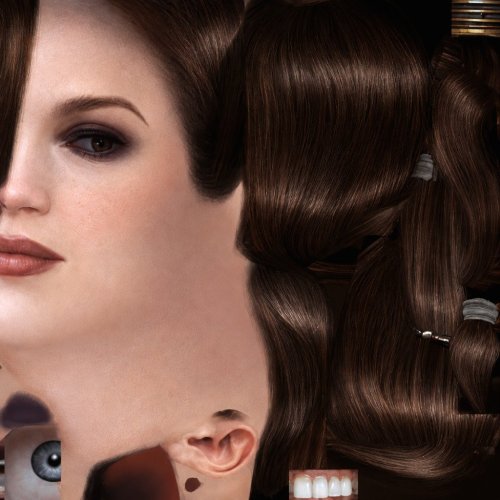
HD head for Bastila. (Recommended to use it with the Party Model fixes and HD Bastila mod by redrob41.) -
View File Bastila HD Head HD head for Bastila. (Recommended to use it with the Party Model fixes and HD Bastila mod by redrob41.) Submitter GearHead Submitted 06/22/2026 Category Knights of The Old Republic Mods Used K1R Compatible Yes Does this mod/file/content use AI? Yes If you use AI, please describe how it is used. I generated the texture with AI then did some minor edits to the picture like color correction ect...
-
View File Vanilla Characters HD Optimized V A N I L L A C H A R A C T E R S H D V E R S I O N 3.0 An HD character texture overhaul for STAR WARS: KNIGHTS OF THE OLD REPUBLIC II THE SITH LORDS ━━━━━━━━━━━━━━━━━━━━━━━━━━━━━━━━━━━━━━━━━━━━━━ The familiar faces of the Old Republic—restored in high definition. ━━━━━━━━━━━━━━━━━━━━━━━━━━━━━━━━━━━━━━━━━━━━━━ O V E R V I E W Vanilla Characters HD enhances the original character textures from KOTOR 2 while preserving the game’s classic art direction. Version 3.0 has been rebuilt using optimized TPC textures and a new modular file structure. Transparency and alpha-channel issues affecting certain textures in previous versions have also been fixed. The textures were upscaled at 4x using Topaz Gigapixel AI and optimized primarily at approximately 2K resolution. ────────────────────────────────────────────── T E X T U R E C O V E R A G E Humans and aliens Droids Beasts and creatures Clothing and armor Character body textures ────────────────────────────────────────────── M O D U L A R F I L E S MAIN FILE — VANILLA GAME Contains the HD textures used by the original game. This is the primary standalone file. TSLRCM and the KOTOR 2 Community Patch are not required. OPTIONAL TSLRCM FILE Contains additional HD textures for characters and restored content included in The Sith Lords Restored Content Mod. Install this file only when using TSLRCM. OPTIONAL COMMUNITY PATCH FILE Contains HD versions of character textures included or modified by the KOTOR 2 Community Patch. Install this file only when using the Community Patch. ────────────────────────────────────────────── F E A T U R E S Optimized TPC texture format Mostly 2K character textures Fixed transparency and alpha-channel issues Modular optional files Preserves the original KOTOR 2 visual style No gameplay changes No model changes No character redesigns ────────────────────────────────────────────── I N S T A L L A T I O N Download and extract the Main File. Place the included TPC files into your KOTOR 2 Override folder. Install the optional TSLRCM file only when using TSLRCM. Install the optional Community Patch file only when using the KOTOR 2 Community Patch. Allow the optional files to overwrite textures from the Main File when prompted. IMPORTANT: Remove any older version of Vanilla Characters HD before installing Version 3.0. Old TGA files may override the new TPC textures. When updating, use Remove Duplicate TGA/TPC or manually remove duplicate TGA and TPC copies of the same texture. ────────────────────────────────────────────── C O M P A T I B I L I T Y The Main File can be installed by itself with the vanilla game. Optional files are available for: The Sith Lords Restored Content Mod KOTOR 2 Community Patch Other character texture mods may replace some of the same files. The textures installed last will generally take priority. ────────────────────────────────────────────── V E R S I O N 3.0 Converted the mod to optimized TPC textures Removed the previous uncompressed TGA version Added a modular file structure Added optional TSLRCM textures Added optional Community Patch textures Fixed transparent texture issues Corrected alpha-channel handling Improved texture optimization ━━━━━━━━━━━━━━━━━━━━━━━━━━━━━━━━━━━━━━━━━━━━━━ M A Y T H E F O R C E B E W I T H Y O U ━━━━━━━━━━━━━━━━━━━━━━━━━━━━━━━━━━━━━━━━━━━━━━ Submitter Saul0097 Submitted 06/02/2026 Category Skins TSLRCM Compatible Yes
-
View File Vanilla Planets HD VANILLA PLANETS HD A VANILLA-FAITHFUL ENVIRONMENTAL TEXTURE OVERHAUL ━━━━━━━━━━━━━━━━━━━━━━━━━━━━━━━━━━━━ OVERVIEW ━━━━━━━━━━━━━━━━━━━━━━━━━━━━━━━━━━━━ Vanilla Planets HD is an environmental texture upscale for Star Wars: Knights of the Old Republic II — The Sith Lords. The mod upscales the game’s planet, area, environmental, screen, display, and panel textures using Topaz Gigapixel at up to four times their original resolution. The goal is to keep KOTOR II as close to its original visual style as possible while making the textures cleaner, sharper, and more detailed. I created this mod because I wanted an HD environmental overhaul that preserved the original materials without making surfaces excessively reflective or glossy. There are no ReShade presets, lighting edits, shader changes, or major visual redesigns. FEATURES ━━━━━━━━━━━━━━━━━━━━━━━━━━━━━━━━━━━━ • Planet and area textures upscaled at up to 4x resolution • All major environments included • Screens, displays, monitors, and panels included • Ebon Hawk interior and exterior included • Optimized TPC textures • Vanilla-faithful appearance • Separate add-ons for TSLRCM and the KOTOR 2 Community Patch INCLUDED AREAS ━━━━━━━━━━━━━━━━━━━━━━━━━━━━━━━━━━━━ Peragus and the Harbinger Telos Ebon Hawk Interior and Exterior Dantooine Dxun Onderon Nar Shaddaa Korriban Malachor V Shared planet and environmental textures Screens, displays, monitors, and panels DOWNLOADS ━━━━━━━━━━━━━━━━━━━━━━━━━━━━━━━━━━━━ There are three files total. MAIN FILE The complete Vanilla Planets HD texture overhaul. This file is required for all users. TSLRCM ADD-ON Additional textures for users of The Sith Lords Restored Content Mod. Requires the Vanilla Planets HD main file and TSLRCM. KOTOR 2 COMMUNITY PATCH ADD-ON Additional textures for users of the KOTOR 2 Community Patch. Requires the Vanilla Planets HD main file and the KOTOR 2 Community Patch. INSTALLATION ━━━━━━━━━━━━━━━━━━━━━━━━━━━━━━━━━━━━ UPDATING FROM A PREVIOUS VERSION If you are updating from a previous version of Vanilla Planets HD, delete the following files from your override folder if they are present: DAN_blst03.tpc DAN_fall.tpc DAN_gobo1.tpc DAN_gobo2.tpc DAN_LBms.tpc DAN_leaf02.tpc DANfx_mots.tpc KOR_lightbeams.tpc DXN_treeline2.tpc PLC_Water01b.tpc After removing these files, install the new version normally using the instructions below. MAIN FILE 1. Download and extract the Vanilla Planets HD main file. 2. Copy the included override folder into your main KOTOR II installation directory. 3. replace files if prompted. ADD-ONS If you use TSLRCM or the KOTOR 2 Community Patch, install the corresponding Vanilla Planets HD add-on after installing the main file. If you use both TSLRCM and the KOTOR 2 Community Patch, install the TSLRCM add-on first, followed by the KOTOR 2 Community Patch add-on. Replace files when prompted. Highly Recommended After Installation After installation, download and install Remove Duplicate TGA-TPC. Run the included .bat file and delete any duplicate TGA files. IMPORTANT The TSLRCM and KOTOR 2 Community Patch files are add-ons and are not standalone downloads. Always install the Vanilla Planets HD main file first. SKYBOXES AND BACKDROPS ━━━━━━━━━━━━━━━━━━━━━━━━━━━━━━━━━━━━ Vanilla Planets HD does not replace the game’s major skyboxes, distant backdrops, or cockpit window views. These assets were intentionally left untouched because Kexikus has already created excellent high-resolution skybox and backdrop mods, while tjsase has created a dedicated mod for the cockpit views. The following mods are highly recommended: High Quailty Skyboxes II TSL Backdrop Improvements TSL HD Cockpit Skyboxes COMPATIBILITY ━━━━━━━━━━━━━━━━━━━━━━━━━━━━━━━━━━━━ Vanilla Planets HD is compatible with most gameplay, character, interface, bug-fix, and audio mods. Conflicts may occur with other planet or environmental texture overhauls that replace the same files. When two mods contain textures with the same filename, the files installed last will take priority. CREDITS ━━━━━━━━━━━━━━━━━━━━━━━━━━━━━━━━━━━━ Obsidian Entertainment and BioWare — Original KOTOR II textures and assets ━━━━━━━━━━━━━━━━━━━━━━━━━━━━━━━━━━━━ VANILLA PLANETS HD The original worlds of KOTOR II in higher definition. Submitter Saul0097 Submitted 05/20/2026 Category Mods TSLRCM Compatible Yes
-
View File Vanilla Maps HD Vanilla Maps HD upscales the map textures in Knights of the Old Republic II to make them sharper and cleaner. I tried other upscaled map mods, but they still were not sharp or high res enough for what I wanted. So I extracted the map textures myself and upscaled them x4 using Topaz Gigapixel. This mod also includes upscaled map textures for The Sith Lords Restored Content Mod and Droid Planet. You do not need either mod installed for Vanilla Maps HD to work. If you do use them, the included map textures are covered. Installation instructions Extract the zip file Place override folder into your main kotor 2 directory Replace files if prompted Main features Upscaled vanilla KOTOR II map textures x4 Topaz Gigapixel upscale Sharper and cleaner map images Includes support for The Sith Lords Restored Content Mod map textures Includes support for Droid Planet map textures Optional file available for Cathalan Improvement Project Requirements No hard requirements. The Sith Lords Restored Content Mod and Droid Planet are not required, but their map textures are included for users who have them installed. Cathalan Improvement Project is only needed if you use the optional Cathalan file. Credits Obsidian Enterainment Submitter Saul0097 Submitted 05/06/2026 Category Mods TSLRCM Compatible Yes
-
View File HD Dark Hope Textures for K2 A Mod for Star Wars Knights of The Old Republic II Author: N-DReW25 1.1.0 Release Date: 29.08.2026 Installation: Select which HD texture you would like to install. For "HD Grenn" and "HD Zhugs" open the "For Override" folder and drag/copy the textures within and drop/paste them into your Kotor II Override folder. Delete the files "N_DolGrenH.tpc" and/or "N_Duros04.tpc" and "N_Duros05.tpc" if they are present. For the "Normal" install of "HD Luxa" open the "For Override" folder and drag/copy the textures within and drop/paste them into your Kotor II Override folder. Delete the files "N_Lala_XuA01.tpc" and "N_Lala_XuH.tpc" if they are present. For the "Thigh High Boots" install of "HD Luxa" you must first install DarthParametric's "TSL Thigh-High Boots For Female Twi'lek Body (Modder's Resource)" mod. Once that mod is installed, open the "For Override" folder and drag/copy the textures within and drop/paste them into your Kotor II Override folder. Delete the files "N_Lala_XuA01.tpc" and "N_Lala_XuH.tpc" if they are present. Uninstallation: Delete the N_DolGrenH.tga, N_Lala_XuA01.tga, N_Lala_XuH.tga, N_Duros04.tga, and/or N_Duros05.tga files from your Override folder. Description: This pack is a compilation of edits made by N-DReW25 to the released work of the modder Dark Hope to resemble Kotor II characters. Whilst Dark Hope did make the original textures for Kotor I, it was N-DReW25 who made these textures for Kotor II. As Dark Hope is focusing her current work on Kotor I mods please do not bother her about this mod. This pack contains HD textures for Lieutenant Dol Grenn, the Zhug Brothers, and Luxa. For Lieutenant Dol Grenn, his head in Kotor II was made via photo sourcing elements of other old male heads from Kotor I. Most of his face and beard comes from Davik, his eyebrows and sideburns are Davik's eyebrows and sideburns that are recolored brown, and most of his hair is Deadeye Duncan's hair that has also been recolored brown. Using this exact same method described above, I was able to photo source elements of Dark Hope's Davik and Deadeye Duncan heads to make a HD Lieutenant Grenn head. For Luxa, her head was a recolored Kotor I player head whilst her body was a reskinned Twi'lek outfit. I recolored Dark Hope's PFHA01 HD mod and one of her Twi'lek dancer body textures to resemble Luxa. I also made an alternative Luxa version for DarthParametric's TSL Thigh-High Boots For Female Twi'lek Body (Modder's Resource) mod. For the Zhug Brothers, I photo sourced elements of RedRob41's Zhug Brother upscale, imposed them onto Dark Hope's Duros, and recolored elements of Dark Hope's Duros to resemble the Kotor II Zhug Brothers. Known Bugs: This mod shouldn't have bugs but if you find any report them to me on Deadlystream. Incompatibilities: Would be incompatible with any mods which add N_DolGrenH.tga, N_DolGrenH.tpc, N_Lala_XuA01.tga, N_Lala_XuA01.tpc, N_Lala_XuH.tga, N_Lala_XuH.tpc, N_Duros04.tga, N_Duros04.tpc, N_Duros05.tga, and N_Duros05.tpc. Permissions: As Dark Hope gave free permission for anyone to use her mods and the assets I photo sourced from RedRob41's mod is a modder's resource, you are therefore allowed to use this mod as it was made using her work. Thanks to: Dark Hope: For giving everyone free permission to use her work! RedRob41: For making his 4x Upscale+ Character Textures & Model Fixes mod a modder's resource! Bioware: For such an amazing game! Obsidian Entertainment: For such an amazing sequel! Fred Tetra: For Kotor Tool! And everyone who downloads the mod! Legal: THIS MODIFICATION IS NOT SUPPORTED BY BIOWARE/OBSIDIAN ENTERTAINMENT, LUCASARTS, DISNEY OR ANY LICENSERS/SPONSORS OF THE MENTIONED COMPANIES. USE OF THIS FILE IS AT YOUR OWN RISK AND THE ABOVE-MENTIONED COMPANIES OR THE AUTHOR IS NOT RESPONSIBLE FOR ANY DAMAGE CAUSED TO YOUR COMPUTER FOR THE USAGE OF THIS FILE. Submitter N-DReW25 Submitted 05/01/2026 Category Skins TSLRCM Compatible Yes
-
Version 1.0.1
6,991 downloads
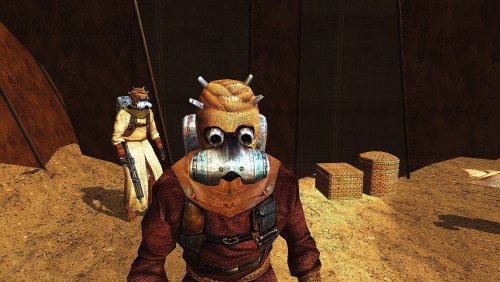
The demonization of the Sand People has always irritated me. Don't these wonderful characters deserve to at least have decent 2K textures? Installation: Move all files from the downloaded and opened archive to the Override folder of your game. Update: added .txi files -
Version 1.0.0
393 downloads
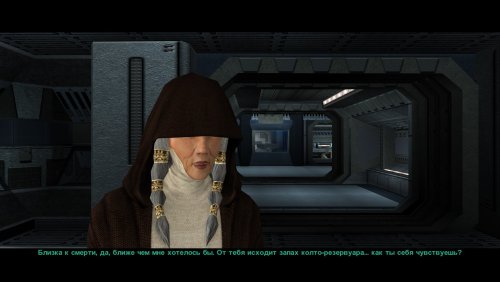
A new retexture of the wonderful character Kreia, also known as Darth Traya. Both iterations, textures of the Light and Dark Side of the Force are presented. Installation: unpack all files to your Override folder. -
View File HD Realistic Sand People The demonization of the Sand People has always irritated me. Don't these wonderful characters deserve to at least have decent 2K textures? Installation: Move all files from the downloaded and opened archive to the Override folder of your game. Update: added .txi files Submitter Etienne76 Submitted 08/17/2024 Category Skins K1R Compatible Yes
-
Version 1.0.0
6,673 downloads
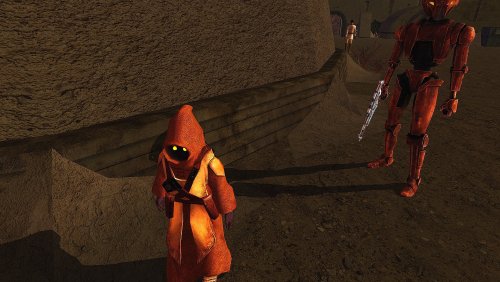
Retextures of Jawas. Jawas are sexy! Installation: unpack and place files to your game Override folder -
View File HD realistic Jawas Retextures of Jawas. Jawas are sexy! Installation: unpack and place files to your game Override folder Submitter Etienne76 Submitted 08/18/2024 Category Skins K1R Compatible Yes
-
View File HD realistic Kreia A new retexture of the wonderful character Kreia, also known as Darth Traya. Both iterations, textures of the Light and Dark Side of the Force are presented. Installation: unpack all files to your Override folder. Submitter Etienne76 Submitted 07/29/2024 Category Skins TSLRCM Compatible Yes
-

Version 1.1.0
15,753 downloads
This computer panel makes various appearances throughout the game - on Peragus, Telos, Dxun and Malachor - but has somehow eluded the attention of every HD texture pack I have installed. I initially intended to just upscale it with an AI and be done with it, but the AI didn't do such a good job... so I started making tiny little tweaks by hand with HAL eyes, bicycle reflectors, screenshots from various SW films, fake GUI elements I made myself, until eventually this was the result. The panels have gone from 256x256 to a possibly excessive 4096x4096 pixels. Drop files into override, compatible with anything that doesn't alter the same textures. I give blanket permission to use / improve this texture, just give me a nod. -
Version 1.0.0
33,371 downloads
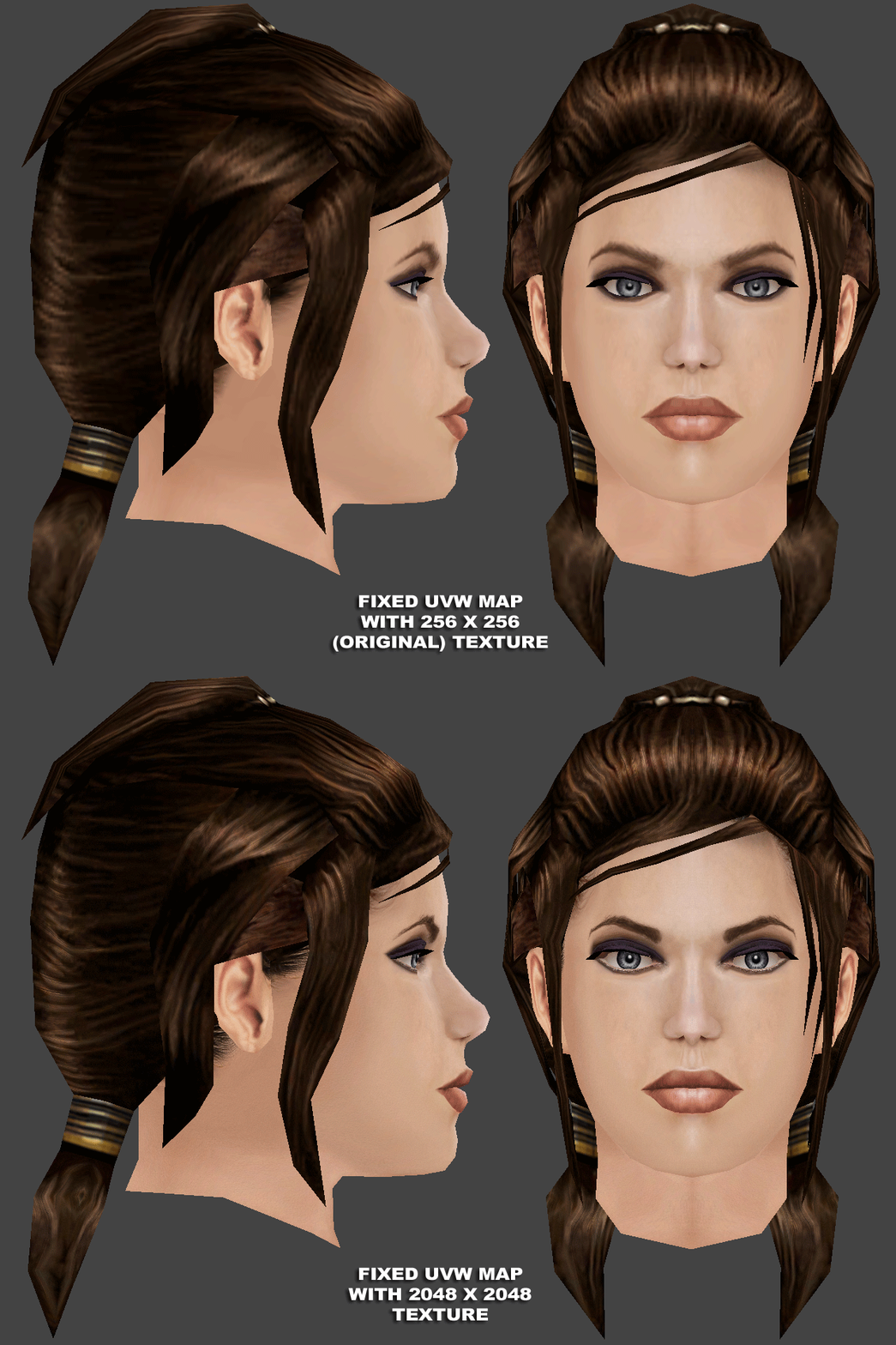
The main purpose of this mod is to fix many of the party models that have uvw errors. Some of these errors may be too small to see in-game, but most become glaring when using some of the HD texture mods here on this site. The only HD texture that I have included here, is for Bastila Shan's head model (P_BastilaH04) which is now 2048x2048 pixels. I have tried to remain true to her original look. The models that I have fixed, and are included, are: default clothes models for Bastila Shan Canderous Ordo Carth Onasi Jolee Bindo Juhani Mission Vao HK-47's whole body model head models for Bastila and Carth HD head texture for Bastila head texture for Jolee (to fix the mustache) two additional clothes textures for Carth Each of these character's files can be used separately, so that the user has the option of mixing and matching with other mods. Many of the screenshots are animated with before/after scenes that flip every 7 seconds. There are included text files with much more detail as to what has been fixed in each. There are also a few files included that other modders can use for helping their own texture mods (some uvw maps and a few Photoshop psd files with multiple layers already separated). -


Version 1.0.1
278 downloads
======================================================== KNIGHTS OF THE OLD REPUBLIC II: THE SITH LORDS ======================================================== Dark Hope and Jorak Uln's IGM HD Endar Spire Textures Recolored for TSL's The Harbinger 1.0.1 ================================= Author: ConansHair Contact: PM me on DeadlyStream For: TSL Date:06/09/22 - 1.0.0 08/01/22 - 1.0.1 ================================= DESCRIPTION: Sometime around the year 2016 I believe, Dark Hope released IGM for K1, with incredible HD textures for just about every environment. (For more info on IGM, please contact https://deadlystream.com/profile/16561-dark-hope/.) Sometime afterward, Sith Holocron recolored the IGM Endar Spire textures for use with TSL, and the results were amazing! So, with kind and gracious permission from Dark Hope, Jorak Uln, and Sith Holocron, I present to you: Dark Hope and Jorak Uln's IGM HD Endar Spire Textures Recolored for TSL's The Harbinger! What this Mod does: Updates TSL's The Harbinger's interior to HD textures in the same green/teal color scheme as the vanilla interior, with amazing results, that simple...Haha!! I have also included new Loadscreens showcasing the new interior, as an option, for those who wish to do so... Mods used in the making of the screenshots (These Mods were used in the making of the BEFORE screenshots, as well.) https://deadlystream.com/files/file/2028-harbinger-bridge-repairs/ https://deadlystream.com/files/file/1374-harbinger-hull-fixes/ https://deadlystream.com/files/file/949-tsl-backdrop-improvements/ https://deadlystream.com/forum/files/file/321-improved-peragus-asteroid-fields/ https://deadlystream.com/forum/files/file/361-replacement-peragus-ii-artwork-by-trench/ ___________________________________________________________ COMPATIBILITY: WILL NOT BE compatible with any other Mods that alter The Harbinger's interior...Should be compatible with almost everything else. Optional Loadscreens: It is HIGHLY RECOMMENDED that you download and install Sith Holocron's https://deadlystream.com/files/file/1255-replacement-loading-screens-for-kotor2-original-pack-with-or-without-tslrcm-part-1/ (All 3 Parts) BEFORE installing the Optional Loadscreens, as you can expect full compatibility with said Mod...I attempted to recreate these TO THE BEST OF MY ABILITY... ___________________________________________________________ INSTALLATION: Extract the zip file somewhere on your PC, and simply copy/paste (overwrite, if prompted) the contents of the "For Override" folder to your TSL Override directory. For additional instructions, see below:(BUGS:) Optional Loadscreens: Simply copy/paste (overwrite, if prompted) the contents of the "Optional Loadscreens" folder to your TSL Override directory. ___________________________________________________________ UNINSTALL: Simply remove the files from your TSL Override directory. ___________________________________________________________ BUGS: This Mod's files are in the TGA/TXI file format...If REPLACING any other texture overhaul Mods that are in the TPC file format, WITH THIS MOD, be sure to open your TSL Override directory and remove any duplicate TPC files, as TGA's and TPC's with duplicate filenames WILL NOT WORK in-game! ___________________________________________________________ CREDITS: ALL Credit for Original Textures goes to Dark Hope and Jorak Uln. This Mod would have not been possible without IGM, so primary credit resides with them. Credit for any Recolors goes to Sith Holocron. Again, this Mod would not have been possible without him, as I was unaware of the IGM before this. Any further color adjustments, touch-ups, and/or alpha adjustments by ConansHair. TXI's verified and game tested by ConansHair. Loadscreens made by ConansHair, using ndix UR's TSL Loadscreen Templates, and also using Sith Holocron's TSL Replacement Loadscreens as guides. ___________________________________________________________ THANKS: Dark Hope: Many thanks for the kind permission to release this Mod, and for being the inspiration for so many of us...Thank You!! Jorak Uln: Many thanks for the kind permission to include original textures with this Mod...Thank You!! Sith Holocron: Many thanks for the original recolors, for proofreading this ReadMe file, and for the kick in the pants and polite urging of me to release this as my first mod. Thank You!! Also, many thanks for patiently answering the million questions I had whilst getting this Mod ready for initial upload!! Thank You!! ndix UR: Many thanks for the TSL Loadscreen Templates! Fred Tetra: Many thanks for KotOR Tool! Many thanks to the Modders whose Mods were used in the making of this Mod's screenshots! Also, I want to thank all the Modders out there whose work I've consistently studied and learned from. ___________________________________________________________ LEGAL: THIS MODIFICATION IS PROVIDED AS-IS AND IS NOT SUPPORTED BY BIOWARE/OBSIDIAN ENTERTAINMENT, LUCASARTS, DISNEY OR ANY LICENSERS/SPONSORS OF THE MENTIONED COMPANIES. USE OF THIS FILE IS AT YOUR OWN RISK. NEITHER THE AFOREMENTIONED COMPANIES NOR THE AUTHOR ARE RESPONSIBLE FOR ANY DAMAGE CAUSED TO YOUR COMPUTER FOR THE USAGE OF THESE FILES. I hereby state that I specifically do NOT wish this mod to be uploaded to Steam Workshop. I may release this on NexusMods at a later date, but I don't wish others to do so. Usage in other mods must be requested AND approved by a consensus of myself, Jorak Uln, Sith Holocron, and Dark Hope, before your use.- 1 comment
-
- 4
-

-
- sith holocron
- dark hope
- (and 4 more)
-
View File Dark Hope and Jorak Uln's IGM HD Endar Spire Textures Recolored for TSL's The Harbinger ======================================================== KNIGHTS OF THE OLD REPUBLIC II: THE SITH LORDS ======================================================== Dark Hope and Jorak Uln's IGM HD Endar Spire Textures Recolored for TSL's The Harbinger 1.0.1 ================================= Author: ConansHair Contact: PM me on DeadlyStream For: TSL Date:06/09/22 - 1.0.0 08/01/22 - 1.0.1 ================================= DESCRIPTION: Sometime around the year 2016 I believe, Dark Hope released IGM for K1, with incredible HD textures for just about every environment. (For more info on IGM, please contact https://deadlystream.com/profile/16561-dark-hope/.) Sometime afterward, Sith Holocron recolored the IGM Endar Spire textures for use with TSL, and the results were amazing! So, with kind and gracious permission from Dark Hope, Jorak Uln, and Sith Holocron, I present to you: Dark Hope and Jorak Uln's IGM HD Endar Spire Textures Recolored for TSL's The Harbinger! What this Mod does: Updates TSL's The Harbinger's interior to HD textures in the same green/teal color scheme as the vanilla interior, with amazing results, that simple...Haha!! I have also included new Loadscreens showcasing the new interior, as an option, for those who wish to do so... Mods used in the making of the screenshots (These Mods were used in the making of the BEFORE screenshots, as well.) https://deadlystream.com/files/file/2028-harbinger-bridge-repairs/ https://deadlystream.com/files/file/1374-harbinger-hull-fixes/ https://deadlystream.com/files/file/949-tsl-backdrop-improvements/ https://deadlystream.com/forum/files/file/321-improved-peragus-asteroid-fields/ https://deadlystream.com/forum/files/file/361-replacement-peragus-ii-artwork-by-trench/ ___________________________________________________________ COMPATIBILITY: WILL NOT BE compatible with any other Mods that alter The Harbinger's interior...Should be compatible with almost everything else. Optional Loadscreens: It is HIGHLY RECOMMENDED that you download and install Sith Holocron's https://deadlystream.com/files/file/1255-replacement-loading-screens-for-kotor2-original-pack-with-or-without-tslrcm-part-1/ (All 3 Parts) BEFORE installing the Optional Loadscreens, as you can expect full compatibility with said Mod...I attempted to recreate these TO THE BEST OF MY ABILITY... ___________________________________________________________ INSTALLATION: Extract the zip file somewhere on your PC, and simply copy/paste (overwrite, if prompted) the contents of the "For Override" folder to your TSL Override directory. For additional instructions, see below:(BUGS:) Optional Loadscreens: Simply copy/paste (overwrite, if prompted) the contents of the "Optional Loadscreens" folder to your TSL Override directory. ___________________________________________________________ UNINSTALL: Simply remove the files from your TSL Override directory. ___________________________________________________________ BUGS: This Mod's files are in the TGA/TXI file format...If REPLACING any other texture overhaul Mods that are in the TPC file format, WITH THIS MOD, be sure to open your TSL Override directory and remove any duplicate TPC files, as TGA's and TPC's with duplicate filenames WILL NOT WORK in-game! ___________________________________________________________ CREDITS: ALL Credit for Original Textures goes to Dark Hope and Jorak Uln. This Mod would have not been possible without IGM, so primary credit resides with them. Credit for any Recolors goes to Sith Holocron. Again, this Mod would not have been possible without him, as I was unaware of the IGM before this. Any further color adjustments, touch-ups, and/or alpha adjustments by ConansHair. TXI's verified and game tested by ConansHair. Loadscreens made by ConansHair, using ndix UR's TSL Loadscreen Templates, and also using Sith Holocron's TSL Replacement Loadscreens as guides. ___________________________________________________________ THANKS: Dark Hope: Many thanks for the kind permission to release this Mod, and for being the inspiration for so many of us...Thank You!! Jorak Uln: Many thanks for the kind permission to include original textures with this Mod...Thank You!! Sith Holocron: Many thanks for the original recolors, for proofreading this ReadMe file, and for the kick in the pants and polite urging of me to release this as my first mod. Thank You!! Also, many thanks for patiently answering the million questions I had whilst getting this Mod ready for initial upload!! Thank You!! ndix UR: Many thanks for the TSL Loadscreen Templates! Fred Tetra: Many thanks for KotOR Tool! Many thanks to the Modders whose Mods were used in the making of this Mod's screenshots! Also, I want to thank all the Modders out there whose work I've consistently studied and learned from. ___________________________________________________________ LEGAL: THIS MODIFICATION IS PROVIDED AS-IS AND IS NOT SUPPORTED BY BIOWARE/OBSIDIAN ENTERTAINMENT, LUCASARTS, DISNEY OR ANY LICENSERS/SPONSORS OF THE MENTIONED COMPANIES. USE OF THIS FILE IS AT YOUR OWN RISK. NEITHER THE AFOREMENTIONED COMPANIES NOR THE AUTHOR ARE RESPONSIBLE FOR ANY DAMAGE CAUSED TO YOUR COMPUTER FOR THE USAGE OF THESE FILES. I hereby state that I specifically do NOT wish this mod to be uploaded to Steam Workshop. I may release this on NexusMods at a later date, but I don't wish others to do so. Usage in other mods must be requested AND approved by a consensus of myself, Jorak Uln, Sith Holocron, and Dark Hope, before your use. Submitter ConansHair Submitted 06/09/2022 Category Skins TSLRCM Compatible Yes
-
View File Darth Sapiens’ T3-M4 HD 2k [Ported to Kotor 1] A Mod for Star Wars Knights of The Old Republic Authors: N-DReW25 1.0.0 Release Date: 11.05.2022 Description: On the 21st of February 2015, Darth Sapiens released his T3-M4 HD 2k reskin mod to Deadlystream.com (http://deadlystream.com/forum/files/file/514-darth-sapiens-presents-t3m4-hd-2k/). In the years following his release, Sith Holocron recolored Sapiens’ texture for the other astromech droids in the game /( https://deadlystream.com/files/file/971-refurbished-astromech-droids/) What we didn’t know is that Sith Holocron recolored the T3-M4 texture for his own personal uses as he was attempting to get closer to the coloring seen in the original “vanilla” T3-M4 texture. Sapiens’ original mod can only work in K1 if the player renames the original texture (and the associated TXI file) to the K1 name structure. To quote from Darth Sapiens’ original mod page: "this is a t3m4 skin I have had in the works for a little while now, my usual rules apply, use this however you'd like but give me credit and a PM, all the disclaimers and stuff apply. thanks obsidian and bioware, NO thanks Disney." With this is mind, I have decided to publish Sith Holocron’s modified version of the T3-M4 HD 2k mod for Kotor 1 in particular. All the credit goes to Darth Sapiens for making the original mod. (Please see Credit section for additional credits.) Installation: For Star Wars Knights of the Old Republic - Extract all files into the Star Wars Knights of the Old Republic/Override folder. Uninstallation: Take it out again. Known Bugs: None known at this time. Credits: This mod would not have been possible with Darth_Sapiens' mod so primary credit belongs to him. Oh . . . and credit to Sith Holocron for the recoloring and responding quickly to my questions about this mod. And the screenshots! Additional Mod Suggestions: If you like the look of Sapiens’ mod, may I recommended to you also download and install Sith Holocron’s Refurbished Astromech Droids mod? (https://deadlystream.com/files/file/971-refurbished-astromech-droids/) Unlike this mod, no renaming was required for that mod. You’ll have the added benefit of Darth Sapiens’ design being standard through the game. This of course is optional. Of course, you may prefer Sapiens’ coloring of T3-M4, especially as some of you have been using that texture in TSL for years. That seems fair to me! In that case, I recommend you download Sapiens’ mod (linked above) to your desktop and do the following: - First uninstall this mod - Rename P_t3m4_01.DDS to P_t3m3_01.DDS - Rename P_t3m4_01.txi to P_t3m3_01.txi - Rename PO_PT3m4.tga to P_pt3m3_01.tga - Rename PO_PT3m4.txi to P_pt3m3_01.txi - Move the renamed files and the remaining unnamed files in that folder to your Override folder. Legal Disclaimer: All materials and copyrights belong to LucasArts, Bioware and Obsidian Entertainment Inc. I own none of the materials, and I'm not making any money out of this mod. It is to be distributed as-is without alteration, unless by permission of me. This mod is not to be distributed for profit, either. Sith Holocron's Policy: I hereby state that I specifically do NOT wish this mod to be uploaded to Steam Workshop. I may release this on NexusMods at a later date but I don't wish others to do so. Usage in other mods must be requested AND approved by me before your use. Submitter N-DReW25 Submitted 05/10/2022 Category Skins K1R Compatible Yes
-

Version 1.0.0
601 downloads
I made this for my current playthrough to have a robe I wouldn't be embarassed to be caught wearing that also doesn't look too evil. It features: A wool mid layer, providing thermoregulation for the Jedi who wears the same clothes in every climate A bandolier to ensure your belongings aren't eaten by Cannoks Boots with lots of buckles for when you want to woo a Sith, but still in plausibly deniable Jedi colors Be "the wave of the future" in fashion and drop the files into your override folder. -
![More information about "Darth Sapiens’ T3-M4 HD 2k [Ported to Kotor 1]"](https://deadlystream.com/downloads/screens/monthly_2022_05/1260376267_T3-M4-Taris-03-DarthSapiensSkin(Recolored).thumb.png.acda78a90f39690f9b68c9a45a1c90f6.png)
Version 1.0.0
444 downloads
A Mod for Star Wars Knights of The Old Republic Authors: N-DReW25 1.0.0 Release Date: 11.05.2022 Description: On the 21st of February 2015, Darth Sapiens released his T3-M4 HD 2k reskin mod to Deadlystream.com (http://deadlystream.com/forum/files/file/514-darth-sapiens-presents-t3m4-hd-2k/). In the years following his release, Sith Holocron recolored Sapiens’ texture for the other astromech droids in the game /( https://deadlystream.com/files/file/971-refurbished-astromech-droids/) What we didn’t know is that Sith Holocron recolored the T3-M4 texture for his own personal uses as he was attempting to get closer to the coloring seen in the original “vanilla” T3-M4 texture. Sapiens’ original mod can only work in K1 if the player renames the original texture (and the associated TXI file) to the K1 name structure. To quote from Darth Sapiens’ original mod page: "this is a t3m4 skin I have had in the works for a little while now, my usual rules apply, use this however you'd like but give me credit and a PM, all the disclaimers and stuff apply. thanks obsidian and bioware, NO thanks Disney." With this is mind, I have decided to publish Sith Holocron’s modified version of the T3-M4 HD 2k mod for Kotor 1 in particular. All the credit goes to Darth Sapiens for making the original mod. (Please see Credit section for additional credits.) Installation: For Star Wars Knights of the Old Republic - Extract all files into the Star Wars Knights of the Old Republic/Override folder. Uninstallation: Take it out again. Known Bugs: None known at this time. Credits: This mod would not have been possible with Darth_Sapiens' mod so primary credit belongs to him. Oh . . . and credit to Sith Holocron for the recoloring and responding quickly to my questions about this mod. And the screenshots! Additional Mod Suggestions: If you like the look of Sapiens’ mod, may I recommended to you also download and install Sith Holocron’s Refurbished Astromech Droids mod? (https://deadlystream.com/files/file/971-refurbished-astromech-droids/) Unlike this mod, no renaming was required for that mod. You’ll have the added benefit of Darth Sapiens’ design being standard through the game. This of course is optional. Of course, you may prefer Sapiens’ coloring of T3-M4, especially as some of you have been using that texture in TSL for years. That seems fair to me! In that case, I recommend you download Sapiens’ mod (linked above) to your desktop and do the following: - First uninstall this mod - Rename P_t3m4_01.DDS to P_t3m3_01.DDS - Rename P_t3m4_01.txi to P_t3m3_01.txi - Rename PO_PT3m4.tga to P_pt3m3_01.tga - Rename PO_PT3m4.txi to P_pt3m3_01.txi - Move the renamed files and the remaining unnamed files in that folder to your Override folder. Legal Disclaimer: All materials and copyrights belong to LucasArts, Bioware and Obsidian Entertainment Inc. I own none of the materials, and I'm not making any money out of this mod. It is to be distributed as-is without alteration, unless by permission of me. This mod is not to be distributed for profit, either. Sith Holocron's Policy: I hereby state that I specifically do NOT wish this mod to be uploaded to Steam Workshop. I may release this on NexusMods at a later date but I don't wish others to do so. Usage in other mods must be requested AND approved by me before your use. -
View File Neglected Computer Panel This computer panel makes various appearances throughout the game - on Peragus, Telos, Dxun and Malachor - but has somehow eluded the attention of every HD texture pack I have installed. I initially intended to just upscale it with an AI and be done with it, but the AI didn't do such a good job... so I started making tiny little tweaks by hand with HAL eyes, bicycle reflectors, screenshots from various SW films, fake GUI elements I made myself, until eventually this was the result. The panels have gone from 256x256 to a possibly excessive 4096x4096 pixels. Drop files into override, compatible with anything that doesn't alter the same textures. I give blanket permission to use / improve this texture, just give me a nod. Submitter ScrierOne Submitted 04/30/2022 Category Skins TSLRCM Compatible Yes
-
View File HD Czerka Droid Dark Hope's excellent Protocol Droids work with TSL as well, but don't include a file for this one unique model. This is not as intricate a change as hers - it's just an AI upscale of the original texture (from 256x256 to 2048x2048), with some hand-made tweaks on the Czerka logo and some other stuff that the AI didn't get right, but I think it at least stands out less. Place files into Override Submitter ScrierOne Submitted 04/24/2022 Category Skins TSLRCM Compatible Yes
- 5 replies
-
- 1
-
-
- protocol droid
- hd
- (and 1 more)