

Skins
318 files
-
High Resolution KotOR Logo (2k)
By FF97
Hello everyone! This mod replaces the default KotOR logo in the main menu and on the loading screens with the official, high-resolution version from the press kit.
10 downloads
(0 reviews)0 comments
Submitted
-
Mission HD Redux
By StellarExile
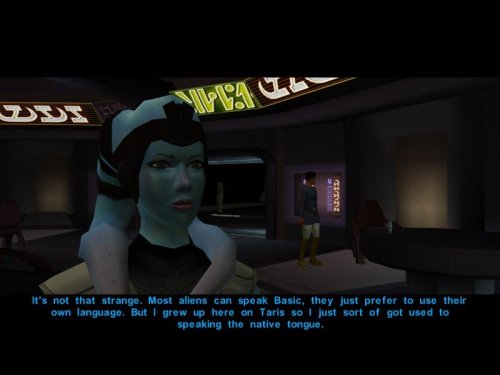
This is a small reskin of Dark Hope's HD Mission Vao. I really liked the textures but couldn't get over the significant change from Mission's original skin tone so I altered the colors to better match the original skin tone. Feel free to do whatever you want with this as Dark Hope and Quanon made their mods open permissions. To install, just move everything to your Override folder.
19 downloads
-
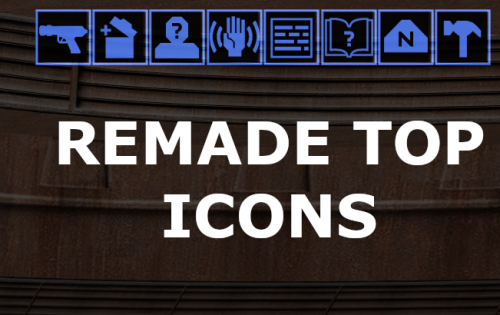
Remade Top UI Icons
By FF97
Hello everyone!
After a long hiatus, I’m back with a new mod.
High-resolution top icons—"handmade" in the game's original style rather than upscaled via AI—at 128x128 resolution.
For widescreen users,
Credit goes to J's Scaled Kotor Project for the icons upon which I based my mod.
"Scaled Kotor" is recommended as a companion mod.
20 downloads
- hud/interface
- kotor1
- (and 2 more)
-
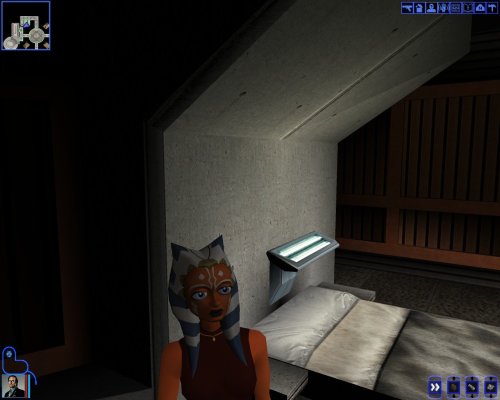
Ahsoka Tano Player Model / NPC KotOR 1
By EwokKotor
This mod adds a playable Ahsoka Tano to Kotor 1.
Her mouth is also weight painted for use as a npc head.
See ReadMe for more info.
Source File Credits:
A Giant thanks and all credits for the source files to KevBot!
"Ahsoka Tano" (https://skfb.ly/6xO6J) by KevBot is licensed under Creative Commons Attribution (http://creativecommons.org/licenses/by/4.0/).
12 downloads
(0 reviews)0 comments
Submitted
-
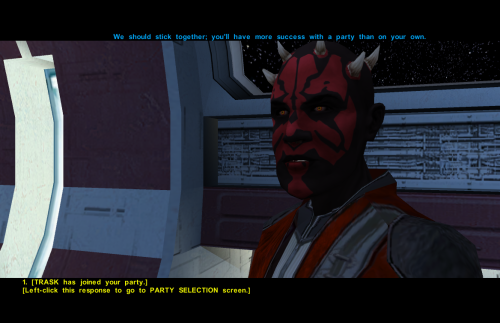
Darth Maul Head for Kotor 1
By EwokKotor
Credit:
Full credit and a giant thanks goes to Effix(ian) for their mod Effixian's Zabrak Player Characters 1.0.0.
Credit also goes to DarthParametric for their modder's resource "Bao-Dur Head Model Neck Fix" and a big thanks for giving permission to use that asset.
The assets from these two mods are the basis of this one, but Effixian's mod has many more features than the simple head model included here that I have simply made the head compatible with KOTOR 1. Deffinitley go check out and support their great work at https://deadlystream.com/files/file/2190-effixians-zabrak-player-characters/ for TSL!
Purpose:
This Mod makes the Darth Maul style head compatible with KOTOR 1 by rigging the mdl to PMHB03, essentially replacing the vanilla mesh. I then moved the eyes to match the new head, and finally adjusted the uv mapping for the eyes, and assigned the new texture to the mdl. I will probably be uploading a video of this process to the Youtube channel at some point for anyone who is interested.
Variants:
There are two head .mdl's included with this mod, the one labeled PMHB04's neck should be aligned perfectly without any clipping. It looks a little odd to me personally though as I feel the neck is too long, so I have included the model I use in my game as well labeled PMHB03. PMHB03 looks more correct in terms of height to me, but be aware there is very slight clipping with this model on some outfits.
-As the models are distinct you can technically drop both variants in your override and choose whichever you like more at character selection.
Installation:
Drop the files you want to use into your override folder, rename them to the head you want to replace, by default they replace PMHB03, and thus you can choose Maul when starting a new game, just cycle through until you see his head appear. If you want portraits or further textures I once again refer you to Effixian's mod.
40 downloads
(0 reviews)0 comments
Updated
-
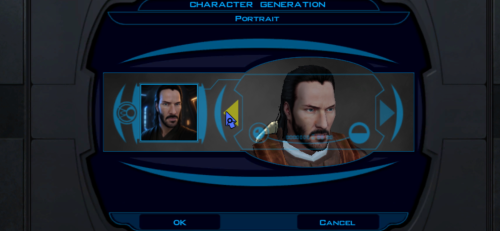
Keanu Reeves Inspired Player Head (K1)
By ShaolinGhost
AI DISCLOSURE & FEEDBACK
I use AI often in my workflows to assist with creating my mods, including handling monotonous and repetitive tasks. You should assume that anything I post has had AI assistance in some way.
As I stated in my Dathomir WIP post, I expect discussion of my projects to remain professional and focused on the actual artwork, performance, and gameplay. Constructive criticism that helps improve the art or gameplay is welcome. Derogatory statements about AI will be ignored. I am here to improve the finished product, and I will not change my workflow to accommodate personal objections to AI.
This mod adds a fully selectable male player head inspired by Keanu Reeves to Star Wars: Knights of the Old Republic.
FEATURES
• Custom high-detail head model with corrected in-game UVs and opaque 2048x2048 textures.
• Neutral, light-side, and progressive dark-side head textures that change with alignment.
• Matching alignment-aware cinematic portraits for character creation, the party interface, and the HUD.
• KOTOR I-native facial animation support: blinking, eye movement, lip sync/phonemes, and expressions.
• Rebuilt mouth articulation that opens through the natural upper/lower lip gap.
• Repositioned teeth and a fully enclosed, dark oral cavity that prevents see-through gaps from frontal, oblique, side, and reclined camera angles.
• Corrected neck and jaw shading across the welded source-model boundary.
• Long hair configured for KOTOR I's native danglymesh simulation.
• Merge-safe TSLPatcher installation for heads.2da, appearance.2da, and portraits.2da, including the installer info document.
• No executable patch is required.
INSTALLATION
1. Extract the archive outside your game folder.
2. Close KOTOR I.
3. Run TSLPatcher.exe and select the folder containing swkotor.exe if asked.
4. Start a new game and select the new portrait during male character creation.
Install after major restoration or community-patch packages. Do not copy the tslpatchdata folder directly into Override. See the included README for complete compatibility and uninstall information.
COMPATIBILITY
This release is for KOTOR I only. It uses TSLPatcher and unique resource names, and is designed to coexist with K1R and other merge-safe mods. Install this mod after K1R or other large content packages.
CREDITS
• ShaolinGhost — concept, source asset, direction, testing, and release.
• Ghost Studio — KOTOR head conversion, facial rigging, native-hair setup, packaging, and verification workflow.
• BioWare and LucasArts — KOTOR I and its original PMHA04 animation/rig foundation.
• Stoffe — TSLPatcher.
PERMISSIONS
You may make personal edits. Do not re-upload, redistribute, or include this mod in another public release without ShaolinGhost's permission. DeadlyStream staff retain the maintenance rights described in the site's upload terms.
DISCLAIMER
This is a non-commercial fan modification. It is not affiliated with or endorsed by Keanu Reeves, Lucasfilm, Disney, Electronic Arts, BioWare, or any other rights holder. Use at your own risk and keep backups of modded files.
Version: 1.1.1
Game: Knights of the Old Republic
Contains ported content from another game: No
122 downloads
- kotor 1
- player head
- (and 4 more)
-
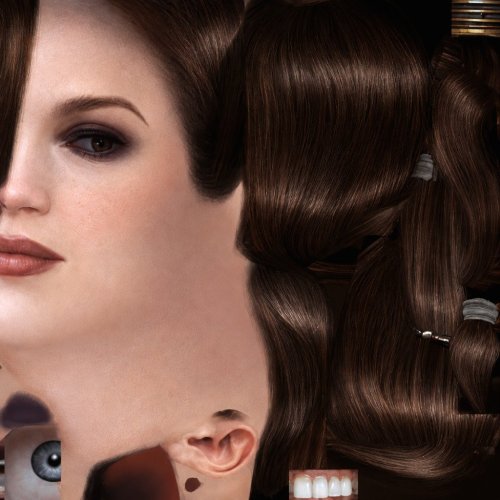
Bastila HD Head
By GearHead
HD head for Bastila. (Recommended to use it with the Party Model fixes and HD Bastila mod by redrob41.)
101 downloads
-
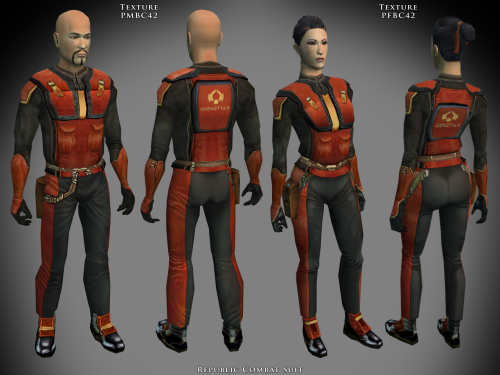
Specialized Combat Suits HD K1
By redrob41
Specialized Combat Suits HD
for Kotor
by
RedRob41
================================================================
IF YOU ARE EVER IN ANY DOUBT ABOUT INSTALLING ANY MODS, PLEASE REMEMBER TO ALWAYS BACKUP YOUR FILES BEFORE INSTALLATION, JUST IN CASE.
WARNING: MAKE SURE NOT TO REPLACE ANY FILES OF THE SAME NAME THAT ARE ALREADY PRESENT IN YOUR OVERRIDE FOLDER!
================================================================
Description: This is not really a mod, but more of a modder's resource. It includes textures for the basic Combat Suit PFBC and PMBC, as well as icons and uti files to make them wearable. Anyone who has created a story mod for either game can use these suits to add some variety to the NPCs that the player interacts with. I have also included models in which I have fixed the uvw maps, so that the textures appear correctly (the original models had some polygons in the wrong places). The new models should work with any other texture mods, since they work perfectly with the in-game ones.
The armour class is the same as the basic Combat Suit, so there isn't any real advantage to wearing them as a player. The real power of these files, is that a modder can create a whole army with both male and female members (and using any head model for NPC variety).
The textures were made from original textures that appear in both games, so there is no issue of porting.
There will be three versions of this mod to choose to download:
1 - 4x .tga version. Highest resolution, the typical texture is now 2048x2048 pixels which = 16MB. This version is the best choice to use as a modder's resource.
2 - 4x .tpc version. Created by running full size .tgas through tga2tpc program which compresses a 2048x2048 pixel file to 5.5MB. This version should be easier on PC systems, with no noticeable loss of visual fidelity.
3 - 2x .tpc version. Created by reducing full size .tgas by half in Photoshop, then running them through tga2tpc which further compresses them to 1.4MB. This version should be much easier on PC systems.
All versions include the same .mdl & .mdx files. Only one version should be installed at a time; having both .tga files and .tpc files with the same name in the Override folder may cause problems.
================================================================
Compatibility: The male models PMBCx are duplicates of the models found in the mod called 4x Upscale+ Character Textures & Model Fixes for KotOR - Version 0.52 by RedRob41. The female models PFBCx in this mod have had additional uvw fixes since the V0.52 mod, and are therefore superior.
The models aren't necessary, but the new textures will look much better with them. If you have other mods that change the models, you might prefer to use those ones. Check them out to be sure which you'd prefer.
================================================================
Includes: KotOR
Republic Combat Suit g_a_class4042.uti PFBC42.tga, PMBC42.tga, ia_class4_042.tga
Sith Combat Suit g_a_class4043.uti PFBC43.tga, PMBC43.tga, ia_class4_043.tga
Czerka Combat Suit g_a_class4044.uti PFBC44.tga, PMBC44.tga, ia_class4_044.tga
T.S.F. Combat Suit g_a_class4045.uti PFBC45.tga, PMBC45.tga, ia_class4_045.tga
Corellian Combat Suit g_a_class4046.uti PFBC46.tga, PMBC46.tga, ia_class4_046.tga
Exchange Suit g_a_class4047.uti PFBC47.tga, PMBC43.tga, ia_class4_047.tga
Black Vulkar (Orange) g_a_class4048.uti PFBC48.tga, PMBC44.tga, ia_class4_048.tga
Black Vulkar (Blue) g_a_class4049.uti PFBC49.tga, PMBC45.tga, ia_class4_049.tga
================================================================
Directions: Please copy all files to the game's Override directory.
K1 uti files: These are necessary in order to wear the armours in-game. The name of the uti file is what you would use to cheat them in with the cheat console, example: giveitem g_a_class4042 will give your player the Republic Combat suit.
================================================================
Uninstall: Delete unwanted files from the game's Override folder.
================================================================
Thanks for modding tools:
KOTOR Tool – Fred Tetra
mdlops (used version 7a2) - cchargin, JdNoa
NWMax – Joco
Replacer - Taina
tga2tpc - ndix UR
KotOR/KotOR2 Savegame Editor v3.3.2 - tk102, Fair Strides
Hex-editor XVI32 2.55 - Christian Maas
================================================================
Permission:
Consider this as a modder's resource. I give permission to any modder to use these files as a base for their own creations; as long as their creation remains free to use (not for profit); and credit is given to me as the source of any modded files. Please include a statement that specifies this mod's title and version.
The original credit of course goes to the talented artists who worked on the original games for BioWare and Obsidian. Without their work, none of this would have been possible. I have tried my best to maintain the artistic style that they created long ago.
This mod may NOT be uploaded or redistributed, in whole or in part, to any mod hosting site without my explicit permission.
As always, this mod is free for your non-commercial/personal use. There should never be a requirement to pay for it. If you like the work I do, and would like to encourage me to create more, you can always donate to my tip jar at
https://buymeacoffee.com/redrob416
where the funds collected will be used towards additional graphics tools and software.
================================================================
THIS MODIFICATION IS PROVIDED AS-IS AND IS NOT SUPPORTED BY BIOWARE CORP/OBSIDIAN ENTERTAINMENT OR LUCASARTS OR ANY LICENSERS/SPONSORS OF THE AFOREMENTIONED COMPANIES. USE OF THIS FILE IS AT YOUR OWN RISK AND THE AFOREMENTIONED COMPANIES OR THE AUTHORS ARE NOT RESPONSIBLE FOR ANY DAMAGE CAUSED TO YOUR COMPUTER FOR THE USAGE OF THIS FILE.
65 downloads
-
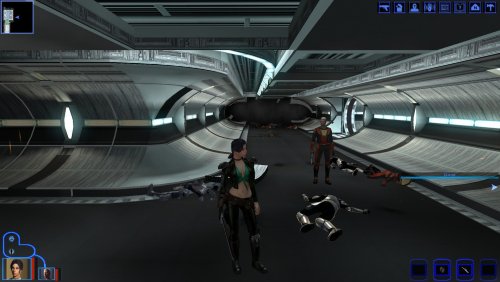
K1 Mira Clothing Replacer for Female PC
By muahwii
This mod replaces the female players clothes to Miras Outfit.
1 for each starting classes.
Now with added Black Mira skin
56 downloads
- female only
- texture
- (and 1 more)
-
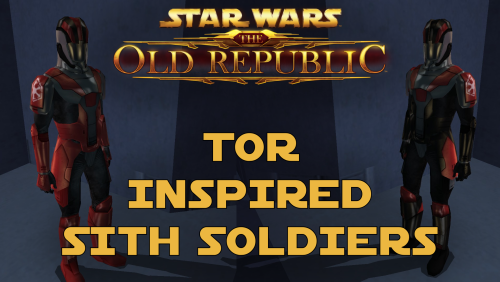
TOR Inspired Sith Soldiers
By N-DReW25
TOR Inspired Sith Soldiers
A Mod for Star Wars Knights of The Old Republic and Star Wars Knights of The Old Republic 2
Author: N-DReW25
1.1.0 Release Date: 15.05.2026
Installation:
This mod comes in two versions which each version having three sub-versions.
The two versions are the "Normal Version" which is the default texture resolution and the "HD Version" which is the high quality texture resolution version.
Inside both folders, these three sub-versions exist for both the Normal and the HD Version.
The TOR Logo version: Adds TOR inspired Sith Soldiers with the logo of the TOR era Sith Empire on their shoulders.
The Kotor Logo version: Adds TOR inspired Sith Soldiers with the logo of the Kotor era Sith Empire on their shoulders.
The No Logo version: Adds TOR inspired Sith Soldiers without no logos on their shoulders.
Select which version you want and copy "N_SithSoldier01.tga" and "N_SithSoldier02.tga" into your Override folder. Delete the files "N_SithSoldier01.tpc" and "N_SithSoldier02.tpc" if they exist in your Override.
Uninstallation:
Delete the "N_SithSoldier01.tga" and "N_SithSoldier02.tga" files from your Override folder.
Description:
The idea for this mod came from the Revenge of Revan mod. In the hypothetical event that the plot of ROR has the Player confront the Sith Empire from TOR 300 years prior to their major appearance in TOR, I would need to create enemies for the player to fight. For ROR's Imperial Soldiers, I had two options - port the Imperial Soldiers from the TOR MMO, or make my own Imperial Soldiers. By reskinning the Kotor Sith Soldiers to resemble Imperial Soldiers, I have both made a convincing enemy for the Player to fight and did so in the laziest way possible.
In the ROR mod, should these Imperial Soldier skins be used for enemies, the lore reason as to why they resemble Sith Soldiers is that, like how Revan duplicated the Leviathan ship via the Star Forge, he duplicated Kotor-era Imperial Soldier armor via the Star Forge which would produce white Imperial Soldier armor which is what the Sith Soldiers wore in Kotor. This excuse can be used as we don't know exactly where and/or how Revan designed the Sith Soldier armor - the Rakatans certainly didn't as they don't have Human proportions. And as to why the Imperial Soldiers in TOR don't resemble the ROR Imperial Soldiers, like how Phase I Clone Trooper Armor evolved into Phase II Clone Trooper Armor, the ROR Imperial Soldier Armor design would evolve into the TOR Imperial Soldier Armor design within the next 300 years.
I decided to release these skins to the public as any appearance of actual Sith Empire forces would take years of ROR development to reach that point, if they even appear at all, so why should these cool skins go to waste rotting on my hard drive when you might want to use them in your Kotor game instead.
Known Bugs:
This mod shouldn't have bugs but if you find any please report them to me on Deadlystream.
Incompatibilities:
Would be incompatible with any mods which modify "N_SithSoldier01.tga" and "N_SithSoldier02.tga" or add "N_SithSoldier01.tpc" and "N_SithSoldier02.tpc".
This mod is fully compatible with Star Wars Knights of the Old Republic 2: The Sith Lords.
Permissions:
Do NOT claim credit for this mod and do not use assets from this mod without my permission.
Thanks to:
Bioware: For such an amazing game and for making The Old Republic which inspired this mod!
Sith Holocron: For upscaling my textures!
Fred Tetra: For Kotor Tool!
Everyone who downloads the mod!
Legal:
THIS MODIFICATION IS NOT SUPPORTED BY BIOWARE/OBSIDIAN ENTERTAINMENT, LUCASARTS, DISNEY OR ANY LICENSERS/SPONSORS OF THE MENTIONED COMPANIES. USE OF THIS FILE IS AT YOUR OWN RISK AND THE ABOVE-MENTIONED COMPANIES OR THE AUTHOR IS NOT RESPONSIBLE FOR ANY DAMAGE CAUSED TO YOUR COMPUTER FOR THE USAGE OF THIS FILE.
100 downloads
-
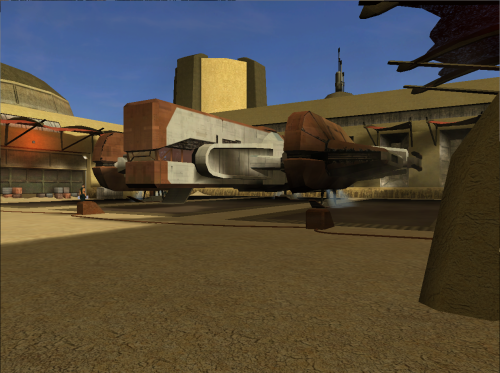
HD Ebon Hawk - K1
By J
Ported clean version of HD Ebon Hawk -TSL to KOTOR.
The original texture was upscaled then a lot of manual cleanup and detail was added.
The original leviathan hangar ebon hawk texture was missing reflections and it has been fixed.
Compatible with Yavin Station Hangar by WildKarrde
75 downloads
-
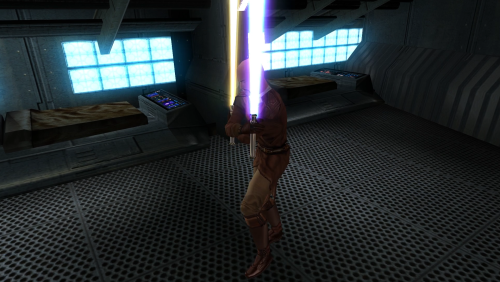
MotF and HotG Icon Styled Recolors
By justdreamer
Recolors of Mantle of the Force and Heart of the Guardian crystals inspired by in-game lightsaber icons.
Installation:
Put files in "swkotor/Override" folder.
To uninstall, simply delete "w_lsabregold01" and "w_lsabreturq01" files.
37 downloads
(0 reviews)0 comments
Updated
-
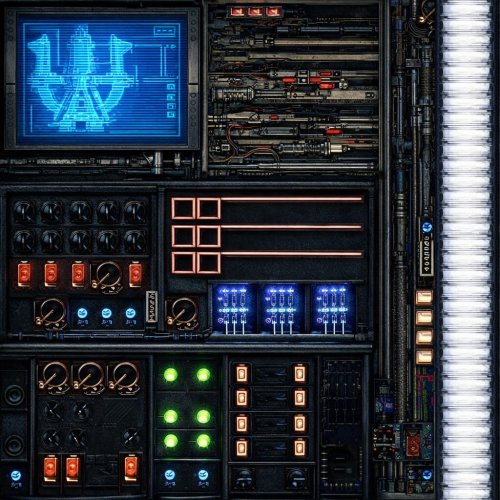
HD Ebon Hawk Hyperdrive panels
By Etienne76
HD (1024 x 1024) textures for hyperdrive panels on Ebon Hawk.
Just place it to your Override folder.
125 downloads
-
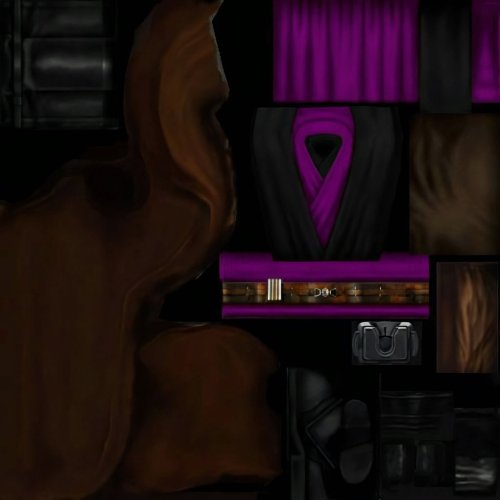
BoSSR addon for K1 Movie-Style Jedi Master Robes 1.1.0 by N-DReW25
By Etienne76
Textures for Jedi robes for "Brotherhood of Shadow: Solomon's Revenge 1.5", you need this expansion for this modification to work.
Also, you need "JC's Fashion Line I: Cloaked Jedi Robes for K1 1.4" and "K1 Movie-Style Jedi Master Robes 1.1.0" installed to work.
Installation:
Copy this mod's files to your Override folder with replace. Don't forget to delete the .txi files of the same name from your Override folder.
I haven't tested how this will work in-game yet, but since you'll be replacing the vanilla Jedi robes from the two mods mentioned above, it should work fine.
49 downloads
-
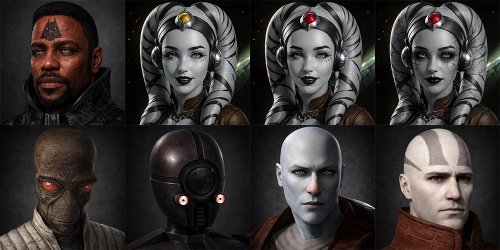
HD BoSSR Custom Portraits
By Etienne76
Custom characters portraits for "Brotherhood of Shadows: Solomon's Revenge" expansion. in 1024 x 1024 resolution.
Simply drop it to your Override folder with a replacement.
It needs "Brotherhood of Shadows: Solomon's Revenge" expansion.
59 downloads
(0 reviews)0 comments
Updated
-
-
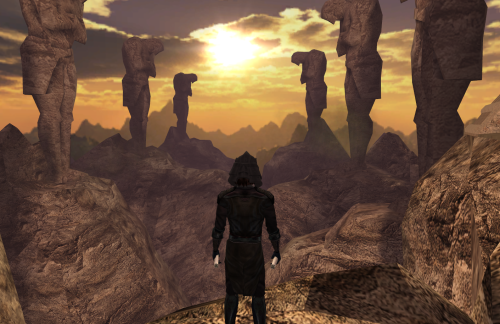
Tulak Hord's lore accurate mask
Hello, very simple mod today.
After Ajunta Pall's swords, here's another much needed modernisation of the game. I bring you one of the most known Dark Lords of the Sith's mask. The actual mask (or more like helmet ?). Not the ugly vanilla one.
Anyway, you'll just have to run the Installer and select either the standard version or the upscaled one. It'll look a bit better but will also take a bit more space, so you choose.
Compatible with everything as long as it doesn't replace Tulak Hord's mask (yes, even compatible with mods that would only change the mask's stats as long as the file doesn't get thrown in Override).
Thanks to @DarthParametric for his awesome SWTOR ports and some guy for the upscale.
I do not own this model. I know nothing of licenses so I'm just going to say that if you want to use this mod (which is basically a modders resource mixed with an end user mod), just make sure doing it is fine. Some guy says that if you want to reuse the upscale, it's okay as long as you attribute the work the same way (credit him as some guy).
255 downloads
- tulak hord
- korriban
- (and 3 more)
-
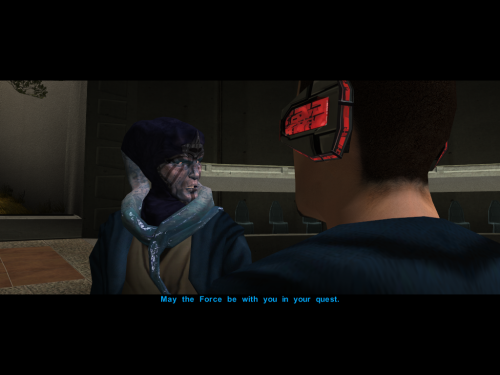
Zhar remesh and retextured
I have edited zhar the jedi master so that he is older and i changed his face traits so he looks even more unique.
214 downloads
-
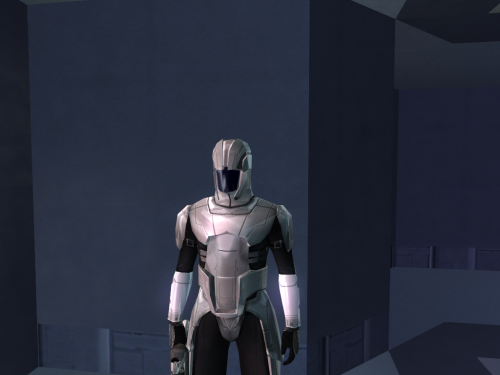
Sith soldiers higher poly and retextured
I extracted the sith soldier mesh and textured and modified it.
For better results as on the pictuere you can download my new texture of metal reflexion.
523 downloads
(0 reviews)0 comments
Updated
-
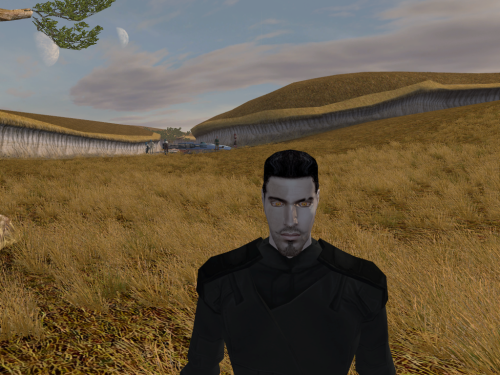
Mekel remeshed, retextured and higher poly
There's some little things to fix BUT i remeshed Mekel and retextured him.
247 downloads
(0 reviews)0 comments
Submitted
-
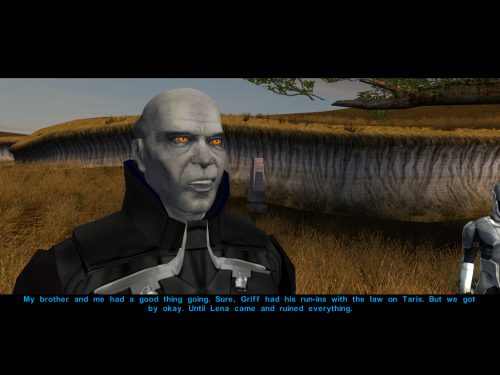
Master Jorak remeshed and retextured
The armor is retextured but not from me so it wont be uploaded here and i don't remember where i downloaded it years ago.
I retextured the face and i added some love to the mesh to he has no more painted hair and i modified his mouth so he has a little smirk when he talk. Even if he smile on the picture he doesnt always smile theets out.
284 downloads
-
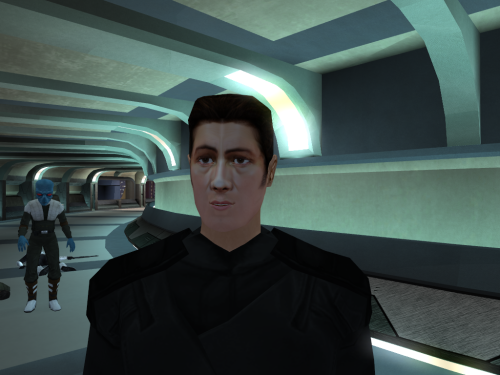
Dustil Higher poly and retextured
I wont spoil anything but i edited the mesh and made it a little higher poly and i retextured it.
183 downloads
(0 reviews)0 comments
Submitted
-
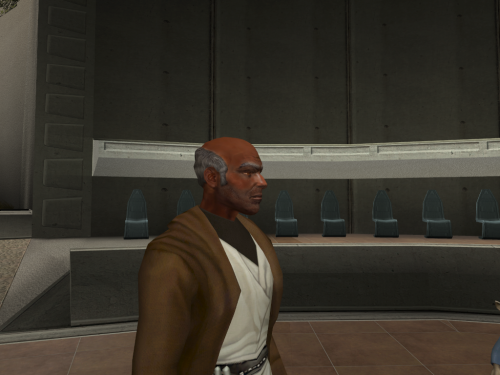
(Kotor 1) Master Dorak remesh and retextured
I decided to remesh Dorak you will see that there is no more painted hair on his skull they all have relief
Also you can install the mesh only if you want another or the vanilla textures and you can just install the texture if you dont want the change of mesh.
!!!THIS MOD IS FOR KOTOR 1 I ACCIDENTLY IMPORTED IT AD K2 MOD!!!
194 downloads
-
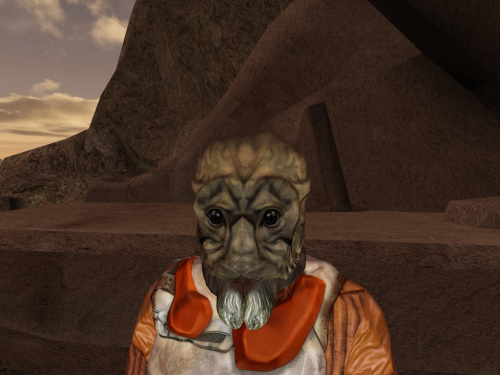
(Kotor 1) Aqualish remade
!!!THIS MOD IS FOR KOTOR 1 I ACCIDENTLY IMPORTED IT AD K2 MOD!!!
I remade the mesh of Aqualish and reworked the texture BUT
The texture you see is my personnal modification of the mod Aqualish Hd from Dark Hope
BUT i did not included my modifications just the mesh (I will ask DarkHope)
I would highly recommand to use these textures along with my mod.
329 downloads
-
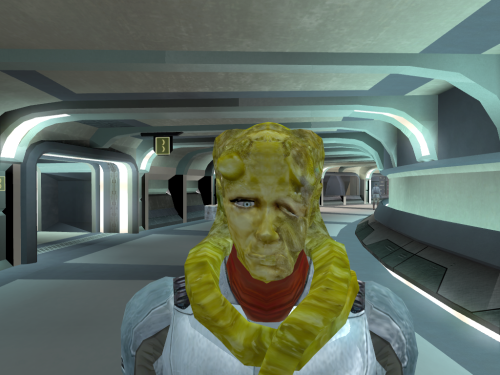
(Kotor 1) Kohmad
!!!THIS MOD IS FOR KOTOR 1 I ACCIDENTLY IMPORTED IT AD K2 MOD!!!
I remade Kohmad the beast hunter.
111 downloads
-
File Reviews
-
I'm just happy that I can finally play the game on PC with real, native, proper controller support. The fact that TSL received that massive update which added native controller support but the original KOTOR was left with mouse/keyboard years later (which was ridiculous) is finally resolved with this.
-

Stuck 0
-
I'm very eager to give it a try but I just can't. I installed KMRP, used KPM patcher with only 2 patches - KMRP and High FPS Fixes.
Then I run your install.cmd and all I get is this:
INSTALL FAILED: Executable compatibility check failed at 47 required hook site(s).
0x004F1A3E: expected [B8 14 00 00 00], found [6A 85 05 C2 9E]
0x004F1A43: expected [0F B6 D0 3B 4C 96 38], found [CE EB 19 56 C1 7C 49]
0x0054EC5B: expected [C7 02 14 00 00 00], found [34 50 71 50 DE 29]
0x00552C9A: expected [8D 7E 38 B9 15 00 00 00 F3 AB], found [66 3F 2E 33 9D 15 28 89 29 00]
0x00552F8A: expected [8D 6E 38], found [DA 7B 54]
0x00552FD6: expected [83 FF 14], found [A7 5A 68]
0x005A54A0: expected [0F B6 F0 3B 54 B1 38], found [F6 AB 63 77 5A C7 1D]
0x005A54AA: expected [83 F8 14], found [75 93 66]
...and 39 more mismatched hook site(s).
Another executable patch or a different KOTOR binary layout is using code this mod needs. No changes were made.Press any key to continue . . .
Edited by WarlordThorvald
I had bunch of graphic mods and old widescreen fix installed before, but deleted it and restored original exe - no luck.
Then I just deleted my game and re-downloaded it (steam version), installed KMRP and patched clean version of the game with KPM - and result is the same.
I am at loss here. -
Does exactly was it says it does!
An observation: Having this active requires it to be installed dead last after EVERYTHING ELSE. If, say, I were to add"High FPS Fixes" or other patches through KotorPatchManager with "...Progression" already active, I lose the ability to back out of the level-up screen(effectively restoring the vanilla game's constraints where it would not let you exit the level-up UI to return to normal gameplay at all until you leveled up.)
This I confirmed via live testing/gameplay last night: I had to uninstall and re-install "....progression" after adding the KPM patches so it effectively sits at the very END of the installation order. This fixed the issue and I could back out of the level-up screen freely.
FYI I'm using KMRP 1.5.1 and KPM in my setup.
-
 1
1
-
-

Ellhaim 0
This mod sorta works. Except that the model is very transparent. Especially on the metal/darker details of her outfit/model. Kind of unusable imo. Just makes me feel like I'm playing the ghost of Talon.
-
Fantastic work!!! Quick question to any who read this: I'm a total rookie with modding, and in my most recent playthrough, when the camera executed the flyby when the HK-50s shot you down over the polar region(when they start speaking "Egotistical Boast") I saw the mod author's logo. Again, since I;m new to this, I likely made a mistake when I added them, so how can I correct it so I don't see the logo?
-

lorddli 2
does what it says on the tin and i like it
-
1
-
-
Awesome mod! Some necessary powers filling out the pool, especially with Revitalize.
I don't know if this is cool, if not I will absolutely delete it... But I had AI upscale your icons so that they would work properly at high resolution (the images look basically identical, they're just 64x64 instead of 32x32). -
Nice job !
ou plutôt dans ce cas Beau travail ! -
This Mod fixes all of the problems that I have when I got back to play this game on newer systems.
The dev behind this mod was quick to answer any questions I had since I was a Linux user of this mod.
Great quality mod, that fixes issues I was having in Ultrawide such as the dialogue windows not working on the first step of a new conversation (Typical on Ultrawide) as well as improving general stability of the game.
Would recommend for anyone playing the game.
-
1
-
-
Ok, I hope this helps perfect it because it's a good idea on paper. I'll keep it as "matter-of-factly" as possible.
My experience with this mod: My setup already had TSLRCM+M478PE+PartySwap as a foundation already running. I installed this mod, created a fresh, new character to test it out, made it to the Telos Citadel Station, and after the "house arrest" sequence wrapped up and I was free to move, the quest triggers, unknown to me, were compromised. For example: The ambush on Dock Module 126? The 5 thugs that attack you spawned, I fought them and beat them, but the dialogue script failed to recognize the instance, leaving the TSF NPC in an infinite "text box loop" saying "don't let them hurt the droid; the instance didn't close properly and, naturally, the journal quest didn't update. I reloaded a save file just prior to that beat and it played out correctly a second time. When I showed the "modified holdout blaster" to Lt. Grenn to pick up the "suspicious goods" quest? that dialogue with Grenn played normally, however the journal didn't log the "suspicious goods" quest at all. So, the masked thug that's supposed to ambush you in the Entertainment Module immediately after that dialogue didn't spawn. Another tell-tale sign that something was wrong is that the Dobo Brothers' Merchant Room was completely inaccessible: The door would not open, full stop. Also, one of the doors to the cantina turned into a "one-way" exit. You could exit out of the cantina through it but not go back in. The other door worked fine. And for some reason, some NPCs appeared with no head whatsoever, (though I'm uncertain of this last bit is related.) To solve these problems on my setup, I purged my game's Override, performed a Steam Integrity Check, and re-installed all my mods in the proper order, except this one. I hope this helps you perfect it.
EDIT: To be clear, I don't use the Steam Workshop for anything whatsoever; I only use Steam to launch the game. All my mods were installed through their respective standalone TSLPatcher executable.
Edited by jmorenobothwell -
-
lorddli 2
Perfect companion mod to go along with KMRP
-
You are the pillar of this community
-
The Atton no guyliner with mid scruff is absolutely perfect! Love this!
-


-
File Comments
-
 In my case cutscenes stopped minimizing after I set compatibility mode to Win XP Service Pack 2.
 -
 This is an incredible find! I've found hours of content to keep myself occupied this entire day, and I've only done Korriban and Tatooine! I am quite content with a large amount of side quests that don't serve a unified plot line. At least, beyond the commonality that they relate to the aftermath of the Jedi Civil War. KOTOR II, as I've read it described, is essentially a "road trip from hell to absolutely nowhere, all the while pondering the void". To quote the cliche, "it's
 -

By BottomlessThought23 · Posted
You ran KMRP and clicked "start patching" and it didn't apply? Or am I misunderstanding? -
I'm not seeing KMRP in my list of patches and it seems that KMRP is not even applying 😕
-
 So this is a really old mod of mine from almost a decade ago, hence why K1R was a requirement. I'll probably update this mod again to have modern install standards, though for now there are two alternatives for you. 1) the NPC Diversity Pack mod which instead requires the K1CP mod and it adds female Dark Jedi alongside up to 400 or so changes to the vanilla NPCs to make them unique. 2) the RC-K1CP mod which is the modern day restored content mod for Kotor 1 which, as
-