

Skins
318 files
-
.thumb.png.d697ad24bf35f05370b181b688037746.png)
HD Vrook Recolored
By Publicola
Like most of you, I loved @Dark Hope's reskin for Jedi Master Vrook, 'HD Vrook'. However, I thought that the mod's changes to his skin tone -- from warm and healthy to pale and decidedly old -- fit far better for his appearance in KOTOR 2.
With her permission, I took Dark Hope's HD Vrook as a base and added a bit of warmth to Vrook's skin tone, to suit his appearance in KOTOR 1.
You can see this mod's texture in the image below, or compare it with other mod's textures in the screenshots above.
1 - HD Vrook Recolored (this mod)
2 - HD Vrook (Dark Hope's original)
3 - upscaled vanilla Vrook (textures from Ultimate Character Overhaul)
Thanks to @Effix for helping me fix a texture error in my robes for the screenshot.
27,246 downloads
-
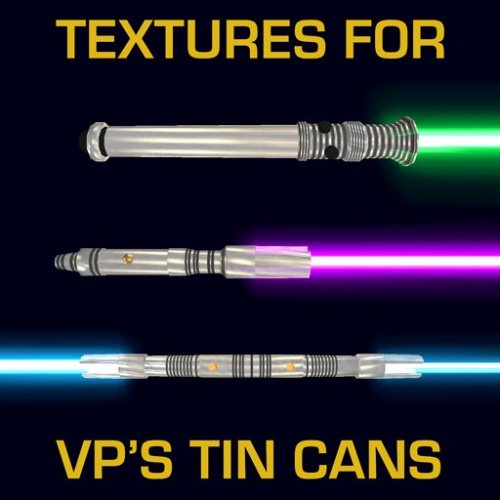
Alternative Textures for VP's Tin Cans
I've had these kicking around for a while for my own personal use, so I decided I should probably release them. They are intended for use with @Fallen Guardian's port of @VarsityPuppet's "Hi Poly Tin Cans" mod for K1, but they should also work for VP's original TSL version (although I haven't tested that myself). There wasn't much to work with given the UVs were designed to fit the atrocious Bioware textures, so they are just simple metal with a few grooves. But they work well for a minimalist/close-to-vanilla playthrough.
Installation:
Copy the TPC files into your Override folder. Delete the existing w_Dblsbr_001.tga and w_Dblsbr_001.txi files in your Override folder (or don't copy those from the Tin Cans mod in the first place).
Requirements:
K1 - https://deadlystream.com/files/file/299-vps-hi-poly-tin-cans-kotor-1/
TSL - https://deadlystream.com/files/file/42-vps-hi-poly-tin-cans/
1,106 downloads
-
![More information about "[K1] Replacement Logo for KotOR Menu Screen"](https://deadlystream.com/downloads/screens/monthly_2021_12/415322655_logo_sw_02(update20DEC21).thumb.png.a2dec2125a3620773e2ec70234267099.png)
[K1] Replacement Logo for KotOR Menu Screen
MOD AUTHOR: Sith Holocron
ORIGINAL RELEASE: 14 DEC 2021
UPDATED RELEASE: 20 DEC 2021
GAMES: Star Wars Knights of the Old Republic 1
Description:
In before the inevitable request…
As I just put up a TSL logo texture mod up yesterday, here’s one for the original KOTOR. This is my attempt to bring the logo in line with modern standards. This texture is sized at 2048 by 2048 (yes, you read that correctly) so it should definitely be slightly crisper than the original. The original texture was sized at 256 by 256.
Someone that shall remain nameless was inquiring about using my mod so they could extend the middle bar out to the end like the original menu logo did. I have done this. Additionally, the coloring on this “long bar” version was slightly de-saturated to more in mine with the original in-game logo.
For those not keeping up . . .
Short Bar Version: That’s the logo that you’ll see on the box art, the game discs, and the Prima Guide Book
Long Bar Version: A variant version of the logo where the bar that contains “Of The” stretches to the end letters rather being nestled in the center between the large “K” and large “S”
A reminder: this whole upload was originally a gag just so I could avoid taking a request in the future. Looks like the joke’s on me.
Before modding (actual size):
After (actual size of Short Bar version):
After (actual size of Long Bar version):
If you find the difference to be pleasing, please let me know in the comments.
Installation:
With more options, there inevitably comes a longer instruction section.
First, choose which version you’ll be going with: Short Bar or Long Bar. That’s where you’ll be grabbing textures from.
If you’re using an original version of KOTOR – that is you’re not using a widescreen mod (such as or UniWS, Flawless Widescreen, or Aspyr's natively widescreen version) – then you’ll want to place the “logo_sw_02.tga” file from the “Standard (Vanilla) Resolutions” sub folder from either the “Short Bar” folder or the “Long Bar folder”
If you’re using KOTOR with either UniWS, Flawless Widescreen, or Aspyr's natively widescreen version) – then you’ll want to place the “logo_sw_02.tga” file from the “For those using Widescreen fixes” sub folder from either the “Short Bar” folder or the “Long Bar” folder.
Uninstallation:
Remove the TGA file from your Override folder. Delete it.
Known Bugs:
None known at this time.
Legal Disclaimer:
All materials and copyrights belong to LucasArts, Bioware and Obsidian Entertainment Inc., I own none of the materials, and I'm not making any money out of this mod. It is to be distributed as-is without alteration, unless by permission of the mod author. This mod is not to be distributed for profit, either.
I hereby state that I specifically do NOT wish this mod to be uploaded to Steam Workshop or to NexusMods. Usage in other mods must be requested AND approved by me before you include my materials in your mod. Modders that request permission to use my mods and don’t do so will have my permission withdrawn after a period of one year after I originally granted (i.e. permission and use is time sensitive.)
Additionally: No, Publicola – you cannot use this in a mod of yours.
535 downloads
(2 reviews)0 comments
Updated
-
K1 Movie-Style Jedi Master Robes
By N-DReW25
K1 Movie-Style Jedi Master Robes
A Mod for Star Wars Knights of The Old Republic
Author: N-DReW25
1.1.0 Release Date: 16.02.2022
Installation:
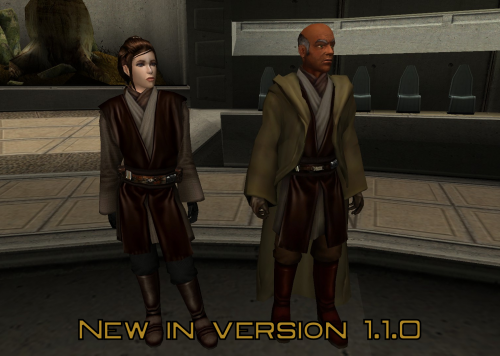
Version 1.1.0 adds another variant of the K1 Movie-Style Jedi Master Robes mod, you can now pick between the original "Replace ALL Jedi Robes" variant or the brand new "Replace the Master Robes ONLY" variant. You can only pick ONE variant, you CANNOT have both.
* How to install "Replace ALL Jedi Robes" variant.
Install JC's Fashion Line I: Cloaked Jedi Robes for K1 1.4 mod first (This mod REQUIRES Cloaked Jedi Robes for K1 to work properly): https://deadlystream.com/files/file/1378-jcs-fashion-line-i-cloaked-jedi-robes-for-k1/
Once you've installed JC's mod, copy the contents of the "For Override" folder and paste it into your swkotor Override folder, overwrite files if necessary.
* How to install "Replace Jedi Master Robes ONLY" variant.
JC's Cloaked Jedi Robes is NOT required for this variant to work, however, if you do choose to install JC's mod (Or any Jedi Robe mod) then it is recommended to install them BEFORE this variant (And DON’T install the gloveless version of JC’s Cloaked Robes for this one either!).
I personally recommend you install the Kotor Prequel Replacement Mod by Kainzorus Prime: https://deadlystream.com/files/file/412-kotor-prequel-robe-replacement/
The way this variant works is that it replaces the Revan Robes 2DA slot with the Movie-Style Robes, this allows players to use the Prequel Replacement mod/JC's Cloaked Jedi Robes or even the vanilla Jedi Robe model ALONGSIDE the Movie-Style Jedi Master Robes.
To install this variant, double click the TSLPatcher.exe and let the TSLPatcher do its magic!
Afterwards, you can also install "Revan patch" to replace the Star Forge/Revan Robes with disguise items that convert the player into Revan, this is a temporary fix until a proper fix can be made in the future.
Description:
This mod is a K1 port of DeadMan's "Movie-style Jedi Master robes 1.5" mod from TSL. In version 1.1.0, the robe textures are styled as they are in vanilla (Padawan, Knight and Masters robes all having the same Brown, Blue, Red or Black color).
This might change in later versions of the mod depending on the demand for such.
The Qel-Droma Robes recieve a unique texture whilst the Revan/Star Forge Robes do not.
If you chose the gloveless installation for JC's Cloaked Jedi Robes mod, then the K1 Movie-Style Jedi Master Robes shall also be gloveless.
In version 1.1.0, an alternative installation was added. This installation can be found within "Replace Jedi Master Robes ONLY" and will only give the Jedi Master Robe items a unique Movie-Style Jedi Master Robe model whereas the Jedi Robe/Jedi Knight Robes maintain their vanilla models unscathed.
If you install JC's Cloaked Jedi Robes or the Kotor Prequel Replacement Mod beforehand, you could have TSL Padawan robes or Prequel Replacement Robes alongside the Movie-Style JEdi Master Robes!
Known Bugs:
This mod shouldn't have bugs but if there is Just PM me on Deadlystream.
Incompatibilities:
Would be incompatible with any mods which:
* Alter the Jedi robe texture and/or models. ("Replace ALL Jedi Robes")
* Alter the Revan robe texture, models and/or the 2DA slot ("Replace Jedi Master Robes ONLY")
* Use S_Female and S_Male files (unless the other mods utilize JCarter's Supermodel Port assets. These edits are necessary to give the player supermodels the bones required for the cloaks to animate.)
Permissions:
Do NOT claim credit for this mod and do not use assets from this mod without my permission.
If you'd like to use assets from DeadMan's mods then he has given permission to every modder to do so, you'll need to ask permission for anything made by Kainzorus Prime.
Thanks to:
DeadMan for making the original mod for K2
HapSlash for the awesome ep3 Obi-Wan and Anakin models which he made for Jedi Academy
Spanki for some great textures which are partially used in this mod
Don Kain for allowing DeadMan to include his Movie Jedi Robes
Kainzorus Prime for allowing me to use assets from his Prequel Replacement mod for the textures of this mod
Bioware for such an amazing game
Stoffee for TSLPatcher
Fred Tetra for Kotor Tool and everyone who downloads the mod.
Legal:
THIS MODIFICATION IS NOT SUPPORTED BY BIOWARE/OBSIDIAN ENTERTAINMENT, LUCASARTS, DISNEY OR ANY LICENSERS/SPONSORS OF THE MENTIONED COMPANIES. USE OF THIS FILE IS AT YOUR OWN RISK AND THE ABOVE-MENTIONED COMPANIES OR THE AUTHOR IS NOT RESPONSIBLE FOR ANY DAMAGE CAUSED TO YOUR COMPUTER FOR THE USAGE OF THIS FILE.
3,376 downloads
- jedi robes
- jedi master
- (and 4 more)
-
Malak redone 2021
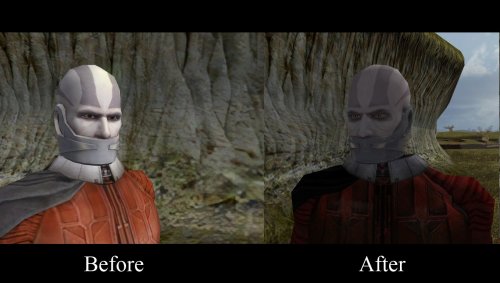
I was tired of Malak old dumb egg face so I made another inspired on the banner on steam and i used Dark Hope's great model to do so !
I updated Malak again with my Malak Redone 2023 on Deadly stream Here's the link
here is the link of her great mode I've only edited the face and the body in my version the base work is hers.
Give me Feedbacks !!!
424 downloads
(0 reviews)0 comments
Updated
-
![More information about "Darth Talon Pack [1K]"](https://deadlystream.com/downloads/screens/monthly_2021_11/391293559_20211025215413_1(1).thumb.png.0726c87ff13285163dfcb971a2437bf7.png)
Darth Talon Pack [1K]
By N-DReW25
Darth Talon Pack [1K]
A Mod for Star Wars Knights of The Old Republic
Author: Bullobrien, 90SK and N-DReW25
1.1.0 Release Date: 19.01.2022
Installation:
Simply click on the TSLPatcher.exe, select your option, click install and sit back and watch the TSLPatcher do its magic.
Uninstallation:
Depends on what you've chosen to install.
Copy the files within the generated "backup" folder and place the file inside your modules folder, make sure you overwrite.
Description:
* Late 2006, Levi Davis (aka nineball) released the first Darth Talon mod for K2 as a playable head for females.
* In 2007, Prime released his Darth Talon mod which replaced Yuthura Ban with Darth Talon.
* In 2008, DarthParametric released his Darth Talon mod which replaced Mission Vao with Darth Talon.
From about 2009, a third modder named Bullobrien began his own Darth Talon mod; completing the final texture in 2011. But, he was unable to properly setup the TSLPatcher or the associated 2da files and
so he passed on the files to a modder named 90SK sometime between 2012-2015 and gave him permission to complete the project. In 2021, a decade since the texture was made, with collaboration with N-DReW25,
the fourth Darth Talon mod was born.
* Some of you new to Star Wars might be thinking "Who is Darth Talon?"
Darth Talon was from the, now Legends, Star Wars: Legacy comic series. Darth Talon was a member of Darth Krayt's new Sith Order around 137 ABY, she is famous in the Star Wars Community as being the red Twi'lek with black Sith tattoos covering her body, head, and lekku; in a similar design to Darth Maul.
She was trained by a fellow Twi'lek Sith named Darth Ruyn, whom she later killed on Krayt's command with a decapitating strike of her lightsaber.
* What does this mod do??
Option 1) Darth Talon Player Head: Adds a playable female head in the form of Darth Talon, replaces the player's underwear and clothing to Darth Talon's attire.
Option 2) Mission Vao as Darth Talon: Replaces Mission Vao's appearance with Darth Talon, gives her two red Short Lightsabers, makes her 25% Dark Side, changed her class to a Jedi Sentinel and gives her a handfull of basic Force powers, nothing else is changed.
Option 3) Yuthura Ban as Darth Talon: Replaces Yuthura Ban's appearance with Darth Talon, replaces Yuthura's Sith Officer's outfit with Darth Talon's attire.
All textures are in 1K resolution, providing the most high detailed Darth Talon mod to date in a Kotor mod.
Known Bugs:
This mod shouldn't have bugs but if there is report it on Deadlystream.com
Incompatibilities:
Mission Vao as Darth Talon is incompatible with any mods which alters Mission Vao's appearance, textures and/or character UTC file
Yuthura Ban as Darth Talon is incompatible with any mods which alters Yuthura Ban's appearance and/or textures
Report any incompatibilities to me on Deadlystream.com
Permissions:
Do NOT claim credit for this mod and do not use assets from this mod!
Thanks:
Bullobrien: For making the original Darth Talon skin back in 2011
90SK: For making the portraits
N-DReW25: For fixing the broken 2da files and setting up the TSLPatcher
Levi Davis (aka nineball): Starting the Darth Talon trend with his first playable Darth Talon mod
Prime: For creating the Yuthura Ban to Darth Talon mod, thus giving us the idea of including the Yuthura Ban option
DarthParametric: For creating the Mission Vao to Darth Talon mod, thus giving us the idea of including the Mission Vao option
Darth Ty: Informing me of TSLPatcher bugs
Effix: For going out of his way to fix up the player head installation for me!
Fred Tetra: For Kotor Tool
Stoffee: TSLPatcher
Dark Horse: For creating the comic series which brought this awesome character to the community, and providing the inspiration for this mod.
Bioware: For such an amazing game
Obsidian: For such an amazing sequel
Everyone who downloads the mod!
Legal:
THIS MODIFICATION IS PROVIDED AS-IS AND IS NOT SUPPORTED BY BIOWARE/OBSIDIAN ENTERTAINMENT, LUCASARTS, DISNEY OR ANY LICENSERS/SPONSORS OF THE MENTIONED COMPANIES. USE OF THIS FILE IS AT YOUR OWN RISK AND THE ABOVE-MENTIONED COMPANIES OR THE AUTHOR IS NOT RESPONSIBLE FOR ANY DAMAGE CAUSED TO YOUR COMPUTER FOR THE USAGE OF THIS FILE.
1,841 downloads
- mission
- yuthura ban
- (and 6 more)
-

Improved Sith Mask (K1 & K2)
By Cytaris
I liked the style of the Original Sith Mask in KOTOR but it's resolution was so low. This is nothing too fancy, I just upscaled it and used some texture and color effects to make it look slightly better imo. My intention was to keep the vanilla feel of the Original Sith Mask but improve it.
This mod will work for both KOTOR & KOTOR 2 without needing to change the name of the file. It's really simple.
Installation: Drop the file into the override of either game.
Compatibility: It is compatible with anything that does not change the default sith mask. If you have a mod that changes the default sith mask, this mod will override it.
182 downloads
-
Men's underwear HD
By Dark Hope
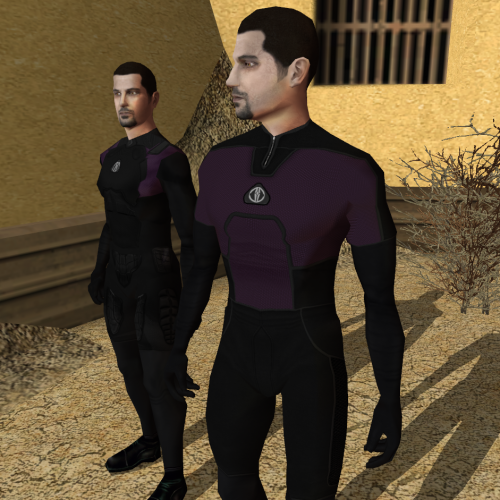
Re-texture of Men's underwear HD for Star wars: Knights of the Old Republic. Texture resolution 2048x2048. The archive contains 12 textures, 1 .txi.
To Install
1. Download: Men's underwear HD
2. Copy all files to the Knights of the Old republic's Override folder.
(Example location - C:\Program Files (x86)\Steam\steamapps\common\swkotor\Override)
3. When/if prompted to overwrite files, press okay.
4. If you like the mod; leave a comment or endorse! (It would be much appreciated) Made with love.
2,320 downloads
- mens underwear
- hd
- (and 1 more)
-

PMHC04 HD
By Dark Hope
Re-texture of PMHC04, for Star wars: Knights of the Old Republic. Texture Resolution 1024X1024. The archive contains 5 textures of the head. 3 textures for underwear. 5 icons and 2 .txi.
To Install
1. Download: PMHC04 HD
2. Copy all files to the Knights of the Old republic's Override folder.
(Example location - C:\Program Files (x86)\Steam\steamapps\common\swkotor\Override)
3. When/if prompted to overwrite files, press okay.
4. If you like the mod; leave a comment or endorse! (It would be much appreciated) Made with love.
3,523 downloads
-

PMHB04 HD
By Dark Hope
Re-texture of PMHB04, for Star wars: Knights of the Old Republic. Texture Resolution 1024X1024. The archive contains 5 textures of the head. 3 textures for underwear. 5 icons and 2 .txi.
To Install
1. Download: PMHB04 HD
2. Copy all files to the Knights of the Old republic's Override folder.
(Example location - C:\Program Files (x86)\Steam\steamapps\common\swkotor\Override)
3. When/if prompted to overwrite files, press okay.
4. If you like the mod; leave a comment or endorse! (It would be much appreciated) Made with love.
2,173 downloads
(0 reviews)0 comments
Submitted
-
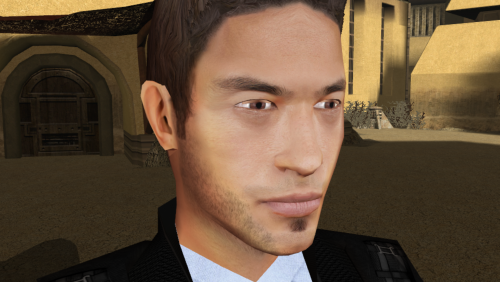
PMHA05 HD
By Dark Hope
Re-texture of PMHA05, for Star wars: Knights of the Old Republic. Texture Resolution 1024X1024. The archive contains 5 textures of the head. 3 textures for underwear. 5 icons and 2 .txi.
To Install
1. Download: PMHA05 HD
2. Copy all files to the Knights of the Old republic's Override folder.
(Example location - C:\Program Files (x86)\Steam\steamapps\common\swkotor\Override)
3. When/if prompted to overwrite files, press okay.
4. If you like the mod; leave a comment or endorse! (It would be much appreciated) Made with love.
25,707 downloads
-

PMHA04 HD
By Dark Hope
Re-texture of PMHA04, for Star wars: Knights of the Old Republic. Texture Resolution 1024X1024. The archive contains 5 textures of the head. 3 textures for underwear. 5 icons and 2 .txi.
To Install
1. Download: PMHA04 HD
2. Copy all files to the Knights of the Old republic's Override folder.
(Example location - C:\Program Files (x86)\Steam\steamapps\common\swkotor\Override)
3. When/if prompted to overwrite files, press okay.
4. If you like the mod; leave a comment or endorse! (It would be much appreciated) Made with love.
2,144 downloads
-

Lore-Friendly Qel-Droma Robes HD
-Cay Qel-Droma's Robes based on the expanded lore and comics.
-HD 1024x1024 texture and HD icon. Alpha layer adds reflective element to the metallic portions in the robe.
-Male and Female version.
-Updated item description with additional lore (Metallic plates made from Cay Qel-Droma's cybernetic arm provides additional armor, while his brother's Wisdom explains the bonus this robe gives to light-side jedis).
1,109 downloads
-

PMHA02 HD
By Dark Hope
Re-texture of PMHA02, for Star wars: Knights of the Old Republic. Texture Resolution 1024X1024. The archive contains 5 textures of the head. 3 textures for underwear. 5 icons and 2 .txi.
To Install
1. Download: PMHA02 HD
2. Copy all files to the Knights of the Old republic's Override folder.
(Example location - C:\Program Files (x86)\Steam\steamapps\common\swkotor\Override)
3. When/if prompted to overwrite files, press okay.
4. If you like the mod; leave a comment or endorse! (It would be much appreciated) Made with love.
23,866 downloads
(1 review)0 comments
Submitted
-

PMHC05 HD
By Dark Hope
Re-texture of PMHC05, for Star wars: Knights of the Old Republic. Texture Resolution 1024X1024. The archive contains 5 textures of the head. 3 textures for underwear. 5 icons and 2 .txi.
To Install
1. Download: PMHC05 HD
2. Copy all files to the Knights of the Old republic's Override folder.
(Example location - C:\Program Files (x86)\Steam\steamapps\common\swkotor\Override)
3. When/if prompted to overwrite files, press okay.
4. If you like the mod; leave a comment or endorse! (It would be much appreciated) Made with love.
2,540 downloads
-
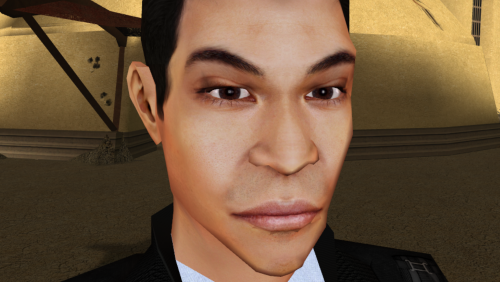
PMHA01 HD
By Dark Hope
Re-texture of PMHA01, for Star wars: Knights of the Old Republic. Texture Resolution 1024X1024. The archive contains 5 textures of the head. 3 textures for underwear. 5 icons and 2 .txi.
To Install
1. Download: PMHA01 HD
2. Copy all files to the Knights of the Old republic's Override folder.
(Example location - C:\Program Files (x86)\Steam\steamapps\common\swkotor\Override)
3. When/if prompted to overwrite files, press okay.
4. If you like the mod; leave a comment or endorse! (It would be much appreciated) Made with love.
23,290 downloads
-

PMHB03 HD
By Dark Hope
Re-texture of PMHB03, for Star wars: Knights of the Old Republic. Texture Resolution 1024X1024. The archive contains 5 textures of the head. 3 textures for underwear. 5 icons and 2 .txi.
To Install
1. Download: PMHB03 HD
2. Copy all files to the Knights of the Old republic's Override folder.
(Example location - C:\Program Files (x86)\Steam\steamapps\common\swkotor\Override)
3. When/if prompted to overwrite files, press okay.
4. If you like the mod; leave a comment or endorse! (It would be much appreciated) Made with love.
1,895 downloads
-
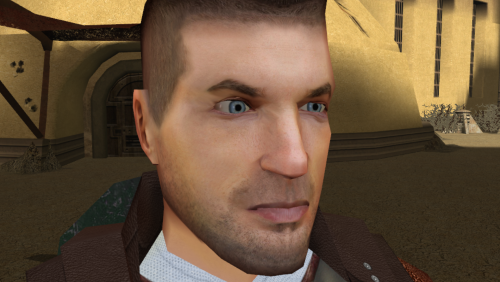
PMHC03 HD
By Dark Hope
Re-texture of PMHC03, for Star wars: Knights of the Old Republic. Texture Resolution 1024X1024. The archive contains 5 textures of the head. 3 textures for underwear. 5 icons and 2 .txi.
To Install
1. Download: PMHC03 HD
2. Copy all files to the Knights of the Old republic's Override folder.
(Example location - C:\Program Files (x86)\Steam\steamapps\common\swkotor\Override)
3. When/if prompted to overwrite files, press okay.
4. If you like the mod; leave a comment or endorse! (It would be much appreciated) Made with love.
2,388 downloads
-
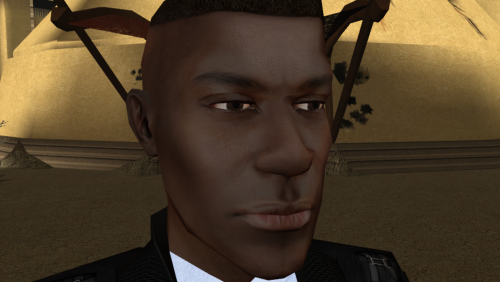
PMHB05 HD
By Dark Hope
Re-texture of PMHB05, for Star wars: Knights of the Old Republic. Texture Resolution 1024X1024. The archive contains 5 textures of the head. 3 textures for underwear. 5 icons and 2 .txi.
To Install
1. Download: PMHB05 HD
2. Copy all files to the Knights of the Old republic's Override folder.
(Example location - C:\Program Files (x86)\Steam\steamapps\common\swkotor\Override)
3. When/if prompted to overwrite files, press okay.
4. If you like the mod; leave a comment or endorse! (It would be much appreciated) Made with love.
15,102 downloads
-

PMHB01 HD
By Dark Hope
Re-texture of PMHB01, for Star wars: Knights of the Old Republic. Texture Resolution 1024X1024. The archive contains 5 textures of the head. 3 textures for underwear. 5 icons and 2 .txi.
To Install
1. Download: PMHB01 HD
2. Copy all files to the Knights of the Old republic's Override folder.
(Example location - C:\Program Files (x86)\Steam\steamapps\common\swkotor\Override)
3. When/if prompted to overwrite files, press okay.
4. If you like the mod; leave a comment or endorse! (It would be much appreciated) Made with love.
15,035 downloads
(1 review)0 comments
Submitted
-

PMHC02 HD
By Dark Hope
Re-texture of PMHC02, for Star wars: Knights of the Old Republic. Texture Resolution 1024X1024. The archive contains 5 textures of the head. 3 textures for underwear. 5 icons and 2 .txi.
To Install
1. Download: PMHC02 HD
2. Copy all files to the Knights of the Old republic's Override folder.
(Example location - C:\Program Files (x86)\Steam\steamapps\common\swkotor\Override)
3. When/if prompted to overwrite files, press okay.
4. If you like the mod; leave a comment or endorse! (It would be much appreciated) Made with love.
2,280 downloads
-

Darth Bastila Sith Eyes
By Cytaris
Darth Bastila Sith Eyes Head Mod
By Cytaris
Orignal Mod by Quanon and Dark Hope
Orginal Eyes by Circa
This is a reskin of the head portion of this mod: https://deadlystream.com/files/file/978-bastila-shan-hd-by-quanon-and-dark-hopa/
All it does is take the HD skin and reskin the eyes to be sith eye's like Anakins from Revenge of the Sith.
I would recommend it be used on top of it.
SPOILERS: You could optionally wait to install it until Bastila is taken so that she will only have Sith Eye's as a Sith.
A reskin of Bastila's Head only. Dark Hope & Quanon made the original. Circa Made the original eyes, Bioware of course also deserves credit for the creation of the original skin. The Txi came from the original mod and was made by dark hope or quanon who have given me permission to use their work in this minor mod.
Installation:
Put P_BastilaH04 & the txi file in override folder of KOTOR 1
416 downloads
-

HD PFHA05
By Dark Hope
Re-texture of PFHA05, for Star wars: Knights of the Old Republic. Texture Resolution 1024X1024. The archive contains 5 textures of the head. 3 textures for underwear. 5 icons and 2 .txi.
To Install
1. Download: HD PFHA05
2. Copy all files to the Knights of the Old republic's Override folder.
(Example location - C:\Program Files (x86)\Steam\steamapps\common\swkotor\Override)
3. When/if prompted to overwrite files, press okay.
4. If you like the mod; leave a comment or endorse! (It would be much appreciated) Made with love.
3,039 downloads
-

HD PFHB03
By Dark Hope
Edited model - DarthParametric
Re-texture of PFHB03, for Star wars: Knights of the Old Republic. Texture Resolution 1024X1024. The archive contains 5 textures of the head. 3 textures for underwear. 5 icons and 2 .txi.
To Install
1. Download: HD PFHB03
2. Copy all files to the Knights of the Old republic's Override folder.
(Example location - C:\Program Files (x86)\Steam\steamapps\common\swkotor\Override)
3. When/if prompted to overwrite files, press okay.
4. If you like the mod; leave a comment or endorse! (It would be much appreciated) Made with love.
16,122 downloads
-
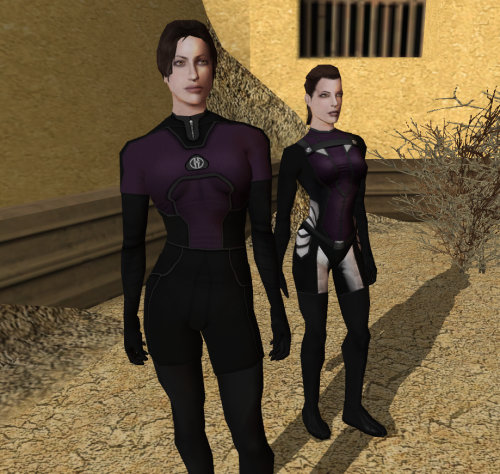
Women underwear
By Dark Hope
Re-texture of women underwear for Star wars: Knights of the Old Republic. Texture resolution 2048x2048. The archive contains 12 textures, 1 .txi.
To Install
1. Download: Women underwear
2. Copy all files to the Knights of the Old republic's Override folder.
(Example location - C:\Program Files (x86)\Steam\steamapps\common\swkotor\Override)
3. When/if prompted to overwrite files, press okay.
4. If you like the mod; leave a comment or endorse! (It would be much appreciated) Made with love.
3,817 downloads
- women underwear
- dark hope
- (and 1 more)
-
File Reviews
-
I'm just happy that I can finally play the game on PC with real, native, proper controller support. The fact that TSL received that massive update which added native controller support but the original KOTOR was left with mouse/keyboard years later (which was ridiculous) is finally resolved with this.
-

Stuck 0
-
I'm very eager to give it a try but I just can't. I installed KMRP, used KPM patcher with only 2 patches - KMRP and High FPS Fixes.
Then I run your install.cmd and all I get is this:
INSTALL FAILED: Executable compatibility check failed at 47 required hook site(s).
0x004F1A3E: expected [B8 14 00 00 00], found [6A 85 05 C2 9E]
0x004F1A43: expected [0F B6 D0 3B 4C 96 38], found [CE EB 19 56 C1 7C 49]
0x0054EC5B: expected [C7 02 14 00 00 00], found [34 50 71 50 DE 29]
0x00552C9A: expected [8D 7E 38 B9 15 00 00 00 F3 AB], found [66 3F 2E 33 9D 15 28 89 29 00]
0x00552F8A: expected [8D 6E 38], found [DA 7B 54]
0x00552FD6: expected [83 FF 14], found [A7 5A 68]
0x005A54A0: expected [0F B6 F0 3B 54 B1 38], found [F6 AB 63 77 5A C7 1D]
0x005A54AA: expected [83 F8 14], found [75 93 66]
...and 39 more mismatched hook site(s).
Another executable patch or a different KOTOR binary layout is using code this mod needs. No changes were made.Press any key to continue . . .
Edited by WarlordThorvald
I had bunch of graphic mods and old widescreen fix installed before, but deleted it and restored original exe - no luck.
Then I just deleted my game and re-downloaded it (steam version), installed KMRP and patched clean version of the game with KPM - and result is the same.
I am at loss here. -
Does exactly was it says it does!
An observation: Having this active requires it to be installed dead last after EVERYTHING ELSE. If, say, I were to add"High FPS Fixes" or other patches through KotorPatchManager with "...Progression" already active, I lose the ability to back out of the level-up screen(effectively restoring the vanilla game's constraints where it would not let you exit the level-up UI to return to normal gameplay at all until you leveled up.)
This I confirmed via live testing/gameplay last night: I had to uninstall and re-install "....progression" after adding the KPM patches so it effectively sits at the very END of the installation order. This fixed the issue and I could back out of the level-up screen freely.
FYI I'm using KMRP 1.5.1 and KPM in my setup.
-
 1
1
-
-

Ellhaim 0
This mod sorta works. Except that the model is very transparent. Especially on the metal/darker details of her outfit/model. Kind of unusable imo. Just makes me feel like I'm playing the ghost of Talon.
-
Fantastic work!!! Quick question to any who read this: I'm a total rookie with modding, and in my most recent playthrough, when the camera executed the flyby when the HK-50s shot you down over the polar region(when they start speaking "Egotistical Boast") I saw the mod author's logo. Again, since I;m new to this, I likely made a mistake when I added them, so how can I correct it so I don't see the logo?
-

lorddli 2
does what it says on the tin and i like it
-
1
-
-
Awesome mod! Some necessary powers filling out the pool, especially with Revitalize.
I don't know if this is cool, if not I will absolutely delete it... But I had AI upscale your icons so that they would work properly at high resolution (the images look basically identical, they're just 64x64 instead of 32x32). -
Nice job !
ou plutôt dans ce cas Beau travail ! -
This Mod fixes all of the problems that I have when I got back to play this game on newer systems.
The dev behind this mod was quick to answer any questions I had since I was a Linux user of this mod.
Great quality mod, that fixes issues I was having in Ultrawide such as the dialogue windows not working on the first step of a new conversation (Typical on Ultrawide) as well as improving general stability of the game.
Would recommend for anyone playing the game.
-
1
-
-
Ok, I hope this helps perfect it because it's a good idea on paper. I'll keep it as "matter-of-factly" as possible.
My experience with this mod: My setup already had TSLRCM+M478PE+PartySwap as a foundation already running. I installed this mod, created a fresh, new character to test it out, made it to the Telos Citadel Station, and after the "house arrest" sequence wrapped up and I was free to move, the quest triggers, unknown to me, were compromised. For example: The ambush on Dock Module 126? The 5 thugs that attack you spawned, I fought them and beat them, but the dialogue script failed to recognize the instance, leaving the TSF NPC in an infinite "text box loop" saying "don't let them hurt the droid; the instance didn't close properly and, naturally, the journal quest didn't update. I reloaded a save file just prior to that beat and it played out correctly a second time. When I showed the "modified holdout blaster" to Lt. Grenn to pick up the "suspicious goods" quest? that dialogue with Grenn played normally, however the journal didn't log the "suspicious goods" quest at all. So, the masked thug that's supposed to ambush you in the Entertainment Module immediately after that dialogue didn't spawn. Another tell-tale sign that something was wrong is that the Dobo Brothers' Merchant Room was completely inaccessible: The door would not open, full stop. Also, one of the doors to the cantina turned into a "one-way" exit. You could exit out of the cantina through it but not go back in. The other door worked fine. And for some reason, some NPCs appeared with no head whatsoever, (though I'm uncertain of this last bit is related.) To solve these problems on my setup, I purged my game's Override, performed a Steam Integrity Check, and re-installed all my mods in the proper order, except this one. I hope this helps you perfect it.
EDIT: To be clear, I don't use the Steam Workshop for anything whatsoever; I only use Steam to launch the game. All my mods were installed through their respective standalone TSLPatcher executable.
Edited by jmorenobothwell -
-
lorddli 2
Perfect companion mod to go along with KMRP
-
You are the pillar of this community
-
The Atton no guyliner with mid scruff is absolutely perfect! Love this!
-


-
File Comments
-
 In my case cutscenes stopped minimizing after I set compatibility mode to Win XP Service Pack 2.
 -
 This is an incredible find! I've found hours of content to keep myself occupied this entire day, and I've only done Korriban and Tatooine! I am quite content with a large amount of side quests that don't serve a unified plot line. At least, beyond the commonality that they relate to the aftermath of the Jedi Civil War. KOTOR II, as I've read it described, is essentially a "road trip from hell to absolutely nowhere, all the while pondering the void". To quote the cliche, "it's
 -

By BottomlessThought23 · Posted
You ran KMRP and clicked "start patching" and it didn't apply? Or am I misunderstanding? -
I'm not seeing KMRP in my list of patches and it seems that KMRP is not even applying 😕
-
 So this is a really old mod of mine from almost a decade ago, hence why K1R was a requirement. I'll probably update this mod again to have modern install standards, though for now there are two alternatives for you. 1) the NPC Diversity Pack mod which instead requires the K1CP mod and it adds female Dark Jedi alongside up to 400 or so changes to the vanilla NPCs to make them unique. 2) the RC-K1CP mod which is the modern day restored content mod for Kotor 1 which, as
-