

Skins
318 files
-

PFHC03 HD
By Dark Hope
Re-texture of PFHC03, for Star wars: Knights of the Old Republic. Texture Resolution 1024X1024. The archive contains 5 textures of the head. 3 textures for underwear. 5 icons and 2 .txi.
To Install
1. Download: PFHC03 HD
2. Copy all files to the Knights of the Old republic's Override folder.
(Example location - C:\Program Files (x86)\Steam\steamapps\common\swkotor\Override)
3. When/if prompted to overwrite files, press okay.
4. If you like the mod; leave a comment or endorse! (It would be much appreciated) Made with love.
2,901 downloads
-

Council Robes Basic Reskin
By cubis182
COUNCIL ROBES BASIC RESKIN
Description:
This mod adds the council robes, a variant normally only worn by NPCs, and makes them available alongside the vanilla game robes in KotOR 1. The robes are added to 3 merchants in the game: the basic, lowest level variety is available at Crattis’ general store on Dantooine with 3 texture variants, although the variants for this robe all look pretty similar. They are also available with better stats as Knight robes at the Czerka Representative’s store on Korriban in Dreshdae, and as Master Robes at Mic’tunan’jus’ store on Tatooine in front of the Ebon Hawk. This mod should be compatible with other mods that modify these merchants, but this mod is not at all compatible with other mods that modify the base robe models OR add new textures. The idea behind this mod is to have the option to wear both council robes and base game robes at the same time, being compatible with base game items but not other similar mods. This mod will also not place the robes properly if you have been to Dantooine, Tatooine, or Korriban before installing the mod.
Installation:
Start the Council Robes Basic Reskin Installer executable. It should prompt you for the location of your KotOR 1 directory and move all the necessary files itself. With the exception of the merchant files, the installer will fully replace any files of the same name as the ones in the ‘tslpatchdata’ folder, so won’t be compatible with other mods modifying those files or using the same names, since they are not standard game resources.
Uninstallation:
To uninstall, remove all the files listed in the ‘tslpatchdata’ folder from the Override folder.
Acknowledgements:
Of course, without use of Fred Tetra’s KotOR Tool, MDLOps by Chuck Chargin, KotOR Blender by Symmetric, Purifier, and Ndix UR, k-gff from tk102, and TSL Patcher by stoffe, this would not be possible. Thanks to all of you.
NOTE:
This is really the first mod I have made, and I have only tested the new models and textures so much. If there are issues you come across that I did not foresee, or perhaps simply any quality-of-life things that may be added, let me know, either by sending a message on deadlystream.com or sending an email to flooggoog@gmail.com.
-cubis182
readme.rtf
630 downloads
-

Player Head PFHB02 Dark Side Transition Eye Fix
The player head PFHB02 has an issue with the eyes of its Dark Side transition textures. Namely, whoever made them offset the eyeball overlay they were trying to blend over the top of the base texture, resulting in a progressively noticeable duplicated set of irises. This mod cleans up the irises so they look as intended. Three options are available. The original 256x256 textures with just the eyes edited, a version that has been AI upscaled to 1024x1024, and an version that is upscaled with the addition of eye textures taken from SWTOR.
Installation Instructions
Pick which version the want, copy those TPCs inside that folder to your Override folder.
Known Issues
The UVs of the head are terrible, so the pupils are a bit wonky. I didn't want to have to edit the head mesh to fix it, since that might affect other mods.
Compatibility
Won't be compatible with other retextures of PFHB02, obviously.
Acknowledgements
Thanks to @ndix UR for TGA2TPC Thanks to @StellarExile for an issue post on the K1CP repo about this, which prodded me into remembering I had something for this Original eye textures for one version ported from The Old Republic MMO24,218 downloads
-

PFHB04 HD
By Dark Hope
Edited model - DarthParametric
Re-texture of PFHB04, for Star wars: Knights of the Old Republic. Texture Resolution 1024X1024. The archive contains 5 textures of the head. 3 textures for underwear. 5 icons and 2 .txi.
To Install
1. Download: PFHB04 HD
2. Copy all files to the Knights of the Old republic's Override folder.
(Example location - C:\Program Files (x86)\Steam\steamapps\common\swkotor\Override)
3. When/if prompted to overwrite files, press okay.
4. If you like the mod; leave a comment or endorse! (It would be much appreciated) Made with love.
2,349 downloads
(1 review)0 comments
Submitted
-
PFHA04 HD
By Dark Hope
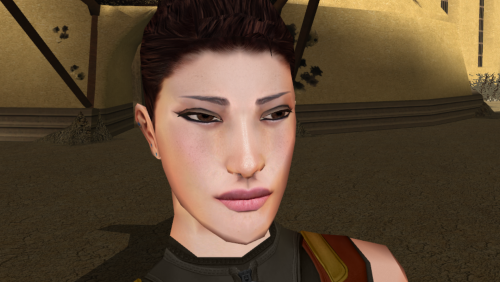
Re-texture of PFHA04, for Star wars: Knights of the Old Republic. Texture Resolution 1024X1024. The archive contains 5 textures of the head. 3 textures for underwear. 5 icons and 2 .txi.
To Install
1. Download: PFHA04 HD
2. Copy all files to the Knights of the Old republic's Override folder.
(Example location - C:\Program Files (x86)\Steam\steamapps\common\swkotor\Override)
3. When/if prompted to overwrite files, press okay.
4. If you like the mod; leave a comment or endorse! (It would be much appreciated) Made with love.
2,693 downloads
-

PFHB02 HD
By Dark Hope
Re-texture of PFHB02, for Star wars: Knights of the Old Republic. Texture Resolution 1024X1024. The archive contains 5 textures of the head. 3 textures for underwear. 5 icons and 2 .txi.
To Install
1. Download: PFHB02 HD
2. Copy all files to the Knights of the Old republic's Override folder.
(Example location - C:\Program Files (x86)\Steam\steamapps\common\swkotor\Override)
3. When/if prompted to overwrite files, press okay.
4. If you like the mod; leave a comment or endorse! (It would be much appreciated) Made with love.
2,558 downloads
-

PFHA03 HD
By Dark Hope
Re-texture of PFHA03, for Star wars: Knights of the Old Republic. Texture Resolution 1024X1024. The archive contains 5 textures of the head. 3 textures for underwear. 5 icons and 2 .txi.
To Install
1. Download: PFHA03 HD
2. Copy all files to the Knights of the Old republic's Override folder.
(Example location - C:\Program Files (x86)\Steam\steamapps\common\swkotor\Override)
3. When/if prompted to overwrite files, press okay.
4. If you like the mod; leave a comment or endorse! (It would be much appreciated) Made with love.
15,637 downloads
(0 reviews)0 comments
Submitted
-

[k1] Reskin of RedHawke's ORD Mandell Mod
By InSidious
This mod reskins RedHawke's ORD Mandell extra planet mod, using textures which were unused in the original game, mostly from Sleheyron.
This was originally made in about 2006 or 2007, I think, and sent to RedHawke, who never used it.
Sith Holocron reminded me I made this, and suggested I release it now that ORD Mandell is available on DeadlyStream, and now that the mod rules are less strict.
Note that you will need to install ORD Mandell first, and then install the reskin. This will not work without the ORD Mandell mod.
Installation
To install, copy the contents of "Override" into your Override folder, and the contents of "Modules" into your Modules folder.
Uninstallation
Remove the files you copied over. This mod replaces the .mod files installed by ORD Mandell, so either make a backup of those first,
or delete them from your modules folder before reinstalling ORD Mandell.
Permissions
As this is a mod modifying someone else's mod, please don't upload elsewhere or modify without my permission.
Credits/Thanks
RedHawke for the original ORD Mandell mod;
Sith Holocron for reminding me to release this.
2,181 downloads
- redhawke
- ord mandell
- (and 4 more)
-

PFHC02 HD
By Dark Hope
Re-texture of PFHC02, for Star wars: Knights of the Old Republic. Texture Resolution 1024X1024. The archive contains 5 textures of the head. 3 textures for underwear. 5 icons and 2 .txi.
To Install
1. Download: PFHC02 HD
2. Copy all files to the Knights of the Old republic's Override folder.
(Example location - C:\Program Files (x86)\Steam\steamapps\common\swkotor\Override)
3. When/if prompted to overwrite files, press okay.
4. If you like the mod; leave a comment or endorse! (It would be much appreciated) Made with love.
3,094 downloads
-

PFHA01 HD
By Dark Hope
Re-texture of PFHA01, for Star wars: Knights of the Old Republic. Texture Resolution 1024X1024. The archive contains 5 textures of the head. 3 textures for underwear. 5 icons and 2 .txi.
To Install
1. Download: PFHA01 HD
2. Copy all files to the Knights of the Old republic's Override folder.
(Example location - C:\Program Files (x86)\Steam\steamapps\common\swkotor\Override)
3. When/if prompted to overwrite files, press okay.
4. If you like the mod; leave a comment or endorse! (It would be much appreciated) Made with love.
3,115 downloads
-

PFHC05 HD
By Dark Hope
Re-texture of PFHC05, for Star wars: Knights of the Old Republic. Texture Resolution 1024X1024. The archive contains 5 textures of the head. 3 textures for underwear. 5 icons and 2 .txi.
To Install
1. Download: PFHC05 HD
2. Copy all files to the Knights of the Old republic's Override folder.
(Example location - C:\Program Files (x86)\Steam\steamapps\common\swkotor\Override)
3. When/if prompted to overwrite files, press okay.
4. If you like the mod; leave a comment or endorse! (It would be much appreciated) Made with love.
24,100 downloads
-

PFHA02 HD
By Dark Hope
Re-texture of PFHA02, for Star wars: Knights of the Old Republic. Texture Resolution 1024X1024. The archive contains 5 textures of the head. 3 textures for underwear. 5 icons and 2 .txi.
To Install
1. Download: PFHA02 HD
2. Copy all files to the Knights of the Old republic's Override folder.
(Example location - C:\Program Files (x86)\Steam\steamapps\common\swkotor\Override)
3. When/if prompted to overwrite files, press okay.
4. If you like the mod; leave a comment or endorse! (It would be much appreciated) Made with love.
2,900 downloads
-

PFHB01 HD
By Dark Hope
About This File
Re-texture of PFHB01, for Star wars: Knights of the Old Republic. Texture Resolution 1024X1024. The archive contains 5 textures of the head. 3 textures for underwear. 5 icons and 2 .txi.
To Install
1. Download: PFHB01HD
2. Copy all files to the Knights of the Old republic's Override folder.
(Example location - C:\Program Files (x86)\Steam\steamapps\common\swkotor\Override)
3. When/if prompted to overwrite files, press okay.
4. If you like the mod; leave a comment or endorse! (It would be much appreciated) Made with love.
14,538 downloads
-

PFHB05 HD
By Dark Hope
Re-texture of PFHB05, for Star wars: Knights of the Old Republic. Texture Resolution 1024X1024. The archive contains 5 textures of the head. 3 textures for underwear. 5 icons and 1 .txi.
To Install
1. Download: PFHB05HD
2. Copy all files to the Knights of the Old republic's Override folder.
(Example location - C:\Program Files (x86)\Steam\steamapps\common\swkotor\Override)
3. When/if prompted to overwrite files, press okay.
4. If you like the mod; leave a comment or endorse! (It would be much appreciated) Made with love.
14,382 downloads
-

Prequel Style Robes for Brotherhood of Shadow
By Elwood288
The idea of the mod is to make Brotherhood of Shadow and Prequel Style Robes play nice. I've done this by making new textures for most (maybe all?) of the robes added by BOS.
Robes edited:
All mandalorian wars robes Seers Robe Shadow's Republic Uniform Robes (Just plain orange robes now. Honestly wish I could have done better on these. Maybe a future update.) Requirements:
Brotherhood of Shadow - https://deadlystream.com/files/file/761-brotherhood-of-shadow-solomons-revenge/ Prequel Robe Replacement - https://deadlystream.com/files/file/412-kotor-prequel-robe-replacement/ If you don't have both of these mods there is literally no reason to install mine. In fact you will most certainly have problems. So don't do it. Unless you like weird/broken textures. Then have at it.
Install: Install Brotherhood of Shadow and Prequel Style Robes first then everything to the override folder!
497 downloads
(0 reviews)0 comments
Submitted
-
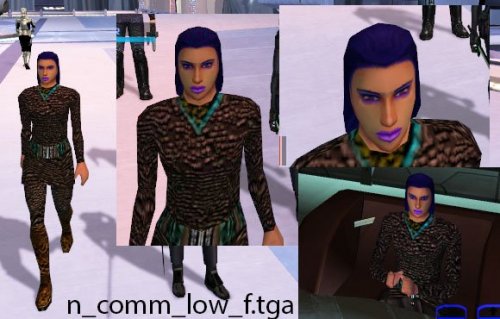
K1 Low Commoner Reskins
By Ahsana
Files only need to be dropped in override folder.
(files edited from CD-ROM of K1)
173 downloads
-

Redhawke Siberian Juhani Skin
By JumpStationZ
Author : RedHawke 09/10/04 Version 1.2
============================================================================
This is a reskin to turn our Cathar Jedi friend, Juhani into a nice Siberian Tigress motif, so I modified her skins accordingly, I hope you enjoy the new Juhani.
This mod is also fully compatable with all of My Mods and just about everyone else's mods as well, unless you have some that change Juhani's appearance.
A .kmm file is included to use with Cchargin's KMM or KOTOR Mod Manager program.
I hope you all enjoy the Mod!
Installation Instructions:
-----------------------------
Just extract everything to your KOTOR override, or activate it with KMM.
Uninstallation Instructions:
-----------------------------
Simply delete all these .tga files from your override directory, or Deactivate it with KMM.
This Mod Does:
-----------------------------
Changes Juhani into a Siberian Tiger themed character. Her Head, Underwear, Clothes, Portrait, and Party Selection Screen Image textures have all been altered.
Her Clothes also have a little additional skin/fur showing, I hated the blue parts, I thought it looked better this way.
Acknowledgements:
------------------------------------------------
A boatload of thanks to Fred Tetra for creating the awesome and simple to use kotor editing tool.
And Thanks to Cchargin for the cool Kotor Mod Manager, KMM Program!
Also a very appreciative nod to the many friendly and informative people at the Lucasforums Holowan Laboratories board who have shown and or helped me to learn how to do stuff like this.
And have fun with the new cold weather Juhani! ;^)
123 downloads
-

Redhawke's Bastila Clothes for PC
By JumpStationZ
Author : RedHawke 10/08/04 Version 1.0
============================================================================
This is a really simple mod adjustment to make the Female PC's able to wear Bastila's style of clothing, there is one default texture for each class, though all three textures are available to the 3 classes. The default Soldier gets the unused (Darker Brown Cloth) Bastila Texture, the default Scout gets the standard (Tan Cloth) Bastila Texture, and the default Scoundrel gets a New (Red Cloth) Bastila Texture.
This mod is also fully compatable with all of My Mods. And this mod should be compatable with just about everyone else's mods as well, except those that alter the Female PC's clothing or clothing models.
And you don't have to edit any appearance.2da files for it to work too!
A .kmm file is included to use with Cchargin's KMM or KOTOR Mod Manager program.
I hope you all enjoy the Mod!
This Mod Does:
-----------------------------
Changes the Female Soldiers Default Clothing to the unused (Darker Brown Cloth) Bastila Clothing. Clothes variant 2 is the New (Red Cloth) Bastila Clothing, Clothes variant 3 is the standard (Tan Cloth) Bastila Clothing.
Changes the Female Scouts Default Clothing to the standard (Tan Cloth) Bastila Clothing. Clothes variant 2 is the unused (Darker Brown Cloth) Bastila Clothing, Clothes variant 3 is the New (Red Cloth) Bastila Clothing.
Changes the Female Scoundrels Default Clothing to a New (Red Cloth) Bastila Clothing. Clothes variant 2 is the standard (Tan Cloth) Bastila Clothing, Clothes variant 3 is the unused (Darker Brown Cloth) Bastila Clothing.
The 3 clothes variants as well as some New Upgradeable Armored Clothing also in the 3 Clothes Color variants can be found in the Taris Apartment Footlocker after you use the Workbench the First time. So you can use whichever texture on whichever Female PC you want.
I also added in a Clothing and Armored Clothing using variant 4 and variant 5 in case you want to do add svösh's good/evil Bastila's Clothing to your PC, if you don't they should appear as the default Bastila clothes texture according to your class if you wear them as listed above.
Installation Instructions:
-----------------------------
Just extract these files to your KOTOR override, or activate it with KMM.
No appearance.2da editing necissary so no 2da file conflicts.
Uninstallation Instructions:
-----------------------------
Simply delete these files from your override directory, or Deactivate it with KMM.
Adding in svösh's Good/Evil Bastila Clothes:
---------------------------------------------
If you know a little about modding KOTOR, copying files, and using KT to edit appearance.2da you could now use svösh's awesome Good/Evil Bastila Clothes on your Female PC.
1) First step is by copying the 2 good/evil textures svösh made P_BastilaBB02.tga and P_BastilaBB03.tga, 3 times each.
2) Second step, is renaming the three copies of the Good Bastila texture P_BastilaBB02.tga to PFBBL04.tga and PFBBM04.tga and PFBBS04.tga, this has now added the Good Bastila texture in as the fourth clothing variant,
3) Third step, is then to rename the three copies of the Evil Bastila texture P_BastilaBB03.tga to PFBBL05.tga and PFBBM05.tga and PFBBS05.tga, this has now added the Evil Bastila texture in as the fifth clothing variant.
4) Fourth step, you will have to edit appearance.2da or else the metallic parts won't shine and will be see through, open up your override's appearance.2da and change all of the female PC lines 91-135, you want to change only the envmap cell to "CM_Baremetal", without quotes in all of the Female PC lines 91-135. Click on a line you didn't edit, and save the appearance.2da to your override.
5) Fifth step, is to copy the 6 .tga files to your KOTOR override.
6) Sixth step, is to go back into the game, and put on the Armored Clothes IV or Armored Clothes V and svösh's Good/Evil Bastila's Clothes chould be yours to wear. ;^) You could also put on the clothing variant 4 and clothing variant 5 you get in the Taris Footlocker as well, that's why I included them.
New Item Cheat Codes:
------------------------------
g3_a_clothes01 - Armored Clothing I (Uses Default Texture)
g3_a_clothes02 - Armored Clothing II (Uses Second Texture)
g3_a_clothes03 - Armored Clothing III (Uses Third Texture)
g3_a_clothes04 - Armored Clothing IV (Uses Fourth Texture, If Present)
g3_a_clothes05 - Armored Clothing V (Uses Fifth Texture, If Present)
Acknowledgements:
------------------------------------------------
A boatload of thanks to Fred Tetra for creating the awesome and simple to use kotor editing tool.
And Thanks to Cchargin for the cool Kotor Mod Manager, KMM Program!
Also a very appreciative nod to the many friendly and informative people at the Lucasforums Holowan Laboratories board who have shown and or helped me to learn how to do stuff like this.
And have fun with the new Female Bastila style PC clothing! ;^)
332 downloads
(0 reviews)0 comments
Submitted
-

Redhawke's Mission Clothes Mod
By JumpStationZ
Author : RedHawke 08/31/04 Version 1.0
============================================================================
This is a reskin to alter the standard clothes of everyones favorite Twilek Street urchin, Mission Vao, I hope you enjoy the new Mission clothes.
This mod is also fully compatable with all of My Mods, except the Caucasian Mission Mod, and that has a like clothes texture to this mods in that one. And this mod should be compatable with just about everyone else's mods as well.
A .kmm file is included to use with Cchargin's KMM or KOTOR Mod Manager program.
I hope you all enjoy the Mod!
Installation Instructions:
-----------------------------
Just extract the one .tga to your KOTOR override, or activate it with KMM.
Uninstallation Instructions:
-----------------------------
Simply delete all this .tga files from your override directory, or Deactivate it with KMM.
This Mod Does:
-----------------------------
Changes Mission Vao's Clothes, Her Clothes also have a little additional bare midriff section so she has a little Britney Spears thing going on, and she has benn give some cut-off "Daisy Duke" style shorts.
The standard black/gray clothing was so plain, I thought this looked better.
Adknowledgements:
------------------------------------------------
A boatload of thanks to Fred Tetra for creating the awesome and simple to use kotor editing tool.
And Thanks to Cchargin for the cool Kotor Mod Manager, KMM Program!
Also a very appreciative nod to the many friendly and informative people at the Lucasforums Holowan Laboratories board who have shown and or helped me to learn how to do stuff like this.
And have fun with the new Mission clothes! ;^)
248 downloads
(0 reviews)0 comments
Submitted
-

Redhawke's Caucasian Mission
By JumpStationZ
Author : RedHawke 08/30/04 Version 1.2
============================================================================
This is a reskin to turn everyones favorite Twilek Street urchin, Mission Vao into a nice Caucasian skin tone, so I modified her skins accordingly, I hope you enjoy the new Mission Vao.
This mod is also fully compatable with all of My Mods and just about everyone else's mods as well.
A .kmm file is included to use with Cchargin's KMM or KOTOR Mod Manager program.
I hope you all enjoy the Mod!
Installation Instructions:
-----------------------------
Just extract everything to your KOTOR override, or activate it with KMM.
Uninstallation Instructions:
-----------------------------
Simply delete all these .tga files from your override directory, or Deactivate it with KMM.
This Mod Does:
-----------------------------
Changes Mission Vao into a Caucasian Twilek. Her Head, Underwear, Clothes, Portrait, and Party Selection Screen Image textures have all been altered, Missions head tails skins are located in her clothes texture and not her head... so be careful giving her clothes from another mod it will mess up her head tails... Bioware did some wierd things with the textures.
Her Clothes also have a little additional bare midriff section so she has a little Britney Spears thing going on. The standard black under shirt was so plain, I thought it looked better.
Version 1.1: Lowered Missions Navel on the Clothes Texture.
New In Version 1.2: Altered The Clothes Texture and Gave Mission some Cut-Off Shorts or "Daisy Dukes" for those that remember the 80's. The original 1.1 Mission clothes texture is in a subfolder so you can use whichever one you want.
Acknowledgements:
------------------------------------------------
A boatload of thanks to Fred Tetra for creating the awesome and simple to use kotor editing tool.
And Thanks to Cchargin for the cool Kotor Mod Manager, KMM Program!
Also a very appreciative nod to the many friendly and informative people at the Lucasforums Holowan Laboratories board who have shown and or helped me to learn how to do stuff like this.
And have fun with the new Mission Vao! ;^)
114 downloads
- mission
- jumpstationz
- (and 4 more)
(0 reviews)0 comments
Submitted
-
ORSAN's Jango Fett Chest Armor
By JumpStationZ
Part of the...
Jango Fett Chest Armor
--------------------------------------------------------------------------------
Description:
Adds Jango Fett chest armor to KOtOR.
--------------------------------------------------------------------------------
Installation:
Drop items into Override folder.
--------------------------------------------------------------------------------
How to acquire item in game:
Use console command "giveitem jango_fett" to grant the chest armor to the player.
--------------------------------------------------------------------------------
158 downloads
(0 reviews)0 comments
Submitted
-
ORSAN's Boba Fett Chest Armor
By JumpStationZ
Part of the...
Boba Fett Chest Armor
--------------------------------------------------------------------------------
Description:
Adds Boba Fett chest armor to KOtOR.
--------------------------------------------------------------------------------
Installation:
Drop items into Override folder.
--------------------------------------------------------------------------------
How to acquire item in game:
Allows the user to complete the Override folder.
Use console command "giveitem boba_fett" to grant the item to the player.
--------------------------------------------------------------------------------
169 downloads
(0 reviews)0 comments
Submitted
-

ORSAN's Boba Fett Helmet
By JumpStationZ
Part of the...
Description:
Adds Boba Fett helmet to KotOR.
Installation:
Drop items into Override folder.
How to acquire item in game:
Use console command "giveitem g_i_mask25" to grant the item to the player.
162 downloads
(0 reviews)0 comments
Submitted
-
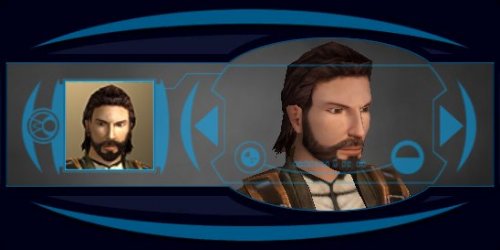
Effixian's Bearded PMHC04
By Effix
***************************
Knights of the Old Republic
***************************
TITLE: Effixian's Bearded PMHC04
AUTHOR: Effix(ian)
CONTACT: PM me on the forums or find me on Steam
************
DESCRIPTION
************
This mod simply adds a beard to the PMHC04 player character (a.k.a. Mullet Man). Requested by Lexone.
*************
INSTALLATION
*************
Unzip. Copy the files from the folder to the your game's Override folder.
*****
BUGS
*****
None.
*************
UNINSTALLING
*************
Remove from the Override folder:
- PMHC04.tga
- PMHC04d.tga
- PMHC04d1.tga
- PMHC04d2.tga
- PMHC04d3.tga
- PO_pmhc4.tga
- PO_pmhc4d.tga
- PO_pmhc4d1.tga
- PO_pmhc4d2.tga
- PO_pmhc4d3.tga
*******************
DISTRIBUTION NOTES
*******************
You may not: Use the material from this mod in your own mod without giving me credit, implying it was your creation.
You might: Use the material from this mod in your own mods if simply you ask me.
*********
THANKS TO
*********
Fred Tetra for KotOR Tool
-------------------
THIS MODIFICATION IS NOT MADE, DISTRIBUTED, OR SUPPORTED BY BIOWARE, OBSIDIAN, OR LUCASARTS ENTERTAINMENT COMPANY LLC. ELEMENTS TM & © LUCASARTS ENTERTAINMENT COMPANY LLC AND/OR ITS LICENSORS.
---------------------------------
My mods are free. If you would like to show your support then you can buy me a coffee at ko-fi.com/effix
3,493 downloads
-
CaptainSkye's "Skye's Armor Expansion Mod"
By JumpStationZ
Part of the...
WHAT IT DOES:
This mod simply adds to the supply of armor/robes in SW: KOTOR. It adds 21 new items (15 new armors, 6 new robes, 1 bonus item) to the game.
Each robe/armor has been placed appropriately somewhere in the game. Some items will show up multiple times throughout the game, while others will only be available in one location.
Some items you will not be able to receive unless
you play certain quests or visit certain planets in the right sequence.
***************************************************************************************
INSTALLATION:
Just place all files into your override folder (this may take a while, but its worth the wait). No .2da files have
been used in this mod, and I believe it will comply with all other mods. If not, please PM me on Lucasforums.com and I will
re-release the mod, upgraded to fit in with any mod that it cannot work with.
****************************************************************************************
UNINSTALL:
If you have KMM, I have included a .kmm file with this mod. If not, I suggest keeping the original mod folder, and when you're done with the mod, copy and past all the things into Override, overwrite the ones already there, and then
(while they are all still highlighted) right-click them and click "delete".
****************************************************************************************
ITEMS IN MOD:
[I'm not going to list the stats of the items, or exactly where to find them. That’s for you to find out ]
----------------------------
AJUNTA PALL'S ROBES
g_a_mstrrobe16
Location: Korriban
----------------------------
ZUULAN SENTAR'S COMBAT SUIT
g_a_class6040
Location: Dantooine
----------------------------
NAGA SADOW's ARMOR
g_a_class6025
Location: Korriban
----------------------------
VINDIKUS MAARLOV'S ARMOR
g_a_class9071
Location: Korriban
----------------------------
MECH ARMOR
g_a_class6080
Location: (Scattered)
----------------------------
CZERKA CO. HEAVY ARMOR
g_a_class6047
Location: (Scattered)
----------------------------
CZERKA CO. FIBER SUIT
g_a_class4047
Location: (Scattered)
----------------------------
DARK JEDI CUSTOM ROBES (#1)
g_a_mstrrobe19
Location: Starforge (DS only)
----------------------------
VORN DAASRAAD'S ARMOR
g_a_class9077
Location: Tatooine
----------------------------
PROTOTYPE MECH ARMOR
g_a_class6078
Location: (Scattered)
----------------------------
RED MANDALORIAN ARMOR
g_a_class9018
Location: Kashyyyk, Dantooine
----------------------------
GOLD MANDALORIAN ARMOR
g_a_class9019
Location: Unknown World
----------------------------
SELVEN'S BODY SUIT
g_a_class8088
Location: Taris
----------------------------
TULAK HORD'S ARMOR
g_a_class9075
Location: Korriban
----------------------------
DURASTEEL PLATE ARMOR
g_a_class6022
Location: (Scattered)
----------------------------
BARAGWIN AGENT SUIT
g_a_class4046
Location: (Scattered)
----------------------------
JEDI MISSIONARY ROBES #1
g_a_kghtrobe10
Location: (Scattered)
----------------------------
LEAD ARMOR
g_a_class6024
Location: Korriban, Manann
----------------------------
DARK JEDI CUSTOM ROBES #2
g_a_mstrrobe17
Location: Korriban, Starforge (DS Only)
----------------------------
JEDI MISSIONARY ROBES #2
g_a_kghtrobe23
Location: (Scattered)
----------------------------
JEDI MISSIONARY ROBES #3
g_a_kghtrobe29
Location: (Scattered)
----------------------------
(Bonus Item) GLOW ROD
g_i_glowrod15
Location: (Scattered)
----------------------------
**********************************************************************
SPECIAL THANKS:
I must thank EVERYONE at Holowan Labs for being such great people and for helping me when I needed it. I would like to also give a giant thanks
to Bneezy for inadvertently teaching me how to mod. And, of course, to LucasArts and Bioware for making a superb game.
**********************************************************************
LEGAL:
This mod is not made, distributed, or paid for by LucasArts and/or Bioware, and it's not meant for anything but non profit public release.
396 downloads
(0 reviews)0 comments
Submitted
-
File Reviews
-
I'm just happy that I can finally play the game on PC with real, native, proper controller support. The fact that TSL received that massive update which added native controller support but the original KOTOR was left with mouse/keyboard years later (which was ridiculous) is finally resolved with this.
-

Stuck 0
-
I'm very eager to give it a try but I just can't. I installed KMRP, used KPM patcher with only 2 patches - KMRP and High FPS Fixes.
Then I run your install.cmd and all I get is this:
INSTALL FAILED: Executable compatibility check failed at 47 required hook site(s).
0x004F1A3E: expected [B8 14 00 00 00], found [6A 85 05 C2 9E]
0x004F1A43: expected [0F B6 D0 3B 4C 96 38], found [CE EB 19 56 C1 7C 49]
0x0054EC5B: expected [C7 02 14 00 00 00], found [34 50 71 50 DE 29]
0x00552C9A: expected [8D 7E 38 B9 15 00 00 00 F3 AB], found [66 3F 2E 33 9D 15 28 89 29 00]
0x00552F8A: expected [8D 6E 38], found [DA 7B 54]
0x00552FD6: expected [83 FF 14], found [A7 5A 68]
0x005A54A0: expected [0F B6 F0 3B 54 B1 38], found [F6 AB 63 77 5A C7 1D]
0x005A54AA: expected [83 F8 14], found [75 93 66]
...and 39 more mismatched hook site(s).
Another executable patch or a different KOTOR binary layout is using code this mod needs. No changes were made.Press any key to continue . . .
Edited by WarlordThorvald
I had bunch of graphic mods and old widescreen fix installed before, but deleted it and restored original exe - no luck.
Then I just deleted my game and re-downloaded it (steam version), installed KMRP and patched clean version of the game with KPM - and result is the same.
I am at loss here. -
Does exactly was it says it does!
An observation: Having this active requires it to be installed dead last after EVERYTHING ELSE. If, say, I were to add"High FPS Fixes" or other patches through KotorPatchManager with "...Progression" already active, I lose the ability to back out of the level-up screen(effectively restoring the vanilla game's constraints where it would not let you exit the level-up UI to return to normal gameplay at all until you leveled up.)
This I confirmed via live testing/gameplay last night: I had to uninstall and re-install "....progression" after adding the KPM patches so it effectively sits at the very END of the installation order. This fixed the issue and I could back out of the level-up screen freely.
FYI I'm using KMRP 1.5.1 and KPM in my setup.
-
 1
1
-
-

Ellhaim 0
This mod sorta works. Except that the model is very transparent. Especially on the metal/darker details of her outfit/model. Kind of unusable imo. Just makes me feel like I'm playing the ghost of Talon.
-
Fantastic work!!! Quick question to any who read this: I'm a total rookie with modding, and in my most recent playthrough, when the camera executed the flyby when the HK-50s shot you down over the polar region(when they start speaking "Egotistical Boast") I saw the mod author's logo. Again, since I;m new to this, I likely made a mistake when I added them, so how can I correct it so I don't see the logo?
-

lorddli 2
does what it says on the tin and i like it
-
1
-
-
Awesome mod! Some necessary powers filling out the pool, especially with Revitalize.
I don't know if this is cool, if not I will absolutely delete it... But I had AI upscale your icons so that they would work properly at high resolution (the images look basically identical, they're just 64x64 instead of 32x32). -
Nice job !
ou plutôt dans ce cas Beau travail ! -
This Mod fixes all of the problems that I have when I got back to play this game on newer systems.
The dev behind this mod was quick to answer any questions I had since I was a Linux user of this mod.
Great quality mod, that fixes issues I was having in Ultrawide such as the dialogue windows not working on the first step of a new conversation (Typical on Ultrawide) as well as improving general stability of the game.
Would recommend for anyone playing the game.
-
1
-
-
Ok, I hope this helps perfect it because it's a good idea on paper. I'll keep it as "matter-of-factly" as possible.
My experience with this mod: My setup already had TSLRCM+M478PE+PartySwap as a foundation already running. I installed this mod, created a fresh, new character to test it out, made it to the Telos Citadel Station, and after the "house arrest" sequence wrapped up and I was free to move, the quest triggers, unknown to me, were compromised. For example: The ambush on Dock Module 126? The 5 thugs that attack you spawned, I fought them and beat them, but the dialogue script failed to recognize the instance, leaving the TSF NPC in an infinite "text box loop" saying "don't let them hurt the droid; the instance didn't close properly and, naturally, the journal quest didn't update. I reloaded a save file just prior to that beat and it played out correctly a second time. When I showed the "modified holdout blaster" to Lt. Grenn to pick up the "suspicious goods" quest? that dialogue with Grenn played normally, however the journal didn't log the "suspicious goods" quest at all. So, the masked thug that's supposed to ambush you in the Entertainment Module immediately after that dialogue didn't spawn. Another tell-tale sign that something was wrong is that the Dobo Brothers' Merchant Room was completely inaccessible: The door would not open, full stop. Also, one of the doors to the cantina turned into a "one-way" exit. You could exit out of the cantina through it but not go back in. The other door worked fine. And for some reason, some NPCs appeared with no head whatsoever, (though I'm uncertain of this last bit is related.) To solve these problems on my setup, I purged my game's Override, performed a Steam Integrity Check, and re-installed all my mods in the proper order, except this one. I hope this helps you perfect it.
EDIT: To be clear, I don't use the Steam Workshop for anything whatsoever; I only use Steam to launch the game. All my mods were installed through their respective standalone TSLPatcher executable.
Edited by jmorenobothwell -
-
lorddli 2
Perfect companion mod to go along with KMRP
-
You are the pillar of this community
-
The Atton no guyliner with mid scruff is absolutely perfect! Love this!
-


-
File Comments
-
 In my case cutscenes stopped minimizing after I set compatibility mode to Win XP Service Pack 2.
 -
 This is an incredible find! I've found hours of content to keep myself occupied this entire day, and I've only done Korriban and Tatooine! I am quite content with a large amount of side quests that don't serve a unified plot line. At least, beyond the commonality that they relate to the aftermath of the Jedi Civil War. KOTOR II, as I've read it described, is essentially a "road trip from hell to absolutely nowhere, all the while pondering the void". To quote the cliche, "it's
 -

By BottomlessThought23 · Posted
You ran KMRP and clicked "start patching" and it didn't apply? Or am I misunderstanding? -
I'm not seeing KMRP in my list of patches and it seems that KMRP is not even applying 😕
-
 So this is a really old mod of mine from almost a decade ago, hence why K1R was a requirement. I'll probably update this mod again to have modern install standards, though for now there are two alternatives for you. 1) the NPC Diversity Pack mod which instead requires the K1CP mod and it adds female Dark Jedi alongside up to 400 or so changes to the vanilla NPCs to make them unique. 2) the RC-K1CP mod which is the modern day restored content mod for Kotor 1 which, as
-