Search the Community
Showing results for tags 'pfhc02'.
Found 7 results
-
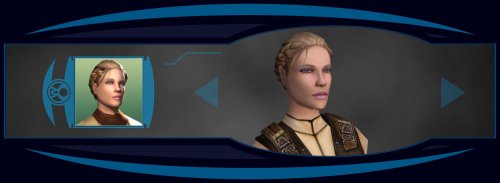
Version 1.0.0
200 downloads
************************ Knights of the Old Republic ************************ TITLE: Effixian's PFHC02 from K2 to K1 AUTHOR: Effix CONTACT: PM me on the forums or find me on Steam ************* INSTALLATION ************* Run the file "TSLPatcher - Install Effixian's PFHC02 from K2 to K1.exe". ************ DESCRIPTION ************ This mod adds a playable character PFHC02 from KotOR 2. As requested by Sappho. ***** BUGS ***** None known. ************* UNINSTALLING ************* 1. Remove the following files from your Override folder: pfhc02fx.mdl pfhc02fx.mdx PFHC02FX.tga PFHC02FX.txi PFHC02FXD.tga PFHC02FXD.txi PFHC02FXD1.tga PFHC02FXD1.txi PFHC02FXD2.tga PFHC02FXD2.txi PFHC02FXD3.tga PFHC02FXD3.txi PO_PFHC02FX.tga PO_PFHC02FXd.tga PO_PFHC02FXd1.tga PO_PFHC02FXd2.tga PO_PFHC02FXd3.tga 2. If you have never installed any mod with the TSL Patcher then you can remove appearance.2da, heads.2da and portraits.2da from the Override folder. Otherwise: If you haven't installed any head mods after this mod you can get the following files from the mod's backup folder and put them back in your Override folder: appearance.2da heads.2da portraits.2da Doing this when you did add another head mod would result in the later head(s) no longer being available in the game, yet the associated files (listed at step 1.) would still be in the Override folder. ******************* DISTRIBUTION NOTES ******************* You can use the files from this mod in your own mod if you simply credit me. ******** Thanks to ******** - Stoffe and Fred Tetra for the needed tools and tutorials - bead-v's MDLEdit - JCarter426 & Kexikus for sharing their knowledge of converting things with MDLEdit ------------------- THIS MODIFICATION IS NOT MADE, DISTRIBUTED, OR SUPPORTED BY BIOWARE, OBSIDIAN, OR LUCASARTS ENTERTAINMENT COMPANY LLC. ELEMENTS TM & © LUCASARTS ENTERTAINMENT COMPANY LLC AND/OR ITS LICENSORS. -
View File Effixian's PFHC02 from K2 to K1 ************************ Knights of the Old Republic ************************ TITLE: Effixian's PFHC02 from K2 to K1 AUTHOR: Effix CONTACT: PM me on the forums or find me on Steam ************* INSTALLATION ************* Run the file "TSLPatcher - Install Effixian's PFHC02 from K2 to K1.exe". ************ DESCRIPTION ************ This mod adds a playable character PFHC02 from KotOR 2. As requested by Sappho. ***** BUGS ***** None known. ************* UNINSTALLING ************* 1. Remove the following files from your Override folder: pfhc02fx.mdl pfhc02fx.mdx PFHC02FX.tga PFHC02FX.txi PFHC02FXD.tga PFHC02FXD.txi PFHC02FXD1.tga PFHC02FXD1.txi PFHC02FXD2.tga PFHC02FXD2.txi PFHC02FXD3.tga PFHC02FXD3.txi PO_PFHC02FX.tga PO_PFHC02FXd.tga PO_PFHC02FXd1.tga PO_PFHC02FXd2.tga PO_PFHC02FXd3.tga 2. If you have never installed any mod with the TSL Patcher then you can remove appearance.2da, heads.2da and portraits.2da from the Override folder. Otherwise: If you haven't installed any head mods after this mod you can get the following files from the mod's backup folder and put them back in your Override folder: appearance.2da heads.2da portraits.2da Doing this when you did add another head mod would result in the later head(s) no longer being available in the game, yet the associated files (listed at step 1.) would still be in the Override folder. ******************* DISTRIBUTION NOTES ******************* You can use the files from this mod in your own mod if you simply credit me. ******** Thanks to ******** - Stoffe and Fred Tetra for the needed tools and tutorials - bead-v's MDLEdit - JCarter426 & Kexikus for sharing their knowledge of converting things with MDLEdit ------------------- THIS MODIFICATION IS NOT MADE, DISTRIBUTED, OR SUPPORTED BY BIOWARE, OBSIDIAN, OR LUCASARTS ENTERTAINMENT COMPANY LLC. ELEMENTS TM & © LUCASARTS ENTERTAINMENT COMPANY LLC AND/OR ITS LICENSORS. Submitter Effix Submitted 07/02/2024 Category Mods K1R Compatible Yes
-
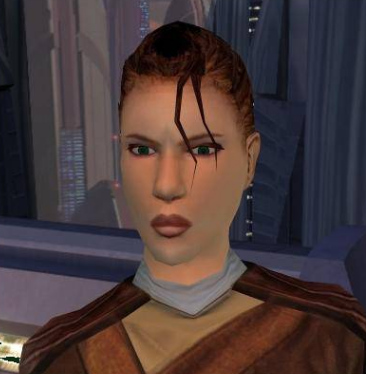
dunno bout ya but, i would love to see and play the PFHC02 female head from K1 inserted to K2, the one and only badass with the french braid?

-

Version 1.0.0
2,900 downloads
Re-texture of PFHC03, for Star wars: Knights of the Old Republic. Texture Resolution 1024X1024. The archive contains 5 textures of the head. 3 textures for underwear. 5 icons and 2 .txi. To Install 1. Download: PFHC03 HD 2. Copy all files to the Knights of the Old republic's Override folder. (Example location - C:\Program Files (x86)\Steam\steamapps\common\swkotor\Override) 3. When/if prompted to overwrite files, press okay. 4. If you like the mod; leave a comment or endorse! (It would be much appreciated) Made with love. -
View File PFHC03 HD Re-texture of PFHC03, for Star wars: Knights of the Old Republic. Texture Resolution 1024X1024. The archive contains 5 textures of the head. 3 textures for underwear. 5 icons and 2 .txi. To Install 1. Download: PFHC03 HD 2. Copy all files to the Knights of the Old republic's Override folder. (Example location - C:\Program Files (x86)\Steam\steamapps\common\swkotor\Override) 3. When/if prompted to overwrite files, press okay. 4. If you like the mod; leave a comment or endorse! (It would be much appreciated) Made with love. Submitter Dark Hope Submitted 11/07/2020 Category Skins K1R Compatible No
-

Version 1.0.0
3,094 downloads
Re-texture of PFHC02, for Star wars: Knights of the Old Republic. Texture Resolution 1024X1024. The archive contains 5 textures of the head. 3 textures for underwear. 5 icons and 2 .txi. To Install 1. Download: PFHC02 HD 2. Copy all files to the Knights of the Old republic's Override folder. (Example location - C:\Program Files (x86)\Steam\steamapps\common\swkotor\Override) 3. When/if prompted to overwrite files, press okay. 4. If you like the mod; leave a comment or endorse! (It would be much appreciated) Made with love. -
View File PFHC02 HD Re-texture of PFHC02, for Star wars: Knights of the Old Republic. Texture Resolution 1024X1024. The archive contains 5 textures of the head. 3 textures for underwear. 5 icons and 2 .txi. To Install 1. Download: PFHC02 HD 2. Copy all files to the Knights of the Old republic's Override folder. (Example location - C:\Program Files (x86)\Steam\steamapps\common\swkotor\Override) 3. When/if prompted to overwrite files, press okay. 4. If you like the mod; leave a comment or endorse! (It would be much appreciated) Made with love. Submitter Dark Hope Submitted 06/24/2020 Category Skins K1R Compatible No