

Search the Community
Showing results for tags 'dol grenn'.
Found 2 results
-
Version 1.1.0
113 downloads
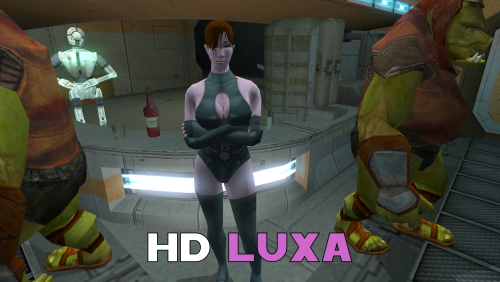
A Mod for Star Wars Knights of The Old Republic II Author: N-DReW25 1.1.0 Release Date: 29.08.2026 Installation: Select which HD texture you would like to install. For "HD Grenn" and "HD Zhugs" open the "For Override" folder and drag/copy the textures within and drop/paste them into your Kotor II Override folder. Delete the files "N_DolGrenH.tpc" and/or "N_Duros04.tpc" and "N_Duros05.tpc" if they are present. For the "Normal" install of "HD Luxa" open the "For Override" folder and drag/copy the textures within and drop/paste them into your Kotor II Override folder. Delete the files "N_Lala_XuA01.tpc" and "N_Lala_XuH.tpc" if they are present. For the "Thigh High Boots" install of "HD Luxa" you must first install DarthParametric's "TSL Thigh-High Boots For Female Twi'lek Body (Modder's Resource)" mod. Once that mod is installed, open the "For Override" folder and drag/copy the textures within and drop/paste them into your Kotor II Override folder. Delete the files "N_Lala_XuA01.tpc" and "N_Lala_XuH.tpc" if they are present. Uninstallation: Delete the N_DolGrenH.tga, N_Lala_XuA01.tga, N_Lala_XuH.tga, N_Duros04.tga, and/or N_Duros05.tga files from your Override folder. Description: This pack is a compilation of edits made by N-DReW25 to the released work of the modder Dark Hope to resemble Kotor II characters. Whilst Dark Hope did make the original textures for Kotor I, it was N-DReW25 who made these textures for Kotor II. As Dark Hope is focusing her current work on Kotor I mods please do not bother her about this mod. This pack contains HD textures for Lieutenant Dol Grenn, the Zhug Brothers, and Luxa. For Lieutenant Dol Grenn, his head in Kotor II was made via photo sourcing elements of other old male heads from Kotor I. Most of his face and beard comes from Davik, his eyebrows and sideburns are Davik's eyebrows and sideburns that are recolored brown, and most of his hair is Deadeye Duncan's hair that has also been recolored brown. Using this exact same method described above, I was able to photo source elements of Dark Hope's Davik and Deadeye Duncan heads to make a HD Lieutenant Grenn head. For Luxa, her head was a recolored Kotor I player head whilst her body was a reskinned Twi'lek outfit. I recolored Dark Hope's PFHA01 HD mod and one of her Twi'lek dancer body textures to resemble Luxa. I also made an alternative Luxa version for DarthParametric's TSL Thigh-High Boots For Female Twi'lek Body (Modder's Resource) mod. For the Zhug Brothers, I photo sourced elements of RedRob41's Zhug Brother upscale, imposed them onto Dark Hope's Duros, and recolored elements of Dark Hope's Duros to resemble the Kotor II Zhug Brothers. Known Bugs: This mod shouldn't have bugs but if you find any report them to me on Deadlystream. Incompatibilities: Would be incompatible with any mods which add N_DolGrenH.tga, N_DolGrenH.tpc, N_Lala_XuA01.tga, N_Lala_XuA01.tpc, N_Lala_XuH.tga, N_Lala_XuH.tpc, N_Duros04.tga, N_Duros04.tpc, N_Duros05.tga, and N_Duros05.tpc. Permissions: As Dark Hope gave free permission for anyone to use her mods and the assets I photo sourced from RedRob41's mod is a modder's resource, you are therefore allowed to use this mod as it was made using her work. Thanks to: Dark Hope: For giving everyone free permission to use her work! RedRob41: For making his 4x Upscale+ Character Textures & Model Fixes mod a modder's resource! Bioware: For such an amazing game! Obsidian Entertainment: For such an amazing sequel! Fred Tetra: For Kotor Tool! And everyone who downloads the mod! Legal: THIS MODIFICATION IS NOT SUPPORTED BY BIOWARE/OBSIDIAN ENTERTAINMENT, LUCASARTS, DISNEY OR ANY LICENSERS/SPONSORS OF THE MENTIONED COMPANIES. USE OF THIS FILE IS AT YOUR OWN RISK AND THE ABOVE-MENTIONED COMPANIES OR THE AUTHOR IS NOT RESPONSIBLE FOR ANY DAMAGE CAUSED TO YOUR COMPUTER FOR THE USAGE OF THIS FILE. -
View File HD Dark Hope Textures for K2 A Mod for Star Wars Knights of The Old Republic II Author: N-DReW25 1.1.0 Release Date: 29.08.2026 Installation: Select which HD texture you would like to install. For "HD Grenn" and "HD Zhugs" open the "For Override" folder and drag/copy the textures within and drop/paste them into your Kotor II Override folder. Delete the files "N_DolGrenH.tpc" and/or "N_Duros04.tpc" and "N_Duros05.tpc" if they are present. For the "Normal" install of "HD Luxa" open the "For Override" folder and drag/copy the textures within and drop/paste them into your Kotor II Override folder. Delete the files "N_Lala_XuA01.tpc" and "N_Lala_XuH.tpc" if they are present. For the "Thigh High Boots" install of "HD Luxa" you must first install DarthParametric's "TSL Thigh-High Boots For Female Twi'lek Body (Modder's Resource)" mod. Once that mod is installed, open the "For Override" folder and drag/copy the textures within and drop/paste them into your Kotor II Override folder. Delete the files "N_Lala_XuA01.tpc" and "N_Lala_XuH.tpc" if they are present. Uninstallation: Delete the N_DolGrenH.tga, N_Lala_XuA01.tga, N_Lala_XuH.tga, N_Duros04.tga, and/or N_Duros05.tga files from your Override folder. Description: This pack is a compilation of edits made by N-DReW25 to the released work of the modder Dark Hope to resemble Kotor II characters. Whilst Dark Hope did make the original textures for Kotor I, it was N-DReW25 who made these textures for Kotor II. As Dark Hope is focusing her current work on Kotor I mods please do not bother her about this mod. This pack contains HD textures for Lieutenant Dol Grenn, the Zhug Brothers, and Luxa. For Lieutenant Dol Grenn, his head in Kotor II was made via photo sourcing elements of other old male heads from Kotor I. Most of his face and beard comes from Davik, his eyebrows and sideburns are Davik's eyebrows and sideburns that are recolored brown, and most of his hair is Deadeye Duncan's hair that has also been recolored brown. Using this exact same method described above, I was able to photo source elements of Dark Hope's Davik and Deadeye Duncan heads to make a HD Lieutenant Grenn head. For Luxa, her head was a recolored Kotor I player head whilst her body was a reskinned Twi'lek outfit. I recolored Dark Hope's PFHA01 HD mod and one of her Twi'lek dancer body textures to resemble Luxa. I also made an alternative Luxa version for DarthParametric's TSL Thigh-High Boots For Female Twi'lek Body (Modder's Resource) mod. For the Zhug Brothers, I photo sourced elements of RedRob41's Zhug Brother upscale, imposed them onto Dark Hope's Duros, and recolored elements of Dark Hope's Duros to resemble the Kotor II Zhug Brothers. Known Bugs: This mod shouldn't have bugs but if you find any report them to me on Deadlystream. Incompatibilities: Would be incompatible with any mods which add N_DolGrenH.tga, N_DolGrenH.tpc, N_Lala_XuA01.tga, N_Lala_XuA01.tpc, N_Lala_XuH.tga, N_Lala_XuH.tpc, N_Duros04.tga, N_Duros04.tpc, N_Duros05.tga, and N_Duros05.tpc. Permissions: As Dark Hope gave free permission for anyone to use her mods and the assets I photo sourced from RedRob41's mod is a modder's resource, you are therefore allowed to use this mod as it was made using her work. Thanks to: Dark Hope: For giving everyone free permission to use her work! RedRob41: For making his 4x Upscale+ Character Textures & Model Fixes mod a modder's resource! Bioware: For such an amazing game! Obsidian Entertainment: For such an amazing sequel! Fred Tetra: For Kotor Tool! And everyone who downloads the mod! Legal: THIS MODIFICATION IS NOT SUPPORTED BY BIOWARE/OBSIDIAN ENTERTAINMENT, LUCASARTS, DISNEY OR ANY LICENSERS/SPONSORS OF THE MENTIONED COMPANIES. USE OF THIS FILE IS AT YOUR OWN RISK AND THE ABOVE-MENTIONED COMPANIES OR THE AUTHOR IS NOT RESPONSIBLE FOR ANY DAMAGE CAUSED TO YOUR COMPUTER FOR THE USAGE OF THIS FILE. Submitter N-DReW25 Submitted 05/01/2026 Category Skins TSLRCM Compatible Yes

