

DarthParametric
-
Content Count
4,798 -
Joined
-
Last visited
-
Days Won
549
Everything posted by DarthParametric
-
This is normal. Adjusting the map requires an exe hack. Last I head ndix UR had finally figured out the exact offsets, but he hasn't updated his WS menus mod as yet.
-
Anyone is able to beta test at any time they want, simply by cloning the repository locally. Although it should be noted that TSLPatcher is no longer supported and HoloPatcher is now the required installer. If you want to try out the current build and test for bugs then you need to be quick. I will be starting my second 1.10.0 beta test playthrough this weekend, looking to have the final release ready by Xmas. Edit: As of this evening, I have wrapped up the last of the planned updates before I begin beta 2 this weekend. So if anyone wants to do a playtest, now is the time to jump in. But you'll need to be quick with your feedback, since I want to get the final release out by next weekend. Current changelog for v1.10.0:
-

[Request] K1 Dantooine Bridge Lighting UV Mapping Repair
DarthParametric replied to ConansHair's topic in Mod Requests
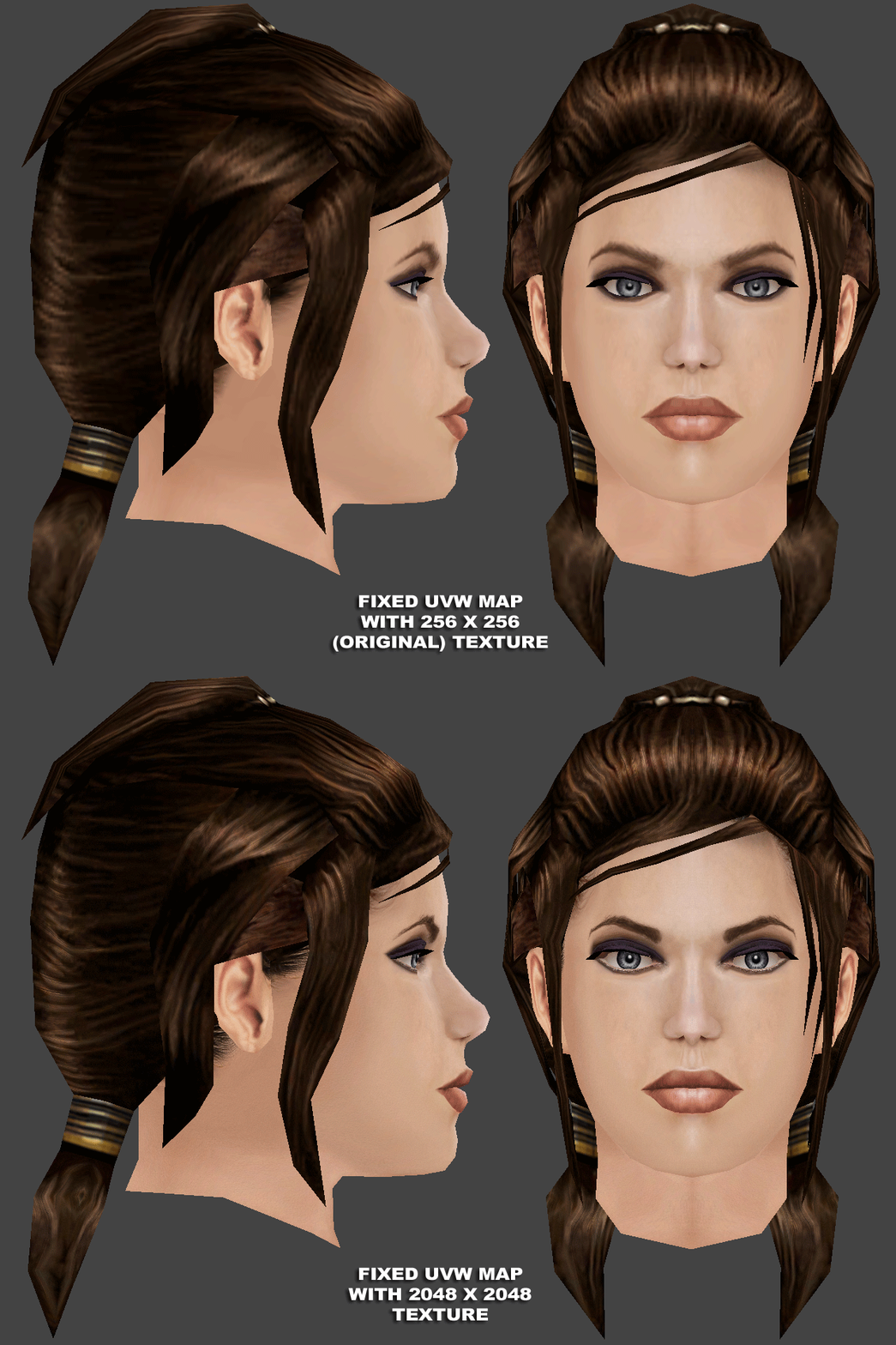
Interestingly both MDLEdit and MDLOps crash when trying to load or compile the exported ASCIIs. Someone proficient with Blender will have to do it in KBlender. Perhaps @WildKarrde could take a crack at it. -
 No, it isn't.
- 5 comments
-
- 1
-
-
- hd texture
- model
- (and 7 more)
-
 I like Matton's pseudo-young Carl Weathers look, but I'm not too keen on the Matales being turned into Chiss.
 -
Now do it in Aurebesh. By the way, I wouldn't say that level of detail doesn't have a place, as long as you are willing to go the extra mile to facilitate it. In other words, create a cutscene where you actually get a chance to show it off. I am doing a vaguely similar sort of thing with comm messages (which hopefully I'll get around to finishing next year some time).
-
You could source new head models from TOR, although the textures are a bit too cartoony to use as-is. At least the earlier stuff anyway. They have been trending towards a more realistic style in more recent updates, at least for unique NPCs (not that I have actively played for a while).
-
 I took the copies of the earlier versions you uploaded, downres'd then to 1920 wide, letterboxed to 1080 high, and upped the framerate to 60fps. My older 29.97fps videos that I had upscaled myself several years ago were running super choppy with the game running at 60fps on a 120hz monitor. It's working well so far, 19-odd hours into my current playthrough. So I'd suggest offering a 60fps version might be useful to people. Although I discovered that the game would crash when mixing videos of different framerates, so it's an all or nothing thing. Is that still the same version as the one you uploaded before? I noticed the crawl pops in suddenly in the version I have rather than scrolling in from the bottom of the frame. I'm curious how you did that btw. Did you just grab the few frames of empty space after the original crawl faded out and duplicate them to give you a clean background to create the new crawl on? That's appreciated. I can add new subs to the letterboxing in my local version. Edit: Ah, I see you included letterboxed versions. Nice.
 -
The starting conditional sets whether the branch is available or not. But k_con_fperslow is actually easier, since it checks for the PC having either FORCE_POWER_AFFECT_MIND or FORCE_POWER_DOMINATE, whereas k_con_fpershigh requires FORCE_POWER_DOMINATE. In other words, the two scripts should really have been labelled "easy" rather than "low" and "hard" rather than "high". Unlike with skill-based Persuade, there's no DC check with Force persuade. You can either do it or you can't. The outcome is entirely dependent on the DLG itself. In this case, it's one of those "illusion of choice" type situations. There's no branch for success because you were always being railroaded into a fight. The only option to do what you want would be to replace that branch with all new custom VO that leads to a new exit node.
-
Figured I should upload a K1CP-compatible version of the Taris script, since that alters the escape sequence slightly to show the Hawk landing on Dantooine before you get the cockpit conversation with Bastila and Carth. It's just the original script with the landing video added to the movie queue. void main() { StartNewModule("ebo_m12aa", "K_TARIS_DESTROYED", "11b", "05_2a"); } k_ren_taris03.ncs
-
Use the last beta version from this post.
-
Enclave Sublevel as a Functioning Jedi Academy
DarthParametric replied to brents742's topic in Work In Progress
This should be pretty straightforward. You just scale down the adult models. I did a similar thing for Dragon Age Origins once: Not much to it for KOTOR, since you'd basically only be scaling the one model. They'd probably require custom sabers, since they'd need to be slimmed down so their hands don't clip through. -
I assume this is displayed on a monitor panel or something?
-
Seems pretty simple. It's just a series of circles that gradually scale up and then fade out.
-
Well for starters that version is outdated. You can grab 1.0.2 from the Github page. But you're probably better off using MDLEdit. It's a bit more user-friendly. The most recent version can be found in this post.
-
KOTOR1 in 3440x1440 modding journey
DarthParametric replied to Pops Maellard's topic in General Kotor/TSL Modding
It's not in the game files at least. The linked track is ripped from 03.bik. -
.thumb.png.1fbbef4dd34d28e85d0f829e93407944.png) Just before entering the Grove for the first time.
Just before entering the Grove for the first time.- 96 comments
-
- 1
-

-
- npc overhaul
- diversity
- (and 6 more)
-
How does that work? Uses a lookup table of values or something?
-
KOTOR1 in 3440x1440 modding journey
DarthParametric replied to Pops Maellard's topic in General Kotor/TSL Modding
OK so here's another comparison, this time with the star map timing adjusted and with the (re)addition of the vanilla lighting, as requested by @Sith Holocron. Although I did tweak the light in the first room to switch it from the original yellow colour to the blue of the light in the star map room. I've since made a minor FoV tweak to the last shot (from 11° to 12°) which hopefully should bring every shot to parity - or as close as I can make it - with the original. I think the only remaining changes are to open the door leading to the room where you encounter the droid (and Nemo's corpse), and delete the flag placeable in the computer room just visible off in the background of the close-up on Malak's face. Strangely the lights fixed the issue with the shading around Malak's eye sockets, which was a nice bonus. The only thing remaining that really bugs me now is the desync between the star map opening and the sound effect for it. This is present in the original video, so it's a problem with the audio track. I'm guessing they must have made a late adjustment to the animation after they had already finalised the audio. Or maybe it was just a mistake. Not sure what can be done to fix it. We could overlay a duplicate of the map opening SFX, but then you'd get a weird duplicate/echo thing going on. Maybe that back end of the audio track could be adjusted/stretched? That might screw up the music though. I guess I can try playing around with it. -
You'd have to ask someone with much better technical knowledge of the model format than I to answer the question. Perhaps @seedhartha can answer regarding the compress quats flag? I assume it alters how they are stored in the model in some manner? A memory saving feature?
-
I'd say you need to do a Reset XForm on all your custom meshes before you realign their pivots to match the pivot of the appropriate vanilla meshes. As to animations, you can simply export the model from KMax without anims and then copy and paste the anims from the vanilla ASCII into your ASCII before compiling.
-
KOTOR1 in 3440x1440 modding journey
DarthParametric replied to Pops Maellard's topic in General Kotor/TSL Modding
Revised version with some of the changes outlined above. Still need to tweak the timing of the star map opening. The framing of the last shot is also seemingly impossible to match by tweaking the Field of View value in the DLG, at least with the star map in its regular game position. I may have to try pushing it a bit closer to the door to see if that allows for tighter framing. -
Are you creating new anims, or trying to use the vanilla ones? Exporting from KBlender?
-
KOTOR1 in 3440x1440 modding journey
DarthParametric replied to Pops Maellard's topic in General Kotor/TSL Modding
Thanks to @Sith Holocron providing a custom VO track to generate lip sync, and @seedhartha for creating a new lip sync tool as part of the reone toolkit, it's getting pretty close. The first line is still a little off to my eyes. Too much lip flapping during the "Dark Side" bit, and the "I can feel its power" needs a small delay. I also need to tweak the timing of the door opening. The framing needs a little adjustment as well - the original seems to be zoomed in a little tighter in some shots. On the plus side, I think the lip sync for the close-up on Malak's face ("If we pass beyond this door we can never go back") is actually much better than the original. Edit: Here's a comparison of the original vs the latest attempt. -
Given they have a new version of MSS, they may have entirely new audio. Copy the attached batch file into the game's folder and run it, then reply back attaching the hash list text file it generates. K1_Generate_Hashes.bat
