Search the Community
Showing results for tags 'error'.
Found 8 results
-
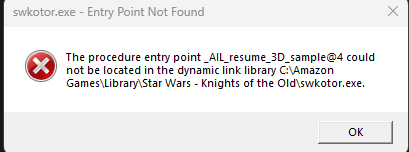
I'm Trying to run Kotor for the first time and I'm trying to run it in 1080p to do so I replace the swkotor.exe file but whenever I do this I get: The procedure entry point _AIL_release_3D_sample_handle@4 could not be located in the dynamic link library C:\AmazonGames\Library\Star Wars - Knights of the Old Republic\swkotor.exe. At first I thought it was maybe Bocaue I was using the Amazon Games version of the game but I saw on Steam that a few people had the same problem but never posted a solution. Does anyone know how to fix the error? I've tried reinstalling\ and I'm pretty certain I've done everything right patch wise.
-
I recited this from few users that encountered the error and I have an information which perhaps could be useful. This does sounds odd really, but on my end I've encountered that error when I run the installer/patcher with K-Tool was opened. I managed to "fix" it by closing the tool and run the installer again. I can't tell what's actually going on but that method works on my end. Hope that could works for you too!
-
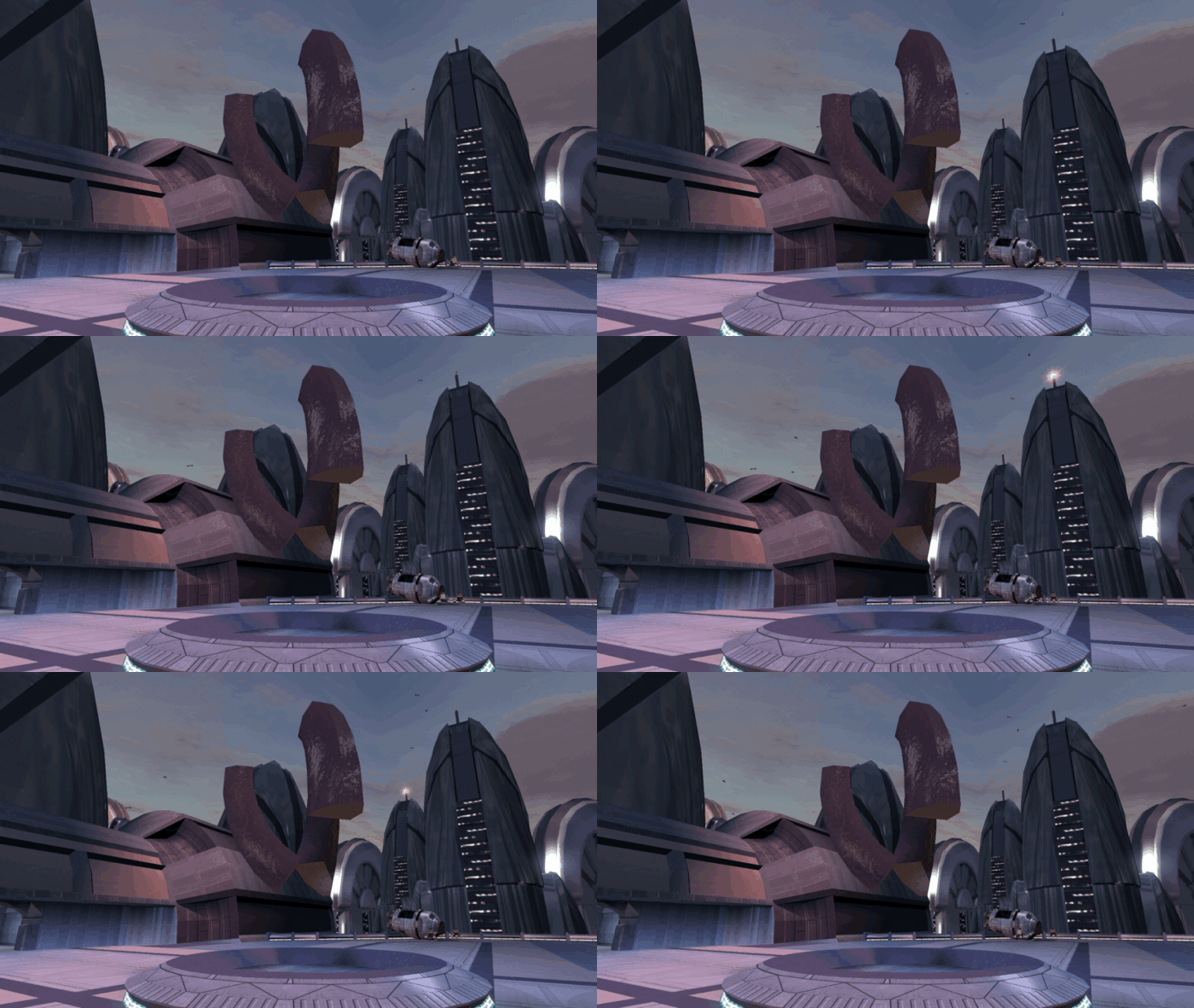
Greetings, fellow Jedi! I am here to ask and to report; does bump-map breaks the animation of certain level geometry? It does occur with the m02ac_02b\Geometry\Box273 mesh on my end. Screenshot: Update: It does working now. I had just recompiled the m02ac_02b.mdl/mdx again and strangely enough it does working on another attempt. But still I don't know what's causing the animation to stop with the aforementioned screenshot. Screenshot of the working bump-map: List of tools which have been used on this attempt: bead-v's "KOTORmax" bead-v's "MDLedit" ndix UR's "tga2tpc" Fred Tetra's "KotOR Tool" Many thanks for considering this- and have a nice weekend y'all!

-
Okay, I've spent way too much time on this. All I'm trying to do is extract one god damn character model from KOTOR 2 and export it (the model *and* its textures) as a single .FBX file. To start off, I used the "KOTOR Tool" for extracting an .MDL, corresponding .MDX, and corresponding texture .TGA file from KOTOR 2. The files are p_hk47.mdl, p_hk47.mdx, and P_hk47_01.tga. I then used the "mdlops" tool to create an ascii .MDL file. Based on my experience, none of the available AutoDesk 3DS scripts (NWMax 0.8 or NWPlus) for ascii .MDL file importing are compatible with the currently available versions of AutoDesk 3DS Max (I've tried the earliest available, 2015, and the latest, 2018, version of 3DS Max; both student edition). The import scripts just give errors at startup and also when importing an ascii MDL file. So because 3DS Max didn't work, I moved to Blender version 2.69. I tried using the "Neverblender" addon to import the same ascii .MDL file as before. However, after I import the ascii .MDL file, the model isn't textured (though I can view this non-textured model once rendered). I then tried the "KOTORBlender" addon to import the same ascii .MDL file as before. However, after I import the ascii .MDL file, the model isn't textured, and the model is invisible upon rendering it. What am I doing wrong? This is insanely frustrating. I have zero background in 3D modeling.
-
Hi, Mdlops seems to have a hard time compiling files which are too heavy. So, if I try to compile a .mdl heavier than say 1500 vertices, it throws an "Out of memory" error or just crashes. I tested it on some computers with good memory and CPU and the result is the same. Is it normal? And are there good alternatives to use?
-
I need help with the registry error "Kotor tool cannot find its key in the registry at HKLM\software\SCM\Kotor Tool." I tried adding in what it said, but im guessing that "SCM" stands for something, because I added the key in "Kotor Tool" which had the directory path, but I don't know why it still can't find the key. Any help would be great, much appreciation.
-
Hi there, I just started playing TSL with your mod a few days ago, and while it has been an all around good experience so far, I am now facing a bug I can't get around. Just after finishing the mission on Goto's ship and getting G0t0, I went and talked to Kreia. She gave me the prestige class choice, I chose Weapon Master and gained a level. Here's where my problem starts: I can choose my new skills (persuade, awareness, etc.) and my new Feat, but as soon as I click the power button, my game crashes to desktop. I have installed TSLRCM with the full installer on a newly installed and updated game. The only mods I've added since, are TGA overides I made myself. I still have the problem without these (though I can't see why they'd cause this). I have also tried reinstalling everything (both the game and the mod), and it still does not work. Here's a video of my problem. I've tried several combinations of skills and feats, to no avail. I hope you can help me here. CL
-
For some reason I am completely unable to download any of the mods from this site. I had the same problem as a guest, and I thought that creating an account would solve the problem, but it's still not working. I've tried using different browsers (Chrome, Firefox and IE) and have tried clearing the cache. The error message I get is: Sorry, we couldn't find that! [#10CCS2]We could not find the page you were looking for. Need Help? Our help documentation Contact the community administrator The download however appears under my account as if it has downloaded normally. I'd really like to download some of these mods, so any help to solve the problem would be much appreciated. P.S. I reported the following mod link as being broken before I realised that I was having the same problem for every mod. I'd appreciate it if someone could take down the warning, since it may just be me having a problem. http://deadlystream.com/forum/files/file/206-ultimate-appearance-mod/