DarthParametric
-
Posts
4,907 -
Joined
-
Last visited
-
Days Won
557
Content Type
Profiles
Forums
Blogs
Forum & Tracker Requests
Downloads
Gallery
Store
Events
Everything posted by DarthParametric
-
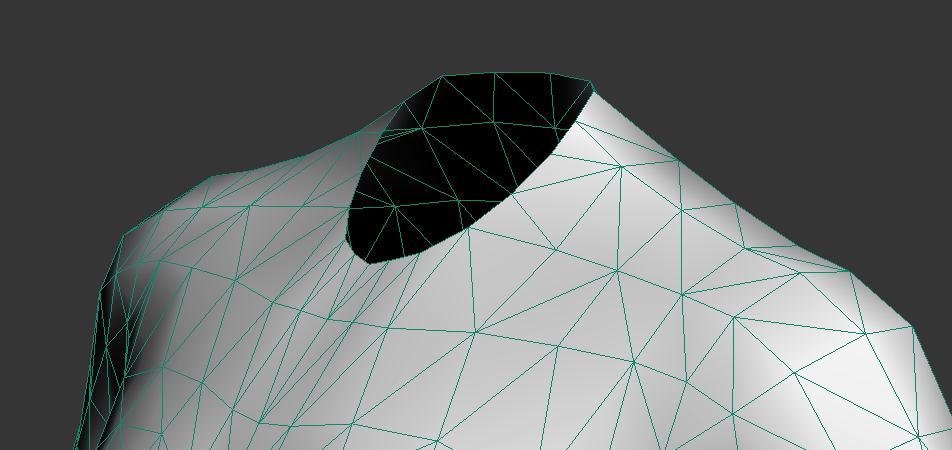
You may not need to worry for armour. Like I said, it's really only for anything with exposed skin, or possibly any of the "skintight" torsos. It will look like this:
-
Oh, that's something I forgot to mention. For any model where you need a seamless neck join (like underwear or anything exposing the base of the neck/shoulders), you'll need to adjust the TOR mesh to fit KOTOR's low poly neck stump. It's literally a case of hexagonal stump in a round hole.
-
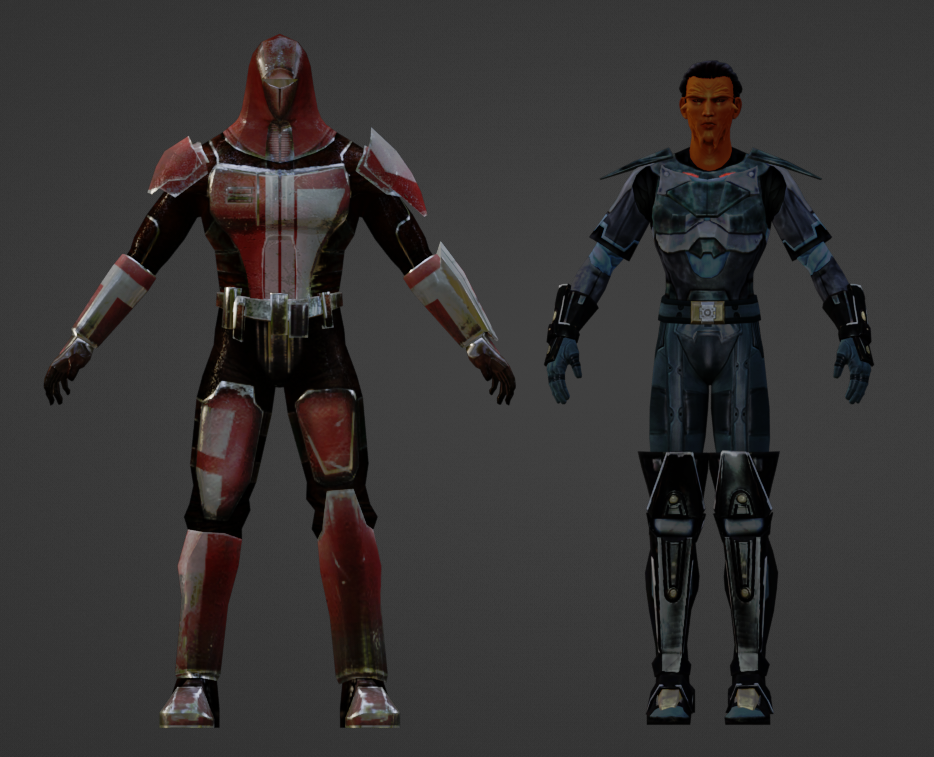
I haven't watched it, but judging from the thumbnail, probably. In specific regards to TOR models, expanding on what I said above you'll need to scale them by around 8 to 9x, depending on the target you're trying to match and rotate 180°. But the two big things are reposing the legs and arms, and adjusting the limb (specifically forearm) lengths. I usually found it was easier to just lop off the TOR hands/gloves and utilise vanilla KOTOR hands rather than try and reposition them. But that will probably vary a bit depending on the specifics of the source model and what rig you're targeting it to. As far as remapping skin weights goes, TOR heads use a lot more face bones, so those need to be condensed down to the nearest KOTOR equivalents.
-
Scale and position it to match vanilla KOTOR models, swap it to the KOTOR rig, remap UVs to fit it all on a single texture (at least if you want variants). TOR models use an A-pose, so you'll need to reposition the rig first before baking the changes. There are also a multitude of scale differences (like the torso and the arms), which typically makes fitting it to the KOTOR rig a pain in the ass.
-
 @Vriff is working on a new multi-platform TPC tool, coming soon™.
 -
 I think the cave uses a single lightmap, m18ac_04a_lm0, which would most likely be a TGA file if it was in the override.
 -
A lightmap issue possibly. Maybe a GPU issue. Shouldn't be anything from K1CP. Looks fine on my end, although it looks worse in a screenshot than it does in-game.
-
The script's OnEnter appears to be: void main() { object trigger = GetObjectByTag("utt_belloq"); DestroyObject(trigger); ActionStartConversation(GetFirstPC(),"unk_belloq"); } So the issue is simple. You're destroying the script owning object (the trigger) while the script it is trying to execute is running. That instantly kills all commands in the script. I would suggest you look at some vanilla trigger OnEnters to get a better idea of how to do this. The two primary approaches are checking and setting a local boolean on the trigger (k_inc_utility has functions for this), or if you want to destroy the trigger either start the convo first and set the destroy on a delay, or signal an external object (invisible placeable typically) and have it fire the convo and destroy the trigger via its UserDefine. The other simple solution is to simply remove the destroy command from the OnEnter and move it to a script on the first node of the conversation.
-
That's an engine limitation due to how globals are defined. People playing that much Pazaak is an extreme edge case, so not something K1CP will address.
-

Editing the Imperial Knight Armor Mod with GIMP
DarthParametric replied to redrebelzero's topic in General Kotor/TSL Modding
You'd need to edit the mod's texture, presumably a TGA given the age of the mod, in an image editor like Photoshop, Gimp, etc. There will presumably be two separate textures, one for females and one for males. -
Kotor 1 - Stuck before Dantooine Star Map
DarthParametric replied to keegs's topic in Knights of the Old Republic General
Here you go. I'm not sure if your game being non-English will be a problem after being saved in my English version. Dantooine_Ruins_Door_Fix_xispect.zip Crash? There shouldn't be any crash. What you encountered is a "soft lock". You managed to break the script that triggers the cutscene, leaving you with no way to continue the main quest. I still don't know how people manage to break it, hence why it's not fixed. I can't replicate the problem on my end. -
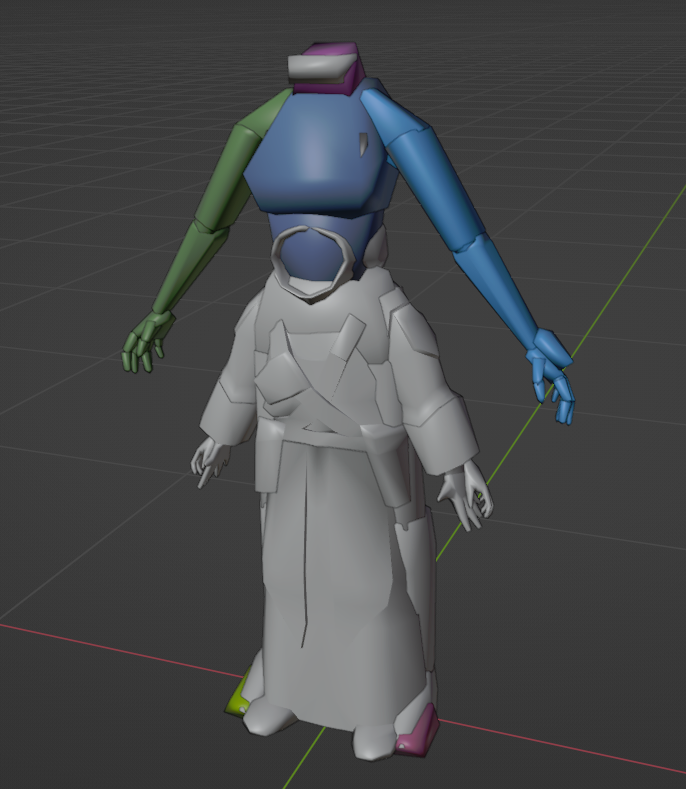
The problem is your rig didn't scale:
-
Attaching the models would be beneficial.
-
Why are you using ASCIIs if you're using KBlender?
-
Because it's a single model with a single texture that just plays two different animations.
-
All Hands on Deck for the Leviathan Prison Break
DarthParametric commented on DarthParametric's file in Mods
 OK, nothing untoward sticks out in the Override. Only thing I have left is getting you to do an in-game check for me. You'll need to download and install this armband mod - https://deadlystream.com/files/file/1963-k1-party-herding-armband/ Once that is done, download the attached script, and move it to your Override folder. Overwrite when prompted. You'll need to add the armband via KSE or spawn it via console. Go to the torture room in your original screenshot, equip the armband, then activate it like you would a shield or stim. Open the Messages screen and switch to the Feedback tab where you should see some messages about searching for placeables. Take a screenshot and post that here. dp_ptyhrd_jump.ncs
 -
All Hands on Deck for the Leviathan Prison Break
DarthParametric commented on DarthParametric's file in Mods
Jesus, that's a lot of mods. Well the good news is your placeables.2da looks fine. So I'm not sure how you managed to end up with what you did. You'll need to generate a file listing of everything in your Override folder. You can do this by opening a commandline window there and running dir /b /s > override.txt or if you're unable to do that, you can download the attached batch file, move it into the Override folder and double click it. After that, grab the override.txt file it generates and attach it here. FILE_LIST.bat That's unrelated to the issue at hand. -
All Hands on Deck for the Leviathan Prison Break
DarthParametric commented on DarthParametric's file in Mods
You broke placeables.2da by the looks. The cage is a vanilla placeable, the mod doesn't add any. Attach the placeables.2da from your Override folder. Alternatively, some other mod overwrote my mod's script/s, which seems less likely but isn't out of the question. Post your mod list in the order you installed them. -
Help Editing appearance.2da in Override folder
DarthParametric replied to tgritzmodder's topic in General Kotor/TSL Modding
The Look In Override option just has it parse 2DAs in the Override whenever a 2DA is used in a template like a UTI, UTC, etc. It won't show up in the main asset browser. You'll have to open it manually via the 2DA editor (1st button under the top menu row). But KTool is old and creaky and not recommended to be used any more. There are multiple alternatives these days, including a new 2DA editor that was literally just released in the last 24 hours. -
 Well the fact that it can generate TSLPatcher/HP ini data is pretty damn useful given how clunky ChangeEdit is. And HT is a complete mess and now officially dead, so new tools coming along isn't a bad thing, even if 2DAs aren't the most pressing use case.
 -
Jade Empire support.
-
Kotor 1 - Stuck before Dantooine Star Map
DarthParametric replied to keegs's topic in Knights of the Old Republic General
You need to send the entire folder of an individual save. For example, everything in saves\000051 - Game50. You'll need to archive it using something like 7-Zip, etc. -
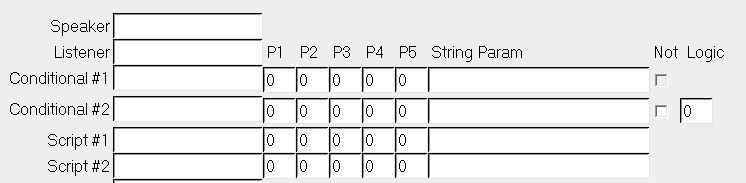
In TSL they expanded on script functionality, so it's certainly possible to have a generic script that parses a string in the DLG to set a global. However, I'm not sure I recall ever seeing something like that. I'm only aware of starting conditional checks, like so:

-
I don't see any references to it in either vanilla or TSLRCM scripts. The only "000_Hand" references I can see are to 000_Hand_Finale and 000_Handmaiden_Dead in 262TEL_Telos_Secret_Academy/a_kreatris. That's despite there being a bunch: 000_Hand_Angry 000_Hand_Atris_PC 000_Hand_Dad_Teach 000_Hand_Father 000_Hand_Finale 000_Hand_Love 000_Hand_Mom_PC 000_Hand_React_Evil 000_Hand_React_Good 000_Hand_Trial 000_Handmaiden_Dead 000_Handmaiden_Force 000_Handmaiden_Jedi
-
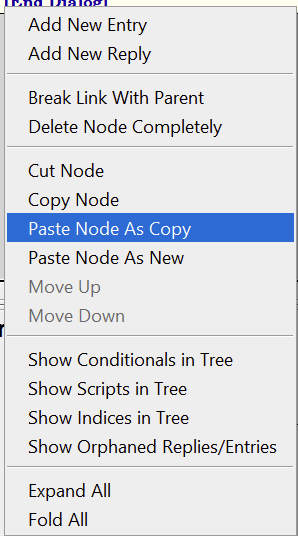
Right click on the source child node, Copy Node, right click on target parent node, Paste Node as Copy: