

Skins
350 files
-

Player Armband Armor for Jal Shey Default Model
By 90SK
TSL Player Armband Armor
by 90SK
---
This mod adds a Jal Shey model armor that replaces the exile armband as the exile's item.
For best use with TSLRCM, install TSLRCM, this mod, robe mods, and weapon/saber/other mods after that.
Jal Shey replacements aren't recommended since this mod adds new default type Jal Shey armors.
This mod is Not compatible with TSL Loot and Immersion Upgrade 3b until further notice.
---
Installation:
Copy mod files into your TSL Override folder.
To uninstall, remove mod files from archive out of your Override folder.
The mod requires a new game start to fully appear in-game. Otherwise, please install and use the giveitem code afterwards to get the item. It will replace the existing Exile armband item in TSL entirely, a trade-off.
The item uses the default Jal Shey/Zeison Sha armor type, and this mod does not include any additional replacement to the armor type. If you want multiple sets of this armor, you have to put in the giveitem code one time per set.
---
giveitem Codes:
"a_band_c01" - Exile's armor
---
Credits:
Please use for personal use only.
Do not rerelease this mod on any site or in any way.
THIS MODIFICATION IS PROVIDED AS-IS AND IS NOT SUPPORTED BIOWARE/ OBSIDIAN ENTERTAINMENT OR LUCASARTSOR ANY LICENSERS/SPONSORS OF THE MENTIONED COMPANIES. USE OF THIS FILE IS AT YOUR OWN RISK AND THE ABOVE MENTIONED COMPANIES OR THE AUTHOR IS NOT RESPONSIBLE FOR ANY DAMAGE CAUSED TO YOUR COMPUTER FOR THE USAGE OF THIS FILE.
193 downloads
-

Mandalore Unbearded
By InSidious
Description
This mod is another file I found on my hard drive from years ago.
By merging Kavar's head texture with Mandalore's, I managed to remove the latter's beard.
For anyone who wanted Mandalore minus the beard. The disadvantage of this is that the texture is now
half the size of Mandalore's standard head texture.
I make no claims as to the quality of the work; this is a very old mod.
Installation
Just drop the files "P_CandH03.tga" and "P_CandH03.txi" into your Override folder.
Uninstallation
Take them out again.
157 downloads
-

Realistic Skybox for deathdisco's Coruscant
By 90SK
Realistic Skybox for deathdisco's Coruscant
---
Authors:
Sith Holocron
90SK
deathdisco
---
Adds a realistic Coruscant skybox to the Coruscant landing pad and council chambers.
This will change the council chamber's skybox to a realistic skybox, and if you have installed deathdisco's Coruscant, it will change those skyboxes as well.
Please note that if you use Steam Workshop, you will have to install this mod to those folders as well as your main directory Override.
---
To install,
Copy mod files from archive to your SWKotOR/Override folder
---
To Uninstall, remove mod files from your Override folder in TSL's program directory that you installed into.
Mod filenames:
COR_sky1
COR_sky2
COR_sky3
COR_sky4
MAL_skyBk
MAL_skyFrnt
MAL_skyLft
MAL_skyRght
MAL_skyUp
load_952cor.tga
load_953cor.tga
load_954cor.tga
---
Special Thanks:
Exile007 for original mod
---
Legalal Disclaimer:
All materials and copyrights belong to LucasArts, Bioware and Obsidian Entertainment Inc. I own none of the materials, and I'm not making any money out of this mod. It is to be distributed
as-is without alteration, unless by permission of me. This mod is not to be distributed for profit, either.
I hereby state that I specifically do NOT wish this mod to be uploaded to Steam Workshop. I may release this on NexusMods at a later date but I don't wish others to do so. Usage in other mods must be requested and approved by me before your use.
THIS MODIFICATION IS PROVIDED AS-IS AND IS NOT SUPPORTED BIOWARE/ OBSIDIAN ENTERTAINMENT OR LUCASARTSOR ANY LICENSERS/SPONSORS OF THE MENTIONED COMPANIES. USE OF THIS FILE IS AT YOUR OWN RISK AND THE ABOVE MENTIONED COMPANIES OR THE AUTHOR IS NOT RESPONSIBLE FOR ANY DAMAGE CAUSED TO YOUR COMPUTER FOR THE USAGE OF THIS FILE.
1,431 downloads
-

Droid Testing Console Texture Upgrade
AUTHOR: Sith Holocron
ORIGINAL RELEASE: 01 MAY 2018
GAMES: Star Wars Knights of the Old Republic 2. [This mod will not work in Star Wars Knights of the Old Republic 1.]
REQUIRED ADDITIONAL MOD: M4-78 Enhancement Project (either EP version 1.2, EP version 1.3 (the one on Steam), or EP version 1.5)
Description:
------------------
I was dissatisfied with the textures that I made for the Droid Testing Consoles. The Droid Testing Consoles are seen near the end of the Industrial Zone on M4-78, just before you get to the Industrial Zone Archon Chamber. One of the textures had a Galaxy as the background and the other had a game map on it. In addition, I thought I could come up with better animations in the smaller boxes. I decided to take action and change that.
The previous backgrounds have been replaced with a new background from an droid assembly line on M4-78. It's actually a loop of the HK Factory with a new War Droid texture swapped in to replace the HK droids usually seen in there. (No, you hadn't missed an area.) Some of the other texture enhancements can been seen in these example GIFs.
This version of the mod is compatible with both version 1.2 (available on MODDB) and the 1.3 version (only available on Steam) or version 1.5 (available here on Deadly Stream.) Each frame size is 1024 by 1024 and there are 11 frames in total.
Installation:
-----------------
Drop the TGA and TXI files into your Override folder.
Uninstall:
--------------
To completely remove the loading screens, delete all the TGA and TXI files that were included in this mod from your Override folder.
Legal Disclaimer:
-------------------------
All materials and copyrights belong to LucasArts, Bioware and Obsidian Entertainment Inc. I own none of the materials, and I'm not making any money out of this mod. It is to be distributed as-is without alteration, unless by permission of me. This mod is not to be distributed for profit, either.
I hereby state that I specifically do NOT wish this mod to be uploaded to Steam Workshop. Ever.
I may release this on NexusMods at a later date but I don't wish others to do so. Usage in other mods must be requested AND approved by me before your use. Messages that request permission without providing information on how your alternate version would be different than mine should be considered an instant denial of permission.
Special Thanks:
-----------------------
JCarter426 for his replacement textures so I could swap in the Sith War Droids into the HK Factory animation.
I used High Quality Blasters version 1.0 by SithSpecter in the animation with the rotating blaster. Highly recommended!
Corrections made to TXI files thanks to ndix UR.
Thanks to Canderis, JCarter426, and Malkior for their input.
And thanks to YOU for giving this mod a gander! Would you kindly leave feedback on the download page? (I would like to know if you've liked it . . . )
1,459 downloads
-

Want Kaah Gone: The Commemorative TexturePack
By ndix UR
Want Kaah Gone: The Commemorative TexturePack
by ndix UR
Commemorate the release of the M4-78 "Want Kaah Gone" music video... with this handsome, albeit entirely frivolous, custom texturepack. You too can experience the amazing textures used in this wonderful new offering. Proudly display your ardent desire for Kaah to no longer be present with a set of "Want Kaah Gone" datascreen textures to call your very own.
What?
You can find the music video here:
What?
This silly little mod replaces the data screen textures for the M4-78 archon chambers for IS-24, ES-05, and M4-78.
Special thanks to Sith Holocron, as the entire project, and these textures, were his idea.
185 downloads
-

Replacement Loading Screens for KotOR2: Original Pack (with or without TSLRCM) - Part 3
AUTHOR: Sith Holocron
ORIGINAL RELEASE: 17 APR 2018
GAMES: Star Wars Knights of the Old Republic 2. [This mod will not work in Star Wars Knights of the Old Republic 1.]
Description:
------------------
Were you ever dissatisfied with the low-resolution loading screens when the in-game footage looks so much better ? What if there was a mod that took care of that for you? Psssst . . . it’s this mod!
This version of the mod covers the areas in the normal “vanilla” game and the areas added/restored by TSLRCM. If you’re looking for additional loading screens that cover large scale add-on mods, you should seek out the “Replacement Loading Screens for KotOR2 Add-On Pack” which is also available on Deadly Stream. The texture size is 2048 by 2048 so you'll have a large sized picture for each.
List of the areas covered in this mod
Code Area
-------- ------------------------------------------------------
701KOR Korriban - Valley of the Dark Lords
702KOR Korriban - Sith Academy
710KOR Korriban - Shyrack Cave
711KOR Korriban - Secret Tomb
851NIH Ravager - Command Deck
852NIH Ravager - Bridge
901MAL Malachor V - Surface
902MAL Malachor V - Depths
903MAL Malachor V - Trayus Academy
904MAL Malachor V - Trayus Core
905MAL Malachor V - Trayus Crescent
906MAL Malachor V - Trayus Proving Grounds
907MAL Malachor V - Kreia/Sion Cutscene
Installation:
-----------------
Drop the TGA files and loadscreen.2da into your Override folder.
Uninstall:
--------------
If for any reason, you don’t like one (or more) of the loading screens, consult the list above so you can determine which you’ll need to remove from your Override folder.
To completely remove the loading screens, delete all the above listed TGA files and the loadscreen.2da.
Legal Disclaimer:
-------------------------
All materials and copyrights belong to LucasArts, Bioware and Obsidian Entertainment Inc. I own none of the materials, and I'm not making any money out of this mod. It is to be distributed
as-is without alteration, unless by permission of me. This mod is not to be distributed for profit, either.
I hereby state that I specifically do NOT wish this mod to be uploaded to Steam Workshop. I may release this on NexusMods at a later date but I don't wish others to do so. Usage in other mods must be requested and approved by me before your use.
Special Thanks:
-----------------------
Ndix UR for his wonderful Loading Screen Template which enabled me to offer these loading screens in a format resembling the original loading screens for you all.
Thanks to DarthParametric, JCarter426, NDreW-25, and Marius Fett for their input and technical expertise.
And thanks to YOU for giving this large 3-parted mod a look-see! Won’t you leave feedback on the download page? (I would like to see what I’ve done right , you see…)
Note:
Compatible with VarsityPuppet's TOR Style Loading Screens 1.0
Video Preview:
----------------------
If you'd like a preview of all of the loading screens, check out this video below. It does show the screens without the filter and the black bars but it give you an idea what you'll be working with before you download. I recommend watching the video maximized. This video shows all screens in part 1, part 2, and part 3 of this mod (excepting 235TEL.)
18,467 downloads
-

Replacement Loading Screens for KotOR2: Original Pack (with or without TSLRCM) - Part 2
Replacement Loading Screens for KotOR2: Original Pack (with or without TSLRCM) – Part 2 ==============================================================================
AUTHOR: Sith Holocron ORIGINAL RELEASE (version 1.0): 17 APR 2018 UPDATED RELEASE (version 1.1): 02 OCT 2018
GAMES: Star Wars Knights of the Old Republic 2
[This mod will not work in Star Wars Knights of the Old Republic 1]
Description: Were you ever dissatisfied with the low-resolution loading screens when the in-game footage looks so much better? What if there was a mod that took care of that for you? Psssst…it’s this mod!
This version of the mod covers the areas in the normal “vanilla” game and the areas added/restored by TSLRCM. If you’re looking for additional loading screens that cover large scale add-on mods, you should seek out the “Replacement Loading Screens for KotOR2 Add-On Pack” which is also available on Deadly Stream. The texture size is 2048 by 2048 so you'll have a large sized picture for each.
List of the areas covered in this mod
Code Area ------ ------------------------------------------------------
301NAR Nar Shaddaa - Refugee Landing Pad 301NARa Nar Shaddaa - Refugee Landing Pad (Alternate)* 302NAR Nar Shaddaa - Refugee Quad 303NAR Nar Shaddaa - Docks 304NAR Nar Shaddaa - Jekk'Jekk Tarr 305NAR Nar Shaddaa - Jekk'Jekk Tarr Tunnels 306NAR Nar Shaddaa - Entertainment Promenade 351NAR Nar Shaddaa - Goto's Yacht 371NAR Nar Shaddaa - Swoop Track
401DXN Dxun - Jungle Landing 402DXN Dxun - Jungle 403DXN Dxun - Mandalorian Ruins 404DXN Dxun - Mandalorian Cache 410DXN Dxun - Jungle Tomb 411DXN Dxun - Sith Tomb 421DXN Dxun - Turret Minigame
501OND Onderon - Iziz Spaceport 502OND Onderon - Iziz Merchant Quarter 503OND Onderon - Iziz Cantina 504OND Onderon - Sky Ramp 505OND Onderon - Turret Minigame 506OND Onderon - Royal Palace 510OND Onderon - Swoop Track 511OND Onderon - Iziz Merchant Quarter Invasion 512OND Onderon - Iziz Western Square
601DAN Dantooine - Khoonda Plains 602DAN Dantooine - Khoonda 603DAN Dantooine - Khoonda Plains Cutscenes 604DAN Dantooine - Crystal Cave 605DAN Dantooine - Enclave Courtyard 610DAN Dantooine - Enclave Sublevel (updated texture!) 650DAN Dantooine - Rebuilt Jedi Enclave
Also included in this latest update are two optional textures to increase the resolution of the columns in the Dantooine Enclave Sublevel.
Installation: ------------- Drop the TGA files and loadscreen.2da into your Override folder.
* The loading screen “load_301NARa.tga” is an alternate version of “load_301NAR.tga”. If you wish to use the alternate version, delete the “a” from the alternate and put that texture into the Override rather than the original texture.
Uninstall: ---------- If for any reason, you don’t like one (or more) of the loading screens, consult the list above so you can determine which you’ll need to remove from your Override folder.
To completely remove the loading screens, delete all the above listed TGA files and the loadscreen.2da.
Legal Disclaimer: ------------------- All materials and copyrights belong to LucasArts, Bioware and Obsidian Entertainment Inc. I own none of the materials, and I'm not making any money out of this mod. It is to be distributed as-is without alteration, unless by permission of me. This mod is not to be distributed for profit, either.
I hereby state that I specifically do NOT wish this mod to be uploaded to Steam Workshop. I may release this on NexusMods at a later date but I don't wish others to do so. Usage in other mods must be requested and approved by me before your use.
Special Thanks: ------------------- Ndix UR for his wonderful Loading Screen Template which enabled me to offer these loading screens in a format resembling the original loading screens for you all.
Thanks to DarthParametric, JCarter426, NDreW-25, and Marius Fett for their input and technical expertise.
And thanks to YOU for giving this monstrosity a whirl! Won’t you leave feedback on the download page? (I would like to see what I’ve done right, you see…)
Note:
Compatible with VarsityPuppet's TOR Style Loading Screens 1.0
20,191 downloads
-

Replacement Loading Screens for KotOR2: Original Pack (with or without TSLRCM) - Part 1
AUTHOR: Sith Holocron
ORIGINAL RELEASE: 17 APR 2018
GAMES: Star Wars Knights of the Old Republic 2. [This mod will not work in Star Wars Knights of the Old Republic 1.]
Description:
------------------
Were you ever dissatisfied with the low-resolution loading screens when the in-game footage looks so much better ? What if there was a mod that took care of that for you? Psssst . . . it’s this mod!
This version of the mod covers the areas in the normal “vanilla” game and the areas added/restored by TSLRCM. If you’re looking for additional loading screens that cover large scale add-on mods, you should seek out the “Replacement Loading Screens for KotOR2 Add-On Pack” which is also available on Deadly Stream. The texture size is 2048 by 2048 so you'll have a large sized picture for each.
"221TEL Citadel Station - Suburban" Is NOT included as a great corrected example is already available in this mod by JCarter426.
List of the areas covered in this mod
Code Area
-------- ------------------------------------------------------
001EBO Prologue - Ebon Hawk Interior
002EBO Prologue - Ebon Hawk Exterior Hull
003EBO Ebon Hawk - Interior
004EBO Ebon Hawk - Interior - Red Eclipse Slayer Invasion
005EBO Ebon Hawk - Escape from Peragus [2]
006EBO Ebon Hawk - Interior (Duplicate of 003EBO – used before cutscene)
007EBO Ebon Hawk - Interior (Duplicate of 003EBO – used before cutscene)
101PER Peragus - Administration Level
102PER Peragus - Mining Tunnels
103PER Peragus - Fuel Depot
104PER Peragus - Asteroid Exterior
105PER Peragus - Dormitories
106PER Peragus - Hangar Bay
107PER Peragus - Turret Minigame
151HAR Harbinger - Command Deck
152HAR Harbinger - Crew Quarters
153HAR Harbinger - Engine Deck
201TEL Citadel Station - Dock Module
202TEL Citadel Station - Entertainment
203TEL Citadel Station - Residential 082 East
204TEL Citadel Station - Residential 082 West
205TEL Citadel Station - Cutscene with the Admiral
207TEL Citadel Station - Cantina
208TEL Citadel Station - Bumani Exchange Corp.
209TEL Citadel Station - Czerka Offices
211TEL Citadel Station - Swoop Track [4]
220TEL Citadel Station - Suburban
222TEL Citadel Station - Entertainment Module 081
231TEL Telos IV - Restoration Zone [5]
232TEL Telos IV - Underground Base
233TEL Telos IV - Czerka Site
235TEL Telos IV – Shuttle Cutscene
261TEL Telos IV - Polar Plateau
262TEL Telos IV - Secret Academy
298TEL Telos IV - Military Base Sub-Level (TSLRCM)
299TEL Telos IV - HK Manufacturing Plant (TSLRCM)
Installation:
-----------------
Drop the TGA files and loadscreen.2da into your Override folder.
The loading screen “load_301NARa.tga” is an alternate version of “load_301NARa.tga”. If you wish to use the alternate version, delete the “a” from the alternate and put that texture into the Override rather than the original texture.
Uninstall:
-------------
If for any reason, you don’t like one (or more) of the loading screens, consult the list above so you can determine which you’ll need to remove from your Override folder.
To completely remove the loading screens, delete all the above listed TGA files and the loadscreen.2da.
Legal Disclaimer:
------------------------
All materials and copyrights belong to LucasArts, Bioware and Obsidian Entertainment Inc. I own none of the materials, and I'm not making any money out of this mod. It is to be distributed as-is without alteration, unless by permission of me. This mod is not to be distributed for profit, either.
I hereby state that I specifically do NOT wish this mod to be uploaded to Steam Workshop. I may release this on NexusMods at a later date but I don't wish others to do so. Usage in other mods must be requested and approved by me before your use.
Special Thanks:
-----------------------
Ndix UR for his wonderful Loading Screen Template which enabled me to offer these loading screens in a format resembling the original loading screens for you all.
Thanks to DarthParametric, JCarter426, NDreW-25, and Marius Fett for their input and technical expertise.
And thanks to YOU for giving this monstrosity a whirl! Won’t you leave feedback on the download page? (I'd like to see what I’ve done right , you see…)
Note:
Compatible with VarsityPuppet's TOR Style Loading Screens 1.0
Video Preview:
----------------------
If you'd like a preview of all of the loading screens, check out this video below. It does show the screens without the filter and the black bars but it will give you an idea what you'll be working with before you download. I recommend watching the video maximized. This video shows all screens in part 1, part 2, and part 3 of this mod (excepting 235TEL.)
20,008 downloads
-
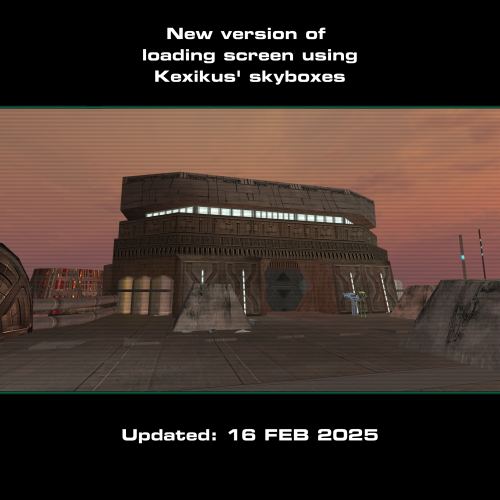
Replacement Loading Screens for KotOR2: Add-On Pack (with or without TSLRCM)
AUTHOR: Sith Holocron
ORIGINAL RELEASE: 17 APR 2018
UPDATED RELEASE: 23 MAR 2019
UPDATED RELEASE: 27 AUG 2019
CURRENT UPDATED RELEASE: 16 FEB 2025
GAMES: Star Wars Knights of the Old Republic 2 [This mod will not work in Star Wars Knights of the Old Republic 1]
Description:
Were you ever dissatisfied with the low-resolution loading screens when the in-game footage looks so much better? What if there was a mod that helped take care of that for you? Psssst…it’s this mod!
This version of the mod covers the loading screens for the following mods: Azgath N'Dul's Tomb, Coruscant Jedi Temple, Curse of the Sith, Korriban Expansion, and the M4-78 Enhancement Project. If you’re looking for the loading screens that cover the areas in the normal “vanilla” game and the areas added by TSLRCM, seek out the “Replacement Loading Screens for KotOR2: Original Pack” which is also available on Deadly Stream. The texture size is 2048 by 2048 so you'll have a large sized picture for each.
This mod now contains alternate skyboxes for those that use Kexikus’ skyboxes for M4-78 EP.
List of the areas covered in this mod.
Code Area
------------ ------------------------------------------------------
Curse of the Sith
100CDN Curse of the Sith
Azgath N'Dul's Tomb
712KOR Korriban - Azgath N'Dul's Tomb
713KOR Korriban - Tomb Antechamber
M4-78 Enhancement Project
703KOR Korriban cutscene #1 for M4-78 version 1.5
705KOR Korriban cutscene #2 for M4-78 version 1.5
801DRO M4-78 - Landing Pad
802DRO M4-78 - Central Zone
803DRO M4-78 - Environmental Zone
804DRO M4-78 - Industrial Zone
805DRO M4-78 - M4-78 Archon Chamber
806DRO M4-78 - Archon I Chamber (ES-05)
807DRO M4-78 - Archon II Chamber (IS-24)
808DRO M4-78 – Central Zone (irradiated)
809DRO M4-78 - Industrial Zone (irradiated)
810DRO M4-78 - Industrial Zone - Design & Testing
811DRO M4-78 - Industrial Zone - Research & Development
Coruscant Jedi Temple
952COR Coruscant - Jedi Temple
953COR Coruscant - Jedi Temple Council Chambers
954COR Coruscant - Jedi Temple Landing Pad
Korriban Expansion
740KOR Valley Floor
741KOR Poxus Awakens Herrco [Cutscene]
743KOR Tomb of Darth Doom III
745KOR Poxus' Academy
746KOR Poxus' Sanctuary
747KOR Shuttle Area
748KOR Sith Ruins
749KOR Thulsa Gaul’s Outer Sanctum
750KOR Thulsa Gaul’s Inner Sanctum
910DAG Tomb of Ezer Arden
Installation:
Drop the TGA files and loadscreen.2da into your Override folder. As M4-78 Enhancement Project includes its own TGA files, you’ll have to allow my TGAs to overwrite the TGAs already there in the Override folder.
If you wish to use the alternate loading screens that feature Kexikus’ skyboxes, grab the TGA files from the “Alternate loading screens for Kexikus' M4-78 skyboxes” folder. As before, allow the new TGAs to override what’s in the Override folder.
Uninstall:
If for any reason, you don’t like one (or more) of the loading screens, consult the list above so you can determine which TGA file/s you will need to remove from your Override folder.
To completely remove the loading screens, delete all the above listed TGA files.
Recommendations for Coruscant TGA’s:
This section won’t tell you how to install Coruscant Jedi Temple, or how fix compatibility issues with other mods. However, if you use the Jedi Temple Expansion (3.0) mod by HK-42, please install his mod first - before you put the relevant Coruscant TGAs from my mod in the Override. Allow the following files to overwrite the pre-existing ones: load_952cor.tga, load_953cor.tga, and load_954cor.tga.
Legal Disclaimer:
All materials and copyrights belong to LucasArts, Bioware and Obsidian Entertainment Inc. I own none of the materials, and I'm not making any money out of this mod. It is to be distributed
as-is without alteration, unless by permission of me. This mod is not to be distributed for profit, either.
I hereby state that I specifically do NOT wish this mod to be uploaded to Steam Workshop. I may release this on NexusMods at a later date but I don't wish others to do so. Usage in other mods must be requested AND approved by me before your use. Messages that request permission without providing information on how your alternate version would be different than mine should be considered an instant denial of permission.
@ndix UR and/or @newbiemodder have permission to include the Korriban Expansion loading screens in their mod if they wish – and if it is ever updated. . Attribution is requested.
Special Thanks:
-----------------------
@ndix UR for his wonderful Loading Screen Template which enabled me to offer these loading screens in a format resembling the original loading screens for you all.
Thanks to @DarthParametric, @JCarter426, @N-DReW25, and @Marius Fett for their input and technical expertise. If you want to have your War Droid utilize the textures from Sithspecter's High Quality blasters, be sure to use the fix for the model created by @DarthParametric which you can find here.
Thanks to @timurD2003 for testing the 23MAR2019 update to this mod.
And thanks to YOU for giving this mod a chance! Won’t you leave feedback on the download page? (I'd like to see what I’ve done right, you see. That's not too needy, right?)
Video Preview:
----------------------
If you'd like a preview of all of the loading screens, check out this video below. It does show the screens without the filter and the black bars but it give you an idea what you'll be working with before you download. I recommend watching the video maximized.
1,315 downloads
-
![More information about "[TSL] Swoop Monitors Replacement Pack"](https://deadlystream.com/downloads/screens/monthly_04_2018/thumb-575f3c766b6d26f0858cb737dcbd94ee-example.png)
[TSL] Swoop Monitors Replacement Pack
Swoop Monitor Replacement Pack
==============================================================================
AUTHOR: Sith Holocron
ORIGINAL RELEASE: 17 APR 2018
GAMES: Star Wars Knights of the Old Republic 2
[This mod will not work in Star Wars Knights of the Old Republic 1. If you're looking for swoop monitors for KotOR1, try Ebmar's Animated Swoop Screen mod instead.]
Description:
Were you ever dissatisfied with the low-resolution monitors that show the swoop footage in TSL? What if there was a mod that took care of that for you? Psssst…it’s this mod!
Installation:
-------------
Drop the TGA and TXI files and loadscreen.2da into your Override folder.
Uninstall:
----------
Remove what you put in above.
Legal Disclaimer:
-------------------
All materials and copyrights belong to LucasArts, Bioware and Obsidian Entertainment Inc. I own none of the materials, and I'm not making any money out of this mod. It is to be distributed
as-is without alteration, unless by permission of me. This mod is not to be distributed for profit, either.
I hereby state that I specifically do NOT wish this mod to be uploaded to Steam Workshop. Ever.
I may release this on NexusMods at a later date but I don't wish others to do so. Usage in other mods must be requested AND approved by me before your use. Messages that request permission without providing information on how your alternate version would be different than mine should be considered an instant denial of permission.
Special Thanks:
-------------------
Thanks to YOU for giving this monstrosity a whirl! Won’t you leave some feedback on the download page? (I’d like to see if I’ve done something right , you see…)
Here's a review of the mod so you can see it in action. Thanks Xuul!
22,381 downloads
-

Darth Traya-new unique model with her animation (Kreia)
By axanik
feel the true power of the Sith there always need to be a Darth Traya Lady of Betreyal my mod add for her a unique robes which is fully animated except Kreia002 model
554 downloads
-

Darth Sion remake
By FF97
Hello everyone!
With this mod, I've redesigned Darth Sion's look to make him look more realistic and scary. When creating this mod, I used the standard appearance as an example, without incorporating features of the Force Unleashed version (except for parts of the clothing). The face consists of various photos of famous movie characters, such as Two-Face, Kroenen or Snoke. The resolution of the textures is 2048x2048. Thanks to Darth_Sapiens for creating the Cube Map Pack, which is where the cube maps come from.
34,152 downloads
-

Ebon Hawk 4K
By FF97
Hello everyone!
This mod aims to make our well-known and beloved Old Republic era spaceship, also known as the Ebon Hawk, look much more detailed and realistic. The resolution of the textures is now 4096x4096 (in contrast to the usual resolution, which was 512x512 or in rare cases 1024x1024), the format I have converted to .DDS. In addition, the mod uses custom cube maps. (Many thanks to Darth_Sapiens, who created the Cube Map Pack!)
1,386 downloads
-

More Subtle Animated Ebon Hawk Monitors (still not including Galaxy Map)
More Subtle Animated Ebon Hawk Monitors (still not including Galaxy Map) (version 1.2)
===============================================================================
ORIGINAL RELEASE: 25 MAR 2017
UPDATED RELEASE: 31 MAR 2017
LATEST RELEASE: 03 NOV 2018
NOTE: The definitive version of this mod can be found here! This is the old version...
GAMES: Star Wars Knights of the Old Republic 1 & 2
Description:
============
When Xarwarz was working on a sample of a monitor texture for the Ebon Hawk, I had suggested to him that it could use a bit of animation to liven it up. The led to the original animated monitor mod called "KOTOR2 Animated Ebon Hawk Monitors (not including Galaxy Map)".
The screen in this separate version are much closer to the original screens included with the game. They are still animated though. (See animated picture below.) I have updated the fourth screen with a new picture - using one of the screens usually seen on the bridge of the Harbinger but recolored to the Ebon Hawk monitor color scheme. (Besides the old version of that section was static before and something about that irked me.)
Recently, Dark Hope has recently Animated Ebon Hawk's Screen HD, which adjusts many of the other panels seen in the cockpit and throughout the Ebon Hawk. With permission granted to me to adjust the credit, I decided to bring to the monitors in her textures in line with my other monitors.
(Size reduced for screenshot purposes. Texture is sized at it's original 2048 x 2048.)
Though I've placed this in the Knights of the Old Republic 2 section, this mod is compatible with both games.
Installation:
===========
Decide whether you want the monitors to have glass-like overlay or not and copy the TGA files and the TXI files from the appropriate folder. Place those files in the Override folder.
Uninstall:
===============
Take them out again.
Known Bugs:
===========
None known at this time.
Legal Disclaimer:
=================
All materials and copyrights belong to LucasArts, Bioware and Obsidian Entertainment Inc. I own none of the materials, and I'm not making any money out of this mod. It is to be distributed as-is without alteration, unless by permission of the mod author. This mod is not to be distributed for profit, either.
I hereby state that I specifically do NOT wish this mod to be uploaded to Steam Workshop. Ever.
I may release this on NexusMods at a later date but I don't wish others to do so. Usage in other mods must be requested AND approved by me before your use. Messages that request permission without providing information on how your alternate version would be different than mine should be considered an instant denial of permission.
Credits:
=======
LSaberDuelist and OldFlash (of LucasForums) for their instructive discussion and tutorial at LucasForums.
(http://www.lucasforums.com/showthread.php?t=153502)
Xarwarz: For putting together the original texture of the monitors surrounding the galaxy map!
@Dark Hope: For her original cockpit texture, for releasing her version to Deadly Stream, allowing me to adjust it as I see fit, and to include it in this package.
@ebmar: For adjusting Dark Hope's new texture by adding a little depth to it and adding the overlay over the monitors shown in the “With Glass Overlays” folder.
Here's what it looks like in the actual game.
Thanks to @Mellowtron11 for providing the game save so I could get this video done relatively quickly!
BTW: Looking for something a little more vibrant? Check this mod for an alternate look.
2,929 downloads
-

Effixian's Bao-Dur Reskins
By Effix
**************************************
Knights of the Old Republic - The Sith Lords
**************************************
TITLE: Effixian's Bao-Dur Reskins
AUTHOR: Effix(ian)
CONTACT: PM me on the forums or find me on Steam.
*************
INSTALLATION
*************
Unzip, copy the files from one of the folders to your override folder.
************
DESCRIPTION
************
This mod includes reskins of:
- Bao-Dur's head
- The lightning in his mechanical arm (more red)
- His mechanical arm when wearing armor (red details)
- His default clothing (a lot of black)
- His Remote (and with it also other Sensor Balls). The Remote gets a more Imperial look.
There's 3 variations included that you can choose from, version A has different looks for light side, half way dark and fully dark side.
Version B is for the Darth Maul fans who want the look inspired by him from the start.
Version C is based on the Nightbrothers from Dathomir.
This mod is not compatible with other mods that change Bao-Dur's appearance.
TSLRCM: A few files that change Bao-Dur's default clothing to a darker version are also included in TSLRCM, so you will need to overwrite those files if you're using TSLRCM. If you like you can make backups of those files before replacing them (P_Bao_DurA.tga, p_bao_dura.txi, P_Bao_DurAD01.tga, p_bao_durad01.txi).
*****
BUGS
*****
None.
*************
UNINSTALLING
*************
Remove the following files from your Override folder:
C_SenBall01D.tga
fx_Baodur.tga
P_Bao_DurA.tga
p_bao_dura.txi
P_Bao_DurAD01.tga
p_bao_durad01.txi
P_Bao_DurH.tga
P_Bao_DurHD1.tga
P_Bao_DurHD2.tga
P_BaoDur_Arm.tga
PO_PBaoDur.tga
po_pBaoDurd1.tga
po_pBaoDurd2.tga
*******************
DISTRIBUTION NOTES
*******************
You may NOT: Use the material from this mod in your own mod without giving me credit, implying it was your creation.
You might: Use the material from this mod in your own mods if simply you ask me.
********
Thanks to
********
Fred Tetra for KotOR Tool
-------------------
THIS MODIFICATION IS NOT MADE, DISTRIBUTED, OR SUPPORTED BY BIOWARE, OBSIDIAN, OR LUCASARTS ENTERTAINMENT COMPANY LLC. ELEMENTS TM & © LUCASARTS ENTERTAINMENT COMPANY LLC AND/OR ITS LICENSORS.
---------------------------------
My mods are free. If you would like to show your support then you can buy me a coffee at ko-fi.com/effix
2,731 downloads
-

Effixian's Miner Uniforms
By Effix
********************************************
Knights of the Old Republic - The Sith Lords
********************************************
TITLE: Effixian's Miner Uniforms
AUTHOR: Effix(ian)
CONTACT: PM me on the forums or find me on Steam
*************
INSTALLATION
*************
Unzip, copy the files from one of the folders to your override folder.
************
DESCRIPTION
************
Two simple reskins of the Miner Uniform. This mod should not conflict with any other mod, except mods that also change this armor.
*************
UNINSTALLING
*************
Remove from the Override folder:
ia_class4_009.tga
PFBC09.tga
PMBC09.tga
*********
THANKS TO
*********
Fred Tetra for KotOR Tool
-------------------
THIS MODIFICATION IS NOT MADE, DISTRIBUTED, OR SUPPORTED BY BIOWARE, OBSIDIAN, OR LUCASARTS ENTERTAINMENT COMPANY LLC. ELEMENTS TM & © LUCASARTS ENTERTAINMENT COMPANY LLC AND/OR ITS LICENSORS.
685 downloads
-

Default Jal Shey Items Expansion for TSL
By 90SK
Default Jal Shey Items Expansion for TSL/Loot3.3b
by 90SK
This mod replaces all the default Jal Shey model skins, and I have created additional Jal Shey model skins.
There are loot drops and modifications to the items included with the skins, listed below in the Content section
INSTALLATION:
Copy Override folder from mod archive to your SWKotOR2 install directory
This mod will patch over loot and immersion upgrade content and overall will patch the game with new Jal Shey type armors.
CONTENT:
- Gegorran is replaced with a new merchant that sells 4 default JS/ZS reskins by 90SK and the original green/black/metal coattails, two ancient sith JS/ZS armors, and at two rare jedi ZS/JS armor.
- A traveler on Telos will turn up dead hunting Zakkeg on Dxun. He has a powerful new JS/ZS armor.
- The six default JS/ZS items in the random loot system have been replaced with Jedi ZS/JS armors.
- In the hidden tomb on Korriban, there is a powerful ancient sith ZS/JS armor
- On Dxun, the ritual sheilds locked in the secret temple are traditional Jedi JS/ZS armors. There is another of these armors in the Onderon museum.
- Uliq Qel-Droma's armor in the random loot system is his JS/ZS custom Jedi armor
- Echani Shield Suit is now a ZS/JS type custom armor
-Darth Malak's armor original is one of the default JS/ZS armors sold on Onderon.
Its ranom loot item is not a new dark side JS/ZS armor.
-Vogga's treasure chamber has twin new JS/ZS armors and some other rare items
-Azkul on Dantooine has a special JS/ZS armor
Some item codes:
"giveitem ancient1" through "ancient6"
"giveitem a_robe_06" "a_robe_07" "a_robe_11" "a_robe_16" "a_robe_20" "a_robe_26"
"giveitem a_light_15" and "a_light_12"
"giveitem ajunta" & "giveitem shadow"
"giveitem mod"
CREDITS:
Do not release this mod in any way/shape/form.
Please contact original author for additional use.
Please use for personal use only.
Update 3/2/18 - Compatible patch for TSL and with TSLRCM/M4-78EP and Loot 2.0.7b
THIS MODIFICATION IS PROVIDED AS-IS AND IS NOT SUPPORTED BIOWARE/ OBSIDIAN ENTERTAINMENT OR LUCASARTSOR ANY LICENSERS/SPONSORS OF THE MENTIONED COMPANIES. USE OF THIS FILE IS AT YOUR OWN RISK AND THE ABOVE MENTIONED COMPANIES OR THE AUTHOR IS NOT RESPONSIBLE FOR ANY DAMAGE CAUSED TO YOUR COMPUTER FOR THE USAGE OF THIS FILE.
772 downloads
(2 reviews)0 comments
Updated
-

Comlink and Sonic Imprint Sensor Icon Swap
By N-DReW25
A Mod for Star Wars Knights of The Old Republic II The Sith Lords
Author: N-DReW25
Release Date: 13.01.2018
Installation:
Simply Copy and Paste or Drag and Drop ALL the files within the "For Override" into your Star Wars Knights of The Old Republic 2 override folder
Uninstallation:
Remove or Delete the files from your Star Wars Knights of The Old Republic 2 override folder
Description:
A mod requested by the user "Roth9" this mod swaps the Comlink Icon and the Sonic Imprint Sensor Icon as they
appeared to have the wrong icons associated with them.
Known Bugs:
this mod shouldn't have bugs but if there is Just PM me on Deadlystream.
Incompatibilities:
Is incompatible with anything that edits "comlink.uti" and "sonicimprintsens.uti" but I know of no mods that do
Permissions:
Do NOT claim credit for this mod
Thanks:
Bioware for such an amazing game
Roth9 for requesting the mod
Fred Tetra for Kotor Tool and everyone who downloads the mod.
Legal:
THIS MODIFICATION IS NOT SUPPORTED BY BIOWARE/OBSIDIAN ENTERTAINMENT, LUCASARTS, DISNEY OR ANY LICENSERS/SPONSORS OF THE MENTIONED COMPANIES. USE OF THIS FILE IS AT YOUR OWN RISK AND THE ABOVE MENTIONED COMPANIES OR THE AUTHOR IS NOT RESPONSIBLE FOR ANY DAMAGE CAUSED TO YOUR COMPUTER FOR THE USAGE OF THIS FILE.
512 downloads
- Comlink
- Sonic Imprint Sensor
- (and 4 more)
(3 reviews)0 comments
Updated
-

Atton DS-Reskins
First attempt at one of these, please be gentle. (〃 ̄ω ̄〃)ゞ
**A KNIGHTS OF THE OLD REPUBLIC II: THE SITH LORDS MODIFICATION**
CREATOR: CausticLullaby
NAME: Atton Rand Dark Side I/II Reskin
DESCRIPTION: This mod replaces Atton Rand's skin for Dark Side levels one and two. It is meant to be a more subtle Dark Side progression than the zombiesque versions in the base-game. This mod also includes profile image replacements for both levels. It IS TSLRCM compatible, just make sure you don't have more than one mod for Atton's skin installed.
HOW TO INSTALL: Unzip file to a location of your choosing, then copy all of the .tga and .txi files into your Override folder. If you use Steam, then your path will likely be C:\Program Files (x86)\Steam\steamapps\common\Knights of the Old Republic II\override or something similar.
PERMISSIONS: This mod may not be used without the explicit permission of the author. This mod may not be distributed on other sites without the express permission of the author.
THIS MODIFICATION IS PROVIDED AS-IS AND IS NOT SUPPORTED BY BIOWARE/OBSIDIAN ENTERTAINMENT OR LUCASARTS OR ANY LICENSERS/SPONSORS OF THE MENTIONED COMPANIES. USE OF THIS FILE IS AT YOUR OWN RISK AND THE ABOVE MENTIONED COMPANIES OR THE AUTHOR IS NOT RESPONSIBLE FOR ANY DAMAGE CAUSED TO YOUR COMPUTER FOR THE USAGE OF THIS FILE.
292 downloads
(1 review)0 comments
Submitted
-

K1 Style T3-M4
By N-DReW25
A Mod for Star Wars Knights of The Old Republic II The Sith Lords
Author: N-DReW25
Release Date: 17.09.2017
Installation:
Simply Copy and Paste or Drag and Drop ALL the files within the "For Override" into your Star Wars Knights of The Old Republic 2 override folder
Uninstallation:
Remove or Delete the files from your Star Wars Knights of The Old Republic 2 override folder
Description:
THIS MOD CONTAINS NO PORTING WHAT SO EVER!
In TSL T3-M4 has an updated look to make him look more run down since the events of Kotor 1. While this
isn't a bad design choice, however, some of you might just like the original K1 T3-M4 better than the one
Obsidian made. Fortunately, the K1 skin for T3-M4 exists in the TSL game files meaning you can have your K1
T3-M4 without the fear of porting
[Portraits not included]
Known Bugs:
this mod shouldn't have bugs but if there is Just PM me on Deadlystream.
Incompatibilities:
Is incompatible with anything that edits "P_t3m4_01.tga"
Permissions:
Do NOT claim credit for this mod
Thanks:
Bioware for such an amazing game, Fred Tetra for Kotor Tool and everyone who downloads the mod.
Legal:
THIS MODIFICATION IS NOT SUPPORTED BY BIOWARE/OBSIDIAN ENTERTAINMENT, LUCASARTS, DISNEY OR ANY LICENSERS/SPONSORS OF THE MENTIONED COMPANIES. USE OF THIS FILE IS AT YOUR OWN RISK AND THE ABOVE MENTIONED COMPANIES OR THE AUTHOR IS NOT RESPONSIBLE FOR ANY DAMAGE CAUSED TO YOUR COMPUTER FOR THE USAGE OF THIS FILE.
380 downloads
-

Ice Eclipse power textures
These textures attempt a more realistic style while also adding effects that I don't see altered very often such as Poison.
There are several iterations of major textures such as fire and lightning. Lightning has been given multiple colors for those who that matters to.
Several of the new textures are large, though nothing over 2k.
I may release an alternate version with lower image sizes for lower end PCs and Laptops. Currently none of these textures are animated, but that could change in the future.
---------------------------------------
Screens have been added for most textures.
Personal preference: Don't use my default fire. The alternate textures are eons better.
1,079 downloads
-
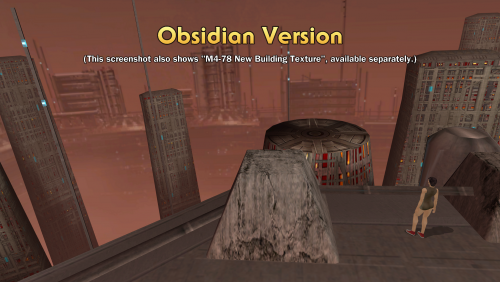
M4-78 Alternate Skybox Pack
By N-DReW25
A Mod for Star Wars Knights of The Old Republic 2
Authors: N-DReW25 and Sith Holocron
1.0.0 Release Date: 18.08.2017
1.1.0 Release Date: 31.08.2021
Description:
If you’ve played M4-78EP before, you might be surprised that the Skybox textures you see in that mod are NOT the intended Skybox that Obsidian sought to use for M4-78.
The original M4-78, as designed by Obsidian Entertainment, used the left-over skyboxes of the cut planet Sleheyron from the 1st game and altered these skyboxes to use be used on M4-78. These original skybox for M4-78, as intended by Obsidian, was briefly seen in Kotor 2's E3 trailer.
In 2008, Quanon created a new skybox for Stoney’s original M4-78 mod. These skyboxes had higher quality buildings, a darker wine-brown sky and visible green radiation.
The Skybox you see in M4-78EP today was created by Stoney himself, these skyboxes have the background of a light orange sky with tall buildings. This is the skybox you see in the most up to date version of M4-78EP.
Installation:
First, make sure you have M4-78EP 1.5 installed for the best playing experience! Follow the instructions on the M4-78EP download page to install M4-78EP.
https://deadlystream.com/files/file/277-m4-78-enhancement-project/
Warning: It is advised that you do NOT use the Steam Workshop version of TSLRCM or M4-78EP due to compatibility issues with other mods. If you do choose to use the Steam Workshop, you will need to install this mod into your Steam Workshop Override folder instead!
If you are using Sith Holocron's "Replacement Loading Screens for KotOR2: Add-On Pack (with or without TSLRCM) 1.3" mod, be sure to install this mod last!
Once you have M4-78EP installed, you will have 3 different skyboxes to choose from (you can only use 1 skybox at a time!).
Option 1:
Stoney's M4-78 Version - by Quanon:
1) Open the “Stoney Version (by Quanon)” folder.
2) Open the “For Override” folder
3) Copy the 10 tga files within the “For Override” folder and paste these files inside your Knights of the Old Republic II Override folder
Option 2:
Obsidian Version - by Obsidian Entertainment:
1) Open the “Obsidian Version” folder.
2) Open the “For Override” folder
3) Copy the 10 tga files within the “For Override” folder and paste these files inside your Knights of the Old Republic II Override folder
Option 3:
Sleheyron Version - by Bioware, roof texture by Sith Holocron:
1) Open the “Sleheyron Version” folder.
2) Open the “For Override” folder
3) Copy the 10 tga files within the “For Override” folder and paste these files inside your Knights of the Old Republic II Override folder
Uninstallation:
To uninstall this version and restore the original M4-78EP skyboxes, simply copy the contents of the BACKUP folder into your Knights of the Old Republic II Override folder.
Warning: If you simply delete the Skybox and Loading Screen files from your Override without copying the BACKUP files you will have no loading screens for M4-78 and the Obsidian Skyboxes by default.
Known Bugs:
The droid testing facility loading screen does not appear, this is a core problem with M4-78EP 1.5 content and not this mod. Once a fix for M4-78EP 1.5 has been made, this bug will be fixed (This is outside of my control though).
If you encounter any bugs, just report to N-DReW25 via PM on Deadlystream.com
Incompatibilities:
This mod is compatible with Kexikus’ High Quality Skybox mod for TSL and any other mod which replaces the skybox for M4-78 EP.
This doesn’t include textures that change the skybox as viewed from inside the Ebon Hawk.
Recommended Mods!:
Permissions:
· Do NOT claim credit for this mod, as that would exceedingly rude.
· Do NOT upload this mod to any other website without the permission of N-DReW25
· If you want to use Stoney’s M4-78 Skybox in your own mod, please contact the original author, Quanon, for permission.
Special Thanks:
· Obsidian for not deleting all of M4-78.
· Bioware for not deleting Sleheyron’s Skybox
· Stoney for making the original M4-78 mod.
· Quanon for making the skyboxes for the original M4-78 mod and for his permission to include them here.
· Zybl2 and Hassat Hunter for their work on M4-78EP.
· Fred Tetra for Kotor Tool
· Sith Holocron for the new loading screens
· Everyone who downloads the mod. (Please leave feedback!)
Legal:
THIS MODIFICATION IS NOT SUPPORTED BY BIOWARE/OBSIDIAN ENTERTAINMENT, LUCASARTS, DISNEY OR ANY LICENSERS/SPONSORS OF THE MENTIONED COMPANIES. USE OF THIS FILE IS AT YOUR OWN RISK AND THE ABOVE-MENTIONED COMPANIES AND/OR THE AUTHOR IS NOT RESPONSIBLE FOR ANY DAMAGE CAUSED TO YOUR COMPUTER FOR THE USAGE OF THIS FILE.
629 downloads
-

Atton - Faithful HD Reskin
By tjsase
This is an HD reskin of our favorite smuggler, Atton! The texture for his body is now 2048x2048, and utilizes hand-drawn edges and photographed textures. I consistently checked my work against a 3D model to ensure there were no texture seams. I even added an environment map to allow Atton's buckles/buttons to shine.
I made sure to remain as faithful to the original texture as possible while adding a few details of my own.
INSTALLATION
Drop the .tga and .txi files into the Override directory of you SWKotOR2 installation folder.
THANX
Thanks to designm.ag at flickr.com (https://creativecommons.org/licenses/by/2.0/) and texturelib.com.
Mod made by tjsase using Adobe Photoshop CS2 and Autodesk Maya 2016 Student Version
1,953 downloads
-

HD Rusty HK47
By tjsase
Here's one of my older mods from the glorious days of kotorfiles
DESCRIPTION
This mod makes HK-47 have a more realistic and intimidating rustic texture (in HD!).
The HK-50 texture was upscaled and rusted, while the non-rusted parts were made shiny via an environment map. Enjoy!
INSTRUCTIONS
If you have KotOR 1, place the files from K1 into the override folder within the main game folder. If you have KotOR 2: The Sith Lords, run the installation file within K2.
BUGS
None that I know of.
THANX
Thanks to Adobe Photoshop 7.0, Kotor Tool, and sharecg.com
COPYRIGHT
You can use this mod and edit it, but don't redistribute it without crediting me, tjsase.
608 downloads
-

Effixian's Player Head Reskins
By Effix
********************************************
Knights of the Old Republic - The Sith Lords
********************************************
TITLE: Effixian's Player Head Reskins
AUTHOR: Effix(ian)
CONTACT: PM me on the forums or find me on Steam
*************
INSTALLATION
*************
Unzip, pick the files from the different folders that you would like to add and place them into your override folder.
************
DESCRIPTION
************
These are simple reskins that replace existing heads. The zip file contains folders so that you can pick which head you want to install. The download also contains screenshots to easily see which folder contains which files. Since this mod only replaces textures and portraits it shouldn't cause conflicts with other mods.
PFHB01
Compared to the original this head has slightly darker skin and she has makeup that's inspired by an option in SWTOR, her eyes are made gray. There's no zombie dark side corruption, fully dark side has yellow eyes and halfway is a bit of a mix between those extremes.
PFHC05
A reskin of the PFHC05 head that I did in 2010 (never published), adjusted a bit inspired by a request from ASinisterGecko & Warregory on Steam. Compared to the original PFHC05 there's no zombie dark side corruption, light side is blue eyes, added blue makeup and brown hair, halfway to dark the makeup goes green with slightly darker hair and at full dark side you get the Sith yellow eyes, red makeup and black hair. I also changed the lips.
PFHC05 - Redhead
(Not compatible with the above head) A reskin of the PFHC05 head and a continuation of the above head mod. Unlike the other 2 redheads this one does have zombie dark side corruption. Requested by Hobo King Niklz.
PFHC06 & PMHC07 - Echani
Echani themed reskins. Compared to the originals there's no zombie dark side corruption, light side has blue eyes, fully dark side has yellow eyes and halfway is a bit of a mix between those extremes. I also made the female's lips less red.
Requested by @@SHALLS210@@ on Steam. I made the female reskin in 2010, but didn't publish it at the time.
PFHC07 & PMHC07 - Redheads
The male gets a beard, as requested by gigaGinger on Steam. Apart from the hair colour I've changed the female's lips.
I've given both characters green eyes. There's no darkside zombie look, only the yellow eyes.
PFHH01, PFHH02, PFHC07, PMHC03, PMHC06 - Chiss
For the Chiss fans. Reskins of 2 male and 3 female heads to make them look like Chiss. Because of Steam mod limitations (Made these for the Steam Workshop) there's no custom underwear or dancer's outfit to match the blue skin.
PMHB10
The changes to this head are inspired by KotOR's Jolee Bindo and a mix of the original texture with KotOR's Gadon Thek (whose texture was left in the KotOR 2 files). There's no zombie dark side corruption, fully dark side has yellow eyes and halfway is a bit of a mix between those extremes.
PMHC01
A bearded reskin of the PMHC01 head that I made in 2010, to look like me as close as possible (you see it in a lot of my screenshots). Compared to the original PMHC01, apart from the beard, it removes the scar, there's no zombie dark side corruption, instead you get Sith tattoos at fully dark side plus the yellow eyes. I think I also tweaked the color of the hair a bit, even though there's not many on the top.
The Sith tattoos have an asymmetrical detail made possible by the fact that this model had a scar on only one side.
PMHC04
A more aged reskin of the PMHC04 head that I did in 2010 (not published). Compared to the original it looks older, there's no zombie dark side corruption, the eyes start with blue, then green and yellow at fully darkside.
PMHH01 - "Son of Vaklu"
A reskin of the PMHH01 head, inspired by a post by Dereshi on Steam, who was looking for a character with white skin and black hair and then Vaklu turned out to be an example of that and I mixed his beard into it.
Compared to the original PMHH01 there's no zombie dark side corruption, light side has brown eyes, fully dark has the yellow eyes, halfway is a mix of the two. This reskin makes the original hispanic head more caucassian so you could notice a slight difference between the head and things like arms when wearing underwear.
Recommended mod to fix clipping issues: TSL Head Model Fixes by redrob41 http://deadlystream.com/forum/files/file/489-tsl-head-model-fixes/
*************
UNINSTALLING
*************
Remove from the Override folder:
For PFHB01: PFHB01.tga, PFHB01d1.tga, PFHB01d2.tga, po_PFHB01.tga, po_PFHB01d1.tga, po_PFHB01d2.tga
For PFHC05: PFHC05.tga, PFHC05D1.tga, PFHC05D2.tga, po_PFHC05.tga, po_PFHC05d1.tga, po_PFHC05d2.tga
For PFHC06: PFHC06.tga, PFHC06D1.tga, PFHC06D2.tga, po_PFHC06.tga, po_PFHC06d1.tga, po_PFHC06d2.tga
For PFHC07: PFHC07.tga, PFHC07D1.tga, PFHC07D2.tga, po_PFHC07.tga, po_PFHC07d1.tga, po_PFHC07d2.tga
For PFHH01: PFHH01.tga, PFHH01D1.tga, PFHH01D2.tga, po_PFHH01.tga, po_PFHH01d1.tga, po_PFHH01d2.tga
For PFHH02: PFHH02.tga, PFHH02D1.tga, PFHH02D2.tga, po_PFHH02.tga, po_PFHH02d1.tga, po_PFHH02d2.tga
For PMHB10: PMHB10.tga, PMHB10d1.tga, PMHB10d2.tga, po_PMHB10.tga, po_PMHB10d1.tga, po_PMHB10d2.tga
For PMHC01: PMHC01A.tga, PMHC01AD1.tga, PMHC01AD2.tga, po_PMHC01.tga, po_PMHC01d1.tga, po_PMHC01d2.tga
For PMHC03: PMHC03A.tga, PMHC03AD1.tga, PMHC03AD2.tga, po_PMHC03.tga, po_PMHC03d1.tga, po_PMHC03d2.tga
For PMHC04: PMHC04A.tga, PMHC04AD1.tga, PMHC04AD2.tga, po_PMHC04.tga, po_PMHC04d1.tga, po_PMHC04d2.tga
For PMHC06: PMHC06.tga, PMHC06d1.tga, PMHC06d2.tga, po_PMHC06.tga, po_PMHC06d1.tga, po_PMHC06d2.tga
For PMHC07: PMHC07.tga, PMHC07D1.tga, PMHC07D2.tga, po_PMHC07.tga, po_PMHC07d1.tga, po_PMHC07d2.tga
For PMHH01: PMHH01.tga, PMHH01d1.tga, PMHH01d2.tga, po_PMHH01.tga, po_PMHH01d1.tga, po_PMHH01d2.tga
*********
THANKS TO
*********
Fred Tetra for KotOR Tool
-------------------
THIS MODIFICATION IS NOT MADE, DISTRIBUTED, OR SUPPORTED BY BIOWARE, OBSIDIAN, OR LUCASARTS ENTERTAINMENT COMPANY LLC. ELEMENTS TM & © LUCASARTS ENTERTAINMENT COMPANY LLC AND/OR ITS LICENSORS.
---------------------------------
My mods are free. If you would like to show your support then you can buy me a coffee at ko-fi.com/effix
3,911 downloads
-
File Reviews
-

Red Hessian 10
A must have for a dark side character. Simon Templeman's voice fits perfectly.
-
A must-have for KOTOR 2, full stop. Like others have said here, this mod is expertly built and integrated into the base game/TSLRCM framework and polishes the end of the game, wrapping up that escape and giving the entire crew a proper closure to their journey. This one is a lock for all my future TSL mod builds. 10/10.
-
 1
1
-
-

Leilukin 344
Another great mod by WildKarrde that has earned a permanent spot in my personal mod build. Bao-Dur is one of the most underrated characters in TSL, so I have always been bothered by how vanilla TSL has Bao-Dur disappear throughout the end-game without explanation for what happaned to him, and the lack of even cut content to be able to restore to fix that. I am thrilled that there is finally an endgame story mod that gives Bao-Dur the love he deserves.
SpoilerI especially appreciate that the mod lets Bao-Dur live. Even though Chris Avellone said that Bao-Dur was supposed to die in the endgame, I honestly never liked the idea of Bao-Dur dying, because consider his story revolves around his trauma and guilt over Malachot V, I believe he deserves a chance to live and heal after the events of TSL, which I would find much more satisfying than killing Bao-Dur off. In my honest opinion, Bao-Dur's death would serve no story purpose other than explaining his disappearance in the endgame, so I am seriously glad to see a story mod meant for giving Bao-Dur more closure in the endgame avoids killing him off.
I also love the salute Bao-Dur gives the Exile when the Exile leaves Telos for Malachor, which perfectly captures the Bao-Dur and the Exile's relationship as comrades during both the Mandalorian Wars and the present day events of TSL.
Edited by Leilukin-
 1
1
-
-
Leilukin 344
Truly an incredible mod that makes a permanent spot in my personal mod build for how much it improves the ending, and how well-made the mod is. While TSLRCM did the best it could in restoring cut content to the end-game, there is still room for improvement for the ending, and TSL Expanded Ending proves that.
SpoilerI appreciate that TSL Expanded Ending gives the player more choices, such as the option if they want to destroy Malachor or not regardless of the player's alignment, if they want to find Revan or not, choosing to stay on Malachor if the player doesn't destroy it, etc. The mod also restores Handmaiden/Visas' ending conversation about wanting to follow the player even if the player chooses to destroy Malachor.
-
 1
1
-
-
Nice to see the Handmaiden's braids beneath her hood! Thanks for creating this mod!
-
1
-
-
Tested this out. This really does look like Nihilus has no face at all, thus making Nihilus look like what Avellone intended like you said! Good job!
Edited by DarthErdan -
Another seamless and great addition that I will keep in my load order.
Edited by vault13deathclaw -
An absolute must mod!
For years I thought it so frustrating that Bao-dur's disappearance was unexplained. I thought it strange that he would abandon the exile after everything they went through. Later I learned of the supposed fate of Bao-dur - running out into a mine?! - seriously!
Now with this mod it ties so much of the story together. It's as if Bao-dur stays behind on Telos to defend it. After all, in a conversation with the handmaiden she does make reference to Atris believing Bao-dur was the key to help Telos. And if you have the extended ending mod it reinforces the idea of the exile - aka Meetra - leaving those she cares about behind to strengthen the Republic for the war to come as she goes in search of Revan.
I really enjoyed this mod. Very well done WildKarrde for creating this mod. It was a much needed edition to a classic game. Definitely a gold star! Keep up the good work!💫
-
Your mod is the prime example of how the Restoration mod should be alongside the Sleheyron mod! 10/10
-
1
-
-

Caim 1
Whoever made this mod is a godsend! It fixes almost everything that needs fixing for modern systems in 2026 for KOTOR 1, including issues for AMD users like me. It has saved me so many nerve cells. So now I can finally play with Soft Shadows and Frame Buffer Effects, except the Grass — sometimes for grass to work properly you need to restart your game. In my opinion this is the best KOTOR mod right now, no exaggeration.
Edited by Caim-
1
-
-
I'm just happy that I can finally play the game on PC with real, native, proper controller support. The fact that TSL received that massive update which added native controller support but the original KOTOR was left with mouse/keyboard years later (which was ridiculous) is finally resolved with this.
-

Stuck 0
-
I'm very eager to give it a try but I just can't. I installed KMRP, used KPM patcher with only 2 patches - KMRP and High FPS Fixes.
Then I run your install.cmd and all I get is this:
INSTALL FAILED: Executable compatibility check failed at 47 required hook site(s).
0x004F1A3E: expected [B8 14 00 00 00], found [6A 85 05 C2 9E]
0x004F1A43: expected [0F B6 D0 3B 4C 96 38], found [CE EB 19 56 C1 7C 49]
0x0054EC5B: expected [C7 02 14 00 00 00], found [34 50 71 50 DE 29]
0x00552C9A: expected [8D 7E 38 B9 15 00 00 00 F3 AB], found [66 3F 2E 33 9D 15 28 89 29 00]
0x00552F8A: expected [8D 6E 38], found [DA 7B 54]
0x00552FD6: expected [83 FF 14], found [A7 5A 68]
0x005A54A0: expected [0F B6 F0 3B 54 B1 38], found [F6 AB 63 77 5A C7 1D]
0x005A54AA: expected [83 F8 14], found [75 93 66]
...and 39 more mismatched hook site(s).
Another executable patch or a different KOTOR binary layout is using code this mod needs. No changes were made.Press any key to continue . . .
Edited by WarlordThorvald
I had bunch of graphic mods and old widescreen fix installed before, but deleted it and restored original exe - no luck.
Then I just deleted my game and re-downloaded it (steam version), installed KMRP and patched clean version of the game with KPM - and result is the same.
I am at loss here.
Edit 2: Hey it seems you were right, tho I had editable exe already but edited for widescreen, that's why maybe there was mismatch. I used it with clean editable exe and all works, thanks a lot.
-
Does exactly was it says it does!
An observation: Having this active requires it to be installed dead last after EVERYTHING ELSE. If, say, I were to add"High FPS Fixes" or other patches through KotorPatchManager with "...Progression" already active, I lose the ability to back out of the level-up screen(effectively restoring the vanilla game's constraints where it would not let you exit the level-up UI to return to normal gameplay at all until you leveled up.)
This I confirmed via live testing/gameplay last night: I had to uninstall and re-install "....progression" after adding the KPM patches so it effectively sits at the very END of the installation order. This fixed the issue and I could back out of the level-up screen freely.
FYI I'm using KMRP 1.5.1 and KPM in my setup.
-
1
-
-

Ellhaim 0
This mod sorta works. Except that the model is very transparent. Especially on the metal/darker details of her outfit/model. Kind of unusable imo. Just makes me feel like I'm playing the ghost of Talon.
-


-
File Comments
-

By neversaydude · Posted
Is this compatible with 3C-FD Tool (https://deadlystream.com/files/file/2734-fog-fix-more-3c-fd-patcher/) ? I use that for applying a 4gb patch and to run the game in borderless windowed mode. -
 Oh sorry I forgot to take them out or mention the textures. I simply gave the doors an alpha channel so they don't look too flat. The textures are not needed for the model to work and completely optional, there won't be any UV layout error if you use a custom retexture or vanilla.
 -

By The_Chaser_One · Posted
You can definitely try. Theoretically, there shouldn't be an issue. At least for the executable, I already played Sleheyron with it. As for the patchers, I'd guess it doesnt conflict with Sleheyron, although I cant guarantee anything. -
By jmorenobothwell · Posted
Hey SAO1138, thanks for the confirmation. Out of curiosity, are there plans to make a compatibility patch/fix down the line? -
By jmorenobothwell · Posted
I love it! Finally brings some visual cohesion between the two KOTOR games. I'm having a little...quirk though(for lack of a better word). I installed it, and for some reason, the Jedi character on the Endar Spire (the one that gets blown up after beating that other "Darth Bandon" knockoff), the Jedi strike team on the Star Forge and on the final Medal ceremony are still wearing their "vanilla" tunics. Is that supposed to be the case or am I missing something? Screenshots attached.
-