
Squall Lionhart
-
Content Count
341 -
Joined
-
Last visited
-
Days Won
10
Everything posted by Squall Lionhart
-

How big is your override?
Squall Lionhart replied to VarsityPuppet's topic in General Kotor/TSL Modding
TSL is at 2.85 GB, thought it would be smaller K1 is at 393 MB, thought that would be bigger. Main mods are TSLRCM, M4-78 EP, and many other restoration mods. -
With the new trailer out for Episode VII, anyone want to attempt the lightsaber for Kotor??? And before anyone asks, this is meant to be a joke
-
Malachor is really the only option for that, although I would also like to see the Exile get separated from the rest of the crew for a bit, maybe make a new addition to Dxun or one of the other planets the Exile has visited. I'll see what I can do, safe bet for Dxun though.
-
For the first one, are you asking for a new model for the robes or just new textures? And for the PMHH01, I recommend this https://deadlystream.com/files/file/440-pmhh01-reskin-to-mullet-man-with-movie-dark-side-transitions/
-
HELP! with Kotor Collection & Kotor Tool
Squall Lionhart replied to Jorak Uln's topic in General Kotor/TSL Modding
I put the solution in the general modding section, although I specified Steam, it does work for the collection as well. Keep in mind it also works for the save game editior, since it needs the path of the game to recognize the save files you have for each game. -
 correction: the code for anakins is as_anakin, not ankain, sorry about any confusion
 -
Thanks, I try.
-
View File Movie Robe Reskin This adds three Jedi Robes into both games, Anakin's, Obi-Wan's, and Mace Windu's robes. Original credit goes to Kainzorus Prime and Deadman for the original skins and HapSlash for the original Jedi Academy model. The reason for the 2.1 instead of 3.0 is because I am not finished with my current expansion to this robe mod. How to Obtain: Type in the cheat code "giveitem_sl_anakin" for Anakin's, "giveitem_sl_windu" for Mace's, and "giveitem_sl_kenobi' for Obi-Wan's. Or you could use the save game editor. If you want these in game, in K1, the times are in the Aratech store on Dantooine right after you get off the Hawk for the first time. The robes in TSL are with Darrala. I have added compatibility with Deadman's robe mod, you can safely replace this and still get his and mine together. However, if you don't use his robe mod, then I have included as default a file that can go in the override should you not want to download Deadman's mod to use with mine. Installation: Drop K1 folder to Override in Kotor directory, and TSL into Kotor II directory. Bugs: None known, if any pop up, PM me. Submitter Squall Lionhart Submitted 10/12/2014 Category Skins K1R Compatible Yes
-
Version 2.2
5,970 downloads
This adds three Jedi Robes into both games, Anakin's, Obi-Wan's, and Mace Windu's robes. Original credit goes to Kainzorus Prime and Deadman for the original skins and HapSlash for the original Jedi Academy model. The reason for the 2.1 instead of 3.0 is because I am not finished with my current expansion to this robe mod. How to Obtain: Type in the cheat code "giveitem_sl_anakin" for Anakin's, "giveitem_sl_windu" for Mace's, and "giveitem_sl_kenobi' for Obi-Wan's. Or you could use the save game editor. If you want these in game, in K1, the times are in the Aratech store on Dantooine right after you get off the Hawk for the first time. The robes in TSL are with Darrala. I have added compatibility with Deadman's robe mod, you can safely replace this and still get his and mine together. However, if you don't use his robe mod, then I have included as default a file that can go in the override should you not want to download Deadman's mod to use with mine. Installation: Drop K1 folder to Override in Kotor directory, and TSL into Kotor II directory. Bugs: None known, if any pop up, PM me.- 31 comments
- 4 reviews
-
- 2
-

-

-
- movie
- kainzorus prime
- (and 2 more)
-
I understand that completely, thanks for the update, hope all goes well with this course.
-
That moment when you reskin a robe with two different sides and Kotor thinking it's one... I sometimes hate the odyssey engine
-
 Jolee, blah
 -
Anyone have the original unaltered global.jrl file for Kotor 2, I need it to merge the one with TSLRCM and Korriban expansion
-
I can finally wear Jolles robe and be light side! Instant download
-
Yeah, if you talk to her after the kiss, it breaks the romance option on the temple. Where as she will be your lover and apprentice if you don't talk to her after the kiss, she will only serve you because of your power if you do talk to her after the kiss. Some mods have been done to fix it, but they never worked for me. Hopefully this one will.
-
Possible Prologue Bug/Glitch?
Squall Lionhart commented on MVacc224's gallery image in Screen of The Week
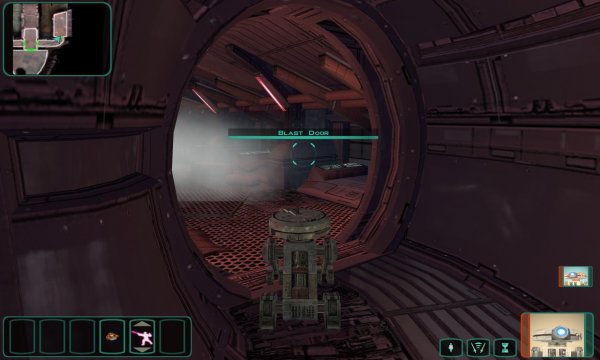 Did it work?
 -
Compatibility with Korriban Expansion?
Squall Lionhart replied to MollyAncalime's topic in M4-78 Enhancement Project
Just did it, I'll let you know if something goes wrong -
 Thanks for the mention, I love the work you put into your reskins.
 -
Possible Prologue Bug/Glitch?
Squall Lionhart commented on MVacc224's gallery image in Screen of The Week
I think it may be the sensor droids, the HDTP only modifies textures and not objects like doors. -
 Would this be compatible with Prime's Overhaul mod?
 -
Possible Prologue Bug/Glitch?
Squall Lionhart commented on MVacc224's gallery image in Screen of The Week
Hmm... maybe a placeable is conflicting with the script -
Dare I say, is this project dead or on hold?
-
Very nice, this will become a permanent addition to my game once its complete.
-
Possible Prologue Bug/Glitch?
Squall Lionhart commented on MVacc224's gallery image in Screen of The Week
Did you use the sparking wires on the hull of the ship to open it? -
KSE & KOTOR Tool on Steam/DVD
Squall Lionhart replied to Traveller's topic in General Kotor/TSL Modding
For those who have had trouble with Kotor Tool not detecting the path of TSL or Kotor and your using the steam version, here is how to enter the registry key manually. 1. Open regedit 2. Navigate to HKEY_LOCAL_MACHINE\SOFTWARE\ on 32 Bit Windows, or HKEY_LOCAL_MACHINE\SOFTWARE\Wow6432Node on 64 Bit Windows. 3. Add Key: "LucasArts" (no quotes) 4. Add Key to LucasArts Key: "KotOR2" (no quotes) 5. Add String Value to KotOR2 Key: "Path" (no quotes) with data set to "C:\Program Files\Steam\steamapps\common\Knights of the Old Republic II\" (no quotes) on 32-bit Windows, "C:\Program Files (x86)\Steam\steamapps\common\Knights of the Old Republic II\" on 64-bit windows. (Above are the default locations. If you installed the game/Steam elsewhere, use their path instead!)