All Activity
- Past hour
-
 Nice, where's the rest of the hud from btw?
 -
 Pragma joined the community
 -
.thumb.png.cdc6832101001fe79f7d105c137e01c5.png) I'd like to see a screenshot of these new Shiny and Shiny HD textures.
I'd like to see a screenshot of these new Shiny and Shiny HD textures. -
 Thank you for letting me know. Still waiting for the Outcast Children in the Taris Undercity and getting a Sith Uniform for both yourself and Carth.
 -
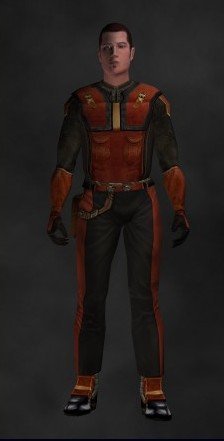 I myself like to use redrob41's Republic Combat Suit for the "Republic Mod Armor."
 - Today
-
 Syntax3rr0r joined the community
 -
 K0RVU5 joined the community
 -
 xcaptaintjx joined the community
 -
 BananaStore joined the community
 -
 izar joined the community
 -
 morn787 joined the community
 -
 Gabochuky joined the community
 -
 SpyraGyra joined the community
 -
 I saw a playthrough of this mod on YouTube. It is a genuinly great achivement based on what I saw and I am curious to try it out. That being said, I do think that the mod could use some polish in the VA area. I don't want to throw any shade towards the many people who helped bringing this mod to life but it is very apparent that the voice cast doesn't consist of professionals. Similairily, the fact that the vanilla companions never actually comment on the events of Sleheyron, nor acknowledge after she joins, is very noticeble and arguably immersion breaking. Same thing when you meet Yuthura on Korriban after the fact. Her past is acknowledged in this mod via So what was the point of that? Now tbf, I don't think that these issues I have can be fixed without 1) basically throwing the people already involved in this mod under the bus by replacing them with a different cast (which would be a bit of a dick move, I admit) and 2) using AI to give the vanilla companions (and Yuthura) something to say. And given that the mod prides itself with not using any AI in it's mod description (at least in terms of the VA's), I dunno if such a change would vibe well with this community, let alone the fans of this mod, unless maybe it is provided as an optional feature. Not to mention the amount of time such an addition would require and I honestly dunno if SAO1138 would be up for investing, what, an extra month just to create some more dialogue for the likes of Carth or Juhani? Still, I kinda felt like I had to mention that part, because it is the one issue that I do have with what otherwise seems to be a really great mod (well, that and the fact that in the version from the playthrough at least, ) and I dunno enough about "coding" or "textures" to give any feedback in the technical area unfortunately All that being said, I still want to give this mod a try. Especially with that new arena mini-game being added in here.
 - Yesterday
-
 Homebread joined the community
 -
Any model that is exported from KMax, regardless of whether it is compiled with MDLEdit or MDLOps, will causes crashes on Linux because KMax is adding invalid Detonate controllers to every VFX emitter. On Windows these are just silently ignored, but on Linux it causes a crash. Per Synchro on the OpenKotor Discord:
-
View File Collar fix patches for JC Cloak mods Description I love the Kotor 2 style jedi robes, who doesn't? its probably THE jedi robe used in modlists now, and yet I think the black collar in JC's original kotor 2 mod looks weird to me. Luckily two mods came out that fixed that issue, Heyoranges collar fix mod and Shems Cloak revival retexture. Then I realized that DarthParametric's JC's cloaked jedi mods still have the collar problem, meaning they'll look out of place with the texture replacements. This mod is moreso an override patch to replace DarthParametrics JC's cloaked roebs to match with whatever collar fix you choose Installation: YOU MUST INSTALL JC'S CLOAKED MOD AND DARTHPARAMETRICS JEDI MODS FOR MY MOD TO WORK: -JC's Fashion Line I: Cloaked Jedi Robes for K1 -Diversified Jedi Captives on the Star Forge (Also install TSL Robes compatibilty patch in the optional files) -Jedi Diversity on the Star Forge -Dark Jedi Wear Robes After the mods are installed, its just a simple override loose file process, all you have to do is download and extract this mod, and pick the specific folder of the mod your using (Or all if thats the case), select the folder of which collar fix your using, and drag the files into your override folder in the swkotor folder and override all files when prompted to Recommended mods: I highly suggest you pick either Heyoranges collar fix mod or Shems Cloak revival retexture, as they give JC's cloaked robe collars and they just overall look nice. I've made two seperate folder for whatever texture your using for whatever mod you chose to use. Thigns to note: I chose to do the simple gloved brown robe textures cause thats what was originally used for DarthParametrics mods. It may be a little hard to tell texture file is which, so refer to the images (Or look at Shems Cloak revival retexture or Heyoranges collar fix to pick which one you prefer more) Credits: - JCarter426 for his amazing Jedi cloaked mod -DarthParametric for his awesome jedi mods -heyorange for his collar fix retexture and giving me the insperation to make this patch -N-DReW25 for giving me permission to use Shenms Cloaked Revival textures for this patch Submitter HeartMan Submitted 05/14/2026 Category Mods K1R Compatible No
-
- 1
-

-
- knights of the old rebublic
- robes
- (and 5 more)
-
View File Vanilla Loading Screens HD (KOTOR1) All maps x4 upscaled to HD Vanilla Maps HD (K1) upscales the original KOTOR 1 map textures while keeping the vanilla look intact. The maps are high res (2k) and much sharper. All maps were upscaled 4x using Topaz Gigapixel. Main features Upscaled vanilla map textures. 4x Topaz Gigapixel upscale. Installation instructions Copy the Override folder into your main Knights of the Old Republic directory. Replace files if prompted. Submitter Saul0097 Submitted 05/14/2026 Category Mods K1R Compatible No
-
View File TSL Even EXP Inspired by conn's K1 Even Exp (https://deadlystream.com/files/file/2273-k1-even-exp/) mod. This mod corrects the fact that Party members only gain 0.8 of the total Experience points that the PC gains for TSL. Installation Just drop npc.2da into your Override folder Should be compatible with TSLCRM Acknowledgements Fred Tetra for Kotor Tool VarsityPuppet for the 2DA editor. ChAiNz.2da for the TSL game saves Submitter RLG Submitted 05/14/2026 Category Mods TSLRCM Compatible Yes
-
.thumb.png.273389e0cd2a2ecd15fdfc0b7c9ed538.png)
Version 1.0.0
2 downloads
Inspired by conn's K1 Even Exp (https://deadlystream.com/files/file/2273-k1-even-exp/) mod. This mod corrects the fact that Party members only gain 0.8 of the total Experience points that the PC gains for TSL. Installation Just drop npc.2da into your Override folder Should be compatible with TSLCRM Acknowledgements Fred Tetra for Kotor Tool VarsityPuppet for the 2DA editor. ChAiNz.2da for the TSL game saves -
Version 1.0.0
1 download
Description I love the Kotor 2 style jedi robes, who doesn't? its probably THE jedi robe used in modlists now, and yet I think the black collar in JC's original kotor 2 mod looks weird to me. Luckily two mods came out that fixed that issue, Heyoranges collar fix mod and Shems Cloak revival retexture. Then I realized that DarthParametric's JC's cloaked jedi mods still have the collar problem, meaning they'll look out of place with the texture replacements. This mod is moreso an override patch to replace DarthParametrics JC's cloaked roebs to match with whatever collar fix you choose Installation: YOU MUST INSTALL JC'S CLOAKED MOD AND DARTHPARAMETRICS JEDI MODS FOR MY MOD TO WORK: -JC's Fashion Line I: Cloaked Jedi Robes for K1 -Diversified Jedi Captives on the Star Forge (Also install TSL Robes compatibilty patch in the optional files) -Jedi Diversity on the Star Forge -Dark Jedi Wear Robes After the mods are installed, its just a simple override loose file process, all you have to do is download and extract this mod, and pick the specific folder of the mod your using (Or all if thats the case), select the folder of which collar fix your using, and drag the files into your override folder in the swkotor folder and override all files when prompted to Recommended mods: I highly suggest you pick either Heyoranges collar fix mod or Shems Cloak revival retexture, as they give JC's cloaked robe collars and they just overall look nice. I've made two seperate folder for whatever texture your using for whatever mod you chose to use. Thigns to note: I chose to do the simple gloved brown robe textures cause thats what was originally used for DarthParametrics mods. It may be a little hard to tell texture file is which, so refer to the images (Or look at Shems Cloak revival retexture or Heyoranges collar fix to pick which one you prefer more) Credits: - JCarter426 for his amazing Jedi cloaked mod -DarthParametric for his awesome jedi mods -heyorange for his collar fix retexture and giving me the insperation to make this patch -N-DReW25 for giving me permission to use Shenms Cloaked Revival textures for this patch -
-
I'm glad that I was able to contribute to this mod, its really such a well made mod for republic side. Thanks for letting me work on the optional textures
-
Version 1.0.0
2 downloads
All maps x4 upscaled to HD Vanilla Maps HD (K1) upscales the original KOTOR 1 map textures while keeping the vanilla look intact. The maps are high res (2k) and much sharper. All maps were upscaled 4x using Topaz Gigapixel. Main features Upscaled vanilla map textures. 4x Topaz Gigapixel upscale. Installation instructions Copy the Override folder into your main Knights of the Old Republic directory. Replace files if prompted. -
 Cool mod and very creative work arounds!
 -
 Very good, highly recommended.
 -
 Essential mod that fixes one of the most annoying things in the game imo.
 -
 Phenomenal mod, highly recommended!
 -
 The handles lose their texture and become matte grey depending on the camera angle, which is a shame.
 -
 This is easily one of the best mods. Simple, effective, and perfect.
 -
Yes, that and the Baragwin Ion-X Gun and the Yavin 4 Breath Mask aren't displaying their unique models. I am slowly getting motivated to make the next update of RC-K1CP. When real work on the update truly begins I do intend to post in the WIP thread of my progress!
- 71 comments
-
- 1
-

-
- cut content
- restorati
- (and 3 more)
-
On a different note: There is a bug with Carth's unique blaster textures. Whenever I have that option installed, everytime I open the equipment menu, Carth's Blaster icon only appears as a white square. I wasn't sure originally, wether this is due to a mod conflict or not but apparently a different user has already reported the same issue back in 2024, so it seems to be an older bug with this mod
- 71 comments
-
- 1
-
-
- cut content
- restorati
- (and 3 more)
-
Huh. I will have to investigate this. Do you remember the exact moment the crash happened? I know I restored some Bastila lines during the cutscene but I do recall there were very specific crashes happening because of the K1CP mod due to its fixes of the Star Map model being incompatible with Mac or Linux or something like that. I have been in deep thought in regards to many of the restored appearances in this mod, and as such I do believe this might be a possibility going forward.
- 71 comments
-
- 1
-
-
- cut content
- restorati
- (and 3 more)
-
Sharina is already covered in the Kotor 1 Community Patch. Apparently, her not appearing on Dantooine was the result of a bug and said bug is fixed in K1CP
- 71 comments
-
- 1
-
-
- cut content
- restorati
- (and 3 more)
-
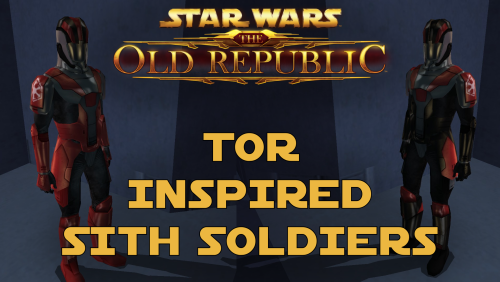 Thank you! As this mod is just two simple textures, it shouldn't conflict with 98% of all other major mods.