All Activity
- Past hour
-
 I did actually adjust a this a little in a later update. I found good places for every companion to speak at least once on Sleheyron. They still, unfortunately, have nothing to say about the new companion. My main issue with the AI voices is that they really do not sound very good. It would be just weird for suddenly all of Jennifer Hale's spirit in her performance to evaporate when talking about certain topics. I am not, however, opposed to recasting, if I had just the best possible voice actors.
 - Today
-
 BuduciPlafonsliUkras joined the community
 -
 mlq88 joined the community
 -
 hd_austr1a joined the community
 -
 Great mod! It's been a few years but I just started a new playthrough - would you kindly share the head via PM?
 -
 creepinkitten joined the community
 -
 Benji joined the community
 -
 DownBoy joined the community
 -
 Fishker joined the community
 -
 Arachne joined the community
 -
Clertiebertie joined the community
-
 MilkMDN joined the community
 -
.thumb.png.cdc6832101001fe79f7d105c137e01c5.png) Thank you for the tip. Going to install the "Ultiamte Character Overhaul" by ShiningRedHD, too. It has a compatibility patch, but interestingly, it says to install Ultiamte Character Overhaul BEFORE K1CP. Usually, you install K1CP first.
Thank you for the tip. Going to install the "Ultiamte Character Overhaul" by ShiningRedHD, too. It has a compatibility patch, but interestingly, it says to install Ultiamte Character Overhaul BEFORE K1CP. Usually, you install K1CP first. -
View File Native Controller Support (K1) True Controller Support is an ASI plugin that adds controller support to Star Wars: Knights of the Old Republic on PC. The goal is to make KOTOR 1 feel more natural on a controller. Installation instructions Extract the True Controller Support zip file. Place dinput8.dll, K1Controller.asi, and K1Controller.ini into your main Knights of the Old Republic directory, where swkotor.exe is located. In-game setup Set your in-game keybinds to default. In Gameplay Options, enable Mouse Look. In Mouse Settings, lower the in-game mouse/free look sensitivity all the way down, since sensitivity is handled by the ASI plugin. Your keyboard and mouse will still work normally with this mod installed. Main features Adds controller support through an ASI plugin. Pressure-based left stick movement with natural walking and running similar to the console versions. Adjustable free look/cursor sensitivity through K1Controller.ini. Some controls can also be remapped, but the default layout is recommended. Cursor mode support for KOTOR UI navigation. D-pad support mapped to keyboard directional arrows. Default controls A / Cross = Mouse Select X / Square = Default Action LB / L1 = Hold Cursor Mode RB / R1 = Swap Character B / Circle = Back / Menu Y / Triangle = Cancel Combat Action / Flourish Weapon Start = Menu Select / Back / View = Pause LT / L2 and RT / R2 = Cycle Target / Menu Navigation RS / R3 = Free Look D-Pad = Directional Arrow Keys Extra note I’ve done everything I can to implement the best controller support possible, but the KOTOR 1 PC version has some real limitations. This is about as far as controller support can currently be pushed without engine-level changes. Submitter Saul0097 Submitted 05/15/2026 Category Mods K1R Compatible Yes
-
Quick warning, if your planning to use JC's soldier fix and use COTOR, DONT INSTALL ANY PLAYER FILES! I learned the hard way that Cotor messes with themdls and mdx's (texture pathing) for the JC's soldier fix mod
-
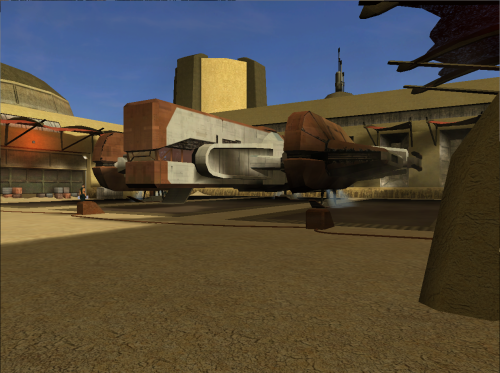 Looks nice, I always love new textures for the Ebon Hawk. Now we need is a proper HD Ebon Hawk interior mod
 -
 Say, would it be a good idea to run this mod with Timbo's 'Balance in the Force' and Kaidon Jorn's "KSR 2022"
 -
 Brianna approaches Kreia before the dialog with the Masters starts, and Kreia has additional lines calling the female pc him and himself please someone dm to help me fix this maybe i installed this wrong video right here Video Project 1.mp4
 - Yesterday
-
Version 1.0.0
2 downloads
True Controller Support is an ASI plugin that adds controller support to Star Wars: Knights of the Old Republic on PC. The goal is to make KOTOR 1 feel more natural on a controller. Installation instructions Extract the True Controller Support zip file. Place dinput8.dll, K1Controller.asi, and K1Controller.ini into your main Knights of the Old Republic directory, where swkotor.exe is located. In-game setup Set your in-game keybinds to default. In Gameplay Options, enable Mouse Look. In Mouse Settings, lower the in-game mouse/free look sensitivity all the way down, since sensitivity is handled by the ASI plugin. Your keyboard and mouse will still work normally with this mod installed. Main features Adds controller support through an ASI plugin. Pressure-based left stick movement with natural walking and running similar to the console versions. Adjustable free look/cursor sensitivity through K1Controller.ini. Some controls can also be remapped, but the default layout is recommended. Cursor mode support for KOTOR UI navigation. D-pad support mapped to keyboard directional arrows. Default controls A / Cross = Mouse Select X / Square = Default Action LB / L1 = Hold Cursor Mode RB / R1 = Swap Character B / Circle = Back / Menu Y / Triangle = Cancel Combat Action / Flourish Weapon Start = Menu Select / Back / View = Pause LT / L2 and RT / R2 = Cycle Target / Menu Navigation RS / R3 = Free Look D-Pad = Directional Arrow Keys Extra note I’ve done everything I can to implement the best controller support possible, but the KOTOR 1 PC version has some real limitations. This is about as far as controller support can currently be pushed without engine-level changes. -
Anybody seen the Kotor fan film?
-
 Right. Well, I guess it's good enough.
 -
Maybe I didn't install JC's Republic Soldier Fix first. Maybe I thought it was in K1CP already or something. Did a test run after installing ONLY K1CP, JC's Republic Soldier Fix, Commando's of the Old Republic, and Republic Soldier's New Shade. It worked perfectly(though Trask was facing the wrong way when he told me Bastila wasn't on the bridge, but that's not a problem with these mods).
-
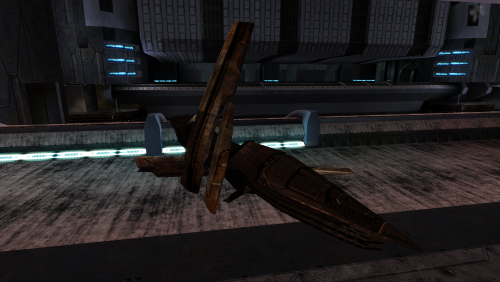 My own texture compilation. I haven't published it anywhere.
 -
Not exactly. Darth Parametric made this mod that makes the party and interrogation drop two disguises. Though I'd prefer it if the player had to both attend the part AND witness/stop the interrogation.
-
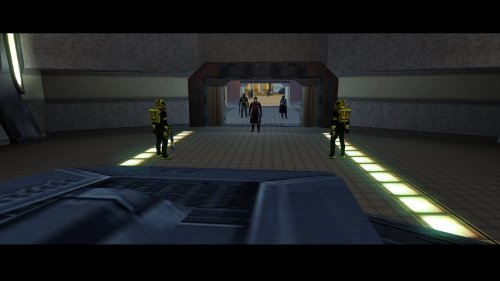 The mod will work installed mid-way. It changes the models and textures of existing items, it does not increase the loot dropped. What I recommend you do is duplicate your override folder before installing so you can revert your game back should you not like the way this one looks. But I can vouch for it, it's what I use with TSL, and it has great textures and good changes to the existing types of robes and armors.
 -
That thing is still not fixed ? People are still wandering around with a Sith uniform and Carth without any disguise in 2026 ?
-
I mostly made the shine textures so that they can work with ebnars new shade, since I thought it looked off that regular soldiers did have shine and commandos didn't. I honestly have no idea how commandos would affect Bandon or trask (Since I installed both and they worked fine for me)
-
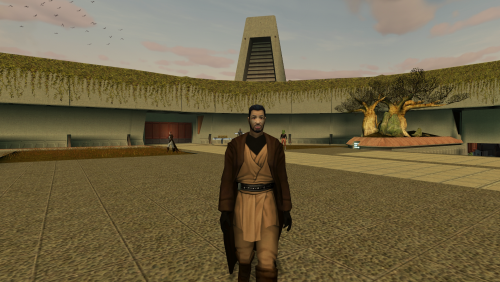 This i a very great edition to the KOTOR 1, but I never like the texture of the front part of the robes (chest). The only mod who fix this is from a modder Acchiles and his mod for TSL but I think can be made to work with KOTOR.
 -
 Do I have to start a new game after installing the mod? I didn't notice any in-game apologies. Here's the installation log:
 -
 I mean, yeah, I just tried a few times to install the mods from Diverse Galaxy modpack and other mods and... Well... Downloading multiple mods at the same time can result in me messing installation order by suddenly forgetting which mod I should install after which. Really need to make for myself a proper list of instructions of what goes after what.
 -
I think we can both agree that too much time has passed for us to do anything about it now. Republic Soldier's New Shade and Commandos of the Old Republic do not directly affect Bandon or Trask. You could install just K1CP, Commandos of the Old Republic, and Republic Soldier's New Shade to test it for us. What I think most likely happened is that you had more mods installed and another mod conflicted with Bandon. If you were to test this out as I described, I'm confident that Bandon will work and you will be able to progress to the next part of the Endar Spire. If you do do this, and the bug still happens, you can tell me again and I'll personally try to replicate the bug and see what the problem is. But again, this mod doesn't touch Bandon or Trask and so a bug between those two is close to impossible.
-
Will this mod work when installed midway through a playthrough? Im at Telos military base now and dont want to restart again, already had to once for a diff mod issue. And what exactly does this mod change as far as loot is concerned? Do enemies drop more loot?
-
Thanks for showing me that! And for some reason, I couldn't get this mod to work with Ebmar's [K1] Republic Soldiers' New Shade. Tried a playthrough with both two years ago, but I encountered a game-breaking bug where Bandon doesn't ignite his lightsaber and Trask doesn't run through the door to confront him. The only way I found to fix this was to not install both mods together.
-
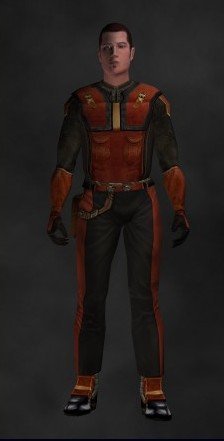 Huh, never thought of doing that before
 -
Right right, heres the HD textures with the shine textures. Hopefully other people will like these