All Activity
- Today
-
 chrispy145 joined the community
 -
 Verdigrin joined the community
 -
 deadlystreamspl joined the community
 -
 toebox joined the community
 - Yesterday
-
 KosmicKaz joined the community
 -
 HerbSaver joined the community
 -
 Zonni80 joined the community
 -
 paperboy joined the community
 -
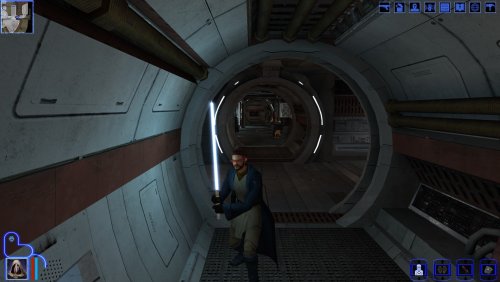 He said he was going to link this once the next update for Sleheyron comes out, I just did it the easy way and used the files from the Hilt Variety. I might try to do a optional file that matches Crazy34's K1 style blades
 -
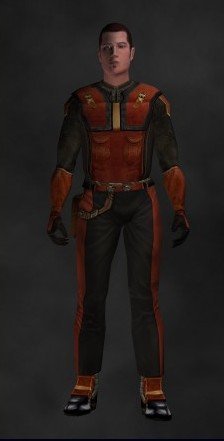
View File Republic Scout clothing reskin Description: I know that clothing for your PC are worthless in the base game, but I've alwasy been more of a immersion kind of man. Unfortunetly even in game the clothing for the PC's kinda dont make since to me, since the PC is supposed to be a Republic Soldier/Scout/Scoundrel and yet we look like we were just picked up from the Endar Spires last pit stop. There has been a few mods out there that gave PC clothes republic colors, but I never really vibed with how they do with scout armor. This mod should at least give the impression that you are part of the republic army as a Scout. Installation: This is simply an override file mod, all you have to do is downlaod and extract the mod, and put the files into your override folder in the swkotor folder and override all files when prompted to Compatibility: This mod does not edit nor change the location of the pc's clothes, so it should be compatible with any gameplay edits to the pc's clothing (Like the custom class item mod which I recommend, as it makes PC's clothing actually useful without being overpowered). I recommend you install this last if you plan on installing other clothing mods (Like the Scout/Scoundrel outfit mod which I also recommend as it gives the scoundrel their own unique republic reskin). Note that if a mod has PFBBM and PMBBM, it will override the files in this mod and might look wonky or replace. Just make sure you install this last and let it override everything and you will be fine Recommanded mods: If you are interested for other mods that give other classes their own republic reskin, I recommend the Scout/Scoundrel outfit and JC's Republic soldier fix or Commando's of the old republic for the same treatment for the Soldiers clothes. Credits: -redrob41 for his Modder's Resource: Specialized Combat Suit textures and his 4X Upscale + Character Model fixes Mdl's and Mdx's used for this mod -Foolinwave and jonathan7 for giving me the idea for a republic scout armor Submitter DreamRetriever Submitted 05/04/2026 Category Mods K1R Compatible No
-
 Luv2hateme00 joined the community
 -
 mazingolfer joined the community
 -
Yeah adapting to Crazy34's blades style is something I told Sao to do but he never got the motivation to do it apparently. @SAO1138, maybe you guys can merge the mods so people have the better crystal without needing to go deep into DeadlyStream. Anyway, good idea and nice mod.
-
Version 1.0.0
1 download
Description: I know that clothing for your PC are worthless in the base game, but I've alwasy been more of a immersion kind of man. Unfortunetly even in game the clothing for the PC's kinda dont make since to me, since the PC is supposed to be a Republic Soldier/Scout/Scoundrel and yet we look like we were just picked up from the Endar Spires last pit stop. There has been a few mods out there that gave PC clothes republic colors, but I never really vibed with how they do with scout armor. This mod should at least give the impression that you are part of the republic army as a Scout. Installation: This is simply an override file mod, all you have to do is downlaod and extract the mod, and put the files into your override folder in the swkotor folder and override all files when prompted to Compatibility: This mod does not edit nor change the location of the pc's clothes, so it should be compatible with any gameplay edits to the pc's clothing (Like the custom class item mod which I recommend, as it makes PC's clothing actually useful without being overpowered). I recommend you install this last if you plan on installing other clothing mods (Like the Scout/Scoundrel outfit mod which I also recommend as it gives the scoundrel their own unique republic reskin). Note that if a mod has PFBBM and PMBBM, it will override the files in this mod and might look wonky or replace. Just make sure you install this last and let it override everything and you will be fine Recommanded mods: If you are interested for other mods that give other classes their own republic reskin, I recommend the Scout/Scoundrel outfit and JC's Republic soldier fix or Commando's of the old republic for the same treatment for the Soldiers clothes. Credits: -redrob41 for his Modder's Resource: Specialized Combat Suit textures and his 4X Upscale + Character Model fixes Mdl's and Mdx's used for this mod -Foolinwave and jonathan7 for giving me the idea for a republic scout armor -
 same problem as the guy above , spent an hour troubleshooting and it didnt fix itself , yikes
 -
 DreamRetriever changed their profile photo
 -
View File HD Ebon Hawk - K1 Ported clean version of HD Ebon Hawk -TSL to KOTOR. The original texture was upscaled then a lot of manual cleanup and detail was added. The original leviathan hangar ebon hawk texture was missing reflections and it has been fixed. Compatible with Yavin Station Hangar by WildKarrde Submitter J Submitted 05/03/2026 Category Skins K1R Compatible No
-
View File Sleheyron Crystal Visual Upgrade Description: I've been playing Sleheyron for the past week or so and I've absolutely love it, shoutout to The Chaser One for testing Sleheyron and SAO for making the Sleheyron mod. However, I noticed compared to other lightsaber mods on Deadly Stream (Which I bet you have at least one in your modlsit), the one you get on Sleheyron sorta lacks visually. So I decided to make a patch for it that will add UV lighting and enhance the the hilt textures & Icons, shoutout for J for making the Lightsaber hilt variety which was used for the files for this patch. Installation: All you have to do is install Sleheyron first and then extract, & install all the files in my patch to your override sub folder in your swkotor folder, and let them override the ones already in the folder Compatibilty: This mod should theoretically work on its own, as long as you install Sleheyron first. Though if you want to use Lightsaber hilt variety (which I recommend as his mod adds UV lighting and hilt texture upgrades to all the lightsabers), install his first before my patch. Things I should mention: Because of the Shortsaber's texture in the Sleheyron mod, the one in this patch will look slightly different from the hilt variety one, shouldnt be much of a hinderence though. I also want to mention that this is a texture patch, this will not edit any stats or locations that affects the crystal. ALSO I DID NOT MAKE ANY OF THESE FILES, I simply renamed files from J's mod to replace the ones in Sleheyron. Credits: -J's Lightsaber Hilt variety and Crazy34's lightsaber blades for the UV lighting and hilts -JC's extra saber colors for the lightsaber icons -Sleheyron for the awsome new planet and crystal Submitter DreamRetriever Submitted 05/03/2026 Category Mods K1R Compatible No
-
Version 1.0.0
4 downloads
Description: I've been playing Sleheyron for the past week or so and I've absolutely love it, shoutout to The Chaser One for testing Sleheyron and SAO for making the Sleheyron mod. However, I noticed compared to other lightsaber mods on Deadly Stream (Which I bet you have at least one in your modlsit), the one you get on Sleheyron sorta lacks visually. So I decided to make a patch for it that will add UV lighting and enhance the the hilt textures & Icons, shoutout for J for making the Lightsaber hilt variety which was used for the files for this patch. Installation: All you have to do is install Sleheyron first and then extract, & install all the files in my patch to your override sub folder in your swkotor folder, and let them override the ones already in the folder Compatibilty: This mod should theoretically work on its own, as long as you install Sleheyron first. Though if you want to use Lightsaber hilt variety (which I recommend as his mod adds UV lighting and hilt texture upgrades to all the lightsabers), install his first before my patch. Things I should mention: Because of the Shortsaber's texture in the Sleheyron mod, the one in this patch will look slightly different from the hilt variety one, shouldnt be much of a hinderence though. I also want to mention that this is a texture patch, this will not edit any stats or locations that affects the crystal. ALSO I DID NOT MAKE ANY OF THESE FILES, I simply renamed files from J's mod to replace the ones in Sleheyron. Credits: -J's Lightsaber Hilt variety and Crazy34's lightsaber blades for the UV lighting and hilts -JC's extra saber colors for the lightsaber icons -Sleheyron for the awsome new planet and crystal- 2 comments
-
- 1
-

-
- knights of the old rebublic
- lightsaber
- (and 5 more)
-
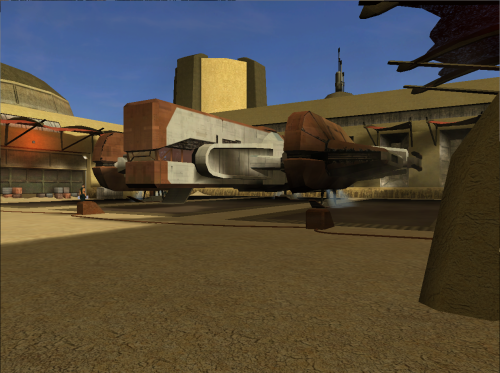
Version 1.0.0
4 downloads
Ported clean version of HD Ebon Hawk -TSL to KOTOR. The original texture was upscaled then a lot of manual cleanup and detail was added. The original leviathan hangar ebon hawk texture was missing reflections and it has been fixed. Compatible with Yavin Station Hangar by WildKarrde - Last week
-
View File KOTORganizer MO2 Plugin ## Quick Setup 1. Download and extract the **Mod Organizer 2 Beta** from the MO2 Discord. 2. Download the **KOTORganizer plugin** and extract it into your MO2 folder. 3. Launch MO2 and complete the first-time setup: * Choose **KOTOR** or **KOTOR 2** as the game. * Choose **portable instance**. * Login to your nexus account, in the settings. 4. Open the **Sync** tab on the right side of MO2. 5. Click **Refresh** to pull the latest mod build instructions. 6. Click **Download All** and wait for the downloads to finish. * Some downloads will open in your browser and require you to click the download button manually. 7. Once all downloads are finished, click **Refresh** again to validate the files. * If any files are missing or mismatched, download them again. 8. When all files are validated, click **Sync** to install the mod list. * This may take some time. * The process is complete when the patcher window shows the final error and warning count. 9. Click **Run** to start the game. NOTE: The following are not included and will need to be patched/installed manually: - Widescreen Patches for KOTOR - 3C-FD Patcher for KOTOR2 - Upscaled Movies for KOTOR and KOTOR2 KOTORganizer MO2 Plugin KOTORganizer extends Mod Organizer 2 for both STAR WARS Knights of the Old Republic and STAR WARS Knights of the Old Republic II: The Sith Lords. Why Mod Organizer 2? Mod Organizer 2 already provides a stable foundation for mod management across many games. Extending it for Star Wars: Knights of the Old Republic and Star Wars: Knights of the Old Republic II: The Sith Lords gives KOTOR modding access to MO2’s biggest strength: the virtual file system. With MO2, the game sees modded files as if they are in the game directory, while the real game folder stays untouched. This keeps the base install closer to vanilla, makes mods easier to enable or disable, and gives better visibility into how files overlap or conflict. MO2 does have a learning curve, but for advanced KOTOR/KOTOR2 builds, the extra structure is worth it. Who Is This For? This plugin is mainly intended for larger KOTOR/KOTOR2 mod builds, repeatable installs, and users who want better insight into file conflicts. An auto downloader and installer is included to easily deply the Mod Builds from https://kotor.neocities.org/ If you only install a few simple loose-file mods, this may be more tool than you need. If you are building a large mod list with many TSLPatcher mods, texture overrides, and compatibility concerns, MO2 provides a much cleaner workflow. Installing Mod Organizer 2.5.3 Beta is required. The current unreleased beta builds include features that KOTOR support depends on. A beta build can be acquired from the Mod Organizer 2 Discord in the dev-build channel. Development has been more active recently, so an official release should be available soon. Once you download and extract MO2, download and extract KOTORganizer to the MO2 directory. Launch ModOrganizer.exe and you can verify the plugin is loaded by opening the Info tab on the right. The sync tab can download and install the mod builds from https://kotor.neocities.org/ Texture Management KOTOR uses several texture-related file types, including .tpc, .tga, .dds, and .txi. MO2 normally only detects exact filename conflicts, but KOTOR has additional texture priority rules that can cause problems even when the extensions differ. The texture management tab helps bridge that gap. It detects conflicts across supported texture formats and highlights them by severity. The highest-severity conflicts are cases that may cause hard crashes in-game. Lower-severity warnings include cases where a .tpc takes priority over a .tga or .dds unexpectedly. An Auto Fix button is included to resolve supported texture conflicts based on the current MO2 mod priority order. TSLPatcher Management Many KOTOR mods use TSLPatcher-style installers instead of simple loose-file installs. The patcher tab lists enabled mods that contain a tslpatchdata folder and can consolidate their patched output into a single MO2-managed mod. Double-clicking a patcher mod shows more detail, including: the changes.ini parsed human-readable install actions detected conflicting patch actions the latest install log A test tab is also available for simulating or testing a single mod install before running the full patcher process. When the patcher process is run, enabled patcher-style mods are processed in priority order and consolidated into a [PATCHER FILES] mod in MO2’s left panel. Automatic Mod Deployment The sync tab is designed to help download, validate, and install mod builds that follow the instructions from the KOTOR Mod Builds site. The Refresh button pulls the latest instruction set and checks for missing files. Download All starts downloading missing mods in sequence. Nexus Mods downloads require logging in with a Nexus account inside MO2. Deadly Stream mods can be downloaded automatically when supported. Mods from other sources open in an Edge browser window, where the user only needs to click the download button. The browser window closes automatically after the download completes. Downloads can still fail. Servers can be slow, unavailable, or inconsistent, and some files may need to be retried manually. Once all files are validated through Refresh, the Sync button becomes available. Sync extracts the downloaded files, runs the multi-patcher, and applies supported texture conflict fixes. When the patcher summary appears with the number of errors and warnings, the process is complete. Manual Mod Installing KOTOR mods are often packed inconsistently. The plugin includes a KOTOR-specific mod data checker that recognizes common archive layouts and can fix many of them automatically. This is especially useful for loose-file mods and patcher-style archives that would otherwise require manual cleanup before MO2 can install them correctly. Steam Workshop Warning If the game is installed through Steam and Workshop content is detected, the plugin warns the user. The intended workflow is MO2-managed content, not a mixed MO2 plus Steam Workshop setup. Mixing both can make conflicts harder to understand and can lead to unexpected file priority issues. Save Support The plugin integrates the game’s saves folder into MO2. Save entries can show timestamps, basic metadata, and screenshot previews. Profile-specific saves can also be enabled through MO2 settings. Limitations This plugin is meant to reduce repetitive setup work, improve conflict visibility, and make large KOTOR/KOTOR2 builds easier to manage. It does not remove the need to read mod instructions. Mods with unusual installers, custom compatibility patches, manual edit requirements, or unsupported archive layouts may still require manual review. Submitter J Submitted 05/03/2026 Category Modding Tools
-

Kotor 1 - Stuck before Dantooine Star Map
Ratgo replied to keegs's topic in Knights of the Old Republic General
Crazy this thread is still active. Crazy I have the same bug. How are yo000003 - Game2.zipu fixing it? -
Version 2.2.0
11 downloads
## Quick Setup 1. Download the Latest Archive version of **Mod Organizer 2 Beta 2.5.3** from the MO2 Discord and extract it somewhere with plenty of free space. 2. Download the **KOTORganizer plugin** and extract it into your MO2 folder. 3. Launch MO2 and complete the first-time setup: * Choose **KOTOR** or **KOTOR 2** as the game. * Choose **portable instance**. * Login to your nexus account, in the settings. 4. Open the **Sync** tab on the right side of MO2. 5. Click **Refresh** to pull the latest mod build instructions. 6. Click **Download All** and wait for the downloads to finish. * Some downloads will open in your browser and require you to click the download button manually. 7. Once all downloads are finished, click **Refresh** again to validate the files. * If any files are missing or mismatched, download them again. 8. When all files are validated, click **Sync** to install the mod list. * This may take some time. * The process is complete when the patcher window shows the final error and warning count. 9. Click **Run** to start the game. NOTE: The following are not included and will need to be patched/installed manually: - Widescreen Patches for KOTOR - 3C-FD Patcher for KOTOR2 - Upscaled Movies for KOTOR and KOTOR2 KOTORganizer MO2 Plugin KOTORganizer extends Mod Organizer 2 for both STAR WARS Knights of the Old Republic and STAR WARS Knights of the Old Republic II: The Sith Lords. Why Mod Organizer 2? Mod Organizer 2 already provides a stable foundation for mod management across many games. Extending it for Star Wars: Knights of the Old Republic and Star Wars: Knights of the Old Republic II: The Sith Lords gives KOTOR modding access to MO2’s biggest strength: the virtual file system. With MO2, the game sees modded files as if they are in the game directory, while the real game folder stays untouched. This keeps the base install closer to vanilla, makes mods easier to enable or disable, and gives better visibility into how files overlap or conflict. MO2 does have a learning curve, but for advanced KOTOR/KOTOR2 builds, the extra structure is worth it. Who Is This For? This plugin is mainly intended for larger KOTOR/KOTOR2 mod builds, repeatable installs, and users who want better insight into file conflicts. An auto downloader and installer is included to easily deply the Mod Builds from https://kotor.neocities.org/ If you only install a few simple loose-file mods, this may be more tool than you need. If you are building a large mod list with many TSLPatcher mods, texture overrides, and compatibility concerns, MO2 provides a much cleaner workflow. Installing Mod Organizer 2.5.3 Beta is required. The current unreleased beta builds include features that KOTOR support depends on. A beta build can be acquired from the Mod Organizer 2 Discord in the dev-build channel. Development has been more active recently, so an official release should be available soon. Once you download and extract MO2, download and extract KOTORganizer to the MO2 directory. Launch ModOrganizer.exe and you can verify the plugin is loaded by opening the Info tab on the right. The sync tab can download and install the mod builds from https://kotor.neocities.org/ Texture Management KOTOR uses several texture-related file types, including .tpc, .tga, .dds, and .txi. MO2 normally only detects exact filename conflicts, but KOTOR has additional texture priority rules that can cause problems even when the extensions differ. The texture management tab helps bridge that gap. It detects conflicts across supported texture formats and highlights them by severity. The highest-severity conflicts are cases that may cause hard crashes in-game. Lower-severity warnings include cases where a .tpc takes priority over a .tga or .dds unexpectedly. An Auto Fix button is included to resolve supported texture conflicts based on the current MO2 mod priority order. TSLPatcher Management Many KOTOR mods use TSLPatcher-style installers instead of simple loose-file installs. The patcher tab lists enabled mods that contain a tslpatchdata folder and can consolidate their patched output into a single MO2-managed mod. Double-clicking a patcher mod shows more detail, including: the changes.ini parsed human-readable install actions detected conflicting patch actions the latest install log A test tab is also available for simulating or testing a single mod install before running the full patcher process. When the patcher process is run, enabled patcher-style mods are processed in priority order and consolidated into a [PATCHER FILES] mod in MO2’s left panel. Automatic Mod Deployment The sync tab is designed to help download, validate, and install mod builds that follow the instructions from the KOTOR Mod Builds site. The Refresh button pulls the latest instruction set and checks for missing files. Download All starts downloading missing mods in sequence. Nexus Mods downloads require logging in with a Nexus account inside MO2. Deadly Stream mods can be downloaded automatically when supported. Mods from other sources open in an Edge browser window, where the user only needs to click the download button. The browser window closes automatically after the download completes. Downloads can still fail. Servers can be slow, unavailable, or inconsistent, and some files may need to be retried manually. Once all files are validated through Refresh, the Sync button becomes available. Sync extracts the downloaded files, runs the multi-patcher, and applies supported texture conflict fixes. When the patcher summary appears with the number of errors and warnings, the process is complete. Manual Mod Installing KOTOR mods are often packed inconsistently. The plugin includes a KOTOR-specific mod data checker that recognizes common archive layouts and can fix many of them automatically. This is especially useful for loose-file mods and patcher-style archives that would otherwise require manual cleanup before MO2 can install them correctly. Steam Workshop Warning If the game is installed through Steam and Workshop content is detected, the plugin warns the user. The intended workflow is MO2-managed content, not a mixed MO2 plus Steam Workshop setup. Mixing both can make conflicts harder to understand and can lead to unexpected file priority issues. Save Support The plugin integrates the game’s saves folder into MO2. Save entries can show timestamps, basic metadata, and screenshot previews. Profile-specific saves can also be enabled through MO2 settings. Limitations This plugin is meant to reduce repetitive setup work, improve conflict visibility, and make large KOTOR/KOTOR2 builds easier to manage. It does not remove the need to read mod instructions. Mods with unusual installers, custom compatibility patches, manual edit requirements, or unsupported archive layouts may still require manual review.-
- 5
-
-

-
- modorganizer
- mo2
- (and 1 more)
-
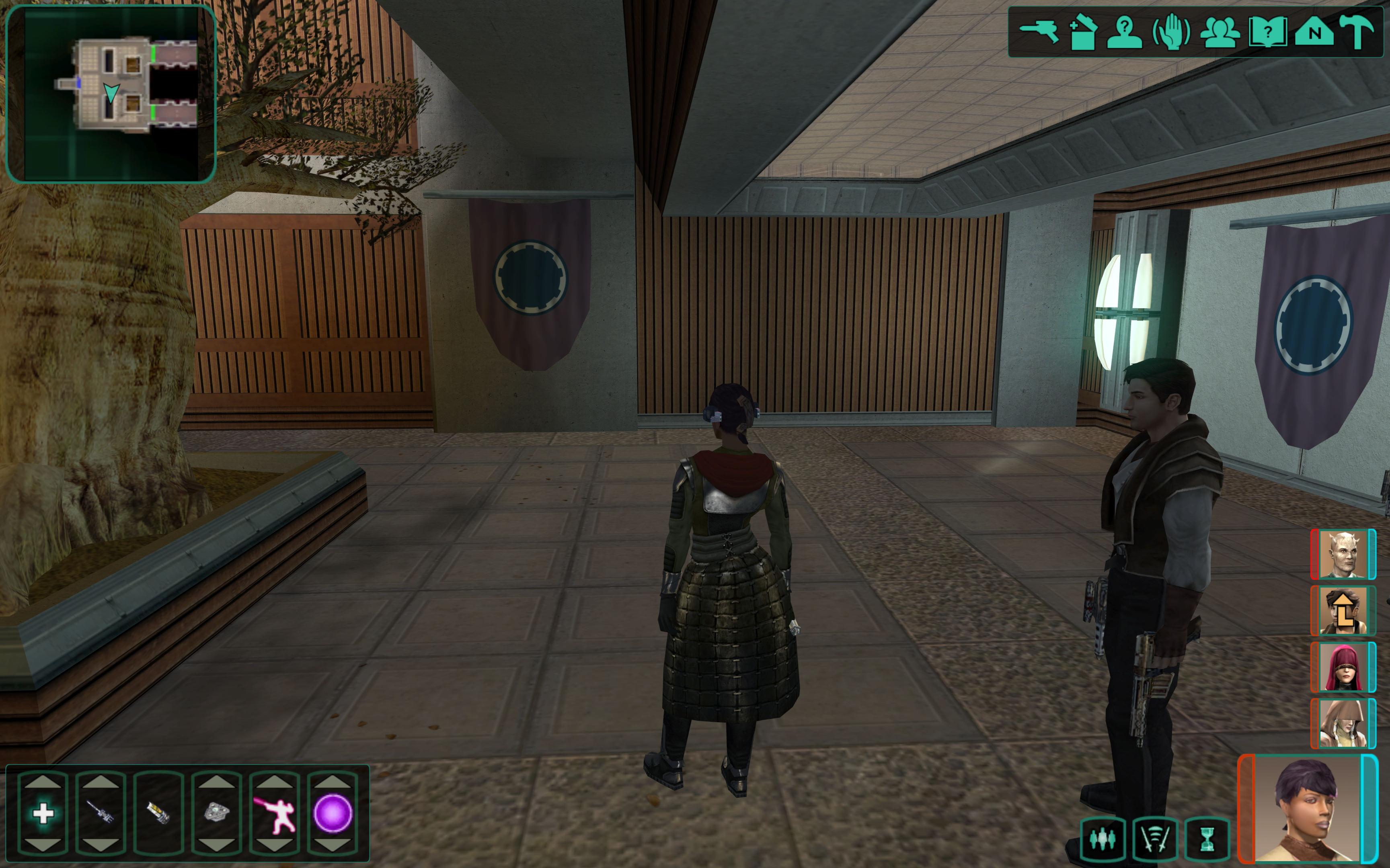
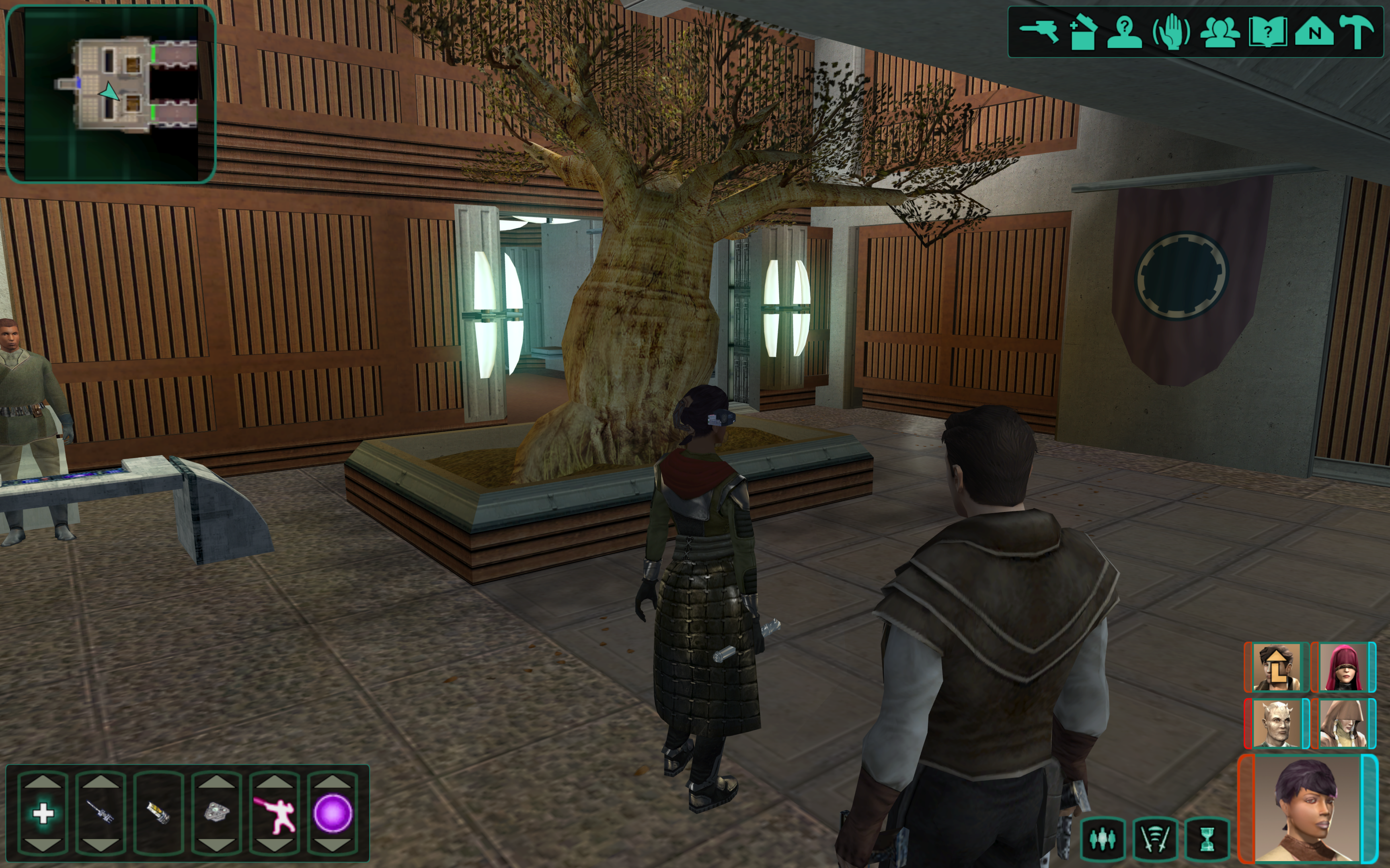
Hello friends, I am currently developing a patch for K2 that extends the active Party from 3 to 5. I've got a lot of it worked out: Adding to party from party select screen Combat, Skill Usage, Quest Reward Experience Propagates to 4th and 5th slots Buffs/Debuffs can be added to 4th and 5th slots. The icons display. Autolevel up will autolevelup 4th and 5th slot members. Most movement related bugs are sorted, still some quirks with pathfinding and spawn location to sort out GUI has been fixed to show 4th and 5th slots. 4/5th slots can react to conversations, start dialogue, gain/lose influence. Things still needed: 5th slot doesn't show level up icon. (Shouldn't be a difficult fix) Scripts that hard code iterating through the party with 3. These will all have to be changed. In menu portraits don't show, researching fixes for this. Coming to a KOTOR Patch Manager Near You, some day, don't ask. I'm working on it.
-
- 4
-
-
-

-
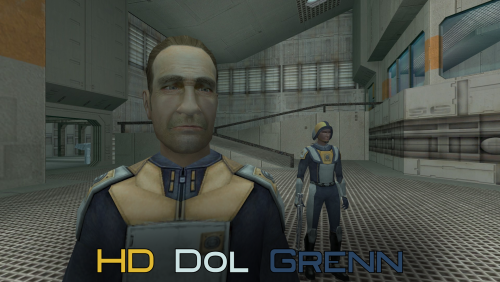 Good mod! And it's not so HD that it looks out of place compared to the rest of the game!
 -
 Oh.
Oh. -
 doesnt seem to be compatible with tslrcm. if i remove rcm it works perfectly
 -
 this caused me not to be able to complete all the mandalorian quests. multiple mandalorians simply do not spawn. including kelborn, mandalorian mercenaries. and zuka
 -
 cannot get to work with tslrcm. works without it though
 -
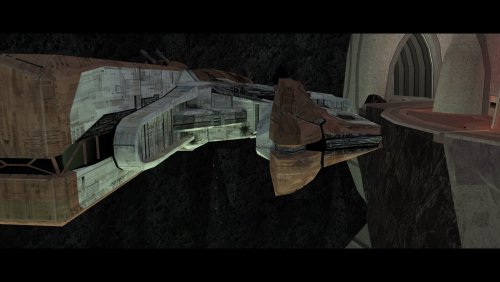 Just a heads up. the TSLPatcher description text still says “Party Conversations on Ebon Hawk”
 -
View File HD Dol Grenn A Mod for Star Wars Knights of The Old Republic II Author: N-DReW25 1.0.0 Release Date: 01.05.2026 Installation: Open the "For Override" folder and drag/copy the textures within and drop/paste them into your Kotor II Override folder. Delete the file "N_DolGrenH.tpc" if it is present. Uninstallation: Delete the N_DolGrenH.tga file from your Override folder. Description: Lieutenant Dol Grenn's head in Kotor II was made via photo sourcing elements of other old male heads from Kotor I. Most of his face and beard comes from Davik, his eyebrows and sideburns are Davik's eyebrows and sideburns that are recolored brown, and most of his hair is Deadeye Duncan's hair that has also been recolored brown. Using this exact same method described above, I was able to photo source elements of Dark Hope's Davik and Deadeye Duncan heads to make a HD Lieutenant Grenn head. Known Bugs: This mod shouldn't have bugs but if you find any report them to me on Deadlystream. Incompatibilities: Would be incompatible with any mods which add N_DolGrenH.tga or N_DolGrenH.tpc. Permissions: As Dark Hope gave free permission for anyone to use her mods, you are therefore allowed to use this mod as it was made using her work. Thanks to: Dark Hope: For giving everyone free permission to use her work and for making the Davik and Deadeye mods in the first place! Bioware: For such an amazing game! Obsidian Entertainment: For such an amazing sequel! Fred Tetra: For Kotor Tool! And everyone who downloads the mod! Legal: THIS MODIFICATION IS NOT SUPPORTED BY BIOWARE/OBSIDIAN ENTERTAINMENT, LUCASARTS, DISNEY OR ANY LICENSERS/SPONSORS OF THE MENTIONED COMPANIES. USE OF THIS FILE IS AT YOUR OWN RISK AND THE ABOVE-MENTIONED COMPANIES OR THE AUTHOR IS NOT RESPONSIBLE FOR ANY DAMAGE CAUSED TO YOUR COMPUTER FOR THE USAGE OF THIS FILE. Submitter N-DReW25 Submitted 05/01/2026 Category Skins TSLRCM Compatible Yes
-
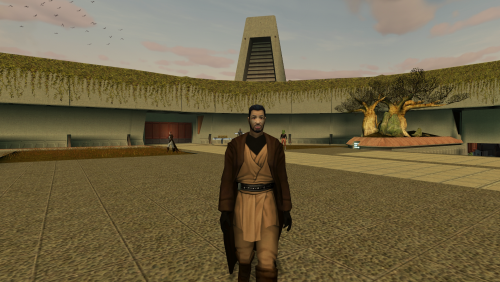 Both mods have brown and brown-red-blue options so not sure I follow.
 -
 Be careful with this tool; it simply destroys your DLG files. Some features are also broken; you can't check or uncheck "plot" or change the value of the "Repair" skill for characters (UTC files). The designer module is terribly unstable and doesn't open all modules. I'm not sure what else it might damage...
 -
PLC_TwlkCrps.rar
-
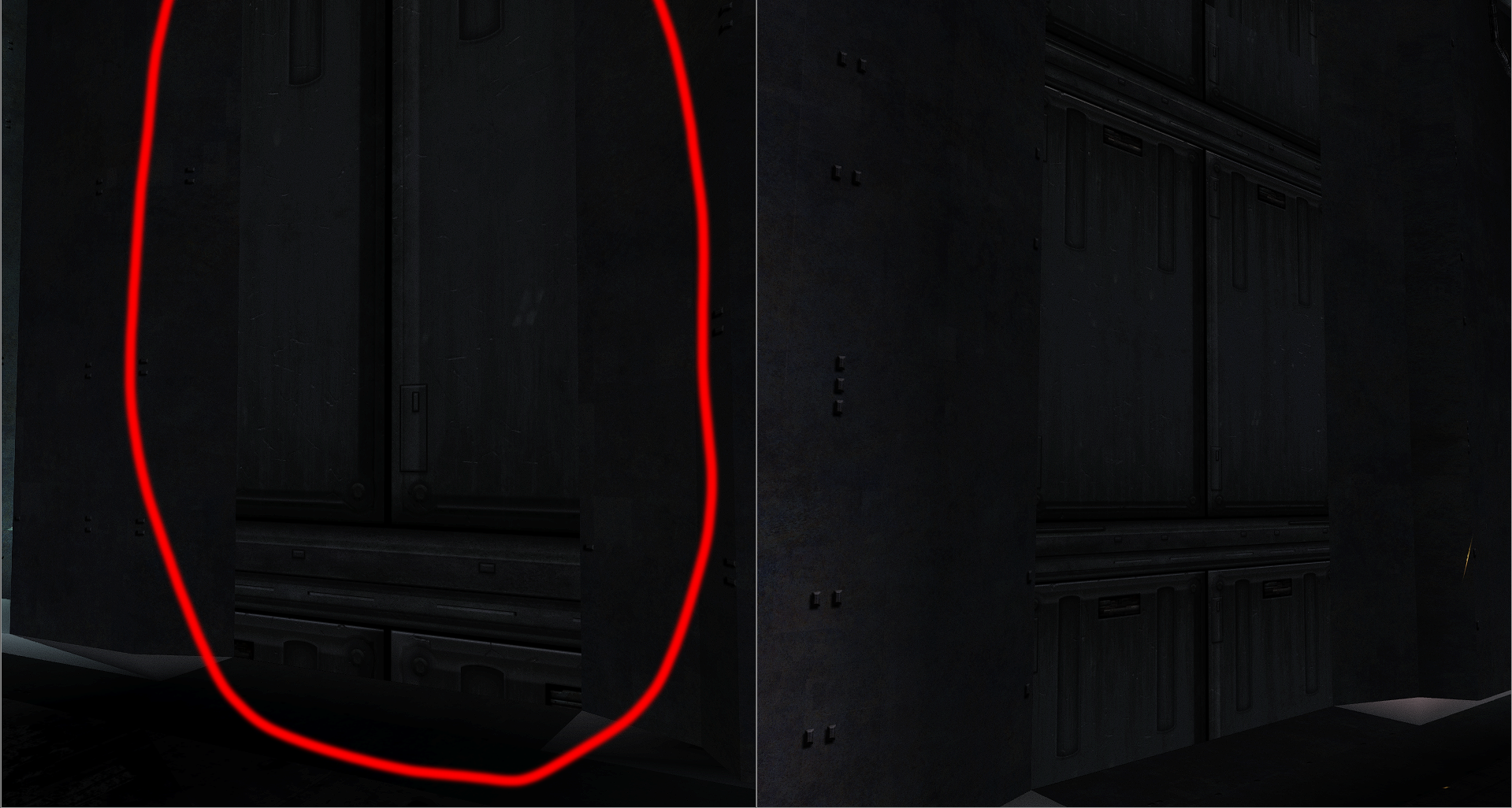
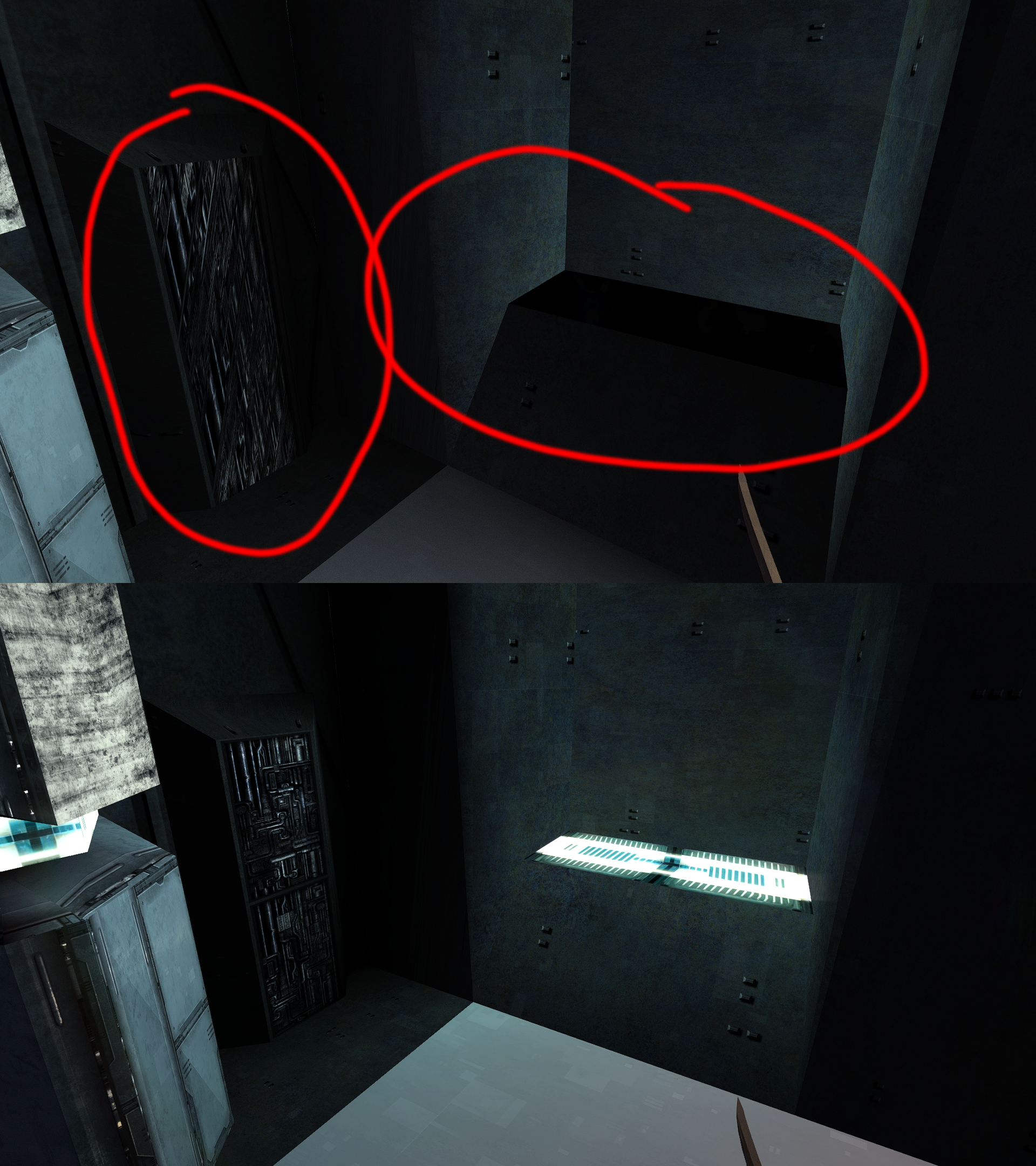
Good afternoon. I've noticed some issues with the lower city models. Perhaps someone has already fixed them (please provide a link).
-
- 1
-
-
View File Ramana/Red Eclipse slaver prestige class fix Ramana/Red Eclipse slaver prestige class fix by HDR1 This mod fixes the money you get from Ramana, the dancer girl on Telos and the Red Eclipse slaver on Nar Shaddaa. Normally, you get money based on your level, however if you take your prestige class, you can no longer get any money from them. With this fix you will keep getting money even after you have a prestige class. There are two versions: Option 1 is just the basic fix. If you want to keep the game's balance, you should probably use this. Option 2 is for people looking to maximize their profits and not miss out on credits. Normally, Ramana and the slaver only give you money based on your current level. So if you talk to them at level 6, they give you 600 credits. If you then come back at level 10, they will give you 1000. However if you were to come back at levels 7, 8, 9, you'd get 700, 800, 900 respectively as well. This version of the mod makes it so that Ramana and the slaver start giving you money from level 1, and will give you money for every single level up, even if you don't talk to them every level. In other words, if you talk to them at level 6 for the first time, instead of getting 600 credits you will get 100, 200, 300, 400, 500, and 600 credits if you keep talking to them. Then if you come back at level 10 and ask for credits, you will get 700, 800, 900 and 1000 credits if you keep talking to them. The game will remember what level you stopped at. You can get quite a bit of extra money this way. Installation: just copy the .NCS files from either the Option 1 or Option 2 folders into your override folder. The NSS files in the source folder are not necessary. Compatibility: Should be compatible with pretty much any mod that doesn't use these three specific files. Known issues: None, based on my testing. I played through the whole game with these and never noticed any problems. Unless c_global_lt_lev.ncs is used for something else in the game that I don't know about, there shouldn't be any issues. Permissions: I grant permission to everyone who'd like to use this mod in their own mods/modpacks, community patches, whatever - just please credit me as HDR1. Submitter HDR1 Submitted 05/01/2026 Category Mods TSLRCM Compatible Yes