All Activity
- Past hour
-
 Ryomen joined the community
 - Today
-

KotOR II Cut Content - Opelle / Valiant
BusterBlader replied to BusterBlader's topic in Knights of the Old Republic General
No I was more curious if that was familiar but I don't recall if this model was used at all in KotOR 2 otherwise? I assume it was made for it too and wasn't an import from KotOR 1 but correct me if I'm wrong. -
 You don't want to leave the vanilla script. That kills him. You need to replace that script with your own that does all the stuff the vanilla script does and then modifies it to get the result you want. Yes, to add static cameras you will need to edit the module's GIT. Which means that they won't take effect in a saved game (unless you extract the save and edit its module GIT). Alternatively, you can create an animated camera, which is a motion track stored in a model that the game can attach a camera to. Any time you see a cutscene with a camera panning or the like, that's an anicam. But you can also use it for simple position switches where you just jump the camera to different points as needed. This would require the use of Blender or 3DS Max and their appropriate I/O scripts.
 -
 Okay, thanks. So what I did in detail was this: I created an all new script. I called it "a_sion_effect" and put it in "script 2" that is underneath "script 1" in the node where Sion's death animation plays, (which is a_sion), and that is where I ended up. The part of the dialogue editor I made can be viewed in this screenshot below... As for what I out in the "a_sion_effect" script, I basically put it like this: void main() { object oDarthSion = GetObjectByTag("DarthSion", 0); location lSion = GetLocation(oDarthSion); AssignCommand(GetModule(), DelayCommand(3.0, AssignCommand(GetFirstPC(), PlaySound("v_pro_lightning")))); AssignCommand(GetModule(), DelayCommand(3.0, CreateObject(64, "sithritual001", lSion, 0))); AssignCommand(GetModule(), DelayCommand(3.5, DestroyObject(oDarthSion, 0.0, 0, 0.1, 0))); AssignCommand(GetModule(), DelayCommand(6.5, DestroyObject(GetObjectByTag("SithRitualEffect", 0), 0.0, 0, 0.0, 0))); } So yeah, that is how I got to where I was. Thanks for the advice. I am trying to learn how to apply new camera shots and make new cameras, but I will try to do so. So, for clarification, do I do this in a script or do I actually have to do module editing to do it efficiently? Like editing the GIT file or something like that?
 -
This is all scripting for the most part. If you look at 903sion.dlg, E121 should be the node of interest. You can see that fires the script a_sion with parameter 3 - https://github.com/KOTORCommunityPatches/Vanilla_KOTOR_Script_Source/blob/master/TSL/TSLRCM/Modules/903MAL_Malachor_V_Trayus_Academy/a_sion.nss That triggers case 3 of the switch runs that function that handles his death scene. Clears all effects on him, plays the ANIMATION_LOOPING_RAGE animation on him for 1.5 seconds, removes his minimum 1HP flag, applies the instant death effect, then unlocks the door. If you want to prevent a node from skipping and run for as long as you want, then you need the ActionPauseConversation and ActionResumeConversation functions. However, you have an added wrinkle here. Sion is the conversation owner. A conversation will immediately terminate if the owner dies. Typically in cases like this where an NPC needs to die, you get around it by making the owner an invisible placeable, but in this case that would probably break all the other scripts. So you'll need a bit of slight of hand to get around it. What I would do is have him manually play the death anim, spawn the VFX placeable over the top of him, then use that as cover to jump Sion somewhere out of sight so he can be killed after the cutscene finishes. The question will be whether the VFX actually obscures him sufficiently. That will probably require some custom shot framing with new static cameras. You could probably do a wide shot from behind the PC and use the PC themselves to block it if absolutely necessary. You can script switching between static cameras using the SetDialogPlaceableCamera function.
-
 popcorn2008 joined the community
 - Yesterday
-
 Inquisition changed their profile photo
 -
 WarStarsOG joined the community
 -
Inquisition joined the community
-
kotor tool KoTOR Tool REBORN.
LordVaderCW replied to LordVaderCW's topic in General Kotor/TSL Modding
VERSION 1.0.3.1 HAS BEEN RELEASED. I am pleased to announce that the first full GitHub source dump is available. Version 1.0.3.1 (2026) for KoTOR Tool is now available, with a compiled release available in the releases section of the GitHub Repo. https://github.com/LordVaderCW/KoTOR_Tool https://github.com/LordVaderCW/KoTOR_Tool/releases/download/Release/KotOR.Tool.v.1.0.3.1.rar MODIFIED MIT PRESERVATION LICENCE. Modified MIT / Source-Available Preservation Licence KoTOR Tool Restoration Project Copyright (c) 2026 LordVaderCW Original KoTOR Tool created by Fred Tetra. This restoration project exists to preserve, repair, maintain, and modernise the original KoTOR Tool source code for educational, archival, and modding purposes. Permission is hereby granted, free of charge, to any person obtaining a copy of this software and associated documentation files (the "Software"), to view, study, build, compile, test, and use the Software for personal, educational, archival, preservation, and lawful modding purposes, subject to the conditions below. 1. Respect for the Original Author The original KoTOR Tool was created by Fred Tetra. Any copy, fork, mirror, modification, distribution, documentation, or public reference to this restoration project must preserve clear credit to Fred Tetra as the original creator of KoTOR Tool. No person may falsely claim original authorship of KoTOR Tool, nor remove reasonable attribution to Fred Tetra or to the restoration work performed by LordVaderCW. 2. Source Availability and Approved Modifications The source code is made publicly available for transparency, education, preservation, and community review. You may make private modifications for personal study, testing, research, or local use. Public distribution of modified versions, altered binaries, patched releases, fork-branded builds, or derivative versions of the Software is not permitted unless the modification has been submitted to and approved through the Official GitHub Repository: https://github.com/LordVaderCW/KoTOR_Tool Approved modifications should be submitted by pull request, issue discussion, or another method accepted by the repository maintainer. This condition is intended to protect users from unsafe, misleading, broken, malicious, or unauthorised builds being circulated as official or semi-official versions of KoTOR Tool. 3. Official Repository The Official GitHub Repository for this restoration project is: https://github.com/LordVaderCW/KoTOR_Tool Only releases, source archives, binaries, and documentation distributed from the Official GitHub Repository, or from release channels expressly authorised by the maintainer, should be considered official. You may link to the Official GitHub Repository. You may not present an unauthorised fork, mirror, binary, or modified version as an official release. 4. Non-Commercial Use The Software may not be sold, rented, leased, sublicensed, monetised, bundled for commercial gain, included in paid software packages, or otherwise used for commercial purposes without prior written permission from the maintainer. This restriction does not prevent voluntary donations. Donations are welcome but not required. Donations do not purchase ownership, control, exclusive rights, commercial rights, or authority over the Software. 5. Third-Party Intellectual Property This project is an unofficial preservation and restoration project. Users are solely responsible for ensuring their use of the Software is lawful in their jurisdiction. 6. Permitted Uses Subject to the restrictions in this licence, you may: - Download and view the source code. - Build the Software for personal use. - Study the restored source for educational purposes. - Use the Software for lawful Knights of the Old Republic modding. - Submit improvements to the Official GitHub Repository. - Share links to the Official GitHub Repository. - Preserve copies for archival or research purposes, provided this licence and all attribution notices remain intact. 7. Prohibited Uses You may not: - Sell the Software or modified versions of it. - Commercially exploit the Software. - Distribute unauthorised modified builds. - Remove attribution to Fred Tetra or LordVaderCW. - Use the Software to distribute or infringe third-party copyrighted assets. - Misrepresent unofficial builds as official releases. - Use the Software in malware, spyware, harmful tooling, or deceptive software packages. - Re-license the Software under terms that remove these restrictions. - Use the name KoTOR Tool, Fred Tetra, LordVaderCW, or the Official GitHub Repository in a misleading endorsement claim. 8. Contributions By submitting code, documentation, patches, fixes, issues, pull requests, or other contributions to the Official GitHub Repository, you agree that your contribution may be incorporated into the project under this licence. You confirm that you have the right to submit your contribution and that it does not knowingly infringe the rights of any third party. The maintainer may accept, reject, modify, or remove contributions at their discretion in order to preserve the stability, legality, and integrity of the project. All contributors will be credited in the applications about section. 9. No Warranty THE SOFTWARE IS PROVIDED "AS IS", WITHOUT WARRANTY OF ANY KIND, EXPRESS OR IMPLIED, INCLUDING BUT NOT LIMITED TO THE WARRANTIES OF MERCHANTABILITY, FITNESS FOR A PARTICULAR PURPOSE, TITLE, NON-INFRINGEMENT, COMPATIBILITY, SECURITY, OR ERROR-FREE OPERATION. USE OF THE SOFTWARE IS ENTIRELY AT YOUR OWN RISK. 10. Limitation of Liability IN NO EVENT SHALL THE AUTHORS, COPYRIGHT HOLDERS, RESTORATION MAINTAINERS, OR CONTRIBUTORS BE LIABLE FOR ANY CLAIM, DAMAGES, LOSS, LIABILITY, DATA LOSS, SYSTEM DAMAGE, LEGAL ISSUE, INTELLECTUAL PROPERTY DISPUTE, OR OTHER CONSEQUENCE ARISING FROM, OUT OF, OR IN CONNECTION WITH THE SOFTWARE OR THE USE OR OTHER DEALINGS IN THE SOFTWARE. 11. Preservation of Notices All copies or substantial portions of the Software must include: - This licence. - The attribution to Fred Tetra as original creator. - The attribution to LordVaderCW for restoration and source repair. - A reference to the Official GitHub Repository. 12. Termination Any rights granted under this licence terminate automatically if you violate its terms. Upon termination, you must stop distributing, using, or presenting any unauthorised modified version of the Software and remove any misleading or infringing copies under your control. 13. Maintainer Contact and Permissions Requests for commercial use, authorised distribution, special permission, or release approval should be made through the Official GitHub Repository: https://github.com/LordVaderCW/KoTOR_Tool or via the Official DeadlySteam Forum page https://deadlystream.com/topic/12194-kotor-tool-reborn/ or via the Official Reddit Thread https://www.reddit.com/r/kotor/comments/1sw3jeq/fred_tetras_kotor_tool_successfully_reconstructed/ End of Licence. -
Please drop any Lightsaber hilt mods you have created here
Inquisition replied to Untold Prophecy's topic in Mod Requests
I realize I am extremely late, as this is almost 7 years old, but could i have all the designs? I love them a lot and want to use them for multiple different playthroughs -
 Question: Is this mod compatible with the Unofficial TSLRCM Tweak Pack? Just curious as there seems to be compatibility issues for me.
 -
 bodri joined the community
 -
To clarify, let me explain my background on this topic and my problems here. So, a while back, I made this post in "mod requests" where I asked for a mod with new content and effects to be made. I don't need to worry about the new cutscenes and all of that, as I learned now the basic common sense of mod compatibility. (A lot of the things I requested for on that post back then I don't need to do now, I can simply make Extended Enclave and the Unofficial TSLRCM Tweak Pack compatible with my game, so no problem with that). There was one final thing I requested in that post though. What I requested was that Darth Sion and Darth Traya at the end of the game of KOTOR II dissolve into dark side energy in the same effect and style as Darth Nihilus. After a bit of consideration, I decided to make the mod where Sion and Traya die this way myself. I have experimented a lot throughout the months, and have learned much. However, there are a few frustrating things about my experimentations. My main modding tool I am using most of the time is Holocron Toolset, (because I am a noobie beginner). The main reason why I want to do the "dark side death effect" for Sion in this mod is mostly because I think the effect is cool, (and for Sion's case, was inspired by his death scene in KOTOR fan-film YouTuber DarthYcey's version of his death). In the vanilla game, after Sion says his last words of dialogue: "I am glad to leave this place, at last.", he lets himself die for good and falls to the floor. During this whole process, once Sion starts falling dead and before he even finishes falling to the floor, the mode of the game reverts from cutscene mode to gameplay mode. After he dies, you can loot his body which is tagged "remains" in gameplay. For my mod, my plan is to have Sion collapse and fall to the floor dead like in the actual game, but once he is fully dead on the floor, (or perhaps when he is right going to be), he suddenly emits a cloud of dark side energy that looks like Darth Nihilus's dark side cloud, and he fades away and vanishes in the cloud. The whole time this process plays out, it is in cutscene mode. So yeah. I found the script for the effect, and I found the placeable for the effect, (sithritual001), and I managed to suceed in my effect, (to an extent). The problem is that I don't know how to pause or extend the duration of a cutscene and let the effect happen. Whenever I let the scene play out, it either results in the cutscene mode reverting to gameplay mode in the middle of this effect happening and Sion leaving "remains" behind after the effect finishes. I will attach a recorded video snippet from my tested gameplay to show you visually. Star Wars_ Knights of the Old Republic II_ The Sith Lords 2026-04-27 16-00-40.mp4 So yeah, there is my problem. I don't know what to do. I kind of want him to fully collapse to the floor then have the "sithritual001" placeable effect and script playing. I also want to make that whole effect, (Sion collapsing to the floor, go through "DestroyObject" by sithritual001 and leave no remains) in cutscene mode, so that is why I asked to extend the duration of the cutscene. (P.S., the mod I planned for this mod is planned to be a private one, as I don't think that anyone would want this mod anyways if it were public. Just to let you know).
-
 Halsam joined the community
 -
.thumb.png.ea96239570ccd1c013d9aa3a30733af7.png) Honestly I feel like this could even go a step further. New armors for your droid could cycle through appearances depending on what armor it is. Maybe the "best" armor for the droids could revert them to their pristine appearances from KotOR 1.
Honestly I feel like this could even go a step further. New armors for your droid could cycle through appearances depending on what armor it is. Maybe the "best" armor for the droids could revert them to their pristine appearances from KotOR 1. -
 Skater6453 joined the community
 -
 ThatOneKnight joined the community
 -
 qwst joined the community
 -
 KillingSunshine joined the community
 -
Corrun Falt has a unique headmorph that could be used for the main character in my opinion.
-
 I really like this. I especially enjoy the varying outfits and color choices, makes her look much cooler and similar to how the Cathar look in the comics. That aside, I can't say I agree with some of the design choices regarding the face. The overtly shaped lips and big eyes make her look a bit like an uncanny doll, and the lipstick's contrasting colors, especially with the Siberian variant, don't really help her case. Also, I really think her eyes would look much more "catlike" and sleek if they had a more slit shape.
 -
kotor tool KoTOR Tool REBORN.
LordVaderCW replied to LordVaderCW's topic in General Kotor/TSL Modding
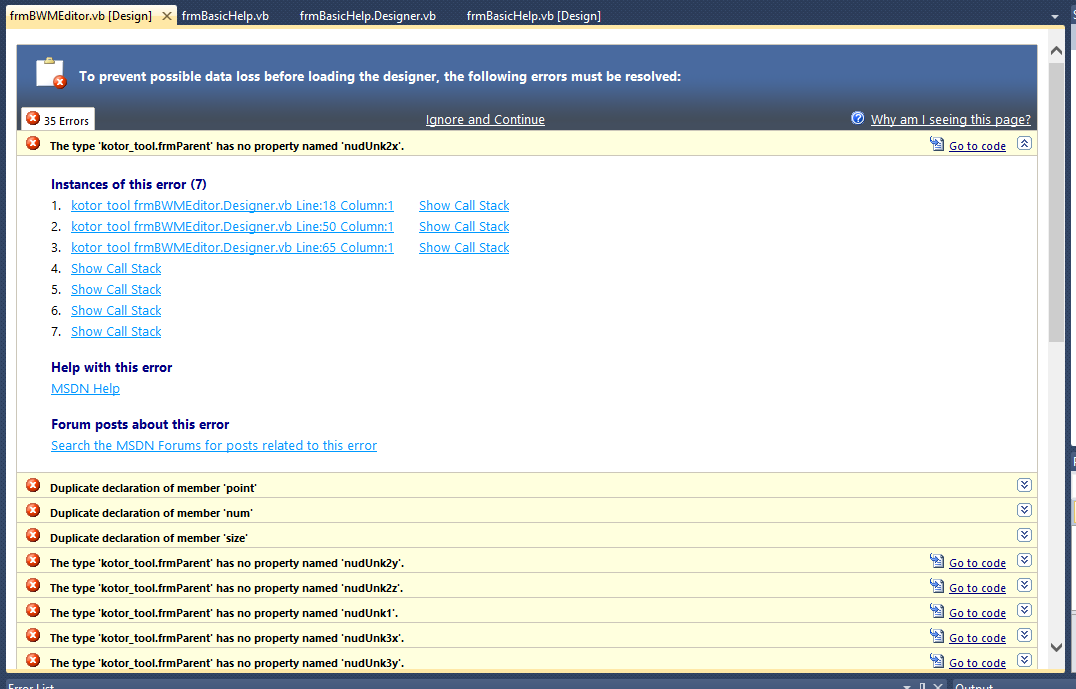
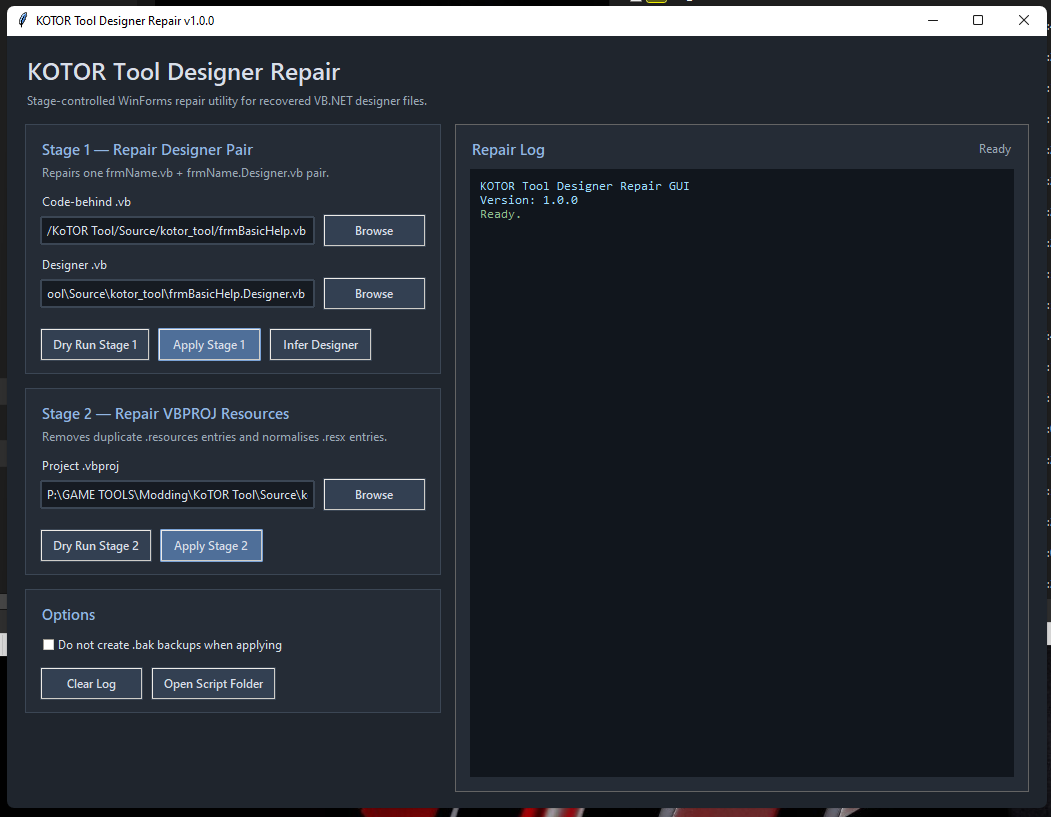
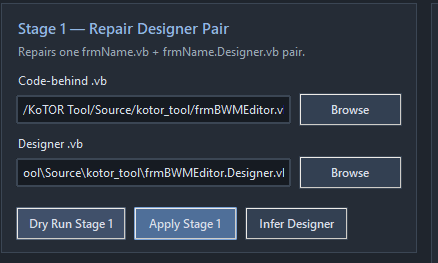
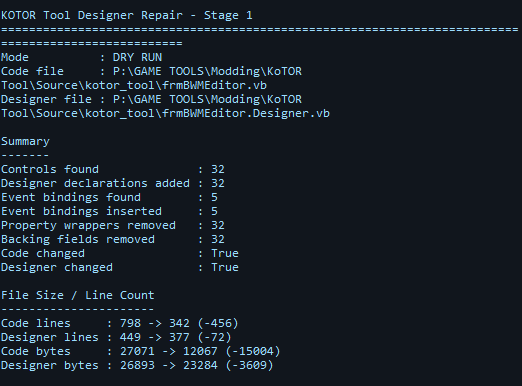
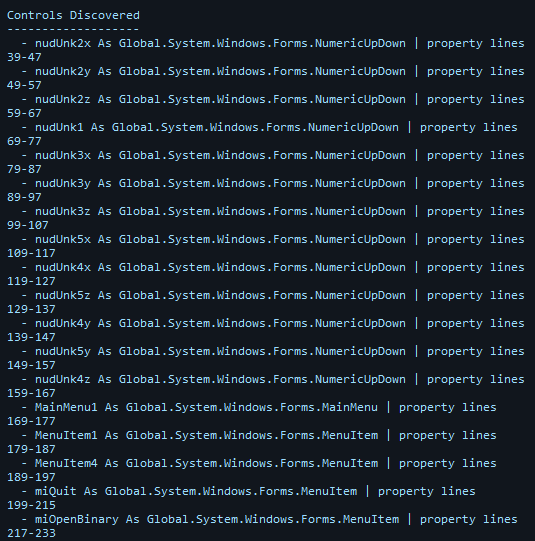
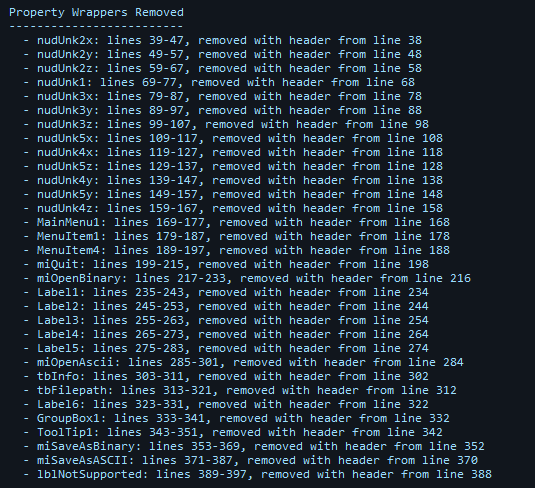
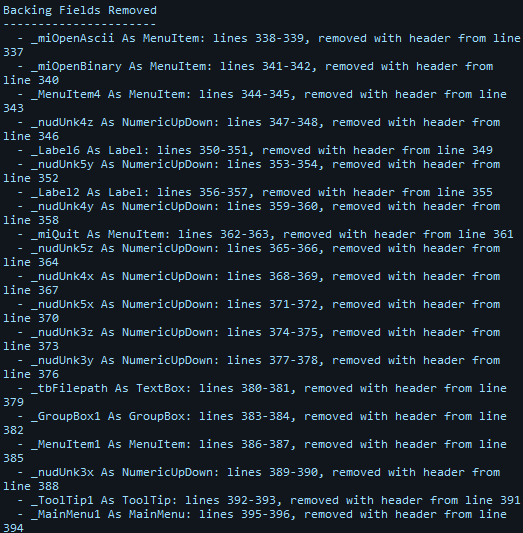
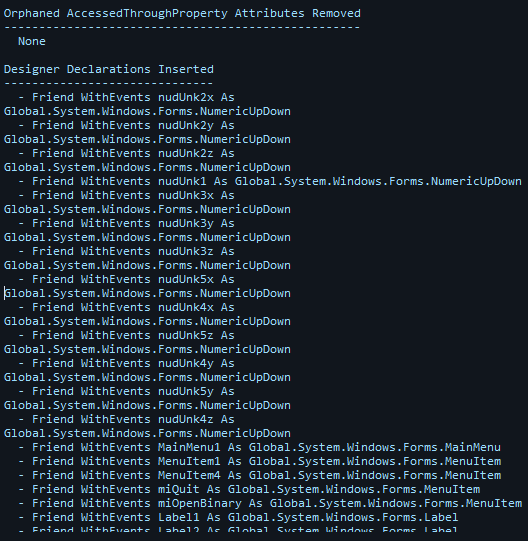
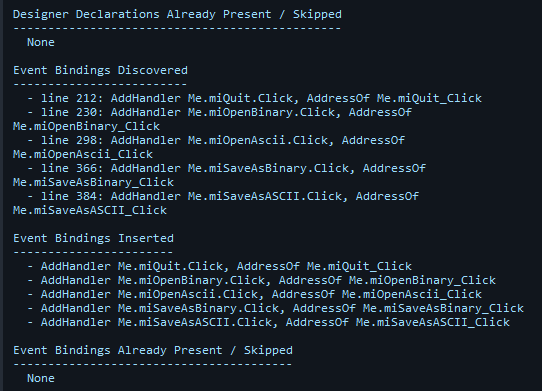
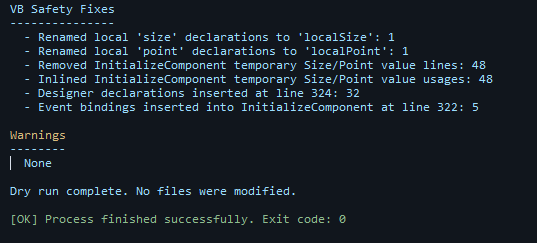
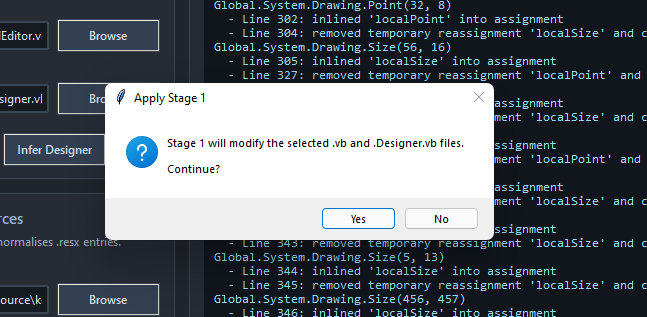
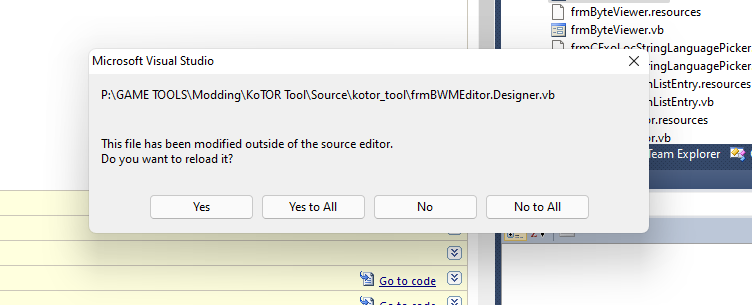
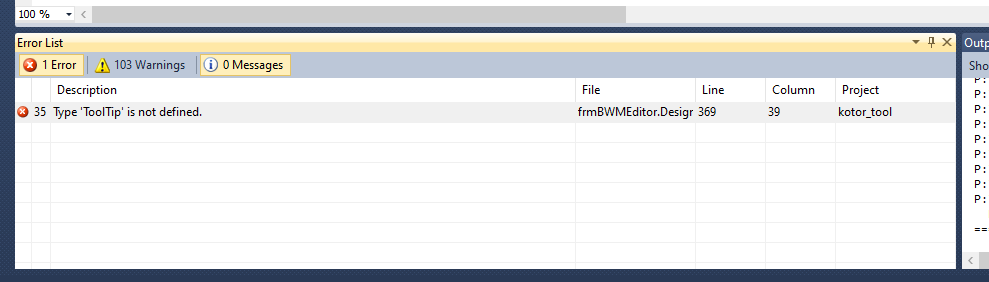
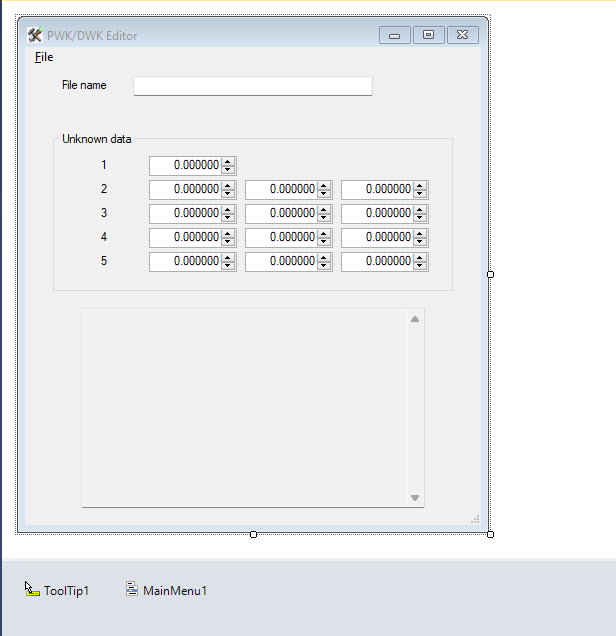
Just a little update. Im working through the Visual Basic Winforms, they appear to be heavily fragmented, or backwards compiled. not in the 2010 era of nested code / vb designer files / resx. so im building a script rapidly edit the files for me. This a utility im writing in python to speed up the process. The first build works okay, a few glitches in the win forms, but i was able to make early fixes to them, adding .resx files where they can be added. ALOT of work is going to be put in this toolkit. But the master will always be Mr. Fred Tetra. No one knows if he is even alive anymore, but whoever he is, and whereever he came from, that brain, deserves the highest recognition in the KoTOR Universe. Forever. In addition to this tool, that is built on specifically Python 3.13, after a couple of iterations, and hella debugging, trial and error, it now seems to be working flawlessly with repairing the Designer files and fixing the decomp mangling. for example, python script which ive built, while running visual studio (very important!) gives us outputs like this. ========================================================================================== [CMD] C:\Users\USER\AppData\Local\Programs\Python\Python313\python.exe "P:\GAME TOOLS\Modding\KoTOR Tool\Source\VbRepair\kt_stage1.py" --code "P:/GAME TOOLS/Modding/KoTOR Tool/Source/kotor_tool/frmBasicHelp.vb" --designer "P:\GAME TOOLS\Modding\KoTOR Tool\Source\kotor_tool\frmBasicHelp.Designer.vb" --apply KOTOR Tool Designer Repair - Stage 1 ==================================================================================================== Mode : APPLY Code file : P:\GAME TOOLS\Modding\KoTOR Tool\Source\kotor_tool\frmBasicHelp.vb Designer file : P:\GAME TOOLS\Modding\KoTOR Tool\Source\kotor_tool\frmBasicHelp.Designer.vb Summary ------- Controls found : 3 Designer declarations added : 3 Event bindings found : 0 Event bindings inserted : 0 Property wrappers removed : 3 Backing fields removed : 3 Code changed : True Designer changed : True File Size / Line Count ---------------------- Code lines : 83 -> 20 (-63) Designer lines : 69 -> 68 (-1) Code bytes : 2799 -> 467 (-2332) Designer bytes : 5666 -> 5625 (-41) Controls Discovered ------------------- - Button1 As Global.System.Windows.Forms.Button | property lines 22-34 - TextBox1 As Global.System.Windows.Forms.TextBox | property lines 39-51 - Label1 As Global.System.Windows.Forms.Label | property lines 56-68 Property Wrappers Removed ------------------------- - Button1: lines 22-34, removed with header from line 18 - TextBox1: lines 39-51, removed with header from line 35 - Label1: lines 56-68, removed with header from line 52 Backing Fields Removed ---------------------- - _Label1 As Label: lines 20-21, removed with header from line 18 - _Button1 As Button: lines 24-25, removed with header from line 22 - _TextBox1 As TextBox: lines 28-29, removed with header from line 26 Orphaned AccessedThroughProperty Attributes Removed --------------------------------------------------- None Designer Declarations Inserted ------------------------------ - Friend WithEvents Button1 As Global.System.Windows.Forms.Button - Friend WithEvents TextBox1 As Global.System.Windows.Forms.TextBox - Friend WithEvents Label1 As Global.System.Windows.Forms.Label Designer Declarations Already Present / Skipped ----------------------------------------------- None Event Bindings Discovered ------------------------- None Event Bindings Inserted ----------------------- None Event Bindings Already Present / Skipped ---------------------------------------- None Designer Alias Declarations Removed ----------------------------------- - Line 25: removed alias 'button' for Me.Button1 - Line 31: removed alias 'textBox' for Me.TextBox1 - Line 37: removed alias 'textBox2' for Me.TextBox1 - Line 43: removed alias 'label' for Me.Label1 Designer Alias Property Rewrites -------------------------------- - button. -> Me.Button1. : 1 replacements - textBox. -> Me.TextBox1. : 1 replacements - textBox2. -> Me.TextBox1. : 1 replacements - label. -> Me.Label1. : 1 replacements Malformed Designer Output Repairs --------------------------------- None Local Declaration Renames ------------------------- None InitializeComponent Value Local Inlines --------------------------------------- - Line 25: removed temporary declaration 'localPoint' and cached New Global.System.Drawing.Point(171, 344) - Line 26: inlined 'localPoint' into assignment - Line 30: removed temporary reassignment 'localPoint' and cached New Global.System.Drawing.Point(8, 40) - Line 31: inlined 'localPoint' into assignment - Line 35: removed temporary declaration 'localSize' and cached New Global.System.Drawing.Size(400, 296) - Line 36: inlined 'localSize' into assignment - Line 40: removed temporary reassignment 'localPoint' and cached New Global.System.Drawing.Point(158, 😎 - Line 41: inlined 'localPoint' into assignment - Line 46: removed temporary reassignment 'localSize' and cached New Global.System.Drawing.Size(5, 13) - Line 47: inlined 'localSize' into assignment - Line 48: removed temporary reassignment 'localSize' and cached New Global.System.Drawing.Size(416, 381) - Line 49: inlined 'localSize' into assignment VB Safety Fixes --------------- - Renamed local 'size' declarations to 'localSize': 1 - Renamed local 'point' declarations to 'localPoint': 1 - Renamed local 'resourceManager' declarations to 'resources': 1 - Removed InitializeComponent temporary Size/Point value lines: 6 - Inlined InitializeComponent temporary Size/Point value usages: 6 - Designer declarations inserted at line 54: 3 Warnings -------- None Apply complete. Files were updated. [OK] Process finished successfully. Exit code: 0 and basically what this does, is it takes the mangled visual designer code, for example, lets take frmBWMEditor.vb Is exactly what you will get if you try to decomp and just load it up in visual studio. Good for debugging and runtime, its like Jabba the Hutt shat on you for designer updates. so we grab our python tool We select our frmBWMEditor.vb file (it populates the designer one with the force) If you want to check with non-destructive, we do a DRY RUN to the Dagoba System, Various output information given, we love data!! Controls auto remove the property wrapper. then it will move the relevent code to the designer etc. Rebindings etc as you can see this is the method of how we fix the galaxy. one scottish obikenobi at a time. 'hellothere' we get a pleasant warning before we untangle the mess. GOD I LOVE PYTHON. Dont forget to click YES TO ALL. Sometimes, it might forget an import or two, if it does, just add it manually. cant be lazy like a huttese prince at everything. we then get this form returned back to us. now i did just have to make a fix as i was writing this, so we can do this. InitializeComponent Decimal Value Local Inlines ----------------------------------------------- - Line 70: removed Decimal declaration 'num' and cached New Decimal(New Integer() {1000, 0, 0, 0}) - Line 71: inlined Decimal temporary 'num' into assignment - Line 72: removed Decimal reassignment 'num' and cached New Decimal(New Integer() {1000, 0, 0, Integer.MinValue}) - Line 73: inlined Decimal temporary 'num' into assignment - Line 80: removed Decimal reassignment 'num' and cached New Decimal(New Integer() {1000, 0, 0, 0}) - Line 81: inlined Decimal temporary 'num' into assignment - Line 82: removed Decimal reassignment 'num' and cached New Decimal(New Integer() {1000, 0, 0, Integer.MinValue}) - Line 83: inlined Decimal temporary 'num' into assignment - Line 90: removed Decimal reassignment 'num' and cached New Decimal(New Integer() {1000, 0, 0, 0}) - Line 91: inlined Decimal temporary 'num' into assignment - Line 92: removed Decimal reassignment 'num' and cached New Decimal(New Integer() {1000, 0, 0, Integer.MinValue}) - Line 93: inlined Decimal temporary 'num' into assignment - Line 100: removed Decimal reassignment 'num' and cached New Decimal(New Integer() {1000, 0, 0, 0}) - Line 101: inlined Decimal temporary 'num' into assignment - Line 102: removed Decimal reassignment 'num' and cached New Decimal(New Integer() {1000, 0, 0, Integer.MinValue}) - Line 103: inlined Decimal temporary 'num' into assignment - Line 110: removed Decimal reassignment 'num' and cached New Decimal(New Integer() {1000, 0, 0, 0}) - Line 111: inlined Decimal temporary 'num' into assignment - Line 112: removed Decimal reassignment 'num' and cached New Decimal(New Integer() {1000, 0, 0, Integer.MinValue}) - Line 113: inlined Decimal temporary 'num' into assignment - Line 120: removed Decimal reassignment 'num' and cached New Decimal(New Integer() {1000, 0, 0, 0}) - Line 121: inlined Decimal temporary 'num' into assignment - Line 122: removed Decimal reassignment 'num' and cached New Decimal(New Integer() {1000, 0, 0, Integer.MinValue}) - Line 123: inlined Decimal temporary 'num' into assignment - Line 130: removed Decimal reassignment 'num' and cached New Decimal(New Integer() {1000, 0, 0, 0}) - Line 131: inlined Decimal temporary 'num' into assignment - Line 132: removed Decimal reassignment 'num' and cached New Decimal(New Integer() {1000, 0, 0, Integer.MinValue}) - Line 133: inlined Decimal temporary 'num' into assignment - Line 140: removed Decimal reassignment 'num' and cached New Decimal(New Integer() {1000, 0, 0, 0}) - Line 141: inlined Decimal temporary 'num' into assignment - Line 142: removed Decimal reassignment 'num' and cached New Decimal(New Integer() {1000, 0, 0, Integer.MinValue}) - Line 143: inlined Decimal temporary 'num' into assignment - Line 150: removed Decimal reassignment 'num' and cached New Decimal(New Integer() {1000, 0, 0, 0}) - Line 151: inlined Decimal temporary 'num' into assignment - Line 152: removed Decimal reassignment 'num' and cached New Decimal(New Integer() {1000, 0, 0, Integer.MinValue}) - Line 153: inlined Decimal temporary 'num' into assignment - Line 160: removed Decimal reassignment 'num' and cached New Decimal(New Integer() {1000, 0, 0, 0}) - Line 161: inlined Decimal temporary 'num' into assignment - Line 162: removed Decimal reassignment 'num' and cached New Decimal(New Integer() {1000, 0, 0, Integer.MinValue}) - Line 163: inlined Decimal temporary 'num' into assignment - Line 170: removed Decimal reassignment 'num' and cached New Decimal(New Integer() {1000, 0, 0, 0}) - Line 171: inlined Decimal temporary 'num' into assignment - Line 172: removed Decimal reassignment 'num' and cached New Decimal(New Integer() {1000, 0, 0, Integer.MinValue}) - Line 173: inlined Decimal temporary 'num' into assignment - Line 180: removed Decimal reassignment 'num' and cached New Decimal(New Integer() {1000, 0, 0, 0}) - Line 181: inlined Decimal temporary 'num' into assignment - Line 182: removed Decimal reassignment 'num' and cached New Decimal(New Integer() {1000, 0, 0, Integer.MinValue}) - Line 183: inlined Decimal temporary 'num' into assignment - Line 190: removed Decimal reassignment 'num' and cached New Decimal(New Integer() {1000, 0, 0, 0}) - Line 191: inlined Decimal temporary 'num' into assignment - Line 192: removed Decimal reassignment 'num' and cached New Decimal(New Integer() {1000, 0, 0, Integer.MinValue}) - Line 193: inlined Decimal temporary 'num' into assignment InitializeComponent Value Local Inlines --------------------------------------- None VB Safety Fixes --------------- - Removed InitializeComponent Decimal temporary value lines: 26 - Inlined InitializeComponent Decimal temporary value usages: 26 Warnings -------- None Apply complete. Files were updated. [OK] Process finished successfully. Exit code: 0 and of course, the about box, is still there. More updates soon. definitely today. or in a few hours. keep tuned.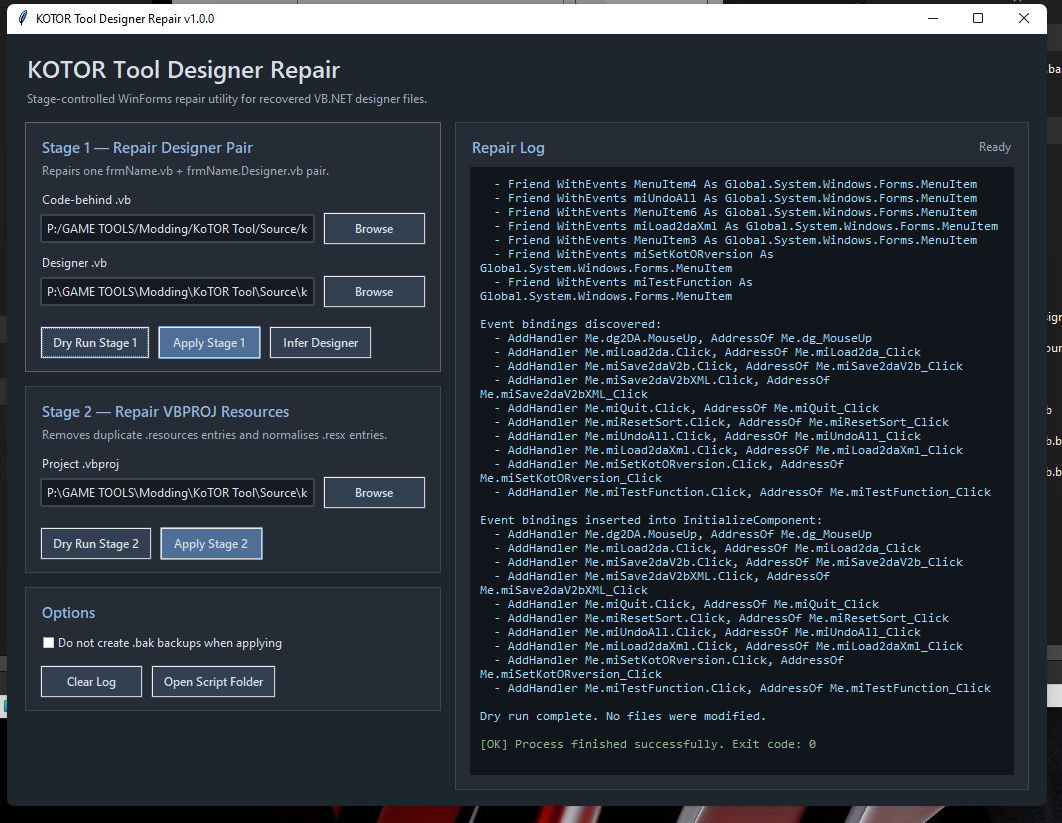


-

KotOR II Cut Content - Opelle / Valiant
Sith Holocron replied to BusterBlader's topic in Knights of the Old Republic General
Planning on putting this up on Wookieepedia?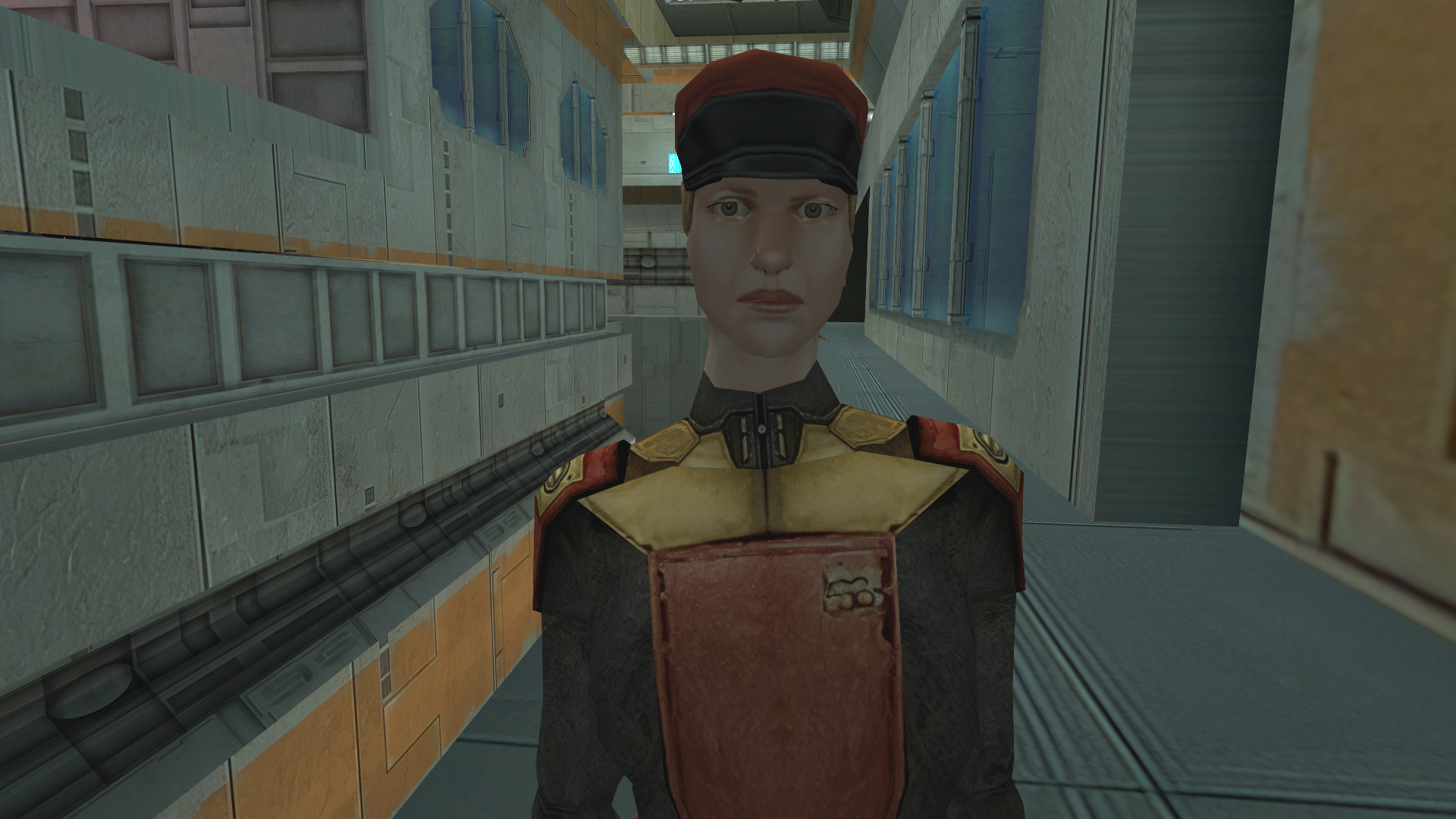
-
Hi everyone, I wanted to share a pretty major milestone with the KOTOR community. Over the last 24 hours, I have successfully reverse engineered and reconstructed the original KOTOR Tool into a working Visual Studio 2010 project, with source code files restored, curated, repaired, and brought back into a buildable structure. I worked through the decompiled output manually, repairing broken VB.NET syntax, restoring missing line continuations, correcting project references, fixing startup and application path issues, and rebuilding the project into something that can now run inside Visual Studio again. Source Files I also used ChatGPT heavily throughout the process as a coding assistant, helping identify broken patterns, repair old VB.NET structures, and accelerate the reconstruction process. The actual curation, testing, correction, and project decisions were done manually by me. This was done in roughly a 24-hour period. For anyone who remembers how important KOTOR Tool was to the original modding scene, this feels like a serious preservation milestone. The goal here is not to take anything away from the original creator or the work that came before. Quite the opposite: this is about preserving an important part of KOTOR modding history and making sure the tool can still be studied, repaired, and potentially modernised. At this stage, I am treating this as a restoration and preservation project. I am not making any promises about releases yet, because there may be legal, licensing, and attribution questions that need to be handled properly and respectfully. Visual Studio 2010 Compile But technically speaking, the milestone is real: - KOTOR Tool has been reconstructed into a Visual Studio 2010-compatible source project - The source files have been manually curated and repaired - The project now runs again from source - The restoration was completed in approximately 24 hours - AI-assisted coding helped accelerate the repair process, but the reconstruction was manually supervised and tested KoTOR Tool running in visual studio 2010 debug. I know this tool means a lot to many people here, so I wanted to share the progress with the community and open the door to discussion. For those who used KOTOR Tool back in the day: What parts of the tool do you think are most important to preserve? What would you want to see documented, stabilised, or modernised first? LordVaderCW There is still much to do with this project. But, after a decade and a half, it is now open to the modding community. I will in due course, make the source available on GitHub. Fred built this in DotNet Visual Basic, on Net 1.1; its now running on 2.5; I intend to get it to atleast dotnet 3.5+ and also plan to make a C# version, or as close it as possible. I almost got sued by Lucasfilm, for trying to make SWKoTOR:III on ModDB. (yea im that guy!) in the days of Unreals UDK (with a little bit of ResourceHacker). I believe with the right minds in the KoTOR community, we can **FINALLY** begin efforts to PRESERVE, RESTORE, and even maybe uplift these Sacred Games, which have become Holocrons of our Heritage. May the Force be with you. LordVaderCW. #StopKillingGames Originally Posted on Reddit: You will find all updates i make to this project over on reddit. When i have a suitable application ready to release, in traditional style, if there are no Objections from the community, i will upload it here, to deadlystream.
- 2 replies
-
- 1
-

-
- fred tetra
- vb
- (and 6 more)
-
 Sure! I will ASAP but overall maybe let a day or so pass to have it settle out, and I'll document the new version and post it into the description. I'm still adding stuff from the old versions / seeing how much I can get
 - Last week
-
Is there a change log you can post on the site? I'd love to give this another run.
-
View File Luke Skywalker - OG Trilogy Voice Overhaul (JKO) Luke Skywalker - Young Mark Hamill JKO Voice Overhaul I replaced the voice of JKO LUKE(Bob Bergen) to Original Trilogy (Mark Hamill)Voice Install:Extact the file to Gamedata/Base folder Credits: • Campaing Voice Edit with Eleven Labs AI • Luke Skywalker Voice From the Original Trilogy • Original game: Jedi Outcast / Jedi Academy – Raven Software THIS FILE IS NOT MADE, DISTRIBUTED, OR SUPPORTED BY ACTIVISION PUBLISHING, INC., RAVEN SOFTWARE, OR LUCASARTS ENTERTAINMENT COMPANY, LLC. ELEMENTS™ & © LUCASFILM LTD.™ & DISNEY, INC.™ AND/OR ITS LICENSORS. STAR WARS®, JEDI®, & JEDI KNIGHT® ARE REGISTERED TRADEMARKS OF LUCASFILM LTD™ AND WALT DISNEY, INC.™ STAR WARS®, JEDI®, & JEDI KNIGHT® ARE REGISTERED TRADEMARKS OF LUCASFILM LTD™ & DISNEY, INC.™ Submitter HoboPeach Submitted 04/26/2026 Category Other Game Jedi Outcast
-
KotOR II Cut Content - Opelle / Valiant
BusterBlader replied to BusterBlader's topic in Knights of the Old Republic General
Do you have a frontal screenshot of that face or point me to how to look at the model directly? I never noticed any of the woman Rep officer models except on holograms in 2 to my recollection. -

Version 1.0.0
4 downloads
Luke Skywalker - Young Mark Hamill JKO Voice Overhaul I replaced the voice of JKO LUKE(Bob Bergen) to Original Trilogy (Mark Hamill)Voice Install:Extact the file to Gamedata/Base folder Credits: • Campaing Voice Edit with Eleven Labs AI • Luke Skywalker Voice From the Original Trilogy • Original game: Jedi Outcast / Jedi Academy – Raven Software THIS FILE IS NOT MADE, DISTRIBUTED, OR SUPPORTED BY ACTIVISION PUBLISHING, INC., RAVEN SOFTWARE, OR LUCASARTS ENTERTAINMENT COMPANY, LLC. ELEMENTS™ & © LUCASFILM LTD.™ & DISNEY, INC.™ AND/OR ITS LICENSORS. STAR WARS®, JEDI®, & JEDI KNIGHT® ARE REGISTERED TRADEMARKS OF LUCASFILM LTD™ AND WALT DISNEY, INC.™ STAR WARS®, JEDI®, & JEDI KNIGHT® ARE REGISTERED TRADEMARKS OF LUCASFILM LTD™ & DISNEY, INC.™ -
View File Luke Skywalker - OG Trilogy Voice Overhaul (JKA) Luke Skywalker - Young Mark Hamill JKA Voice Overhaul I replaced the voice of JKO LUKE(Bob Bergen) to Original Trilogy (Mark Hamill)Voice Install:Extact the file to Gamedata/Base folder Credits: • Campaing Voice Edit with Eleven Labs AI • Luke Skywalker Voice From the Original Trilogy • Original game: Jedi Outcast / Jedi Academy – Raven Software THIS FILE IS NOT MADE, DISTRIBUTED, OR SUPPORTED BY ACTIVISION PUBLISHING, INC., RAVEN SOFTWARE, OR LUCASARTS ENTERTAINMENT COMPANY, LLC. ELEMENTS™ & © LUCASFILM LTD.™ & DISNEY, INC.™ AND/OR ITS LICENSORS. STAR WARS®, JEDI®, & JEDI KNIGHT® ARE REGISTERED TRADEMARKS OF LUCASFILM LTD™ AND WALT DISNEY, INC.™ STAR WARS®, JEDI®, & JEDI KNIGHT® ARE REGISTERED TRADEMARKS OF LUCASFILM LTD™ & DISNEY, INC.™ Submitter HoboPeach Submitted 04/26/2026 Category Other Game Jedi Academy
-

Version 1.0.0
7 downloads
Luke Skywalker - Young Mark Hamill JKA Voice Overhaul I replaced the voice of JKO LUKE(Bob Bergen) to Original Trilogy (Mark Hamill)Voice Install:Extact the file to Gamedata/Base folder Credits: • Campaing Voice Edit with Eleven Labs AI • Luke Skywalker Voice From the Original Trilogy • Original game: Jedi Outcast / Jedi Academy – Raven Software THIS FILE IS NOT MADE, DISTRIBUTED, OR SUPPORTED BY ACTIVISION PUBLISHING, INC., RAVEN SOFTWARE, OR LUCASARTS ENTERTAINMENT COMPANY, LLC. ELEMENTS™ & © LUCASFILM LTD.™ & DISNEY, INC.™ AND/OR ITS LICENSORS. STAR WARS®, JEDI®, & JEDI KNIGHT® ARE REGISTERED TRADEMARKS OF LUCASFILM LTD™ AND WALT DISNEY, INC.™ STAR WARS®, JEDI®, & JEDI KNIGHT® ARE REGISTERED TRADEMARKS OF LUCASFILM LTD™ & DISNEY, INC.™ -
 KingRito64 changed their profile photo
 -
 It's really unfortunate since I'd argue the dialogue+description is the biggest reason one would get this mod, since the dialogue is so small on bigger screens. But I don't blame you for being unable to solve this. I'm just surprised no one has decompiled this game and made a mod to fix this yet. If only we could just make the "quantity" font and "save file" font into separate files and sizes.
 -
View File K2 Appearance Restoration Pack A Mod for Star Wars Knights of The Old Republic II Author: N-DReW25 1.0.0 Release Date: 26.04.2026 Installation: Please install The Sith Lords Restored Content Mod 1.8.6 FIRST, no exceptions. It is highly advised to install the KOTOR 2 Community Patch before this mod, this is optional. Click on the HoloPatcher.exe, pick your desired appearance restoration, click install, and sit back and watch the installer do its magic. Repeat this process until all, or only the appearances you want, of the appearances are installed. Description: The Sith Lords Restored Content Mod (TSLRCM) restores cut content, obviously, but what you may or may not know is that it also restores cut appearances such as Saedhe's and Hussef's cut appearances - both of whom use generic appearances in the vanilla game. But TSLRCM doesn't restore ALL of the cut appearances, my Kotor II Restored Content Plus mod did have options to restore these cut appearances but with more and more install options being added I decided to take these restored appearances and make them their standalone mod. Thus far, this mod restores: * The appearance of the Harbinger's Captain which had a unique head. * The appearance of Ralon which used Jorran's body model. * The male and female Fat Commoner variants which were mostly unused from the first game * The Smuggler variants which were used quite frequently in the first game on NPCs like Holdan. * The first Rodian variant which was bugged in the first game causing it to render as the second variant (fixed in K1CP). * The male Twi'lek variants with special Twi'lek outfits which were used quite frequently in the first game on NPCs like Larrim. * The green female Twi'lek head from the first game has been added to replace Ramana's head whilst Ramana's original head has been added as a brand new appearance for Jonra Far. Known Bugs: This mod shouldn't have any bugs but if you find any please report them to me on Deadlystream. Incompatibilities: To be added! Permissions: Do NOT claim credit for this mod and do not use assets from this mod without my permission. Thanks to: Dashus: For kickstarting the Kotor restoration efforts with TSLRP! Zbyl2 and the TSLRCM Team: For creating TSLRCM in the first place! Bioware: For such an amazing first game! Obsidian: For such an amazing sequel and for keeping the cut content in the files! Fred Tetra: For Kotor Tool! th3w1zard1: For maintaining the HoloPatcher! Everyone who downloads the mod! Legal: THIS MODIFICATION IS NOT SUPPORTED BY BIOWARE/OBSIDIAN ENTERTAINMENT, LUCASARTS, DISNEY OR ANY LICENSERS/SPONSORS OF THE MENTIONED COMPANIES. USE OF THIS FILE IS AT YOUR OWN RISK AND THE ABOVE-MENTIONED COMPANIES OR THE AUTHOR IS NOT RESPONSIBLE FOR ANY DAMAGE CAUSED TO YOUR COMPUTER FOR THE USAGE OF THIS FILE. Submitter N-DReW25 Submitted 04/26/2026 Category Mods TSLRCM Compatible Yes
-
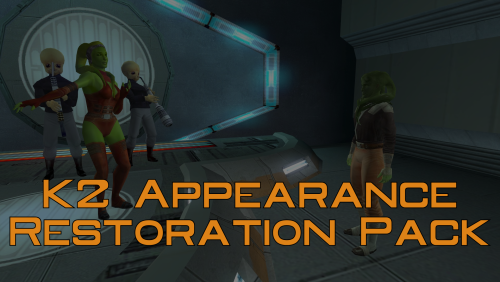
Version 1.0.0
9 downloads
A Mod for Star Wars Knights of The Old Republic II Author: N-DReW25 1.0.0 Release Date: 26.04.2026 Installation: Please install The Sith Lords Restored Content Mod 1.8.6 FIRST, no exceptions. It is highly advised to install the KOTOR 2 Community Patch before this mod, this is optional. Click on the HoloPatcher.exe, pick your desired appearance restoration, click install, and sit back and watch the installer do its magic. Repeat this process until all, or only the appearances you want, of the appearances are installed. Description: The Sith Lords Restored Content Mod (TSLRCM) restores cut content, obviously, but what you may or may not know is that it also restores cut appearances such as Saedhe's and Hussef's cut appearances - both of whom use generic appearances in the vanilla game. But TSLRCM doesn't restore ALL of the cut appearances, my Kotor II Restored Content Plus mod did have options to restore these cut appearances but with more and more install options being added I decided to take these restored appearances and make them their standalone mod. Thus far, this mod restores: * The appearance of the Harbinger's Captain which had a unique head. * The appearance of Ralon which used Jorran's body model. * The male and female Fat Commoner variants which were mostly unused from the first game * The Smuggler variants which were used quite frequently in the first game on NPCs like Holdan. * The first Rodian variant which was bugged in the first game causing it to render as the second variant (fixed in K1CP). * The male Twi'lek variants with special Twi'lek outfits which were used quite frequently in the first game on NPCs like Larrim. * The green female Twi'lek head from the first game has been added to replace Ramana's head whilst Ramana's original head has been added as a brand new appearance for Jonra Far. Known Bugs: This mod shouldn't have any bugs but if you find any please report them to me on Deadlystream. Incompatibilities: To be added! Permissions: Do NOT claim credit for this mod and do not use assets from this mod without my permission. Thanks to: Dashus: For kickstarting the Kotor restoration efforts with TSLRP! Zbyl2 and the TSLRCM Team: For creating TSLRCM in the first place! Bioware: For such an amazing first game! Obsidian: For such an amazing sequel and for keeping the cut content in the files! Fred Tetra: For Kotor Tool! th3w1zard1: For maintaining the HoloPatcher! Everyone who downloads the mod! Legal: THIS MODIFICATION IS NOT SUPPORTED BY BIOWARE/OBSIDIAN ENTERTAINMENT, LUCASARTS, DISNEY OR ANY LICENSERS/SPONSORS OF THE MENTIONED COMPANIES. USE OF THIS FILE IS AT YOUR OWN RISK AND THE ABOVE-MENTIONED COMPANIES OR THE AUTHOR IS NOT RESPONSIBLE FOR ANY DAMAGE CAUSED TO YOUR COMPUTER FOR THE USAGE OF THIS FILE. -

KotOR II Cut Content - Opelle / Valiant
N-DReW25 replied to BusterBlader's topic in Knights of the Old Republic General
Yes, that is indeed the lesser used female Republic Officer appearance. It's generic so it probably has been used elsewhere, but considering most NPCs reuse the same generic appearances that wouldn't be a problem for an NPC who's only purpose is to move the plot forward during a cutscene.