


DarthErdan
-
Posts
31 -
Joined
-
Last visited
Recent Profile Visitors
2,201 profile views





DarthErdan's Achievements






-
 This mod is so cool! This would be very useful for squeezing more party interactions the next time I do a playthrough for KOTOR. Good job WildKarrde!
- 24 comments
-
- 1
-

-
- ebon hawk
- conversation
- (and 2 more)
-
I find it always still cool that his likness became a unique head for a unique NPC.
-
Hello. My name is DarthErdan. This will be the thread where I will discuss, post, and brainstorm ideas and even greenlit modding projects of various typees, most of them for KOTOR 2: TSL, but I will make some mods for the original game as well. Alright, to start this thread off, here are the greenlit or in consideration works that I am planning as of right now. Project 1: The Ravager: Expanded Edition Status: Greenlit Ambitious Scale: High This is one of the top focused greenlit mod project for TSL that I have. I have already made a post on this separate from this one recently on this very forum, (I regret doing that now, I should have included the topic of this mod in this thread instead of a separate post, but back then I didn't conceive of that) Given I already stated my thoughts and ideas in that separate post, I will just link it here: If you want a summary and a TLDR on this post here it is: Remember Zybyl2? I believe they were on of the TSLRCM team. Back in the day, they made a mod called "Ravager Rewrite", (hosted on GamFront). My mod is a similar idea to tha, but it is more nuanced and complicated. I need to clarify that my mod will NOT be an update to the Ravager Rewrite, it will entirely be written and directed by me and my own intepretation of what the Ravager will be like in a more "complete edition". Okay, with that in mind, let me summarize it for you: The Ravager in vanilla TSL, even the TSLRCM, feels kind of unfinished story-wise and even out of place in some areas. My mod will try to expand on the whole level and part of the story for the Ravager, and if needed, tweak some parts to fit seamlessly. I will try to be as accurate to cut content from the original devs of KOTOR II, but since we BARELY have anything on the plan for the Ravager, this mod will mostly be custom made content that will just try to make more expanded sense of the level, even if the expanded stuff is completely fanon, (in which it most probably will be). I want to make this mod compatible with TSLRCM, (MAYBE even the vanilla game? I don't know, THAT part needs to be in consideration). Project 2: Darth Nihilus New Model (Maybe a Pack) Status: Partially Greenlit (I am for sure at least making ONE Darth Nihilus new model, but the model pack is in consideration and may or may not proceed) Ambitious Scale: Kind of High, (Will be higher if I proceed with the model pack) This one is probably even more top priority than the Ravager: Expanded Edition mod. This one will be easier to do, but may be harder than I think if the model pack part is greenlit. In a nutshell, it is in the name: A brand new model, (maybe even multiple brand new models if the model pack is made), of Darth Nihilus that is a completely different mesh(es) from the vanilla game that fits my aesthetic taste. If the model pack parrt proceeds, some of these other extra models will be based off of KOTOR II promotional art, with alternate reskin variations, (as some concept or promotional art of Nihilus in KOTOR II looks the same, but he has bloodier red aesthetic around his eyeholes in some vs others). If not, at the very least one model, (a model I have been DYING to make), will come out eventually. If I proceed with the model pack, or even just that one model, I hope you guys will enjoy any one of them that you think is coolest for the game best. I will also put an optional addon for Nihilus to have either Red Force Lightning exclusively for him in this mod, and a higher mesh quality and skinned lightsaber made just for him, (that looks like his in-universe lightsaber as depicted in media outside of KOTOR II). The Red Force Lightning addons and the new lightsaber model can be both used as addons with the new Nihilus model, (or model pack), but one or the other can be used exlcusively instead for the model, (or model pack). Regardless, of your choosing, these addons will be optional for the model, (or model pack). Some elements of the new Nihilus model, (and MAYBE the other models in the model pack), will be generated from AI 3D programs or sites, (for now, it will just be the masl, everything else I will try to craft man-made). Even the mask, if it is not perfect in shape or UV maps, will be tweaked if needed. Just a heads up for people. Project 3: The Ravager's Death New BIK Movie Status: Greenlit Ambitious Scale: High I have made a post on this back at the general modding discussion forum recently, but basically I want to make a brand new BIK movie for the Ravager's explosion scene in KOTOR II. Long story short, the Ravager is like a skeleton fragile ship, and thus it should be far more fragile and unstable than a typical ship, being held together by only it's owner and master Darth Nihilus's will. The proton cores set by the Mandalorians in my opinion are very destructive according to what I got, combine that with the Ravager's ghost and skeletal ship scructure, it makes total logical sense for he Ravager to be way more blown apart and disintegrated than the vanilla BIK movie already shows, (plus, I like explosions that cause a lot of destruction, because I like visuals like that for whatever reason, haha). With that said, I want the BIK movie to look like it is in the animation and style of the original one, and same lighting, filming, and position of filming, almost as if it is a remake of the original BIK itself. However, the BIK movie in this one will be slightly higher in resolution and quality to make the experience more cinematic. I am debating whether this should release as a separate mod file or if it can be an optional addon to the "Ravager: Expanded Edition" mod. Project 4: In-game Ravager Brand New Module Status: In consideration, (I really want this mod to come to life, but what is making me doubt is how hard it will be, especially where I am at in modding right now) Ambitious Scale: Really High Yes, yes, ANOTHER Ravager mod. I gurantee this will be the last one though. For context, the Ravager is constantly being referred to as a ship that has been ruined in battles during the Mandalorian Wars and even crushed and heavily ruined by the Mass Shadow Generator in the final battle of war: On Malachor V. Nihilus at some point in time made the Ravager gruesomely welded back together in a mesh of metal to create a devastated ghost skeletal ship, held together by his will and power, a lot like how Darth Sion does it with his own ruined body. The concept art of the Ravager for KOTOR II, and it's depiction in the short prequel comic Unseen Unheard, (a black and white comic written by Avellone himself, and art of the Ravager's depiction in the comic is based off of the official game concept art), looks like just how the game describes it: Ruined, brittled, and held together. The vanilla in-game depiction of the Ravager does resemble that, but far less. It look WAAAY more stable and almost like as if the floors and walls and even ceilings sometimes have been fixed and repaired, making it look like a way more stable ship. This mod, (not truly greenlit yet, but I really want it to come to life), will be a faithful depiction and portrayal of the concept art and comic Ravager, especially the bridge, brought to life in an accurate way. This one will be hard, so that is why I am considering on this. The Ravager's Death new BIK movie scene will be compatible with this mod, (who knows, maybe the Ravager's Death New BIK Movie may even not be a sepparate mod, but included as an optional addon, I haven't really decided yet). This will also be compatible with the Ravager: Expanded Edition mod, and TSLRCM. Project 5: Darth Sion's Death Presented as a BIK movie Status: Greenlit Ambitious Scale: High, (will be easier than the Ravager's Death New BIK Movie though). Darth Sion is one of the most fascinating villains in KOTOR for me. For those who have played the games and know Sion's role very well, I guess I will assume you know what he is going through. Now, here is the idea of this mod: In KOTOR 2, the game, Sion just falls down and dies a like a normal NPC like every other one, and you can loot his remains. The lore, (the KOTOR Campaign Guide, released in 2008) states that he went through "absolute necrosis", but the game couldn't render anything glorious at the time. Necrosis is bascially the chaotic, unprogrammed death of cells that can be severe, and sadly it is a thing in real-life. Since Sion is stated to go through "ABSOLUTE" necrosis, I took it as Sion rapidly rots and completely decomposes rapidly, (That is what I took from the text, I could be wrong). Even if the text didn't mean it by that, that makes sense to me and would be a fitting way for Sion to go considering his nature, (like how Nihilus "evaporates" or "sublimates" into a "cloud" of scarlet red dark side energy with red strings of lightning coming out, given his nature). I want to make Sion rapidly decay and sucumb to the "absolute necrosis", but I want it to be not "dusting" or "rapidly decay into dust" like a vampire or Walter Donovan's Holy Grail death from Indiana Jones and the Last Crusade. Instead, I want to make it so that Sion goes through a much more realistic and "necrosis" way of rapid decay, yes, Sion will be reduced to utter dust EVENTUALLY, but the dust will be heavily reduced and so small and scattered that it looks like he completely broke apart from existence, but BEFORE he goes through the "dusting" stage, I want him to be completely rapidly rotting and decomposing in a "necrosis" style way. Of course, for my own sanity and for other people, and more, I don't want it to look SO groteque and horrifying that people get disgusted or traumatized, that is a line I don't want to cross, but realistic enough that you can tell that he is sucumbing to absolute decay, without making things too violent or gross. So, with all that said, the in-game engine can obviously NOT render that. So instead I will be making a BIK movie clip that will be in the KOTOR BIK movie animation, style, and all of that, but a little more higher in sharp quality and resolution. After Sion says his final words: "I am glad to leave this place, at last", the game will immediatly trigger the BIK movie cutscene, Sion rapidly dissolves to necrosis and then disnitegrates so utterly eventually into dust that it looks like he is gone, and then the movie ends and the in-game engine is brought back again, with the in-game Sion NPC nowwhere to be found. This mod will not be for the faint of heart. I will try my very best to make it look like KOTOR style of animation, and not too gross and grotesque to my best ability, but even then I would advise that people who are sensitive to visuals like this may not want to install this mod, or maybe I am overthinking it, who knows. Project 6: The Star Forge Revan Robes Mod Status: Greenlit Ambitious Scale: Moderate This one will be a KOTOR I mod. I am going to give a description here: I am making a mod where there are variant colors, textures, and looks of Revan's robes and armor, and you can create and forge any one of these looks depending on your aligment and resources, you create any one of these looks of the armor on the Star Forge. Some looks and textures will be almost exclusively a dark side forged item, but everything else, whether they resemble "Darth Revan" or the "Light Side robes" or not can be made by either players of either aligment, and ending for the game. This project is for sure greenlit, but I DO need some ideas for this mod. In the vanilla game, you need computer spikes...a lot of them, to create your Star Forge robes, whether they are dark sided or light sided. My mod is planning to do a similar thing. You need computer spikes. However, every Revan robe and model will have a cape variant or hood variant, (hood can be separate without cape, but definetely not the other way around). This would mean extra computer spikes, but I want to make this mod easier for the average player, because what if they don't have enough computer spikes? Should I tone down the amount of spikes required or what? Other things I need to consider: In the game, the vanilla one, you can only get Darth Revan's robes if you are dark sided and the dark side ending is happening, and the white and brown Star Forge ones for light sided aligned and ending players. They have pros and cons to both versions. In my mod you can customize and create the Star Forge robes to look and be colored like any texture you want, (okay, maybe not "anything", there are limits, but you get what I am saying). So you can get a Darth Revan robe, whether it has the hood or cape or not, or variants of the dark side look, and make it light side aligned, same thing for the Star Forge robes and its variants, you can make them dark side aligned if you want too. But...should the robes, no matter how they look, and whether they are all dark side aligned or light side aligned depending on your aligment and ending, have more pros and cons for each one, or is simply making a variety of skins and potentially model options just optional for your visual aesthetic? Oof, and another thing: When the player is crafting their robes, and the idea of this, does that mean that an optional thing is that the player creates one piece of robes that is one texture or color, and another a different color or texture? This will make the mod much more work for me, or is there a wrap around idea I can do to make one robe piece, whether the hood or cape not work with a robe piece that is a different texture or color? Any ideas or something like that would help me with better clarity. Project 7: Darth Malak Lore Accurate Lightsaber Status: Greenlit Ambitious Scale: Slightly tough but mostly easy Basically the title: I make a new model for Darth Malak's lightsaber that has the textures, colors, and quality look and appearance of Malak's in-universe lightsaber as depicted in other official Star Wars media with their art brought to life in-game, such as the Complete Star Wars Encyclopedia. This one will probably be the easiest out of the mods to make, and will be cool. Conclusion: And that is all for now folks! There are more mod ideas, but these are top priorities that are greenlit or in heavy consideration. Will post any updates to any of the mods in this thread, and if you are interested in any of these ideas and projects, feel free to engage in this thread as well! ( EXTRA NOTE: Yes, I like visual cinematic effects and adapting lore stuff to life, it is a hobby of mine, hence why a lot of these ideas or upcoming projects are in those categories, also, forgive me if this is a long post to a start of a new thread, but I am just listing and trying to be precise on all of my future main ideas or projects that are greenlit or in consideration.)
-
 Thanks for responding! Glad to hear that! Looking forward to your update on this mod!
 -
 Hello. So we all know the Ravager right? Darth Nihilus's flagship that is held together by his will but is really wrecked and akin to a ghost ship in KOTOR II? Well, in the vanilla game, there is a pre-rendered BIK movie of the Ravager exploding from the Mandalorian Proton Cores after defeating Darth Nihilus. The movie is called "MalMov05" and can be viewed here in this YouTube video: I always had a personal problem though: The explosions that tore the Ravager apart was devastating, but it should have been more destructive and catastrophic to the ship, and I am going to explain why. The Ravager is a big ship of metal and all, yes, but it got torn apart by the Mass Shadow Generator of Malachor V during the final battle there at the end of the Mandalorian Wars. The lore everywhere in the game, and in reference books emphasize and state that Nihilus tore it from the mass shadows and made it crudely hold itself into a ship once again, a lot like Darth Sion and his body. Colonel Tobin and the others keep on emphasizing on how the ship is a ghost ship and is ruined and damaged, it is described as having a fragile atmosphere, and more. In-game, it looks wrecked but not too bad, (something I will fix in another mod), but the concept art for the Ravager and the prequel short comic "Unseen Unheard" written by Chris Avellone himself depicts the Ravager truly how it is described in-game and in subsequent lore: A hollow, barely holding itself together ghost ship. Given its ruined and fragile state and it's sole reliance on Nihilus holding it together, the Ravager should have been totally disnitegrated in the explosion by the proton cores, thus it should be small, particulate matter and millions of shrapnel rather than big chunks as seen in the BIk movie. (Side note, but it is fair to note that it is weird that the Ravager isn't falling apart after Nihilus dies, and that it is stable enough that the proton cores need to blow it up, so that is confusing). The proton cores themselves too probably are really destructive and devastating as well given the Mandalorians made it, and since they are devastating bombs and the Ravager's ruined and fragile state, it should make sense for the explosion to be more catastrophic and destructive to the ship than what is shown in the BIK. Also, even if all that I said is not entirely true....it still would be very nice and cool to see, as I like devastating explosions and visuals and would like to see a more visually satisfying look. So, with all that said, here is what I am planning to do: I want to make a new BIK pre-rendered movie of MalMov05. I want to make the expolsion way more fiery and impactful, and the Ravager disintegrate and broken down much more than what the original one shows. To add onto that though, I want to make the filming and camera angle the same, as well as the animations of the shuttle escaping with the horizon of Telos 4 positioned the same. I also would like to add that I want it to look like it is the same graphics and animation as the original pre-rendered movie cutscene, specifically this one, and have similar, if not slightly higher quality, but overall I want to make the "vibe" and "feel" of the BIk the same, almost as if it is the exact movie just edited. The question comes to whether I should edit the BIk, (if such a thing is even possible), or render an all new BIK. I think the latter option is more realistic and plausible, but if I do that how do I precisely make it look very similar to the original movie? Anyone good at or have experience at pre-rendered movie cutscenes that may help me out? How do I make them? Any advice would be appreciated, thanks.
 -
Hi AxConsortium. Absolutely incredible that you made Kreia get a green lightsaber for this mod! Any plans to update this mod such as using HoloPatcher, or fix the double bladed red lightsaber issue that you removed because it was complicated? What made the red lightsaber complicated?
-
Hello all. I am a new modder compared to most of the community, who has ambitious ideas and projects in mind for the KOTOR games, specifically KOTOR II given its rushed development and lots of cut content. We thankfully got the Sith Lords Restored Content Mod that restores or adapts many cut content into a playable platform for the game, and most of the time the cut content in the Restored Content mod is spot on. However, there are a few things in TSLRCM that are kind of put in a way that makes it look incomplete, rushed, or forcibly put in. The extra content between Mandalore the Preserver, (Canderous Ordo), and Visas Marr is one of them, (other than the inclusion of Kaeve of course). I will argue this: The whole Ravager level itself is pretty weird. I am not just saying this for TSLRCM, but the vanilla game as well. Let us explore the problems with the Ravager level near the endgame of KOTOR II. Let us start with the first thing we need to address: Mandalore and Visas’s dialogue. In the original game dialogues, we have a dialogue called “852mand.dlg”. The dialogue, as written by one of the original game devs, has a note saying that Canderous/Mandalore is lying injured on the ground, and Visas Marr walks up to him and heals him with the Force. As Visas says these words, it reminds Mandalore of Revan, and he goes up to his feet to explain the hidden war and threat Revan learned of in the Unknown Regions that Mandalore knows of. The dialogue is kind of different depending on whether the player decides for the story Revan was male or female, light or dark, but overall, the context is the same. In TSLRCM, Mandalore the Preserver, (Canderous Ordo) steps on a random invisible mine that injures him right as he, alongside Visas Marr and the Exile, leave the bridge. That is how his injury is portrayed in TSRLCM initially, and then Visas walks over and heals him through the Force, and they exchange dialogue about Revan. In later revisions, and in the latest revision of TSLRCM, Mandalore stepping on a mine was revised in favor of something that makes more sense. The mine made no sense whatsoever, so later on it was changed to this: When the trio try to run out of the bridge, Darth Nihilus’s body erupts into dark side energies and fades away in it, (just like in the vanilla game and in earlier TSLRCM versions when Canderous gets injured), only except this time, the dark energies emit lightning at the trio, and zaps them all and seems to have hurt Mandalore the most, causing him to be injured and the whole scenario plays out the same again. I would like to state my problems here. Though the newest revised version of the Mandalore and Visas scene on the Ravager makes hundreds of times more sense than some random invisible mine, it still feels forced for many reasons. The first one is perhaps this: If Visas is still alive and wants to look at the fallen Nihilus, Mandalore says: "What the hell are you doing up there? WE NEED TO GET OFF THIS SHIP. NOW." Mandalore suddenly having a conversation with Visas right afterwards seem out of place to me. Now, I could be wrong: But isn't it stated that the Ravager is held by Nihilus's will? If Nihilus is dead, then either the ship will fall apart, (a thing that for a curious reason doesn't even happen in the vanilla game), or it will be disabled and then crash into Citadel Station. Even if none of that is true, they still need to blow up the Ravager in order for the Sith invasion of Telos to be over. Of course, I can be looking too much into small details like these, but it is worth noting. Plus, the lightning attack, while making some sense, seems to be like an active deliberate entity that injured Canderous, and that can mistake players and make them wonder if Nihilus somehow transferred into the trio or that Nihilus still exists in some form elsewhere and that is certainly not the case. We also have to consider that in the dark side alternate path where you choose to sacrifice Visas, Nihilus combusts into dark side energy but there is no “lightning side-effect attack” happening, which would make this even more out of place. Also, how would the lightning wound Mandalore and not the player and Visas? One could say it is because Mandalore is not Force-sensitive, but…I don't know, it still sounds weird to me. Most of all though....the whole scene looks a little forced. I appreciate the effort into trying to make sense of and trying to adapt it into TSLRCM, but personally it is one of those few things that don't fit well with me. It looks kind of out of place and is just...there. There is also the fact that the context is weird too. Not only is the player, the Jedi Exile, just standing there while Mandalore and Visas talk as if there is just the two of them, but the whole scene, (and the original dialogue files that were cut off the game that the scene was loosely based off of), imply that the Exile isn't there at all. Probably the weirdest thing surrounding the conversation is the lack of the Exile/player’s involvement. They are just standing there and Visas and Mandalore’s dialogue, based on the situation and wording, makes it seem like there are just two of them. This leads me to the next big problem, not just for TSLRCM, but the vanilla game as well: The player’s weird role in the Ravager level. Back at the Battle for Citadel Station, Mandalore tells you that he will have to leave for some time to gather the Mandalorian clans and forces to help him and you infiltrate the Ravager ship, and he even says he will rejoin you on the way to the Ravager or something like that. When you go to the place where a shuttle will take you to the Ravager, Mandalore and his forces appear and say they will join with you on the Ravager, and Visas Marr says she will come with the Exile. The shuttle then goes to the Ravager, and then the three of the characters are on the Ravager. I went to an old message discussion on the DeadlyStream Discord and according to memory, the shuttle's very flight and how the trio got onto the Ravager seems a little off, but let's put that aside for now, as it is the least of my concerns right now. What is perhaps really weird is that sometimes, the Exile seems to be actually legit with Mandalore and Visas, while other times, it just seems to be Visas and Mandalore or maybe even just Mandalore. For example, when the Mandalorians first attack the Sith troopers in a way that is similar to the Stormtrooper attack at the beginning of A New Hope, the Mandalorians, (was it Zuka or Kelborn? Can’t remember) talk to Mandalore about the ship and all but it seems like Mandalore is the only one there. They talk about how the Ravager is from Malachor and all, and Mandalore seems to imply based off of his dialogue with that he wants to remind the galaxy or the Republic of Malachor by blowing up the Ravager and he even doesn’t want the Republic fleet to detect or know of the proton cores that he and the Mandalorians have shipped aboard. This implies that Mandalore came to the Ravager for a different reason. Now, I again could be looking too much into this, but this is something worth noting in my opinion as well. Then there is the fact that Visas Marr, (who apparently pops out of nowhere and the player/Exile is nowhere present), asks Mandalore what he was talking about, in which he replies, “Nothing you need to worry about Sith” and in TSLRCM, they threaten to kill each other if they pose a threat to each other, (I don’t know if the dialogue and how it is presented in the restored content is chronological or something else, I swear I heard somewhere that the dialogue was meshed together). The 851NIH module in the Ravager in general seems to be about just Mandalore and perhaps Visas Marr with him. Whenever the player plants a proton core bomb in certain sections of the Ravager, Zuka always addresses the player as "Mandalore" and the responses the player gives to the Mandalorian is akin to something Mandalore would say and command. Despite them calling for Mandalore, it is the Exile that is talking back to them. Strange. This is evident in the part where Zuka adresses the player as Mandalore and says that Sith troops are coming in, and the player responds back to them, but Zuka is supposed to be talking to Mandalore! Again, I am kind of repeating myself, but there are some legit scenes that cannot make sense without the Exile, (such as Colonel Tobin's scene or Visas Marr's mdeitation chamber scene). And again, there is a lot that just is off in the Ravager, mostly TSLRCM but still obvious in vanilla too. There are even more problems that I notice, but let's leave it there for now and focus on the core problems for now. I know there is the Unofficial TSLRCM Tweak Pack that makes it behave like the vanilla game and omits the "out of place" elements, but I want to make the cut content implemented and most likely adapted in some way, shape, or form that makes the Ravager level feel more “complete” and feel like the situations in them are logical and rational. I know there is a mod by Zbyl2 called “Ravager Rewrite” that makes much more sense, but honestly, I want to make my own version where these core things are kept: 1: Mandalore gets injured by someone or something, and Visas Marr heals him and they have their talk. I want this scene to happen BEFORE the bridge confronting Nihilus, whether it is 852NIH or 851NIH, (maybe it could differ depending on your choices?) and the player is not present for this. I would like to even propose that perhaps this whole scene and conversation is not even a mandatory event to happen in the level/story, and that this could be a result of one of the alternate paths the player could choose. 2: I want the placing of the proton cores quest just be for Mandalore and perhaps even Visas Marr with him, but no Exile/player. How this works and all is unknown to me. 3: Mandalore and Visas Marr and the Exile could be involved in these possible ways: Either Mandalore and Visas go to the Ravager first and the Exile joins later, (perhaps as a result of the circumstance or choice the Exile/player goes through), or the three go there, but something splits them, or maybe a hybrid combination of elements from both, (again, could be because of the player's choices and alternate paths). 4: I want all three to be in the Darth Nihilus fight, hence why Mandalore could say: “What the hell are you doing up there? We need to get off this ship now!” At some point in the Ravager level, I want all three people to be in the fight on the bridge of 852NIH. 5: If it is possible, I want to make this mod compatible with TSLRCM, not as a true update to TSLRCM itself of course, but as a mod that can be compatible with TSLRCM, (maybe even make TSLRCM required for the mod to work). How to make that work is a difficult question, (at least for me, haha. I am bad of a modder when it comes to compatibility). Maybe I can make it that the “Unofficial Tweak Pack” that removes the Mandalore and Visas changes from TSLRCM are required for this mod to work? I don't know. So, with all that said: This mod is definetly greenlit. I havn't begun official development and production yet because the one thing that is holding me back is how The Ravager: Expanded Edition mod will even work story-wise. That is why I wanted to bring it up here, (if it is alright to), and open to brainstorming and discusion on how to make this mod work, (and if anyone is up for it, perhaps maybe collaborate with me on this project.) (MPORTANT NOTE: This story expanded mod for the Ravager plot is very most likely going to be fan-written, and fanon driven in terms of story. In other words, it is not going to be true restored content that is trying to be faithful to the original intention. The reason why is because just like the GenoHaradan sub-plot, there is little to no information we can get off of to make a cohesive faithful recreation of whatever slightly expanded role The Ravager is or was going to get, hence why this greenlit mod will take creative liberties and custom ideas. The core motive here is to not restore faithful cut content, but rather adapt elements of the cut content and make it logically and rationally make more sense with the game we got.)
-
 Congrats on this addon! EDIT: I have already installed all of the mods as shown in the comments section of WildeKarrde's Bao-Dur Departure mod section, and I am wondering if I have to do a clean install for this addon to work.
 -
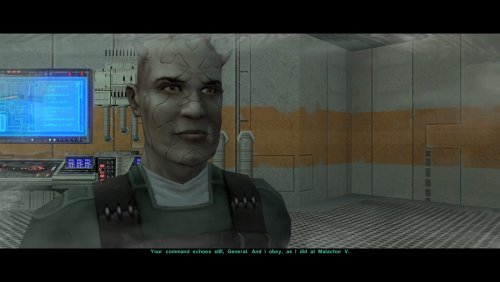 Hey Wilde Karrde. Interesting mod! Question: Other than the PartySwap, (the Patch version without the PartySwap item), I have the following mods installed: The Unofficial TSLRCM Tweak Pack, (only components 1, 2, 3, 5, and 6), the KOTOR 2 Community Patch, GenoHaradan Legacy mod, the Extended Enclave mod with the Extended Enclave Tweaks installed along, the TSL Expanded Ending, the Train the Handmaiden mod, the Coruscant Jedi Temple mod, and the "Kreia's Fall Cutscene (In-game)" mod. Any one of these have the files that you listed are incompatible with your mod here?
 -
To clarify what I mean here I said that Darth Nihilus in my weird head-canon/fanfic was originally Mandalore the Ultimate BEFORE he became Darth Nihilus, the leader of the Mandos that started the Mandalorian Wars, and I am trying to apply logic to that. As for your idea though, I always wondered if Nihilus can and have lived on in his mask and possess people like Momin, (the Sith you mentioned), from the New Canon, or if there is something else going on. There is a Tabletop book called "Unknown Regions" and one of its mini-adventures is called the "Mask of Darth Nihilus". In that mini-adventure, it has interesting lore bits on Nihilus's mask, but it doesn't seem like he outright possesses people, at least from what I have gotten from it, but who knows. Regardless though, this is a headcanon and theory thread so talking about what seems "official" or not is irrelvant to the topic of the post, (especially since Mandalore the Ultimate is for sure not Nihilus in the real KOTOR lore but he is in one of my fanfic/headcanon idea story).
- 20 replies
-
- 1
-
-
- head canon
- lore
- (and 2 more)
-
Kind of a weird head-canon/fanfic idea, but Mandalore the Ultimate is the future Darth Nihilus. I have no idea how to make that work though, haha.
-
Okay, I learned some new information. First of all, it seems like both TSLRCM and vanilla TSL in KOTOR II have the fadeout transparent effect. I have seen some playthroughs for both versions on YouTube where the transparent fadeout happens. It seems like all of the YouTube playthroughs that DO have the transparent fadeout effect are Xbox or older PC. It seems like PC playtrhough videos from 7 years ago to now seem to have what I have: The solid "DestroyObject" effect. I set the script to both "TRUE" or "FALSE", and even used the "DelayCommand" for DestroyObject, and no fadeout. I then came to the conclusion that it was a video card rendering and/or graphics issue. I tried changing the graphics in a variety of ways, both in-game and in AMD settings, but it doesn't do anything rather than change the "sithritual001" cloud effect's texture. I shared the savegame with a modder on the OpenKOTOR Discord, and it seem like in their playthrough of that save, which is Steam version, specifically Steam Proton Linux, there is no fadeout either. Regardless of what graphics or anything that I do, whether it is edited or default, the fadeout doesn't happen, but it works for Darth Sion and even Darth Traya. Is there something "broken" about PCs to render this properly, or is it perhaps not a graphics thing either and is another issue entirely?
-
 Hello. I have installed the Mandalore-Visas Marr added scenes tweak pack on my computer. However, I also wanted to install this mod as well....https://deadlystream.com/files/file/196-nihilus-zombies-death/ The two mods seem to be incompatible with each other. Any chance the tweak pack could be updated to have compatibility with the mod linked above please? If not, that's okay. EDIT: Unrelated to the Unofficial Tweak Pack's compatbility to the Nihilus Zombie Death comment I made above, just not sure if making separate comments in this post is allowed, but I have found an issue with the Visas-Mandalore tweak component. Everything is smooth except my main PC and my companions are running from the bridge like in the original TSLRCM rather than walking normally, (the walking normally thing is something the main character and the companions do in the vanilla game without TSLRCM, which this component of the mod is trying to restore). Perhaps the biggest problem is after running from the bridge and Nihilus evaporates into the dark side cloud, Canderous/Mandalore falls down onto the floor like he does in the original TSLRCM, (without the lightning attack effect), and when it goes back to game mode it is as if it never happened that Mandalore fell down. I dunno, seems to be weird and not smooth, but it could also be how I installed the mod as well.
 -
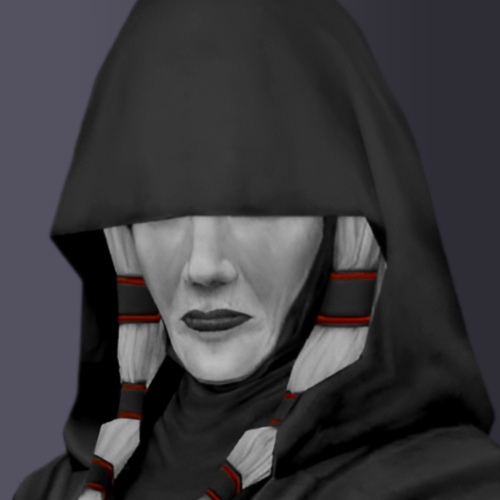 Hi Revan100. How did you make these portraits? Most of all, how did you darken Evil Atris's robes and made her skin ghostly white? Is there a reason why you decided to make Atris look ghostly? Just curious, as I want to edit Evil Atris's TGA file to match the color tones of the image attached here if that is all right with you.
 -
Hello. So a while back, I made a post called "Dumb question, but what graphics are required for a smooth dissaperance in a cutscene?". The post basically was about the way Darth Nihilus fades away as he dissolves into a red "cloud" of dark side energy. Back then, I didn't have the game yet, and now I do. There are some playtrhough videos on YouTube of KOTOR II, both TSLRCM and TSL vanilla, that have Darth Nihilus fade away gradually and become transparent before completely vanishing in the red cloud. The way he vanishes into the scarlet red dark side "smoke" looks super clean and transitions nicely, his model fades and becomes more transparent as he fades away in the cloud. However, there are other playthroughs of the game, both vanilla and TSLRCM, in which he doesn't vanish the same way as others. Instead, he just glitches out of existence after the dark side energies combust out of him without fading gradually and becoming more transparent. His model just stays the same before he just pops out of existence in the cloud. I really like the effect where his model becomes transparent and fades away in the cloud, as it looks more realistic and looks like a visually stunning effect, but in my own personal playthrough of the game, my fear was true. He just glitches out of existence, the one where he doesn't become transparent. I made a video of what I want the death of Nihilus to look like vs what I have in my actual game. I want to make him become transparent and fade out gradually, but I don't know if it is graphic or resolution issues or a script thing. To give you more context, here is what I have on my game. I have the GOG version of the game, (Good Old Games), specifically the GOG Galaxy version of the game. I am running this on a Nimo Gaming laptop. I had installed TSLRCM to my computer, then I installed the Unofficial TSLRCM Tweak Pack, specifically the tweak that removes the Visas Marr and Mandalore conversation on the Ravager and makes the cutscenes run like in the vanilla game. The footage you see is from my game with those mods installed. I then began to wonder if this was a product of the Tweak Pack and/or TSLRCM, so I uninstalled those mods and played the save game of that level vanilla, but same result, (to be fair though, I was playing from the same save after I uninstalled the mods, so I dunno). This is all REALLY weird because I myself am making a mod where I use the sithritual001 effect on Darth Sion in the final battle level with him on Malachor V, and he has the transparent gradual fadeout but somehow Nihilus doesn't. You can see a snippet of my "earlier revision" of the Darth Sion mod here, where he is seen fading out and becoming transparent. I want to find the root of this problem, mind if anyone helps me please? Help would be greatly appreciated. Darth Nihilus fadeout.mp4 Video Project 4.mp4
