All Activity
- Past hour
-
 RoyalTr4sh joined the community
 - Today
-
 jw joined the community
 -
 Vizual_Samurai joined the community
 -
 UndeadNordic joined the community
 -
 Nicilondon joined the community
 -
 Krispy joined the community
 -
 pheemdream joined the community
 -
 zachachach joined the community
 -
 Shapeshifting joined the community
 -
-
 bonjo_kenobi joined the community
 -

Kotor 1 - Stuck before Dantooine Star Map
DarthParametric replied to keegs's topic in Knights of the Old Republic General
The door's OnOpen script has to fire in order to set the boolean on the door (which is what happens). But somehow the script is terminating before it starts the dialogue. I plan to completely revise the triggering approach in the next version of K1CP to hopefully remove this issue permanently. -

Kotor 1 - Stuck before Dantooine Star Map
Klepto replied to keegs's topic in Knights of the Old Republic General
I also had this same bug, but I had a hard save just moments before opening the door, so I was able to fix it. When you open the second door (behind the locked one) the screen flashes black for a moment, which I think is the cutscene trying to play and something going wrong. After I got it working I spent a while trying to to reproduce the problem from the save before the door, but no dice. -
 @N-DReW25 Fair enough ! Tbh I was already biased by the AI portraits. Yeah you can make whatever you want but sometimes I just find myself wondering "just why ?". Although if it's in better resolution then why not.
 -
 I'm running into the blank menu error and I'm trying to figure out a fix. I tried the prepatched .exe and .ini and it worked, but the menu was skewed because it wasn't set to the correct resolution for my monitor so it's not useful to me. Edited the .ini to be sure that was the problem and it gave me the same blank-menu error. Okay, so the .ini being wrong is definitely a cause, but even with a correct ini for my resolution it doesn't work so there must be a disagreement somewhere in the patching process. I've followed the instructions for patching the .exe multiple times using uniws and this mod and it hasn't worked any time I've tried it. My scaling is set to 100%, my ini matches the same resolution I'm selecting for the batch file and the menu from the Override elements it's still not working. Is it an issue with the inital patched .exe? Is there a specific resolution in uniws I should be using? I've tried multiple different ones and none of them have worked. Even the one that is suggested in the video posted on the modding guide. I feel like an idiot and that I'm missing something incredibly obvious. I'm using the Steam version of the game and am on Windows 11. Any advise on things to try? My monitor's native resolution is 1920 x 1200.
 - Yesterday
-
 Legend for this fr.
 -

Please drop any Lightsaber hilt mods you have created here
LoneWanderer replied to Untold Prophecy's topic in Mod Requests
Sorry for the late reply. Sent the mod to you in PM. -

MOD:Workbench Upgrade Screen Camera Tweak for TSL
coolfellow replied to DarthParametric's topic in Mod Releases
(edited) Never mind, just a bug -
 Stardust13 changed their profile photo
 -
 I don't have any other UI mods and this isn't working.
 -
Just because someone else has already made a mod based on the idea before doesn't mean yangloup isn't allowed to make his own original take on the idea? For starters, this mod's texture is 2K in resolution whereas that old man is vanilla quality.
-
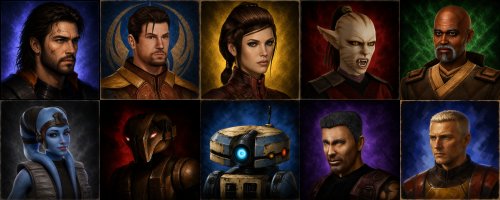 This also looks like a blatant ripoff of Tinman888's portraits, which I feel highlights another major issue with GenAI.
 -
Font/color used by the first game’s dialogue?
DarthParametric replied to th3w1zard1's topic in Mod Requests
It's Arial. You can tell by the Q stroke being wavy vs Helvetica's being straight: White is font sheet, red is Arial text overlay.
-

Kotor 1 - Stuck before Dantooine Star Map
Zeyrox replied to keegs's topic in Knights of the Old Republic General
Thanks dude ur a legend! - Last week
-
And this exists as well... Gotta go deeper if you want this kind of mod man !
-
Shame to use AI when there already are mods for this. HD portraits and even hand made ones.
-
View File Protrait HD KOTOR Description Some companion portraits that I generated with AI Installation instructions Place the .TGA files in your Override folder Main features Uses to replace old portraits with modern ones Requirements Have created an Override file or followed an installation guide beforehand Shout outs I thank the KOTOR Community Portal for modernizing the game; it inspired me to request the creation of more realistic portraits. Submitter yangloup Submitted 05/31/2026 Category Mods K1R Compatible No
-
View File PMHC04 for main character Description Face of the character PMHC04 with hand-drawn scars Installation instructions Make sure you don't have a file with the same name in TCP format, as it will overwrite it otherwise. Otherwise, drag the file into your Override folder. Main features Describe the core features of your mod Requirements You must have created an Override folder or followed an installation guide beforehand. Shout outs Thanks to the KOTOR Community Portal team for creating an excellent guide that inspired me to redo a beautiful portrait of Revan Submitter yangloup Submitted 05/31/2026 Category Mods K1R Compatible No
-
 yangloup changed their profile photo
 -
Version 1.0.0
17 downloads
Description Some companion portraits that I generated with AI Installation instructions Place the .TGA files in your Override folder Main features Uses to replace old portraits with modern ones Requirements Have created an Override file or followed an installation guide beforehand Shout outs I thank the KOTOR Community Portal for modernizing the game; it inspired me to request the creation of more realistic portraits. -
Version 1.0.0
4 downloads
Description Face of the character PMHC04 with hand-drawn scars Installation instructions Make sure you don't have a file with the same name in TCP format, as it will overwrite it otherwise. Otherwise, drag the file into your Override folder. Main features Describe the core features of your mod Requirements You must have created an Override folder or followed an installation guide beforehand. Shout outs Thanks to the KOTOR Community Portal team for creating an excellent guide that inspired me to redo a beautiful portrait of Revan -

Font/color used by the first game’s dialogue?
Sith Holocron replied to th3w1zard1's topic in Mod Requests
I don't know about it being supposed to be FranklinGothic. The dialogue looks closer to Helvetica (or the Windows bootleg version of it called Arial as previously mentioned) to me. Franklin Gothic is what they use for the crawls. -
Font/color used by the first game’s dialogue?
DarthParametric replied to th3w1zard1's topic in Mod Requests
It's supposed to be Franklin Gothic, but they cheaped out on the licensing and used Arial (bold). -
Sorry if this is the wrong place to post. What on earth is the exact font and size and color and style used by the first game? If anyone knows it would be appreciated 🙏 thank you
-
Kotor 1 - Stuck before Dantooine Star Map
DarthParametric replied to keegs's topic in Knights of the Old Republic General
Zeyrox_Fix.zip -
 Hello 👋 n-drew, I'm investigating a bug and I'm trying to fix it myself. I have tslrcm, community patch, 3C-FD fog fix patcher as well as your bug fix collection and restored content plus. I have no other mods related to audio. I'm having a issue where the work bench "upgrade" sound isn't playing... I've narrowed it down to one of the aforementioned mods being the cause. Just wondering of you or anyone else can recreate the bug or know how to fix it. Thank you - Saul
 -
 Much better than the Remote Tells Influence Mod in my book. If only for the fact that the Ebon Hawk computer doesn't make that REALLY ANNOYING SOUND while I'm checking in on said influence