All Activity
- Past hour
-
Ill look into it tonight and tomorrow!
-
-
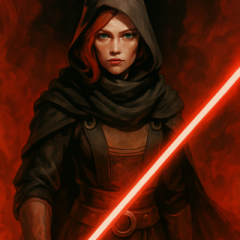
 Still loving the mod. But just pointing this out, but Vima's canon Lightsaber is most likely Green. I am aware of this image, but... the Lightsaber colours (and even character artwork!) are somewhat inconsistent throughout the comic series that she builds her Lightsaber in. It's kinda understandable. For instance, this is another panel in the series.
 -
 mugsbaloney joined the community
 -
 tronlegacy joined the community
 - Today
-
 Hello. So a while back, I made a post called "Dumb question, but what graphics are required for a smooth dissaperance in a cutscene?". The post basically was about the way Darth Nihilus fades away as he dissolves into a red "cloud" of dark side energy. Back then, I didn't have the game yet, and now I do. There are some playtrhough videos on YouTube of KOTOR II, both TSLRCM and TSL vanilla, that have Darth Nihilus fade away gradually and become transparent before completely vanishing in the red cloud. The way he vanishes into the scarlet red dark side "smoke" looks super clean and transitions nicely, his model fades and becomes more transparent as he fades away in the cloud. However, there are other playthroughs of the game, both vanilla and TSLRCM, in which he doesn't vanish the same way as others. Instead, he just glitches out of existence after the dark side energies combust out of him without fading gradually and becoming more transparent. His model just stays the same before he just pops out of existence in the cloud. I really like the effect where his model becomes transparent and fades away in the cloud, as it looks more realistic and looks like a visually stunning effect, but in my own personal playthrough of the game, my fear was true. He just glitches out of existence, the one where he doesn't become transparent. I made a video of what I want the death of Nihilus to look like vs what I have in my actual game. I want to make him become transparent and fade out gradually, but I don't know if it is graphic or resolution issues or a script thing. To give you more context, here is what I have on my game. I have the GOG version of the game, (Good Old Games), specifically the GOG Galaxy version of the game. I am running this on a Nimo Gaming laptop. I had installed TSLRCM to my computer, then I installed the Unofficial TSLRCM Tweak Pack, specifically the tweak that removes the Visas Marr and Mandalore conversation on the Ravager and makes the cutscenes run like in the vanilla game. The footage you see is from my game with those mods installed. I then began to wonder if this was a product of the Tweak Pack and/or TSLRCM, so I uninstalled those mods and played the save game of that level vanilla, but same result, (to be fair though, I was playing from the same save after I uninstalled the mods, so I dunno). This is all REALLY weird because I myself am making a mod where I use the sithritual001 effect on Darth Sion in the final battle level with him on Malachor V, and he has the transparent gradual fadeout but somehow Nihilus doesn't. You can see a snippet of my "earlier revision" of the Darth Sion mod here, where he is seen fading out and becoming transparent. I want to find the root of this problem, mind if anyone helps me please? Help would be greatly appreciated. Darth Nihilus fadeout.mp4 Video Project 4.mp4
 -
 Louie joined the community
 -
Thanks Rob, I'll take a look probably tomorrow after I fly home. So without any other edits to the model it's messed up in-game after decompile/recompiling it?
-
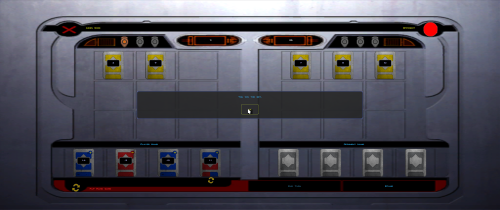
View File Fair Pazaak Turn Order In the vanilla game, the player always goes first. This means you're more likely to bust, since you'll always have one more bust-possible draw than the AI at any given time. It also means the AI can look at your hand and Stand, where you have to Stand before you see their next draw. How to install: Unzip and put the following in the game dire (beside swkotor.exe): FairPazaak.exe, Apply Fair Pazaak Patch.bat, and Revert Fair Pazaak Patch.bat Double click Apply Fair Pazaak Patch.bat Requirements Only requires KOTOR Editable Executable (https://deadlystream.com/files/file/1320-kotor-editable-executable/). This mod is entirely compatible with any and all Pazaak deck mods like Easy Pazaak or Balanced Pazaak. readme.txt Submitter ShaeMyName Submitted 06/15/2026 Category Mods K1R Compatible Yes
-
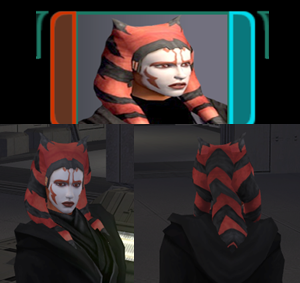
View File Playable Ahsoka alternate dark side transitions After starting a playthrough with Stormie97 & Effix's playable Ahsoka (https://deadlystream.com/files/file/1995-tsl-stormie97-effixs-ahsokatogruta/), I thought it would be cool if there was a more visible dark side transition, so I made one.... this was initially for personal use and it's not to the highest of standards, but here it is, I hope somebody can get some enjoyment out of it. I also included an alternate light side portrait, should you wish to use it. Installation: 1. Install https://deadlystream.com/files/file/1995-tsl-stormie97-effixs-ahsokatogruta/ 2. Download the Dark Side Transitions.zip 3. Drop the files into your override folder Uninstallation: 1. Delete the following files from your override folder - po_PFHAHSD2.tga - po_PFHAHSD1.tga - po_PFHAHS.tga - PFHAHS01D2.tga - PFHAHS01D1.tga Full credit goes to @Stormie97 & @Effix for their amazing work creating the original. Legal Disclaimer ================= All materials and copyrights belong to LucasArts, Bioware and Obsidian Entertainment Inc. & I own none of the materials and are not making money for this. Please don't upload this on other sites, I will handle that. You may request use in other mods, pending approval; any mods using the assets should credit all the below parties. Submitter OzilsEyes Submitted 06/16/2026 Category Mods TSLRCM Compatible Yes
-
Version 1.0.0
1 download
After starting a playthrough with Stormie97 & Effix's playable Ahsoka (https://deadlystream.com/files/file/1995-tsl-stormie97-effixs-ahsokatogruta/), I thought it would be cool if there was a more visible dark side transition, so I made one.... this was initially for personal use and it's not to the highest of standards, but here it is, I hope somebody can get some enjoyment out of it. I also included an alternate light side portrait, should you wish to use it. Installation: 1. Install https://deadlystream.com/files/file/1995-tsl-stormie97-effixs-ahsokatogruta/ 2. Download the Dark Side Transitions.zip 3. Drop the files into your override folder Uninstallation: 1. Delete the following files from your override folder - po_PFHAHSD2.tga - po_PFHAHSD1.tga - po_PFHAHS.tga - PFHAHS01D2.tga - PFHAHS01D1.tga Full credit goes to @Stormie97 & @Effix for their amazing work creating the original. Legal Disclaimer ================= All materials and copyrights belong to LucasArts, Bioware and Obsidian Entertainment Inc. & I own none of the materials and are not making money for this. Please don't upload this on other sites, I will handle that. You may request use in other mods, pending approval; any mods using the assets should credit all the below parties. -
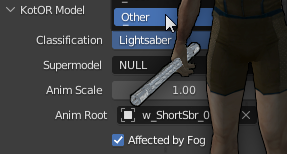 No JCs Lightsaber effects mod does not work with crazy's. This one does support it tho: https://deadlystream.com/files/file/2794-lightsaber-hilt-variety-tsl/
 -
 jayden7505 joined the community
 -
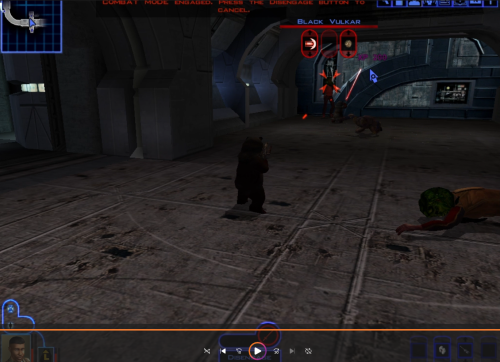 There is also an additional issue where the model half t-poses when moving quickly (at least in when directed to move during a conversation). Though, considering most uses for an ewok model are going to be silly anyway, I'm not sure if that's a bug or a feature lol.
 -
 nihalak joined the community
 -
Hey is this mod somehow compatible with JC's Lightsaber Visual Effects for K2 1.5? I installed the New_Lightsaber_Blade_Model mod by crazy34 and this fix, but JC's lightsaber mod doesn't seem to work. Can someone help? Thanks.
-
I have tested the appearance out in-game as an NPC and I have discovered some issues. As you can see, the area between the hood and the face has holes in it allowing you to see right through the NPC. There are also some minor clipping issues with dialogue animations and there's an oddity where the heard lurches forward when it dies, though I suppose that's to be expected. The Ewok's dead body also clips into the floor, which I suspect might be fixable, however.
-
 Lilydale joined the community
 -
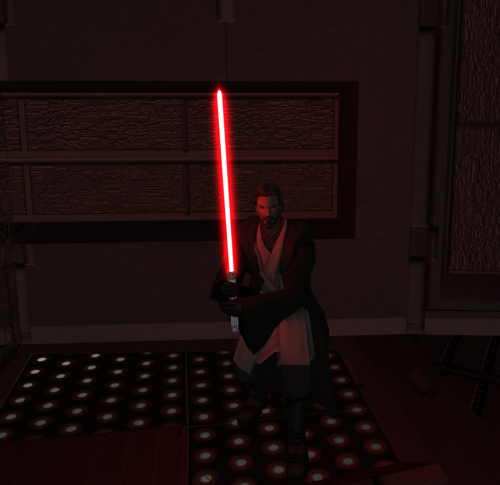 Hey, is this mod somehow compatible with JC's Lightsaber Visual Effects for K2 1.5? I installed yours with the Glitched Lightsaber Hilt Fix - TSL Aspyr 2.0 and JC's lightsaber mod, but the latter doesn't seem to work. Can someone help? Thanks.
 -
 That sounds like some kind of texture error. I ran the textures provided by the mod in cupscale and got some p nice 2k textures. You might have conflicting files. I swear once I realized that .tpc and .tga files dont overwrite each other and went into my override and picked which texture I wanted either the tga or tpc version I have had zero texture problems. also no worries on the fix, I wanted the set too since I now got a dark side revan disguise and LS revan disguise.
 -
 The changed their profile photo
 -
I just checked, I do only have a file labelled load_sle_m30aa.tga in there.
-
 Cyanide95633 joined the community
 -
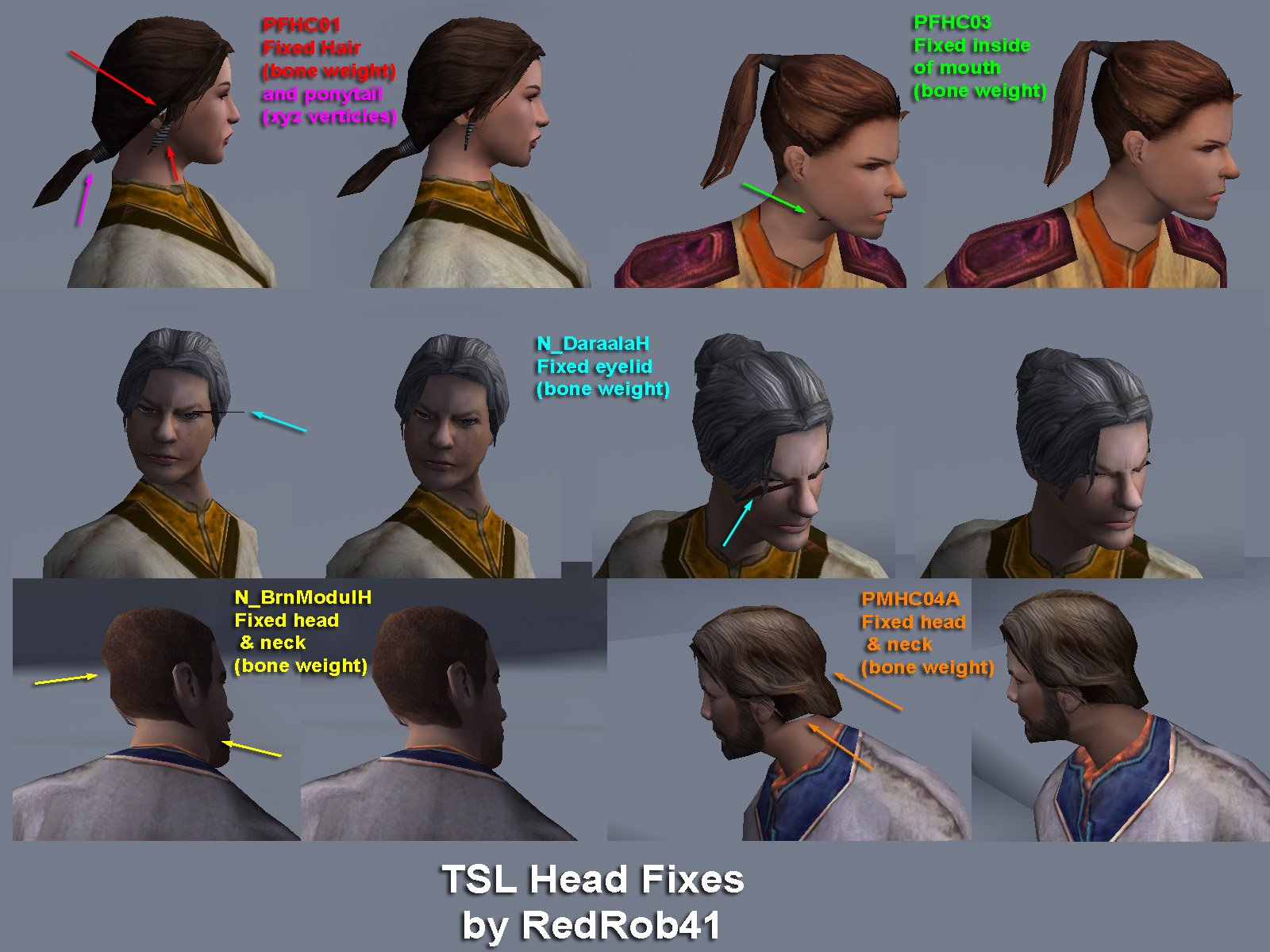
I've made some files. I hope they help. The end result binary mdl & mdx make for a messed up head in-game. Most files I work with have been fine, but I've come across several head models that get messed up like this. PMHH02 works but PMHH01 doesn't. PFHC03 doesn't (maybe it is because it is a K1 holdover?). I haven't tried the rest of the models in this pic, but I'm guessing that they are likely to fail too. When I did this old mod, I think I had to painstakingly hex edit by trial and error. I never could alter the mdl's xyz or uv coordinates. I was really hoping that the new mdlops and KotorMax system would handle them. The K1 version of PFHC03 works just fine, it is only the TSL version that gets messed up. pmhc04 error.zip
-
 Superdean49 joined the community
 -
 The male Wookiees would work great as Zaalbar reskins.
 -
 TheMooingTree joined the community
 -
Thank you for providing a fix for an old mod! And for me, the issue was that the metal parts would be translucent.
-
 BitKryptonic joined the community
 -
Good to know, so one of the differences i noticed between the mdledit and the vanilla head was an ordered array of bone indices was zeroed out in the mdledit head so I swapped it with the values of the vanilla and zeroed that array in the vanilla head, to see if that was maybe the cause. It apparently was not. I will continue investigating. I was wondering if you could just round trip a head in mdlops and kmax without any other edits, just the saving and conversion processes. Both the ascii and binary and pass it over, and also if you can see if that with no manual edits is still messed up it can help me eliminate (and ultimately hopefully fix) whatever tool is mangling it.
- Yesterday
-
First of all: very glad you enjoyed the mod! Really was a labor of love. Secondly: That respawning fog of war glitch is totally new to me. Haven’t heard of that one anywhere, but historically a similar problem occurs when there is a .git file for the module in your Override folder. Not sure how it would have got there, but is there a sle_m30aa.git in your Override? Third: a lot of people have asked about that crystal shard… DM me if you want me to spoil it for you. But I promise it’s there somewhere!
-
Such an impressive and fun mod! I only have one question, since I couldn't find it properly mentioned in the other reviews/comments: The main Sleheyron hub kept respawning its loot piles and was always unexplored (fog of war) after leaving the area or reloading. I also have been very unsuccessful tracking down Dragon Krayt Pearl Shard #1. Did somebody else face the bug and if anybody could throw me a bone for the latter it would be much appreciated!
-
Sentinel Sneak Attack with Multiclassing (KotOR)
darthbdaman commented on darthbdaman's file in Mods
 No. You don't need that mod if you are using this one.
 -
Version 1.0.0
3 downloads
In the vanilla game, the player always goes first. This means you're more likely to bust, since you'll always have one more bust-possible draw than the AI at any given time. It also means the AI can look at your hand and Stand, where you have to Stand before you see their next draw. How to install: Unzip and put the following in the game dire (beside swkotor.exe): FairPazaak.exe, Apply Fair Pazaak Patch.bat, and Revert Fair Pazaak Patch.bat Double click Apply Fair Pazaak Patch.bat Requirements Only requires KOTOR Editable Executable (https://deadlystream.com/files/file/1320-kotor-editable-executable/). This mod is entirely compatible with any and all Pazaak deck mods like Easy Pazaak or Balanced Pazaak. readme.txt -
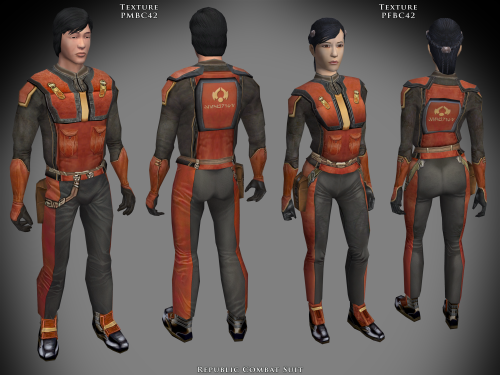
View File Specialized Combat Suits HD TSL Specialized Combat Suits HD for TSL by RedRob41 ================================================================ IF YOU ARE EVER IN ANY DOUBT ABOUT INSTALLING ANY MODS, PLEASE REMEMBER TO ALWAYS BACKUP YOUR FILES BEFORE INSTALLATION, JUST IN CASE. WARNING: MAKE SURE NOT TO REPLACE ANY FILES OF THE SAME NAME THAT ARE ALREADY PRESENT IN YOUR OVERRIDE FOLDER! ================================================================ Description: This is not really a mod, but more of a modder's resource. It includes textures for the basic Combat Suit PFBC and PMBC, as well as icons and uti files to make them wearable. Anyone who has created a story mod for either game can use these suits to add some variety to the NPCs that the player interacts with. I have also included models in which I have fixed the uvw maps, so that the textures appear correctly (the original models had some polygons in the wrong places). The new models should work with any other texture mods, since they work perfectly with the in-game ones. The armour class is the same as the basic Combat Suit, so there isn't any real advantage to wearing them as a player. The real power of these files, is that a modder can create a whole army with both male and female members (and using any head model for NPC variety). The textures were made from original textures that appear in both games, so there is no issue of porting. There will be three versions of this mod to choose to download: 1 - 4x .tga version. Highest resolution, the typical texture is now 2048x2048 pixels which = 16MB. This version is the best choice to use as a modder's resource. 2 - 4x .tpc version. Created by running full size .tgas through tga2tpc program which compresses a 2048x2048 pixel file to 5.5MB. This version should be easier on PC systems, with no noticeable loss of visual fidelity. 3 - 2x .tpc version. Created by reducing full size .tgas by half in Photoshop, then running them through tga2tpc which further compresses them to 1.4MB. This version should be much easier on PC systems. All versions include the same .mdl & .mdx files. Only one version should be installed at a time; having both .tga files and .tpc files with the same name in the Override folder may cause problems. ================================================================ Compatibility: The male models PMBCx and BAODUR_BC are duplicates of the models found in the mod called 4x Upscale+ Character Textures & Model Fixes for TSL - Version 0.52 by RedRob41. The female models PFBCx in this mod have had additional uvw fixes since the V0.52 mod, and are therefore superior. The models aren't necessary, but the new textures will look much better with them. If you have other mods that change the models, you might prefer to use those ones. Check them out to be sure which you'd prefer. ================================================================ Includes: TSL Republic Combat Suit a_light_42.uti PFBC42.tga, PMBC42.tga, ia_class4_042.tga Sith Combat Suit a_light_43.uti PFBC43.tga, PMBC43.tga, ia_class4_043.tga Czerka Combat Suit a_light_44.uti PFBC44.tga, PMBC44.tga, ia_class4_044.tga T.S.F. Combat Suit a_light_45.uti PFBC45.tga, PMBC45.tga, ia_class4_045.tga Corellian Combat Suit a_light_46.uti PFBC46.tga, PMBC46.tga, ia_class4_046.tga Exchange Suit a_light_47.uti PFBC47.tga, PMBC43.tga, ia_class4_047.tga Black Vulkar (Orange) a_light_48.uti PFBC48.tga, PMBC44.tga, ia_class4_048.tga Black Vulkar (Blue) a_light_49.uti PFBC49.tga, PMBC45.tga, ia_class4_049.tga ================================================================ Directions: Please copy all files to the game's Override directory. TSL uti files: These are necessary in order to wear the armours in-game. The name of the uti file is what you would use to cheat them in with the cheat console, example: giveitem a_light_42 will give your player the Republic Combat suit. ================================================================ Uninstall: Delete unwanted files from the game's Override folder. ================================================================ Thanks for modding tools: KOTOR Tool – Fred Tetra mdlops (used version 7a2) - cchargin, JdNoa NWMax – Joco Replacer - Taina tga2tpc - ndix UR KotOR/KotOR2 Savegame Editor v3.3.2 - tk102, Fair Strides Hex-editor XVI32 2.55 - Christian Maas ================================================================ Permission: Consider this as a modder's resource. I give permission to any modder to use these files as a base for their own creations; as long as their creation remains free to use (not for profit); and credit is given to me as the source of any modded files. Please include a statement that specifies this mod's title and version. The original credit of course goes to the talented artists who worked on the original games for BioWare and Obsidian. Without their work, none of this would have been possible. I have tried my best to maintain the artistic style that they created long ago. This mod may NOT be uploaded or redistributed, in whole or in part, to any mod hosting site without my explicit permission. As always, this mod is free for your non-commercial/personal use. There should never be a requirement to pay for it. If you like the work I do, and would like to encourage me to create more, you can always donate to my tip jar at https://buymeacoffee.com/redrob416 where the funds collected will be used towards additional graphics tools and software. ================================================================ THIS MODIFICATION IS PROVIDED AS-IS AND IS NOT SUPPORTED BY BIOWARE CORP/OBSIDIAN ENTERTAINMENT OR LUCASARTS OR ANY LICENSERS/SPONSORS OF THE AFOREMENTIONED COMPANIES. USE OF THIS FILE IS AT YOUR OWN RISK AND THE AFOREMENTIONED COMPANIES OR THE AUTHORS ARE NOT RESPONSIBLE FOR ANY DAMAGE CAUSED TO YOUR COMPUTER FOR THE USAGE OF THIS FILE. Submitter redrob41 Submitted 06/15/2026 Category Skins TSLRCM Compatible Yes
-
Version 1.0.0
5 downloads
Specialized Combat Suits HD for TSL by RedRob41 ================================================================ IF YOU ARE EVER IN ANY DOUBT ABOUT INSTALLING ANY MODS, PLEASE REMEMBER TO ALWAYS BACKUP YOUR FILES BEFORE INSTALLATION, JUST IN CASE. WARNING: MAKE SURE NOT TO REPLACE ANY FILES OF THE SAME NAME THAT ARE ALREADY PRESENT IN YOUR OVERRIDE FOLDER! ================================================================ Description: This is not really a mod, but more of a modder's resource. It includes textures for the basic Combat Suit PFBC and PMBC, as well as icons and uti files to make them wearable. Anyone who has created a story mod for either game can use these suits to add some variety to the NPCs that the player interacts with. I have also included models in which I have fixed the uvw maps, so that the textures appear correctly (the original models had some polygons in the wrong places). The new models should work with any other texture mods, since they work perfectly with the in-game ones. The armour class is the same as the basic Combat Suit, so there isn't any real advantage to wearing them as a player. The real power of these files, is that a modder can create a whole army with both male and female members (and using any head model for NPC variety). The textures were made from original textures that appear in both games, so there is no issue of porting. There will be three versions of this mod to choose to download: 1 - 4x .tga version. Highest resolution, the typical texture is now 2048x2048 pixels which = 16MB. This version is the best choice to use as a modder's resource. 2 - 4x .tpc version. Created by running full size .tgas through tga2tpc program which compresses a 2048x2048 pixel file to 5.5MB. This version should be easier on PC systems, with no noticeable loss of visual fidelity. 3 - 2x .tpc version. Created by reducing full size .tgas by half in Photoshop, then running them through tga2tpc which further compresses them to 1.4MB. This version should be much easier on PC systems. All versions include the same .mdl & .mdx files. Only one version should be installed at a time; having both .tga files and .tpc files with the same name in the Override folder may cause problems. ================================================================ Compatibility: The male models PMBCx and BAODUR_BC are duplicates of the models found in the mod called 4x Upscale+ Character Textures & Model Fixes for TSL - Version 0.52 by RedRob41. The female models PFBCx in this mod have had additional uvw fixes since the V0.52 mod, and are therefore superior. The models aren't necessary, but the new textures will look much better with them. If you have other mods that change the models, you might prefer to use those ones. Check them out to be sure which you'd prefer. ================================================================ Includes: TSL Republic Combat Suit a_light_42.uti PFBC42.tga, PMBC42.tga, ia_class4_042.tga Sith Combat Suit a_light_43.uti PFBC43.tga, PMBC43.tga, ia_class4_043.tga Czerka Combat Suit a_light_44.uti PFBC44.tga, PMBC44.tga, ia_class4_044.tga T.S.F. Combat Suit a_light_45.uti PFBC45.tga, PMBC45.tga, ia_class4_045.tga Corellian Combat Suit a_light_46.uti PFBC46.tga, PMBC46.tga, ia_class4_046.tga Exchange Suit a_light_47.uti PFBC47.tga, PMBC43.tga, ia_class4_047.tga Black Vulkar (Orange) a_light_48.uti PFBC48.tga, PMBC44.tga, ia_class4_048.tga Black Vulkar (Blue) a_light_49.uti PFBC49.tga, PMBC45.tga, ia_class4_049.tga ================================================================ Directions: Please copy all files to the game's Override directory. TSL uti files: These are necessary in order to wear the armours in-game. The name of the uti file is what you would use to cheat them in with the cheat console, example: giveitem a_light_42 will give your player the Republic Combat suit. ================================================================ Uninstall: Delete unwanted files from the game's Override folder. ================================================================ Thanks for modding tools: KOTOR Tool – Fred Tetra mdlops (used version 7a2) - cchargin, JdNoa NWMax – Joco Replacer - Taina tga2tpc - ndix UR KotOR/KotOR2 Savegame Editor v3.3.2 - tk102, Fair Strides Hex-editor XVI32 2.55 - Christian Maas ================================================================ Permission: Consider this as a modder's resource. I give permission to any modder to use these files as a base for their own creations; as long as their creation remains free to use (not for profit); and credit is given to me as the source of any modded files. Please include a statement that specifies this mod's title and version. The original credit of course goes to the talented artists who worked on the original games for BioWare and Obsidian. Without their work, none of this would have been possible. I have tried my best to maintain the artistic style that they created long ago. This mod may NOT be uploaded or redistributed, in whole or in part, to any mod hosting site without my explicit permission. As always, this mod is free for your non-commercial/personal use. There should never be a requirement to pay for it. If you like the work I do, and would like to encourage me to create more, you can always donate to my tip jar at https://buymeacoffee.com/redrob416 where the funds collected will be used towards additional graphics tools and software. ================================================================ THIS MODIFICATION IS PROVIDED AS-IS AND IS NOT SUPPORTED BY BIOWARE CORP/OBSIDIAN ENTERTAINMENT OR LUCASARTS OR ANY LICENSERS/SPONSORS OF THE AFOREMENTIONED COMPANIES. USE OF THIS FILE IS AT YOUR OWN RISK AND THE AFOREMENTIONED COMPANIES OR THE AUTHORS ARE NOT RESPONSIBLE FOR ANY DAMAGE CAUSED TO YOUR COMPUTER FOR THE USAGE OF THIS FILE.