Search the Community
Showing results for tags 'Skin'.
-
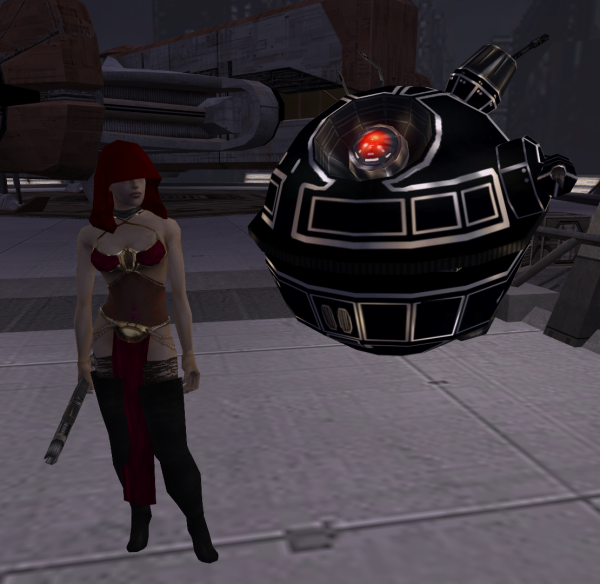
From the album: Gat4's Memories
"The moon sized droid said its my turn being lawful evil on Nar Shaddaa" I managed to make this gorgeous dancer dress thanks to Lily ❤️. -

Version 1.0
4,952 downloads
Author: Kainzorus Prime Mod Name: TOR HK Droids Skin Pack ************************* Under NO circumstances is this, or any of my other mods, to be posted on ANY site other than by myself. ************************* 1. Info =========== This mod provides several custom versions of HK series droids, available for Darth Parametric's TOR HK Droids mod. 2. Installation: ========= Copy the files of your choosing into the Override folder, overwriting as necessary. Darth Parametric's original mod is required for this one to function properly - http://www.nexusmods.com/kotor2/mods/52/? 3. Credits: =========== Special thanks to: Darth Parametric - for the original TOR HK Droids mod. -
Version 1.0.0
186 downloads
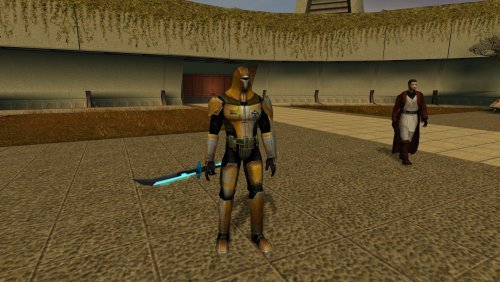
I always hated vanilla armor look, especially if you look at Cassus' arts. And since I always give it to Canderous I decided to make small modifications. All stats are the same, the only thing I have changed is the model itself. -
View File Cassus Fett's Armor Reskin I always hated vanilla armor look, especially if you look at Cassus' arts. And since I always give it to Canderous I decided to make small modifications. All stats are the same, the only thing I have changed is the model itself. Submitter Wagner235 Submitted 03/24/2026 Category Mods K1R Compatible Yes
-

Version 3
380 downloads
This mod makes HK-47 gold and shiny. This is the third version (first on this site) which adds an environment map to create an artificial reflection. I originally posted this mod and previous versions to kotorfiles under the name goatman82197. Enjoy! Compatible with KotOR 1 & 2 INSTRUCTIONS If you have Kotor 1, place the files from K1 into the override folder within the main game folder. If you have KotOR 2: The Sith Lords, run the installation file within K2. BUGS None that I know of. THANX Thanks to Adobe Photoshop 7.0 and Kotor Tool. COPYRIGHT You can use this mod and edit it, but don't redistribute it without crediting me, tjsase (formerly goatman82197). -
View File Weequay Player Race with Soundset Now you can play the game as a Weequay. Before placing the two folders from the archive into the root of /swkotor - please backup your streamsounds folder by e.g packaging it into a rar or zip (whatever you prefer) because the mod will overwrite your original player sounds. The new face and head mesh is a replacement for PMHA03 (in the unedited game it is the asian looking bald guy). If you want to go back to having the default textures then place the files from /override from this mod archive into your /override again, then directly press Delete to delete all files from the mod. The mod uses a new soundset for the player sounds since the default ones does not fit the race/look at all. A sound and graphics video can be found here: KoTOR Weequay Race - voice and graphics showcase The mod comes with new underwear/body texture for the new head and all portraits and Dark Side transition changes. Submitter vurt Submitted 09/27/2025 Category Mods K1R Compatible Yes
-
Version 0.9
68 downloads
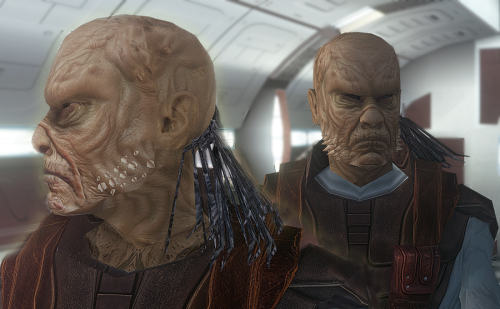
Now you can play the game as a Weequay. Before placing the two folders from the archive into the root of /swkotor - please backup your streamsounds folder by e.g packaging it into a rar or zip (whatever you prefer) because the mod will overwrite your original player sounds. The new face and head mesh is a replacement for PMHA03 (in the unedited game it is the asian looking bald guy). If you want to go back to having the default textures then place the files from /override from this mod archive into your /override again, then directly press Delete to delete all files from the mod. The mod uses a new soundset for the player sounds since the default ones does not fit the race/look at all. A sound and graphics video can be found here: KoTOR Weequay Race - voice and graphics showcase The mod comes with new underwear/body texture for the new head and all portraits and Dark Side transition changes. -
 Sometime ago into a YouTube far far away i've watched Anakin vs Obi-wan duel in Clone Wars style and i've got a 3D model of Anakin Skywalker so i realized that it can be ported to KOTOR 1 What im asking? HEAD: To mod the player head to the Anakin one BODY: To mod player underwear, jedi aprendice robes and star forge robes PS: If its to much do ask, just the head and jedi apprendice robes would do the trick The model is here, its free to use Anakin Skywalker Season 7 (The Clone Wars) https://sketchfab.com/3d-models/anakin-skywalker-clone-wars-season-7-2e697f3b1f47470d8a21483bc8d6b71e https://sketchfab.com/3d-models/anakin-skywalker-clone-wars-season-7-2e697f3b1f47470d8a21483bc8d6b71e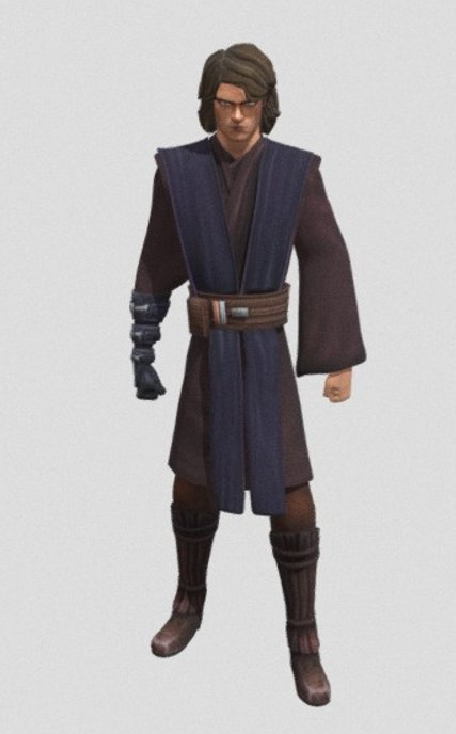
-
 So, this is a mod I was having a lot of fun with in KOTOR1. Link: https://www.nexusmods.com/kotor/mods/452?tab=description I love alien species, so a mod like this that actually lets you play as the aliens in Star Wars instead of a bunch of humans is awesome. From the digging I've done, alien mods appear to be pretty sparse. I've read old a bunch of forum posts that confirm what the existence of this NM archive suggested: alien skins for the player are mostly found on Filefront. Which is now gone. However, porting over this mod can't be impossible, right? The games run on the same engine, and use 2da files. Is it possible to port this over? If so, how would I go about that?
 -

Version 1.0.4
628 downloads
COUNCIL ROBES BASIC RESKIN Description: This mod adds the council robes, a variant normally only worn by NPCs, and makes them available alongside the vanilla game robes in KotOR 1. The robes are added to 3 merchants in the game: the basic, lowest level variety is available at Crattis’ general store on Dantooine with 3 texture variants, although the variants for this robe all look pretty similar. They are also available with better stats as Knight robes at the Czerka Representative’s store on Korriban in Dreshdae, and as Master Robes at Mic’tunan’jus’ store on Tatooine in front of the Ebon Hawk. This mod should be compatible with other mods that modify these merchants, but this mod is not at all compatible with other mods that modify the base robe models OR add new textures. The idea behind this mod is to have the option to wear both council robes and base game robes at the same time, being compatible with base game items but not other similar mods. This mod will also not place the robes properly if you have been to Dantooine, Tatooine, or Korriban before installing the mod. Installation: Start the Council Robes Basic Reskin Installer executable. It should prompt you for the location of your KotOR 1 directory and move all the necessary files itself. With the exception of the merchant files, the installer will fully replace any files of the same name as the ones in the ‘tslpatchdata’ folder, so won’t be compatible with other mods modifying those files or using the same names, since they are not standard game resources. Uninstallation: To uninstall, remove all the files listed in the ‘tslpatchdata’ folder from the Override folder. Acknowledgements: Of course, without use of Fred Tetra’s KotOR Tool, MDLOps by Chuck Chargin, KotOR Blender by Symmetric, Purifier, and Ndix UR, k-gff from tk102, and TSL Patcher by stoffe, this would not be possible. Thanks to all of you. NOTE: This is really the first mod I have made, and I have only tested the new models and textures so much. If there are issues you come across that I did not foresee, or perhaps simply any quality-of-life things that may be added, let me know, either by sending a message on deadlystream.com or sending an email to flooggoog@gmail.com. -cubis182 readme.rtf -

Version 1
2,696 downloads
Have you ever wondered why there is a bunch of retextures for every teammate but Hanharr? Even NPCs who are not even part of your party, like atris and sion, have a lot of new texture projects dedicated to them... So why not poor Hanharr? Yes, he is one of the least popular party members, but there are even textures for GOTO, so this can't be the reason alone. The main reason is all that hair, in my honest opinion. It is really a pain in the (swears in Huttish). I couldn't let poor Hanharr sit between all those shiny HD textures looking like he was pulled straight out of an Commodore 64. Frankly, his texture was bad from the beginning, even for 2004 standards. So I remade it. I put a lot of work in this and I hope you like it. Because there is such an abundance of skins for other characters I felt like 1 texture for Hanharr wouldn't do. So I made 2. Version 1 (With Scar) features a scar on his stomach, to show in what condition he is and what he's been through. (Screenshot for reference) Version 2 (Without Scar) just doesn't have that scar If you don't want to have blood and similar content in your game, this Version is for you. Installation: Move the P_Hanharr.dds from the "with scar" or "without scar" folder into your override folder Credits: CGTextures (now just "Textures"): www.textures.com This Eye texture ressource: http://xoriu.deviantart.com/art/MMD-Naturae-Eye-Texture-249285720 and Biowares TGA to DDS converter, here from deadlystream. -
View File Hk 51 skin for Hk 47 This mod is for Kotor 2 Hk51 skin for Hk 47, actually i used original hk 51 skin from the game but for portrait i recolored it's original icon. enjoy. Submitter Blackrock Submitted 11/03/2024 Category Mods TSLRCM Compatible No
-

Version 1.0.0
589 downloads
This mod will add upscaled textures for the Manaan part of the game. Except the skies, see note below. All textures are now 4x their original size. Example a 128x128 becomes 512x512, etc... I've not gone up to the 4096x4096 sizes as I don't see what that would add to this older game. A few textures do get to this size, example is the Ebon Hawk. Normal maps have also been redone, rerendered not just upscaled. It's still a 400% improvement on the older files. Have a peek at the screenshots and: Enjoy! Minor note: No the Sith base is not included, this is a separate texture set within the game, it gets used on various other locations to. So it'll be a pack on its own. Sky textures are made by the awesome Kexikus get them here: => https://deadlystream.com/files/file/723-high-quality-skyboxes-ii/ => https://www.nexusmods.com/kotor/mods/69 For the best looking Cantina signs, pick up this mod by SithHolocron: => https://deadlystream.com/files/file/1135-animated-manaan-cantina-sign-for-kotor1/ -

Version 1.01
38,246 downloads
Hi, this is my first texture mod, so please don't be to rude. It covers all textures related to Atton. All of them are reworked vanilla ones and in 4k-resolution. I know that some pieces, for example the faces are still like in vanilla, but I intend to change that in the near future. I edited following things: -His Leather Jacket now looks like real leather -his shirt now has a visible fabric.texture -all metal pieces of his clothing look like actual metal (including buttons) -His shoes and belt have a nice black leather texture, now -his pants are in higher resolution, and i changed the stripe on them from grey to red. Now they look a little bit more like Han Solo. It's only a small asthetic change, but I think it looks great I used following ressources and tools: - various textures from http://www.cgtextures.com/ - This nice Eye-Textureset http://xoriu.deviantart.com/art/MMD-Naturae-Eye-Texture-249285720 & photoshop to edit the textures. Installation: just put the .tga files from the download into your override folder. I hope you enjoy my mod. If you have any suggestions or tips for me, please let me know. -
View File More Ebon Hawk Scaffolding Description: This is a quick little retexture I made that replaces some of the textures on the Ebon Hawk to look mildy repaired. It has the damaged "Wiring/Broken" texture from the damaged Ebon Hawk with the scaffolding seen in the fixed ship put over top. I'd like to imagine that the Peragus miner's and mining droids didn't have the right parts to 100% keep the inside of the Ebon Hawk looking clean and properly fixed up, and they only had the scaffolding/spare parts to fix up the ship to the point where it won't fall apart. It also gives the perspective of the ship being more scrapped and damaged, the exile and her party making do with the mildy intact ship. Note: The textures can look a bit wonky in a few areas, but that's due to how the texture's are laid out originally on the model. Won't do much to fix all that, since I just wanted a simple retexture. Sometimes you won't notice unless you pay attention to it. Additional: An Ebon Hawk retexture can be seen in the screenshots. This is NOT apart of my mod, but it is from Laast's "Ebon Hawk Revisited" mod here: https://deadlystream.com/files/file/2338-ebon-hawk-revisited/ Installation: Extract the .zip and copy the .tga files in the folder to the Override folder in your TSL directory. Delete any files with the same name that end in .tpc or .dds. Credits: Obsidian/Bioware for the original textures GIMP Holocron Toolset for file extraction You can use these retextures in your own mod as long as I am credited and they are repurposed. Submitter Lewok2007 Submitted 12/27/2024 Category Skins TSLRCM Compatible Yes
-
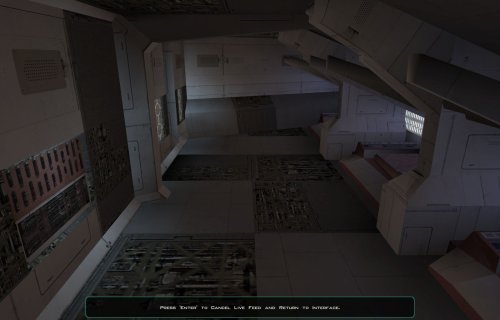
Version 1.0.0
76 downloads
Description: This is a quick little retexture I made that replaces some of the textures on the Ebon Hawk to look mildy repaired. It has the damaged "Wiring/Broken" texture from the damaged Ebon Hawk with the scaffolding seen in the fixed ship put over top. I'd like to imagine that the Peragus miner's and mining droids didn't have the right parts to 100% keep the inside of the Ebon Hawk looking clean and properly fixed up, and they only had the scaffolding/spare parts to fix up the ship to the point where it won't fall apart. It also gives the perspective of the ship being more scrapped and damaged, the exile and her party making do with the mildy intact ship. Note: The textures can look a bit wonky in a few areas, but that's due to how the texture's are laid out originally on the model. Won't do much to fix all that, since I just wanted a simple retexture. Sometimes you won't notice unless you pay attention to it. Additional: An Ebon Hawk retexture can be seen in the screenshots. This is NOT apart of my mod, but it is from Laast's "Ebon Hawk Revisited" mod here: https://deadlystream.com/files/file/2338-ebon-hawk-revisited/ Installation: Extract the .zip and copy the .tga files in the folder to the Override folder in your TSL directory. Delete any files with the same name that end in .tpc or .dds. Credits: Obsidian/Bioware for the original textures GIMP Holocron Toolset for file extraction You can use these retextures in your own mod as long as I am credited and they are repurposed. -

Version 1.1.0
166 downloads
Description: I've always found that some of the vanilla energy shield icons look like a piece of laminated thick paper instead of an armband of some sort. This reskin uses the other armband icons and changes them to have the vanilla icon's color scheme, but a look that feels more like a piece of technology. This mod also upscales the icons from 64 x 64 to 128 x 128 (512 x 512 in v1.1), with addition upscaling the other, unedited (besides upscaled) icons. They may look a bit fuzzy in the pictures provided, but I assure that they will look fine in game. ADDITIONALLY - This file is usable for K1 as well, after taking a look at the icons between each games. Installation: Put the files from the override folder in the mod download into the override folder in your swkotor 2 directory. -> IF* you have files with the same name and are in .tga format, you will be prompted to overwrite. If you have files with the same name and are in .tpc or .dds format, you will need to delete those. Uninstallation: Delete the files this reskin adds. Tools Used: Kotor Tool GIMP File Use: You may use these in your own mod if you want, but give me credit somewhere in the mod description please. Additionally, I don't want these to be uploaded to the steam workshop or a re-upload of the mod. (If I want it somewhere specific, I will put it there.) Compatibility: Incompatible with anything else that edits anything with the same name as this mods files. Legal: THIS MODIFICATION IS PROVIDED AS-IS AND IS NOT SUPPORTED BY BIOWARE/OBSIDIAN ENTERTAINMENT, LUCASARTS, DISNEY OR ANY LICENSERS/SPONSORS OF THE MENTIONED COMPANIES. USE OF THIS FILE IS AT YOUR OWN RISK AND THE ABOVE-MENTIONED COMPANIES OR THE AUTHOR IS NOT RESPONSIBLE FOR ANY DAMAGE CAUSED TO YOUR COMPUTER FOR THE USAGE OF THIS FILE. -
View File Consistent Energy Shield Icons Description: I've always found that some of the vanilla energy shield icons look like a piece of laminated thick paper instead of an armband of some sort. This reskin uses the other armband icons and changes them to have the vanilla icon's color scheme, but a look that feels more like a piece of technology. This mod also upscales the icons from 64 x 64 to 128 x 128 (512 x 512 in v1.1), with addition upscaling the other, unedited (besides upscaled) icons. They may look a bit fuzzy in the pictures provided, but I assure that they will look fine in game. ADDITIONALLY - This file is usable for K1 as well, after taking a look at the icons between each games. Installation: Put the files from the override folder in the mod download into the override folder in your swkotor 2 directory. -> IF* you have files with the same name and are in .tga format, you will be prompted to overwrite. If you have files with the same name and are in .tpc or .dds format, you will need to delete those. Uninstallation: Delete the files this reskin adds. Tools Used: Kotor Tool GIMP File Use: You may use these in your own mod if you want, but give me credit somewhere in the mod description please. Additionally, I don't want these to be uploaded to the steam workshop or a re-upload of the mod. (If I want it somewhere specific, I will put it there.) Compatibility: Incompatible with anything else that edits anything with the same name as this mods files. Legal: THIS MODIFICATION IS PROVIDED AS-IS AND IS NOT SUPPORTED BY BIOWARE/OBSIDIAN ENTERTAINMENT, LUCASARTS, DISNEY OR ANY LICENSERS/SPONSORS OF THE MENTIONED COMPANIES. USE OF THIS FILE IS AT YOUR OWN RISK AND THE ABOVE-MENTIONED COMPANIES OR THE AUTHOR IS NOT RESPONSIBLE FOR ANY DAMAGE CAUSED TO YOUR COMPUTER FOR THE USAGE OF THIS FILE. Submitter Lewok2007 Submitted 11/23/2024 Category Skins TSLRCM Compatible Yes
-
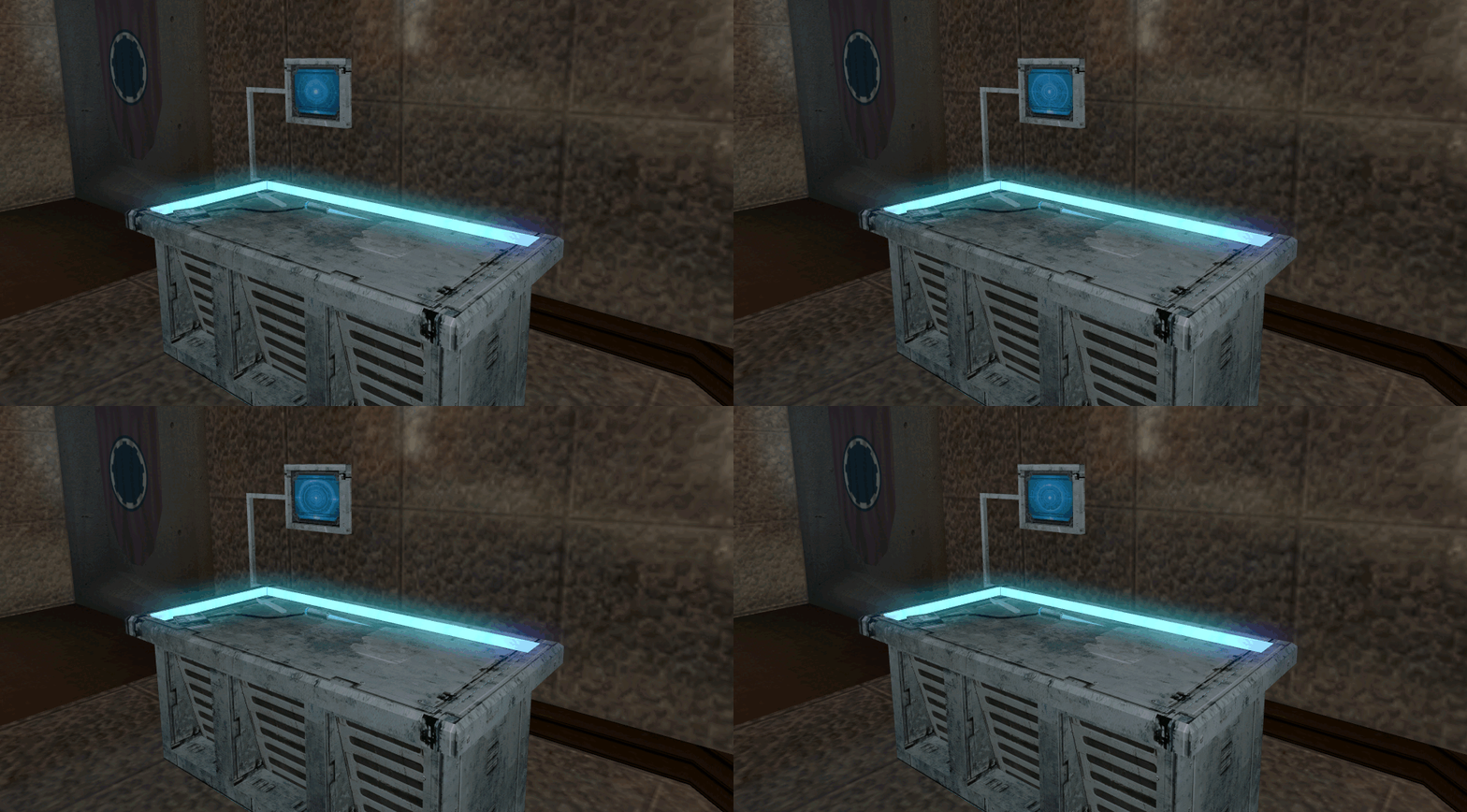
415 downloads
============================================ Animated - Upscaled Workbench & Medstation ============================================ New upscaled & animated texture for workbenches & medstations. The .gifs in the preview are a lot faster than the ones in-game, I'll get some new gif's made up eventually. There are 4 versions: Workbench: 1. Orange LED around the table 2. (Original) White LED around the table Medstation: 1. Blue LED around the table 2. (Original) White LED around the table Installation: 1. Choose which version you'd like to use. 2. Drop the file (.tpc) into your override folder - restart your game. Uninstallation: 1. Remove the file from your override. Please Note: It has been reported that the skin is causing a short delay when loading into the level, I've investigated but cannot replicate the issue - if anybody has any ideas please let me know. Legal Disclaimer ================= All materials and copyrights belong to LucasArts, Bioware and Obsidian Entertainment Inc. & I own none of the materials and are not making money for this. Please don't upload this on other sites, I will handle that. You may request use in other mods, pending approval; any mods using the assets should credit all the below parties. Credits: -
View File Animated Upscaled Workbench & Medstation ============================================ Animated - Upscaled Workbench & Medstation ============================================ New upscaled & animated texture for workbenches & medstations. The .gifs in the preview are a lot faster than the ones in-game, I'll get some new gif's made up eventually. There are 4 versions: Workbench: 1. Orange LED around the table 2. (Original) White LED around the table Medstation: 1. Blue LED around the table 2. (Original) White LED around the table Installation: 1. Choose which version you'd like to use. 2. Drop the file (.tpc) into your override folder - restart your game. Uninstallation: 1. Remove the file from your override. Please Note: It has been reported that the skin is causing a short delay when loading into the level, I've investigated but cannot replicate the issue - if anybody has any ideas please let me know. Legal Disclaimer ================= All materials and copyrights belong to LucasArts, Bioware and Obsidian Entertainment Inc. & I own none of the materials and are not making money for this. Please don't upload this on other sites, I will handle that. You may request use in other mods, pending approval; any mods using the assets should credit all the below parties. Credits: Submitter OzilsEyes Submitted 11/10/2024 Category Skins TSLRCM Compatible Yes
-
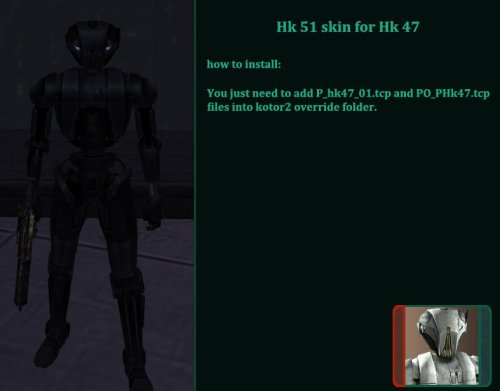
Version 1.0.0
71 downloads
This mod is for Kotor 2 Hk51 skin for Hk 47, actually i used original hk 51 skin from the game but for portrait i recolored it's original icon. enjoy. -
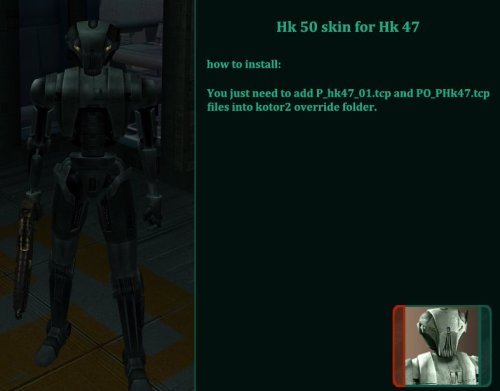
Version 1.0.0
62 downloads
This mod is for Kotor 2 Hk50 skin for Hk 47, actually i used original hk 50 skin from the game but for portrait i recolored it's original icon. enjoy. -
View File Hk 50 skin for Hk 47 This mod is for Kotor 2 Hk50 skin for Hk 47, actually i used original hk 50 skin from the game but for portrait i recolored it's original icon. enjoy. Submitter Blackrock Submitted 11/02/2024 Category Mods TSLRCM Compatible No
-

Version ALPHA-2
5,201 downloads
STAR WARS: Knights of the Old Republic II: The Sith Lords MOD ============================================================== Ep. 3 Anakin Skywalker Mod version: ALPHA-2 Author: DeadMan ============================================================== What is this? This mod adds a new head for your character - it's my attempt to make Anakin skin. Head model and textures still need a lot of tweaking, but people keep asking me to release this as soon as possible, so here you go. This skin is still W.I.P. Maybe one day I'll have more free time to finish it... until that time, consider it like a 'modding resourse' of some sort. ============================================================== Installation: just run the installer called setup.exe When I released it on Filefront I've received a lot of messages that on some PC head skin didn't worked right. In this version I've included hotfix for that. Normally, you WILL NOT need to install it, BUT if you get white head without textures in game - manually copy all files from included 'alt_textures' folder to your Override and overwrite exiting files. ============================================================== Conditions of use: Under NO CIRCUMSTANCES ANY OF MY MODS TO BE UPLOADED TO STEAM WORKSHOP. Anything else - be my guest, use like you want, just give credit to me. -
View File Black T3-M4 and other similar droids HD skins DESCRIPTION HD texture for the droids in the game KotorII, but it also works in KotorI. INSTALLATION Place all .tga files in the Override folder of either the KotOR or KotORII game. UNINSTALLATION Delete all .tga files and any files with the same name but with other extensions, such as .tcp. Submitter mestrealan Submitted 06/05/2024 Category Skins K1R Compatible Yes