JCarter426
-
Posts
1,599 -
Joined
-
Last visited
-
Days Won
140
Content Type
Profiles
Forums
Blogs
Forum & Tracker Requests
Downloads
Gallery
Store
Events
Everything posted by JCarter426
-
 Hmm, I wouldn't expect a problem from Windows but I have never actually tested on Windows 10. I can, but I'll have to get back to you.
 -
That I'll have to look into. It's probably a problem with the KOTOR 2 supermodel that got carried over. As to your original issue, I don't know. It doesn't happen to me, obviously. If you're on a non-Windows operating system it could be some file system issue.
-
Hmm, actually that is one of the animations that should be fixed and it looks like the fixes aren't in effect. First, I'd suggest checking that you installed everything properly to Override and that you aren't using other mods that might conflict. Then delete all the S_Female and S_Male files from Override and reinstall. Alternatively, you could use the ported supermodel sets from Cloaked Jedi Robes or Slave Bastila. They include all the fixes.
-
I'll need to see pictures. This only fixes a couple animations, but if there's a clear problem with another one, I can take a look.
-
Move any files you want to install to Override. The readme says what does what.
-
 The one from the other day? That was just an edit of the description we prodded zbyl for so it doesn't unilaterally recommend using the Steam Workshop anymore. Don't use the Steam Workshop.
 -
You can find some old tutorials here. Editing UTC files isn't that difficult and you can do it with KOTOR Tool without much issue.
-
 You need to select your root KOTOR folder, not Override. I don't know what the path is for Steam but it's the folder where dialog.tlk is.
 -

Version 1.3.0
15,403 downloads
This mod allows those playing a female character to romance Bastila, an option available only for male player characters in the original release of the game. The female version of the romance will play out just as the male version, through talking to Bastila as your player gains experience and by choosing certain dialogue options. The romance can also be ended just as the male romance can, by choosing or avoiding certain dialogue options. Dialogue has been adjusted so that characters will not refer to a female player as a man. Some voiceovers have been spliced to create new lines for female players, while in other cases certain lines or parts of lines were removed. This mod does not prevent one from pursuing the other romance options normally available to a female player; however, it does affect one dialogue with Bastila and Carth. In the original game, Bastila's path is always picked for male players and Carth's path is always picked for female players. With this mod, the character whose romance has progressed further will e favored instead, based on the player's choices up until that point. Installation You must start a new game to experience the full effects of this mod. Extract files from the downloaded archive. Run INSTALL.exe. Click "Install Mod" and select your game directory. This mod only supports the English language version of the game at this time. Uninstallation During installation, TSLPatcher generates a backup folder and a log recording which files were affected. Restore or delete all all module files affected by this mod. For each module, copy the corresponding .mod file from the backup folder to replace the one in your game's Modules folder if a backup was created, otherwise delete the .mod file from your game's Modules folder. Restore or delete all other files installed by this mod. For each file, check where it was installed, then replace it if a backup was created, otherwise delete it. Compatibility This mod is compatbile with the KOTOR 1 Community Patch. Install K1CP before this mod. This mod is compatible with my Pan-Galactic Flirting mod. This mod is compatible with my Dark Sacrifice mod. This mod is compatible with Leilukin's Carth Onasi and Male PC Romance mod, but installation order determines which changes will be used. Review the installation options for Leilukin's mod to decide which you would prefer. If you prefer Leilukin's changes, install this mod first. If you prefer this mod's changes, install Leilukin's mod first. This mod includes bug fixes for Bastila's romance scripts. You should not install another mod to fix these bugs, as that would override this mod's changes that remove the gender checks. This mod patches the following dialogue files: k_hbas_dialog.dlg (Bastila's global dialogue) lev40_saul403.dlg unk44_evilbast.dlg k_sta_bastlast.dlg This mod may not be compatible with other mods that edit those dialogues. TSLPatcher is utilized for better compatibility, but conflicts are still possible. This mod must be installed after any mods that replace, rather than patch, these files. This mod will not be compatile with mods which install these files to a different location (e.g. Override instead of the respective module). This mod creates the following voiceovers: nglobebast06951_ nglobebast06952_ nglobebast06953_ nglobebast06954_ nm44acevil01901_ nm45aabast01901_ This mod will not be compatible with any mods utilizing those names for WAV or LIP files, unless they are for the same dialogue (e.g. Carth Onasi and Male PC Romance mod). Credits KOTOR Tool – Fred Tetra TSLPatcher – stoffe & Fair Strides CSLU Toolklit – Center for Spoken Language Understanding DLGEditor – tk102 ERFEdit – stoffe & Fair Strides K-GFF – tk102 LipSynchEditor – JdNoa NWNSSCOMP – Torlack, stoffe, & tk102 Bug fix reconnaissance courtesy Markus Ramikin's Bastila Romance Scriptfix Global variable reconnaissance with save files courtesy Amandalore the Ultimate License This work is licensed under a Creative Commons Attribution-NonCommercial 4.0 International License. Donations If you enjoy my mods and would like to show your support in a monetary manner, you may do so via PayPal at https://www.paypal.me/carterunited. -
View File JC's Romance Enhancement: Biromantic Bastila for K1 This mod allows those playing a female character to romance Bastila, an option available only for male player characters in the original release of the game. The female version of the romance will play out just as the male version, through talking to Bastila as your player gains experience and by choosing certain dialogue options. The romance can also be ended just as the male romance can, by choosing or avoiding certain dialogue options. Dialogue has been adjusted so that characters will not refer to a female player as a man. Some voiceovers have been spliced to create new lines for female players, while in other cases certain lines or parts of lines were removed. This mod does not prevent one from pursuing the other romance options normally available to a female player; however, it does affect one dialogue with Bastila and Carth. In the original game, Bastila's path is always picked for male players and Carth's path is always picked for female players. With this mod, the character whose romance has progressed further will e favored instead, based on the player's choices up until that point. Installation You must start a new game to experience the full effects of this mod. Extract files from the downloaded archive. Run INSTALL.exe. Click "Install Mod" and select your game directory. This mod only supports the English language version of the game at this time. Uninstallation During installation, TSLPatcher generates a backup folder and a log recording which files were affected. Restore or delete all all module files affected by this mod. For each module, copy the corresponding .mod file from the backup folder to replace the one in your game's Modules folder if a backup was created, otherwise delete the .mod file from your game's Modules folder. Restore or delete all other files installed by this mod. For each file, check where it was installed, then replace it if a backup was created, otherwise delete it. Compatibility This mod is compatbile with the KOTOR 1 Community Patch. Install K1CP before this mod. This mod is compatible with my Pan-Galactic Flirting mod. This mod is compatible with my Dark Sacrifice mod. This mod is compatible with Leilukin's Carth Onasi and Male PC Romance mod, but installation order determines which changes will be used. Review the installation options for Leilukin's mod to decide which you would prefer. If you prefer Leilukin's changes, install this mod first. If you prefer this mod's changes, install Leilukin's mod first. This mod includes bug fixes for Bastila's romance scripts. You should not install another mod to fix these bugs, as that would override this mod's changes that remove the gender checks. This mod patches the following dialogue files: k_hbas_dialog.dlg (Bastila's global dialogue) lev40_saul403.dlg unk44_evilbast.dlg k_sta_bastlast.dlg This mod may not be compatible with other mods that edit those dialogues. TSLPatcher is utilized for better compatibility, but conflicts are still possible. This mod must be installed after any mods that replace, rather than patch, these files. This mod will not be compatile with mods which install these files to a different location (e.g. Override instead of the respective module). This mod creates the following voiceovers: nglobebast06951_ nglobebast06952_ nglobebast06953_ nglobebast06954_ nm44acevil01901_ nm45aabast01901_ This mod will not be compatible with any mods utilizing those names for WAV or LIP files, unless they are for the same dialogue (e.g. Carth Onasi and Male PC Romance mod). Credits KOTOR Tool – Fred Tetra TSLPatcher – stoffe & Fair Strides CSLU Toolklit – Center for Spoken Language Understanding DLGEditor – tk102 ERFEdit – stoffe & Fair Strides K-GFF – tk102 LipSynchEditor – JdNoa NWNSSCOMP – Torlack, stoffe, & tk102 Bug fix reconnaissance courtesy Markus Ramikin's Bastila Romance Scriptfix Global variable reconnaissance with save files courtesy Amandalore the Ultimate License This work is licensed under a Creative Commons Attribution-NonCommercial 4.0 International License. Donations If you enjoy my mods and would Submitter JCarter426 Submitted 01/18/2020 Category Mods K1R Compatible No
-
You were supposed to get it on Kashyyyk, so it's likely something isn't working correctly. It's too late to get it the proper way so I'd suggest cheating it in.
-
It's not. None, and quite the contrary. Don't use the Steam Workshop.
-

TSL - Appearances and combat animations
JCarter426 replied to Ithoriandude116's topic in General Kotor/TSL Modding
The Ithorian model doesn't use the player supermodel rig, so it only has what animations are on the model. You can read up on the various difficulties with giving such a model combat animations here but the short answer is it's hard and I don't see anybody volunteering to do it yet. -
You'd have to remove the creatures from the module's .git file using a GFF Editor like K-GFF. Note that these aren't safe to install to Override, so you'd have to compile it in a .mod, and for mod compatibility you'd want to use TSLPatcher for that instead of a hard .mod install.
-
That sort of thing is specific to the UTI, but more general properties like the base damage, critical threat, and whether it's balanced are strictly determined by baseitems.2da.
-
That would be the weaponsize. I don't know if there's a way to do what you want, though, because 2 and 3 are used to distinguish balanced/not balanced single-bladed weapons, but all double-bladed weapons are set to 4.
-
You need to change the OdysseyBase's layout type to Room.
-
Editing Appearances And Help With A Few Things
JCarter426 replied to ALPHA000102's topic in General Kotor/TSL Modding
Hmm, I wouldn't be surprised if TSLPatcher has that capability, but I doubt any mod has done that because there would be no way to know which save should be edited.- 8 replies
-
- 1
-

-
- appearances
- armor
- (and 8 more)
-
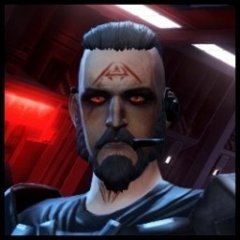
Jolee and Juhani done (barring possible future tweaks).

Still Bastila's to go.
I also should try a few different brown variations for compatibility with the 100% Brown option of the main cloaked robes mod, but I'm not sure what to do with those yet, might save it for a future update.
-

-
-

Everything looks good in black! @ebmar
These look great, bias aside of which is the best.
-
-
Editing Appearances And Help With A Few Things
JCarter426 replied to ALPHA000102's topic in General Kotor/TSL Modding
As far as I know the player doesn't have a UTC file we can edit To get what you want, you need to either edit the area's OnEnter script (k_pend_area01.ncs) or make a new script and attach it to the opening dialogue (m01aa_c01.dlg). I'm guessing the mods you're talking about probably did the latter, but the Community Patch includes the source code for the OnEnter + fixes and I'd recommend that. Dialogue editing can be messy. -
Latest progress on cloaked party clothing robes:

It's not readily apparent, but in addition to the cloak I upscaled her clothing texture and fixed some minor errors.
-
Ah, well spotted. I'll fix it in the next version, which already has something else on the to-do list.
-
 They are supposed to be WAV files. The version I released is the same as all the other soundsets in the game, WAV with a fake MP3 header. That's the format the game files are in, so until I'm told there is an actual problem, I don't intend to convert them to another format.
 -
The release version is that.
-
I converted them to the usual SteamSounds format so I believe they should work, but I don't have the game on Steam so I can't test it.