


JCarter426
-
Posts
1,599 -
Joined
-
Last visited
-
Days Won
140
Content Type
Profiles
Forums
Blogs
Forum & Tracker Requests
Downloads
Gallery
Store
Events
Everything posted by JCarter426
-
That's the most up to date compiler we have for KOTOR, unfortunately.
-

Please help. Problem with JCs cloaked robes
JCarter426 replied to mackmitchell94's topic in General Kotor/TSL Modding
I'm not familiar with most of those mods, but if I had to guess I'd say Weapons of the Old Republic. I wouldn't expect it to be compatible with most mods. -
I compiled with the version of NWNSSCOMP found here. In KOTOR 2 mode, if that matters.
-
It's me again. The mod roundup has most definitely served its purpose this time. It tipped me off that I never got around to updating the K2 version of a mod that I updated for K1 in January. The work was nearly all done and I was just too lazy to take new screenshots at the time. So good job, mod roundup. Updates Robe Adjustmnet – Fixed an issue that made the training cutscene wonky if you skipped through dialogue too quickly. Jedi Tailor – While testing a while back, the Tailor's shop spawned inside a Jawa. So I tried to fix that for this update, but because it's a random occurrence I'm not sure if it actually worked. Also fixed another bug in the Tailor's dialogue. Fashion Line I: Cloaked Jedi Robes / Cloaked Jedi Robes & Supermodel Port – Redid all textures. Higher resolution and ideally higher quality. Lightsaber Visual Effects for K1 and K2 – Added new options for blue and green lightsabers and converted all texture files to superior TPC format. New Mods Player Soundset Restoration – Restores the player's voice to K2 so you say random stuff when performing actions like you do in K1. Romance Enhancement: Biromantic Bastila – Allows a female player character to romance Bastila. Something Completely Different I have two somethings this time. I suspect certain individuals might be experiencing an increase in productivity on account of having more extra time than usual for certain reasons. First, @VarsityPuppet has finally gotten around to announcing the winners of the 2018 Mod of the Year awards. I hadn't realized that my Cloaked Jedi Robes had won for one category, so thanks to whomever voted for that. VP has also promised to get the 2019 competition running soon. Second, @AmanoJyaku has been working on a new script decompiler to address some issues with DeNCS. If successful, it will be a boon to modding as there are many scripts that cause DeNCS to choke up, preventing us from fixing bugs in them or otherwise improving their performance. We ran into several such unfortunate cases during Community Patch development, and there are also many scripts in K2 still running the bugged original random loot code even though TSLRCM fixes some of those bugs because the scripts without source code couldn't be recompiled. Any progress on that front could help make those fixes and other mods possible.
-
It's like I'm looking at my future, and my future is written in assembly. I whipped up some tests and attached them. I don't know how much help they'll be, though, since if anything they only confirm what's already been said. The compiler we have, at least, does The preprocessor that we're using, at least, will only include code that is actually used. Which is good. My tests confirm that. Based on the garbage I've seen in decompiled game scripts, though, I think it's possible BioWare's might not have been as optimized. I often see tons of integers declared in decompiled scripts that are never used. I can't remember if I've ever seen any functions I was sure weren't used, though. I tried various things that should lead to dead code but I think it's all of the first variety. I tried to make an unreachable block in the 6th one, but I still see jump points in the disassembled code. ncstest.zip
-
As far as I recall, the Dantooine lightsaber part drop was moved to the dead salvagers quest.
-
Modelling edits for Area Models and their various trials
JCarter426 replied to Malkior's topic in Work In Progress
The modeling software will compensate (at least 3ds Max will) if you edit the object via its modifiers, but it's not perfect and some actions will change the vertex setup too much and completely strip the skin weights. -
Please help. Problem with JCs cloaked robes
JCarter426 replied to mackmitchell94's topic in General Kotor/TSL Modding
They are compatible. Both mods were tested fairly thoroughly during development of the last Community Patch update and also by Sniggles when he was updating his mod builds. I'm not aware of any other reported problems. -
Please help. Problem with JCs cloaked robes
JCarter426 replied to mackmitchell94's topic in General Kotor/TSL Modding
As I said before, this is not an effect of Cloaked Jedi Robes alone. It's either caused by another mod you're using or some incompatibility with it and Cloaked Jedi Robes. What you are describing is what happens when a character is unable to equip an item due to the item type being corrupted in some way. If you have any mods that affect the robe UTI files or baseitems.2da, the problem is probably happening somewhere around there. Cloaked Jedi Robes does not affect either. -
 The readme doesn't say to install before TSLRCM. It shouldn't make a difference in this case, but generally TSLRCM should be installed before other mods. They are compatible.
 -
No, it has nothing to do with Kaevee.
-
Sounds like you've done everything right and it might just be a problem with the K1 rig. I'll take a look.
-
I'm pretty sure it could be via bitmask flags. 0x00000002 seems to mean Wookiee, and I'm guessing 0x00000008 would mean Zabrak (Zabrak is subrace 3, and 2^3 = 8). In that case, 0x0000000A would cover both (2 + 8 = 10, aka A in hex).
-
TSLRCM does move Jorran's part elsewhere. Zez-Kai Ell never gave a lightsaber part, however, as far as I can tell from a quick glance at the files.
-
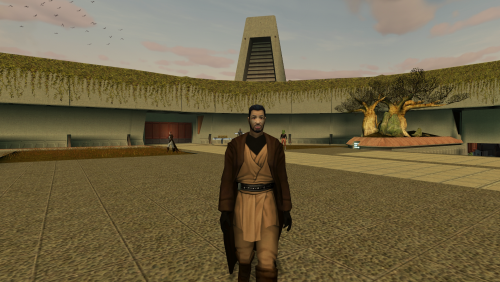 That must be caused by some other mod. This mod doesn't affect Vrook's UTC file and his row in appearance.2da is only affected by the gloveless option, which changes his robe texture and it can't be that either because he doesn't have it in your screenshot.
 -
I don't know what would be needed specifically, but generally I'd need somebody to test various things in real time, ideally through the /r/kotor Discord server. I won't be able to start on it until a couple weeks at the earliest, though.
-
I don't know how to fix the texture for Android, or if it even can be fixed. I don't have a way of testing on Android and so far nobody has volunteered to do so for me, so there's nothing I can do at the moment. As for the weapon failing to drop, it looks like that's an issue with the installer that I'll have to fix in the next version.
-
 Those warnings mean nothing. It's fine.
 -
I've heard that's the case with WAV files that lack the proper header file on Steam, but the files in this mod are WAV and have the same header as the original game files and those are the ones that are working (as they should). It's possible there's a difference between the K1 and K2 headers, but I won't have time to investigate thoroughly for a while. All I can say for now is that the audio files I tested work for me and I haven't tested any other audio files on any other system and can't.
-
I can't say since it was SH who exported those audio files, not me; and I talked to him and he says he doesn't know either, because there have been no reported problems for the mod in K1. It's possible the audio formats are different, but I won't have time to look into it for a while.
-
If it's crashing that probably means the model or upcrystals.2da is missing. I can only guess you didn't run TSLPatcher correctly, or since you're on the Steam version possibly the Steam Workshop is interfering.
-
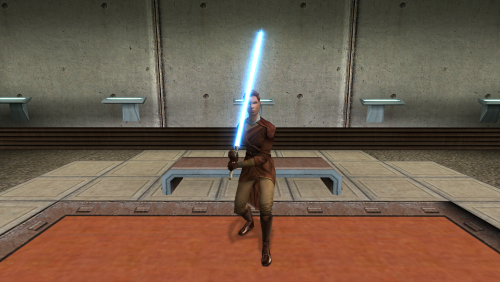 Basically, yeah. You should also duplicate the TXI data, but you might not have to. I was too lazy to take screenshots and then I forgot to do it the next day and that was a week ago. But yes.
 -
The easiest way is Composition --> Save Frame As --> File, and in the Render Queue click Photoshop and change that to Targa Sequence. That should export a TGA file in the correct game format.
-
I used a free plug-in for After Effects called Saber. (The plug-in is free; After Effects costs many dollars.) It was made by visual effects artists who worked on the Star Wars films. It has a few shape options, like a line for rotoscoping, but it can also be applied to any layer mask. I used that feature to draw over the shape of the original game texture.


