Effix
-
Posts
930 -
Joined
-
Last visited
-
Days Won
61
Content Type
Profiles
Forums
Blogs
Forum & Tracker Requests
Downloads
Gallery
Store
Events
Everything posted by Effix
-
What would you like changed? I did? Refresh my memory please.
-
The hat is part of the head, so there's no easier route. You would have to replace the Dodonna head and the special full body hologram version which is one model with a body + head. A bit much work to replace a char that already has a unique look. For your project it's probably better to put your time/energy in making the generic NPCs more unique, which is a good plan.
-
Kotor1: Keeping Companions Default Clothes Skin
Effix replied to MadMax4q2's topic in General Kotor/TSL Modding
The Handmaiden starts with row 454, which has the hood up and uses a full body model (a single 3D model that includes the head & body, "F" for "full" in column "modeltype"). Later she uses row 638, which uses separate head and body models ("B" in column "modeltype" and a number in the "normalhead" column) , so it can show gear that's equiped. There's several ways to go, up to you. You can turn 638 into the hood up version or keep the hood down in 638 but make it so that it will never show gear. Sure, no problem. Effixians_Keep_Companian_Default_Clothing_Jedi_only_version.zip -
Extract the template file g_i_mask15.uti with KotOR Tool (Kotor I -> BIFs -> templates.bif -> Blueprint, Item) , that's the Stabilizer Mask (see GameBanshee to look up the template names). Extract to your Override folder or for now to a temporary location to keep some more overview. Now you can open (no need to extract) g_i_mask06.uti (Vacuum Mask) to check its Model Variation value: 10. This means that the model name for it is i_mask_010.mdl & i_mask_010.mdx (2 files make up the 3D model). The filename of the texture for a mask is "embedded" in the 3D model, in this case that means that you need to do some things to let the 2 instances of the same model use 2 different textures: - Extract i_mask_010.mdl & i_mask_010.mdx (KotOR Tool: Kotor I -> BIFs -> items.bif -> Aurora Model & Aurora Model Extension), give them a new number. 001 through 014 are used by vanilla items and best not to use 015 but something a bit more random to make it less likely to conflict with another mod. - Use K-GFF* to open your g_i_mask15.uti and change the Model Variation value to reflect that new number you picked (without zeros at the front). Model swapping part done. - Now use MDLedit, load the mdl file -> Menu: Edit -> Textures -> click on the name, change it to whatever you like -> Menu: Save, Binary, replace original file. While doing this you'll see what the original texture is, you can extract it with KotOR Tool, edit it and of course make sure it matches that name you picked in MDLedit (not case sensitive and in MDLedit you don't add ".tga"). In the end you do need to put everything in your Override folder to test things. So you''ll have: - g_i_mask15.uti with a different model variation inside, to replace the original Stabilizer Mask model - a mdl and mdx file to match the model variation with a different texture reference inside of it - a new texture - Oh right, an icon.. the name that the game will try to pull up is also based on the model variation number. You can export/extract ii_mask_010.tpc to a .tga from Kotor I -> ERFs -> TexturePacks -> swpc_tex_gui.erf -> I Tweak that and change 10 in the filename to whatever model variation number you picked. Or use a photo of a kitten as your icon. * You can just do it with KotOR Tool, but I was told that that can make item names and descriptions English for other language versions of the game. Good luck & feel free to ask questions if you get stuck on something!
-
Ok, and you're launching the game from there; C:\Program Files (x86)\Steam\steamapps\common\Knights of the Old Republic II ? Hm, you say you manually added TSLRCM to this location, but the new log doesn't mention making backups of files, which it should if TSLRCM is there. Like in your first log. Are you sure you're not subscribed to the workshop version of TSLRCM? You can check by going to the Workshop of the game, then on the right you have your avatar with "Your Files" next to it, then click "Subscribed items".
-
Ok, but looking at your installlog, that all went to/worked with C:\Program Files (x86)\lucasarts\swkotor2\override\ That is not the location of the Steam version. A simplified example of where the Steam game might be: DRIVE:\PATHTOSTEAM\(OPTIONAL)SteamLibrary\steamapps\common\Knights of the Old Republic II Pointing the patcher there should work, it will add things to files you already have there. btw Adding a non Steam TSLRCM to your Steam version of the game is fine and might even make adding more non Steam mods a bit more straight forward. Then again, you can also add non Steam mods by directing the Patcher of the mod to the workshop folder of the Steam version of TSLRCM.
-
Correct. I don't remember the order, but if you go through all the heads and end up at the one that you started with and they're not there then it's no good. The only thing that comes to mind.. did you maybe install different versions of the game or the same version in more than one location? Doesn't seem to be the case, judging from your log, but still: If you use the Steam version with the workshop version of TSLRCM then you need to point the patcher to its location (as mentioned in the description).
-
Bummer, yeah, I forgot about that.
-
Here's 2 posts with info on porting: Tips.. there's lots of things involved and also all kinds of tutorials out there. I guess it's best to ask for help if you get stuck on something specific, in the modding section or by sending me a message. To make Vima a player character you would need to add rows to heads.2da, appearance.2da and portraits.2da, copy existing rows/values from another PFHC char and replacing some values with the values from the NPC that this council mod uses. You would also need to make portraits and if wanted darkside transitions for the head textures (or you can just stick to 1 texture, same goes for the portraits).
-
Pretty easy to do yourself, with KotOR Tool. Open your appearance.2da that you probably have in your override folder. Go to row 23, change the value in the normalhead column to 37, save.
- 7 replies
-
- 1
-

-
- model swapping
- retex
- (and 1 more)
-
Strange, the log looks fine. I don't know what's wrong, sorry.
-
 A high res screenshot, please. 319 will not do.
 -
Alright, I think this should do it for Belaya. Do note that it only works with a save in which you haven't been to Dantooine yet, so as late as right before you enter the Ebon Hawk to leave Taris. Otherwise appearances get "locked" in your savegame, a bit of a pain making, testing and using a mod, but that's how it is. Effixians PFHC07 from K2 to Belaya K1.zip
-
If you don't know how to use KotOR Tool, the files involved and an image editing tool; probably hard. I can't really produce a mod for you out of this request, since it's not my work, you'd need to contact Kexikus and/or DarthParametric. I can possibly guide you through something for your own personal use, let me know.
-
I need some more time to turn it into a TSL Patcher mod, but for now I have this: p.s. the robe change is from "JC's Fashion Line I: Cloaked Jedi Robes for K1", I didn't want to uninstall it for a screenshot.
-
Is it possible to make kreia robes wearable for the player character
Effix replied to DarthDip's topic in Mod Requests
That's also not Kreia's dark side appearance, it's the unused dark side Atris model. Someone simply had some fun changing appearances with the savegame editor. -
 Quite hard to see in the screenshots, because it's subtle, but parts of the armors have a mesh texture (Kaidon's idea). Not the medieval kind, the sports gear/modern sneaker kind. I'll be honest, I probably won't do a replay anytime soon, but the quest part sounds really cool and additions like that are very welcome for enriching the game. I'm glad I could assist with the texture part, it was fun. Keep up the good work! p.s. don't use that headgear in screenshots lol
 -
Work in progress sneak peek, TSL Twi'lek Pack 2021:

20 chars, matching underwear, matching and unique dancer's outfits for the females, based on Bastila's robes. -
(Spoilers)
"10 Minutes of Useless Information about Knights of The Old Republic"-

-

Juhani gay. Malak's real name is Squidward. T3M4 = T3M3+1. Kotor = $. Sleyheyron = Bye. Jedi Jabba cut. StarForge =/= Death Star. Mission used to be a dude. Big cronch to finish geme. HK47 funny voice actor. Malak has pretty grey eyes. Sion be chopping Jedi in K1. Dustin ❤️ Saleen. Selkath make Fish Jedi Order. Zal Shey = Force nerds. Taris hobos find paradise. Malak's a simp. Revan's mask is a female mandalorian's. Malak = Discount Vader. Evil Bastila = Bae. Trask VA uncredited =( Vrook = Biggest canonical POS.
There. Should be a single line (on an ultrawide).
-
-
-
 Ok, yeah, makes sense to me. This mod is for the vanilla 3D head model, that mod replaces it and the textures that go with it are different. b.t.w. currently working on a new version of this mod, but not sure when it will be finished.
 -
 Very cool, nice job! Things look great and the dialogues and datapads that tie in with the rest of the story are great. I did wonder if finishing it might unbalance things a bit, got quite a bit of xp and items... luxury problems.
- 26 comments
-
- 1
-
-
- cruiser
- deadlystream
- (and 4 more)
-
Hey Zam, Similar to the one above, this one also has some issues with the mouth, see if it's acceptable to you. Greets Effixians_PMHA05_from_K2_to_K1.zip
-
 I think I understand the confusion, we're talking about 2 different things. The screenshot above is of the Galaxy map when you interact with it, where you can click on a planet to travel there (so fullscreen). Sith Holocron's mod has a replacement of the panel that you see when you're standing in the cockpit, so a small part of the wall that you can click on to get to the interactable map.
 -
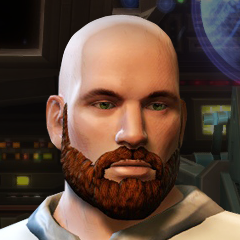
View File Effixian's Bearded PMHA06 --------------------------------------------------------------------- Knights of the Old Republic - The Sith Lords --------------------------------------------------------------------- TITLE: Effixian's Bearded PMHA06 AUTHOR: Effix(ian) CONTACT: PM me on the forums or find me on Steam ------------------------ INSTALLATION ------------------------ Extract the zip, put the contents of the sub folder into your override folder. ---------------------- DESCRIPTION ---------------------- Reskin that adds a beard to the PMHA06 player head. It also changes the eye color to cyanish. The darkside transitions are similar to the vanilla ones. ------------------------- UNINSTALLING ------------------------- Remove from the override folder: PMHA06.tga PMHA06d1.tga PMHA06d2.tga po_PMHA06.tga po_PMHA06d1.tga po_PMHA06d2.tga ------------------- THANKS TO ------------------- Fred Tetra for KotOR Tool ----------------- Donations ----------------- My mods are free. If you would like to show your support then you can buy me a coffee at ko-fi.com/effix ------------------- THIS MODIFICATION IS NOT MADE, DISTRIBUTED, OR SUPPORTED BY BIOWARE, OBSIDIAN, OR LUCASARTS ENTERTAINMENT COMPANY LLC. ELEMENTS TM & © LUCASARTS ENTERTAINMENT COMPANY LLC AND/OR ITS LICENSORS Submitter Effix Submitted 06/18/2021 Category Skins TSLRCM Compatible Yes