Effix
-
Posts
931 -
Joined
-
Last visited
-
Days Won
61
Content Type
Profiles
Forums
Blogs
Forum & Tracker Requests
Downloads
Gallery
Store
Events
Everything posted by Effix
-
 Try it and add the "Unique Party Robes" last.
 -
Do they not work together? It looks like that mod replaces party member clothing.
-
Does it not work with it?
-
Not sure, I don't test them as talking NPCs.
-
haha, yeah, the PC doesn't talk so the mod can get away with it. It's likely because of supermodel differences between the 2 games.
-
 Ah, I see, thanks for letting me know. 2 files have the wrong filename.po_PFHC07FX.tgapo_PFHC07FXd1.tga Add these files to fix it. The zip is also updated.
 -
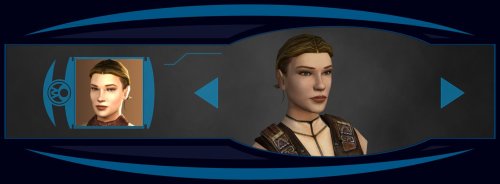
View File Effixian's PFHA05 from K2 to K1 --------------------------------- Knights of the Old Republic --------------------------------- TITLE: Effixian's PFHA05 from K2 to K1 AUTHOR: Effix CONTACT: PM me on the forums or find me on Steam or Discord ------------------ INSTALLATION ------------------ Run the file "TSLPatcher - Install Effixian's PFHA05 from K2 to K1.exe". ----------------- DESCRIPTION ----------------- This mod adds a playable character PFHA05 from KotOR 2. The head is very similar to K1's PFHA05, only the hair is different. ----------------- KNOWN BUGS ----------------- The head clips a bit through the hair in one spot. ------------------ UNINSTALLING ------------------ 1. Remove the following files from your Override folder: pfhax05.mdl pfhax05.mdx PFHAX05.tga PFHAX05.txi PFHAX05D.tga PFHAX05D1.tga PFHAX05D2.tga PFHAX05D3.tga po_PFHAX05.tga po_PFHAX05d.tga po_PFHAX05d1.tga po_PFHAX05d2.tga po_PFHAX05d3.tga 2. If you have never installed any mod with the TSL Patcher then you can remove appearance.2da, heads.2da and portraits.2da from the Override folder. Otherwise: If you haven't installed any mod after this mod you can get the following files from the mod's backup folder and put them back in your Override folder: appearance.2da heads.2da portraits.2da Doing this when you did add another mod would result in the later mod(s) no longer working. -------------------------- DISTRIBUTION NOTES -------------------------- You can use the files from this mod in your own mod if you simply credit me. ------------ Thanks to ------------ - Stoffe and Fred Tetra for the needed tools and tutorials - bead-v's MDLEdit - JCarter426 & Kexikus for sharing their knowledge on converting things with MDLEdit ------------------- THIS MODIFICATION IS NOT MADE, DISTRIBUTED, OR SUPPORTED BY BIOWARE, OBSIDIAN, OR LUCASARTS ENTERTAINMENT COMPANY LLC. ELEMENTS TM & © LUCASARTS ENTERTAINMENT COMPANY LLC AND/OR ITS LICENSORS. Submitter Effix Submitted 08/17/2026 Category Mods K1R Compatible Yes
-
Version 1.0.0
38 downloads
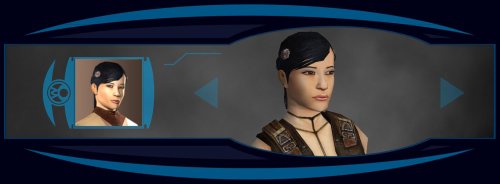
--------------------------------- Knights of the Old Republic --------------------------------- TITLE: Effixian's PFHA05 from K2 to K1 AUTHOR: Effix CONTACT: PM me on the forums or find me on Steam or Discord ------------------ INSTALLATION ------------------ Run the file "TSLPatcher - Install Effixian's PFHA05 from K2 to K1.exe". ----------------- DESCRIPTION ----------------- This mod adds a playable character PFHA05 from KotOR 2. The head is very similar to K1's PFHA05, only the hair is different. ----------------- KNOWN BUGS ----------------- The head clips a bit through the hair in one spot. ------------------ UNINSTALLING ------------------ 1. Remove the following files from your Override folder: pfhax05.mdl pfhax05.mdx PFHAX05.tga PFHAX05.txi PFHAX05D.tga PFHAX05D1.tga PFHAX05D2.tga PFHAX05D3.tga po_PFHAX05.tga po_PFHAX05d.tga po_PFHAX05d1.tga po_PFHAX05d2.tga po_PFHAX05d3.tga 2. If you have never installed any mod with the TSL Patcher then you can remove appearance.2da, heads.2da and portraits.2da from the Override folder. Otherwise: If you haven't installed any mod after this mod you can get the following files from the mod's backup folder and put them back in your Override folder: appearance.2da heads.2da portraits.2da Doing this when you did add another mod would result in the later mod(s) no longer working. -------------------------- DISTRIBUTION NOTES -------------------------- You can use the files from this mod in your own mod if you simply credit me. ------------ Thanks to ------------ - Stoffe and Fred Tetra for the needed tools and tutorials - bead-v's MDLEdit - JCarter426 & Kexikus for sharing their knowledge on converting things with MDLEdit ------------------- THIS MODIFICATION IS NOT MADE, DISTRIBUTED, OR SUPPORTED BY BIOWARE, OBSIDIAN, OR LUCASARTS ENTERTAINMENT COMPANY LLC. ELEMENTS TM & © LUCASARTS ENTERTAINMENT COMPANY LLC AND/OR ITS LICENSORS. -
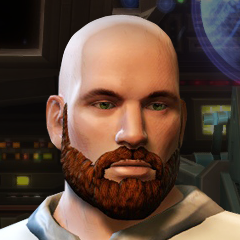
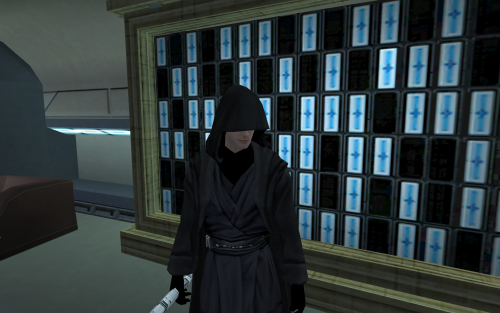 Feel free to add these icons, no credits needed. ii_Mask_222.tga ii_Mask_221.tga
- 4 comments
-
- 1
-

-
- modders resource
- hoods
- (and 5 more)
-
Aww, that sucks
-
Those files are correct. Your override folder is a subfolder of "Knights of the Old Republic II"? Again, I don't have any experience with the mobile version. You could try https://kotor.neocities.org/modding/mod_builds/#androidios for hints.
-
You can have tpc files or tga files (+txi if relevant) to replace a texture. You can't have both (tpc and tga) with the same name in your Override folder. If you do then the tpc files will get precedence and the tga files will get ignored. p.s. I don't have any mods that use .tpc files.
-
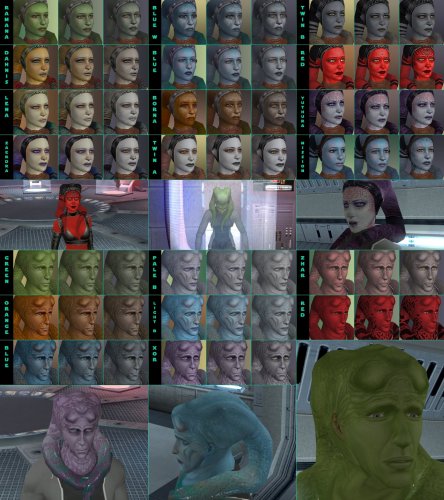 It's hard to tell without seeing your files. What I can see is that it's using the normal clothing model, but applying the new texture to it (Strange combo). Maybe one of the mods updated appearance.2da, undoing the changes that "TSLPatcher - Install PFT10 Red - Clothing like underwear.exe" made. Try running it again. Here's a Luxa style red version: PFBT10_Red01.tga
 -
It's a very straight forward reskin mod, copy files to the override folder. You don't need to start a new game for texture replacements. I have no experience with modding the mobile version, but I assume you also have an Override folder.
-
 Mucha chakka pakka
 -
 Oh, I did not see the earlier comment about this. I had one number wrong, I've updated the zip. See if you can uninstall and try the new version,
 -
 I only work with the existing models.
 -
Try: Copy DP_AtrisRb1H.mdl (from the add-on) to somewhere, rename to DPFBM1H.mdl Do the same for the DP_AtrisRb1H.mdx file -> DPFBM1H.mdx Copy both back to your Override folder, replace.
-
 Oh, typo in the description. It uses ia_ClassZS_006, not 004. Thanks
 -
I see, it might be hard coded in the engine.
-
There's probably an alpha layer that causes transparency. Can you give a filename as an example?