Search the Community
Showing results for tags 'dopak'.
Found 4 results
-
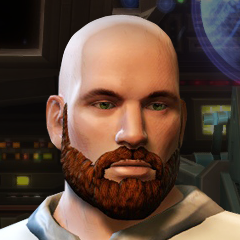
View File Effixian's Dopak Player Character -------------------------------------------- Knights of the Old Republic - The Sith Lords -------------------------------------------- TITLE: Effixian's Dopak Player Character AUTHORS: Effix(ian) CONTACT: PM me on the forums or find me on Steam ------------ INSTALLATION ------------ Unzip somewhere and run the file "TSLPatcher - Install Effixian's Dopak Player Character". ----------- DESCRIPTION ----------- This mod adds a player head that is the same as the mercenary Dopak. There's vanilla dark side transitions, but with Sith eyes instead of zombie eyes. Orginally requested by rkallday1 on Steam. ---- BUGS ---- None known. ------------ UNINSTALLING ------------ 1. Remove the following files from your override folder: (not harmful if you leave these, step 2 will make the game ignore them) p_dopakh.mdl p_dopakh.mdx P_DopakH.tga P_DopakHd1.tga P_DopakHd2.tga po_Dopakh.tga po_Dopakhd1.tga po_Dopakhd2.tga 2. If you haven't installed any mods after this mod then you can get the following files from the mod's backup folder and put them back in your override folder: appearance.2da heads.2da portraits.2da Doing this when you did add another mod would likely result in undoing that later mod. ------------------ DISTRIBUTION NOTES ------------------ You can use the files from this mod in your own mod if you simply credit me. Please do not reupload to other sites. ------ THANKS ------ Stoffe and Fred Tetra for the needed tools and tutorials --------- Donations --------- My mods are free. If you would like to show your support then you can buy me a coffee at ko-fi.com/effix --------- THIS MODIFICATION IS NOT MADE, DISTRIBUTED, OR SUPPORTED BY BIOWARE, OBSIDIAN, OR LUCASARTS ENTERTAINMENT COMPANY LLC. ELEMENTS TM & © LUCASARTS ENTERTAINMENT COMPANY LLC AND/OR ITS LICENSORS. Submitter Effix Submitted 07/20/2025 Category Mods TSLRCM Compatible Yes
-
Version 1.0.0
78 downloads
-------------------------------------------- Knights of the Old Republic - The Sith Lords -------------------------------------------- TITLE: Effixian's Dopak Player Character AUTHORS: Effix(ian) CONTACT: PM me on the forums or find me on Steam ------------ INSTALLATION ------------ Unzip somewhere and run the file "TSLPatcher - Install Effixian's Dopak Player Character". ----------- DESCRIPTION ----------- This mod adds a player head that is the same as the mercenary Dopak. There's vanilla dark side transitions, but with Sith eyes instead of zombie eyes. Orginally requested by rkallday1 on Steam. ---- BUGS ---- None known. ------------ UNINSTALLING ------------ 1. Remove the following files from your override folder: (not harmful if you leave these, step 2 will make the game ignore them) p_dopakh.mdl p_dopakh.mdx P_DopakH.tga P_DopakHd1.tga P_DopakHd2.tga po_Dopakh.tga po_Dopakhd1.tga po_Dopakhd2.tga 2. If you haven't installed any mods after this mod then you can get the following files from the mod's backup folder and put them back in your override folder: appearance.2da heads.2da portraits.2da Doing this when you did add another mod would likely result in undoing that later mod. ------------------ DISTRIBUTION NOTES ------------------ You can use the files from this mod in your own mod if you simply credit me. Please do not reupload to other sites. ------ THANKS ------ Stoffe and Fred Tetra for the needed tools and tutorials --------- Donations --------- My mods are free. If you would like to show your support then you can buy me a coffee at ko-fi.com/effix --------- THIS MODIFICATION IS NOT MADE, DISTRIBUTED, OR SUPPORTED BY BIOWARE, OBSIDIAN, OR LUCASARTS ENTERTAINMENT COMPANY LLC. ELEMENTS TM & © LUCASARTS ENTERTAINMENT COMPANY LLC AND/OR ITS LICENSORS. -

Version 1.0
297 downloads
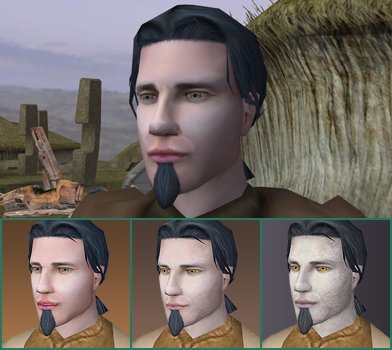
"Captains will curse our flag, kings will fear it." - Edward Kenway This changes PMHC04 (Jesus or Obi-Wan) to the model of Dopak and reskinned to look like Edward Kenway from Assassin's Creed IV: Black Flag. This does include Movie Style Dark Side Transitions, and new portraits. Enjoy Installation: Drop the files into the override folder Bugs: None found -
File Name: Dopak to Edward Kenway File Submitter: AnakinSwader File Submitted: 26 Jul 2014 File Category: Mods TSLRCM Compatible: Yes "Captains will curse our flag, kings will fear it." - Edward Kenway This changes PMHC04 (Jesus or Obi-Wan) to the model of Dopak and reskinned to look like Edward Kenway from Assassin's Creed IV: Black Flag. This does include Movie Style Dark Side Transitions, and new portraits. Enjoy Installation: Drop the files into the override folder Bugs: None found Click here to download this file