

Skins
316 files
-
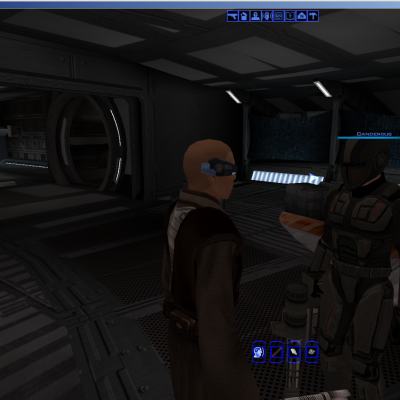
Alternate Textures for Sithspecter's "Canderous' Mandalorian Items"
By xander2077
I really thought that Sithspecter did an outstanding job on the original mod, however, i always got the feeling i was looking at things from other video games like CoD, MoH, or Wolfenstein. So, i decided to reskin the mod in a more star warsey look. Not one of my best skins, but considering it was done in linux with no way to know what it was going to look like until i fired up the game each time i made an adjustment, i would say i did alright. The worst part of it was the shins, and i think if i would have had a proper modeling program to draw the textures on and control how they were wrapped then it would have been tons better than gimp and using the game to view the results. Anyway, here it is for anyone who might like to use it. *NOTE* you must have the original "Canderous' Mandalorian Items" installed for this skin to work in your game or it wont ever show up.
Update: now with new icons made by djh269. Thanks again DJ!
For anyone who wants to update this skin or refine the skin to greater detail (in lieu of my feeble programs), i don’t mind if you do, as long as Sithspecter gets credit for the original mod.
756 downloads
-

JC's Canderous Ported from K2 to K1
By JCarter426
This mod alters Canderous' appearance, porting the unused texture from K2 to be used in K1.
852 downloads
(2 reviews)0 comments
Submitted
-
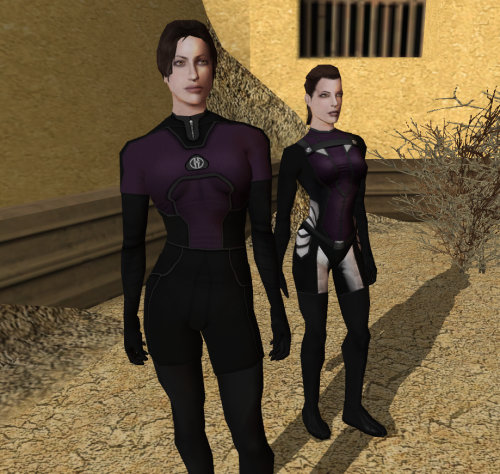
Women underwear
By Dark Hope
Re-texture of women underwear for Star wars: Knights of the Old Republic. Texture resolution 2048x2048. The archive contains 12 textures, 1 .txi.
To Install
1. Download: Women underwear
2. Copy all files to the Knights of the Old republic's Override folder.
(Example location - C:\Program Files (x86)\Steam\steamapps\common\swkotor\Override)
3. When/if prompted to overwrite files, press okay.
4. If you like the mod; leave a comment or endorse! (It would be much appreciated) Made with love.
3,810 downloads
- women underwear
- dark hope
- (and 1 more)
-

Green Crystal from K2 to K1
By N-DReW25
A Mod for Star Wars Knights of The Old Republic
Author: N-DReW25
Release Date: 18.06.2018
Installation:
Simply Copy and Paste or Drag and Drop ALL the files within the "For Override" into your Star Wars Knights of The Old Republic override folder
Uninstallation:
Remove or Delete the files from your Star Wars Knights of The Old Republic override folder
Description:
In both Kotor games, the green Lightsaber crystal is different from one another. In my opinion, the K2 crystal is the superior version and
looks more like a crystal, thus, I have made this mod which ports the K2 crystal into K1.
Known Bugs:
None but if there is Just PM me on Deadlystream.
Incompatibilities:
Will be incompatible with things that edit "iw_SbrCrstl_016.tga" though I know of no mods which do so.
Permissions:
You are NOT allowed to claim this work to be your own.
Thanks:
Bioware for such an amazing game
Fred Tetra for Kotor Tool
The Staff of Deadlystream for lifting the no Porting rule
and everyone who downloads the mod.
Legal:
THIS MODIFICATION IS NOT SUPPORTED BY BIOWARE/OBSIDIAN ENTERTAINMENT, LUCASARTS, DISNEY OR ANY LICENSERS/SPONSORS OF THE MENTIONED COMPANIES. USE OF THIS FILE IS AT YOUR OWN RISK AND THE ABOVE MENTIONED COMPANIES OR THE AUTHOR IS NOT RESPONSIBLE FOR ANY DAMAGE CAUSED TO YOUR COMPUTER FOR THE USAGE OF THIS FILE.
741 downloads
(1 review)0 comments
Submitted
-

Force Lightning and Death Field
By InSidious
Hi-Res Beam Effects for K1
==========================
by Darth InSidious
==================
Description
-----------
This mod replaces the Force Lightning and Death Field beam effects with higher resolution versions.
It is meant to be used in conjunction with my "Hi-Res Beam Effects" mod for KotOR 1, but can be used on its own, or for KotOR II if you so wish.
Installation
------------
Just drop the file Fx_Lightning.tga in this archive into your Override folder.
Uninstallation
--------------
Take the file out again.
Legal Disclaimer
----------------
All materials and copyrights belong to LucasArts, Bioware and Obsidian Entertainment Inc.,
Kotor Tool belongs to Fred Tetra, NWNSSCOMP belongs to Edward T. Smith.
I own none of the materials, and I'm not making any money out of this mod. It is to be distributed
as-is without alteration, unless by permission of the mod author. This mod is not to be distributed for profit, either.
Use it how you like, but if you're going to post it up somewhere, or make a derivate mod, or use it in another mod, you must
ask me first.
Thanks to:
----------
TriggerGod, whose mod inspired me to make this one;
Quanon and Zhaboka for the feedback on the original TSL hi-res beam effects;
Fred Tetra for the truly awesome KotOR tool and his nwnsscomp conversion;
Holowan in general for being helpful, friendly and all the rest of the good stuff it is ;
KotORFiles, for being simply the best website in the history of the internet...Propaganda? What's that? ;
Lucasarts and Bioware for KotOR, and Obsidian, too, for TSL, without which, I couldn't have made this .
1,986 downloads
-
.thumb.png.331b1c442cda636db02e2b00d313c3c3.png)
KOTOR1 "Canon" Animated Galaxy Map
AUTHOR: Sith Holocron
FIRST RELEASE: 21 FEB 2017
CURRENT RELEASE: 24 JUL 2024
GAME: Star Wars Knights of the Old Republic I [Not recommended for Star Wars Knights of the Old Republic II]
Description:
------------
The Galaxy Map texture of the Ebon Hawk was originally sized at 128x128. It is now sized to 512x512. In addition to the resolution bump, the actual texture is now animated.
So . . . what’s different? The planets are now in the positions as laid out in Kexikus’ Canon Galaxy Map for KotOR 1 version 1.1 (http://deadlystream.com/forum/files/file/479-canon-galaxy-map-for-kotor-1/)
Note: The LEH_scre03 texture is the Galaxy Map *before* you click on it, that is when you can see the rest of the cockpit.
Not recommended for use in KOTOR2. (For KotOR2, use this mod instead.)
There are TWO different versions of the Galaxy Map texture that you can use!
- Version 1: The original planets as laid out in the original un-modded game. This texture uses Tatooine as the spinning planet. It has 12 frames of animation.
- Version 2: In addition to the original planets, I've added Ord Mantell to the map. This texture uses Dantooine as the spinning planet. It has 17 frames of animation.
Installation:
Choose the version that bests suits your uses. Grab the files from that file folder and drop them into the following folder:
SWKotOR/Override
Uninstallation:
Take them out again.
Known Bugs:
None known at this time.
Legal Disclaimer:
All materials and copyrights belong to LucasArts, and Bioware Corp.
I own none of the materials, and I'm not making any money out of this mod. It is to be distributed as-is without alteration, unless by permission of the mod author. This mod is not to be distributed for profit, either.
I hereby state that I specifically do NOT wish this mod to be uploaded to Steam Workshop. Ever.
I hereby state that I specifically do NOT wish this mod to be uploaded to Steam Workshop. I may release this on NexusMods at a later date but I don't wish others to do so. Usage in other mods must be requested AND approved by me before your use. Messages that request permission without providing information on how your alternate version would be different than mine should be considered an instant denial of permission.
Credits:
Kexikus: Help with putting together this mod.
LSaberDuelist and OldFlash (of LucasForums) for their instructive discussion and tutorial at LucasForums.
(http://www.lucasforu...ad.php?t=153502)
2,630 downloads
-

PROTOCOL DROID HD
By Dark Hope
This mod will replace and update DrdProt texture files.
To Install
1. Download: DrdProtHD
2. Copy all files to the Knights of the Old republic's Override folder.
(Example location - C:\Program Files (x86)\Steam\steamapps\common\swkotor\Override)
3. When/if prompted to overwrite files, press okay.
4. If you like the mod; leave a comment or endorse! (It would be much appreciated) Made with love.
26,763 downloads
-

HD PC Portraits
By ndix UR
HD PC Portraits
for Knights of the Old Republic
v1.0 - 20190909 by ndix UR (DeadlyStream user)
This modification adds high resolution (1K) portrait images for player characters (PCs). All 30 male and female vanilla player characters are provided, with all 5 light-dark variants, for a total of 150 new portraits. The 1K portraits have 256x the resolution of the 64x64 originals. The portraits are rendered to match the poses, colors, facial expressions, and lighting of the original images as closely as possible given the following constraints:
Only vanilla textures (and my own additional maps based on same) are used A couple face textures had the eye in the wrong place and had to be fixed I reduced the number of background gradients to a set of 4 standards. The originals are all over the place in terms of the gradients and I didn't have time to replicate every one. An effort was made to match each individual set of portraits to its appropriate set of background gradients. While the textures are mostly crap, most of the work was in material setup using a modern rendering engine, so even the vanilla textures still wind up looking much better than they have any right to. This is because of real lights, shading, and materials, of which the original diffuse textures are only a part. I didn't really redo geometry, beyond appropriate use of subdivision surface modifiers.
See the included images in preview/ for an idea of how the portraits look.
INSTALL / UNINSTALL
To install, copy the files from the package Override/ folder to the Override/ folder for your KOTOR game installation.
To uninstall, remove the TPC files for this package from your KOTOR game Override/ folder.
LEGAL
THIS MODIFICATION IS NOT MADE, DISTRIBUTED, OR SUPPORTED BY OBSIDIAN, OR LUCASARTS ENTERTAINMENT COMPANY LLC. ELEMENTS TM LUCASARTS ENTERTAINMENT COMPANY LLC AND/OR ITS LICENSORS.
The content of this mod is free for use and reuse, with no implied warranty, you can redistribute it, in original or modified form. If you do, a credit of some kind is nice but not required.
42,605 downloads
-

Quanons Twilek Outfits
By Quanon
Quanons Twilek Outfits.
A new pack to replace the old Twilek skins with a new look.
These are new and are differant then the old skins. So it's not really a reskin. Since I went for another style on all of them.
Look at the screenshots to pick and choose. I did NOT redo the heads though.
I suggest using Caches mod for that. She did a really great job and you can seem them in the screenshots!
So you know it just fits
The green twilek has 2 options. A Black/ Red out fit or you can go for just the red look overall.
Each skin as a TXI file so you should get some shiney effect. It's set to CM_Spec as I like the look of that effect more then CM_Baremetal.
Feel free to adjust the TXI to your own liking.
INSTALLING:
Copy the files from my mod folder to your Override.
Done!
2,645 downloads
-

Evil Sith Flags
By N-DReW25
A Mod for Star Wars Knights of The Old Republic
Author: N-DReW25
1.0.0 Release Date: 17.06.2023
Installation:
There are two versions of this mod to pick from!
DarthVarkor Inspired Version: This flag is the default 128x128 resolution, the same as the vanilla flag. This flag closely resembles the Sith flag seen in DarthVarkor's fan film "Star Wars: KOTOR - Heart of Darkness".
HD Version: This flag is 512x512 in resolution, an upgrade from the DarthVarkor Inspired Version.
Pick which flag you want, open the "For Override" folder in your selected version and copy PLC_SithFlag.tga to your Override folder.
This mod works for Kotor 2 as this same flag appears in the Secret Tomb on Korriban.
Description:
One of the main inspirations for the Galactic Empire back when "Star Wars: A New Hope" was being developed was real life N*zi Germany. Ever since the release of the Original Trilogy, the writers of the Star Wars Expanded Universe (nowadays called "Legends") and even the writers of modern day Disney Canon draw upon the imagery of the F*scist regimes of old to create their own authoritarian factions that exist in the Galaxy far, far away.
The flag of N*zi Germany is commonly parodied in Star Wars as authors often replace the Sw*stika with the Imperial Crest alongside some minor detail edits to make the parody look less obvious. Whilst Bioware's 2011 Star Wars: The Old Republic MMO did this with Vitiate's Sith Empire, Bioware's 2003 Star Wars: Knights of the Republic RPG did not do this with Revan's Sith Empire.
Across various digital signs throughout the game, such as the Sith Base on Taris to the Sith Embassy on Manaan, the Crest of the Sith Empire is dark blue in color with a light blue background. Additionally, at the end of the Dark Side ending, players can spot an odd yellow and green colored flag with the Sith Crest on it in the end cutscene.
This mod will change those flags at the very end of the game to appear more like the flags of the TOR Sith Empire and the Galactic Empire with their F*scist influences.
This mod was greatly influenced by DarthVarkor's Heart of Darkness Kotor fan film, his film also modified the Sith flag and edited it to look more like the flag found in this mod. Whilst the flag seen in Heart of Darkness is modded, the flag seen in that film is NOT the one found in this mod as I, N-DReW25, saw that film on YouTube and then made the flag found in this mod from scratch!
This mod will not modify the before mentioned Sith signs found throughout the Sith Bases as other mods do a far superior job at editing those signs than I ever could.
Known Bugs:
Please report any bugs to me on Deadlystream!
Incompatibilities:
Incompatible with any mods that edit "PLC_SithFlag.tga" or "PLC_SithFlag.tpc"
Permissions:
Do NOT claim credit for this mod and do not use assets from this mod without my permission.
Thanks to:
DarthVarkor: For showing the original flag in his fan film "Star Wars: KOTOR - Heart of Darkness"!
Bioware: For such an amazing game!
Fred Tetra: For Kotor Tool!
Everyone who downloads the mod!
Legal:
THIS MODIFICATION IS NOT SUPPORTED BY BIOWARE/OBSIDIAN ENTERTAINMENT, LUCASARTS, DISNEY OR ANY LICENSERS/SPONSORS OF THE MENTIONED COMPANIES. USE OF THIS FILE IS AT YOUR OWN RISK AND THE ABOVE-MENTIONED COMPANIES OR THE AUTHOR IS NOT RESPONSIBLE FOR ANY DAMAGE CAUSED TO YOUR COMPUTER FOR THE USAGE OF THIS FILE.
713 downloads
-

Yuthura Ban HD
By DarthKyber
With the help of mod creator, Cache71, I decided to finally take the plunge and made my first reskin mod: an HD version of Yuthura Ban. This resin is based on the HD Twilek reskin that Cache71 released earlier this year. I have repurposed one of the textures for my resin with his/her permission.
The reskin basically takes one of the HD Twilek textures, changes with the colors, and adds an HD version of the Sith Tattoo that Yuthura has. Making the Sith Tattoo took some time and a lot tweaking to get right. One liberty I took was removing the ugly Darkside veins from her. It just never looked that good on her and was a bit distracting.
You can tell from the before and after pics that there is a massive improvement.
809 downloads
- kotor
- yuthura ban
- (and 2 more)
-

PVC Bastila Clothes
By kristykistic
Creates long and short versions of Bastila's clothing in various colors with a pvc lighting effect. Current version is 2.0.
575 downloads
-
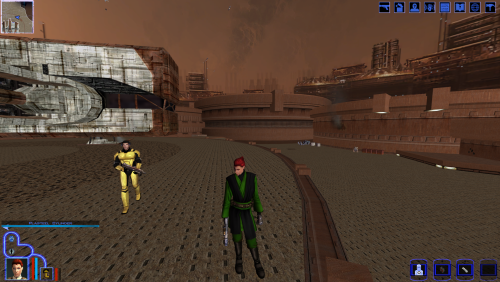
Green Robe Patch for Kainzorus Prime's Prequel Robes
This is a retexture of the Green Robe from SAO's Sleheyron planet mod to make it compatible with Kainzorus Prime's Prequel Robes mod.
I hope you guys enjoy it!
43 downloads
-

Ebon Hawk Texture Enhancement
In the vanilla version of Knights of the Old Republic many of the textures were of extremely low quality.
Through the usage of pictures of actual material and some gems that were left behind in the game files I've
taken some of the worst (and some of the most noticeable/prominent) and made them of much higher quality.
3,874 downloads
-

HD Yuthura Ban
By Dark Hope
This mod will replace and update Yuthura Ban textures. In the modification there are three types of textures. Original Tattoos, Modified Tattoo, Without tattoos.
7,221 downloads
-

Vandar to Yoda
By xavier1985
-------------
Vandar to Yoda
by Xavier1985 (Ross jackson) ross.jackson1985@hotmail.co.uk
-------------
a re-skin of Master Vandar to look like Yoda
-------------
Install:
-------------
Extract N_Yoda01 to the "override" directory
-------------
Uninstall:
-------------
Delete N_Yoda01 from the override directory
-------------
Permission:
-------------
You may NOT re-upload on any other site with out my permission
You MAY use this in any mods you wish to make, but you must gain permission from me first. (email below)
You may NOT alter the mod with out my permission.
-Xavier1985
ross.jackson1985@hotmail.co.uk
1,035 downloads
(1 review)0 comments
Submitted
-

Saber Colors Overhaul animated - SWTOR Edition
By Jorak Uln
This small Overhaul covers the standard saber colors in the game. Unlike the other big LS Overhauls it focuses not on hilt textures but on the blades itself.
Ive retextured them in very closely to the SWTOR look and animated them with 64 pics. Ingame you dont realize the animation actively, but they feel very "fluid" indeed.
Compatibility: Should be compatible with the major LS overhauls. Since these focus mainly on the hilts, i recommend to install them first, then my mod and override if necessary.
Install: Unlike my other files no XnView needed, just drag & drop the into your Kotor\Override folder.
22,317 downloads
-

Republic Recolor (Sith Colors)
By L0ki194
These are some reskins of all the Republic NPCs, which make them have Sith Colors, as you can see in the Screens. This also includes files, that make your clothes to look like the Republic Soldier Armor. Hope you enjoy what I've made.
Originally Made By: L0ki194 (Me)
Note: This is my first ever reskin.
562 downloads
-

PMHC02 HD
By Dark Hope
Re-texture of PMHC02, for Star wars: Knights of the Old Republic. Texture Resolution 1024X1024. The archive contains 5 textures of the head. 3 textures for underwear. 5 icons and 2 .txi.
To Install
1. Download: PMHC02 HD
2. Copy all files to the Knights of the Old republic's Override folder.
(Example location - C:\Program Files (x86)\Steam\steamapps\common\swkotor\Override)
3. When/if prompted to overwrite files, press okay.
4. If you like the mod; leave a comment or endorse! (It would be much appreciated) Made with love.
2,269 downloads
-

PMHB01 HD
By Dark Hope
Re-texture of PMHB01, for Star wars: Knights of the Old Republic. Texture Resolution 1024X1024. The archive contains 5 textures of the head. 3 textures for underwear. 5 icons and 2 .txi.
To Install
1. Download: PMHB01 HD
2. Copy all files to the Knights of the Old republic's Override folder.
(Example location - C:\Program Files (x86)\Steam\steamapps\common\swkotor\Override)
3. When/if prompted to overwrite files, press okay.
4. If you like the mod; leave a comment or endorse! (It would be much appreciated) Made with love.
15,018 downloads
(1 review)0 comments
Submitted
-

Bodysuit Bastila Revisited
By kristykistic
A modified Bastila underwear model with 21 skins. This version was never released anywhere but my website - which didn't last long. Includes the previous widely distributed version 1.2. They will overwrite each other so you can't install both.
818 downloads
-
![More information about "[K1/TSL] Star Forge Robes Texture Enhancement"](https://deadlystream.com/downloads/screens/monthly_04_2017/thumb-69e479b9a7218660b520d12fef2a3447-screen-3.png)
[K1/TSL] Star Forge Robes Texture Enhancement
By L0ki194
Star Forge Robes Texture Enhancement
==============================
Mod For: KotOR & KotOR 2: TSL
==========================
Description:
This mod is intended to sort of "fix" the Star Forge Robes, as they were missing the Cape, Belt and other accessories that Revan's Robe has for it's texture. I know there's already a few mods out there that do the same thing, but I felt like doing my own take on it. If you want to use this in a mod, go right ahead, just be sure to add credit where it's due.
Included is another option that uses the armor pieces from the Female version's texture.
NOTE: You can also use these textures for TSL as well, if you have a mod that allows you to obtain Revan's Robes/Star Forge Robes.
5,729 downloads
-
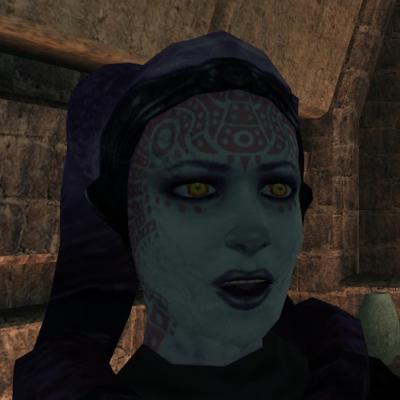
Yuthura Sith Eyes with Light Side Transition
By Kexikus
This mod replaces Yuthura Ban's head texture to give her Sith eyes as seen in the Star Wars movies. But if you manage to turn her back to the light and meet her again later she'll have her original eye colour again.
Installation:
Run YuthuraInstaller.exe and let TSL Patcher do its magic. It should find your KotOR installation automatically. If it doesn't and you have to select it manually, choose the folder that includes swkotor.exe. Do NOT delete the backup folder that is created during the installation, you'll need it if you ever want to uninstall this mod.
Uninstallation:
Delete N_UthuraH.tga, N_UthuraH_Light.tga and dan13_yuthura.utc from your Override folder. Then copy heads.2da from this mods backup folder and place it inside your Override folder, replacing the one already there. If there is no heads.2da in your backup folder, you can simply delete heads.2da from your Override folder (unless you installed other mods editing this file afterwards).
Compabilitiy:
This mod is obviously incompatible with any mod that alters Yuthuras head texture, you can however replace my version with another one if you like it better. It is also incompatible with any mod that alters Yuthuras .utc file on Dantooine and with any mod that alters her dark side transition skin in heads.2da.
I made it that way - this way meaning that I made Yuthura a dark side character on Dantooine and giving her a light side skin while she's dark - because that way it was possible to leave her Korriban .utcs untouched and since it's more common to have them modded that's probably a good idea. And it doesn't matter if the game thinks she's on the dark side on Dantooine anyway.
Credits:
Mod by Kexikus
TSL Patcher by stoffe
THIS MOD IS NOT SUPPORTED BY LUCASARTS OR BIOWARE. USE THIS FILE AT YOUR OWN RISK. NEITHER THE AUTHOR OF THIS MOD NOR THE COMPANIES MENTIONED ABOVE ARE RESPONSIBLE FOR ANY DAMAGE TO YOUR COMPUTER WHEN USING THIS FILE.
903 downloads
(2 reviews)0 comments
Submitted
-

KK's Custom Female PC
By Antonia
This little mod is actually just a hex-edit of another model (we didn't have shiny tools back then) to point to my new, custom textures, with full DS transitions (though I'm still not super happy with those. Guess I don't play DS often enough to be good at them lol)
Anyways, the revised version (this one) has the colors toned down a little. I got a bit carried away with the original, or maybe the high res I can play in now just makes them stand out a lot more, but in any case, I'm happier with them now.
I also went ahead and made it all TSL Patcher happy, so the modifications it needs to make to appearance.2da, heads.2da, and portraits.2da will merely add to those files, and not break anything (thus, ensuring compatibility). Everything else is uniquely named, so this "head" will appear as an additional (16th) choice for a starting female character and not replace any "core content".
The versions of my armband gizmo with KK_PC in their name support this mod, while other versions of the band will work, but it won't know about this content.
Anyways, enjoy. ^-^
-Kitt
818 downloads
-
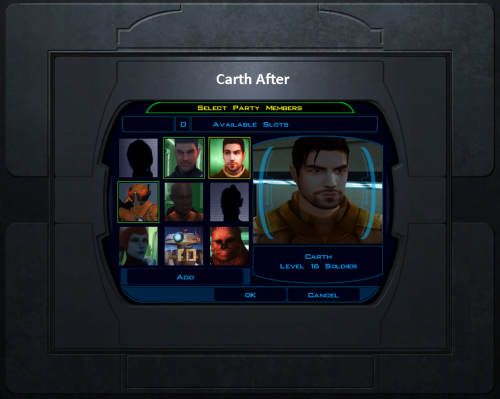
K1 Fenharel Style Character Select Screen Portraits for Carth, HK, and T3
Hey guys. This is my very first 'mod' (feels almost insulting to call it that but what can you do?), such as it is. I made this for my own personal use but thought I'd see if anyone else would like to use it. Please leave feedback on whether you'd like different backgrounds etcetera and I can see about updating/adding to it.
If like me, both Fenharel's character retextures and the HK SWTOR retexture by DarthParametric have become a staple in your override folder, and you're also a little insane in the membrane, you may have been bothered by the fact that Fen included some awesome portraits for each character on the party select screen, yet Carth (even though he was retextured), HK, and T3 have no such portraits. For me, it broke the immersion of the mod to have this juxtaposition. Therefore, I've created portraits for them (while trying to stay as faithful to his style as possible).
Installation: Just stick the TGA's in yer good ole override folder. Warning: DarthParametric's HK retexture already has a po_phk473 file but it is under a different file format. Even though your computer won't say that it conflicts, you need to go into the override folder and delete the file named po_phk473.dds manually for his portrait to show up.
Compatibility: Shouldn't have any conflicts with anything besides mods that change po_pcarth3, po_phk473, or po_pt3m33 (of which I haven't seen any aside from the one detailed in the installation section above, so you should be good to go).
Anyway, let me know what you guys think and thanks a bunch for being such an awesome community.
262 downloads
-
File Reviews
-
Excellent addition! Everything worked great, and I love the different logs and the story they tell!
-
Synchro 20
These look great! Now I know what you meant about not being able to get portrait images out of your head

-
-
Incredible that it's taken this long to use grass and shadows again. Incredible.
-
 1
1
-
-
Worked great!
-
The camera effect has always annoyed me so much, this makes running around the ship vastly better!
-
It's a small change but the visions look so much better now!
-
Worked great, no more running all over!
-
 1
1
-
-
Really fun addition to the game, and no bugs encountered! Worked great combined with Easy Pazaak, as directed here I installed this first then added the file from EP to override. Definitely will include in future playthroughs!
-
 1
1
-
-
I wish I'd known about this sooner! Such a great QOL tool that makes creating/editing such a breeze. Would've saved me soooo many hours if I had been using it prior (curse you broken Kotor tool! XD).
-

diegodb 32
An mod that did the (a couple of years ago) impossible. He solved one of the most pertiment bugs for the K1 users, the enabling of Soft Shadows, Frame Buffer Effects and all the bugs in the metalic surfaces, reflections and all.
To me even the Standalone version of this mod is mandatory. Congratulations goes to the modder
-
1
-
-
Darn shame this never got rated! The HQ Rodian mod is great, but this really makes them stand out!
-

J 169
Restores/fixes the original effects!
-
1
-
-
Synchro 20
The best way to get KOTOR scaled up for modern resolutions. Works great on my superultrawide
-
Always great to have more Czerka unity and diversity! It makes them the ummm "completely legitimate" enterprise the whole galaxy knows them as XD
One note though is that the female .mp3 sound/voice files need to be moved directly into the streamwaves folder rather than into streamwaves\m22aa (otherwise they will not activate/fire).
-


-
File Comments
-

By ShaolinGhost · Posted
Sorry about the error with the installer! I forgot to add FileExists=1 to te changes.ini .... So weird that exists. Updating the mod again right now to fix some bugs with scripted interactions. I tested all of the scripted appearances of the Terentatek and it works well now -
By ShaolinGhost · Posted
Thanks Shay! I'm working on a better armors mod that will add AAA quality outfits to the game to replace all the current armors in the game, and I'm working with @SAO on a Dathomir expansion mod coming soon! -
 Holly! That's a great mod to add to my collection. Definetly looking forward for new ones.
 -
By StellarExile · Posted
Any chance of KOTOR 1 version? -
I don't know much about the execution of the KMRP mod. There's details on it's github page. Scaled Kotor was developed with a few goals in mind: 1) Scaling to any resolution while maintaining the menus aspect ratio and not stretching any UI assets. 2) compatibility with Kotor Patch Manger and it's rapidly growing patch ecosystem 3) HD UI assets that preserve the original aesthetic. This includes the expanded menu borders, icons, backgrounds, and hud. This a large project(much larger
-