Search the Community
Showing results for tags 'pretty'.
Found 6 results
-
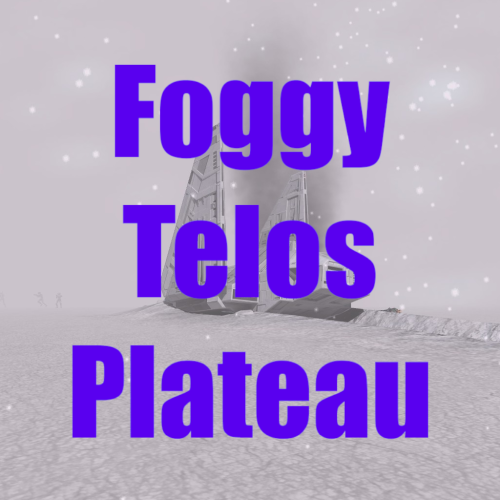
View File Foggy Telos Plateau Description: The Plateau in the polar region of Telos always felt like you were meant to be kind of lost and blind finding the entrance to the Polar Academy. I think the fog helps with that, even though you know the area from playing before. I've also done a loading screen and edited the map so it seems like the crashed shuttle and Academy entrance are your landmarks. Installation: If you're playing with the Aspyr Patch, I'd recommend using J's 3C-FD Patcher to fix fog for TSL. Just drop the files after extracting the .zip archive into your override folder. The .are is necessary for the fog, but lbl_map261tel.tga and load_261tel.tga aren't required for the fog to function. Delete/overwrite any files with the same name. Credits: Holocron Toolset by Cortisol JC's Loadscreen template modders resource GIMP Submitter Lewok2007 Submitted 01/07/2026 Category Mods TSLRCM Compatible Yes
-
Version 1.0.0
135 downloads
Description: The Plateau in the polar region of Telos always felt like you were meant to be kind of lost and blind finding the entrance to the Polar Academy. I think the fog helps with that, even though you know the area from playing before. I've also done a loading screen and edited the map so it seems like the crashed shuttle and Academy entrance are your landmarks. Installation: If you're playing with the Aspyr Patch, I'd recommend using J's 3C-FD Patcher to fix fog for TSL. Just drop the files after extracting the .zip archive into your override folder. The .are is necessary for the fog, but lbl_map261tel.tga and load_261tel.tga aren't required for the fog to function. Delete/overwrite any files with the same name. Credits: Holocron Toolset by Cortisol JC's Loadscreen template modders resource GIMP -

Version v2.1
44,077 downloads
Installation is simple: just drag the .tga files you want into your override folder. It is, in fact, compatible with KotOR 1. Fire Files: fx_fireball01.tga fx_flame.tga Covers the flame effect from flamethrowers and things that reuse this (most custom force powers using fire use this effect). The fireball is an adaptation of Fire_001 made by Mr. Bubble for RPG Maker games. (http://mrbubblewand.wordpress.com/tag/fire/) I recolored the flames to be a little less red, and also added some tween frames to make the whole thing more puffy. It is approximately four times the original flame's resolution - the original was made of multiple overlapping 51x51 sprites expanded up to consume entire bodies, these are 204x204 with soft blending edges. The fire stream is an adaptation of Misc Fire Element made by dbszabo for general usage. (http://dbszabo1.deviantart.com/) It was a pretty simple affair. Ice Files: fx_crystal01.tga fx_reflectmap.tga The ice is an adaptation of Ice Texture made by DudeAlan2001 for general purposes, and is eight times the original resolution, going from 128 to 1024. (http://dudealan2001.deviantart.com/art/Ice-Texture-77076446) I slightly colored the ice and played with the alpha channel, but I didn't really do any hard work on that one. Most of the hard work was actually on the ice's reflect map, reducing the overpowering glow to be a little paler and a little less common. Overall, it looks more like "unnaturally glowing ice and snow" and less like "unnaturally glowing saran wrap." -

Version v2.1
55,056 downloads
Installation is simple: just drag the .tga files you want into your override folder. It is, in fact, compatible with KotOR 1. Fire Files: fx_fireball01.tga fx_flame.tga Covers the flame effect from flamethrowers and things that reuse this (most custom force powers using fire use this effect). The fireball is an adaptation of Fire_001 made by Mr. Bubble for RPG Maker games. (http://mrbubblewand.wordpress.com/tag/fire/) I recolored the flames to be a little less red, and also added some tween frames to make the whole thing more puffy. It is approximately four times the original flame's resolution - the original was made of multiple overlapping 51x51 sprites expanded up to consume entire bodies, these are 204x204 with soft blending edges. The fire stream is an adaptation of Misc Fire Element made by dbszabo for general usage. (http://dbszabo1.deviantart.com/) It was a pretty simple affair. Ice Files: fx_crystal01.tga fx_reflectmap.tga The ice is an adaptation of Ice Texture made by DudeAlan2001 for general purposes, and is eight times the original resolution, going from 128 to 1024. (http://dudealan2001.deviantart.com/art/Ice-Texture-77076446) I slightly colored the ice and played with the alpha channel, but I didn't really do any hard work on that one. Most of the hard work was actually on the ice's reflect map, reducing the overpowering glow to be a little paler and a little less common. Overall, it looks more like "unnaturally glowing ice and snow" and less like "unnaturally glowing saran wrap." -
HD Fire and Ice, Whee! View File Installation is simple: just drag the .tga files you want into your override folder. It is, in fact, compatible with KotOR 1. Fire Files: fx_fireball01.tga fx_flame.tga Covers the flame effect from flamethrowers and things that reuse this (most custom force powers using fire use this effect). The fireball is an adaptation of Fire_001 made by Mr. Bubble for RPG Maker games. (http://mrbubblewand.wordpress.com/tag/fire/) I recolored the flames to be a little less red, and also added some tween frames to make the whole thing more puffy. It is approximately four times the original flame's resolution - the original was made of multiple overlapping 51x51 sprites expanded up to consume entire bodies, these are 204x204 with soft blending edges. The fire stream is an adaptation of Misc Fire Element made by dbszabo for general usage. (http://dbszabo1.deviantart.com/) It was a pretty simple affair. Ice Files: fx_crystal01.tga fx_reflectmap.tga The ice is an adaptation of Ice Texture made by DudeAlan2001 for general purposes, and is eight times the original resolution, going from 128 to 1024. (http://dudealan2001.deviantart.com/art/Ice-Texture-77076446) I slightly colored the ice and played with the alpha channel, but I didn't really do any hard work on that one. Most of the hard work was actually on the ice's reflect map, reducing the overpowering glow to be a little paler and a little less common. Overall, it looks more like "unnaturally glowing ice and snow" and less like "unnaturally glowing saran wrap." Submitter Cinder Skye Submitted 09/10/2014 Category Skins K1R Compatible No
-
Fire and Ice HD, Whee! View File Installation is simple: just drag the .tga files you want into your override folder. It is, in fact, compatible with KotOR 1. Fire Files: fx_fireball01.tga fx_flame.tga Covers the flame effect from flamethrowers and things that reuse this (most custom force powers using fire use this effect). The fireball is an adaptation of Fire_001 made by Mr. Bubble for RPG Maker games. (http://mrbubblewand.wordpress.com/tag/fire/) I recolored the flames to be a little less red, and also added some tween frames to make the whole thing more puffy. It is approximately four times the original flame's resolution - the original was made of multiple overlapping 51x51 sprites expanded up to consume entire bodies, these are 204x204 with soft blending edges. The fire stream is an adaptation of Misc Fire Element made by dbszabo for general usage. (http://dbszabo1.deviantart.com/) It was a pretty simple affair. Ice Files: fx_crystal01.tga fx_reflectmap.tga The ice is an adaptation of Ice Texture made by DudeAlan2001 for general purposes, and is eight times the original resolution, going from 128 to 1024. (http://dudealan2001.deviantart.com/art/Ice-Texture-77076446) I slightly colored the ice and played with the alpha channel, but I didn't really do any hard work on that one. Most of the hard work was actually on the ice's reflect map, reducing the overpowering glow to be a little paler and a little less common. Overall, it looks more like "unnaturally glowing ice and snow" and less like "unnaturally glowing saran wrap." Submitter Cinder Skye Submitted 09/08/2014 Category Skins TSLRCM Compatible No