

Modder's Resources
Resources for aspiring modders
38 files
-
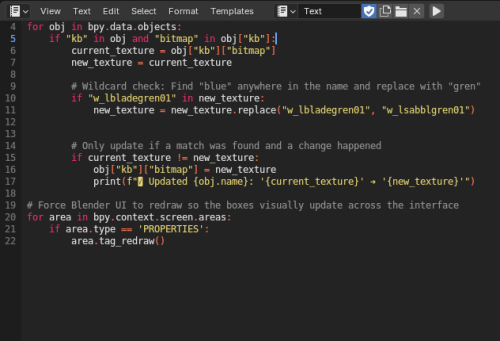
KotOR Blender Texture Swap script
By EwokKotor
Have you ever had a model where you need to replace the textures for WAY to many meshes? This automates that process turning a tedious couple hours into a quick and easy process. No need to convert to .ascii and batch files, this python script allows you to work and achieve your goal right within KotOR Blender!
This Script is meant to replace texture names in the KotOR Model Node ->Mesh -> Main Texture textbox in KBlender.
To USE
1)In Blender switch to the scripting- text editor (shift+f11)
2)Create a new Text Data Block (ALT N)
2)Paste the script
3)On lines 10 and 11 replace "blue" (make sure to replace "blue" on BOTH lines) with your original texture name AND replace "green" with the new texture. -You can replace just part i.e. bladeblue will become bladegreen, OR specify the whole name (replace "blue" with "bladeblue" and "green" with "testgreen" and blueblade will become testgreen.
4) Run script by pressing play button at top of scripting window or (Alt P)
5) To confirm changes at top of blender select Window -> Toggle Console.
K Blender Tex Swap.zip
4 downloads
-

KotOR Switch Modding Framework
By jacqylfrost
Switch KotOR Modding romFS Dummy Folder with 1.0.3 dialog.tlk
This is a set of files and folders designed to make modding the Switch version of KotOR easier and more accessible to a novice user.
Read to the end before using.
You will need a hackable, or modchipped Switch to use this, and custom firmware must be installed, I use Atmosphere, but anything that supports romFS should be fine.
This should work just fine with the digital or physical version (when it is released) without issue. I have only tested this on the most up-to-date build at this time, 1.0.3. It may work on 1.0.2 or 1.0.1, but it is not guaranteed, and I'm not concerned with supporting them.
Extract the zip file, and install any mods you want to use, pointing TSLPatcher at the romfs folder containing the dialog.tlk file. For mods that don't use TSLPatcher, copy files as directed, "romfs" is equivalent to the directory on PC containing the executable.
NOTE: You may need to move files that TSLPatcher is expecting to the folder to be able to patch them. You can access them by dumping your game with nxdumptool, using romfs. Make sure you include updates when doing so.
Feel free to comment with what you needed, and what mod it was for, and if there is popular demand, I will add the files to this pack. The easiest way I found, was just to try installing a mod, and then check the log for errors to see what files were missing.
NOTE: Long filenames cause issues with TSLPatcher, this is exacerbated by the length of the filepath for romFS modding. I recommend moving the "romfs" folder to the root of the drive and patching there, moving the folder back afterwards.
Make sure to check your error log, you may manually need to copy .lip files over to override afterwards.
Move textures (.tga, .txi and .tpc) to override/Textures or they won't apply. NOTE: Aspyr included upscaled textures with this version that are not in other releases of the game. As far as I can tell, they are all in the format the original textures were in, by and large, that means they are in .tpc format, which trumps .tga and .txi files of the same name. If you have issues with a mod's textures not applying, try converting them to .tpc with Xoreos-Tools. You can download my texture reversion mods for K1 and K2 on Switch if you want to see what files are in what format.
At this point, copy the atmosphere folder to the root of your SD card, and you should be done. Please feel free to mention any issues you run into, or workarounds you needed, and I'll update this post.
I tested a run of K1CP with no major issues.
Mods that involve UI likely won't work. Everything is at your own risk, you may end up with a broken save, etc. Worst case scenario, you can uninstall all mods by deleting the `0100854015868000` folder from `/atmosphere/contents/`
Big thanks to JC for helping me pin this all down.
7-22-2022 Update:
Just a change to the readme regarding potential texture issues.
631 downloads
-
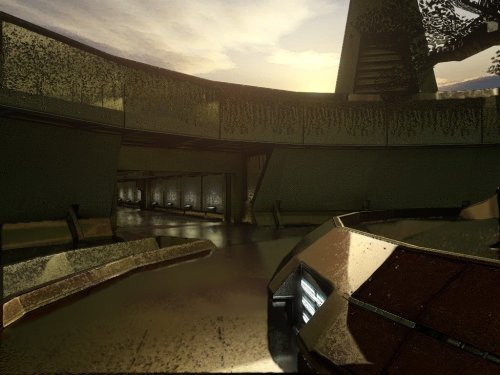
KotOR HyperPixel ReShade
By 90SK
-----------
KOTOR HyperPixel ReShade
by ShaolinGhost and 90SK
-----------
This reshade preset has been tuned to drastically enhance KOTOR's native visual quality.
Please understand It is highly stressful on your system.
It is not perfect. Dialog, will be hindered by the black borders showing old reflectivity from the BaBa: SSR filter's Intensity setting.
KOTOR must be installed, then Install ReShade (With full add-on support), then install this directory into your swkotor directory (where Override is, not inside Override itself).
-----------
The preset is called KOTOR HyperPixel ReShade.
You can edit the settings, they have been calibrated to show significantly enhanced reflections and reflective detail.
It contains a collective work, not expressly created here. All credit is to the ReShade community, the KotOR and TSL Community. The Intensity setting under BaBa: SSR filter will reduce the reflections -----------
30 downloads
(0 reviews)0 comments
Updated
-

Kotor script Extender (K1SE)kse-1.0.0.zip
By TheMMN
K1SE is a script extender for KOTOR 1, in the same tradition as SKSE, OBSE, and NWNX. It is a DLL that loads with the game and gives NWScript functions BioWare never exposed. You write ordinary scripts, compile them with your normal compiler, and add one include line.
This is a tool for mod authors. It does not change anything in the game by itself. On its own it is invisible.
BEFORE YOU DOWNLOAD: Steam only, and only some Steam builds
Every address K1SE uses was derived from one game executable on one machine. At launch it checks your game against eleven fingerprints, and if they do not match it refuses to install and does nothing at all. GOG, retail disc, localized builds, and anything patched have never been tested. Not broken, just never looked at.
That refusal is deliberate. K1SE will not run against offsets it cannot confirm, so it cannot quietly corrupt a save on a build it does not recognize. But it does mean the honest supported list right now is a single build. docs/SCOPE.md in the archive lays out exactly what the evidence base is.
WHAT IT ADDS
Bitwise and integer math. AND, OR, XOR, NOT, three shift variants, popcount, plus min, max, clamp, sign, Euclidean modulo, integer power, and integer square root. NWScript has no bitwise operators at all, so if you have been faking bit flags with arithmetic, that is over.
A key-value store. Set and get strings or integers by string key, test existence, delete. In memory only, cleared when the game restarts, 256 entries. Useful for passing state between scripts inside a session. It is not a save system.
Feats, skills, and saving throws. Grant or remove a feat, adjust skill ranks, adjust Fortitude, Reflex, and Will base saves. These write into the character and survive save and reload.
Utility. A version check, a build id string, an error code you can read after a refused operation, and a logging call so you can drop your own markers into K1SE's log alongside what K1SE did.
Full signatures and notes for every function are in docs/API.md.
READ THIS IF YOU USE THE FEAT FUNCTIONS
A granted feat is permanent. It is written into the creature's feat array and it survives saving and reloading. KOTOR has no engine path that removes an array feat, so K1SE's remover is the only one that exists, and it persists too.
Treat every grant as one-way until you have tested removal inside your own mod. Test on a save you do not care about. The same applies to skills and saving throws.
INSTALLATION
1. Open your KOTOR folder, the one with swkotor.exe in it. On Steam: right click the game, Manage, Browse local files.
2. Rename the existing binkw32.dll to binkw32_real.dll.
3. Copy K1SE's binkw32.dll into that folder.
4. Copy kse.nss to wherever your script compiler looks for includes.
5. Launch the game. K1SE writes a log to %LOCALAPPDATA%\KSE\kse.log and the top of it tells you whether it loaded.
K1SE forwards every call to the real library, so the game behaves normally whether or not K1SE installs itself.
UNINSTALLATION
Delete K1SE's binkw32.dll and rename binkw32_real.dll back to binkw32.dll. That is the whole uninstall. The only other thing K1SE leaves is its log folder, which you can delete.
THE THING THAT WILL CATCH YOU OUT
If K1SE is not loaded, K1SE calls do not throw an error. They silently return zero. That is indistinguishable from your mod being broken.
Guard every script that uses K1SE:
if (KSE_GetVersion() <= 0) return;
Use <= 0 and not == 0. An older K1SE returns a negative number rather than zero, and == 0 would let it through.
If a K1SE script appears to do nothing, read kse.log. It is the only place that records whether K1SE loaded and, if it refused, which fingerprint failed.
COMPATIBILITY
Requires the binkw32.dll slot. If you already run another mod that replaces binkw32.dll, the two will conflict and you will have to pick one.
KOTOR 2 is not supported and has not been tested.
Stability: K1SE ran for 7 hours 10 minutes under sustained script load without crashing or degrading. That is a run length result, not a leak measurement. No leak measurement has been made.
WHAT WOULD HELP MOST
One read-only check on a non-Steam install. GOG, retail disc, anything that is not the build this was developed against. More testing on my own machine cannot widen the supported list, because it is the same single witness re-attesting itself. One run on a different copy of the game is the contribution that actually changes what this project covers. Come to the Discord if you are willing.
PERMISSIONS
MIT licensed. Use it, modify it, redistribute it, bundle it inside your own mod, commercial or not. Keep the copyright notice and license text with it. No permission request needed.
SUPPORT
Discord: https://discord.gg/EqR7uqQy3f
Bug reports, questions, and "it will not work on my copy" all welcome. Attach your kse.log. It answers the did-it-load question in about two seconds.
12 downloads
-
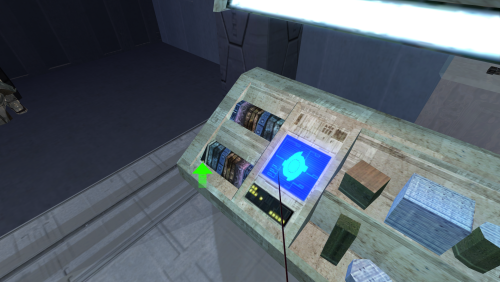
Kiosk Model Fix for K1
By Snigaroo
This file is a model adjustment for the merchant kiosk which fixes part of the texture for the button panel in the center of the console overwriting the left side of what appears like some stacked merchandise.
To install, unpack the file archive with a program like WinRAR or 7zip and move the two files within the "K1" folder to your game's override folder.
This model adjustment was produced by Marius Fett and has been uploaded as a modder's resource with his permission.
4,005 downloads
(0 reviews)0 comments
Updated
-
KOTOR 2025 Mod Guide
By Hraith
Provides complete instructions on modding KOTOR in 2025. Restores cut content, that the community patch does NOT restore, updates the resolution and UI, updates textures, fixes bugs and finally finishes the game.
KOTOR 2025 Mod Guide! Get the full experience in one of the greatest games ever made!
Deadly Stream always has the most up to date version: https://deadlystream.com/files/file/2689-kotor-2025-mod-guide
Included in the mod is two different versions of the guide, one you do everything manually and the other is mostly automated. If one doesn't work, try the other. This build has been tested on many different systems and the majority of it has been tested regularly for about 10 years. I am aware that the community patch is new and people are interested in it but it doesn't restore a lot of things the Restored Content mod does bring back and the two are simply incompatible. Besides, community patch is bad anyway, and doesn't come from the community, just one guy. Follow along step by step or let the scripts do the work, enjoy Knights of the Old Republic!
Summary of mods in build:
1. # KOTOR Restoration mod: https://www.nexusmods.com/kotor/mods/54
2. # 1080p 60fps fix: https://www.nexusmods.com/kotor/mods/1287
Patches
3. # Skyboxes: https://www.nexusmods.com/kotor/mods/69?tab=files
4. # Pazaak Tournament fix: https://www.nexusmods.com/kotor/mods/1343 (This tournament is one of the best sections of the entire game.)
5. # Widescreen fade fix: https://www.nexusmods.com/kotor/mods/1379
6. # Repair HK-47 Fix: https://deadlystream.com/files/file/2324-repair-hk-47-with-common-parts/ (Ignore Source folder.)
7. # Stars and Nebulas: https://www.nexusmods.com/kotor/mods/41
8. # Jedi Dialogue Enhancement: https://deadlystream.com/files/file/2428-jedi-choice-dialogue-enhancement/
9. # High Quality Lightsaber: https://www.nexusmods.com/kotor/mods/1126
10. # Better Bastilla Textures: https://www.nexusmods.com/kotor/mods/1152
11. # Sand ppl disguise fix: https://www.nexusmods.com/kotor/mods/51 Restores functionality present in the xbox version but not in the PC version.
12. # Ebon Hawk animated screen: https://www.nexusmods.com/kotor/mods/1296 (Winrar required to extract. 7Zip will not work.)
13. # Ebon Hawk Transparent cockpit: https://deadlystream.com/files/file/2354-ebon-hawk-transparent-cockpit-windows-for-k1/
14. # Escape Pod upgrade: https://deadlystream.com/files/file/2435-lts_escapepod-hd/ (Winrar extraction.)
15. # Rune covered pillar: https://deadlystream.com/files/file/2381-rune-covered-pillar-crystal/
16. # Czerka on Korriban: https://deadlystream.com/files/file/2332-czerka-on-korriban/ (Czerka doesn’t wear Sith uniforms, they dress in Czerka uniforms.)
17. Optional # Easy Pazaak: https://www.nexusmods.com/kotor/mods/1154 Copy to override and replace existing files. Pazaak is rigged and
even with this you won't always win. (Also: https://pazaakonline.com/ lol.)
Upgrades and Updates
18. # Swoop Bike Upgrades: https://deadlystream.com/files/file/2473-kotor-swoop-bike-upgrades/
19. # Jedi Justice: https://deadlystream.com/files/file/1056-kill-marlena/
20. # Bastila has Battle Meditation: https://deadlystream.com/files/file/2379-bastila-has-tsl-battle-meditation/
21. # Cinematic Music: https://www.nexusmods.com/kotor/mods/1286 (Winrar Extraction.)
22. # Taris dueling arena enhanced: https://deadlystream.com/files/file/1404-taris-dueling-arena-adjustment/
23. # Party Conversation Guarantee: https://deadlystream.com/files/file/2284-party-conversations-on-ebon-hawk
24. # Force Buff Duration Fix: https://www.nexusmods.com/kotor/mods/1420
Optional - (Brotherhood of Shadow is a fan made, voice acted, 8+ hour expansion to the game.)
25. # Brotherhood of Shadow: https://www.nexusmods.com/kotor/mods/95
26. Optional # Yavin 4: https://www.nexusmods.com/kotor/mods/1335 (Adds Yavin 4 as a usable planet.)
Warning! Using Yavin 4 will cause some texture glitches, nothing game breaking, but pillars and containers can show up where they shouldn't. The Pazaak tournament holographic display, which adds a LOT of atmosphere to the section, will not work correctly.
Do not attempt to use Brotherhood of Shadow and Yavin 4 at the same time. Use either one or the other on a single playthrough.
# Textures:
Download the compressed versions. No noticeable improvement on uncompressed
and less stable. Use Winrar to extract all of these. 7 zip doesn’t work. Safe to ignore errors.
27.Ultimate Character Overhaul: https://www.nexusmods.com/kotor/mods/1282
28.unknown world: https://www.nexusmods.com/kotor/mods/1369
29.Kashyyk: https://www.nexusmods.com/kotor/mods/1365
30. Manaan: https://www.nexusmods.com/kotor/mods/1366
31.Endar Spire: https://www.nexusmods.com/kotor/mods/1370
32.Korriban: https://www.nexusmods.com/kotor/mods/1367
33.Dantooine: https://www.nexusmods.com/kotor/mods/1368
34.Tatooine: https://www.nexusmods.com/kotor/mods/1364
35.Taris: https://www.nexusmods.com/kotor/mods/1360
KOTOR Save GameEditor: https://www.nexusmods.com/kotor/mods/103
3,118 downloads
-
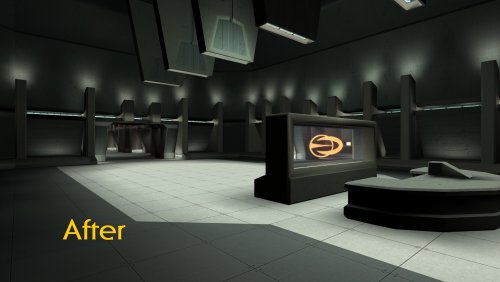
Czerka cut module restoration
Czerka cut module restoration v1.0
By Zobizob
Description:
In 2014, InSidious provided the Lost Modules Pack mod that was providing a playable version from cut content modules. The czerka depot module needed some work to be entirely playable.
This is a modder's ressource. All you need to do is drop the m21aa.mod in the module folder, and the other files into override.
Work done and disclaimer :
All the geometry errors for the models have been fixed as best as i could (misplaced walls, missing parts, missing ceilings, a lot of geometry holes...) The lightmaps have been partially fixed for a good portion of the module, there are still some rough lightmap transition between each room tho and i'm not skilled enough yet to fix this entirely The walkmeshes have been entirely fixed There was no minimap. I pulled out a custom minimap using holocron toolset and edited the .are from the module so it is displayed accurately in the level. I placed 2 doors and some waypoints, they are leftovers from work on my own mod. You'll have to edit this if you want to use it for your own work. You will have to edit the .are to change the name from the module depending on how you wanna use it. It is currently named "Endar Spire - Command Module". There is still 1 file missing, the .pth file which allows npcs to walk inside the module in a scripted way. I will see to pull out a custom .pth file. Credit:
InSidious for his original Lost Modules Pack mod.
Thor110 for his very valuable insights.
Kotor discord channel for insights on developping mods for this awesome game.
Permissions:
Feel free to use this work, just credit me if you're using my files.
Legal:
THIS MODIFICATION IS PROVIDED AS-IS AND IS NOT SUPPORTED BY BIOWARE/OBSIDIAN ENTERTAINMENT, LUCASARTS, DISNEY OR ANY LICENSERS/SPONSORS OF THE MENTIONED COMPANIES. USE OF THIS FILE IS AT YOUR OWN RISK AND THE ABOVE MENTIONED COMPANIES OR THE AUTHOR IS NOT RESPONSIBLE FOR ANY DAMAGE CAUSED TO YOUR COMPUTER FOR THE USAGE OF THIS FILE.
63 downloads
(0 reviews)0 comments
Updated
-
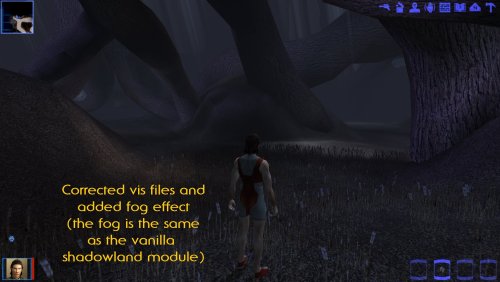
Kashyyk restored module v1.0
Kashyyk cut module restoration v1.0
By Zobizob
Description:
In 2014, InSidious provided the Lost Modules Pack mod that was providing a playable version from cut content modules. The kashyyk module was the one that needed the less work to be entirely playable.
This is a modder's ressource. All you need to do is drop the m25ab.mod in the module folder, and the vis file + the minimap files into override.
I provided 2 versions of my custom minimap: 1 without any background, 1 with the gamefile minimap existing for this module as a background.
Work done and disclaimer :
The vis file has been corrected, so there won't be any part of the level disappearing within your field of view. The minimap existing in the game file was unusable, being only a screen from the top of the map. I created a new minimap using the .are view from holocron toolset. There are 2 versions of my custom minimap, 1 without any background, and another 1 using the preexisting minimap from the gamefiles as a background. I edited the .are so the minimap was accurately displayed in game, and also to add the fog effect like in the K1 vanilla shadowland module. The level is entirely playable and very faithful to the other shadowlands modules. The only thing a bit wrong is some bird animations, but i can't edit them with blender without breaking them even more. This little issue is really not that noticeable now that the fog effect has been enable anyway. There is still 1 file missing, the .pth file which allows npcs to walk inside the module in a scripted way. I will see to pull out a custom .pth file. Credit:
InSidious for his original Lost Modules Pack mod.
Thor110 for his very valuable insights.
Kotor discord channel for insights on developping mods for this awesome game.
Permissions:
Feel free to use this work, just credit me if you're using my files.
Legal:
THIS MODIFICATION IS PROVIDED AS-IS AND IS NOT SUPPORTED BY BIOWARE/OBSIDIAN ENTERTAINMENT, LUCASARTS, DISNEY OR ANY LICENSERS/SPONSORS OF THE MENTIONED COMPANIES. USE OF THIS FILE IS AT YOUR OWN RISK AND THE ABOVE MENTIONED COMPANIES OR THE AUTHOR IS NOT RESPONSIBLE FOR ANY DAMAGE CAUSED TO YOUR COMPUTER FOR THE USAGE OF THIS FILE.
62 downloads
(0 reviews)0 comments
Updated
-
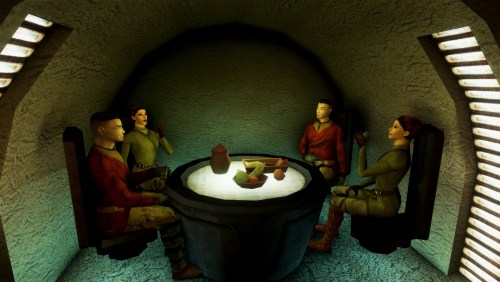
Improved Cantina Sitters
By Alvar007
Improved Cantina Sitters
By Alvar007
-------------------------------------------------------------------------
DESCRIPTION: This mod populates some of the empty spots at the Tatooine cantina, mainly the four alcoves with tables on the room. Each sitter has the corresponding item depending on the animation played. The laughing animation is also implemented as another placeable sitting animation. The mod also adds a Duros as a new placeable sitter in the game, replacing the Twilek male that wasn’t being used. Finally, the two low-poly human sitters at the Upper City Taris cantina are replaced by high-poly models.
INSTALLATION: Just run the .exe that comes with this download and select the game's installation main folder (NOT override).
COMPATIBILITY: This mod should be compatible with any mod that doesn’t mess with the placeable sitters in the cantinas.
LICENSE: Anyone is welcome to use this mod in any of their mods or include it in a mod build.
CREDITS: EbonHawkStowaway999 for the idea.
-------------------------------------------------------------------------
THIS MODIFICATION IS PROVIDED AS-IS AND IS NOT SUPPORTED BY BIOWARE/OBSIDIAN ENTERTAINMENT, LUCASARTS, DISNEY OR ANY LICENSERS/SPONSORS OF THE MENTIONED COMPANIES. USE OF THIS FILE IS AT YOUR OWN RISK AND THE ABOVE MENTIONED COMPANIES OR THE AUTHOR IS NOT RESPONSIBLE FOR ANY DAMAGE CAUSED TO YOUR COMPUTER FOR THE USAGE OF THIS FILE.
5,364 downloads
-
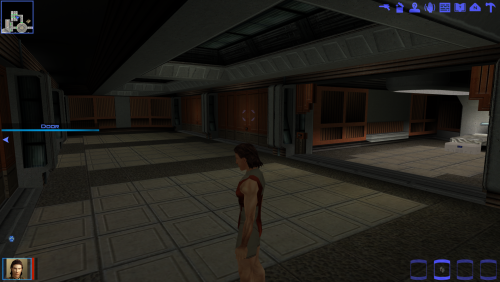
Dantooine enclave extra rooms modder's ressource
Description:
This is a modder's ressource. In K1 jedi enclave there is a dormitory for visitors with 3 opened rooms. 2 other doors were present in front of the 3 rooms, but were closed (without any geometry behind them). I mirrored the preexisting rooms so now there are 3 playable rooms. Basically you just have to drop the 5 files included into override, but you will also have to edit the doors from the .git because in vanilla 2 of them are closed and the last one is non existent because it was a wall.
Disclaimer :
This mod should be compatible with anything i guess?
The only minor problem with my ressource is that i extended the basic corridor's walkmesh to be able to walk into the new rooms. This is not the "by the book" way to pull it out, but i couldnt manage to make the door links work despite my numerous attempts. So the only downside from this ressource is, if you want to have a different ambient sound in these new rooms separate from the main corridor, you can't. But in vanilla the rooms should have the same ambient sound than the corridor, so its not a huge deal here.
I also provided an edited minimap.
Credit:
Thor110 for his very valuable insights.
Kotor discord channel for insights on developping mods for this awesome game.
Permissions:
Feel free to use my work as you see fit, just credit me if you use my files.
50 downloads
-
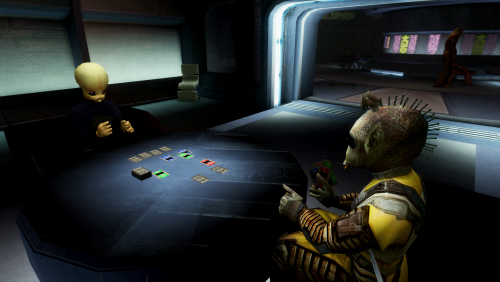
Fixed Cantina Sitters
By Alvar007
Fixed Cantina Sitters
By Alvar007
-------------------------------------------------------------------------
DESCRIPTION: This mod adds Pazaak cards and drinking cups to the corresponding sitters in the cantinas. It also fixes the drinking animation for the aqualish in lower city Taris cantina. I realized that there is a bith drinking in the Tatooine cantina, so I tweaked that as well.
INSTALLATION: Just run the .exe that comes with this download and select the game's installation main folder (NOT override).
COMPATIBILITY: This mod should be compatible with any mod that doesn’t mess with the placeable sitters in the cantinas.
LICENSE: Anyone is welcome to use this mod in any of their mods or include it in a mod build.
-------------------------------------------------------------------------
THIS MODIFICATION IS PROVIDED AS-IS AND IS NOT SUPPORTED BY BIOWARE/OBSIDIAN ENTERTAINMENT, LUCASARTS, DISNEY OR ANY LICENSERS/SPONSORS OF THE MENTIONED COMPANIES. USE OF THIS FILE IS AT YOUR OWN RISK AND THE ABOVE MENTIONED COMPANIES OR THE AUTHOR IS NOT RESPONSIBLE FOR ANY DAMAGE CAUSED TO YOUR COMPUTER FOR THE USAGE OF THIS FILE.
188 downloads
-

SWTOR Icons Modder's Resource
This is a dump of various icons from The Old Republic, converted to PNGs for ease of use. The full dump is the 315MB archive which are untouched besides the format conversion, while the smaller 58MB archive is a subset of ones I considered useful/interesting and ran through an upscaler to resize and clean them up a little. I extracted these a while back, so it's not completely up to date with the latest version of the game.
Use how you see fit, since they don't belong to me. But credit Bioware/Broadsword/EA as the original source.
343 downloads
-
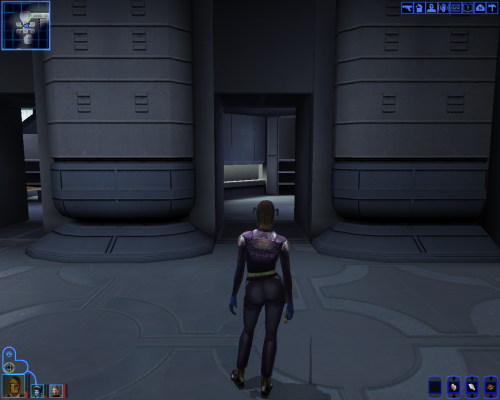
Manaan Hotel Missing Room
By Thor110
NOTE : This was made specifically for the Expanded Galaxy Project but I decided to release a modders resource version.
Manaan - Hotel Missing Room - TSL Levels in K1
by Thor110
This adds in that missing and locked room in the Hotel on Manaan, turns out the walkmesh was there all along, just not the model, so I copied the room from the opposite corner and rotated it's contents then moved them in to the model.
------------------------------------------------------------------------------------------------
Installation:
Copy Modules & Override folder to the game directory.
Warp to m26ae to look around the level.
There is an installer specific version for anyone who wishes to install the empty rooms to the game for a regular playthrough.
------------------------------------------------------------------------------------------------
Thanks to PapaZinos for reminding me room containers can't be rotated and only their contents can.
Used KotOR Tool, Blender, MDLEdit-v1.0.4, GIMP and Notepad++ to make this.
339 downloads
-

SWTOR Saber Hilt Resource
This is a dump of most of the double and single saber hilts from The Old Republic (as-of May 2025) as FBX files. There are 207 single hilts and 158 double hilts, although note that somewhere between half to two thirds of these are just texture variants, while a not insignificant number of the rest are just minor mesh variations (e.g. different emitter shroud).
Notes:
The meshes have been scaled to a rough ballpark approximation of KOTOR's hilt size, but will need manual adjustment as well as scene setup (addition of blade planes, etc.). Some will probably also require custom low poly shadowcasters as well, assuming you want to enable shadows. TOR uses texture-based emissive, which will necessitate either mesh splitting or custom mesh creation to replicate/approximate in Odyssey. I have left out some of the more fancy things that TOR gets up to with VFX involving separate meshes with emissive and multiple UV channels.
Textures vary in their quality. Many of the launch-era textures are low resolution (256x256) compared to more recent additions (1024x1024), as well as very simplistic and cartoony. The models are similar, with launch hilts often being oversized with minimal geometry detail. Although note that even some more recent additions occasionally have low res textures, even when the models are more detailed.
Each hilt archive includes a text file that specifies its material and texture names.
Textures are included in their original DDS format. For PS users, install the Intel DDS plugin. For everyone else, you can use TexConv from MS's DirectXTex utilities to convert them to TGA. I have provided pre-swizzled and normalised normal maps in TGA, already in OpenGL format with a blank alpha, ready for conversion to TPC (thanks to ndix UR's normun tool). Check this SWTOR Slicers wiki page for information about TOR's texture setup. Note that the diffuse textures are made for TOR's renderer, so will likely require some adjustment to work correctly in Odysssey. You'll also need to make your own envmap masks.
Given the sheer volume of files and the process of manually converting them, it's quite possible I have missed some textures or the like. Let me know if that's the case.
If you're looking for a particular hilt and you only know its in-game name (from, for example, Swtorista) check TORCommunity's database (warning, site is often slow as hell) and find its model name in the Detailed Data tab of the item (search for gr2, for example - "Model": "\\art\\dynamic\\weapon\\model\\saber_high12_a01_v01.gr2"). Refer to the SWTOR Slicers wiki page for more detailed information.
Posted in the K1 section, but naturally they'll work for either game depending on what format you export the models in.
Terms of Use:
I make no claims of ownership. This is all taken from TOR's asset files, I just extracted them. Credit belongs to Disney/EA/Bioware/Broadsword. Use as you see fit, although if you use them in a mod release an acknowledgement would be nice.
274 downloads
(0 reviews)0 comments
Submitted
-

Jolees hut mod - Modders resource
By djh269
Jolee's Hut - Modders resource 1.3
Author: djh269
Release Date: 23.02.2017
Installation:
Simply click on the TSLPatcher.exe and click install and sit back and watch the TSLpatcher do its magic
Uninstallation:
N/A
Description:
- djnugent requested a Jolee's Hut mod so I made a simple little house that you can enter for our old moody friend.
- I've also added an extra Zoological Compound and a separate mod with extra plants, these can be installed separately.
Known Bugs:
this mod shouldn't have bugs but if there is Just PM me on Deadlystream.
Incompatibilities:
Shouldn't be incompatible with anything but if there is just PM me on Deadlystream
Permissions:
- As this is a modders resource full usage of this mod is allowed, in fact it's encouraged.
- The only thing you can't use is the info.rtf or the tslpatcher.
Thanks:
djnugent for the request.
Kainzorous Prime for allowing me to use the TSLPatcher frame from his TSL NPC Overhaul mod (Without him this mod wouldn't be possible).
N-DReW25 for his assistance and usage of his info.rtf file.
Fairstrides for his unquestionable patience whilst helping me out in the past.
bead-v for his module editting assistance.
Kexikus for his tslpatcher advice in making my mod more compatible.
Bioware for such an amazing game.
Fred Tetra for Kotor Tool and everyone who downloads the mod.
Holowan labs for the endless pit of information for Kotor modding.
Legal:
THIS MODIFICATION IS NOT SUPPORTED BY BIOWARE/OBSIDIAN ENTERTAINMENT, LUCASARTS, DISNEY OR ANY LICENSERS/SPONSORS OF THE MENTIONED COMPANIES. USE OF THIS FILE IS AT YOUR OWN RISK AND THE ABOVE MENTIONED COMPANIES OR THE AUTHOR IS NOT RESPONSIBLE FOR ANY DAMAGE CAUSED TO YOUR COMPUTER FOR THE USAGE OF THIS FILE
896 downloads
- modders resource
- Kashyyk
- (and 1 more)
-
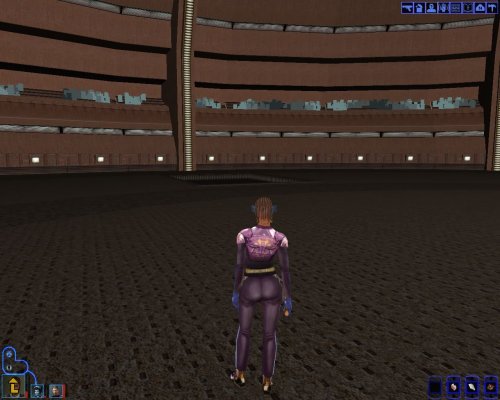
Sleheyron Arenas
By Thor110
Just the files needed to access the three Sleheyron Arenas that are contained within the kotor 1 files.
They aren't perfect, the walkmeshes are a little off and this results in the player getting stuck at points.
The crowd is also non-existent.
This won't work without the Sleheyron Demo by SithSpectre : https://deadlystream.com/files/file/391-sleheyron-demo/
Because it needs the following files which are included in the Sleheyron Demo.
m31aa_00l.mdl
m31aa_00l.mdx
The .wok file isn't necessary.
NOTE : This is a modders resource and isn't intended for use by non-modders, all it does is add three empty levels for the Sleheyron Arenas that can only be accessed via the warp command.
Thor110
36 downloads
(0 reviews)0 comments
Submitted
-
K1 Switch Override Files
By Thor110
This is the contents of the Override folder on the Switch version of the game.
99% of this is absolute garbage, but I wanted to get a closer look to see if there was anything special that would need to be reworked for any of my mod projects, such as button prompts or .gui files and thought I would release it for anyone else seeking to do the same.
Taken from v1.0.0 of the game.
Included is a folder that has any changes made in v1.0.4 of the game.
I chose not to include anything else from the release, there isn't anything special of interest besides Japanese support for the game.
Thor110
27 downloads
(0 reviews)0 comments
Submitted
-
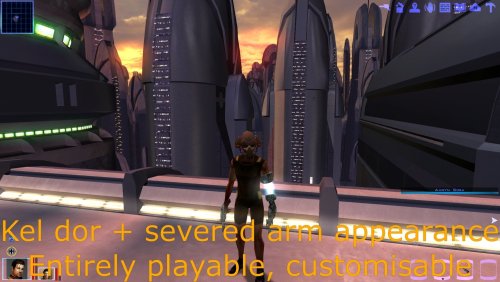
Kel Dor severed arm model - Modder's ressource
Description
This mod is a modder's ressource, and will not include anything in game.
Thx to @DarthParametric kel dor modder's ressource, this mod is possible.
I was unhappy with Bao dur's models animations while porting him into k1. I figured i would scrap the arm and tie it to a scout model, which bear the same size properties.
This ressource contains a completely kel dor appearance/head, with bao dur severed/robotic arm, bao dur animation as unarmed to see the model in action, and complete support for all the vanilla items in the game.
So you can do a lot of thing with this, make a new playable character or bring new npc appearances.
The textures provided only cover vanilla + some extras (as i use my override folder, i have few modder textures i provided aswell) because the uv maps are different from vanilla models. They are 2048x2048.
Video showcase
Disclaimer :
There are few combat animation glitches, the weapon in the right hand will be slightly off, the robot arm is not totally under the gun for rifles for instance, or is not "exactly" at the perfect position for dual hand melee weapons. There is clipping with heavy armors especially. Otherwise after playtesting everything else seems fine.
Some armor textures have conflicted properties with .txi. When cm_bright was applied, i deleted alpha channel to the arm so the armor keeps the original effect, but the arm metal won't be reflective. I deleted alpha channels for robes to deal with transparency/metal reflection. I provided the unedited textures aswell.
Obviously models have unique names to prevent conflict with other vanilla models in game and between each other.
The default head has jaw animation, but theyre a bit too much imo. I couldnt fix it, so i provided a head model without the jaw animation in the ressources.
Installation and how are the files ordered :
- The folder "Add the appearance" contains an executable that will add everything to your game override and create a single new appearance row in appearance.2da that bears the mullet man head and white skin. You can manually change the head
inside appearance.2da if you wish to, this is a ready to go install and you simply have to give the appearance to npcs or anything. The black/asian skins are located in the ressources folder/underwear.
- The folder "ressources" contains everything related to the mod itself (body models and textures). The textures contained within the base appearance folders (robes, clothing, armors ...) are unedited, which mean there will be bad interactions regarding alpha layers and .txi i attributed.
- The "edited textures" folder contain my ready to go texture, i edited the alpha layers there so maybe you prefer tweaking the base textures.
- The "supermodel" folder contains Baodur base model/textures (you can use it if you want to) and contains the animation information to perform the unarmed attack. I tied every models to baodur base one as a supermodel to allow the custom attack animation. If you want to get rid of this, simply change every model's supermodel to s_female02.
- The texture for bao dur arm is provided aswell in a single folder.
- The "No animation jaw" folder contains the head model without the jaw animation.
- The "base texture" folder contains the texture with only bao dur arm and default kel dor hand.
Credit:
@DarthParametric, i totally stole his entire process to make Kel dor models possible via his modder's ressource.
Kotor discord channel for insights on developping mods for this awesome game.
Permissions:
Feel free to use my work, just a simple credit.
32 downloads
(0 reviews)0 comments
Updated
-
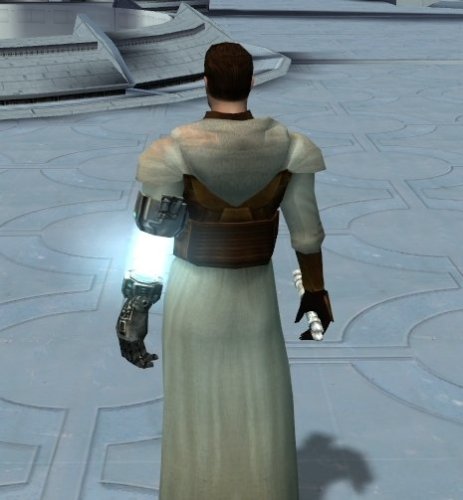
K1 Severed arm male body model - Modder's ressource
Description
This mod is a modder's ressource, and will not include anything in game.
I was unhappy with Bao dur's models animations while porting him into k1. I figured i would scrap the arm and tie it to a scout model, which bear the same size properties.
This ressource contains a completely new male body appearance, with bao dur severed/robotic arm, bao dur animation as unarmed to see the model in action, and complete support for all the vanilla items in the game.
You can tie any head to the model aswell. So you can do a lot of thing with this, make a new playable character or bring new npc appearances.
The textures provided only cover vanilla + some extras (as i use my override folder, i have few modder textures i provided aswell). They are 1024x512 to allow the arm uv mapping into a single texture.
Atm the textures are low res, im gonna update this someday, at least to 2048x1024.
Video showcase for the ressource
Disclaimer :
There are few combat animation glitches, the arm is not totally under the gun for rifles for instance, or is not "exactly" at the perfect position for dual hand melee weapons. There is clipping with heavy armors especially. Otherwise after playtesting everything else seems fine.
Some armor textures have conflicted properties with .txi. When cm_bright was applied, i deleted alpha channel to the arm so the armor keeps the original effect, but the arm metal won't be reflective. I deleted alpha channels for robes to deal with transparency/metal reflection. I provided the unedited textures aswell.
Obviously models have unique names to prevent conflict with other vanilla models in game and between each other.
Installation and how are the files ordered :
- The folder "Add the appearance" contains an executable that will add everything to your game override and create a single new appearance row in appearance.2da that bears the mullet man head and white skin. You can manually change the head
inside appearance.2da if you wish to, this is a ready to go install and you simply have to give the appearance to npcs or anything. The black/asian skins are located in the ressources folder/underwear.
- The folder "ressources" contains everything related to the mod itself (body models and textures). The textures contained within the base appearance folders (robes, clothing, armors ...) are unedited, which mean there will
be bad interactions regarding alpha layers and .txi i attributed.
- The "edited textures" folder contain my ready to go texture, i edited the alpha layers there so maybe you prefer tweaking the base textures.
- The "supermodel" folder contains Baodur base model/textures (you can use it if you want to) and contains the animation information to perform the unarmed attack. I tied every models to baodur base one as a supermodel
to allow the custom attack animation. If you want to get rid of this, simply change every model's supermodel to s_female02.
- The texture for bao dur arm is provided aswell in a single folder.
Credit:
@DarthParametric, i totally stole his entire process to make Kel dor models possible via his modder's ressource.
Kotor discord channel for insights on developping mods for this awesome game.
Permissions:
Feel free to use my work, just a simple credit.
39 downloads
(0 reviews)0 comments
Updated
-

High Quality Blasters for Modders
By Sithspecter
A KNIGHTS OF THE OLD REPUBLIC RESOURCE
High Quality Blasters for Modders
By Sithspecter
Description:
These are all the source files necessary for you to create your own iterations of my High Quality Blasters.
Permissions:
If you wish to create a mod that adds on to my High Quality Blasters mod with a new item utilizing these resources, you are free to do so as long as you provide the appropriate credit AND please message me with a screenshot. You don’t need to wait for me to respond, just drop me a PM so that I’m aware.
DO NOT UPLOAD UN-MODIFIED SOURCE FILES FROM THIS RESOURCE WITHOUT EXPRESS PERMISSION FROM MYSELF. THIS RESOURCE IS INTENDED TO ALLOW MODDERS TO CREATE THEIR OWN RETEXTURES AND REMODELS OF THE WEAPONS.
Use:
Included are the original ASCII model files and the PSD source texture files. It should be all you need to create your own retextures/remodels of the blasters in the mod.
To achieve final texture results similar to my mod, complete these steps once you are done with your texture:
1. Merge all the visible layers into one layer.
2. Select all and copy.
3. Paste into the Alpha Channel
4. Invert the image in the Alpha Channel
5. Play with the Brightness/Contrast until you achieve predominantly white, with bits of black where you want the texture to be shiny.
6. Size the image to 512 by 512 for rifles, and 256 by 256 for pistols.
7. Sharpen the image 2-3 times.
8. Sharpen the Alpha Channel 2-3 times.
9. Profit
Bugs:
Due to differences between the body models (especially female), the weapons will sometimes appear to clip the hands (especially in the female off-hand). There is nothing I can do about this without introducing more issues, it is something that happens with the default weapons, and you will have to live with it.
The Assassin Droid and the War Droid carry repeating blasters. I attempted to retrofit the high quality blaster to those models, but was unable to due to tool limitations. The texture is still applied to the old models, albeit incorrectly. It still looks better, though slightly odd. You will have to live with it.
The new textures are also applied incorrectly to the weapons you can see on the tables in Kebla Yurt's store. They might look a bit funky, but you will have to live with it.
Legal:
THIS MODIFICATION IS PROVIDED AS-IS AND IS NOT SUPPORTED BY BIOWARE/OBSIDIAN ENTERTAINMENT, LUCASARTS, DISNEY OR ANY LICENSERS/SPONSORS OF THE MENTIONED COMPANIES. USE OF THIS FILE IS AT YOUR OWN RISK AND THE ABOVE MENTIONED COMPANIES OR THE AUTHOR IS NOT RESPONSIBLE FOR ANY DAMAGE CAUSED TO YOUR COMPUTER FOR THE USAGE OF THIS FILE.
1,749 downloads
-

kotor1 Amazon Games's K1 Release sounds/movies fix
By th3w1zard1
As some of you know, K1 was released free on Amazon Games for Prime users recently. Unfortunately, the release is bugged and partially broken. Here are the steps to fix it:
First, find out where your game is located on disk. Default path is: C:\Amazon Games\Library\Star Wars - Knights of the Old
Download and extract the provided ZIP, and copy and replace those files into your game's miles folder, backing up if you ever want to revert the changes.
backup and delete the following files from your miles folder: mssds3d.flt, msseax.flt, mssogg.asi **copy** mss32.dll from the miles folder into the same directory as swkotor.exe, overwriting when prompted. Back up the original if you want to revert. The Editable EXE is required from here on out, the amazon swkotor.exe will **not** work after these changes. Download it, backup swkotor.exe, and replace Remove Disable Movies=1 and Disable Sound = 1 from the swkotor.ini (or set them to 0) Your game should now have fully working audio and movies!
The files provided here in the .zip are from the steam version of the game, other versions of the game have the exact same files. For some reason only the Amazon release is different.
1,315 downloads
-
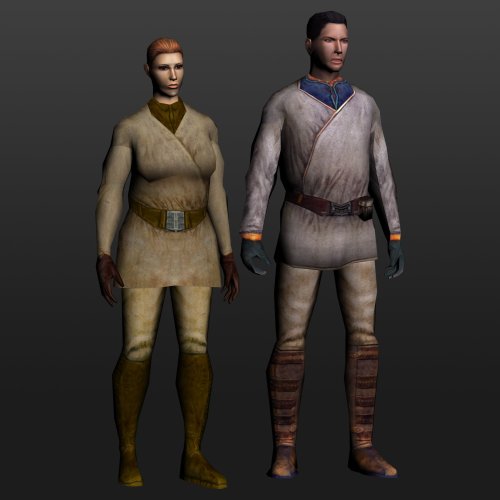
Fat Commoner Body Models - Modder's Resource
This is a modder’s resource that provides some additional commoner body models that can be used for NPCs. The game includes body models for fat male and female commoners, each using a custom texture with no variants. They are unused. Originally, as part of the K1 Community Patch, a fat-ified version of the standard male commoner body was made to be used for Handon on Dantooine. This allowed it to use the regular commoner textures. As of K1CP v1.10.0, this addition has been removed, so the assets are now being made available for third party mods to make use of. Additionally, the vanilla female fat commoner model has had some adjustments made to its UVs so that it can also make use of the regular commoner texture variants.
A simple TSLPatcher setup has been provided that edits the two vanilla appearance rows to switch their texture assignments, as well as adding new rows using all the regular NPC heads. Note to regular users: Installing this package by itself will do nothing as the game does not make use of the vanilla fat commoner appearance rows. It requires other authors to create content utilising it.
Permissions:
This is a modder’s resource, and thus intended to be utilised by the community. You can freely incorporate the included assets in your mod. Simply provide credit to the Community Patch team and link back to this page. Do not redistribute/rehost this resource as-is elsewhere.
111 downloads
-
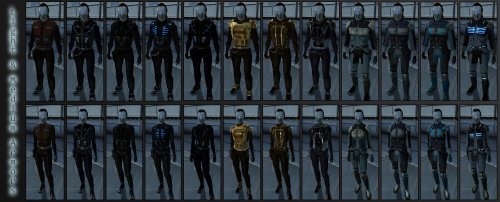
Modder's Resource: SpaceAlex's Unfinished K1 Enhancement Pack
By JasonRyder
SpaceAlex's Unfinished K1 Enhancement Pack
Modder's Resource for: KoTOR.
I DID NOT CREATE THIS. SpaceAlex did. It was intended to be both a cosmetic NPC upgrade, a loot upgrade that added new items for Knights of the Old Republic, and more. Sadly, it was never finished, but plenty of work was completed by the time the project was cancelled as these screenshots display. Since SpaceAlex's K1 Enhancement Pack was not hosted on the website, I decided to host it myself and provide an easy link to all the assets so someone can either finish it or use bits and pieces of it in their own mods. Personally, I would like the entire mod to be finished as SpaceAlex intended with the NPC Modification Pack Bonus Content, Party Member Reskins, Player Character Clothing and Head Reskins, and Miscellaneous items implemented as optional add-ons.
Also, there is a fix for invisible heads for some reason, here: https://deadlystream.com/files/file/417-spacealexs-k1ep-invisible-head-fix/ . Please download this too if you're using it as a mod or just using it for editing.
Lastly, do not use this with K1 Restoration because it will cause cosmetic glitches such as Outcast Children looking like Mandalorians.
NOTE: I just realized that I took out a few pieces of the file so it would work. I took out anything related to Darth Bandon and Calo Nord, as these additions cause game-breaking bugs.
Credits:
-The Deadlystream Website Team for creating this website.
-SpaceAlex for creating all these assets
-All the great modders and users in this community
-Fred Tetra for his KOTOR Tool which makes this possible
-The original creator of TSL Patcher, which makes mod installation so much easier
-BioWare for creating the Odyssey Engine and this awesome game.
-milestails and Fallen Guardian for providing the files themselves: https://onedrive.live.com/?id=AF290B5E544EBB56!121&cid=AF290B5E544EBB56
1,750 downloads
- k1 enhancement
- spacealex
- (and 7 more)
-

Topaz GigaPixel AI Upscales - K1
By Thor110
WARNING : THIS IS A MODDERS RESOURCE NOT INTENDED FOR USE WITH THE GAME!
Modder's Resource - Topaz GigaPixel AI Upscales - Source
These are all of the first games textures upscaled by Topaz GigaPixel AI.
While they are intended for use eventually with my overall project, for the time being I have handed them off to a texture artist to clean up beforehand, after which they will also be released for the standalone game as well.
It was also suggested to me that I should upload them here as a Modder's Resource and backup for people to use when repainting any textures for the game.
So here they are.
The images shown aren't from the game, but they are the only reference imagery I have to show the upscaling in action. ( added some screenshots of the actual textures )
All TXI files as well as the few textures that had issues being upscaled in their own packages.
155 downloads
(0 reviews)0 comments
Updated
-

New_Lightsaber_Blades_Modder's_Res
By Crazy34
========================================================
KNIGHTS OF THE OLD REPUBLIC SOURCE FILE
========================================================
New_Lightsaber_Blades_Modder's_Res
=================================
Author: Crazy34
Contact: PM me on Deadlystream
For: K1/TSL
Date: 03/24/2021
=================================
DESCRIPTION:
This modder's resource contains a detailed step-by-step instruction on how to use and modify the new lightsaber blade system introduced in my recent mods.
You can find this instruction in the file: manual.pdf.
The folder resources contains example textures, saber models in the ascii format and example batch file to generate color copies of a given saber.
I HOPE that in the future some talented texture artist will create better looking blade textures using these new blade models.
CREDITS:
Kaidon Jorn:
Lightsaber Hilts models and textures and icons are created by Kaidon Jorn and taken from his SLM 2.0 mod, which you can find here: https://deadlystream.com/files/file/551-schematic-lightsaber-mod-slm/
Thank you very much for the permission to use your models and hilts here. They are amazing and I enjoyed working with them.
Sithspecter:
The new layout for the lightsaber blades plane models are inspired by Sithspecter's animated Crossguard Lightsabers mod for KOTOR which can be found here: https://deadlystream.com/files/file/1314-crossguard-lightsabers/
Thank you very much for the permission to include your animated unstable blade texture and to modified them to include the new TSL colors.
___________________________________________________________
COMPATIBILITY:
___________________________________________________________
INSTALLATION:
___________________________________________________________
BUGS:
The tip of the blade has a spike which comes from a deformation of the lightsaber planes. This is also present in the original model. I was not able to find a fix. (Sorry about that.)
The lightsaber hilts will clip through the blades. (Unfortunately, DarthParametric has said that it is not possible to fix this.)
___________________________________________________________
PERMISSIONS:
You may use this mod as you see fit. Display it in screenshots, make it compatible with your mod. Use it to update your own mod or use it as a basis to start your own lightsaber mod. However, please give credit where it's due.
___________________________________________________________
THANKS:
Fred Tetra: All the thanks for KotOR Tool.
TK102: All the thanks for K-GFF.
ndix UR: All the thanks for the kotorblender plugin, which I used to create the blade 3d models.
bead-v: All the thanks for Mdledit and constantly updating it. Without it this mod would not be possible. Thanks also for the comments on the ascii code.
Kaidon Jorn: All the thanks for giving me the permission for using the hilts textures and icons. With these included this is a real mod. Thank you so much.
Sithspecter: All the thanks for giving me the permission to include his animated blade textures and to modify them. Also i want to thank you for inspiring me to start modding KOTOR in the first place.
Jorak Uln: All the thanks for the constant feedback, suggestions and beta testing of the preliminary versions of the mod.
JCarter426: I want to thank him for providing information regarding lights in KOTOR and the documentation.
DarthParametric: I want to thank him for answering all my questions and being so helpful when creating and tuning of the models.
Sith Holocron: For minor proofreading of the mod documents.
For the initial feedback on the ambient light, I want to thank: DarthVarkor, Stormie97, ebmar.
Also, I want to thank all the modders out there whose work I've consistently studied and learned from.
___________________________________________________________
LEGAL:
THIS MODIFICATION IS PROVIDED AS-IS AND IS NOT SUPPORTED BY BIOWARE/OBSIDIAN ENTERTAINMENT, LUCASARTS, DISNEY OR ANY LICENSERS/SPONSORS OF THE MENTIONED COMPANIES. USE OF THIS FILE IS AT YOUR OWN RISK. NEITHER THE ABOVE MENTIONED COMPANIES NOR THE AUTHOR ARE RESPONSIBLE FOR ANY DAMAGE CAUSED TO YOUR COMPUTER FOR THE USAGE OF THIS FILE.
445 downloads
-
File Reviews
-
This wonderful black magic fuckery has enabled me to play my favorite game of all time at 240fps without any issues and I am very happy about it. Thank you!
Edited by gilless429 -
Excellent addition! Everything worked great, and I love the different logs and the story they tell!
-
 1
1
-
-

Synchro 20
These look great! Now I know what you meant about not being able to get portrait images out of your head

-
-
Incredible that it's taken this long to use grass and shadows again. Incredible.
-
1
-
-
Worked great!
-
The camera effect has always annoyed me so much, this makes running around the ship vastly better!
-
It's a small change but the visions look so much better now!
-
Worked great, no more running all over!
-
 1
1
-
-
Really fun addition to the game, and no bugs encountered! Worked great combined with Easy Pazaak, as directed here I installed this first then added the file from EP to override. Definitely will include in future playthroughs!
-
 1
1
-
-
I wish I'd known about this sooner! Such a great QOL tool that makes creating/editing such a breeze. Would've saved me soooo many hours if I had been using it prior (curse you broken Kotor tool! XD).
-

diegodb 32
An mod that did the (a couple of years ago) impossible. He solved one of the most pertiment bugs for the K1 users, the enabling of Soft Shadows, Frame Buffer Effects and all the bugs in the metalic surfaces, reflections and all.
To me even the Standalone version of this mod is mandatory. Congratulations goes to the modder
-
1
-
-
Darn shame this never got rated! The HQ Rodian mod is great, but this really makes them stand out!
-

J 173
Restores/fixes the original effects!
-
1
-
-
Synchro 20
The best way to get KOTOR scaled up for modern resolutions. Works great on my superultrawide
-



-
File Comments
-
sort by file size, theres like 40+ textures that are larger than 2MB
-
-
Everything except the large background file would be compatible. If you are looking for the menus to stretch to the width of the screen, this patch does not do that. It maintains the original menu aspect ratio, without stretching any ui elements, and fills in the extra space with extended backgrounds.
-
By StellarExile · Posted
Would you consider making it compatible or adding support for @JackInTheBox’s HD Menus and UI? The widescreen is great but the vanilla menus still look dated and the mod was designed for widescreen specifically and this mod is a replacement for UniWS. -

By AxConsortium · Posted
Thanks for the report! Turns out I missed some conditional scripts, but I’ve now re-added them to the archive. I’ve uploaded an updated version, and the changes are retroactive, even if you’ve already trained your companions. Just pulled an update based on your reports. The issue has been fixed, please download the new version.
-