All Activity
- Past hour
-

MOD:Handmaiden and Female Exile - Disciple and Male Exile Romance
hroodee replied to Leilukin's topic in Mod Releases
Was this issue ever resolved? I am having a similar issue, although in my case it is will fields called ReplyList\260\EntriesList\2\Active and other similar directories (including a similar path to what I just wrote but rather than Active it'll be Active2 or Param1, Param2 or Index. In all cases like this issue from last year ithe error is that the Parent field does not exist. I am installing on Steam Deck in the desktop, I have downloaded TSLRCM, I'm not using the M4-78 mod and the only other mods I have so far as the K2 community patch. I did miss the note in the FAQ about installing Extended Enclave after this mod, so I uninstalled Extended Enclave and Extended Enclave Tweaks, as well as this mod. Then I attempted to reinstall this mod using the default installation before installing Extended Enclave. It did throw fewer errors (22 rather than 33). I'm assuming I don't need to have Party Swap installed to run this mod since there is a separate install for the Party Swap option. So I'm not sure what isn't working. I am using Holopatcher to assist with the install since I am on Steam Deck desktop. Any help would be greatly appreciated as I very much would rather have the handmaiden in my particle than boring disciple. Thanks! -
 EmmaWayne joined the community
 - Today
-
 Timo joined the community
 -
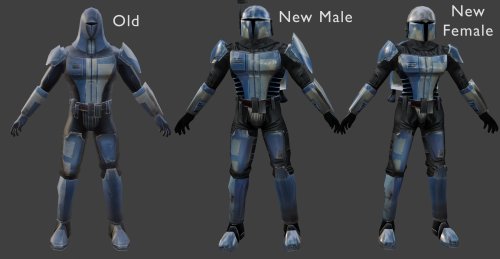 I found the mod and you're right, this does look more like Dark Hope's. I don't think Attackperson credited them but I can. Oh you linked the file. Not sure how I missed that...
 -
Yeah, though I think what Dark Hope did was take Vurt's Mandalorians and improve upon them. Maybe I was mistaken and Folklore Mandalorians did use Vurt's texture, I actually inspected the Folklore textures myself and compared them to the one's found in Dark Hope's mod and saw that they were very similar.
-
 I didn't realize it's not, but you are right. Description corrected! Thanks for pointing this out.
 -
 Royal_Rose changed their profile photo
 -
 gotmilq joined the community
 -
 KaiG joined the community
 -
 Amazing detail! Must Have
 -
 MadVoorpak joined the community
 -
 Aradoll joined the community
 -
Wouldn't this require TSLRCM since the option to choose Bao-Dur as the party leader is not available in the original release of the game?
- Yesterday
-
 Devildog93 joined the community
 -
 khol91 joined the community
 -
 TheOgNomad joined the community
 -
 RAvENOuS77 joined the community
 -
 Thank you!! Hope you enjoy!
 -
Does Dark Hope have Mandalorians? I think the original author used Vurt's so that might be the same thing.
-
I think they used Dark Hope's Mandalorian textures as a bad for their own. If you don't like the ones from this mod, you could use this instead:
-
 No worries, at least you know it doesn't work exactly in the same way. However when HoloPatcher is provided with a mod it should work with no issue (for example I've always used HP for my mods and they all work smooth). You just have to use the patcher included in said mod.
 -
Yes I did encounter more errors down the line with other mods using holopatcher, in that case ignore my last message I didn't know holopatcher wasn't considered a fully working TSLPatcher replacement at the time, sorry for bothering with a non issue.
-
View File Ahsoka Tano Player Model / NPC KotOR 1 This mod adds a playable Ahsoka Tano to Kotor 1. Her mouth is also weight painted for use as a npc head. See ReadMe for more info. Source File Credits: A Giant thanks and all credits for the source files to KevBot! "Ahsoka Tano" (https://skfb.ly/6xO6J) by KevBot is licensed under Creative Commons Attribution (http://creativecommons.org/licenses/by/4.0/). Submitter EwokKotor Submitted 08/22/2026 Category Skins K1R Compatible Yes
-
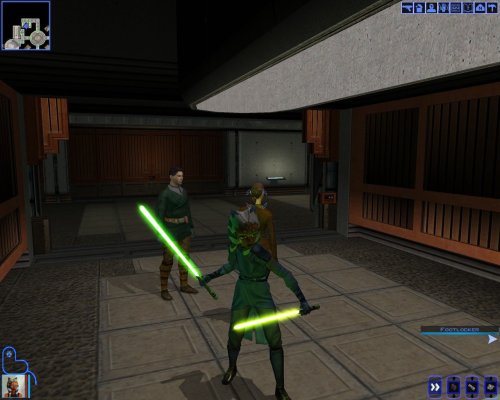
View File Ahsoka Lightsabers TCW KotOR 1 This Mod adds Ahsoka's green lightsaber and two yellow-green shotos from TCW to KotOR 1. Also includes a blue version. The Hilts are Ahsoka's as seen in TCW. The blade of the lightsaber I made very slightly shorter than standard lightsabers. The blade length of the shoto models are two different lengths, one that is slightly shorter than standard short lightsaber blades, and one significantly shorter. To Use: Either Drop the included .ncs files into your override folder, this makes it so that when you receive your lightsaber crystal on Dantooine you will also receive two of each crystal (39 and 40). OR Alternatively Enter the cheat menu (~) and type: giveitem g_w_lghtsbr39 or g_w_lghtsbr40 for the full sized saber. For the Shoto models type: giveitem g_w_shortsbr39 or g_w_shortsbr40. OR Use KSE/ modules / scripting to add the lightsabers to the game. ------------------------------------- Installation: 1:Drop all files from folder except upcrystal.2da into override folder. 2:If you don't already have an upcrystal.2da file in your override drop the include one into override. If you do already have one add the last two rows from the included .2da to the one that is already in your override, and save it. (make sure to update the row numbers as needed!) --Note that if you don't update the upcrystals.2da the new lightsabers will appear in game but won't be customizable at a workbench. See ReadMe for more info. Credit for source files: A Very special Thanks and Credit for source hilt model goes to CtrlLight check out and support their work at https://sketchfab.com/3d-models/ahsoka-tano-clone-wars-lightsabers-30e5e52a41a3412db07a0002d1f1e5d3 A Very special Thanks and Credit to Crazy34 for their "New_Lightsaber_Blades_Modder's_Res_v1" on which the blade for this mod is based! Credit goes to them as the models and textures used to make this mod come directly from their source material! A special thanks again to them for making these resources available to modders. Check out their mod here: https://deadlystream.com/files/file/1855-new_lightsaber_blades_modders_res/ Also check out their full release of their mod here: https://deadlystream.com/files/file/1846-new_lightsaber_blade_model_k1/ Submitter EwokKotor Submitted 08/22/2026 Category Mods K1R Compatible Yes
-
View File AxC's Bao-Dur's Dxun Reunion Fix As you know, there's a story segment on Dxun where your party splits up. While you're off to Onderon, the other group goes to explore the jungle. After everything's done, there's a little reunion scene with the party leader of your choosing, just a few lines between the Exile and their companion before Kreia interrupts. Turns out, despite being one of the possible party leaders, Bao-Dur was the only one who didn't have any lines at all. The game simply skipped straight to Kreia rather abruptly. This little fix adds that missing reunion scene with Bao-Dur, provided he's been chosen to lead the party on Dxun, putting him on par with all other companions. Notes: The mod can be installed and uninstalled at any time; the changes are minimal and safe. Since these lines weren't even cut originally (they were just missed), I've reused some of Bao-Dur's existing voice lines that I deemed fit the occasion perfectly. TSLRCM is not required, but is always recommended. Installation: Copy following file from archive's "Override" folder to yours: reunion.dlg. Credits: Fred Tetra, for KOTOR Tool TK102, for DLGEditor Torlack, stoffe & TK102, for NWNSSCOMP JdNoa & Dashus, for DeNCS Cortisol, for Holocron Toolset Submitter AxConsortium Submitted 08/22/2026 Category Mods TSLRCM Compatible Yes
-
Version 1.0
11 downloads
As you know, there's a story segment on Dxun where your party splits up. While you're off to Onderon, the other group goes to explore the jungle. After everything's done, there's a little reunion scene with the party leader of your choosing, just a few lines between the Exile and their companion before Kreia interrupts. Turns out, despite being one of the possible party leaders, Bao-Dur was the only one who didn't have any lines at all. The game simply skipped straight to Kreia rather abruptly. This little fix adds that missing reunion scene with Bao-Dur, provided he's been chosen to lead the party on Dxun, putting him on par with all other companions. Requirements: TSLRCM — for being able to send Bao-Dur at all. Notes: The mod can be installed and uninstalled at any time; the changes are minimal and safe. Since these lines weren't even cut originally (they were just missed), I've reused some of Bao-Dur's existing voice lines that I deemed fit the occasion perfectly. Installation: Copy following file from archive's "Override" folder to yours: reunion.dlg. Credits: Fred Tetra, for KOTOR Tool TK102, for DLGEditor Torlack, stoffe & TK102, for NWNSSCOMP JdNoa & Dashus, for DeNCS Cortisol, for Holocron Toolset -
What a wonderful mod!
-
Version 1.0.0
2 downloads
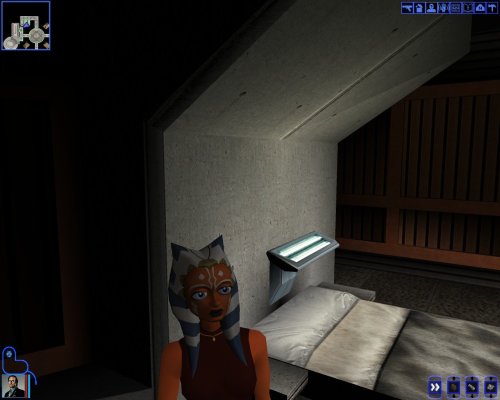
This mod adds a playable Ahsoka Tano to Kotor 1. Her mouth is also weight painted for use as a npc head. See ReadMe for more info. Source File Credits: A Giant thanks and all credits for the source files to KevBot! "Ahsoka Tano" (https://skfb.ly/6xO6J) by KevBot is licensed under Creative Commons Attribution (http://creativecommons.org/licenses/by/4.0/). -
Version 1.0.0
4 downloads
This Mod adds Ahsoka's green lightsaber and two yellow-green shotos from TCW to KotOR 1. Also includes a blue version. The Hilts are Ahsoka's as seen in TCW. The blade of the lightsaber I made very slightly shorter than standard lightsabers. The blade length of the shoto models are two different lengths, one that is slightly shorter than standard short lightsaber blades, and one significantly shorter. To Use: Either Drop the included .ncs files into your override folder, this makes it so that when you receive your lightsaber crystal on Dantooine you will also receive two of each crystal (39 and 40). OR Alternatively Enter the cheat menu (~) and type: giveitem g_w_lghtsbr39 or g_w_lghtsbr40 for the full sized saber. For the Shoto models type: giveitem g_w_shortsbr39 or g_w_shortsbr40. OR Use KSE/ modules / scripting to add the lightsabers to the game. ------------------------------------- Installation: 1:Drop all files from folder except upcrystal.2da into override folder. 2:If you don't already have an upcrystal.2da file in your override drop the include one into override. If you do already have one add the last two rows from the included .2da to the one that is already in your override, and save it. (make sure to update the row numbers as needed!) --Note that if you don't update the upcrystals.2da the new lightsabers will appear in game but won't be customizable at a workbench. See ReadMe for more info. Credit for source files: A Very special Thanks and Credit for source hilt model goes to CtrlLight check out and support their work at https://sketchfab.com/3d-models/ahsoka-tano-clone-wars-lightsabers-30e5e52a41a3412db07a0002d1f1e5d3 A Very special Thanks and Credit to Crazy34 for their "New_Lightsaber_Blades_Modder's_Res_v1" on which the blade for this mod is based! Credit goes to them as the models and textures used to make this mod come directly from their source material! A special thanks again to them for making these resources available to modders. Check out their mod here: https://deadlystream.com/files/file/1855-new_lightsaber_blades_modders_res/ Also check out their full release of their mod here: https://deadlystream.com/files/file/1846-new_lightsaber_blade_model_k1/ -
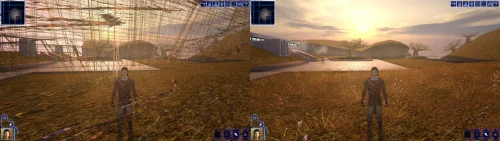
View File [TSL] Ebon Hawk skybox for M4-78 EP [TSL] Ebon Hawk skybox for M4-78 EP AUTHOR: Sith Holocron ORIGINAL RELEASE: 21 AUG 2026 GAMES: Star Wars Knights of the Old Republic II (using M4-78 Enhancement Project) Description: I like Kexikus’ skyboxes for the various worlds in K1 and TSL. I like tjsase’s Ebon Hawk skyboxes for TSL. However, it seems I've always had to make a choice between keeping one or the other when considering either tjsase's Ebon Hawk skybox (which utilizes the standard skybox included in the EP) or Kexikus' world skybox which is its own thing. That is until I made a Frankenstein's monster of the EH skybox and the EP world skybox together, which I think merges them suitably. (See attached picture.) I reached out in early 2025 to both modders to see if I could make this combined skybox available to the public. The first modder responded almost immediately. The second modder – who doesn’t visit the site often – finally granted permission today. Installation: Copy the TGA file to the Knights of the Old Republic II's Override folder. (Example location - C:\Program Files (x86)\Steam\steamapps\common\swkotor2\Override) When/if prompted to overwrite files, press okay. If you like the mod; please leave a comment or endorse! It would be much appreciated. Uninstall: Remove the TGA file you’ve added in Installation instructions. Thanks (in alphabetical order): Kexikus: For their kind permission to publicly release their work in this skybox to the public. tjsase: For their kind permission to publicly release their work in this skybox to the public. You can find Kexikus’ mods on Deadly Stream here: https://deadlystream.com/profile/12766-kexikus/content/?type=downloads_file You can find tjsase’s mods on Deadly Stream here: https://deadlystream.com/profile/12310-tjsase/content/?type=downloads_file Submitter Sith Holocron Submitted 08/21/2026 Category Skins TSLRCM Compatible Yes
-
I have one thing to say.... Dude.
- Last week
-
 Hi! Unfortunatelly I forgot about the bug with this mod and proceeded to go straight for the cruiser without triggering the cutscene first. Also I am a bit stupid and do not have multiplew save files, so I can not reload before I made the mistake. Is this a huge problem which might break something down the line, or not? I have played the game before, so if it is just a missing cutscene, then no problem. Thanks!
 -
![More information about "[TSL] Ebon Hawk skybox for M4-78 EP"](https://deadlystream.com/downloads/screens/monthly_2026_08/EHSkyboxforM4-78EPThumbnail.thumb.png.785575fb7fac539a0adcc772f373b0cc.png)
Version 1.0.0
7 downloads
[TSL] Ebon Hawk skybox for M4-78 EP AUTHOR: Sith Holocron ORIGINAL RELEASE: 21 AUG 2026 GAMES: Star Wars Knights of the Old Republic II (using M4-78 Enhancement Project) Description: I like Kexikus’ skyboxes for the various worlds in K1 and TSL. I like tjsase’s Ebon Hawk skyboxes for TSL. However, it seems I've always had to make a choice between keeping one or the other when considering either tjsase's Ebon Hawk skybox (which utilizes the standard skybox included in the EP) or Kexikus' world skybox which is its own thing. That is until I made a Frankenstein's monster of the EH skybox and the EP world skybox together, which I think merges them suitably. (See attached picture.) I reached out in early 2025 to both modders to see if I could make this combined skybox available to the public. The first modder responded almost immediately. The second modder – who doesn’t visit the site often – finally granted permission today. Installation: Copy the TGA file to the Knights of the Old Republic II's Override folder. (Example location - C:\Program Files (x86)\Steam\steamapps\common\swkotor2\Override) When/if prompted to overwrite files, press okay. If you like the mod; please leave a comment or endorse! It would be much appreciated. Uninstall: Remove the TGA file you’ve added in Installation instructions. Thanks (in alphabetical order): Kexikus: For their kind permission to publicly release their work in this skybox to the public. tjsase: For their kind permission to publicly release their work in this skybox to the public. You can find Kexikus’ mods on Deadly Stream here: https://deadlystream.com/profile/12766-kexikus/content/?type=downloads_file You can find tjsase’s mods on Deadly Stream here: https://deadlystream.com/profile/12310-tjsase/content/?type=downloads_file -
 I've uploaded a KotOR II version of this.
 -
 I've uploaded a patch for this to make it compatible with TSLRCM and give you the option to disable the dark shroud.
 -
 Yeah, unfortunately the Kotor Patch Manager needs a clean executable (you can use a gog one or the editable exe, both work), the best way to get widescreen support back in that scenario is to use @J's https://github.com/J0-o/KotorUniResPatch patches. They work quite well, but depending on what you already have installed you may need to undo existing overrides in order for everything to look right. (e.g. the high resolution menu mods) They've properly scaled pretty much every interface in the game to look right (and even unlocked the in game resolution menu) This does have me thinking that it might be a good idea to have a standalone version of this mod that can be dropped in to existing modbuild installs or installs with other pre-patched executables. Stay tuned for something on that, I'll see if I can take a look at what is needed on the weekend.