Effix
-
Posts
931 -
Joined
-
Last visited
-
Days Won
61
Content Type
Profiles
Forums
Blogs
Forum & Tracker Requests
Downloads
Gallery
Store
Events
Everything posted by Effix
-
 That's awesome, glad I could assist.
 -
I'm on it. Edit: This should do the trick, unzip into your Override folder. It replaces the vanilla K1 PFHB05. Effixians_PFHB05_from_K2_to_K1.zip In case you or anyone is curious about the process; you export the K2 head with KotOR Tool (mdl & mdx), you export the super model (mdl & mdx) from the game you want to port things to (so K1 here) to the same location. It turned out it was s_female03 for this one (MDLEdit will let you know if you picked the wrong one). Now you open MDLEdit, load the mdl file, switch the game to KotOR 1 with the button, save as ASCII. Next you load the ASCII model that you just saved and save it as Binary. I think the super model is needed for animations and the "saving to ASCII step" is apparantly needed to make things work, you can't do binary to binary with only hitting that game version button.
-
I can't find one for Malak, but I added links to the other ones.
-
Version 1.0.0
416 downloads
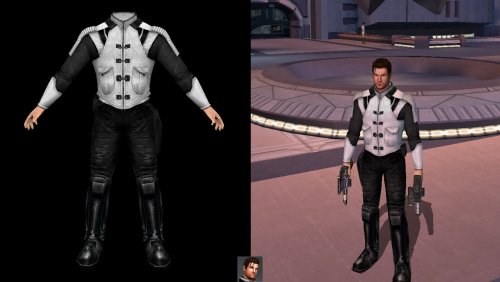
*************************** Knights of the Old Republic *************************** TITLE: Effixian's Carth's Black and White Clothing AUTHOR: Effix(ian) CONTACT: PM me on the forums or find me on Steam ************ DESCRIPTION ************ This a simple reskin mod that changes Carth's default clothing. An adjusted portrait is included. ************* INSTALLATION ************* Unzip. Copy the files from the folder to your game's Override folder. ***** BUGS ***** None. ************* UNINSTALLING ************* Remove from the Override folder: - P_CarthBB01.tga - PO_pcarth.tga ******************* DISTRIBUTION NOTES ******************* You may not: Use the material from this mod in your own mod without giving me credit, implying it was your creation. You might: Use the material from this mod in your own mod if you simply ask me. ********* THANKS TO ********* - Bioware & Lucasarts - Fred Tetra's Kotor Tool ------------------- THIS MODIFICATION IS NOT MADE, DISTRIBUTED, OR SUPPORTED BY BIOWARE, OBSIDIAN, OR LUCASARTS ENTERTAINMENT COMPANY LLC. ELEMENTS TM & © LUCASARTS ENTERTAINMENT COMPANY LLC AND/OR ITS LICENSORS. -
View File Effixian's Disguises ******************************************** Knights of the Old Republic - The Sith Lords ******************************************** TITLE: Effixian's Disguises AUTHOR: Effix(ian) CONTACT: PM me on the forums or find me on Steam ************* INSTALLATION ************* Unzip, put the contents of the folder into your override folder. ************ DESCRIPTION ************ This mod adds 25 disguises in the form of belts. They all have: +1 Wisdom +1 Strength +1 Dexterity +10 Force Resist They can be bought from Opo Chano on Citadel Station, Apartment Complex B, Apartment B2. You need to use a save in which you haven't been to that area yet for him to have the items in his inventory. I stuck to appearances that largely work as a player character and those that can't be done by simply replacing an existing player head. Requested by Steam users: WookieeChief566, GrubbyHands, npc183, creeperking38, Esperirod and cowdy501. This mod includes Hunters Run's Revan's Flowing Robe Model http://deadlystream.com/forum/files/file/216-revans-flowing-robe-tsl *************** CHEAT CODES *************** Unknown Species (Yoda): giveitem a_belt_d31 Bith: giveitem a_belt_d32 Duros: giveitem a_belt_d33 Gand: giveitem a_belt_d34 Gran: giveitem a_belt_d35 Quarren: giveitem a_belt_d36 Rakata: giveitem a_belt_d37 Rodian: giveitem a_belt_d38 Tusken Raider: giveitem a_belt_d39 Selkath: giveitem a_belt_d40 Sullustan: giveitem a_belt_d41 Trandoshan: giveitem a_belt_d42 Aqualish: giveitem a_belt_d43 Weeqay: giveitem a_belt_d44 Wookie: giveitem a_belt_d45 Female Dark Jedi: giveitem a_belt_d46 Male Dark Jedi: giveitem a_belt_d47 Sith Soldier: giveitem a_belt_d48 Red Sith Soldier: giveitem a_belt_d49 Calo Nord: giveitem a_belt_d50 Darth Malak: giveitem a_belt_d51 Darth Nihilus: giveitem a_belt_d52 Darth Revan: giveitem a_belt_d53 Darth Sion: giveitem a_belt_d54 Queen Talia: giveitem a_belt_d55 ************** COMPATIBILITY ************** Not compatible with my Yoda Disguise and Revan Disguise mods, replacements for those are included in this mod though. Not compatible with other mods that change Opo Chano's inventory. ************* KNOWN ISSUES/WARNINGS ************* - This goes for any item with the disguise property: your appearance can get stuck because of unknown reasons, meaning you'll keep the appearance even when you unequip the item. This can be fixed with the KotOR Savegame Editor. - There will likely be missing animations, clipping issues, etc. - The animations (for example walking) of the Malak Disguise stop working when certain types of weapons are equipped. Working: 1 lightsaber/sword, 1 or 2 blasters. Not working: 2 lightsabers/swords, all 2 handed weapons (rifles, double bladed lightsabers/swords). ************* ANIMATION FIXES ************* Darth Nihilus Animation Fix 2.0 by Ӄhrizby Yoda Animation Fix by Imptacular https://www.nexusmods.com/kotor2/mods/982 ************* UNINSTALLING ************* Remove from the Override folder: a_belt_d31.uti through a_belt_d55.uti ii_Belt_031.tga through ii_Belt_055.tga m_chano.utm N_DarthRevan.mdl N_DarthRevan.mdx n_wookiem.mdl n_wookiem.mdx N_WookieM08.tga N_WookieM08.txi N_Yoda01.tga ********* THANKS TO ********* Hunters Run for allowing the usage of his Revans Flowing Robe Model http://deadlystream.com/forum/files/file/216-revans-flowing-robe-tsl Fred Tetra for KotOR Tool ------------------- THIS MODIFICATION IS NOT MADE, DISTRIBUTED, OR SUPPORTED BY BIOWARE, OBSIDIAN, OR LUCASARTS ENTERTAINMENT COMPANY LLC. ELEMENTS TM & © LUCASARTS ENTERTAINMENT COMPANY LLC AND/OR ITS LICENSORS. Submitter Effix Submitted 03/19/2019 Category Mods TSLRCM Compatible Yes
-
N_DarthRevan01 p.s.:
-
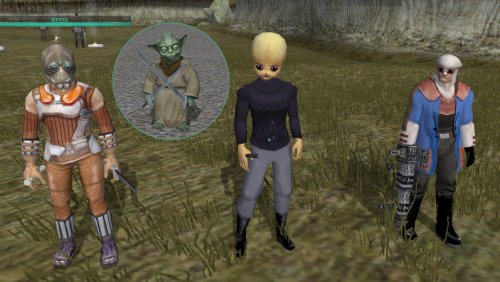
Version 1.0.0
789 downloads
******************************************** Knights of the Old Republic - The Sith Lords ******************************************** TITLE: Effixian's Disguises AUTHOR: Effix(ian) CONTACT: PM me on the forums or find me on Steam ************* INSTALLATION ************* Unzip, put the contents of the folder into your override folder. ************ DESCRIPTION ************ This mod adds 25 disguises in the form of belts. They all have: +1 Wisdom +1 Strength +1 Dexterity +10 Force Resist They can be bought from Opo Chano on Citadel Station, Apartment Complex B, Apartment B2. You need to use a save in which you haven't been to that area yet for him to have the items in his inventory. I stuck to appearances that largely work as a player character and those that can't be done by simply replacing an existing player head. Requested by Steam users: WookieeChief566, GrubbyHands, npc183, creeperking38, Esperirod and cowdy501. This mod includes Hunters Run's Revan's Flowing Robe Model http://deadlystream.com/forum/files/file/216-revans-flowing-robe-tsl *************** CHEAT CODES *************** Unknown Species (Yoda): giveitem a_belt_d31 Bith: giveitem a_belt_d32 Duros: giveitem a_belt_d33 Gand: giveitem a_belt_d34 Gran: giveitem a_belt_d35 Quarren: giveitem a_belt_d36 Rakata: giveitem a_belt_d37 Rodian: giveitem a_belt_d38 Tusken Raider: giveitem a_belt_d39 Selkath: giveitem a_belt_d40 Sullustan: giveitem a_belt_d41 Trandoshan: giveitem a_belt_d42 Aqualish: giveitem a_belt_d43 Weeqay: giveitem a_belt_d44 Wookie: giveitem a_belt_d45 Female Dark Jedi: giveitem a_belt_d46 Male Dark Jedi: giveitem a_belt_d47 Sith Soldier: giveitem a_belt_d48 Red Sith Soldier: giveitem a_belt_d49 Calo Nord: giveitem a_belt_d50 Darth Malak: giveitem a_belt_d51 Darth Nihilus: giveitem a_belt_d52 Darth Revan: giveitem a_belt_d53 Darth Sion: giveitem a_belt_d54 Queen Talia: giveitem a_belt_d55 ************** COMPATIBILITY ************** Not compatible with my Yoda Disguise and Revan Disguise mods, replacements for those are included in this mod though. Not compatible with other mods that change Opo Chano's inventory. ************* KNOWN ISSUES/WARNINGS ************* - This goes for any item with the disguise property: your appearance can get stuck because of unknown reasons, meaning you'll keep the appearance even when you unequip the item. This can be fixed with the KotOR Savegame Editor. - There will likely be missing animations, clipping issues, etc. - The animations (for example walking) of the Malak Disguise stop working when certain types of weapons are equipped. Working: 1 lightsaber/sword, 1 or 2 blasters. Not working: 2 lightsabers/swords, all 2 handed weapons (rifles, double bladed lightsabers/swords). ************* ANIMATION FIXES ************* Darth Nihilus Animation Fix 2.0 by Ӄhrizby Yoda Animation Fix by Imptacular https://www.nexusmods.com/kotor2/mods/982 ************* UNINSTALLING ************* Remove from the Override folder: a_belt_d31.uti through a_belt_d55.uti ii_Belt_031.tga through ii_Belt_055.tga m_chano.utm N_DarthRevan.mdl N_DarthRevan.mdx n_wookiem.mdl n_wookiem.mdx N_WookieM08.tga N_WookieM08.txi N_Yoda01.tga ********* THANKS TO ********* Hunters Run for allowing the usage of his Revans Flowing Robe Model http://deadlystream.com/forum/files/file/216-revans-flowing-robe-tsl Fred Tetra for KotOR Tool ------------------- THIS MODIFICATION IS NOT MADE, DISTRIBUTED, OR SUPPORTED BY BIOWARE, OBSIDIAN, OR LUCASARTS ENTERTAINMENT COMPANY LLC. ELEMENTS TM & © LUCASARTS ENTERTAINMENT COMPANY LLC AND/OR ITS LICENSORS. -
Alright, here it is. Just unzip and copy the files from the folder to your override folder. Effixians_Disciple_Alternative.zip Keep the zip file to know which files you need to remove from the override folder in case you want to uninstall.
-
Sounds like a plan, I'll see what I can do.
-
I don't know about the people here who are awesome at modifying 3D models (I'm not), but I think it's quite complex to try the hair swap. The hair isn't a separate 3D model, so trying another hairstyle isn't as easy as in some other games (e.g. SWTOR). The texture also contains everything (hair + the rest) for that one head model. Feel free to request something specific, not sure if you've already found something close enough.
-
I'm not sure if what you're really looking for can be done with a reskin alone, because the shape of his head does a lot. Maybe a reskin of another head and swapping that onto Mical would be a better way to go. This is my reskin from a while back:
-
You might need to study a bit on how, but with the TSL Patcher you can add lines to upgrade.2da. That's the power of the Patcher. Unfortunately inluding the Patcher in a Steam workshop mod is not a thing, but with a non Steam mod you can instruct people with the Steam version to point the patcher to that TSLRCM folder I mentioned above.
-
You can add your changes to TSLRCM's upgrade.2da, then both should work. The location will be something like [drive]:\[steamfolder]\SteamLibrary\steamapps\workshop\content\208580\485537937\override
-
Hm, not sure what running Steam with TSLRCM while not running the workshop means. Either way, like I said, TSLRCM contains upgrade.2da, it might cause the game to ignore your upgrade.2da in your override folder.
-
Which version of the game? (disc, Steam etc.) With or without TSLRCM? (TSLRCM contains upgrade.2da)
-
The item has no properties, it has a required feat that Mira has: "Weapon proficiency: Wrist Mounted Rockets". I haven't tested it but you can give that feat to your player character with the KotOR Savegame Editor.
-
Great, have fun!
-
Heya, KotOR 1 only has one robe model, and it's not either of these. You could get JC's Fashion Line I: Cloaked Jedi Robes for K1 1.1, then you have the model that the Electromesh Battle Robe uses. Once you have that you can add the files from my attachment to your override folder. Cheatcodes: giveitem g_a_kghtrobe05 giveitem g_i_mask25 I've also added them to merchant Adum Larp's inventory (Dantooine Courtyard). Electromesh Battle Robe for JC's Cloaked Jedi Robes.zip
-
"Birth of a Monster", pretty sweet fan film.
-
[TSL] [Request] Handmaiden clothes without hood
Effix replied to evilmark443's topic in Mod Requests
Interesting. I experimented with replacing her head once, at some point she got a 2nd head inside the other one, that moved slightly different, also weird. I figured it maybe had to do with the hood on/off mechanics. -
🙂 You're welcome, happy gaming!
-
Underwear and default clothing set to dancer outfits: appearance.2da
-
I think you can get the mod below, then make copies of any set of mdl and mdx files, rename those copies to the names you list. You don't need to do anything with the tga files. If I remember correctly It works because the 3D objects are taken out, so it doesn't matter which files you make copies of.
-
"Even though I walk through the valley of the Dark Lords, I fear no evil, for the Force is with me and I am one with the Force."
Journal of the Whills, 1:79-
Didn''t realize this was actual SW content, thought it was one of those mashup quotes with multiple references.
-
-
View File Effixian's Mandalorian Disguises for K1 *************************** Knights of the Old Republic *************************** TITLE: Effixian's Mandalorian Disguises for K1 AUTHOR: Effix CONTACT: PM me on the forums or find me on Steam ************* INSTALLATION ************* Unzip, copy the files in the folder to your override folder. ************ DESCRIPTION ************ This mod adds a disguise property to the heavy Mandalorian armors that makes you look like the Mandalorian NPCs when you equip them. Blue: Mandalorian Armor (only obtainable with cheats), Mandalorian Battle Armor Red: Mandalorian Heavy Armor Yellow: Mandalorian Assault Armor, Cassus Fett's Armor Relevant icons are updated to match the new appearances. Requested by JDub96. This mod is also available for KotOR 2. ***** BUGS ***** This goes for any item with the disguise property: your appearance can get stuck (because of unknown reasons), meaning you'll keep the appearance even when you unequip the item. This can be fixed with the KotOR Savegame Editor. ************* UNINSTALLING ************* Remove the following files from your Override folder: g_a_class8004.uti g_a_class9003.uti g_a_class9004.uti g_a_class9009.uti g_a_class9010.uti ia_class8_004.tga ia_class9_004.tga ia_class9_006.tga ia_class9_008.tga ******************* DISTRIBUTION NOTES ******************* You may use the material from this mod in whichever way you like. ******** Thanks to ******** Stoffe and Fred Tetra for the needed tools and tutorials JDub96 for the request ------------------- THIS MODIFICATION IS NOT MADE, DISTRIBUTED, OR SUPPORTED BY BIOWARE, OBSIDIAN, OR LUCASARTS ENTERTAINMENT COMPANY LLC. ELEMENTS TM & © LUCASARTS ENTERTAINMENT COMPANY LLC AND/OR ITS LICENSORS. Submitter Effix Submitted 02/24/2019 Category Mods K1R Compatible Yes