All Activity
- Today
-
 wirda joined the community
 -
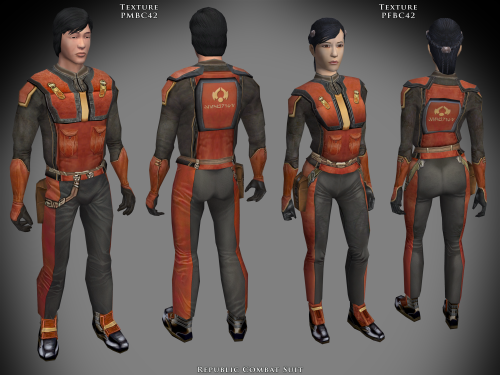
View File Specialized Combat Suits HD TSL Specialized Combat Suits HD for TSL by RedRob41 ================================================================ IF YOU ARE EVER IN ANY DOUBT ABOUT INSTALLING ANY MODS, PLEASE REMEMBER TO ALWAYS BACKUP YOUR FILES BEFORE INSTALLATION, JUST IN CASE. WARNING: MAKE SURE NOT TO REPLACE ANY FILES OF THE SAME NAME THAT ARE ALREADY PRESENT IN YOUR OVERRIDE FOLDER! ================================================================ Description: This is not really a mod, but more of a modder's resource. It includes textures for the basic Combat Suit PFBC and PMBC, as well as icons and uti files to make them wearable. Anyone who has created a story mod for either game can use these suits to add some variety to the NPCs that the player interacts with. I have also included models in which I have fixed the uvw maps, so that the textures appear correctly (the original models had some polygons in the wrong places). The new models should work with any other texture mods, since they work perfectly with the in-game ones. The armour class is the same as the basic Combat Suit, so there isn't any real advantage to wearing them as a player. The real power of these files, is that a modder can create a whole army with both male and female members (and using any head model for NPC variety). The textures were made from original textures that appear in both games, so there is no issue of porting. There will be three versions of this mod to choose to download: 1 - 4x .tga version. Highest resolution, the typical texture is now 2048x2048 pixels which = 16MB. This version is the best choice to use as a modder's resource. 2 - 4x .tpc version. Created by running full size .tgas through tga2tpc program which compresses a 2048x2048 pixel file to 5.5MB. This version should be easier on PC systems, with no noticeable loss of visual fidelity. 3 - 2x .tpc version. Created by reducing full size .tgas by half in Photoshop, then running them through tga2tpc which further compresses them to 1.4MB. This version should be much easier on PC systems. All versions include the same .mdl & .mdx files. Only one version should be installed at a time; having both .tga files and .tpc files with the same name in the Override folder may cause problems. ================================================================ Compatibility: The male models PMBCx and BAODUR_BC are duplicates of the models found in the mod called 4x Upscale+ Character Textures & Model Fixes for TSL - Version 0.52 by RedRob41. The female models PFBCx in this mod have had additional uvw fixes since the V0.52 mod, and are therefore superior. The models aren't necessary, but the new textures will look much better with them. If you have other mods that change the models, you might prefer to use those ones. Check them out to be sure which you'd prefer. ================================================================ Includes: TSL Republic Combat Suit a_light_42.uti PFBC42.tga, PMBC42.tga, ia_class4_042.tga Sith Combat Suit a_light_43.uti PFBC43.tga, PMBC43.tga, ia_class4_043.tga Czerka Combat Suit a_light_44.uti PFBC44.tga, PMBC44.tga, ia_class4_044.tga T.S.F. Combat Suit a_light_45.uti PFBC45.tga, PMBC45.tga, ia_class4_045.tga Corellian Combat Suit a_light_46.uti PFBC46.tga, PMBC46.tga, ia_class4_046.tga Exchange Suit a_light_47.uti PFBC47.tga, PMBC43.tga, ia_class4_047.tga Black Vulkar (Orange) a_light_48.uti PFBC48.tga, PMBC44.tga, ia_class4_048.tga Black Vulkar (Blue) a_light_49.uti PFBC49.tga, PMBC45.tga, ia_class4_049.tga ================================================================ Directions: Please copy all files to the game's Override directory. TSL uti files: These are necessary in order to wear the armours in-game. The name of the uti file is what you would use to cheat them in with the cheat console, example: giveitem a_light_42 will give your player the Republic Combat suit. ================================================================ Uninstall: Delete unwanted files from the game's Override folder. ================================================================ Thanks for modding tools: KOTOR Tool – Fred Tetra mdlops (used version 7a2) - cchargin, JdNoa NWMax – Joco Replacer - Taina tga2tpc - ndix UR KotOR/KotOR2 Savegame Editor v3.3.2 - tk102, Fair Strides Hex-editor XVI32 2.55 - Christian Maas ================================================================ Permission: Consider this as a modder's resource. I give permission to any modder to use these files as a base for their own creations; as long as their creation remains free to use (not for profit); and credit is given to me as the source of any modded files. Please include a statement that specifies this mod's title and version. The original credit of course goes to the talented artists who worked on the original games for BioWare and Obsidian. Without their work, none of this would have been possible. I have tried my best to maintain the artistic style that they created long ago. This mod may NOT be uploaded or redistributed, in whole or in part, to any mod hosting site without my explicit permission. As always, this mod is free for your non-commercial/personal use. There should never be a requirement to pay for it. If you like the work I do, and would like to encourage me to create more, you can always donate to my tip jar at https://buymeacoffee.com/redrob416 where the funds collected will be used towards additional graphics tools and software. ================================================================ THIS MODIFICATION IS PROVIDED AS-IS AND IS NOT SUPPORTED BY BIOWARE CORP/OBSIDIAN ENTERTAINMENT OR LUCASARTS OR ANY LICENSERS/SPONSORS OF THE AFOREMENTIONED COMPANIES. USE OF THIS FILE IS AT YOUR OWN RISK AND THE AFOREMENTIONED COMPANIES OR THE AUTHORS ARE NOT RESPONSIBLE FOR ANY DAMAGE CAUSED TO YOUR COMPUTER FOR THE USAGE OF THIS FILE. Submitter redrob41 Submitted 06/15/2026 Category Skins TSLRCM Compatible Yes
-
Version 1.0.0
2 downloads
Specialized Combat Suits HD for TSL by RedRob41 ================================================================ IF YOU ARE EVER IN ANY DOUBT ABOUT INSTALLING ANY MODS, PLEASE REMEMBER TO ALWAYS BACKUP YOUR FILES BEFORE INSTALLATION, JUST IN CASE. WARNING: MAKE SURE NOT TO REPLACE ANY FILES OF THE SAME NAME THAT ARE ALREADY PRESENT IN YOUR OVERRIDE FOLDER! ================================================================ Description: This is not really a mod, but more of a modder's resource. It includes textures for the basic Combat Suit PFBC and PMBC, as well as icons and uti files to make them wearable. Anyone who has created a story mod for either game can use these suits to add some variety to the NPCs that the player interacts with. I have also included models in which I have fixed the uvw maps, so that the textures appear correctly (the original models had some polygons in the wrong places). The new models should work with any other texture mods, since they work perfectly with the in-game ones. The armour class is the same as the basic Combat Suit, so there isn't any real advantage to wearing them as a player. The real power of these files, is that a modder can create a whole army with both male and female members (and using any head model for NPC variety). The textures were made from original textures that appear in both games, so there is no issue of porting. There will be three versions of this mod to choose to download: 1 - 4x .tga version. Highest resolution, the typical texture is now 2048x2048 pixels which = 16MB. This version is the best choice to use as a modder's resource. 2 - 4x .tpc version. Created by running full size .tgas through tga2tpc program which compresses a 2048x2048 pixel file to 5.5MB. This version should be easier on PC systems, with no noticeable loss of visual fidelity. 3 - 2x .tpc version. Created by reducing full size .tgas by half in Photoshop, then running them through tga2tpc which further compresses them to 1.4MB. This version should be much easier on PC systems. All versions include the same .mdl & .mdx files. Only one version should be installed at a time; having both .tga files and .tpc files with the same name in the Override folder may cause problems. ================================================================ Compatibility: The male models PMBCx and BAODUR_BC are duplicates of the models found in the mod called 4x Upscale+ Character Textures & Model Fixes for TSL - Version 0.52 by RedRob41. The female models PFBCx in this mod have had additional uvw fixes since the V0.52 mod, and are therefore superior. The models aren't necessary, but the new textures will look much better with them. If you have other mods that change the models, you might prefer to use those ones. Check them out to be sure which you'd prefer. ================================================================ Includes: TSL Republic Combat Suit a_light_42.uti PFBC42.tga, PMBC42.tga, ia_class4_042.tga Sith Combat Suit a_light_43.uti PFBC43.tga, PMBC43.tga, ia_class4_043.tga Czerka Combat Suit a_light_44.uti PFBC44.tga, PMBC44.tga, ia_class4_044.tga T.S.F. Combat Suit a_light_45.uti PFBC45.tga, PMBC45.tga, ia_class4_045.tga Corellian Combat Suit a_light_46.uti PFBC46.tga, PMBC46.tga, ia_class4_046.tga Exchange Suit a_light_47.uti PFBC47.tga, PMBC43.tga, ia_class4_047.tga Black Vulkar (Orange) a_light_48.uti PFBC48.tga, PMBC44.tga, ia_class4_048.tga Black Vulkar (Blue) a_light_49.uti PFBC49.tga, PMBC45.tga, ia_class4_049.tga ================================================================ Directions: Please copy all files to the game's Override directory. TSL uti files: These are necessary in order to wear the armours in-game. The name of the uti file is what you would use to cheat them in with the cheat console, example: giveitem a_light_42 will give your player the Republic Combat suit. ================================================================ Uninstall: Delete unwanted files from the game's Override folder. ================================================================ Thanks for modding tools: KOTOR Tool – Fred Tetra mdlops (used version 7a2) - cchargin, JdNoa NWMax – Joco Replacer - Taina tga2tpc - ndix UR KotOR/KotOR2 Savegame Editor v3.3.2 - tk102, Fair Strides Hex-editor XVI32 2.55 - Christian Maas ================================================================ Permission: Consider this as a modder's resource. I give permission to any modder to use these files as a base for their own creations; as long as their creation remains free to use (not for profit); and credit is given to me as the source of any modded files. Please include a statement that specifies this mod's title and version. The original credit of course goes to the talented artists who worked on the original games for BioWare and Obsidian. Without their work, none of this would have been possible. I have tried my best to maintain the artistic style that they created long ago. This mod may NOT be uploaded or redistributed, in whole or in part, to any mod hosting site without my explicit permission. As always, this mod is free for your non-commercial/personal use. There should never be a requirement to pay for it. If you like the work I do, and would like to encourage me to create more, you can always donate to my tip jar at https://buymeacoffee.com/redrob416 where the funds collected will be used towards additional graphics tools and software. ================================================================ THIS MODIFICATION IS PROVIDED AS-IS AND IS NOT SUPPORTED BY BIOWARE CORP/OBSIDIAN ENTERTAINMENT OR LUCASARTS OR ANY LICENSERS/SPONSORS OF THE AFOREMENTIONED COMPANIES. USE OF THIS FILE IS AT YOUR OWN RISK AND THE AFOREMENTIONED COMPANIES OR THE AUTHORS ARE NOT RESPONSIBLE FOR ANY DAMAGE CAUSED TO YOUR COMPUTER FOR THE USAGE OF THIS FILE. -
 Here is how I *actually* fixed this mod. Tools needed: Kotor Tool: and: Why Kotor Tool: You need it to actually add a new property First install the mod as normal. Why this mod breaks: If you open up the "jedirevan_robes.uti" file and look at it's properties you will see an "ERROR" in the 'Disguise' property. That is why this keeps crashing. First thing we need to do is actually *remove* that property. You cannot do this in Kotor Tool to my knowledge. Download and install K-GFF and run the .exe, navigate to your override file, find "jedirevan_robes.uti" open it. Look for the property that has a value or something to do with 500 something in it, i forget the actual number, but that's the disguise property, and that 500 something number is why it's breaking afaik. Use K-GFF to remove that entire property. Save it. Relaunch Kotor Tool and verify that the property is gone. Now go to OPTIONS of kotor tool go to 'other' and check the box "Find .2da files in override" This is what will let the GFF editor in kotor tool actually see the custom disguise added in the appearance.2da that the TSL patcher installs when you first install the mod. Go back to "Open GFF" in kotor tool. select "jedirevan_robes.uti" navigate to properties. Select 'disguise' in the bottom, the box under, click, and scroll ALL the way down (You should see a list of your appearances in your appearance.2da file) find ZM_Star_Forge_Robe. Click on it. Your new "jedirevan_robes.uti" should look like: If you have a character with the armor already on it. Then use KSE to remove it from that save. Reload the game, save over the save no longer having the armor, re-add it to you via KSE, load that save again and check to see if it still breaks.
 -
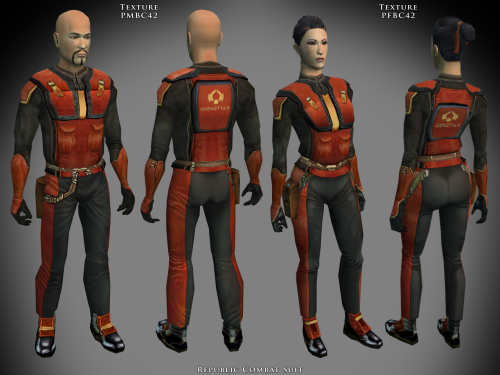
View File Specialized Combat Suits HD K1 Specialized Combat Suits HD for Kotor by RedRob41 ================================================================ IF YOU ARE EVER IN ANY DOUBT ABOUT INSTALLING ANY MODS, PLEASE REMEMBER TO ALWAYS BACKUP YOUR FILES BEFORE INSTALLATION, JUST IN CASE. WARNING: MAKE SURE NOT TO REPLACE ANY FILES OF THE SAME NAME THAT ARE ALREADY PRESENT IN YOUR OVERRIDE FOLDER! ================================================================ Description: This is not really a mod, but more of a modder's resource. It includes textures for the basic Combat Suit PFBC and PMBC, as well as icons and uti files to make them wearable. Anyone who has created a story mod for either game can use these suits to add some variety to the NPCs that the player interacts with. I have also included models in which I have fixed the uvw maps, so that the textures appear correctly (the original models had some polygons in the wrong places). The new models should work with any other texture mods, since they work perfectly with the in-game ones. The armour class is the same as the basic Combat Suit, so there isn't any real advantage to wearing them as a player. The real power of these files, is that a modder can create a whole army with both male and female members (and using any head model for NPC variety). The textures were made from original textures that appear in both games, so there is no issue of porting. There will be three versions of this mod to choose to download: 1 - 4x .tga version. Highest resolution, the typical texture is now 2048x2048 pixels which = 16MB. This version is the best choice to use as a modder's resource. 2 - 4x .tpc version. Created by running full size .tgas through tga2tpc program which compresses a 2048x2048 pixel file to 5.5MB. This version should be easier on PC systems, with no noticeable loss of visual fidelity. 3 - 2x .tpc version. Created by reducing full size .tgas by half in Photoshop, then running them through tga2tpc which further compresses them to 1.4MB. This version should be much easier on PC systems. All versions include the same .mdl & .mdx files. Only one version should be installed at a time; having both .tga files and .tpc files with the same name in the Override folder may cause problems. ================================================================ Compatibility: The male models PMBCx are duplicates of the models found in the mod called 4x Upscale+ Character Textures & Model Fixes for KotOR - Version 0.52 by RedRob41. The female models PFBCx in this mod have had additional uvw fixes since the V0.52 mod, and are therefore superior. The models aren't necessary, but the new textures will look much better with them. If you have other mods that change the models, you might prefer to use those ones. Check them out to be sure which you'd prefer. ================================================================ Includes: KotOR Republic Combat Suit g_a_class4042.uti PFBC42.tga, PMBC42.tga, ia_class4_042.tga Sith Combat Suit g_a_class4043.uti PFBC43.tga, PMBC43.tga, ia_class4_043.tga Czerka Combat Suit g_a_class4044.uti PFBC44.tga, PMBC44.tga, ia_class4_044.tga T.S.F. Combat Suit g_a_class4045.uti PFBC45.tga, PMBC45.tga, ia_class4_045.tga Corellian Combat Suit g_a_class4046.uti PFBC46.tga, PMBC46.tga, ia_class4_046.tga Exchange Suit g_a_class4047.uti PFBC47.tga, PMBC43.tga, ia_class4_047.tga Black Vulkar (Orange) g_a_class4048.uti PFBC48.tga, PMBC44.tga, ia_class4_048.tga Black Vulkar (Blue) g_a_class4049.uti PFBC49.tga, PMBC45.tga, ia_class4_049.tga ================================================================ Directions: Please copy all files to the game's Override directory. K1 uti files: These are necessary in order to wear the armours in-game. The name of the uti file is what you would use to cheat them in with the cheat console, example: giveitem g_a_class4042 will give your player the Republic Combat suit. ================================================================ Uninstall: Delete unwanted files from the game's Override folder. ================================================================ Thanks for modding tools: KOTOR Tool – Fred Tetra mdlops (used version 7a2) - cchargin, JdNoa NWMax – Joco Replacer - Taina tga2tpc - ndix UR KotOR/KotOR2 Savegame Editor v3.3.2 - tk102, Fair Strides Hex-editor XVI32 2.55 - Christian Maas ================================================================ Permission: Consider this as a modder's resource. I give permission to any modder to use these files as a base for their own creations; as long as their creation remains free to use (not for profit); and credit is given to me as the source of any modded files. Please include a statement that specifies this mod's title and version. The original credit of course goes to the talented artists who worked on the original games for BioWare and Obsidian. Without their work, none of this would have been possible. I have tried my best to maintain the artistic style that they created long ago. This mod may NOT be uploaded or redistributed, in whole or in part, to any mod hosting site without my explicit permission. As always, this mod is free for your non-commercial/personal use. There should never be a requirement to pay for it. If you like the work I do, and would like to encourage me to create more, you can always donate to my tip jar at https://buymeacoffee.com/redrob416 where the funds collected will be used towards additional graphics tools and software. ================================================================ THIS MODIFICATION IS PROVIDED AS-IS AND IS NOT SUPPORTED BY BIOWARE CORP/OBSIDIAN ENTERTAINMENT OR LUCASARTS OR ANY LICENSERS/SPONSORS OF THE AFOREMENTIONED COMPANIES. USE OF THIS FILE IS AT YOUR OWN RISK AND THE AFOREMENTIONED COMPANIES OR THE AUTHORS ARE NOT RESPONSIBLE FOR ANY DAMAGE CAUSED TO YOUR COMPUTER FOR THE USAGE OF THIS FILE. Submitter redrob41 Submitted 06/14/2026 Category Skins K1R Compatible Yes
-
- 1
-

-
Version 1.0.0
1 download
Specialized Combat Suits HD for Kotor by RedRob41 ================================================================ IF YOU ARE EVER IN ANY DOUBT ABOUT INSTALLING ANY MODS, PLEASE REMEMBER TO ALWAYS BACKUP YOUR FILES BEFORE INSTALLATION, JUST IN CASE. WARNING: MAKE SURE NOT TO REPLACE ANY FILES OF THE SAME NAME THAT ARE ALREADY PRESENT IN YOUR OVERRIDE FOLDER! ================================================================ Description: This is not really a mod, but more of a modder's resource. It includes textures for the basic Combat Suit PFBC and PMBC, as well as icons and uti files to make them wearable. Anyone who has created a story mod for either game can use these suits to add some variety to the NPCs that the player interacts with. I have also included models in which I have fixed the uvw maps, so that the textures appear correctly (the original models had some polygons in the wrong places). The new models should work with any other texture mods, since they work perfectly with the in-game ones. The armour class is the same as the basic Combat Suit, so there isn't any real advantage to wearing them as a player. The real power of these files, is that a modder can create a whole army with both male and female members (and using any head model for NPC variety). The textures were made from original textures that appear in both games, so there is no issue of porting. There will be three versions of this mod to choose to download: 1 - 4x .tga version. Highest resolution, the typical texture is now 2048x2048 pixels which = 16MB. This version is the best choice to use as a modder's resource. 2 - 4x .tpc version. Created by running full size .tgas through tga2tpc program which compresses a 2048x2048 pixel file to 5.5MB. This version should be easier on PC systems, with no noticeable loss of visual fidelity. 3 - 2x .tpc version. Created by reducing full size .tgas by half in Photoshop, then running them through tga2tpc which further compresses them to 1.4MB. This version should be much easier on PC systems. All versions include the same .mdl & .mdx files. Only one version should be installed at a time; having both .tga files and .tpc files with the same name in the Override folder may cause problems. ================================================================ Compatibility: The male models PMBCx are duplicates of the models found in the mod called 4x Upscale+ Character Textures & Model Fixes for KotOR - Version 0.52 by RedRob41. The female models PFBCx in this mod have had additional uvw fixes since the V0.52 mod, and are therefore superior. The models aren't necessary, but the new textures will look much better with them. If you have other mods that change the models, you might prefer to use those ones. Check them out to be sure which you'd prefer. ================================================================ Includes: KotOR Republic Combat Suit g_a_class4042.uti PFBC42.tga, PMBC42.tga, ia_class4_042.tga Sith Combat Suit g_a_class4043.uti PFBC43.tga, PMBC43.tga, ia_class4_043.tga Czerka Combat Suit g_a_class4044.uti PFBC44.tga, PMBC44.tga, ia_class4_044.tga T.S.F. Combat Suit g_a_class4045.uti PFBC45.tga, PMBC45.tga, ia_class4_045.tga Corellian Combat Suit g_a_class4046.uti PFBC46.tga, PMBC46.tga, ia_class4_046.tga Exchange Suit g_a_class4047.uti PFBC47.tga, PMBC43.tga, ia_class4_047.tga Black Vulkar (Orange) g_a_class4048.uti PFBC48.tga, PMBC44.tga, ia_class4_048.tga Black Vulkar (Blue) g_a_class4049.uti PFBC49.tga, PMBC45.tga, ia_class4_049.tga ================================================================ Directions: Please copy all files to the game's Override directory. K1 uti files: These are necessary in order to wear the armours in-game. The name of the uti file is what you would use to cheat them in with the cheat console, example: giveitem g_a_class4042 will give your player the Republic Combat suit. ================================================================ Uninstall: Delete unwanted files from the game's Override folder. ================================================================ Thanks for modding tools: KOTOR Tool – Fred Tetra mdlops (used version 7a2) - cchargin, JdNoa NWMax – Joco Replacer - Taina tga2tpc - ndix UR KotOR/KotOR2 Savegame Editor v3.3.2 - tk102, Fair Strides Hex-editor XVI32 2.55 - Christian Maas ================================================================ Permission: Consider this as a modder's resource. I give permission to any modder to use these files as a base for their own creations; as long as their creation remains free to use (not for profit); and credit is given to me as the source of any modded files. Please include a statement that specifies this mod's title and version. The original credit of course goes to the talented artists who worked on the original games for BioWare and Obsidian. Without their work, none of this would have been possible. I have tried my best to maintain the artistic style that they created long ago. This mod may NOT be uploaded or redistributed, in whole or in part, to any mod hosting site without my explicit permission. As always, this mod is free for your non-commercial/personal use. There should never be a requirement to pay for it. If you like the work I do, and would like to encourage me to create more, you can always donate to my tip jar at https://buymeacoffee.com/redrob416 where the funds collected will be used towards additional graphics tools and software. ================================================================ THIS MODIFICATION IS PROVIDED AS-IS AND IS NOT SUPPORTED BY BIOWARE CORP/OBSIDIAN ENTERTAINMENT OR LUCASARTS OR ANY LICENSERS/SPONSORS OF THE AFOREMENTIONED COMPANIES. USE OF THIS FILE IS AT YOUR OWN RISK AND THE AFOREMENTIONED COMPANIES OR THE AUTHORS ARE NOT RESPONSIBLE FOR ANY DAMAGE CAUSED TO YOUR COMPUTER FOR THE USAGE OF THIS FILE. -
 jojnoconrar joined the community
 -
 zmlr joined the community
 -
 tarnold28570 joined the community
 -
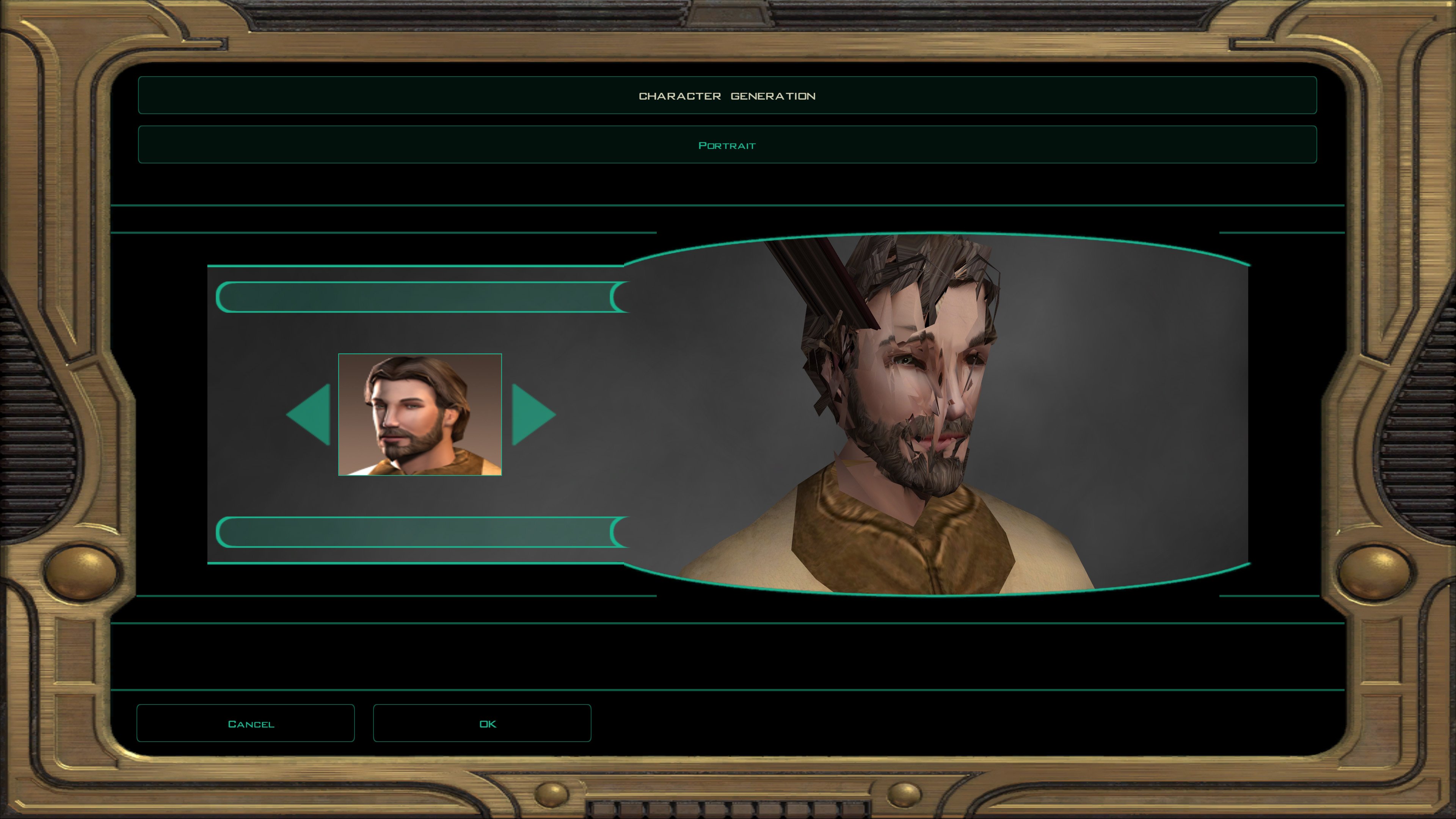
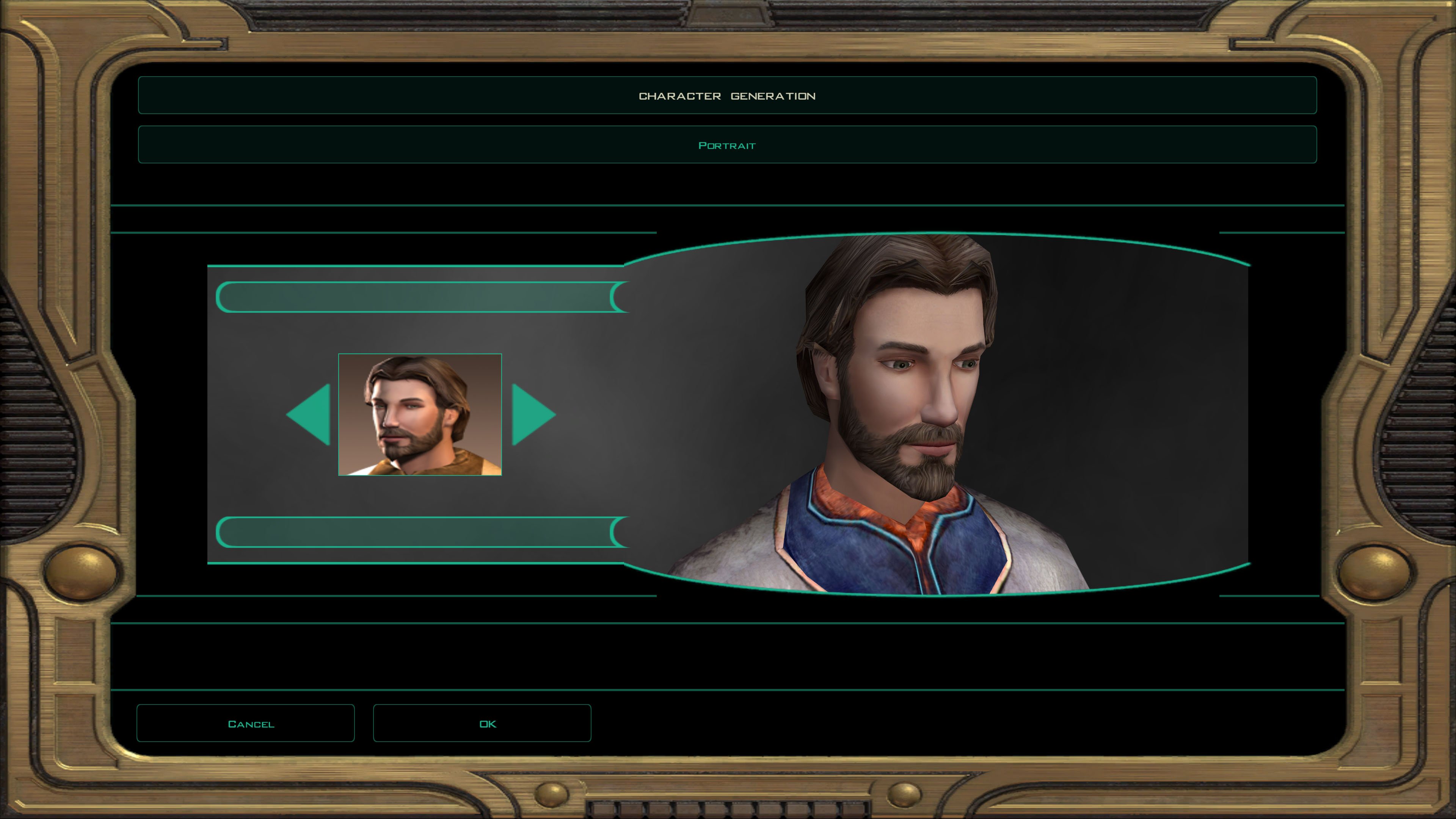
Thanks. The "pmhc04_mdledit_skin_unknown_from_vanilla" files looked messed up; just like this one: The files from "pmhc04_vanilla_skin_unknown_zeroed" looked like this: I don't know what you meant by "zeroed" but it seems to work. The only thing is though, I don't see that any of my uvw or smoothing group edits made it through. Were you working with the vanilla files or the ones that I linked in the first post?
-
 Zoantharian joined the community
 -
 Phx joined the community
 -
 This might be considered a sequel of sorts to another blog I've made (found here) but you needn't read it to understand this one. (It is there so you could read afterwards but that's up to you, of course.) I've been around this community for some time. I've seen a lot of projects announced. I have seen very few of them to make it to a point of release. So I'm going to make a hot-take which is: Work first on everything that could feasibly be released separately if you don't finish the project. Let's be honest with ourselves: real-life happens. Sometimes, an author might lose interest in a project before it is done. And sometimes, the spirit is there but time requirements must be given elsewhere: work, family. school, etc. And even if these folks do manage to grab back some of that free time, that doesn't mean the passion for old project is going to return. If work on large scale projects (such as a planet mod or a total conversion, for example) is doled out with possible smaller mods in mind, then at least the modder can at least release the parts they have completed. Net gain: the end user who could at least appreciate what did get uploaded to the community. If the modders does return to work on a project, they even have the added advantage of their materials being safe on a website without it being accidentally deleted or suffer being lost to a hard drive failure.
 -
 Solamis01 joined the community
 -
 Steppasaurus joined the community
 - Yesterday
-
 ploys11 joined the community
 -
 Petit_Gregory joined the community
 -
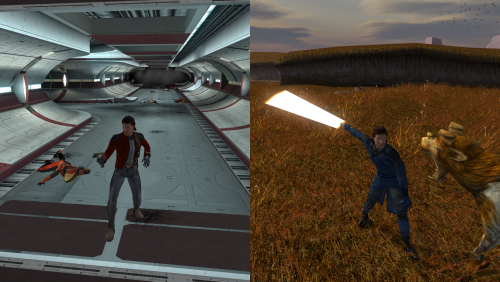 Is the Mod compatible with the Sneak Attack 10 Restoration Mod?
 -
 Juhani always belonged to the Kotor 1 companions who got the rather short end of the stick. So while this mod may not fix all my issues with her character, I do appreciate the effort to make her feel more complete.
 -
 I never understood why there were no Iriaz on Dantooine, despite everyone on Dantooine always talking about there being both Iriaz and Kathhounds on Dantooine. Must have mod for anyone (like me) who wishes for this inconsistency to be fixed.
 -
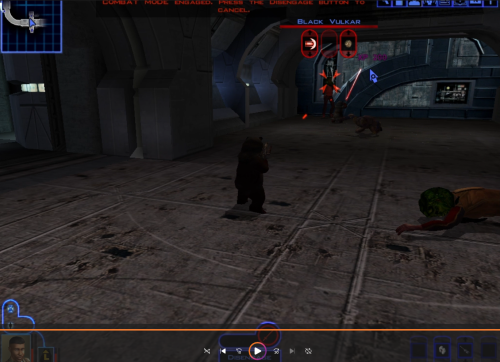 Interesting, is this Ewok a custom made asset from this SWBF2 Mod Tools SDK 2020 mod or is it a vanilla asset from Star Wars Battlefront II 2005? And what is the status of permission should Kotor modders wish to add the Ewok into the game as an NPC for separate mods?
 - Last week
-
JC's Romance Enhancement: Biromantic Bastila for K1
Stardust13 commented on JCarter426's file in Mods
 RIP: I installed it between Dark Sacrifice and Saber Knockback, so I'll have to just rebuild. I'll probably do that after this playthrough: thanks for answering!
 -

JC's Romance Enhancement: Biromantic Bastila for K1
JCarter426 commented on JCarter426's file in Mods
If this was the last mod you installed which affects all of the files this mod edits then you could uninstall and install the new version. Otherwise, I wouldn't recommend it; you would need to reinstall the game and then install every mod you installed before in the same order you did before. -
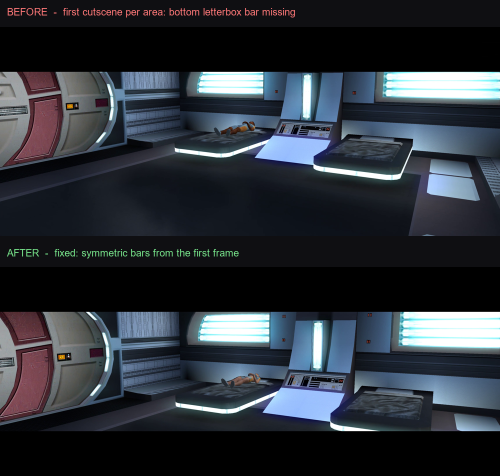
View File K1 Ultrawide Letterbox Fix The function that enables letterbox mode for cutscenes has a fork whether the segment was the first in the scene or came later. The very first letterbox after an area loads (first branch) skipped a specific call that sets up the bottom bar's draw state, while every later letterbox made that call. That's why only the first one of each area was ever broken. This patch adds back in the skipped call while making sure not to interfere with dialogue or being able to skip it. This Patcher doesn't need to be installed in your game folder, although it doesn't hurt anything if you want it there. You can use it easily by unzipping the archive and double-clicking Apply Fix.bat. Alternatively, if you'd rather not trust an executable, you can run the patch yourself using Python by following the instructions in the README. You can also easily uninstall the patch by using Revert Fix.bat if there are any issues. Required setup (install these first): 1. KOTOR Editable Executable: provides a patchable exe (https://deadlystream.com/files/file/1320-kotor-editable-executable/) 2. UniWS: to run the game at your widescreen resolution (https://www.wsgf.org/article/star-wars-knights-old-republic) 3. KotOR High Resolution Menus (the "hires"/k1hrm patcher): for correct widescreen menus and, crucially, the _widescreen dialog-letterbox proportion_ this fix builds on. (https://deadlystream.com/files/file/1159-kotor-high-resolution-menus/) 4. Then this fix, last. Please email me if you have any questions or issues! My email address is shae.mushling91@gmail.com. README.md Submitter ShaeMyName Submitted 06/12/2026 Category Mods K1R Compatible Yes
-
View File Kotor Ewok This Kotor 1 mod adds a playable custom ewok mdl that can be placed into the override folder to replace some npcs or used in conjunction with KSE as a playable character with combat animations. No 2 hand mele combat animations at this time. This .Zip file contains a ReadMe.txt a brief tutorial.txt on how to recreate the mod process, the custom .tga files for the textures, and finally the custom .mdl and .mdx files that can be dropped into override following the instructions in the ReadMe file. I also included a link to how to recreate the process incase anyone is interested. Disclaimer: This mod utilizes a modified asset from the community-maintained SWBF2 Mod Tools SDK 2020 available at ModDB, alongside original assets from Star Wars: Knights of the Old Republic. Full credit goes to the original developers, artists, and respective intellectual property rights holders (Lucasfilm, Pandemic Studios, and BioWare). This is a strictly non-profit, fan-made educational project intended exclusively as a technical proof-of-concept demonstrating asset handling for the KOTOR modding community. Furthermore, I do not own or claim rights to any of the third-party tools used or described in this project; all rights belong entirely to their respective developers Submitter EwokKotor Submitted 06/10/2026 Category Mods K1R Compatible No
-
 ShaeMyName changed their profile photo
 -
JC's Romance Enhancement: Biromantic Bastila for K1
Stardust13 commented on JCarter426's file in Mods
If I want to use this update, do I need to uninstall the previous version and then install this one? Or can I just install the update over the top of it? I'm using the full KotOR mod build. -

Yavin Station model request (exterior)
DarthParametric replied to Sith Holocron's topic in Mod Requests
Yavin itself is also a billboard (albeit a dome-shaped one), just like the Yavin outside the window of the station in K1. Might be useful to someone if they wanted to swap it. /resources/art/fx/geometry/galaxy_map/texture/gal_map_yavin_dome.dds gal_map_yavin_dome.dds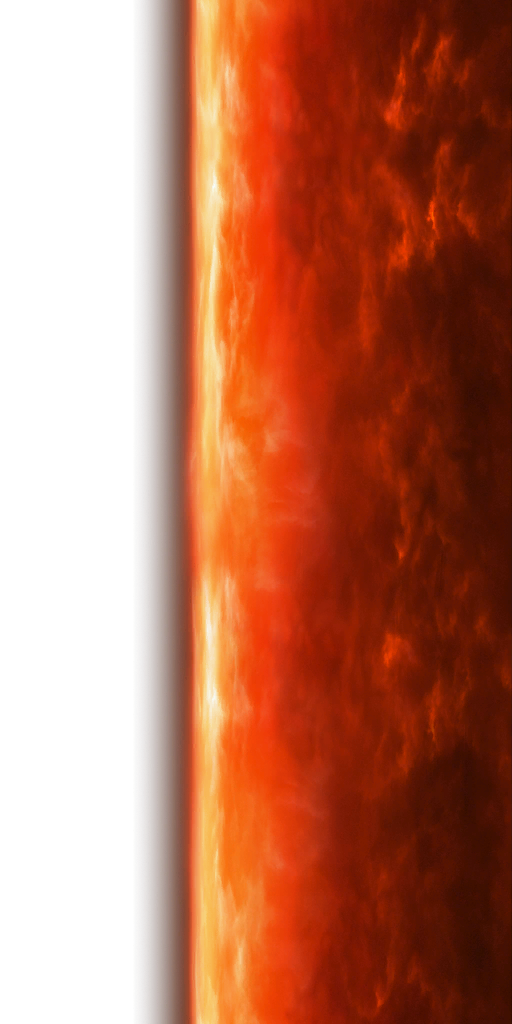
-
Yavin Station model request (exterior)
Sith Holocron replied to Sith Holocron's topic in Mod Requests
Thanks, DP! -
Yavin Station model request (exterior)
DarthParametric replied to Sith Holocron's topic in Mod Requests
There is not. I have posted about it previously (probably multiple years ago at this point), but TOR only has a simple billboard (a plane with an alpha-masked texture) of the station, not a model. It's just a little Easter egg as you fly past Yavin on your way to Yavin IV, you never actually visit it. /resources/art/fx/geometry/cinematics/texture/cine_billboard_yavin_station_01.dds cine_billboard_yavin_station_01.dds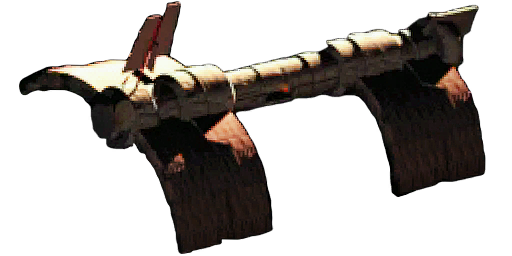
-
So about an hour ago, I asked on Discord if a model of the Yavin Station exterior as it appears in the landing and take off videos in KOTOR1 actually exists in the game files. @JCarter426says he didn't think so but that a model of it might be in the MMO's files. If that model does indeed exist in the MMO, I request that model be extracted from there and posted here. Thank you for reading this far.
-
 Ah... Yeah! Apparently the site doesn't allow to load more then 2 mods simultaniosly.
 -
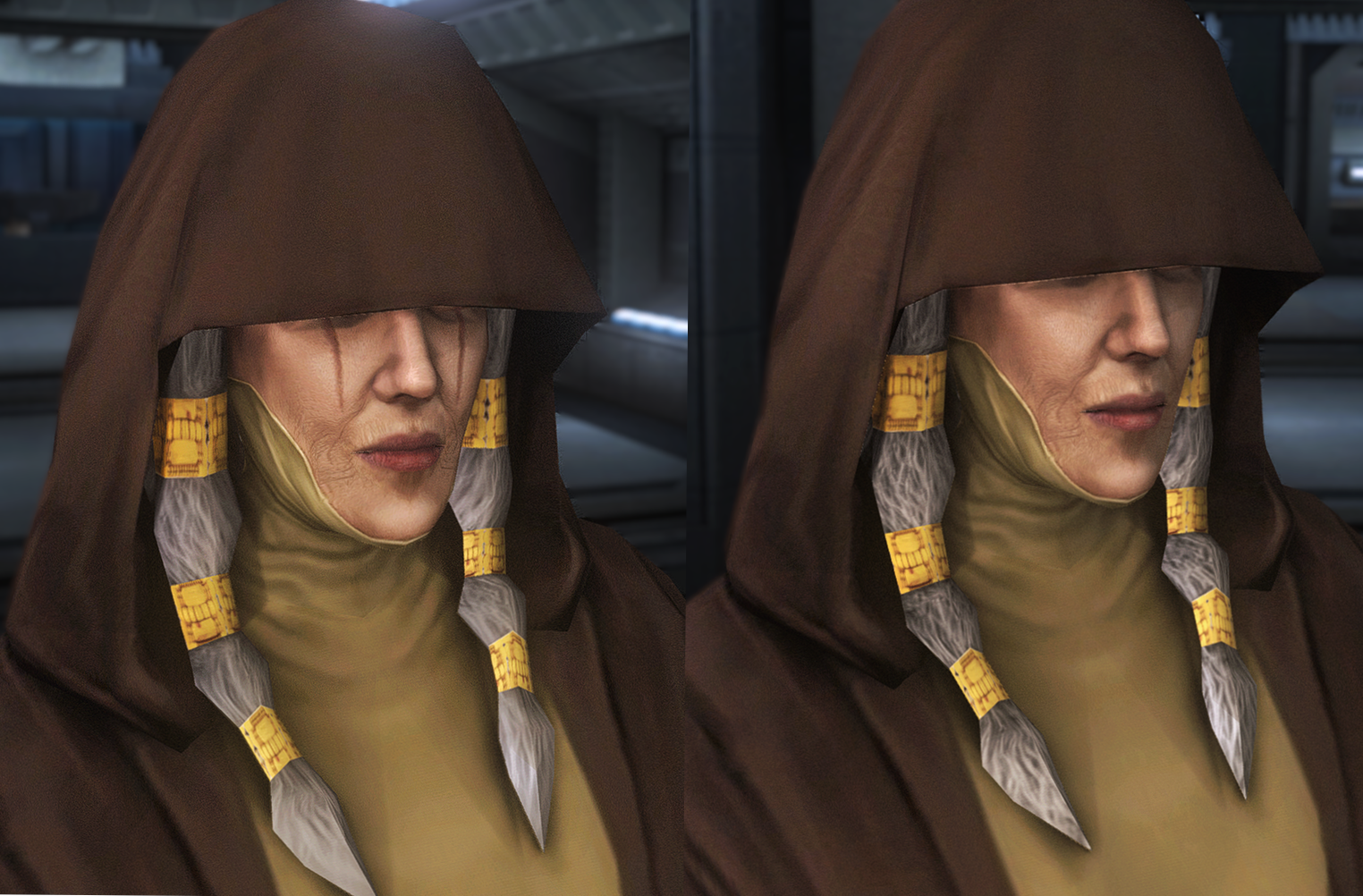
1.7 (Kreia plus Disciple ) is out now
-
Version 1.0.0
6 downloads
The function that enables letterbox mode for cutscenes has a fork whether the segment was the first in the scene or came later. The very first letterbox after an area loads (first branch) skipped a specific call that sets up the bottom bar's draw state, while every later letterbox made that call. That's why only the first one of each area was ever broken. This patch adds back in the skipped call while making sure not to interfere with dialogue or being able to skip it. This Patcher doesn't need to be installed in your game folder, although it doesn't hurt anything if you want it there. You can use it easily by unzipping the archive and double-clicking Apply Fix.bat. Alternatively, if you'd rather not trust an executable, you can run the patch yourself using Python by following the instructions in the README. You can also easily uninstall the patch by using Revert Fix.bat if there are any issues. Required setup (install these first): 1. KOTOR Editable Executable: provides a patchable exe (https://deadlystream.com/files/file/1320-kotor-editable-executable/) 2. UniWS: to run the game at your widescreen resolution (https://www.wsgf.org/article/star-wars-knights-old-republic) 3. KotOR High Resolution Menus (the "hires"/k1hrm patcher): for correct widescreen menus and, crucially, the _widescreen dialog-letterbox proportion_ this fix builds on. (https://deadlystream.com/files/file/1159-kotor-high-resolution-menus/) 4. Then this fix, last. Please email me if you have any questions or issues! My email address is shae.mushling91@gmail.com. README.md-
- 1
-
-
- widescreen
- fix
- (and 2 more)
-
This mod is still available for download. Must be an issue on your end.
-
Are the mods no longer allowed to be downloaded or something? Got hit with - "You're not allowed to download this mod."